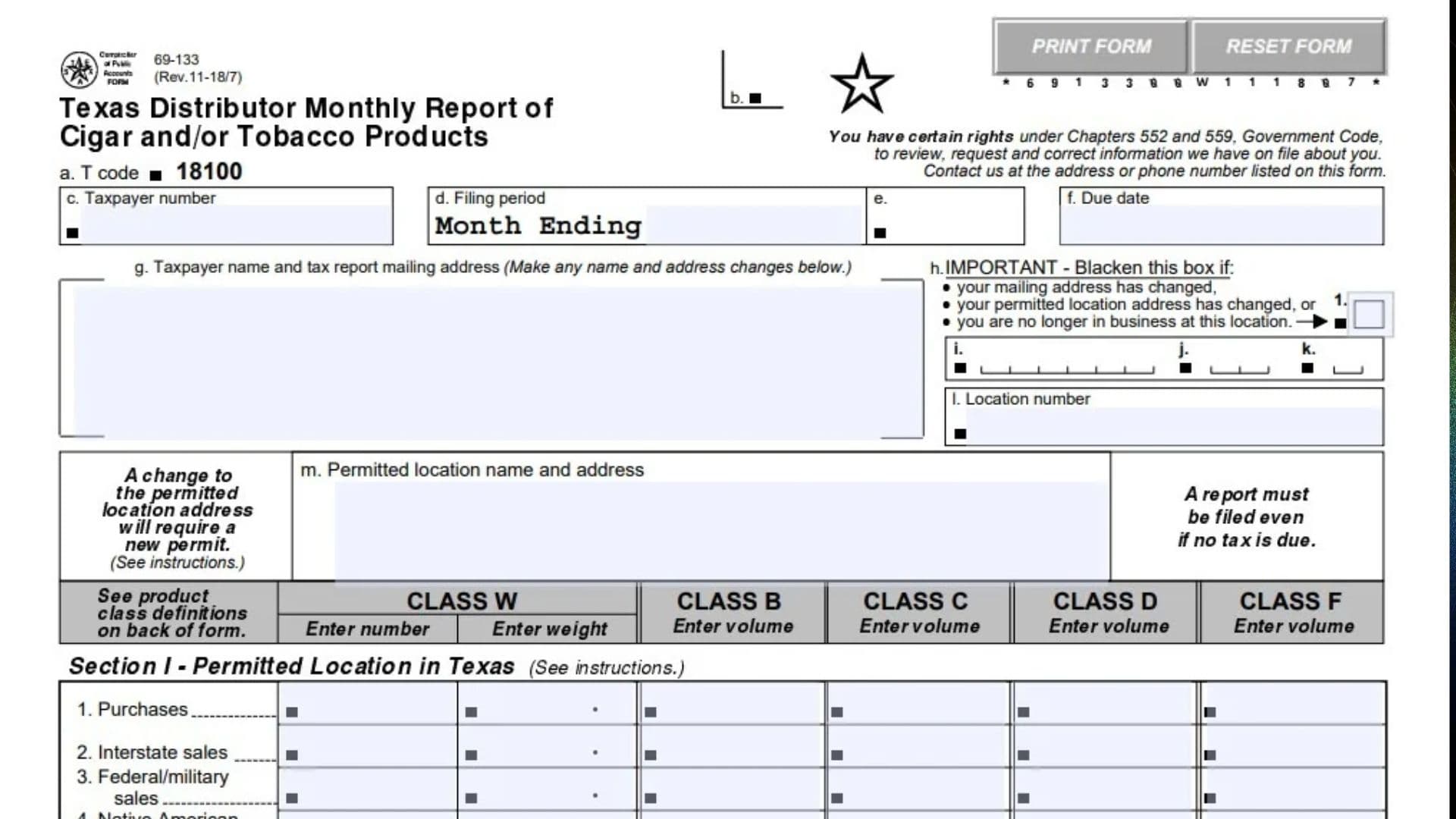
Texas Form 69-133, titled Texas Distributor Monthly Report of Cigar and/or Tobacco Products, is the primary monthly tax return issued by the Texas Comptroller of Public Accounts for permitted distributors that receive cigars or other tobacco products to make a first sale in Texas. It exists to report monthly tobacco purchases, out-of-state and tax-exempt deductions, taxable volumes by product class, authorized credits, and Non-Settling Manufacturer (NSM) or Subsequent Participating Manufacturer (SPM) fees. Sole proprietors, partnerships, and corporations holding a Texas distributor permit must file this return every month—even if no tax is due—using the specific reporting section (Section I, II, or III) approved for their account. Completing Form 69-133 accurately and attaching all required supporting schedules protects your deductions, ensures your Class W and cigar tax calculations match state rates, and helps you avoid late penalties starting at $50.
How To File Texas Form 69-133
File Form 69-133 and pay any tax due on or before the 25th day of each month following the month in which the cigars or tobacco products were received or sold in Texas. If the 25th falls on a Saturday, Sunday, or legal holiday, the deadline shifts to the next business day.
Required Supporting Schedules
Attach the following forms whenever they apply to your monthly report:
- Form 69-134: Texas Distributor Monthly Report of Tobacco Products – Class W Worksheet.
- Form 69-135: Texas Distributor Report of Interstate Sales of Cigars and/or Tobacco Products.
- Form 69-136: Texas Distributor Receiving Record of Cigar and/or Tobacco Products (supports Classes B, C, D, and F).
- Form 69-208: Texas Tobacco Products Authorized Credits Letter (required if claiming credits in Item 13; do not attach manufacturer affidavits or credit memos).
- Form 69-315: Texas Certificate of Tax Exempt Sale (required if reporting federal/military or Native American Reservation tax-exempt sales).
Payment And Mailing Address
Make your check payable to State Comptroller for the amount on Item 17, and mail your completed return, supporting schedules, and payment to:
Comptroller of Public Accounts
P.O. Box 149361
Austin, TX 78714-9361
What To Prepare Before Starting
Gather these items before filling out Form 69-133:
- Your 11-digit Texas taxpayer number, filing period, due date, permitted location number, and physical location address.
- Completed supporting schedules (Forms 69-134, 69-135, 69-136, 69-208, and 69-315) as applicable.
- Monthly purchase, shipment, and deduction totals separated by Texas product class (Classes W, B, C, D, and F).

How To Complete Texas Form 69-133
Complete the distributor header, fill in only the reporting section (Section I, II, or III) approved for your business, calculate your tax and fees on Items 10 through 17, and sign the return.
Distributor Header And Location Details (Items a Through m)
Item a: T Code
This field is pre-coded as 18100 for Texas tobacco distributor reporting.
Item c: Taxpayer Number
Enter your 11-digit Texas taxpayer number.
Item d: Filing Period
Enter the monthly reporting period covered by the return.
Item f: Due Date
Enter the official due date (the 25th day of the following month, or next business day).
Item g: Taxpayer Name And Tax Report Mailing Address
Enter your legal taxpayer name and mailing address, noting any name or mailing address updates.
Item h: Address Change Or Out-Of-Business Box
Blacken this box if your mailing address has changed, your permitted location address has changed, or you are no longer in business at this location.
Item l: Location Number
Enter your assigned Texas permitted location number.
Item m: Permitted Location Name And Address
Enter the name and physical address of your permitted location. Note that changing your permitted location address requires a new permit (submitted on Form AP-175); operating without a valid permit carries a penalty of up to $2,000 per day.
Product Class Columns (Classes W, B, C, D, And F)
Across Sections I, II, and III, enter quantities under the matching product class column:
- Class W (Number And Weight Columns): Non-cigarette tobacco products—including chewing tobacco, snuff, pipe tobacco, roll-your-own (RYO), and tobacco substitutes—split into number of cans/packages weighing 1.2 oz or less and total ounce weight for containers over 1.2 oz.
- Class B (Volume): Little cigars weighing no more than 3 pounds per thousand.
- Class C (Volume): Cigars weighing more than 3 pounds per thousand selling for 3.3 cents or less each.
- Class D (Volume): Natural-leaf cigars weighing more than 3 pounds per thousand selling for over 3.3 cents each.
- Class F (Volume): Cigars weighing more than 3 pounds per thousand with substantial non-tobacco ingredients selling for over 3.3 cents each.
Section I: Permitted Location In Texas (Items 1 Through 7)
Complete Section I if your permitted location is in Texas and you report based on purchases minus allowable deductions.
Item 1: Purchases
Enter total tobacco purchases for each product class. For Class W, transfer the amounts from Form 69-134. For Classes B, C, D, and F, attach Form 69-136 to support the reported figures.
Item 2: Interstate Sales
Enter the quantity of tobacco products sold outside Texas for each product class, and attach Form 69-135.
Item 3: Federal/Military Sales
Enter the quantity of tobacco products sold to a federal or military establishment for each product class, and attach Form 69-315.
Item 4: Native American Reservation Sales
Enter the quantity of tobacco products sold to a Native American Reservation for each product class, and attach Form 69-315.
Item 5: Lost In Shipment
Enter the quantity of tobacco products lost in shipment for each product class.
Item 6: Total Deductions
Add Items 2 through 5 for each product class column and enter the total deductions.
Item 7: Taxable Amounts
Subtract Item 6 from Item 1 (Item 1 - Item 6) for each product class column to determine your taxable quantities.
Section II: Permitted Location Outside Texas (Item 8)
Complete Section II if your permitted location is outside Texas.
Item 8: Tobacco Products Sent To Texas
Enter the quantity of tobacco products sent into Texas for each product class. For Class W tobacco products, transfer the amounts from Form 69-134.
Section III: Permitted Location In Texas Reporting Texas Sales Only (Item 9)
Complete Section III if your permitted location is in Texas and you are approved to report Texas sales only.
Item 9: Tobacco Products Sold In Texas
Enter only the quantity of tobacco products sold in Texas for each product class. For Class W tobacco products, transfer the amounts from Form 69-134.
Tax Computation, Credits, And Totals (Items 10 Through 17)
Item 10: Tax Rate
Review the applicable Texas tax rate for each product class column.
Item 11: Tax Due
Multiply Item 7, Item 8, or Item 9 (whichever section applies to you) by the corresponding Item 10 tax rate for each product class column.
Item 12: Net Tax Due
Add the Item 11 tax due amounts across all columns and enter the combined total here.
Item 13: Authorized Credits
Enter your authorized credits available for the reporting period, limited to the net tax due on Item 12. Attach Form 69-208 (Authorized Credits Letter); do not attach manufacturer affidavits or credit memos.
Item 14: Fee Due
Enter the sum of Items 4d and 4f from Form 69-134 (your NSM/SPM RYO fees).
Item 15: Total Tax And Fee Due
Subtract Item 13 from Item 12, then add Item 14 (Item 12 - Item 13 + Item 14).
Item 16: Penalty And Interest
Leave blank if filing and paying on time. If paying after the due date, calculate your late penalty as 5% of Item 15 (if 1–30 days late) or 10% of Item 15 (if more than 30 days late), subject to a $50 minimum penalty. If any tax remains unpaid 61 days after the due date, add interest calculated at the Texas Comptroller’s published interest rate.
Item 17: Total Amount Due And Payable
Add Item 15 and Item 16 and enter the total payable to State Comptroller.
Signature And Payment Stub
Authorized Agent Signature, Preparer’s Name, Daytime Phone, And Date
Have an authorized agent sign to affirm that the report and all attachments are true and correct, print or type the preparer’s name, enter a daytime phone number with area code, and date the return.
Payment Coupon (Bottom Stub)
Confirm the T Code, Taxpayer number, Period, Taxpayer name, and payment amount match your return and check before mailing.
Final Review Before Filing
Before mailing Form 69-133 to the Texas Comptroller, verify these items:
- Confirm your taxpayer number, filing period, location number, and permitted location address are accurate, and file Form AP-175 if your permitted location address changed.
- Verify you completed only the reporting section (Section I, II, or III) approved for your account.
- Check that all Class W figures match Form 69-134 and that Item 14 equals the sum of Form 69-134 Lines 4d and 4f.
- Attach all required supporting forms (Forms 69-134, 69-135, 69-136, 69-208, and 69-315) and omit manufacturer affidavits or credit memos.
- Re-check your math on Items 6, 7, 11, 12, 15, 16, and 17, sign and date the return, and mail it with your check payable to State Comptroller by the 25th of the following month.