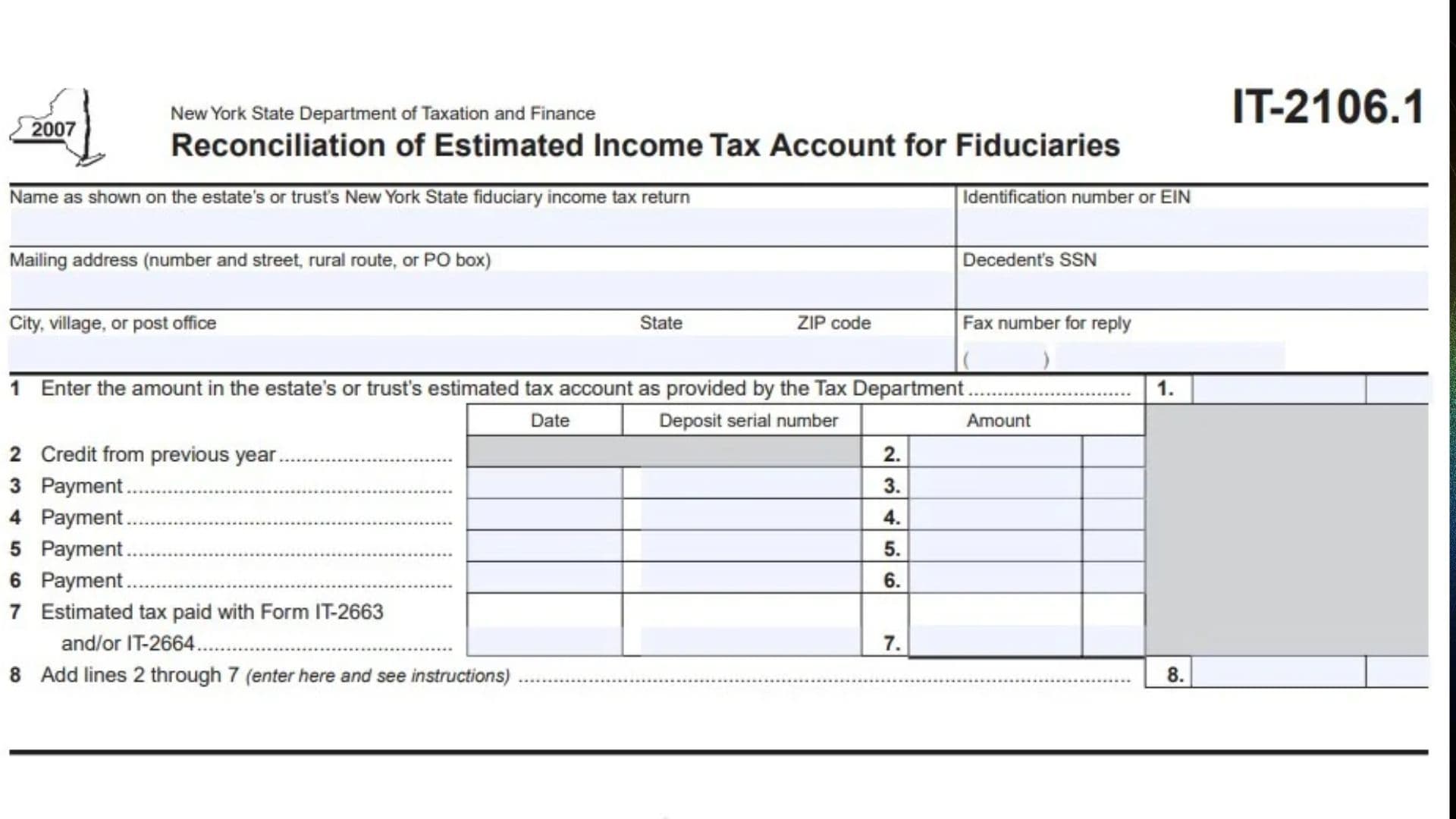
Form IT-2106.1, titled Reconciliation of Estimated Income Tax Account for Fiduciaries, is a New York State Department of Taxation and Finance form used by estates and trusts to resolve discrepancies in their estimated income tax accounts. It exists specifically for situations where the estate’s or trust’s own payment records do not match the estimated tax balance reported by the Tax Department for the 2007 tax year. Fiduciaries—such as executors, administrators, or trustees—use this form to list prior-year overpayment credits, individual estimated tax payments, and nonresident real property or cooperative unit estimated tax payments along with each payment’s date and deposit serial number. Completing and submitting Form IT-2106.1 promptly is important because it allows the Tax Department to locate missing or misapplied payments and confirm the correct estimated tax balance before the estate or trust files its New York State fiduciary income tax return (Form IT-205).
How To File Form IT-2106.1
Only submit Form IT-2106.1 if your estate’s or trust’s records disagree with the estimated tax total reported by the Tax Department. If your records match, you do not need to send this form.
Where And When To Submit
If Line 8 does not match Line 1, send the completed form immediately to the Account Reconciliation Unit using either of the following methods:
- Fax: (518) 457-2249
- Mail: NYS Tax Department, Estimated Tax Unit, W A Harriman Campus, Albany, NY 12227
To give the Tax Department enough time to review its records and reply before your fiduciary return is due, make sure the department receives Form IT-2106.1 by April 1, 2008. You can also check the account balance and reconcile estimated tax payments online through the Online Tax Center on the New York State Tax Department website.
What To Prepare Before Starting
Gather the following records before filling out the form:
- The estimated tax account statement or figure provided by the New York State Tax Department.
- The estate’s or trust’s 2007 New York State fiduciary income tax return name, Employer Identification Number (EIN), and the decedent’s Social Security number (if applicable).
- Any notice of adjusted credit from the prior tax year showing the final overpayment credited to the current account.
- Copies of the backs of canceled checks or money order records showing the exact payment dates, amounts, and 12-character deposit serial numbers beginning with
PT. - Records of any estimated tax paid with Form IT-2663 or Form IT-2664.

How To Complete Form IT-2106.1
Fill in the estate or trust identification block at the top of the page first, then enter your account figures and payment details on Lines 1 through 8.
Estate Or Trust Identification
Name As Shown On The Estate’s Or Trust’s New York State Fiduciary Income Tax Return
Enter the exact name of the estate or trust as it appears on its 2007 New York State fiduciary income tax return (Form IT-205).
Identification Number Or EIN
Enter the estate’s or trust’s federal Employer Identification Number (EIN) or tax identification number as shown on its fiduciary return.
Mailing Address (Number And Street, Rural Route, Or PO Box)
Enter the street address, rural route, or post office box where the fiduciary receives official tax correspondence.
Decedent’s SSN
If you are filing for an estate, enter the deceased individual’s Social Security number.
City, Village, Or Post Office
Write the name of the city, village, or post office for the mailing address.
State
Enter the standard two-letter state abbreviation.
ZIP Code
Provide the postal ZIP code for the mailing address.
Fax Number For Reply
Enter a fax number, including the three-digit area code, where the Tax Department can send its reconciliation response.
Estimated Tax Account Reconciliation
For Lines 3 through 7, the form provides three columns: Date, Deposit serial number, and Amount. Including the deposit serial number for every payment is essential so the Tax Department can trace and credit each payment properly. The deposit serial number is a 12-character code starting with PT printed on the back of your canceled check or money order. If you paid by money order, contact the issuing agent to obtain this number.
Line 1: Estimated Tax Account Amount Provided By The Tax Department
Enter the total estimated tax balance currently shown in the estate’s or trust’s account according to the Tax Department’s records.
Line 2: Credit From Previous Year
Enter the final determined amount of the estate’s or trust’s previous year’s income tax overpayment that was credited to the current estimated tax account. If the Tax Department adjusted the prior year’s return, the actual credited amount may differ from what you originally requested—use the figure shown on your notice of adjusted credit.
Line 3: Payment
Enter the payment date, the 12-character PT deposit serial number, and the dollar amount for your first estimated tax payment.
Line 4: Payment
Enter the payment date, the 12-character PT deposit serial number, and the dollar amount for your second estimated tax payment.
Line 5: Payment
Enter the payment date, the 12-character PT deposit serial number, and the dollar amount for your third estimated tax payment.
Line 6: Payment
Enter the payment date, the 12-character PT deposit serial number, and the dollar amount for your fourth estimated tax payment.
Line 7: Estimated Tax Paid With Form IT-2663 And/Or Form IT-2664
Enter the payment date, the 12-character PT deposit serial number, and the dollar amount of any estimated tax paid with Form IT-2663 (Nonresident Real Property Estimated Income Tax Payment Form) or Form IT-2664 (Nonresident Cooperative Unit Estimated Income Tax Payment Form).
Line 8: Total Estimated Tax Payments And Credits
Add the amounts entered on Lines 2 through 7 and write the total here. Compare Line 8 to Line 1:
- If Line 8 equals Line 1: Your records agree with the Tax Department’s records. Do not submit Form IT-2106.1; simply claim the Line 1 amount as estimated tax paid on Line 30 of Form IT-205.
- If Line 8 differs from Line 1: Fax or mail the completed Form IT-2106.1 to the Account Reconciliation Unit right away so the discrepancy can be resolved.
Final Review Before Filing
Before faxing or mailing Form IT-2106.1, double-check the following items:
- Confirm that the estate’s or trust’s name and EIN match the 2007 Form IT-205 exactly, and that the decedent’s SSN is included if applicable.
- Verify that your mailing address and reply fax number (with area code) are complete and legible.
- Check that Line 2 reflects the final adjusted prior-year credit rather than an unadjusted request.
- Ensure every payment listed on Lines 3 through 7 includes its date, exact dollar amount, and 12-character
PTdeposit serial number. - Re-add Lines 2 through 7 to confirm that Line 8 truly differs from Line 1 before submitting the form.
- Send the form to (518) 457-2249 or the Albany Estimated Tax Unit address early enough for the Tax Department to receive it by April 1, 2008.