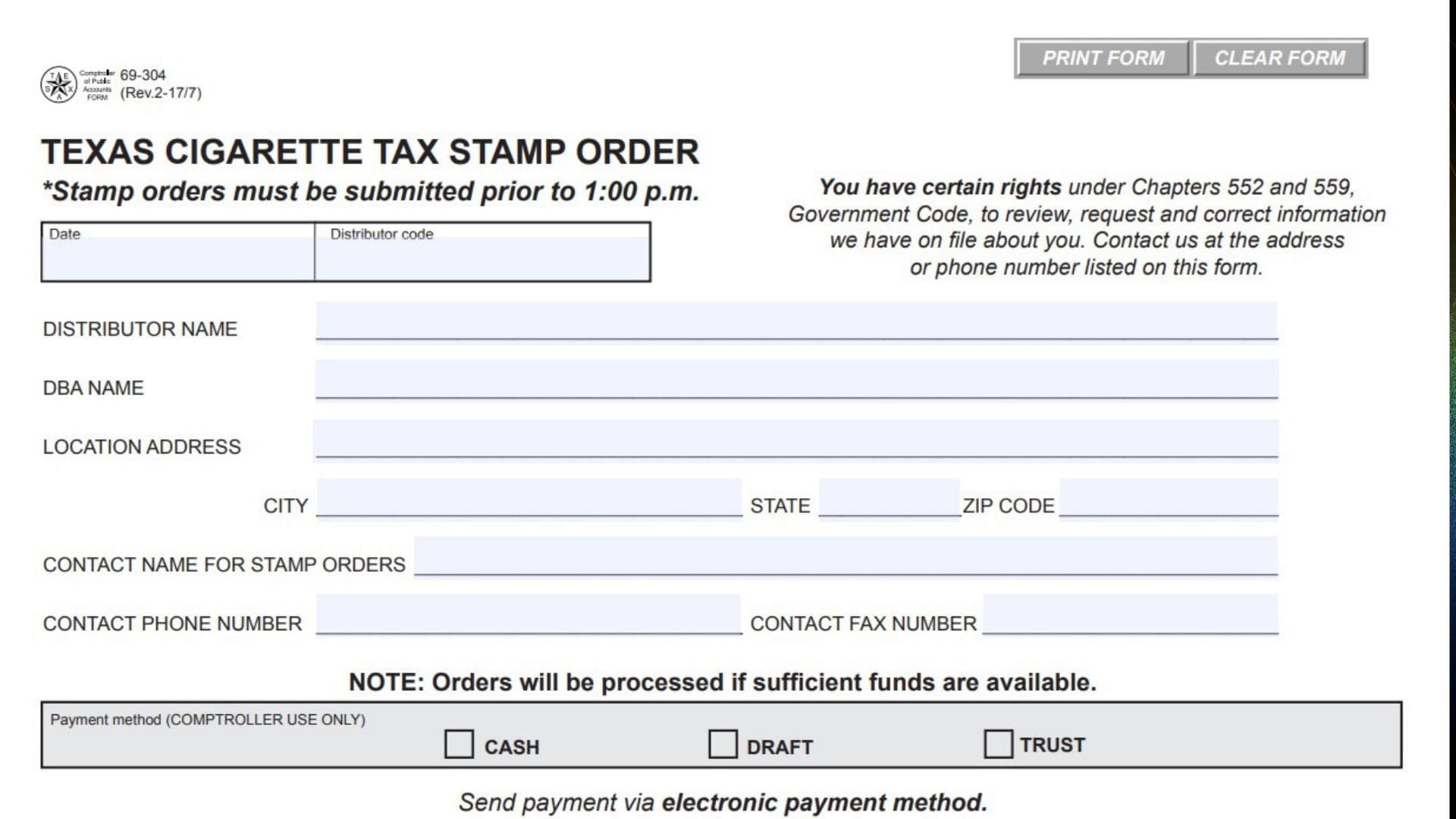
Texas Form 69-304, known as the Texas Cigarette Tax Stamp Order, is a document used by cigarette distributors to request cigarette tax stamps from the Texas Comptroller of Public Accounts. These stamps are associated with Texas cigarette tax requirements and are ordered by distributors for use in connection with their cigarette sales and tax obligations. The form provides a structured way to identify the distributor, specify the cigarette stamp types and quantities required, calculate the total amount payable, account for available stamp credits or previous overpayments, and select a preferred delivery or collection method. It collects the distributor’s code, business name, doing-business-as name, permitted business location, contact details, and order date. The stamp order section contains five cigarette stamp categories, each with a specified unit price and ordering increment. Distributors must enter the required quantity for each stamp type and calculate the corresponding stamp value. The form also provides a financial summary covering the gross amount due, stamp credits, subtotal, a 2.5% discount, previous overpayments, and the final tax amount payable. A payment processing section is reserved for the Comptroller’s office, which identifies the applicable payment method. The form states that orders will be processed only when sufficient funds are available and instructs distributors to send payment electronically. It also requires the distributor to select a shipping or pickup option, including registered delivery, different FedEx services, UPS, or personal pickup. If the distributor selects the option to hold the shipment at a FedEx location, the physical address of that location must be provided. Submitting the form accurately is important because incorrect distributor details, stamp quantities, payment calculations, or delivery information may delay order processing. The form also establishes an important submission deadline: cigarette tax stamp orders must be submitted before 1:00 p.m.
How To File Form 69-304
Form 69-304 must be completed by the distributor requesting cigarette tax stamps and submitted to the Texas Comptroller of Public Accounts, Tobacco Tax, Amusement & AG/Timber Exemptions Section.
The completed order must include accurate distributor information, the required stamp quantities, the calculated payment amount, and the selected delivery or pickup method.
Important Submission Deadline
The form clearly states that cigarette tax stamp orders must be submitted before 1:00 p.m.
Make sure the completed order is faxed before this deadline to avoid potential processing delays.
Where To Submit Form 69-304
Fax the completed form to:
Comptroller of Public Accounts
Tobacco Tax, Amusement & AG/Timber Exemptions Section
Fax: (512) 936-0019
Payment Requirements
The form includes an important payment instruction:
- Orders will be processed only if sufficient funds are available.
- Payment must be sent through an electronic payment method.
- The payment method selection area is reserved for Comptroller use.
Before submitting an order, ensure that sufficient funds are available to cover the total tax amount due.
Information To Prepare Before Completing The Form
Gather the following information:
- Distributor code.
- Date of the stamp order.
- Distributor’s registered business name.
- Doing-business-as (DBA) name, if applicable.
- Physical business location.
- City, state, and ZIP code.
- Contact person’s name.
- Contact telephone number.
- Contact fax number.
- Required cigarette stamp types.
- Quantity required for each stamp type.
- Applicable unit prices.
- Stamp values for each category.
- Available stamp credits.
- Applicable 2.5% discount.
- Previous overpayment amount, if any.
- Total tax amount due.
- Preferred shipping or pickup method.
- Physical FedEx location address, if applicable.
Having these details available will help you complete the order accurately and reduce the possibility of processing delays.

How To Complete Form 69-304
Form 69-304 is a one-page document divided into distributor information, payment processing, stamp quantities and values, financial calculations, and delivery instructions.
Follow the instructions below to complete each field.
Distributor Information
This section identifies the business requesting the cigarette tax stamps.
Date
Enter the date on which the stamp order is prepared and submitted.
Use the actual order date and make sure it is clearly recorded.
Distributor Code
Enter the distributor code assigned to your business by the Texas Comptroller.
This code identifies the distributor in the Comptroller’s records. Check your existing distributor documentation to ensure that the correct code is entered.
Distributor Name
Enter the complete legal or registered name of the distributor placing the order.
Use the business name associated with the distributor’s official tax and permit records.
DBA Name
Enter the business’s Doing Business As (DBA) name, if applicable.
A DBA name is the operating or trade name used by the business when it differs from its registered legal name.
If your business does not operate under a separate DBA name, follow the Comptroller’s instructions regarding this field.
Location Address
Enter the physical street address of the distributor’s business location.
Provide the complete address associated with the location requesting the cigarette tax stamps.
City
Enter the city where the distributor’s business location is situated.
State
Enter the state associated with the distributor’s physical business address.
ZIP Code
Enter the ZIP code corresponding to the distributor’s location address.
Check that the city, state, and ZIP code match the physical business location.
Contact Name For Stamp Orders
Enter the full name of the person responsible for handling cigarette tax stamp orders for the distributor.
Choose someone who is familiar with the business’s stamp requirements and can respond to questions about the order.
Contact Phone Number
Enter the contact person’s telephone number, including the appropriate area code.
Make sure the number is active and can be used by the Comptroller’s office if clarification is required.
Contact Fax Number
Enter the distributor’s fax number where order-related correspondence can be received.
Check the number carefully to ensure that it is correct.
Payment Method – Comptroller Use Only
This section is specifically marked for Comptroller use. It contains three payment method options:
Cash
This is one of the payment method categories printed on the form. The Comptroller’s office uses this option for its payment processing records.
Draft
This option identifies draft as a payment method category. It is part of the Comptroller’s internal payment processing section.
Trust
This option identifies the trust payment category used in the Comptroller’s processing records.
Important Payment Instruction
The form explicitly states that payment must be sent through an electronic payment method.
The Cash, Draft, and Trust checkboxes are located inside the section marked for Comptroller use only. Distributors should not select these options unless specifically instructed by the Comptroller.
Stamps Requested
This is the main ordering section of Form 69-304. It allows distributors to specify the cigarette stamp types and quantities required.
The table contains five columns:
- Type.
- Quantity.
- Unit Price.
- Increments.
- Stamp Value.
The form provides five predefined cigarette stamp categories. Each category has its own unit price and ordering increment.
H-4/20’S
Type – H-4/20’S
This is the first cigarette stamp category listed on the form.
Use this row when ordering the H-4/20’S stamp type.
Quantity – H-4/20’S
Enter the quantity of H-4/20’S stamps required.
Follow the ordering increment printed in the same row.
Unit Price – H-4/20’S
The preprinted unit price is $1.41.
Use this price when calculating the stamp value for the requested quantity.
Increments – H-4/20’S
The form specifies an ordering increment of 30,000 per roll.
Use the stated increment when determining the quantity to order.
Stamp Value – H-4/20’S
Enter the calculated value of the H-4/20’S stamps requested.
Use the applicable quantity and unit price to determine the amount.
N-6/20’S
Type – N-6/20’S
This is the second cigarette stamp category available on the form.
Use this row when ordering N-6/20’S stamps.
Quantity – N-6/20’S
Enter the required quantity of N-6/20’S stamps.
Make sure the quantity follows the specified ordering increment.
Unit Price – N-6/20’S
The preprinted unit price is $1.41.
Use this amount when calculating the corresponding stamp value.
Increments – N-6/20’S
The form specifies an increment of 1,500 per pad and identifies the category as Camel Wide.
Follow this ordering increment when preparing the quantity.
Stamp Value – N-6/20’S
Enter the total calculated value for the requested N-6/20’S stamps.
Use the applicable quantity and unit price.
N-7/20’S
Type – N-7/20’S
This is the third cigarette stamp category listed on the order form.
Use this row when requesting N-7/20’S stamps.
Quantity – N-7/20’S
Enter the quantity required for this stamp category.
Make sure the quantity follows the increment printed on the form.
Unit Price – N-7/20’S
The preprinted unit price is $1.41.
Use this rate when determining the stamp value.
Increments – N-7/20’S
The specified ordering increment is 1,500 per pad.
Use this quantity increment when preparing the order.
Stamp Value – N-7/20’S
Enter the calculated total value of the N-7/20’S stamps requested.
Check the amount against the applicable quantity and unit price.
N-2/25’S
Type – N-2/25’S
This is the fourth cigarette stamp category available on the form.
Use this row when ordering N-2/25’S stamps.
Quantity – N-2/25’S
Enter the required quantity for this stamp category.
Follow the ordering increment specified in the form.
Unit Price – N-2/25’S
The preprinted unit price is $1.7625.
Use this rate when calculating the stamp value.
Increments – N-2/25’S
The form specifies an increment of 1,000 per pad and identifies the category as Century.
Use this increment when determining the quantity to order.
Stamp Value – N-2/25’S
Enter the calculated value of the N-2/25’S stamps requested.
Make sure the amount corresponds to the quantity and unit price.
H-5/25’S
Type – H-5/25’S
This is the fifth cigarette stamp category listed on the form.
Use this row when ordering H-5/25’S stamps.
Quantity – H-5/25’S
Enter the required quantity for this stamp category.
Check the ordering increment before finalizing the quantity.
Unit Price – H-5/25’S
The preprinted unit price is $1.7625.
Use this rate when calculating the corresponding stamp value.
Increments – H-5/25’S
The form specifies an increment of 7,200 per roll and identifies the category as Meyercord.
Follow the specified increment when determining the quantity.
Stamp Value – H-5/25’S
Enter the calculated value of the H-5/25’S stamps requested.
Verify that the amount agrees with the applicable quantity and unit price.
How To Calculate The Stamp Values
For each stamp category, use the quantity and corresponding unit price to calculate the stamp value.
The general calculation is:
Stamp Value = Applicable Quantity × Unit Price
Use the unit price printed in the relevant row.
For reference, the form provides the following rates and increments:
| Stamp Type | Unit Price | Ordering Increment |
|---|---|---|
| H-4/20’S | $1.41 | 30,000 per roll |
| N-6/20’S | $1.41 | 1,500 per pad (Camel Wide) |
| N-7/20’S | $1.41 | 1,500 per pad |
| N-2/25’S | $1.7625 | 1,000 per pad (Century) |
| H-5/25’S | $1.7625 | 7,200 per roll (Meyercord) |
Make sure the quantities are entered using the appropriate ordering increments. The form does not provide a separate worked example explaining whether the Quantity field represents individual stamps or ordering units, so confirm the expected quantity-entry convention with the Comptroller if it is unclear.
Financial Summary And Tax Calculation
After entering the stamp quantities and values, complete the financial summary section.
This section calculates the amount payable after considering applicable stamp credits, the stated discount, and previous overpayments.
Gross Amount Due
Enter the combined value of all cigarette stamp categories requested.
Add the individual stamp values from the five product rows to calculate the gross amount.
Stamp Credits
Enter the applicable stamp credits available for the order, if any.
These credits are deducted from the gross amount due when determining the subtotal.
If no stamp credits are available, follow the Comptroller’s instructions for this field.
Subtotal Due
Calculate the subtotal after deducting the applicable stamp credits from the gross amount due.
The calculation is:
Gross Amount Due − Stamp Credits = Subtotal Due.
2.5% Discount
Enter the applicable discount amount calculated at the stated rate of 2.5%.
The discount is shown as a separate deduction in the financial summary.
The form does not provide additional eligibility conditions or a separate worked example for calculating this discount. Confirm the applicable discount treatment with the Comptroller if necessary.
Prior Overpayment
Enter any eligible previous overpayment that can be applied toward the current order.
This amount reduces the remaining balance due.
If there is no previous overpayment available, follow the Comptroller’s instructions for the field.
Total Tax Due
Enter the final amount payable after accounting for the stamp credits, applicable discount, and previous overpayment.
The calculation follows the order of deductions shown on the form:
- Calculate the Gross Amount Due.
- Deduct Stamp Credits to determine the Subtotal Due.
- Deduct the applicable 2.5% Discount.
- Deduct any eligible Prior Overpayment.
- Record the resulting Total Tax Due.
Check all figures carefully before submitting the order. The final amount should reflect the applicable deductions and available credits.
Shipping And Pickup Instructions
The bottom section of Form 69-304 contains several delivery and collection options.
Select the appropriate checkbox to indicate how you want the cigarette tax stamps delivered or collected.
Registered
Select this option if you want the order sent through registered delivery.
FDX Standard
Select this option for standard FedEx delivery.
FDX 2 Day
Select this option for FedEx two-day delivery.
UPS
Select this option if you want the shipment delivered through UPS.
Pickup
Select this option if you intend to collect the order rather than have it delivered through a listed shipping service.
FDX Overnight Priority
Select this option if you want the shipment sent using FedEx Overnight Priority service.
Hold FDX Location
Select this option if you want the shipment held at a FedEx location for collection.
FedEx Physical Location Address
When selecting Hold FDX Location, enter the complete physical address of the FedEx location where the shipment must be held.
The form specifically emphasizes that the physical location address must be provided for this delivery option.
Other
Select this option if you require a delivery method that is not included among the listed choices.
Enter the relevant delivery details in the space provided next to the Other option.
Choose the appropriate delivery method and make sure the information is complete before submitting the order.
Contact Information And Assistance
The form provides contact information for distributors who have questions about the cigarette tax stamp order or the stamps themselves.
Texas Comptroller of Public Accounts
Tobacco Tax, Amusement & AG/Timber Exemptions Section
Fax: (512) 936-0019
Tax Assistance Telephone: (800) 862-2260
Alternative Telephone: (512) 463-3731
Use these contact details if you need clarification about stamp quantities, ordering increments, payment calculations, or delivery arrangements.
Information Rights Notice
The form includes a notice explaining that individuals have certain rights under Chapters 552 and 559 of the Texas Government Code.
These rights allow individuals to review, request, and correct information maintained about them by the Comptroller.
For assistance, contact the Comptroller using the address or telephone information provided on the form.
This notice is informational and does not require a separate entry or signature.
Final Review Before Filing
Before submitting Form 69-304, review the entire order to ensure that the distributor details, stamp quantities, financial calculations, and delivery instructions are complete.
Use the following checklist:
- Entered the correct order date.
- Provided the correct distributor code.
- Entered the distributor’s complete business name.
- Provided the DBA name, if applicable.
- Entered the physical business location.
- Completed the city, state, and ZIP code fields.
- Provided the contact person’s name for stamp orders.
- Entered the correct contact telephone number.
- Provided the contact fax number.
- Reviewed the payment method section and left Comptroller-only fields for official use.
- Confirmed that payment will be sent electronically.
- Checked the quantity for each requested stamp category.
- Followed the specified ordering increments.
- Used the correct unit price for each stamp type.
- Calculated the stamp value for each category.
- Added all stamp values to determine the Gross Amount Due.
- Entered applicable Stamp Credits.
- Calculated the Subtotal Due correctly.
- Calculated the applicable 2.5% Discount.
- Entered any eligible Prior Overpayment.
- Verified the final Total Tax Due.
- Confirmed that sufficient funds are available for processing.
- Selected the appropriate delivery or pickup method.
- Provided the physical FedEx location address if using Hold FDX Location.
- Completed the Other delivery details if applicable.
- Checked that all information is legible and accurate.
- Faxed the completed order before 1:00 p.m.
Where To Fax The Completed Form
Comptroller of Public Accounts
Tobacco Tax, Amusement & AG/Timber Exemptions Section
Fax: (512) 936-0019
For Assistance:
- 1-800-862-2260
- (512) 463-3731
Accurately completing Form 69-304 helps ensure that cigarette tax stamp orders contain the necessary distributor information, requested quantities, payment calculations, and delivery instructions. Review the ordering increments and financial deductions carefully, confirm that sufficient funds are available, and submit the completed order before the 1:00 p.m. deadline.