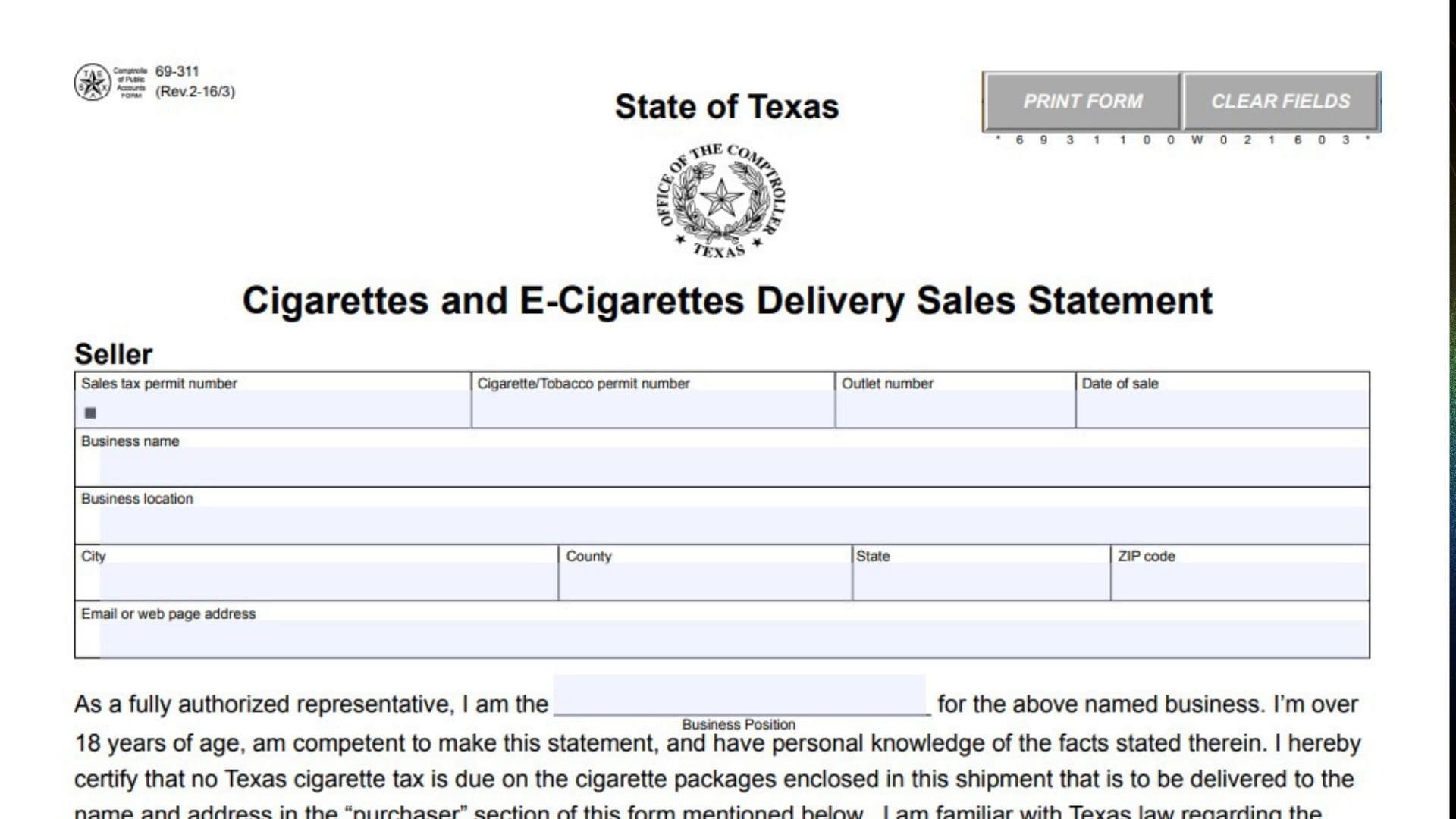
Texas Form 69-311, known as the Cigarettes and E-Cigarettes Delivery Sales Statement, is a document used to record information about cigarette and e-cigarette delivery sales in Texas. It identifies the seller, purchaser, and delivery service provider involved in a shipment and includes a formal certification concerning the applicable Texas cigarette tax requirements. The form is designed to document the business responsible for the sale, its relevant tax permit information, the date of the transaction, and the location from which the merchandise is sold. It also identifies the purchaser receiving the shipment and the delivery service provider responsible for transporting or delivering the merchandise. The seller’s authorized representative must make a sworn-style business certification confirming that they are at least 18 years old, are competent to provide the statement, have personal knowledge of the facts, and are authorized to sign on behalf of the business. The representative also certifies that no Texas cigarette tax is due on the cigarette packages included in the shipment being delivered to the purchaser identified on the form. In addition, the representative acknowledges familiarity with Texas laws governing cigarette and e-cigarette delivery sales and confirms that the package contents comply with Chapters 151 and 154 of the Texas Tax Code and Chapter 161 of the Texas Health and Safety Code. The purchaser section collects the recipient’s legal name, delivery or mailing address, and daytime telephone number. The delivery service provider section records the provider’s business name, invoice number, address, and email address. Completing the form accurately helps document the parties involved in a delivery transaction and provides a record of the seller’s certification regarding the applicable tax requirements. The form also advises users to retain a completed copy for their records.

How To Complete Form 69-311
Form 69-311 is a one-page document divided into three main information sections: Seller, Purchaser, and Delivery Service Provider. The seller must provide business and permit information, the purchaser’s delivery details must be recorded, and the delivery provider’s information must be included.
Information To Prepare Before Completing The Form
Gather the following information before starting:
- Seller’s sales tax permit number.
- Seller’s cigarette or tobacco permit number.
- Outlet number.
- Date of sale.
- Business’s legal name.
- Physical business location.
- City, county, state, and ZIP code.
- Business email address or website.
- Seller representative’s official position.
- Purchaser’s legal name.
- Purchaser’s delivery or mailing address.
- Purchaser’s daytime telephone number.
- Delivery service provider’s name.
- Delivery service provider’s invoice number.
- Delivery service provider’s physical address.
- Delivery service provider’s email address.
The authorized seller representative should also review the certification statement before signing to ensure that the required declarations are accurate.
How To Complete The Seller Section
The Seller section identifies the business responsible for the delivery sale and records its tax permit and business location information.
Sales Tax Permit Number
Enter the seller’s sales tax permit number in the designated field.
Make sure the number belongs to the business making the sale and is entered accurately.
Cigarette/Tobacco Permit Number
Enter the seller’s applicable cigarette or tobacco permit number.
This identifies the permit associated with the business’s cigarette or tobacco sales activities. Check the number against the business’s permit records before entering it.
Outlet Number
Enter the outlet number associated with the business location involved in the transaction.
Use the correct outlet identification for the location from which the sale is being made.
Date Of Sale
Enter the date on which the cigarette or e-cigarette delivery sale occurred.
Use the actual sale date rather than the delivery date or the date the form is completed.
Business Name
Enter the complete legal or registered business name of the seller.
The name should accurately identify the business responsible for the sale.
Business Location
Enter the physical location of the seller’s business or outlet involved in the transaction.
Provide the appropriate street address so that the location can be identified.
City
Enter the city where the seller’s business location is situated.
County
Enter the county associated with the seller’s business location.
State
Enter the state in which the business location is situated.
ZIP Code
Enter the ZIP code corresponding to the seller’s physical business address.
Check that the city, county, state, and ZIP code accurately match the business location.
Email Or Web Page Address
Enter the seller’s business email address or website address.
Provide a current contact address that can be used to identify or reach the business.
Seller’s Authorized Representative Certification
After completing the business information, the seller’s authorized representative must review the certification statement printed on the form.
Business Position
Enter your official position or job title within the business.
This identifies the capacity in which you are making the certification on behalf of the seller.
Age And Competency Certification
The representative must confirm that they are over 18 years of age and competent to make the statement.
They must also confirm that they have personal knowledge of the facts being certified.
Texas Cigarette Tax Certification
The representative must certify that no Texas cigarette tax is due on the cigarette packages included in the shipment being delivered to the purchaser identified in the Purchaser section.
Review the transaction carefully before making this declaration.
Knowledge Of Applicable Texas Laws
The representative must acknowledge familiarity with Texas laws governing the delivery sales of cigarettes and e-cigarettes, including applicable requirements under the Texas Tax Code and Texas Health and Safety Code.
Compliance With Applicable Laws
The representative must certify that the contents of the shipment comply with:
- Chapters 151 and 154 of the Texas Tax Code.
- Chapter 161 of the Texas Health and Safety Code.
This certification relates to the contents of the package being delivered.
Authority To Sign
The representative must confirm that they are authorized to sign the statement on behalf of the business identified in the Seller section.
Make sure the person completing the form has the appropriate authority before making this declaration.
The form does not provide a separate signature line within this certification paragraph, so follow the form’s presentation and the applicable instructions for completing the statement.
How To Complete The Purchaser Section
The Purchaser section identifies the individual or entity receiving the cigarette or e-cigarette shipment.
Provide the purchaser’s information accurately so that the delivery recipient can be identified.
Legal Name
Enter the purchaser’s complete legal name.
Use the name of the person or entity receiving the shipment rather than the seller’s business name or delivery provider’s name.
Delivery Or Mailing Address
Enter the complete address where the shipment is to be delivered or where the purchaser receives mail.
Include the appropriate street address and any relevant apartment, suite, or unit information.
City
Enter the city associated with the purchaser’s delivery or mailing address.
State
Enter the state associated with the purchaser’s address.
ZIP Code
Enter the ZIP code for the purchaser’s delivery or mailing location.
Make sure the city, state, and ZIP code match the address provided.
Daytime Phone Number
Enter a telephone number where the purchaser can be reached during daytime hours.
Use a current number and check that all digits are correct.
How To Complete The Delivery Service Provider Section
This section identifies the delivery service provider associated with the shipment. Complete each field using the provider’s business and transaction information.
Name
Enter the name of the delivery service provider responsible for the shipment.
Use the provider’s business or legal name so that the delivery company can be properly identified.
Invoice Number
Enter the invoice number associated with the delivery service or shipment.
This information helps connect the delivery record with the relevant transaction documentation.
Address
Enter the delivery service provider’s business address.
Provide the appropriate physical address associated with the provider.
City
Enter the city where the delivery service provider’s address is located.
State
Enter the state associated with the provider’s business address.
ZIP Code
Enter the ZIP code corresponding to the delivery service provider’s address.
Email Address
Enter the delivery service provider’s current email address.
Check the spelling and formatting carefully to ensure that the contact information is accurate.
Important Recordkeeping And Legal Information
Retain A Copy For Your Records
The form specifically instructs users to retain the completed document for their records.
Keep a copy of the completed statement together with the relevant transaction and shipment documentation.
Rights Under Chapter 559 Of The Texas Government Code
The form includes a notice explaining that individuals have certain rights under Chapter 559 of the Texas Government Code.
These rights include reviewing, requesting, and correcting information maintained about them.
For assistance, contact the Texas Comptroller’s office using the contact details provided on the form:
Telephone: 1-800-862-2260.
The notice is informational and does not require a separate entry.
Final Review Before Filing
Before completing and retaining Form 69-311, review all sections carefully to ensure that the seller, purchaser, delivery provider, and certification information is accurate.
Use the following checklist:
- Entered the correct sales tax permit number.
- Provided the applicable cigarette or tobacco permit number.
- Entered the correct outlet number.
- Recorded the actual date of sale.
- Entered the seller’s complete business name.
- Provided the seller’s physical business location.
- Completed the city, county, state, and ZIP code fields.
- Entered the seller’s email address or website.
- Provided the authorized representative’s business position.
- Confirmed that the representative is over 18 years old.
- Confirmed that the representative is competent and has personal knowledge of the facts.
- Reviewed the certification concerning Texas cigarette tax.
- Confirmed familiarity with the applicable Texas cigarette and e-cigarette delivery sales laws.
- Reviewed the certification concerning Chapters 151 and 154 of the Texas Tax Code and Chapter 161 of the Texas Health and Safety Code.
- Confirmed that the representative is authorized to act for the business.
- Entered the purchaser’s complete legal name.
- Provided the purchaser’s delivery or mailing address.
- Completed the purchaser’s city, state, and ZIP code.
- Entered the purchaser’s daytime telephone number.
- Provided the delivery service provider’s name.
- Entered the applicable invoice number.
- Completed the delivery provider’s address.
- Entered the provider’s city, state, and ZIP code.
- Provided the delivery provider’s email address.
- Reviewed the entire statement for missing or incorrect information.
- Retained a completed copy for business records.
For Assistance:
Texas Comptroller of Public Accounts
Telephone: 1-800-862-2260.
Accurately completing Form 69-311 helps maintain a clear record of cigarette and e-cigarette delivery sales, identifies the parties involved in the shipment, and documents the seller’s certification concerning applicable Texas tax and legal requirements. Keep the completed statement with the relevant business records for future reference.