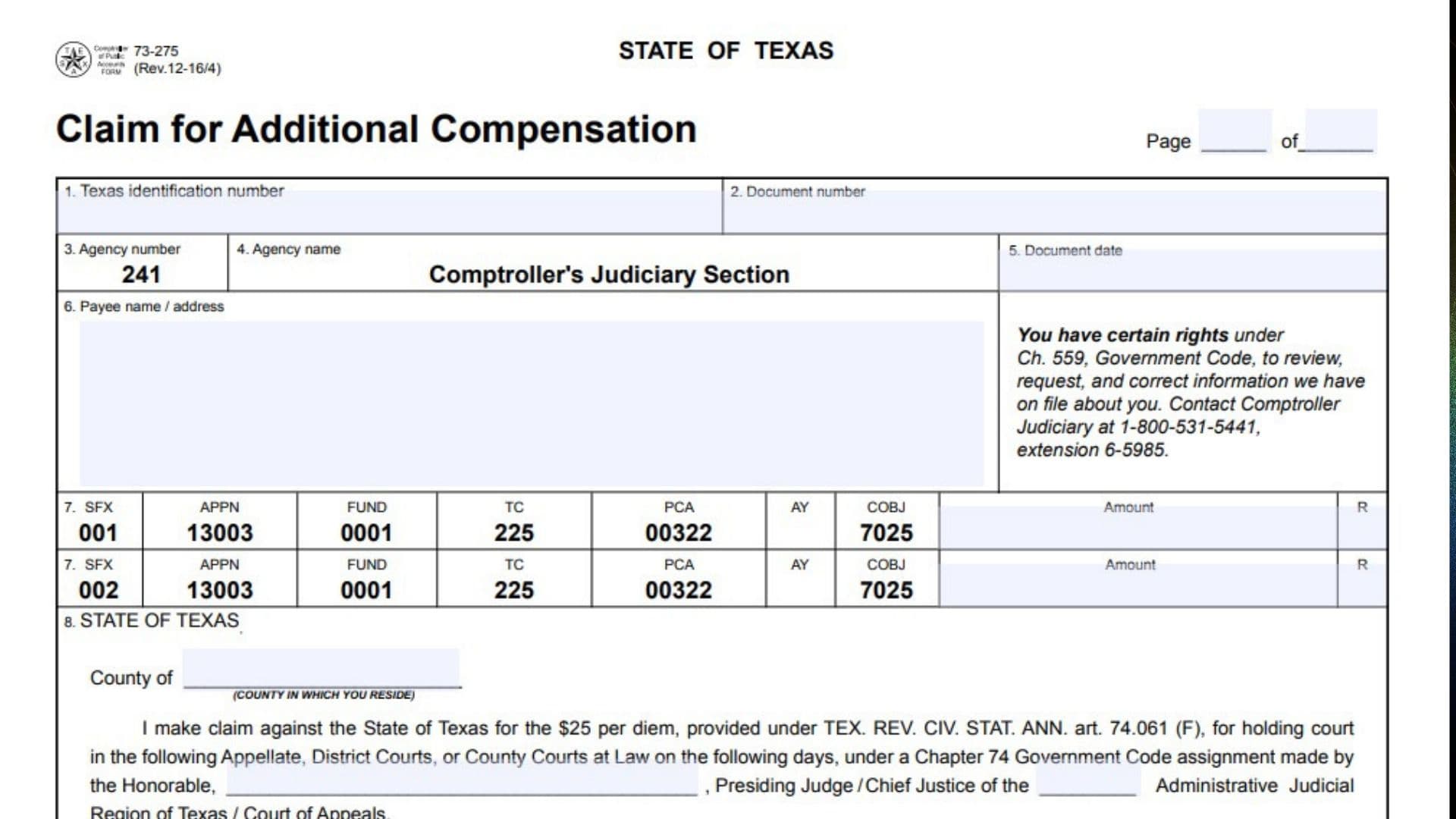
Texas Form 73-275, known as the Claim for Additional Compensation, is a document used by eligible Texas judges to claim additional per diem compensation for holding court under an assignment made pursuant to Chapter 74 of the Texas Government Code. The form specifically provides for a $25 per diem payment under Article 74.061(F) of the Texas Revised Civil Statutes, as referenced in the document. It applies to qualifying judicial service performed in Appellate Courts, District Courts, and County Courts at Law. The form records the claimant’s Texas identification number, document number, agency information, payee details, and the dates on which the judge performed the assigned court duties. It also identifies the county where the claimant resides, the Presiding Judge or Chief Justice who authorized the assignment, the applicable Administrative Judicial Region or Court of Appeals, and the individual courts where the service was performed. The claimant must provide a separate record of the month and year, service date, court, and county for each qualifying day. These details are used to determine the total number of eligible service days and calculate the additional compensation at the stated rate of $25 per day. The claimant must certify under oath that the amount claimed remains unpaid and that the information provided is true and correct. The Presiding Judge or Chief Justice must separately approve the claim for payment. The form also contains contact information, document preparation details, and a final payment approval section. Completing Form 73-275 accurately is important because the reported judicial assignments and service dates establish the basis for calculating and approving the additional compensation.
How To File Form 73-275
Form 73-275 must be completed by the eligible claimant and submitted with the required certifications and approvals. The claimant must provide accurate information about the judicial assignment and the dates on which court was held.
The form contains one page with two accounting distribution entries, a judicial service record, a per diem calculation, claimant certification, approval by the Presiding Judge or Chief Justice, and administrative processing information.
Where To Submit Form 73-275
The form identifies the Comptroller’s Judiciary Section as the responsible agency.
For questions about completing or submitting the claim, contact:
Comptroller Judiciary
Telephone: 1-800-531-5441
Extension: 6-5985
The form does not specify a mailing address, electronic submission method, or filing deadline. Contact the Comptroller Judiciary to confirm the current submission procedure before sending the completed claim.
Information To Prepare Before Completing The Form
Gather the following information before starting:
- Your Texas identification number.
- Document number, if already assigned.
- Agency information.
- Document date.
- Complete payee name and address.
- County where you reside.
- Name of the Presiding Judge or Chief Justice who made the assignment.
- Applicable Administrative Judicial Region or Court of Appeals.
- Month and year of each qualifying service period.
- Exact dates on which you held court.
- Names or identification of the Appellate, District, or County Courts at Law.
- Counties where the assigned courts are located.
- Total number of qualifying service days.
- Calculated per diem compensation at $25 per day.
- Claimant’s signature.
- Presiding Judge’s or Chief Justice’s approval.
- Contact person’s name and telephone number.
- Name of the person who entered the voucher.
Having these details available will help ensure that the service information and compensation calculation are accurate.

How To Complete Form 73-275
Complete the form from top to bottom. The numbered sections identify the information required for processing the additional compensation claim.
Page Identification
Page Of
Enter the current page number and the total number of pages included in the claim.
For example, if you are submitting a single-page claim, identify it as page 1 of 1. If additional pages are used to record more service dates, number the pages accordingly.
Claimant And Document Information
1. Texas Identification Number
Enter your Texas identification number in the designated field. This number identifies the claimant for payment and administrative processing purposes.
Check the number carefully before submitting the form to avoid identification errors.
2. Document Number
Enter the document number associated with the claim, if one has been assigned.
This number helps identify the voucher during administrative processing. If the number is generated by the Comptroller’s office, follow its instructions regarding completion of this field.
3. Agency Number
The agency number identifies the government agency associated with the claim.
The form displays the preprinted agency number 241. Do not change this value unless specifically instructed by the Comptroller Judiciary.
4. Agency Name
The form identifies the agency as the Comptroller’s Judiciary Section.
This field identifies the administrative office responsible for processing the claim. The agency name is already printed on the form.
5. Document Date
Enter the date associated with the preparation or submission of the claim, as applicable to the voucher’s processing.
Make sure the date is accurate and clearly written.
6. Payee Name / Address
Enter the complete name and mailing address of the person receiving the additional compensation.
Include the following information:
- Full legal name.
- Street address.
- City.
- State.
- ZIP code.
The form provides a large space for this information. Make sure the details are complete and accurate so the payment can be associated with the correct claimant.
Information Rights Notice
The form includes a notice explaining that individuals have certain rights under Chapter 559 of the Texas Government Code.
These rights include reviewing, requesting, and correcting information maintained about them by the Comptroller.
For questions about information held on file, contact:
Comptroller Judiciary: 1-800-531-5441, Extension 6-5985.
This is an informational notice and does not require a separate signature or entry.
Accounting Distribution Information
7. SFX – Entry 001
The first accounting distribution line is identified by the sequence number 001. The form displays this as a preprinted accounting reference.
Do not change the preprinted sequence number.
APPN – Entry 001
This field identifies the appropriation classification associated with the first distribution entry. The preprinted value is 13003.
FUND – Entry 001
This field identifies the fund classification. The preprinted value is 0001.
TC – Entry 001
This field identifies the transaction code. The preprinted value is 225.
PCA – Entry 001
This field identifies the applicable program or cost allocation classification. The preprinted value is 00322.
AY – Entry 001
This field represents the accounting year. The form does not display a preprinted value in this space. Follow the Comptroller Judiciary’s instructions if this field requires completion.
COBJ – Entry 001
This field identifies the Comptroller object classification. The preprinted value is 7025.
Amount – Entry 001
Enter the dollar amount associated with the first accounting distribution entry, if required by the processing instructions. The amount should correspond to the compensation being claimed.
R – Entry 001
This field is reserved for the applicable accounting indicator. Follow the Comptroller Judiciary’s instructions regarding whether an entry is required.
SFX – Entry 002
The second accounting distribution line is identified by the sequence number 002. It provides another accounting entry for the claim.
Keep the preprinted sequence number unchanged.
APPN – Entry 002
The preprinted appropriation classification is 13003. Leave this value unchanged unless instructed otherwise.
FUND – Entry 002
The preprinted fund classification is 0001.
TC – Entry 002
The preprinted transaction code is 225.
PCA – Entry 002
The preprinted program or cost allocation classification is 00322.
AY – Entry 002
Enter the accounting year only when required by the responsible office. Do not assume or invent an accounting year.
COBJ – Entry 002
The preprinted Comptroller object classification is 7025.
Amount – Entry 002
Enter the applicable amount for the second distribution entry if the claim requires one. Follow the agency’s accounting instructions.
R – Entry 002
This field provides space for the relevant accounting indicator. Complete it only as instructed by the Comptroller Judiciary.
Judicial Service And Per Diem Claim
8. State Of Texas
This section contains the claimant’s formal declaration of the additional compensation being requested from the State of Texas.
It identifies the legal basis of the claim and requires the claimant to report the qualifying judicial service.
County Of Residence
Enter the name of the county where you reside.
The form specifically requests the county in which the claimant lives. Make sure this is your actual county of residence rather than the county where the assigned court is located.
$25 Per Diem Claim
The form states that the claimant is requesting a $25 per diem payment under Article 74.061(F) of the Texas Revised Civil Statutes for holding court in qualifying Appellate Courts, District Courts, or County Courts at Law.
The claim must relate to service performed under a Chapter 74 Government Code assignment made by the appropriate Presiding Judge or Chief Justice.
Review the assignment information to ensure that the reported service falls within the scope of the assignment.
Presiding Judge / Chief Justice Name
Enter the full name of the Presiding Judge or Chief Justice who made the Chapter 74 assignment.
This identifies the judicial authority responsible for authorizing the assignment.
Administrative Judicial Region
Enter the applicable Administrative Judicial Region associated with the assignment.
The form provides a blank for identifying the region in which the assigning Presiding Judge serves.
Court Of Appeals
If the assignment was made by a Chief Justice of a Court of Appeals, identify the applicable Court of Appeals in the designated space.
Complete the appropriate regional or appellate court identification according to the assignment authority.
Judicial Service Record
The service table contains four columns. Each qualifying service entry must identify the month and year, exact date, court, and county.
Month / Year
Enter the month and year in which you held court.
For example, if the qualifying service occurred in November 2026, enter November 2026.
When service takes place across multiple months, record the appropriate month and year for each entry.
Date
Enter the exact date on which you held court under the qualifying assignment.
Record each qualifying service date separately. Do not combine multiple dates into a single entry.
Court
Enter the name or identification of the Appellate Court, District Court, or County Court at Law where you performed the assigned judicial duties.
Make sure the court information corresponds to the service date entered in the same row.
County
Enter the county in which the corresponding court is located.
This information helps identify the location where the judicial service was performed.
Additional Service Entries
Use the available rows to record every qualifying date of service. Each row should contain the corresponding month and year, date, court, and county.
If the available space is insufficient, use additional pages as appropriate and ensure that the page numbering reflects the complete claim.
Per Diem Calculation
Total Days
Add the number of qualifying service days recorded in the service table.
Enter the total number of days in the designated field.
Count the qualifying dates individually and make sure the total agrees with the service records.
Days At $25 Per Diem
Multiply the total number of qualifying service days by the stated rate of $25 per day.
Use the following calculation:
Total qualifying days × $25 = Total per diem compensation.
For example:
- 5 qualifying days × $25 = $125.
- 10 qualifying days × $25 = $250.
- 15 qualifying days × $25 = $375.
Enter the resulting compensation amount in the dollar field provided.
Total Per Diem Amount
Enter the calculated dollar amount resulting from the total qualifying days multiplied by $25.
Check the calculation carefully before completing the sworn certification.
Claimant’s Sworn Certification
The next section requires the claimant to make a sworn declaration confirming the accuracy and payment status of the claim.
Unpaid Per Diem Amount
Enter the total per diem amount being claimed in the designated dollar field.
This amount must match the result of the calculation based on the qualifying service days.
Certification Of Accuracy And Nonpayment
The claimant must swear that the per diem amount claimed remains unpaid and that the claim has been examined and is true and correct to the best of their knowledge and belief.
Before signing, review the service dates, court information, total days, and compensation calculation.
Claimant’s Signature
Sign your full name on the designated line to certify the claim.
The signature confirms that you accept responsibility for the accuracy of the information and the unpaid amount being requested.
Presiding Judge / Chief Justice Approval
The form requires a separate approval from the Presiding Judge or Chief Justice who authorized the assignment.
Approved For Payment
This section indicates that the claim has been reviewed and approved for payment by the appropriate judicial authority.
Presiding Judge / Chief Justice Signature
The Presiding Judge or Chief Justice must sign in the designated space to approve the additional compensation claim.
This signature is separate from the claimant’s certification and should not be omitted.
Administrative Judicial Region / Court Of Appeals
Enter the applicable Administrative Judicial Region or Court of Appeals associated with the approving authority.
Complete the appropriate identification in the designated space so the approval can be associated with the correct judicial authority.
Contact And Document Preparation Information
9. Contact Name
Enter the name of the person who can answer questions about the information provided in the claim.
Choose someone familiar with the claimant’s judicial service records and the compensation calculation.
Phone (Area Code And Number)
Enter the contact person’s telephone number, including the area code.
Make sure the number is accurate so the Comptroller Judiciary can reach the appropriate person if clarification is needed.
10. Entered By
Enter the name or identification of the person who prepared or entered the voucher information.
This field identifies the individual responsible for completing the document.
Payment Approval
11. Payment Approval Statement
The final section contains the official payment approval statement.
It confirms that the voucher is approved for payment and that the reported goods or services correspond with the applicable contract.
It also confirms that the invoice is correct and that the payment complies with the General Appropriations Act.
The authorized approving official should review the claim before signing this section.
Approval Signature
The authorized official must sign in the designated space to indicate approval of the voucher for payment.
Phone (Area Code And Number)
Enter the approving official’s telephone number, including the area code, where required.
Date
Enter the date associated with the payment approval.
Make sure the signature, telephone number, and date are completed as required by the responsible approval process.
Final Review Before Filing
Before submitting Form 73-275, review the entire document to ensure that all claimant details, judicial service records, calculations, and required approvals are complete.
Use the following checklist:
- Entered the correct page number and total number of pages.
- Provided the correct Texas identification number.
- Entered the document number, if assigned.
- Verified the preprinted agency number 241.
- Confirmed the Comptroller’s Judiciary Section as the agency.
- Entered the document date.
- Provided the complete payee name and address.
- Reviewed the preprinted accounting classifications.
- Followed the instructions for the accounting amount and indicator fields.
- Entered the county where the claimant resides.
- Confirmed that the claim relates to a qualifying Chapter 74 assignment.
- Entered the Presiding Judge’s or Chief Justice’s name.
- Identified the appropriate Administrative Judicial Region or Court of Appeals.
- Recorded the month and year for each qualifying service entry.
- Entered every qualifying service date separately.
- Identified the correct Appellate, District, or County Court at Law.
- Entered the county associated with each court.
- Checked that no qualifying service dates have been omitted.
- Calculated the total number of qualifying service days.
- Multiplied the total days by the stated $25 per diem rate.
- Verified the total compensation amount.
- Confirmed that the claimed amount remains unpaid.
- Signed the claimant’s sworn certification.
- Obtained the Presiding Judge’s or Chief Justice’s approval signature.
- Identified the applicable Administrative Judicial Region or Court of Appeals.
- Provided the contact person’s name and telephone number.
- Completed the Entered By field.
- Obtained the required payment approval signature.
- Entered the applicable approval telephone number and date.
- Reviewed the entire claim for missing information and calculation errors.
For Assistance:
Comptroller Judiciary
Telephone: 1-800-531-5441
Extension: 6-5985
Accurately completing Form 73-275 helps document qualifying judicial service and supports the review and approval of additional compensation claims. Make sure every service date is properly identified, the $25 per diem calculation is correct, and all required certifications and approvals are obtained before submitting the voucher.