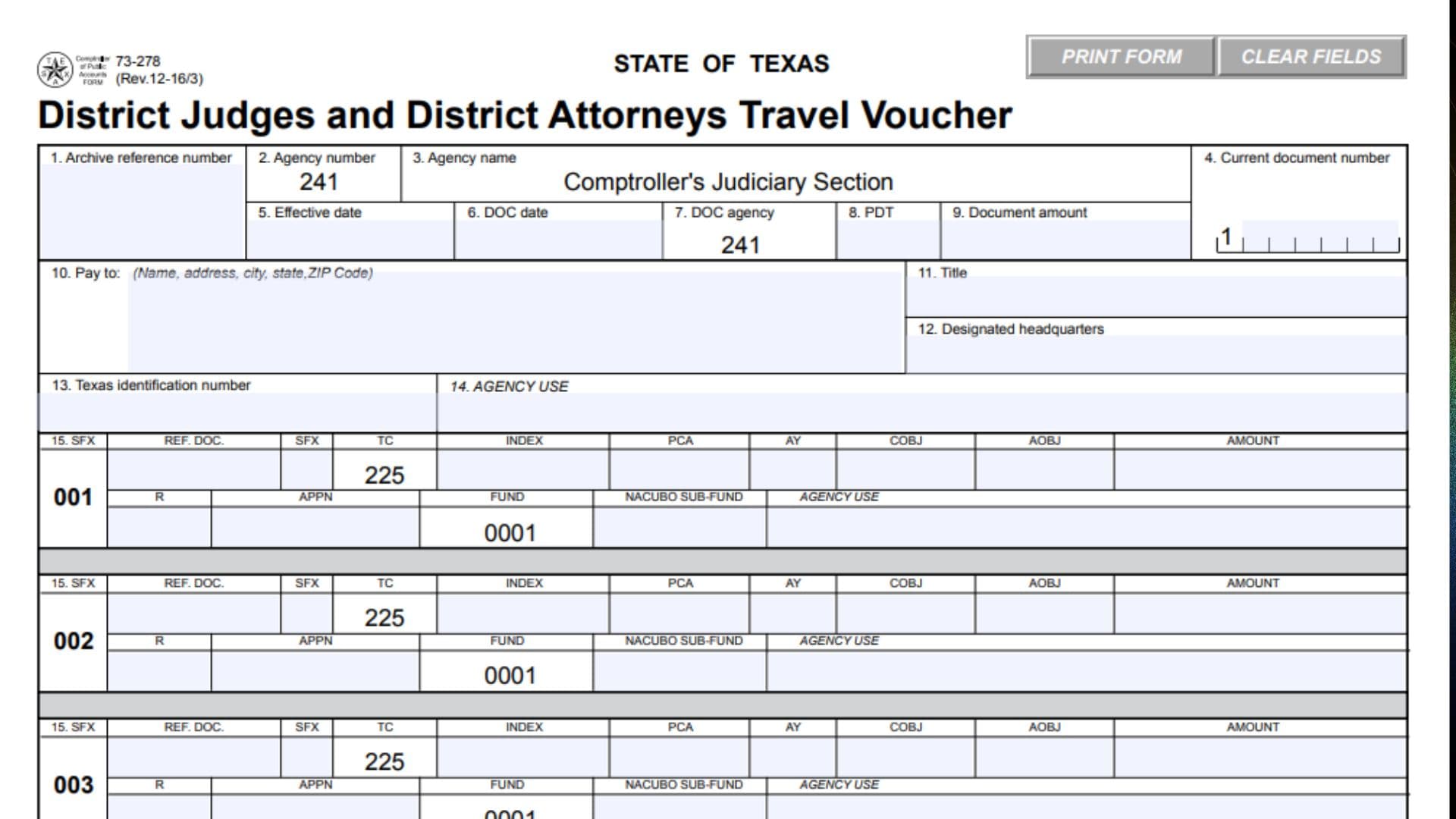
Texas Form 73-278, known as the District Judges and District Attorneys Travel Voucher, is a document used to report and claim travel expenses incurred by District Judges and District Attorneys while performing their official duties. The form provides a structured method for recording travel dates, transportation costs, mileage, meals, lodging, and other authorized expenses associated with official judicial responsibilities. It is designed to document expenses incurred while attending court sessions in the counties within the judge’s judicial district, as described in the certification section. The voucher collects information about the claimant’s name, mailing address, official title, designated headquarters, Texas identification number, and the dates covered by the travel claim. It also contains accounting and agency classification fields used to identify and process the payment. The distribution section allows claimants to report different categories of travel expenses, including public transportation, taxi services, airfare, rental cars, personal automobile mileage, personal plane mileage, meals, lodging, postage, telephone charges, and other travel-related costs. A detailed expense record on the reverse side provides additional space for documenting daily meals, lodging, transportation, mileage, and duties performed. The claimant must also complete a sworn certification confirming that the expenses were incurred while performing official duties, that the reported amounts are accurate, and that no part of the claim has previously been paid. A notary public must complete the notarization section, and the voucher includes separate approval fields for authorized reviewers. Completing Form 73-278 correctly is important because the information allows the responsible agency to review the purpose of the travel, verify the reported expenses, and determine the amount requested for reimbursement. The form also specifies that unauthorized expenses and miscellaneous incidentals should not be charged because they will not be approved.
How To File Form 73-278
Form 73-278 must be completed with accurate information about the official travel and the expenses being claimed. The claimant should document the reporting period, describe the purpose of the travel, itemize the expenses, and complete the required sworn certification.
The form contains two pages. The first page includes the claimant’s identification, accounting information, service dates, expense distribution, sworn statement, contact details, and approval section. The reverse side provides detailed records for actual meal and lodging expenses and transportation activities.
Where To Submit Form 73-278
The form identifies the Comptroller’s Judiciary Section as the responsible agency. However, it does not print a specific mailing address, submission email, or telephone number.
Before submitting the completed voucher, confirm the current submission address and filing instructions with the Comptroller’s Judiciary Section.
Information And Documents To Prepare
Gather the following information before completing the voucher:
- Claimant’s full name and mailing address.
- Official position title.
- Designated headquarters.
- Texas identification number.
- Archive reference and document information, if applicable.
- Effective date and document date.
- Dates covered by the travel voucher.
- Description of the official travel and its purpose.
- Transportation details and mileage records.
- Receipts for public transportation and other applicable expenses.
- Daily meal and lodging expenses, when claiming actual expenses.
- Details of duties performed during the travel.
- Contact person’s name and telephone number.
- Required sworn certification and notarization.
- Approval information from the authorized reviewing officials.
Keep supporting receipts and travel records available when preparing the claim.

How To Complete Form 73-278
The first page contains 22 numbered sections. Some fields are intended for agency or administrative use rather than direct completion by the claimant. Follow the instructions below to understand what belongs in each field.
Top Section: Agency And Document Information
Print Form
The form provides a Print Form control for printing the completed document. Use this option when you need a printed copy for signing, notarization, or submission.
Clear Fields
The Clear Fields control is used to remove entered information from the form. Avoid using it after completing the voucher unless you intend to clear the information.
1. Archive Reference Number
Enter the applicable archive reference number if one has been assigned to the voucher. This field identifies the record for administrative or document-tracking purposes. If you do not have a reference number, follow the instructions of the responsible agency.
2. Agency Number
This field identifies the agency associated with the travel voucher. The form displays the preprinted agency number 241. Do not change the preprinted value unless instructed by the agency.
3. Agency Name
The form identifies the agency as the Comptroller’s Judiciary Section. This identifies the administrative office associated with the voucher.
4. Current Document Number
Enter the current document number if this field is assigned to the claimant or submitting office. It is used to identify the voucher during processing. If the number is generated by the agency, leave the field for the appropriate administrative staff.
5. Effective Date
Enter the applicable effective date associated with the voucher or its processing, as instructed by the responsible agency. The form does not provide a specific definition of this date, so do not substitute another date without confirmation.
6. DOC Date
Enter the document date in the designated field. This identifies the date associated with the document for administrative processing.
7. DOC Agency
This field identifies the agency associated with the document. The form displays the preprinted number 241. Leave the preprinted value unchanged unless the agency instructs otherwise.
8. PDT
Enter the applicable PDT information if required by the responsible agency. The form does not provide a definition of this code, so obtain the correct value from the appropriate administrative office rather than guessing.
9. Document Amount
Enter the total amount associated with the travel voucher when this field is intended for claimant completion. The amount should correspond with the expense total reported in the distribution section. If the shaded or administrative area is reserved for agency use, leave it blank.
Claimant Identification And Employment Information
10. Pay To: Name, Address, City, State, ZIP Code
Enter the full name and mailing address of the person receiving the reimbursement.
Include:
- Full legal name.
- Street address.
- City.
- State.
- ZIP code.
Make sure the information is complete and accurate so that payment can be associated with the correct recipient.
11. Title
Enter your official position title. This identifies your professional capacity in connection with the travel claim, such as District Judge or District Attorney, as applicable.
12. Designated Headquarters
Enter the designated headquarters associated with your official position. This identifies the location from which your official duties and travel are associated.
Use the applicable headquarters information rather than automatically entering your temporary travel destination.
13. Texas Identification Number
Enter your Texas identification number in the designated field. Check the number carefully to ensure that it is correct and corresponds with the claimant.
14. Agency Use
This section is reserved for information required by the agency during voucher processing. Do not enter information in this area unless the responsible agency specifically instructs you to complete it.
Accounting And Distribution Coding – Section 15
Section 15 contains three separate accounting distribution blocks, identified by the sequence numbers 001, 002, and 003. These blocks provide space for accounting classifications and the amounts associated with different distribution entries.
The form includes several accounting abbreviations and preprinted values. Complete only the fields applicable to your voucher and follow the agency’s accounting instructions.
15. SFX
Enter the applicable SFX accounting information when required. The form provides this field in each of the three distribution blocks.
Reference Document (REF. DOC.)
Enter the reference document information associated with the accounting transaction, if applicable. This helps connect the distribution entry with its supporting administrative record.
SFX – Second Field
Complete the second SFX field when required by the agency’s accounting process. Do not assume that it should contain the same value as the first SFX field.
TC
This field identifies the transaction code. The form displays the preprinted value 225 in each distribution block. Leave this value unchanged unless instructed otherwise.
INDEX
Enter the applicable accounting index when required. This identifies the relevant accounting allocation.
PCA
Enter the applicable program or cost allocation information, if required by the agency.
AY
Enter the accounting year associated with the transaction when instructed. Use the correct year supplied by the responsible accounting office.
COBJ
Enter the applicable Comptroller object classification when required. This field identifies the accounting category associated with the expenditure.
AOBJ
Enter the applicable agency object classification if required by the accounting process.
AMOUNT
Enter the dollar amount associated with the corresponding accounting distribution. Make sure the amount agrees with the expense information reported in the voucher.
R
The form displays the letter R in the accounting classification area. This is a preprinted accounting indicator. Do not change it without authorization.
APPN
This field identifies the appropriation classification. The form displays APPN as a preprinted label. Complete any associated information only as instructed by the agency.
FUND
The form displays the preprinted fund number 0001. This identifies the fund classification associated with the voucher. Do not alter the preprinted value unless instructed.
NACUBO SUB-FUND
Enter the applicable sub-fund classification if required by the agency. The form provides this field for additional accounting identification.
AGENCY USE
This field is reserved for agency accounting information. Leave it blank unless the responsible office instructs you to complete it.
Distribution Blocks 001, 002, And 003
Use the three available blocks for the applicable accounting distribution entries. Each block contains the same accounting fields and can be used when the voucher requires multiple allocations.
Do not create or assume accounting codes. Confirm the correct values with the responsible agency when necessary.
Service Dates And Description
16. Service Dates – From
Enter the beginning date of the official travel period covered by the voucher. This identifies when the reported travel or official service started.
16. Service Dates – To
Enter the ending date of the reporting period. Make sure the date range accurately covers the travel expenses being claimed.
17. Description
Describe the purpose and nature of the official travel. Explain why the travel was necessary and how it related to your official responsibilities.
The certification section refers to attending terms of court in counties within the judge’s judicial district. Your description should clearly identify the relevant official duties and travel activities.
Avoid vague descriptions that do not explain the reason for the travel.
Distribution Of Travel Expenses – Section 18
Section 18 is used to itemize the expenses associated with official travel. Enter the appropriate amount for each applicable expense category in the Amount column.
Do not include unauthorized expenses or miscellaneous incidentals.
Fares – Public Transportation (Attach Receipts)
Enter the amount spent on public transportation used for official travel. Attach the applicable receipts to support the amount claimed.
Taxi
Enter the cost of taxi transportation associated with the official travel. Report the applicable amount in the distribution section and retain supporting documentation.
Air Fare
Enter the airfare paid for travel connected with official duties. Record the actual applicable expense and keep the supporting travel documentation.
Rental Car
Enter the rental vehicle expense associated with official travel. Report the applicable cost in the Amount column and retain the supporting documentation.
Personal Car Mileage
Enter the number of miles traveled using a personal automobile for official duties.
The reimbursement rate must be the rate established by the legislature. Calculate the mileage reimbursement using the applicable statutory rate.
Meals And Lodging
Enter the eligible expenses for meals and lodging incurred during official travel. If claiming expenses based on actual costs, complete the detailed daily expense records on the reverse side.
Personal Plane Mileage
Enter the number of miles traveled using a personal aircraft for official purposes.
The reimbursement rate must follow the rate established by the legislature. Calculate the applicable amount using the authorized mileage rate.
Postage
Enter postage expenses directly related to the official travel or duties covered by the voucher. Provide the applicable amount in the distribution section.
Telephone
Enter telephone expenses associated with the official travel or duties being reported. Include only applicable expenses supported by the relevant records.
Other Travel Expense
Use this category for other eligible travel expenses that do not fit into the specific categories listed above.
The form requires proof of third-party payments for reimbursements under this category. The supporting proof must be submitted to the responsible office within 30 days.
Do not use this category to claim miscellaneous incidentals or unauthorized expenses.
Total
Add all applicable travel expense amounts reported in Section 18.
Enter the combined amount in the Total field. Check the calculation carefully to ensure that the total agrees with the individual expense entries.
Employee Tax Record Notice
The form instructs the employee to keep an extra copy of the completed voucher for income tax purposes.
It also warns that miscellaneous incidentals and unauthorized expenses should not be charged because the agency will not approve them.
Keep a copy of the completed voucher and relevant supporting expense records for your personal files.
State Of Texas Sworn Certification – Section 19
Section 19 contains the claimant’s sworn statement. It requires the claimant to confirm that the expenses were incurred while performing official duties and that the information is accurate and unpaid.
County Of
Enter the name of the county associated with the notarized statement in the designated County of field.
Claimant’s Full Name
Enter your complete name in the first blank of the sworn statement. This identifies the person making the declaration.
District
Enter the applicable judicial district associated with your official position.
Judicial District Of Texas
Enter the name or identification of the judicial district in which you serve. The statement connects the claimed expenses with your official responsibilities in that district.
District Position
Complete the blank identifying your position as a District Judge or District Attorney, as applicable to the certification statement.
Make sure the position information is consistent with the official title entered earlier in the voucher.
Certification Of Official Duties
The claimant must swear that the reported expenses were incurred while performing official duties, including attending terms of court in the counties within the judicial district.
Review this statement carefully before signing because it confirms the official purpose of the travel.
Certification Of Accuracy And Nonpayment
The claimant must confirm that the expense account is just, true, and correct and that no part of the claim has previously been paid.
Check the reported expenses and supporting records before making this declaration.
Claimant’s Signature
Sign your name in the designated space to confirm the sworn statement. This signature must be completed as part of the notarized certification.
Subscribed And Sworn Before Me – Date
Enter the day, month, and year on which the claimant appears before the notary and makes the sworn statement.
The notary completes the relevant date information.
Notary Signature
The notary public must sign the designated space to certify that the sworn statement was properly administered.
Name Of Notary (Please Print)
Enter the notary’s full printed name in the designated field. This identifies the notary who witnessed the declaration.
Date Commission Expires
Enter the expiration date of the notary’s commission. Make sure the information is accurate and legible.
Notary Public, State Of Texas
The notary completes the notarization as a Texas notary public and applies the appropriate signature and official seal where required.
Do not sign the sworn statement in advance of the notarial appearance if the notary must witness the signature.
Contact And Processing Information
20. Contact Name
Enter the name of the person who can answer questions about the travel voucher. This should be someone familiar with the reported expenses and official travel details.
Phone (Area Code And Number)
Enter the contact person’s telephone number, including the area code. Make sure the number is correct so the responsible office can reach the appropriate person.
21. Entered By
Enter the name or identification of the person who entered the voucher information. This identifies the individual responsible for preparing the document.
Payment Approval – Section 22
Section 22 contains the official payment approval statement and two separate approval areas.
22. Payment Approval Statement
The approval statement confirms that the voucher is approved for payment and that the reported goods or services correspond with the applicable purchase contract.
It also confirms that the invoice is correct and that the payment complies with the General Appropriations Act.
The responsible approving official should review the voucher and confirm that the information meets the applicable payment requirements.
First Approved Signature
The authorized approving official completes the first approval line by signing in the designated space.
First Approval – Phone Number
Enter the approving official’s telephone number, including the area code, where required.
First Approval – Date
Enter the date associated with the first approval.
Second Approved Signature
The form provides a second approval line for an additional authorized approval. The responsible official completes this field when a second approval is required.
Second Approval – Phone Number
Enter the telephone number of the second approving official, including the area code.
Second Approval – Date
Enter the date associated with the second approval.
Make sure all required approval signatures and dates are completed before submitting the voucher.
How To Complete The Reverse Side Of Form 73-278
The reverse side is intended for individuals claiming expenses based on actual costs. It contains two main sections: a daily meal and lodging expense record and a transportation and duties record.
Complete this page when the applicable claim requires detailed actual expense or mileage information.
Actual Expenses For Meals And Lodging
To Be Filled Out By Persons On Actual Expense
This instruction identifies the individuals who must complete the detailed meal and lodging table based on actual expenses.
Enter the expenses incurred for each applicable date rather than combining all daily amounts into a single entry.
Date
Enter the date on which the meal or lodging expense occurred. Record each date separately.
Meals
Enter the actual meal expense for the corresponding date. Make sure the amount is recorded in the correct row.
Lodging
Enter the actual lodging expense incurred on the corresponding date. Keep the amount associated with the correct travel date.
Daily Total
Add the meal and lodging expenses for each date. Enter the combined amount in the Total column for that date.
Additional Date, Meals, Lodging, And Total Columns
The continuation table provides three repeated groups of Date, Meals, Lodging, and Total columns. Use the available groups to record the daily expenses in the spaces provided.
Each entry should identify the correct date and the corresponding meal and lodging amounts.
Total Meals And Lodging
Add the applicable daily meal and lodging totals recorded throughout the table.
Enter the combined amount in the Total Meals & Lodging field at the far right of the table.
This amount should agree with the meal and lodging expense reported in Section 18 on the first page.
Transportation And Duties Performed
The lower section of the reverse side provides a detailed record of transportation and official activities during the travel period.
Date
Enter the date on which the transportation occurred or the official duties were performed.
Record each applicable travel date separately.
Record Of Transportation And Duties Performed
Describe the transportation activities and official duties performed on the corresponding date.
Include enough detail to explain the travel and its connection with your official responsibilities.
The information should clearly show what transportation was used and what official activities were performed during the reporting period.
Total Daily Mileage
Enter the total number of miles traveled on the corresponding date. Calculate the daily mileage using the actual travel distance.
Make sure the mileage agrees with the transportation details recorded in the same row.
Total Mileage
Add the daily mileage amounts recorded throughout the transportation table.
Enter the combined mileage in the Total Mileage field at the bottom of the section.
Check that the total agrees with the personal automobile or personal plane mileage reported on the first page, as applicable.
Final Review Before Filing
Before submitting Form 73-278, review both pages carefully. Make sure the claimant’s information, official travel details, expense calculations, sworn statement, and approvals are complete.
Use the following checklist:
- Entered the archive reference number, if applicable.
- Checked the agency number and agency name.
- Completed the applicable document identification fields.
- Verified the effective date and document date.
- Entered the correct payee name and mailing address.
- Provided the official position title.
- Entered the designated headquarters.
- Provided the correct Texas identification number.
- Reviewed the accounting distribution fields.
- Used the applicable accounting codes without guessing.
- Entered the beginning and ending service dates.
- Clearly described the purpose of the official travel.
- Reported all applicable transportation expenses.
- Entered personal automobile or personal plane mileage correctly.
- Used the mileage rate established by the legislature.
- Included applicable meals and lodging expenses.
- Attached receipts for public transportation expenses.
- Provided proof of third-party payments for other travel expenses within 30 days.
- Excluded miscellaneous incidentals and unauthorized expenses.
- Calculated the Section 18 expense total correctly.
- Kept an extra copy of the voucher for income tax purposes.
- Completed the claimant’s sworn certification.
- Entered the correct judicial district and official position.
- Confirmed that the expenses have not previously been paid.
- Signed the sworn statement in the presence of the notary, as required.
- Obtained the notary’s signature and completed the notary information.
- Entered the contact person’s name and telephone number.
- Completed the Entered By field.
- Obtained all required payment approval signatures.
- Entered the applicable approval telephone numbers and dates.
- Completed the actual meal and lodging expense table when required.
- Verified the daily and combined meal and lodging totals.
- Completed the transportation and duties performed record.
- Checked the daily mileage and total mileage calculations.
- Confirmed that all information is consistent across both pages.
- Verified the current submission instructions with the Comptroller’s Judiciary Section.
Accurately completing Form 73-278 helps document official travel, support reimbursement requests, and provide the necessary expense details and certifications for payment review. Make sure all claimed expenses are authorized, properly documented, and consistent with the official duties performed.