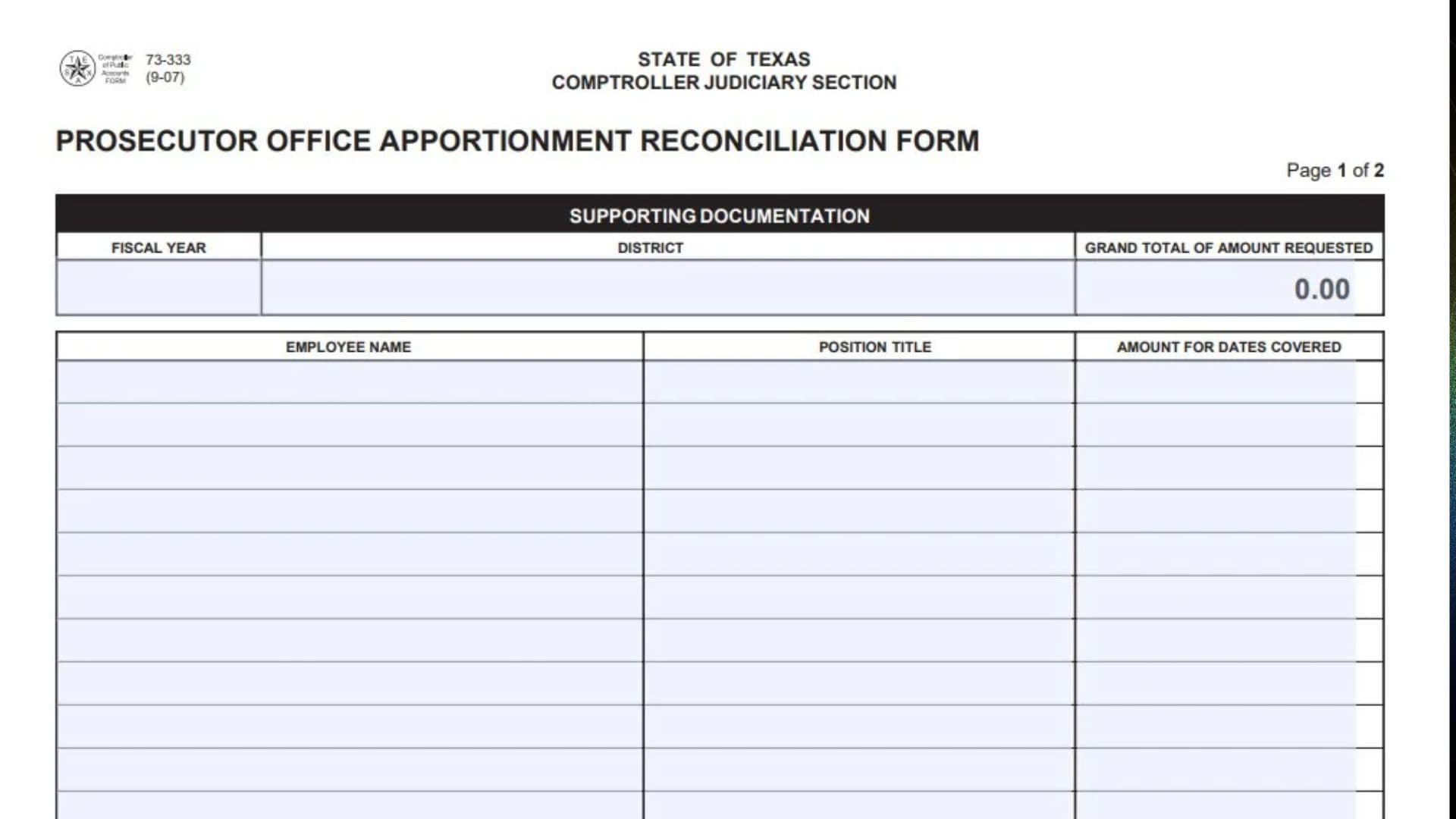
Texas Form 73-333, officially titled the Prosecutor Office Apportionment Reconciliation Form, is a two-page financial accounting document issued by the Judiciary Section of the Texas Comptroller of Public Accounts. It exists to reconcile state-apportioned funds provided to local prosecutor offices across Texas for operational and personnel costs. District attorneys, county attorneys, and criminal district attorneys—or their designated financial administrators—use this form to itemize and verify how allocated state funds were spent during a specific fiscal year. The form collects detailed expenditure data across three primary categories: employee compensation, general office expenses, and employee travel costs, alongside a sworn legal certification from the head prosecutor. Completing Form 73-333 accurately and thoroughly is essential because it serves as the official audit record for state funds, ensures compliance with Texas Comptroller accounting standards, and prevents delays or denials in state apportionment disbursements.
How To File Form 73-333
Form 73-333 is submitted directly to the Judiciary Section of the Texas Comptroller of Public Accounts. Because the form contains a formal affidavit section that must be notarized, filers must print the completed document, sign it in the presence of a notary public, and mail or deliver the physical original according to current Comptroller Judiciary Section submission instructions. If you have questions regarding submission deadlines or where to send the completed form, you can contact the Comptroller Judiciary Section directly at (800) 531-5441, extension 6-5985.
Before filling out the form, gather the following records and information:
- Your office’s assigned judicial district or county designation and the applicable state fiscal year.
- Payroll ledgers showing employee names, official job titles, covered service dates, and exact compensation amounts funded by the apportionment.
- Itemized receipts, invoices, and accounting records for general office supplies and operational expenses.
- Travel vouchers, mileage logs, and expense reports for employee business travel.
- Contact details for the staff member designated to answer questions from the Comptroller’s office, as well as access to a commissioned notary public to witness the prosecutor’s signature.

How To Complete Form 73-333
Page 1 captures your office’s identifying details, employee salary expenditures, the grand total of all requested funds, and the mandatory notarized certification.
Header and Summary Information
Fiscal Year Enter the specific state fiscal year for which you are reconciling apportionment funds.
District Enter the official judicial district number or county name that identifies your prosecutor office.
Grand Total of Amount Requested Enter the combined dollar amount of all expenses claimed across both pages of the form. This figure must equal the sum of the Employee Total from Page 1, the Office Expenses Total from Page 2, and the Employee Travel and Expenses Total from Page 2.
Supporting Documentation: Employee Compensation Schedule
Use this table to itemize every employee whose salary or compensation is covered by the state apportionment.
Employee Name Enter the full legal name of each eligible employee on a separate row.
Position Title Enter the official job title or role held by the corresponding employee within the prosecutor’s office.
Amount for Dates Covered Enter the exact dollar amount of compensation paid to that employee for the specific period covered by this reconciliation. Repeat this process for each employee listed.
Total Add all individual figures entered in the Amount for Dates Covered column and enter the combined sum in this box.
Certification and Contact Information
The bottom section of Page 1 serves as a sworn legal statement verifying the accuracy of the financial report.
I, [Print Name] Print the full name of the elected or appointed head prosecutor making the certification in the blank space at the beginning of the statement.
Title and Jurisdiction Selection (Complete Appropriate Blank) Select the single title that applies to your office and write the corresponding judicial district number or county name on the adjacent line:
- District Attorney of the [Blank] Judicial District: Complete this line if you serve as a District Attorney, entering your judicial district number.
- County Attorney of [Blank] County: Complete this line if you serve as a County Attorney, entering your county name.
- Criminal District Attorney of [Blank] County: Complete this line if you serve as a Criminal District Attorney, entering your county name.
Sign Here (Certifying Official Signature) The District Attorney, County Attorney, or Criminal District Attorney named above must sign on this line to certify that the entire account is true and correct. Do not sign until you are in the presence of a notary public.
Date (Certifying Official Date) Enter the calendar date on which the prosecutor signs the certification.
Person to Contact Regarding Information on This Form Enter the full name of the administrative or financial staff member whom the Comptroller’s office should contact if questions arise about the figures or documentation provided.
Contact Phone Number Enter the direct telephone number, including area code, for the designated contact person.
Contact E-Mail Address Enter a monitored business email address for the designated contact person.
Notary Acknowledgment
This section must be completed exclusively by a commissioned notary public at the time the prosecutor signs the form.
Subscribed and Sworn to Before Me On [Date] The notary public enters the exact date on which the prosecutor personally appeared and swore to the accuracy of the form.
Notary Signature (Sign Here) The notary public signs their official signature on this line.
Date (Notary Date) The notary public enters the date of notarization.
Official Seal ((Seal)) The notary public must affix their official ink stamp or embossed notary seal in the designated space to the left of the notary signature block.
How To Complete Form 73-333 (Page 2)
Page 2 serves as a continuation schedule for documenting non-payroll operational costs and staff travel expenses.
Header Information
Fiscal Year Re-enter the exact same state fiscal year listed on Page 1 so both pages remain properly matched.
District Re-enter the exact same judicial district number or county name listed on Page 1.
Supporting Documentation: Office Expenses
Use the top table on Page 2 to itemize general operational expenditures paid with apportionment funds.
Office Expenses List each specific type or category of office expense (such as office supplies, postage, equipment, or telecommunications) on a separate row.
Amount Enter the exact dollar amount spent for each corresponding office expense item listed on that row.
Total (Office Expenses) Add all individual figures in the Office Expenses Amount column and enter the combined subtotal here.
Supporting Documentation: Employee Travel and Expenses
Use the bottom table on Page 2 to itemize reimbursable business travel and related expenses incurred by office personnel.
Employee Travel and Expenses List each employee travel entry, trip description, or specific travel expense item on a separate row.
Amount Enter the exact dollar amount spent for each corresponding travel entry listed on that row.
Total (Employee Travel and Expenses) Add all individual figures in the Employee Travel and Expenses Amount column and enter the combined subtotal here.
Final Review Before Filing
Before mailing your completed Form 73-333 to the Texas Comptroller Judiciary Section, verify every item on the checklist below:
- Matching Headers: Confirm that the Fiscal Year and District fields on Page 2 match the entries on Page 1 identically.
- Accurate Math: Verify that the Employee Total on Page 1, the Office Expenses Total on Page 2, and the Employee Travel and Expenses Total on Page 2 are added correctly.
- Grand Total Reconciliation: Confirm that the Grand Total of Amount Requested on Page 1 equals the exact sum of the three section totals across both pages.
- Proper Jurisdiction Selection: Check that the head prosecutor’s name is printed clearly and that only the one applicable jurisdiction blank (Judicial District, County Attorney, or Criminal District Attorney) is filled in.
- Complete Contact Details: Ensure the designated contact person’s name, phone number, and email address are accurate and legible.
- Valid Notarization: Confirm that the head prosecutor signed and dated the form and that a notary public completed the jurat date, signature, and official seal.
- Supporting Records: Keep copies of the signed form along with all underlying payroll ledgers, receipts, and travel vouchers in your office files in case of a Comptroller audit.