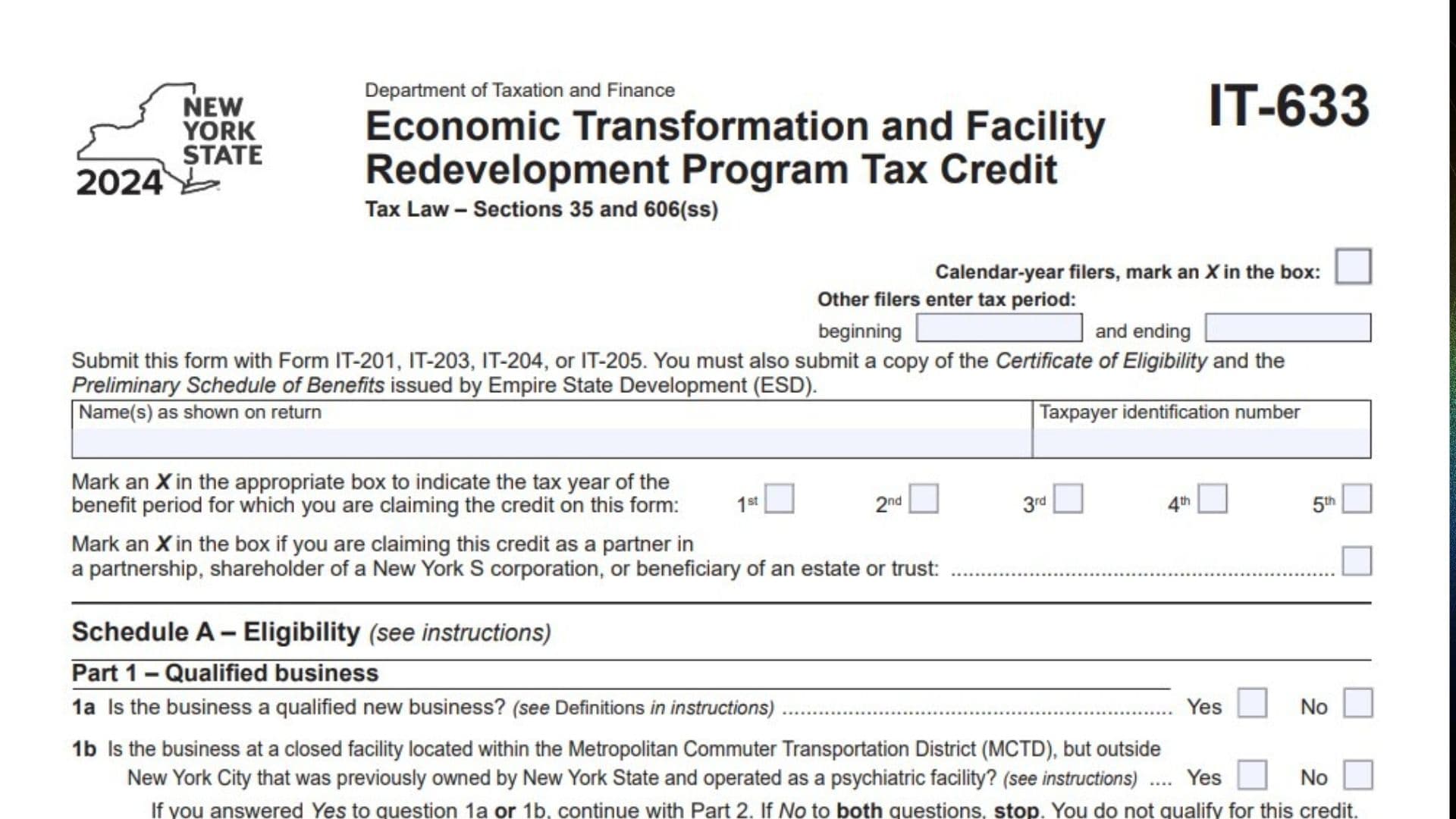
Form IT-633, Economic Transformation and Facility Redevelopment Program Tax Credit, is a New York State tax form used to calculate and claim tax credits available under Sections 35 and 606(ss) of the New York Tax Law. The credit is designed to support eligible businesses involved in economic transformation and facility redevelopment activities in designated areas of New York State. It allows qualifying taxpayers to calculate several credit components associated with job creation, qualifying business investments, employee training, and eligible real property taxes. The form collects information about the business’s eligibility, employment activity, employee wages, investment property, training expenses, property tax payments, and the taxpayer’s share of credits received through partnerships, S corporations, estates, or trusts. It also provides sections for calculating the total credit and reporting any credit recapture that may apply during the final year of the benefit period. Businesses and taxpayers claiming this credit must provide the relevant employment and financial information and identify their applicable benefit period. Completing Form IT-633 accurately is important because each credit component has its own calculation method, limitations, and eligibility conditions. The information reported on this form is also used to determine the amount that can be transferred to the taxpayer’s applicable New York income tax return.
How To File Form IT-633
Form IT-633 must be submitted together with the applicable New York State income tax return. The form is not intended to be filed independently of the associated return.
Depending on the taxpayer’s filing status, attach Form IT-633 to one of the following:
- Form IT-201: New York State Resident Income Tax Return.
- Form IT-203: Nonresident and Part-Year Resident Income Tax Return.
- Form IT-204: Partnership Return.
- Form IT-205: Fiduciary Income Tax Return.
Taxpayers must also submit copies of two documents issued by Empire State Development (ESD):
- Certificate of Eligibility.
- Preliminary Schedule of Benefits.
These documents support the taxpayer’s eligibility and provide information relevant to the available tax benefits.
Information To Prepare Before Completing Form IT-633
Gather the following information before starting the form:
- Taxpayer’s name as it appears on the income tax return.
- Taxpayer identification number.
- Applicable tax year or tax period.
- Benefit period year for which the credit is being claimed.
- Business eligibility information.
- Quarterly employment figures for the current tax year.
- Employee names and Social Security numbers.
- Employee employment dates and gross wages.
- Details of qualified investment property.
- Property acquisition or service dates and federal tax basis.
- Employee training expense information.
- Eligible real property tax amounts.
- Partnership, S corporation, estate, or trust credit allocation information, if applicable.
- Certificate of Eligibility and Preliminary Schedule of Benefits issued by ESD.
The form contains several schedules covering different credit components. Taxpayers should complete the sections applicable to their circumstances and follow the calculation instructions for each component.

How To Complete Form IT-633
The form is divided into six main schedules and several calculation sections. The following instructions explain the information required in each section, including the individual questions, columns, checkboxes, and numbered lines.
Taxpayer Information and Benefit Period
The first section identifies the taxpayer, the applicable tax period, and the benefit year for which the credit is being claimed.
Calendar-Year Filer Checkbox
Mark the checkbox if you file your taxes using the calendar year. If you do not use a calendar-year filing period, leave this box unmarked and provide your applicable tax period below.
Beginning and Ending Tax Period
Taxpayers using a fiscal or other non-calendar tax period must enter the beginning and ending dates of their tax year in the designated spaces.
Name(s) as Shown on Return
Enter the taxpayer’s name exactly as it appears on the associated New York State income tax return. Use the appropriate taxpayer or entity name.
Taxpayer Identification Number
Enter the identification number associated with the taxpayer or entity filing the return.
Benefit Period Year Checkbox
Select the appropriate box to identify the year of the benefit period for which you are claiming the credit. The available options are:
- 1st year
- 2nd year
- 3rd year
- 4th year
- 5th year
Select only the applicable benefit period year. This selection is particularly important because certain credit components use different percentages depending on the benefit period year.
Partner, S Corporation Shareholder, or Beneficiary Checkbox
Mark this box if you are claiming the credit as a partner in a partnership, a shareholder of a New York S corporation, or a beneficiary of an estate or trust. This designation identifies taxpayers who receive an allocated share of the credit through another entity.
Schedule A: Eligibility
Schedule A determines whether the business meets the eligibility conditions required to claim the Economic Transformation and Facility Redevelopment Program Tax Credit.
Part 1: Qualified Business
This section contains two eligibility questions. Answer both questions based on the business’s circumstances.
Question 1a: Qualified New Business
Indicate whether the business qualifies as a qualified new business under the applicable program definition.
- Select Yes if the business meets the qualified new business requirements.
- Select No if it does not meet those requirements.
The detailed definition of a qualified new business is provided in the form’s separate instructions.
Question 1b: Business Located at a Qualifying Closed Facility
Indicate whether the business operates at a closed facility that meets the following conditions:
- The facility is located within the Metropolitan Commuter Transportation District (MCTD).
- The facility is outside New York City.
- The facility was previously owned by New York State.
- The facility was operated as a psychiatric facility.
Select Yes or No based on whether the facility meets the stated conditions.
If you answer Yes to either Question 1a or Question 1b, proceed to Part 2.
If you answer No to both questions, stop completing the form. The business does not qualify for this credit based on the eligibility tests shown in this section.
Part 2: Computation of Average Number of Net New Jobs
This section measures the number of net new jobs maintained by the business during the current tax year.
Current Tax Year Employment Table
Enter the number of net new jobs for each of the four reporting dates:
- March 31: Enter the number of net new jobs as of March 31.
- June 30: Enter the number of net new jobs as of June 30.
- September 30: Enter the number of net new jobs as of September 30.
- December 31: Enter the number of net new jobs as of December 31.
- Total: Enter the total of the four quarterly employment figures.
These figures provide the employment information used to calculate the average number of net new jobs for the current tax year.
Line 2: Average Number of Net New Jobs
Enter the average number of net new jobs for the current tax year. Calculate this amount using the employment figures reported in the quarterly table and the method provided in the form instructions.
Line 3: Average Number of Net New Jobs Five or Greater
Determine whether the average number of net new jobs reported on Line 2 is at least five.
- Select Yes if the average is five or greater. Continue to Schedule B.
- Select No if the average is below five. You do not qualify for the credit for the current tax year.
Schedule B: Computation of Credit Component Amounts
Schedule B calculates the individual components of the tax credit. It contains four parts covering job creation, qualifying investments, employee training, and real property taxes.
Part 1: Jobs Tax Credit Component
This section calculates the credit associated with each net new job created and maintained in the economic transformation area.
Complete one row for each qualifying employee. If you have more employees than the available rows, use additional Forms IT-633 as required.
Column A: Employee’s Name
Enter the full name of each employee whose qualifying job is being included in the calculation.
Column B: Social Security Number
Enter the employee’s Social Security number. Make sure the number corresponds to the employee identified in Column A.
Column C: Date First Employed
Enter the date the employee first started working for the business. Use the MMDDYYYY format.
Column D: Last Date of Employment During the Current Tax Year
Enter the employee’s last date of employment during the current tax year. Use the MMDDYYYY format. This field records the applicable employment end date within the reporting year.
Column E: Gross Wages
Enter the employee’s gross wages for the applicable reporting period. This amount is used to calculate the employee’s jobs tax credit.
Column F: Credit Amount
Calculate the credit for each employee by multiplying the gross wages in Column E by 6.85%.
Use the following calculation:
Credit Amount = Gross Wages × 0.0685
For example, if the applicable gross wages are $40,000, the calculation is:
$40,000 × 0.0685 = $2,740
Enter the calculated credit amount in Column F.
Additional Forms IT-633: Total of Column F Amounts
If you used additional Forms IT-633 to report more qualifying employees, enter the combined total of the Column F amounts from those additional forms in the designated space.
Line 4: Jobs Tax Credit Component
Add all the credit amounts reported in Column F, including the applicable amounts from additional Forms IT-633.
Enter the resulting total on Line 4. This represents the jobs tax credit component before including any allocated shares received from other entities.
Line 5: Partnership Jobs Tax Credit Share
Enter your share of the jobs tax credit component received from partnerships in which you are a partner.
Use the applicable credit allocation information provided by the partnership.
Line 6: S Corporation Jobs Tax Credit Share
Enter your share of the jobs tax credit component received from New York S corporations in which you are a shareholder.
Line 7: Estate or Trust Jobs Tax Credit Share
Enter your share of the jobs tax credit component received as a beneficiary of an estate or trust.
Line 8: Total Jobs Tax Credit Component
Add the amounts reported on Lines 4, 5, 6, and 7.
Line 8 represents the total jobs tax credit component, including the taxpayer’s own qualifying credit and any applicable allocated shares.
Partnership Reporting Instructions
Partnerships must enter the Line 8 amount and code 633 on Form IT-204, Line 144. They should then continue with Part 2.
Fiduciary Reporting Instructions
Fiduciaries must enter the Line 8 amount on the Total line of Schedule C, Column C, and continue with Part 2.
Other Taxpayers
All other taxpayers should continue directly to Part 2.
Part 2: Investment Tax Credit Component
This section calculates the investment tax credit based on qualifying property placed in service. It separates investments located at a closed facility from other qualified investments because the applicable credit percentages are different.
Qualified Investment at a Closed Facility
Use this table to report qualifying investments in property located at a closed facility.
Complete one row for each qualifying property item.
Column A: Description of Property
Describe the property associated with the qualifying investment. Provide enough information to identify the asset being reported.
Column B: Date Placed in Service
Enter the date the property was placed in service. Use the MMDDYYYY format.
Column C: Cost or Other Basis for Federal Income Tax Purposes
Enter the property’s cost or other basis used for federal income tax purposes. Use the applicable tax basis amount for the investment.
Column D: Credit Amount
Calculate the credit by multiplying the amount in Column C by 10%.
Use this formula:
Credit Amount = Cost or Other Basis × 0.10
For example, if qualifying property has a federal tax basis of $100,000:
$100,000 × 0.10 = $10,000
Enter the resulting amount in Column D.
Additional Forms IT-633: Total of Column D Amounts
If additional Forms IT-633 were used to report other qualifying closed-facility investments, enter the combined Column D credit amounts from those forms in this space.
Line 9: Total Closed Facility Investment Credit
Add the credit amounts reported in Column D, including applicable amounts from additional Forms IT-633.
Enter the total on Line 9.
Line 10: Closed Facility Investment Tax Credit
Enter the smaller of the following two amounts:
- The total reported on Line 9.
- The maximum credit amount provided to you by Empire State Development (ESD).
The amount entered on Line 10 cannot exceed the applicable maximum credit provided by ESD.
All Other Qualified Investments
This table is used to calculate the investment tax credit for qualifying investments that are not included in the closed-facility investment section.
Column A: Description of Property
Provide a description of each qualifying property item included in this investment calculation.
Column B: Date Placed in Service
Enter the date the property was placed in service using the MMDDYYYY format.
Column C: Cost or Other Basis for Federal Income Tax Purposes
Enter the property’s cost or other basis for federal income tax purposes.
Column D: Credit Amount
Calculate the credit by multiplying the amount in Column C by 6%.
Use the following formula:
Credit Amount = Cost or Other Basis × 0.06
For example, if the qualifying investment has a federal tax basis of $50,000:
$50,000 × 0.06 = $3,000
Enter the result in Column D.
Additional Forms IT-633: Total of Column D Amounts
If additional Forms IT-633 were used for other qualified investments, enter the combined Column D amounts from those forms in the designated space.
Line 11: Total Other Qualified Investment Credit
Add the Column D amounts for all other qualified investments, including the applicable amounts reported on additional Forms IT-633.
Enter the resulting total on Line 11.
Line 12: Other Qualified Investments Credit Component Limitation
This line displays the credit limitation for other qualified investments.
The amount shown on the 2024 form is $4,000,000.
Use this limitation when determining the allowable amount on Line 13.
Line 13: Other Qualified Investments Credit After Limitation
Compare the amount on Line 11 with the limitation on Line 12.
Enter whichever amount is smaller.
In other words:
Line 13 = The Smaller of Line 11 or Line 12
This ensures that the other qualified investments credit component does not exceed the stated limitation.
Line 14: Total Investment Tax Credit Before Allocated Shares
Add the amounts reported on Line 10 and Line 13.
Enter the combined amount on Line 14. This represents the investment tax credit calculated from the two investment categories before adding allocated shares from other entities.
Line 15: Partnership Investment Tax Credit Share
Enter your share of the investment tax credit component received from partnerships in which you are a partner.
Line 16: S Corporation Investment Tax Credit Share
Enter your share of the investment tax credit component received from S corporations in which you are a shareholder.
Line 17: Estate or Trust Investment Tax Credit Share
Enter your share of the investment tax credit component received as a beneficiary of an estate or trust.
Line 18: Total Investment Tax Credit Component
Add Lines 14, 15, 16, and 17.
Enter the resulting total on Line 18.
Partnership Reporting Instructions
Partnerships must enter the Line 18 amount and code B33 on Form IT-204, Line 144. Then continue with Part 3.
Fiduciary Reporting Instructions
Fiduciaries must enter the Line 18 amount on the Total line of Schedule C, Column D, and continue with Part 3.
Other Taxpayers
All other taxpayers should continue with Part 3.
Part 3: Training Tax Credit Component
This section calculates the credit associated with qualifying employee training expenses.
Complete a separate row for each employee and the corresponding training expense.
Column A: Employee’s Name
Enter the full name of the employee associated with the reported training expense.
Column B: Social Security Number
Enter the employee’s Social Security number.
Column C: Description of Training Expense
Describe the training expense associated with the employee. The description should identify the type of training expenditure being reported.
Column D: Date Paid
Enter the date the training expense was paid. Use the MMDDYYYY format.
Column E: Amount of Expense
Enter the amount paid for the qualifying training expense.
Column F: Column E × 50%
Multiply the expense amount in Column E by 50%.
Use the following formula:
Column F = Column E × 0.50
For example, if the training expense is $6,000:
$6,000 × 0.50 = $3,000
Enter the calculated amount in Column F.
Column G: Training Credit Amount
Calculate the allowable credit for each employee by comparing the amount in Column F with $4,000.
Enter the smaller of the two amounts.
The formula is:
Column G = The Smaller of Column F or $4,000
For example:
- Training expense: $6,000
- 50% of the expense: $3,000
- Maximum per-employee amount: $4,000
- Allowable credit: $3,000
If the calculated 50% amount is greater than $4,000, enter $4,000 instead.
Additional Forms IT-633: Total of Column G Amounts
If additional Forms IT-633 were used to report training expenses for other employees, enter the combined Column G credit amounts from those forms in the designated space.
Line 19: Total Training Tax Credit
Add the Column G amounts for all reported employees, including the applicable amounts from additional Forms IT-633.
Enter the total on Line 19.
Line 20: Partnership Training Tax Credit Share
Enter your share of the training tax credit component received from partnerships in which you are a partner.
Line 21: S Corporation Training Tax Credit Share
Enter your share of the training tax credit component received from S corporations in which you are a shareholder.
Line 22: Estate or Trust Training Tax Credit Share
Enter your share of the training tax credit component received as a beneficiary of an estate or trust.
Line 23: Total Training Tax Credit Component
Add Lines 19, 20, 21, and 22.
Enter the total on Line 23.
Partnership Reporting Instructions
Partnerships must enter the Line 23 amount and code C33 on Form IT-204, Line 144. Then continue with Part 4.
Fiduciary Reporting Instructions
Fiduciaries must enter the Line 23 amount on the Total line of Schedule C, Column E, and continue with Part 4.
Other Taxpayers
All other taxpayers should continue with Part 4.
Part 4: Real Property Tax Credit Component
This section calculates the credit associated with eligible real property taxes. It separates property located entirely within a closed facility from property located outside a closed facility.
Different credit percentages apply depending on the property location and the benefit period year.
Property Located Entirely Within a Closed Facility
Use this table for eligible real property located entirely within a closed facility.
Complete one row for each applicable property tax amount.
Column A: Eligible Real Property Taxes
Enter the amount of eligible real property taxes associated with the qualifying property.
Column B: Benefit Period Year Rate
Enter the applicable percentage based on the benefit period year selected at the beginning of the form.
The rates for property located entirely within a closed facility are:
- 1st year: 50% (0.50)
- 2nd year: 40% (0.40)
- 3rd year: 30% (0.30)
- 4th year: 20% (0.20)
- 5th year: 10% (0.10)
Use the rate corresponding to the applicable benefit period year.
Column C: Credit Amount
Multiply the eligible real property taxes in Column A by the applicable percentage in Column B.
Formula:
Credit Amount = Eligible Real Property Taxes × Benefit Period Rate
For example, if eligible real property taxes are $20,000 during the first benefit period year:
$20,000 × 0.50 = $10,000
Enter the calculated amount in Column C.
Additional Forms IT-633: Total of Column C Amounts
If additional Forms IT-633 were used to report eligible property taxes for other properties within closed facilities, enter the combined Column C amounts from those forms in the designated space.
Line 24: Real Property Tax Credit for Property Within a Closed Facility
Add the Column C credit amounts for properties located entirely within a closed facility, including applicable amounts from additional Forms IT-633.
Enter the total on Line 24.
Property Located Outside a Closed Facility
Use this table for eligible real property located outside a closed facility.
The calculation follows the same general structure as the previous table, but the applicable percentages are lower.
Column A: Eligible Real Property Taxes
Enter the amount of eligible real property taxes associated with each qualifying property located outside a closed facility.
Column B: Benefit Period Year Rate
Enter the applicable percentage based on the benefit period year.
The rates for property located outside a closed facility are:
- 1st year: 25% (0.25)
- 2nd year: 20% (0.20)
- 3rd year: 15% (0.15)
- 4th year: 10% (0.10)
- 5th year: 5% (0.05)
Select the percentage corresponding to the applicable benefit period year.
Column C: Credit Amount
Multiply the eligible real property taxes in Column A by the percentage in Column B.
Formula:
Credit Amount = Eligible Real Property Taxes × Benefit Period Rate
For example, if eligible real property taxes are $20,000 during the first benefit period year:
$20,000 × 0.25 = $5,000
Enter the calculated amount in Column C.
Additional Forms IT-633: Total of Column C Amounts
If additional Forms IT-633 were used to report eligible real property taxes outside closed facilities, enter the combined Column C amounts from those forms in the designated space.
Line 25: Real Property Tax Credit for Property Outside a Closed Facility
Add all Column C credit amounts for qualifying property located outside a closed facility, including applicable amounts from additional Forms IT-633.
Enter the total on Line 25.
Line 26: Combined Real Property Tax Credit
Add Line 24 and Line 25.
Enter the combined amount on Line 26. This represents the real property tax credit calculated from both property categories.
Line 27: Partnership Real Property Tax Credit Share
Enter your share of the real property tax credit components received from partnerships in which you are a partner.
Line 28: S Corporation Real Property Tax Credit Share
Enter your share of the real property tax credit component received from S corporations in which you are a shareholder.
Line 29: Estate or Trust Real Property Tax Credit Share
Enter your share of the real property tax credit component received as a beneficiary of an estate or trust.
Line 30: Total Real Property Tax Credit Component
Add Lines 26, 27, 28, and 29.
Enter the resulting total on Line 30.
Partnership Reporting Instructions
Partnerships must enter the Line 30 amount and code D33 on Form IT-204, Line 144. Complete Schedule F if applicable.
Fiduciary Reporting Instructions
Fiduciaries must enter the Line 30 amount on the Total line of Schedule C, Column F, and continue with Line 31.
Other Taxpayers
All other taxpayers should continue with Line 31.
Line 31: Total Credit Components
Add the four main credit component totals:
- Line 8: Jobs tax credit component.
- Line 18: Investment tax credit component.
- Line 23: Training tax credit component.
- Line 30: Real property tax credit component.
Formula:
Line 31 = Line 8 + Line 18 + Line 23 + Line 30
Enter the combined amount on Line 31.
This represents the total of the four credit components before completing the applicable credit computation schedule.
Fiduciary Reporting Instructions
Fiduciaries must complete Schedules C and E and Schedule F, if applicable.
Other Taxpayers
All other taxpayers should continue with Line 32.
Schedule C is used to report how the different credit components and any credit recapture amounts are allocated among beneficiaries and the fiduciary of an estate or trust.
The beneficiary information should correspond to the information reported on Form IT-205, Schedule C.
Complete the applicable rows for the beneficiaries and the fiduciary.
Column A: Beneficiary’s Name
Enter each beneficiary’s name exactly as shown on Form IT-205, Schedule C.
The final row is designated for the fiduciary.
Column B: Identifying Number
Enter the appropriate identifying number for each beneficiary or fiduciary listed in Column A.
Column C: Share of Jobs Tax Credit Component
Enter the portion of the jobs tax credit component allocated to each beneficiary or retained by the fiduciary.
The total column amount represents the jobs tax credit allocation.
Column D: Share of Investment Tax Credit Component
Enter each beneficiary’s or fiduciary’s allocated share of the investment tax credit component.
Column E: Share of Training Tax Credit Component
Enter the allocated share of the training tax credit component for each beneficiary or the fiduciary.
Column F: Share of Real Property Tax Credit Component
Enter each beneficiary’s or fiduciary’s share of the real property tax credit component.
Column G: Share of Recapture of Credit
Enter the applicable share of any credit recapture allocated to each beneficiary or retained by the fiduciary.
Total Row
The Total row summarizes the allocated credit components and recapture amounts reported for the beneficiaries and fiduciary.
Use the applicable totals for the corresponding columns.
Fiduciary Row
Enter the portion of each credit component and recapture amount allocated to or retained by the fiduciary.
The fiduciary’s amounts are used in the applicable calculations in Schedule E and Schedule F.
Schedule D: Partnership, S Corporation, Estate, and Trust Information
Schedule D collects information about the partnerships, S corporations, estates, or trusts through which the taxpayer received a share of the Economic Transformation and Facility Redevelopment Program Tax Credit or a share of a credit recapture.
Complete a separate row for each applicable entity.
Name
Enter the legal name of the partnership, S corporation, estate, or trust from which you received a credit allocation or recapture amount.
Type
Identify the type of entity using the appropriate code:
- P: Partnership.
- S: S corporation.
- ET: Estate or trust.
Enter the corresponding code in the Type column.
Employer ID Number
Enter the Employer Identification Number (EIN) of the partnership, S corporation, estate, or trust.
Repeat this process for every applicable entity. The form provides multiple rows for reporting the relevant entities.
Schedule E: Computation of Credit
Schedule E determines the credit amount to be reported by individuals, partners, S corporation shareholders, beneficiaries, and fiduciaries.
The applicable calculation depends on the taxpayer’s filing status.
Line 32: Amount From Line 31
Enter the amount reported on Line 31.
This represents the combined credit components calculated in Schedule B and is the starting amount for the individual, partner, S corporation shareholder, or beneficiary credit calculation.
Fiduciary Calculations
The following lines are used by fiduciaries to bring the relevant credit allocations from Schedule C into the credit computation.
Line 33: Fiduciary’s Jobs Tax Credit Component
Enter the amount from Schedule C, Fiduciary row, Column C.
This represents the jobs tax credit component allocated to or retained by the fiduciary.
Line 34: Fiduciary’s Investment Tax Credit Component
Enter the amount from Schedule C, Fiduciary row, Column D.
This represents the investment tax credit component allocated to or retained by the fiduciary.
Line 35: Fiduciary’s Training Tax Credit Component
Enter the amount from Schedule C, Fiduciary row, Column E.
This represents the training tax credit component allocated to or retained by the fiduciary.
Line 36: Fiduciary’s Real Property Tax Credit Component
Enter the amount from Schedule C, Fiduciary row, Column F.
This represents the real property tax credit component allocated to or retained by the fiduciary.
Line 37: Total Credit
Calculate the total credit using the applicable amounts and computation instructions for the taxpayer’s filing category.
Enter the resulting amount on Line 37.
For fiduciaries, use the credit allocations reported on Lines 33 through 36 as applicable. Follow the applicable Schedule E instructions to determine the final amount.
Schedule F: Summary of Recapture of Credit
Schedule F is used to calculate and report credit recapture amounts during the final year of the benefit period.
Complete this schedule when the recapture reporting requirements apply.
The schedule separates recapture amounts according to the taxpayer’s role or the entity through which the credit was received.
Line 38: Individual’s and Partnership’s Recapture of Credit
Enter the applicable recapture amount associated with an individual or partnership.
Use the amount determined under the applicable credit recapture rules.
Line 39: Beneficiary’s Share of Recapture of Credit
Enter the beneficiary’s allocated share of any credit recapture amount.
This amount relates to the portion of recapture assigned to the beneficiary.
Line 40: Partner’s Share of Recapture of Credit
Enter the partner’s share of the credit recapture amount received through a partnership.
Line 41: S Corporation Shareholder’s Share of Recapture of Credit
Enter the amount of credit recapture allocated to the taxpayer as a shareholder of an S corporation.
Line 42: Fiduciary’s Share of Recapture of Credit
Fiduciaries must enter their share of the recapture amount reported in Schedule C, Fiduciary row, Column G.
Transfer the applicable amount from that column to Line 42.
Line 43: Total Recapture of Credit
Calculate the total recapture amount using the applicable amounts from Lines 38 through 42 and the relevant Schedule F instructions.
Enter the resulting total on Line 43.
Where To Report the Recapture Amount
After calculating Line 43, transfer the amount to the appropriate New York State tax return or schedule, depending on the taxpayer’s filing status.
Individuals, Including Sole Proprietors
Enter the Line 43 amount and code 633 on:
- Form IT-201-ATT, Line 20; or
- Form IT-203-ATT, Line 19.
Use the applicable form based on your filing status.
Fiduciaries
Include the Line 43 amount on Form IT-205, Line 12.
Partnerships
Enter the Line 43 amount and code 633 on Form IT-204, Line 148.
Final Review Before Filing
Before submitting Form IT-633 with your New York State income tax return, review every completed section and verify that the information is accurate.
Use the following checklist to review the form.
Taxpayer Information
- The taxpayer’s name matches the name on the associated income tax return.
- The taxpayer identification number is correct.
- The calendar-year checkbox or applicable beginning and ending tax period has been completed.
- The correct benefit period year has been selected.
- The partner, S corporation shareholder, or beneficiary checkbox has been marked when applicable.
Schedule A: Eligibility
- Question 1a has been answered.
- Question 1b has been answered.
- The business meets at least one of the eligibility conditions shown in Part 1.
- The quarterly net new job figures have been entered.
- Line 2 contains the calculated average number of net new jobs.
- Line 3 confirms whether the average is at least five.
Schedule B: Credit Calculations
- Employee names and Social Security numbers have been entered correctly.
- Employment dates and gross wages have been reported.
- Jobs tax credit amounts have been calculated using the 6.85% rate.
- Line 4 and Lines 5 through 8 have been completed as applicable.
- Qualified closed-facility investments have been listed.
- Closed-facility investment credits have been calculated using the 10% rate.
- The Line 10 amount does not exceed the maximum credit provided by ESD.
- Other qualified investments have been listed.
- Other investment credits have been calculated using the 6% rate.
- The $4,000,000 limitation on Line 12 has been considered.
- Lines 13 through 18 have been completed.
- Employee training expenses and payment dates have been entered.
- Training credit calculations use the 50% rate and the $4,000 per-employee limit.
- Lines 19 through 23 have been completed.
- Real property taxes have been separated between closed-facility and outside-closed-facility properties.
- The correct benefit period percentages have been applied.
- Lines 24 through 30 have been completed.
- Line 31 reflects the total of the four credit components.
Schedules C and D
- Beneficiary names match Form IT-205, Schedule C, where applicable.
- Beneficiary and fiduciary identifying numbers are correct.
- Credit component allocations have been entered in the appropriate columns.
- Any applicable recapture amounts have been allocated.
- Partnership, S corporation, estate, and trust names have been entered.
- The correct entity type codes have been used.
- Employer Identification Numbers have been checked.
Schedules E and F
- Line 32 agrees with Line 31 where applicable.
- Fiduciary amounts on Lines 33 through 36 agree with Schedule C.
- Line 37 reflects the applicable total credit calculation.
- Schedule F has been completed when recapture reporting is required.
- Lines 38 through 43 have been reviewed.
- The recapture amount has been transferred to the appropriate tax return or schedule.
Supporting Documents and Submission
- A copy of the Certificate of Eligibility issued by Empire State Development is included.
- A copy of the Preliminary Schedule of Benefits issued by Empire State Development is included.
- Additional Forms IT-633 have been included when needed to report additional employees, investments, training expenses, or property tax amounts.
- The completed Form IT-633 is attached to the correct New York State income tax return: IT-201, IT-203, IT-204, or IT-205.
- All calculations and transferred amounts have been reviewed for accuracy.
Completing Form IT-633 requires careful attention to business eligibility, employment records, investment costs, employee training expenses, real property taxes, and applicable credit allocations. Reviewing each schedule and verifying the calculations before filing can help reduce errors and ensure that the claimed credit amounts are reported in the appropriate sections of the New York State tax return.