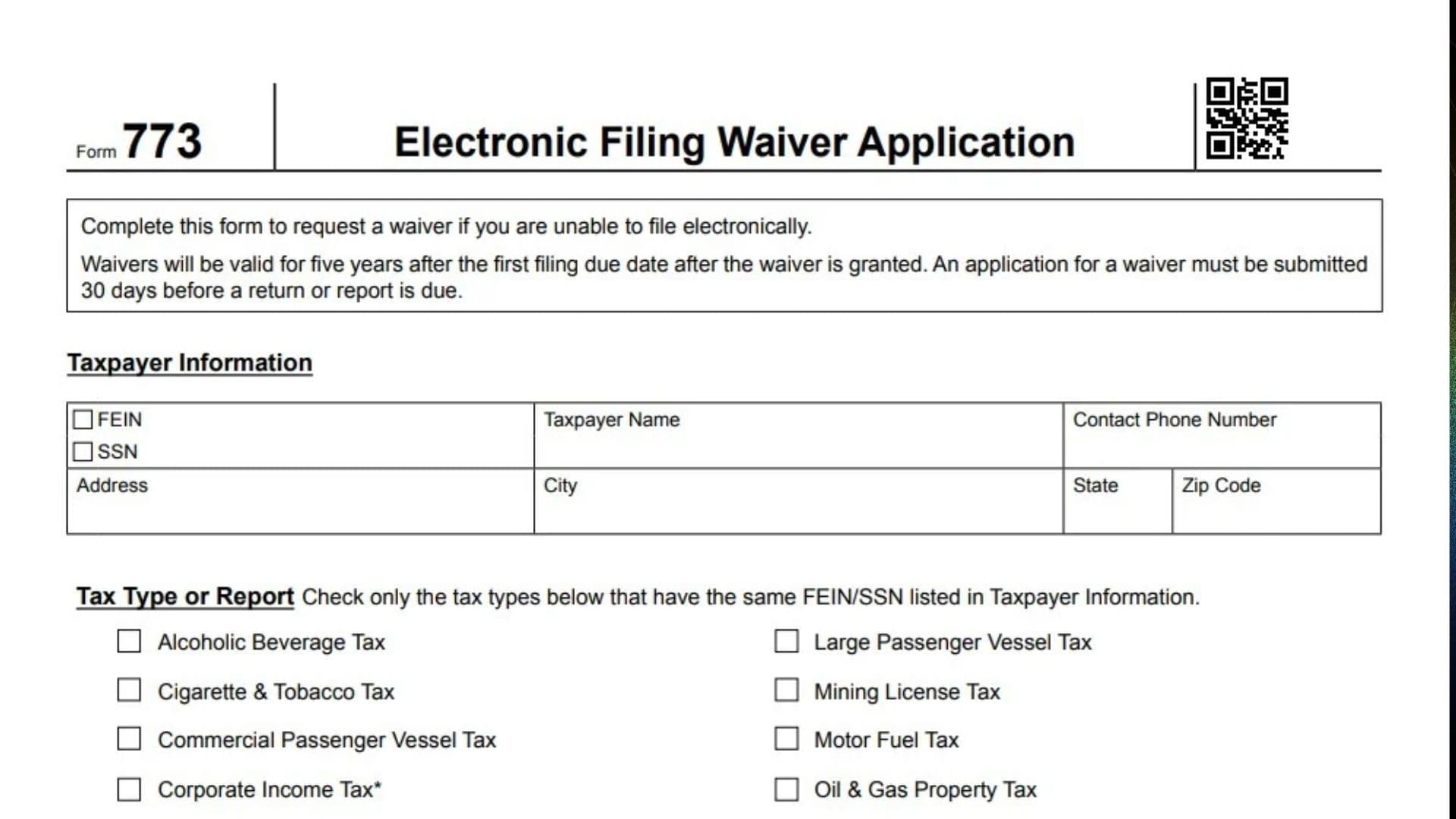
Alaska Form 773, officially known as the Electronic Filing Waiver Application, is a tax form used by individuals and businesses that cannot file their tax returns or reports electronically and need to request permission to use an alternative filing method. The form is issued by the Alaska Department of Revenue, Tax Division. Its primary purpose is to allow eligible taxpayers to request an exemption from electronic filing requirements when they do not have access to a computer, cannot access the internet, or have another valid reason that prevents them from filing electronically. The application collects taxpayer identification details, contact information, the applicable tax types or reports, and the reason for requesting the waiver. It also requires a declaration and signature from the person submitting the application.
An approved electronic filing waiver is valid for five years after the first filing due date that occurs following the approval of the waiver. However, taxpayers must submit their waiver applications at least 30 days before the applicable tax return or report is due. This advance submission requirement gives the Alaska Department of Revenue time to review the request before the filing deadline. Form 773 covers several Alaska tax types, including alcoholic beverage tax, cigarette and tobacco tax, corporate income tax, motor fuel tax, fisheries-related taxes, vehicle rental tax, and other listed tax obligations. Taxpayers must identify only the tax types associated with the same Federal Employer Identification Number (FEIN) or Social Security Number (SSN) entered in the taxpayer information section. Completing the application accurately is important because incorrect identification details, missing tax selections, or an incomplete explanation may affect the department’s ability to review the waiver request. Certain restrictions also apply. For example, a waiver will not be granted to a taxpayer who is required to electronically file its federal corporate income tax return.
How To File Form 773
Form 773 must be completed and submitted to the Alaska Department of Revenue, Tax Division, to request an electronic filing waiver.
The application should be submitted at least 30 days before the applicable tax return or report due date.
Where To Submit Form 773
Mail the completed application to:
Alaska Department of Revenue
Tax Division
PO Box 110420
Juneau, AK 99811-0420
For additional information, taxpayers can contact the Alaska Department of Revenue, Tax Division.
- Website: www.tax.alaska.gov
- Phone: 907-269-6620
How Long Is the Waiver Valid?
An approved electronic filing waiver remains valid for five years after the first filing due date following the date the waiver is granted.
Taxpayers should consider this validity period when planning their filing arrangements.
Information To Prepare Before Filing
Gather the following information before completing Form 773:
- Federal Employer Identification Number (FEIN) or Social Security Number (SSN).
- Complete taxpayer name.
- Contact phone number.
- Mailing address.
- City, state, and ZIP code.
- Applicable Alaska tax types or reports.
- Reason for requesting an electronic filing waiver.
- Additional supporting information, if applicable.
- Signature of the person submitting the application.
- Printed name and title of the signer.
- Date of signature.
- Contact phone number for the person signing the application.
Make sure all taxpayer identification details match the tax account associated with the selected tax types.

How To Complete Form 773
Form 773 contains four main sections:
- Taxpayer Information.
- Tax Type or Report.
- Reason for Waiver.
- Declaration and Signature.
Each section collects information needed to identify the taxpayer, determine which tax obligations are covered by the request, and understand why electronic filing is not possible.
Taxpayer Information
This section identifies the individual or business requesting permission to file without using the electronic filing system.
FEIN – Federal Employer Identification Number
Mark the FEIN checkbox if the application is being submitted under a Federal Employer Identification Number.
Enter the applicable FEIN associated with the taxpayer’s tax account.
Businesses and other entities that use an FEIN for tax identification should select this option.
SSN – Social Security Number
Mark the SSN checkbox if the application is being submitted under an individual’s Social Security Number.
Enter the taxpayer’s applicable SSN.
Select the identification type that corresponds to the taxpayer information being reported. Do not select an identification type that does not apply.
Taxpayer Name
Enter the complete legal name of the individual or business requesting the electronic filing waiver.
For an individual taxpayer, provide the individual’s full name.
For a business or other entity, enter its legal business or organization name.
The name should match the tax identification information associated with the FEIN or SSN entered above.
Contact Phone Number
Enter a telephone number where the Alaska Department of Revenue can contact the taxpayer regarding the waiver application.
Provide a working phone number and check that all digits are correct.
Address
Enter the taxpayer’s complete mailing address.
Include the house or building number and street name. If the taxpayer receives mail through another recognized mailing address, provide the appropriate address information.
City
Enter the name of the city associated with the taxpayer’s mailing address.
State
Enter the two-letter postal abbreviation for the state associated with the mailing address.
ZIP Code
Enter the ZIP code for the taxpayer’s mailing address.
Make sure the address information is complete and accurate so that official correspondence can reach the taxpayer.
Tax Type or Report
This section identifies the Alaska taxes or reports for which the taxpayer is requesting an electronic filing waiver.
The form instructs taxpayers to select only those tax types that are associated with the same FEIN or SSN entered in the Taxpayer Information section.
There are 14 tax categories listed in two columns. Review each category and mark the applicable checkbox.
Alcoholic Beverage Tax
Select this checkbox if the waiver request applies to the taxpayer’s Alcoholic Beverage Tax filing or reporting requirements.
Make sure the tax account is associated with the FEIN or SSN entered in the taxpayer information section.
Large Passenger Vessel Tax
Select this checkbox if the taxpayer needs an electronic filing waiver for the Large Passenger Vessel Tax.
Choose this option only when the applicable tax obligation is associated with the taxpayer’s identification number.
Cigarette and Tobacco Tax
Select this checkbox if the waiver request covers Cigarette and Tobacco Tax reporting or filing requirements.
Mining License Tax
Select this checkbox if the taxpayer is requesting a waiver for the Mining License Tax.
Commercial Passenger Vessel Tax
Select this checkbox if the application relates to the Commercial Passenger Vessel Tax.
Motor Fuel Tax
Select this checkbox if the taxpayer needs a waiver for Motor Fuel Tax electronic filing requirements.
Corporate Income Tax
Select this checkbox if the waiver request applies to Corporate Income Tax.
An important restriction applies to this category: the Alaska Department of Revenue will not grant a waiver if the taxpayer is required to electronically file its federal corporate income tax return.
Review this restriction before selecting the Corporate Income Tax option.
Oil and Gas Property Tax
Select this checkbox if the taxpayer’s waiver request concerns Oil and Gas Property Tax reporting requirements.
Electric Cooperative Tax
Select this checkbox if the application covers Electric Cooperative Tax.
Telephone Cooperative Tax
Select this checkbox if the taxpayer is requesting a waiver for Telephone Cooperative Tax filing requirements.
Fisheries Related Taxes
Select this checkbox if the waiver request applies to one or more of the fisheries-related taxes or reports included in this category.
The form identifies the following taxes and reports under this category:
- Fisheries Business Tax.
- Fishery Resource Landing Tax.
- Seafood Marketing Assessment.
- Salmon Enhancement Tax.
- Regional Seafood Development Tax.
- Dive Fishery Management Assessment.
- Common Property Fishery Assessment.
- Alaska Salmon Price and Production Reports.
Select this option when the applicable fisheries-related tax or reporting requirement is associated with the taxpayer’s FEIN or SSN.
Tire Fee
Select this checkbox if the waiver request applies to the Tire Fee.
Charitable Gaming
Select this checkbox if the taxpayer needs an electronic filing waiver for Charitable Gaming reporting or tax requirements.
Vehicle Rental Tax
Select this checkbox if the application covers Vehicle Rental Tax filing requirements.
Important Tax Type Selection Rules
Only select tax types associated with the same FEIN or SSN entered in the Taxpayer Information section.
If the taxpayer has multiple tax accounts under different identification numbers, make sure the application does not combine tax types associated with different FEINs or SSNs.
The Corporate Income Tax restriction should also be reviewed before submitting the application.
Reason for Waiver
This section explains why the taxpayer cannot file electronically and needs permission to use an alternative filing method.
The form provides three options. Select the reason that best describes the taxpayer’s circumstances.
No Access to a Computer
Select this checkbox if the taxpayer does not have access to a computer and cannot use one to complete electronic tax filing requirements.
This option applies when the lack of computer access prevents the taxpayer from filing electronically.
No Internet Availability
Select this checkbox if the taxpayer does not have access to an internet connection.
This option is appropriate when internet access is unavailable and prevents the taxpayer from using the required electronic filing system.
Other – State the Specific Reason
Select this checkbox if the reason for requesting the waiver is not covered by the first two options.
Provide a clear explanation in the space provided.
Describe the specific circumstances that prevent electronic filing. The explanation should be direct, accurate, and relevant to the waiver request.
The form also instructs applicants to attach additional supporting information when requesting a waiver.
If the explanation requires more space, include additional information with the application.
Declaration and Signature
The final section contains a declaration confirming that the information provided in the application is accurate and complete.
The person submitting the application must review the information before signing.
Declaration Under Penalty of Unsworn Falsification
By signing the application, the person declares that they have examined the information provided and that, to the best of their knowledge and belief, it is true, correct, and complete.
Read this declaration carefully before signing.
The declaration carries legal responsibility for the accuracy of the information submitted.
Signature
The person authorized to submit the application must sign this field.
For a business or organization, the appropriate representative should provide the signature.
Make sure the signature is included before mailing the application.
Date
Enter the date the application is signed.
Use the date format indicated by the form, which provides separate spaces for the month, day, and year.
Printed Name
Enter the full printed name of the person who signed the application.
The printed name should clearly identify the individual responsible for the declaration.
Phone Number
Enter the telephone number of the person signing the application.
Provide a number where the signer can be reached if the Alaska Department of Revenue needs additional information.
Title
Enter the signer’s official position or title within the business or organization, if applicable.
For example, a business representative may enter their position or role in the organization.
Make sure the title accurately describes the person’s authority or position.
Additional Filing Considerations
Application Submission Deadline
Form 773 must be submitted at least 30 days before the applicable tax return or report is due.
Do not wait until the regular filing deadline to request the waiver. Submit the application early enough to meet the required advance submission period.
Five-Year Waiver Validity
An approved waiver remains valid for five years after the first filing due date following approval.
This means the validity period is connected to the first applicable filing due date after the waiver is granted, rather than simply starting from the date the application is submitted.
Corporate Income Tax Restriction
Taxpayers requesting a waiver for Corporate Income Tax should review the federal electronic filing requirement.
No waiver will be granted if the taxpayer is required to electronically file its federal corporate income tax return.
Supporting Information
The application instructs taxpayers to attach additional supporting information explaining why electronic filing is not possible.
This is particularly relevant when selecting the Other option under Reason for Waiver.
Provide information that clearly explains the circumstances behind the request.
Mailing the Completed Application
After completing all applicable sections, mail the application to:
Alaska Department of Revenue, Tax Division
PO Box 110420
Juneau AK 99811-0420
For questions about the application, use the department’s listed website or telephone number.
Final Review Before Filing
Before mailing Form 773, review the following checklist to ensure that the application is complete and accurate.
Taxpayer Information
- The correct FEIN or SSN checkbox is selected.
- The taxpayer’s identification number is entered correctly.
- The taxpayer’s legal name is provided.
- The contact phone number is accurate.
- The complete mailing address is entered.
- The city, state, and ZIP code are correct.
Tax Type or Report
- Only applicable tax types are selected.
- Every selected tax type is associated with the same FEIN or SSN entered in the taxpayer information section.
- The appropriate fisheries-related tax category is selected when applicable.
- The Corporate Income Tax restriction has been reviewed.
Reason for Waiver
- The correct waiver reason is selected.
- No access to a computer is selected when applicable.
- No internet availability is selected when applicable.
- A specific explanation is provided if Other is selected.
- Additional supporting information is attached when necessary.
Declaration and Signature
- The declaration has been reviewed.
- The application is signed by the appropriate person.
- The signature date is entered.
- The signer’s printed name is provided.
- The signer’s phone number is included.
- The signer’s title is entered where applicable.
Final Submission Checks
- The application is submitted at least 30 days before the applicable return or report due date.
- All applicable sections are completed.
- Supporting information is included.
- The application is addressed to the Alaska Department of Revenue, Tax Division.
- The mailing address is correct.
Form 773 allows eligible Alaska taxpayers to request an exemption from electronic tax filing when they cannot meet electronic filing requirements. Providing accurate taxpayer information, selecting the correct tax types, explaining the reason for the request, and submitting the application on time are essential steps. Review the entire application before mailing it to the Alaska Department of Revenue, Tax Division.