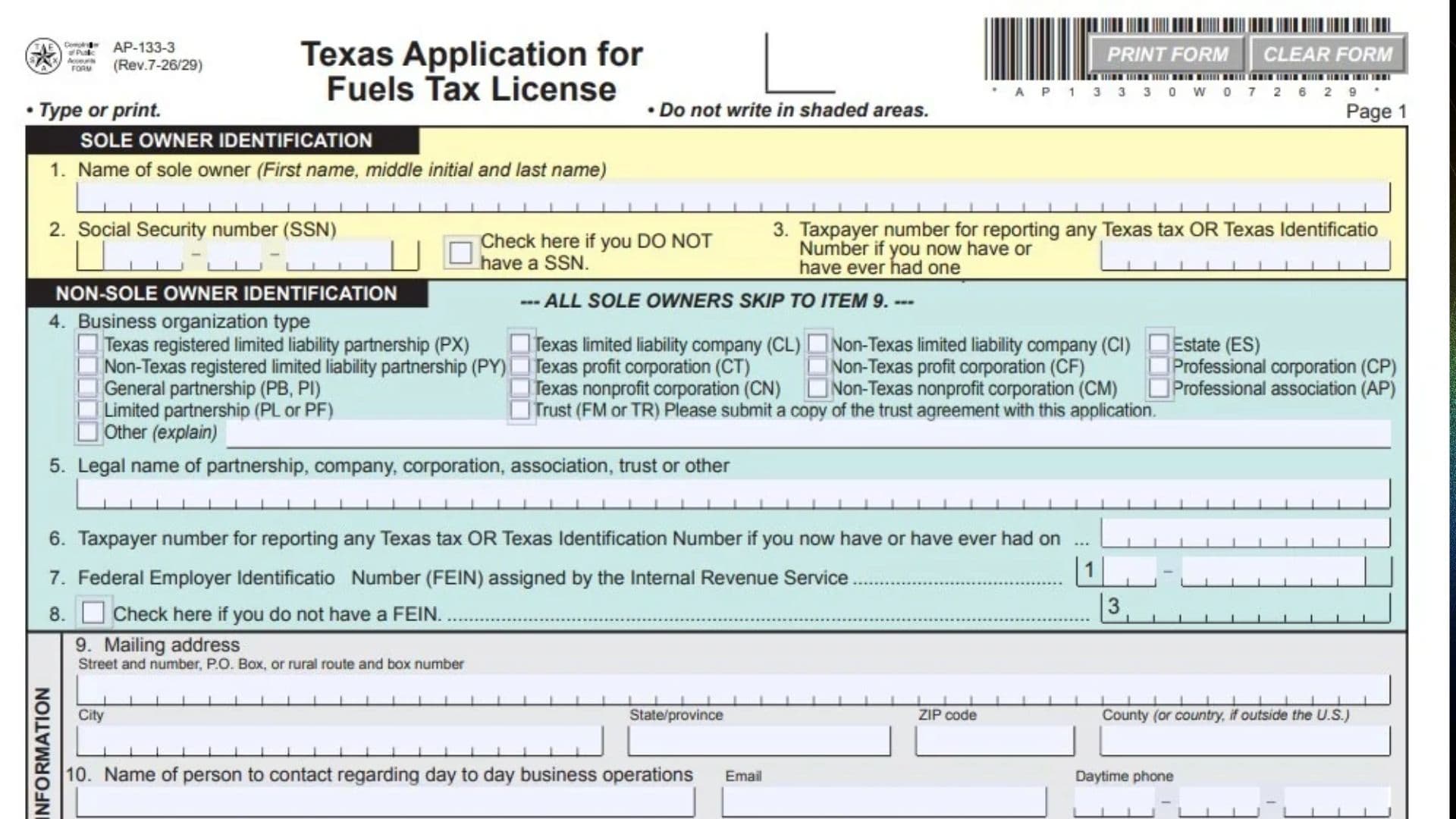
Texas Form AP-133, Application for Fuels Tax License, is an application issued by the Texas Comptroller of Public Accounts for individuals and businesses that must obtain a license under the Texas Motor Fuels Tax Law. It is used by sole proprietors, partnerships, corporations, limited liability companies, and other organizations involved in activities such as purchasing, selling, importing, exporting, transporting, blending, or distributing motor fuels in Texas. The application allows the Comptroller to identify the applicant, establish the appropriate tax account, understand the business structure, and determine which fuel-related activities require licensing. It collects information about the legal name of the owner or business, taxpayer identification numbers, ownership percentages, business addresses, principal officers, partners, business operations, and fuel purchasing or distribution activities. Applicants must also identify the specific license categories they need, which may include terminal operator, supplier, permissive supplier, distributor, importer, motor fuel transporter, aviation fuel dealer, compressed natural gas or liquefied natural gas dealer, exporter, blender, interstate trucker, and dyed diesel fuel bonded user. Depending on the license requested, additional information may be required about fuel types, expected monthly tax-free gallon purchases, terminal locations, suppliers, major customers, fuel imports, exports, and security or bond arrangements. Businesses that have purchased an existing company or its assets must also disclose information about the previous owner and the transaction. The application includes a surety or financial security section and requires authorized business representatives to certify the accuracy of the submitted information. Completing Form AP-133 correctly is important because the Texas Comptroller uses the information to determine licensing eligibility, establish applicable reporting responsibilities, and ensure that businesses meet the state’s motor fuel tax licensing and security requirements.
How To File Form AP-133
Form AP-133 must be completed and mailed to the Texas Comptroller of Public Accounts.
Mailing Address:
Comptroller of Public Accounts
111 E. 17th Street
Austin, TX 78774-0100
Do not separate the pages of the application. Complete the form by typing or printing clearly, and write only in the designated white areas. Do not enter information in shaded sections.
Before starting the application, prepare the following information:
- Legal name of the sole owner or business entity.
- DBA or operating name, if applicable.
- Social Security number or Individual Taxpayer Identification Number (ITIN), when applicable.
- Texas taxpayer number or Texas Identification Number.
- Federal Employer Identification Number (FEIN).
- Business ownership classification and registration information.
- Names, addresses, identification numbers, and positions of partners or principal officers.
- Complete business mailing and physical location addresses.
- Contact details for the person responsible for daily operations.
- Description of the business activities and products or services.
- Applicable business industry classification and SIC information.
- Details of the fuel licenses being requested.
- Fuel types and estimated monthly tax-free gallon purchases.
- Supplier, customer, and terminal information.
- Details of any existing business or assets purchased.
- Applicable surety bond, letter of credit, or other financial security documents.
- Required signatures and supporting attachments.
The application can be used to request multiple fuel licenses. Select every license category that applies and provide the additional information required for each one.
Who Must Submit Form AP-133?
You must submit this application if you operate as a sole proprietor, partnership, corporation, or other organization that is required to obtain a license under the Texas Motor Fuels Tax Law.
The application covers businesses involved in different motor fuel activities, including purchasing, selling, importing, exporting, transporting, storing, blending, and distributing fuel.
The license category you select depends on the nature of your business operations.

How To Complete Form AP-133
The application contains 35 numbered items divided into ownership identification, business information, licensing activities, previous owner information, financial security, and signatures.
Sole Owner Identification
Item 1: Name of Sole Owner
If you are applying as an individual sole proprietor, enter your complete legal name.
Provide the following:
- First name.
- Middle initial.
- Last name.
Use your personal legal name rather than a business operating name.
If you are applying as a partnership, corporation, or another organization, follow the non-sole-owner instructions instead.
Item 2: Social Security Number (SSN)
Enter your Social Security number if you are a sole owner.
The application also provides a checkbox for individuals who do not have a Social Security number. Select this option if applicable.
If you do not have an SSN, the application allows you to provide an Individual Taxpayer Identification Number (ITIN) or another identification number assigned by the federal government for federal income tax filing purposes where requested.
Item 3: Texas Taxpayer Number or Texas Identification Number
Enter your identification number used for reporting Texas taxes.
If you currently have, or have previously had, both a Texas taxpayer number and a Texas Identification Number, enter the Texas Identification Number.
Only the first 11 digits of the Texas Identification Number should be entered.
The application also requests the applicable ownership percentage. Enter the percentage of the business owned by the applicant in the designated field.
Non-Sole Owner Identification
All sole owners should skip this section and proceed to Item 9, as instructed by the application.
Item 4: Business Organization Type
Select the checkbox that identifies the legal structure of your business.
The available classifications include:
- Texas Registered Limited Liability Partnership (PX): Select this option if your partnership is registered as a limited liability partnership in Texas.
- Non-Texas Registered Limited Liability Partnership (PY): Choose this option if the limited liability partnership is registered outside Texas.
- General Partnership (PB, PI): Select this option if the business operates as a general partnership.
- Limited Partnership (PL or PF): Choose this option if the business is legally registered as a limited partnership.
- Texas Limited Liability Company (CL): Select this option for an LLC formed in Texas.
- Non-Texas Limited Liability Company (CI): Choose this option for an LLC formed outside Texas.
- Texas Profit Corporation (CT): Select this option for a Texas for-profit corporation.
- Texas Nonprofit Corporation (CN): Choose this option for a Texas nonprofit corporation.
- Non-Texas Profit Corporation (CF): Select this option for a for-profit corporation formed outside Texas.
- Non-Texas Nonprofit Corporation (CM): Choose this option for a nonprofit corporation formed outside Texas.
- Estate (ES): Select this option if the applicant is an estate.
- Professional Corporation (CP): Choose this option for a professional corporation.
- Professional Association (AP): Select this option for a professional association.
- Trust (FM or TR): Choose this option if the business operates as a trust.
- Other: Select this option if the organization does not fit the listed classifications and explain the type of organization.
If you select Trust, attach a copy of the trust agreement to the application.
Item 5: Legal Name of Business Entity
Enter the complete legal name of the partnership, company, corporation, association, trust, or other organization.
The name must match the entity’s official registration records.
For the different business structures:
- Partnership: Enter the partnership’s legal name.
- Corporation: Use the exact legal name registered with the Secretary of State.
- Other Organization: Enter the organization’s official title.
Item 6: Texas Taxpayer Number or Texas Identification Number
Provide the identification number used for reporting Texas taxes.
If you have both a Texas taxpayer number and a Texas Identification Number, enter the Texas Identification Number.
Only the first 11 digits of the Texas Identification Number should be provided.
Item 7: Federal Employer Identification Number (FEIN)
Enter the Federal Employer Identification Number assigned to your business by the Internal Revenue Service.
This number identifies the business for federal tax purposes.
Item 8: No FEIN Declaration
Check this box if your business does not have a Federal Employer Identification Number.
Do not select this option if your business already has an assigned FEIN.
Business Information
Item 9: Mailing Address
Enter the complete mailing address where you want to receive correspondence from the Texas Comptroller of Public Accounts.
Provide the following details:
Street Address, P.O. Box, or Rural Route
Enter the street number and name, P.O. Box, or rural route and box number used for receiving mail.
City
Enter the city associated with the mailing address.
State/Province
Provide the applicable state or province.
ZIP Code
Enter the correct ZIP code.
County or Country
Provide the county for a U.S. address or the country if the address is outside the United States.
If you want to receive correspondence for other taxes at a different mailing address, attach a separate letter identifying those additional addresses.
Item 10: Contact Person for Day-to-Day Business Operations
Provide the name and contact details of the individual responsible for the daily operations of the business.
Complete the following fields:
- Name: Enter the full name of the person responsible for routine business operations.
- Email: Provide the person’s active email address.
- Daytime Phone: Enter the telephone number, including the area code, where the individual can be reached during business hours.
This information allows the Comptroller to contact the appropriate person regarding business operations.
Item 11: Principal Type of Business
Select the industry category that best describes your organization’s primary business activities.
The available categories are:
- Agriculture.
- Transportation.
- Retail Trade.
- Real Estate.
- Mining.
- Communications.
- Finance.
- Services.
- Construction.
- Utilities.
- Insurance.
- Public Administration.
- Manufacturing.
- Wholesale Trade.
- Other.
If you select Other, describe the principal industry or business category in the space provided.
Item 12: Primary Business Activities and Products or Services
Describe the main activities performed by your business and identify the products or services you intend to sell or provide.
Explain what the business does and how it operates.
For example, describe whether your organization purchases fuel for resale, distributes petroleum products, imports motor fuel, or provides fuel-related services.
Enter the applicable Standard Industrial Classification (SIC) information in the designated field.
Business Formation And Ownership Information
Sole owners should skip Items 13 through 17 and proceed to Item 18.
Item 13: Texas Corporation or Limited Liability Company Information
Complete this item if your business is a Texas profit corporation, nonprofit corporation, professional corporation, or limited liability company.
Enter:
- File Number: Provide the identification or registration number assigned by the Texas Secretary of State.
- Date of Formation: Enter the date the entity was officially formed.
Use the information from the business’s official Texas registration records.
Item 14: Foreign Corporation or Limited Liability Company Information
Complete this section if your business is a non-Texas profit corporation, nonprofit corporation, professional corporation, or limited liability company formed outside Texas.
Provide the following information:
State or Country of Formation
Enter the state or country where the organization was originally established.
Charter/File Number
Provide the charter or registration number assigned by the original jurisdiction.
Formation Date
Enter the date the business was originally formed or registered.
Texas Secretary of State File Number
Provide the registration or file number assigned by the Texas Secretary of State.
Texas Registration Date
Enter the date associated with the entity’s Texas registration.
Make sure the information distinguishes the original formation details from the Texas registration details.
Item 15: Corporate Merger During the Previous Seven Years
Answer whether the business has been involved in a merger during the last seven years.
Select one option:
- Yes: Check this box if the corporation has participated in a merger during the specified period.
- No: Select this option if no such merger has occurred.
If you answer Yes, attach a detailed explanation describing the merger.
Item 16: Limited Partnership or Registered Limited Liability Partnership Information
Complete this item if the business operates as a limited partnership or registered limited liability partnership.
Enter:
- State: Identify the state where the partnership is registered.
- Number: Provide the registered identification number or limited partnership number issued by the Secretary of State.
Use the official registration details for the partnership.
Item 17: General Partners, Principal Members, Officers, Managing Director, or Managers
This section identifies the individuals who own, manage, or hold principal positions within the organization.
The application specifically requires all general partners to be listed.
For corporations and other organizations, provide information about the principal officers or responsible individuals.
The form provides space for two individuals. Attach additional sheets if more people need to be reported.
Complete the following information for each individual:
Name
Enter the person’s complete legal name.
Title
Provide the person’s official business position or title.
Phone (Area Code and Number)
Enter the individual’s telephone number, including the area code.
Home Address
Provide the individual’s residential street address.
City
Enter the city where the person resides.
State
Provide the applicable state abbreviation.
ZIP Code
Enter the residential ZIP code.
SSN or ITIN
Enter the individual’s Social Security number or Individual Taxpayer Identification Number.
If the individual does not have an SSN, provide the ITIN or another identification number assigned by the federal government for federal income tax filing purposes.
Percentage of Ownership
Enter the percentage of the business owned by the individual.
Use the actual ownership percentage reflected in the business’s ownership records.
Driver License Number
Provide the individual’s driver’s license number.
State
Enter the state that issued the driver’s license.
County or Country
Identify the applicable county or country associated with the individual’s information.
Position Held
Select every position that applies to the individual.
The available options are:
- Partner: Select this option for a business partner.
- Officer: Check this option if the person holds an officer position.
- Director: Select this option if the individual serves as a director.
- Corporate Stockholder: Choose this option if the individual owns corporate shares.
- Record Keeper: Select this option if the person is responsible for maintaining business records.
Repeat the information for every required partner, principal member, officer, managing director, or manager.
Business Location Information
Item 18: Business Location Name and Address
Provide the actual physical location of your business.
This section is different from Item 9 because it identifies where business activities take place rather than where official correspondence should be delivered.
Complete the following fields:
Business Location Name
Enter the name of the business location or operating facility.
Street and Number
Provide the physical street address, including the building number and street name.
Do not use a P.O. Box or rural route number as the physical location address.
City
Enter the city where the business facility is located.
State
Provide the applicable state abbreviation.
ZIP Code
Enter the physical location’s ZIP code.
County
Identify the county where the business operates.
Physical Location
If the location cannot be identified using a conventional street address, provide meaningful directions that allow the Comptroller to locate the property.
For example, the form suggests describing a location by its distance and direction from a known road.
If the physical address is a rural route and box number, provide directions to the actual business location.
Business Location Phone
Enter the telephone number associated with the physical business location, including the area code.
If your business operates from multiple locations, attach additional sheets identifying every additional business location.
How To Complete The Fuel License Sections
The second page of the application contains Item 19 and Item 20, which establish the legal entity applying and identify the specific motor fuel licenses requested.
Legal Entity Information
Item 19: Legal Name of Entity
Enter the legal name of the business applying for the fuel tax license.
The name must be the same as the legal name entered in Item 1 for a sole owner or Item 5 for a non-sole-owner business.
License Application Requirements
Item 20: Type of License Requested
Check every license category that applies to your business.
The application allows applicants to request multiple fuel licenses using one application.
For each selected category, provide the requested information and attach the required supporting documents.
The available license types are explained below.
A. Terminal Operator License
A terminal operator is an individual or business that owns, operates, or otherwise controls a fuel terminal and has received a Terminal Control Number under the Internal Revenue Code.
Select this license if your business performs terminal operator activities.
Type of Terminal
Identify the type of terminal operated by the business.
The available options are:
- Barge.
- Pipeline.
- Refiner.
Texas Terminal Information
Attach an additional sheet listing every terminal located in Texas that your business operates or controls.
For each terminal, provide:
- City.
- State.
- ZIP code.
- Terminal Control Number.
Make sure all applicable Texas terminal locations are included.
B. Supplier License
A supplier is a person registered under Section 4101 of the Internal Revenue Code who participates in motor fuel transactions within the bulk transfer or terminal system.
A supplier may hold fuel inventory at a terminal or refinery in Texas, own motor fuel in a marine vessel in Texas, or receive fuel through a qualifying two-party exchange.
A supplier may also conduct activities such as importing, exporting, distributing, blending, or dealing in aviation fuel without obtaining separate licenses for those activities, subject to the conditions described in the application.
A Texas Supplier License holder is also required to obtain a Petroleum Product Delivery Fee Permit and submit the corresponding monthly reports.
Federal Certificate of Registry
Indicate whether your business owns motor fuel inventory in a terminal for sale or exchange and has received a federal Certificate of Registry under Section 4101 of the Internal Revenue Code.
Select Yes or No.
Certificate of Registry Number
If you selected Yes, enter the federal Certificate of Registry number issued by the Internal Revenue Service.
Fuel Type
Select the applicable fuel categories:
- Diesel Fuel.
- Gasoline.
Expected Monthly Tax-Free Gallons
Estimate the average number of Texas tax-free gallons your business expects to purchase or otherwise acquire each month during the next 12 months.
Texas Terminal Inventory Information
Attach an additional sheet listing every Texas IRS-registered terminal where you expect to hold fuel inventory or maintain a contract with a terminal operator.
Include:
- City.
- State.
- ZIP code.
- Terminal Control Number.
The application specifies a minimum bond requirement of $600,000 for this license category.
C. Permissive Supplier License
A permissive supplier is a person registered under Section 4101 of the Internal Revenue Code who holds motor fuel inventory only in an out-of-state terminal or receives fuel in another state through a qualifying two-party exchange.
This license allows an eligible business to collect Texas motor fuel tax on fuel removed from an out-of-state terminal and destined for delivery into Texas.
A permissive supplier may also act as a distributor, importer, exporter, blender, or aviation fuel dealer without obtaining separate licenses for those activities, subject to the applicable requirements.
A Texas Permissive Supplier License holder may also be required to obtain a Petroleum Product Delivery Fee Permit and file corresponding monthly reports.
Out-of-State Terminal Position
Indicate whether your business holds fuel inventory in an out-of-state terminal for sale or exchange and has received a federal Certificate of Registry under Section 4101 of the Internal Revenue Code.
Select Yes or No.
Federal Certificate of Registry Number
If you selected Yes, enter the corresponding Certificate of Registry number.
Election to Collect Texas Motor Fuel Tax
Indicate whether you elect to collect Texas tax on motor fuel removed from an out-of-state terminal and destined for Texas.
Select Yes or No.
Out-of-State Terminal Information
Attach a separate list of all out-of-state terminals where Texas motor fuel tax will be collected.
Include:
- City.
- State.
- ZIP code.
- Terminal Control Number.
The application specifies a minimum bond requirement of $600,000 for this license category.
D. Distributor License
A distributor is a business that acquires motor fuel from a licensed supplier, permissive supplier, or another licensed distributor and sells fuel at wholesale.
Wholesale activities include deliveries for resale and bulk fuel deliveries by transport truck, railroad tank car, or barge to end users.
A distributor may also conduct retail sales. A licensed distributor may act as an importer, exporter, or blender without obtaining separate licenses for those activities. However, a separate license is required to operate as an aviation fuel dealer.
A Texas Distributor License holder may also need a Petroleum Product Delivery Fee Permit and must submit the corresponding monthly reports.
Answer the following questions:
Purchase Motor Fuel From Licensed Suppliers for Wholesale Resale
Indicate whether you purchase motor fuel from a licensed supplier, permissive supplier, or another licensed distributor for resale at wholesale.
Select Yes or No.
Purchase Motor Fuel for Resale Through Your Own Retail Stations
Indicate whether your business purchases fuel exclusively for resale through its own retail stations.
Select Yes or No.
Wholesale and Retail Sales
Indicate whether your business purchases motor fuel for both wholesale resale and resale through its own retail stations.
Select Yes or No.
Import Fuel Into Texas
Indicate whether your business intends to import motor fuel into Texas from another state or another country.
Select Yes or No.
Fuel Type
Select the applicable categories:
- Diesel Fuel.
- Gasoline.
Expected Monthly Tax-Free Gallons
Enter the estimated average number of Texas tax-free gallons your business expects to purchase or otherwise acquire each month over the next 12 months.
The application specifies a minimum bond requirement of $30,000 for this license category.
E. Importer License
An importer is a person or business that brings motor fuel into Texas.
An importer may also operate as an exporter or blender without obtaining separate licenses for those activities.
A Texas Importer License holder is also required to obtain a Petroleum Product Delivery Fee Permit and file the corresponding monthly reports.
Answer each question below:
Import Motor Fuel Outside the Bulk Transfer or Terminal System
Indicate whether your business imports motor fuel into Texas outside the bulk transfer or terminal system.
Select Yes or No.
Import Fuel for Wholesale Resale
Indicate whether you import motor fuel into Texas for resale at wholesale.
Select Yes or No.
If you answer Yes, also complete Section D for the distributor license.
Import Fuel for Resale Through Your Own Retail Stations
Indicate whether you import motor fuel for resale exclusively through your own retail stations.
Select Yes or No.
Import Fuel for Own Use
Indicate whether your business imports motor fuel into Texas exclusively for its own use.
Select Yes or No.
Purchase Tax-Free Dyed Diesel for Own Use
Indicate whether your business purchases tax-free dyed diesel fuel in Texas for its own use.
Select Yes or No.
Fuel Type
Select the applicable fuel categories:
- Diesel Fuel.
- Gasoline.
Expected Monthly Tax-Free Gallons
Enter the estimated average number of Texas tax-free gallons your business expects to purchase or otherwise acquire each month during the next 12 months.
The application specifies a minimum bond requirement of $30,000 for this license category.
Additional License Categories
The third page of the application contains additional license types, including motor fuel transporter, aviation fuel dealer, compressed natural gas or liquefied natural gas dealer, exporter, blender, interstate trucker, and dyed diesel fuel bonded user.
Before completing these sections, enter the legal name of the business in the entity identification field provided.
Item 21: Legal Name of Entity
Enter the same legal entity name provided in Item 1 or Item 5.
This ensures that the additional license requests are associated with the correct applicant.
F. Motor Fuel Transporter License
A motor fuel transporter is a person or business that transports gasoline, diesel fuel, or gasoline-blended fuel outside the bulk transfer or terminal system.
Transportation may be performed using:
- A transport vehicle.
- A railroad tank car.
- A marine vessel.
A separate motor fuel transporter license is not required for a person transporting their own fuel in their own cargo tank for their own use and not for resale.
The same exception applies to licensed suppliers, permissive suppliers, or distributors who retain ownership of the fuel during transportation.
Transportation of Fuel Owned by Others
Indicate whether your business transports motor fuel owned by other parties outside the bulk transfer or terminal system using a transport vehicle, railroad tank car, or marine vessel.
Select Yes or No.
G. Aviation Fuel Dealer License
An aviation fuel dealer operates an aircraft servicing facility that delivers gasoline or diesel fuel exclusively into aircraft fuel supply tanks or equipment used solely for aircraft servicing and exclusively off-highway.
An aviation fuel dealer cannot use, sell, or distribute gasoline or diesel fuel on which motor fuel tax is required to be collected or paid.
Answer the following questions:
Aircraft Servicing Facility Operations
Indicate whether you own or operate an airport servicing facility from which all gasoline, aviation gasoline, jet fuel, and diesel fuel purchased will be delivered only into:
- Aircraft.
- Aircraft servicing equipment.
- Bulk storage tanks of other licensed aviation fuel dealers.
Select Yes or No.
Purchase Aviation Fuel for Own Use
Indicate whether your business purchases aviation fuel for its own use.
Select Yes or No.
H. Compressed Natural Gas/Liquefied Natural Gas Dealer License
A compressed natural gas or liquefied natural gas dealer delivers CNG or LNG into the fuel supply tanks of motor vehicles.
This category also includes fleet users who maintain private CNG or LNG storage facilities to supply their own motor vehicles rather than selling the fuel for resale.
Expected Monthly Tax-Free Gallons
Enter the average number of Texas tax-free gallons your business expects to purchase or otherwise acquire each month over the next 12 months.
Fuel Type
Select the appropriate fuel category:
- Compressed Natural Gas (CNG)/Liquefied Natural Gas (LNG).
- Diesel Fuel.
- Gasoline.
Select the applicable categories based on your business activities.
I. Exporter License
An exporter is a person or business that exports motor fuel from Texas.
Export Motor Fuel Outside the Bulk Transfer or Terminal System
Indicate whether your business exports motor fuel outside the bulk transfer or terminal system to a destination other than Texas.
Select Yes or No.
Destination State and License Information
If you answer Yes, attach additional sheets identifying the state where the fuel is destined and the license number issued to your business by that state.
Fuel Type
Select the applicable categories:
- Diesel Fuel.
- Gasoline.
Expected Monthly Tax-Free Gallons
Enter the average number of Texas tax-free gallons you expect to purchase or otherwise acquire each month over the next 12 months.
The application specifies a minimum bond requirement of $30,000 for this license category.
J. Blender License
A blender is a person or business that creates blended motor fuel outside the bulk transfer or terminal system.
This activity involves mixing one or more petroleum products with other products or materials to produce fuel capable of powering a motor vehicle.
Motor Fuel Blending Activities
Indicate whether your business blends or mixes petroleum products with other components or materials outside the bulk transfer or terminal system to create a product suitable for use in a motor vehicle engine.
Select Yes or No.
Fuel Type
Select the applicable categories:
- Diesel Fuel.
- Gasoline.
Expected Monthly Tax-Free Gallons
Enter the average number of Texas tax-free gallons your business expects to purchase or otherwise acquire each month over the next 12 months.
The application specifies a minimum bond requirement of $30,000 for this license category.
K. Interstate Trucker License
An interstate trucker is a person or business operating a qualifying commercial motor vehicle only in Texas and Mexico.
The vehicle must meet at least one of these conditions:
- It has two axles and a registered gross weight exceeding 26,000 pounds.
- It has three axles.
- It operates as part of a combination with a registered gross weight exceeding 26,000 pounds.
Complete the following fields and questions:
United States Department of Transportation (USDOT) Number
Enter the USDOT number assigned to your business or transportation operation.
Travel in Texas and Mexico Only
Indicate whether the vehicle operates only in Texas and Mexico for commercial purposes.
Select Yes or No.
Fuel Type
Select the applicable fuel category:
- Compressed Natural Gas (CNG)/Liquefied Natural Gas (LNG).
- Diesel Fuel.
- Gasoline.
Bulk Storage Facilities in Texas
Indicate whether your business maintains bulk fuel storage facilities in Texas.
Select Yes or No.
Intrastate Passenger or Property Transportation
Indicate whether your business carries passengers or property in Texas when both the pickup and delivery take place within Texas.
Select Yes or No.
Texas Facilities, Employees, or Representatives
Indicate whether your business maintains facilities, employees, independent contractors, agents, or other representatives in Texas for storing, delivering, or shipping goods.
Select Yes or No.
If you are based in Texas and travel to other states, the form explains that you may need