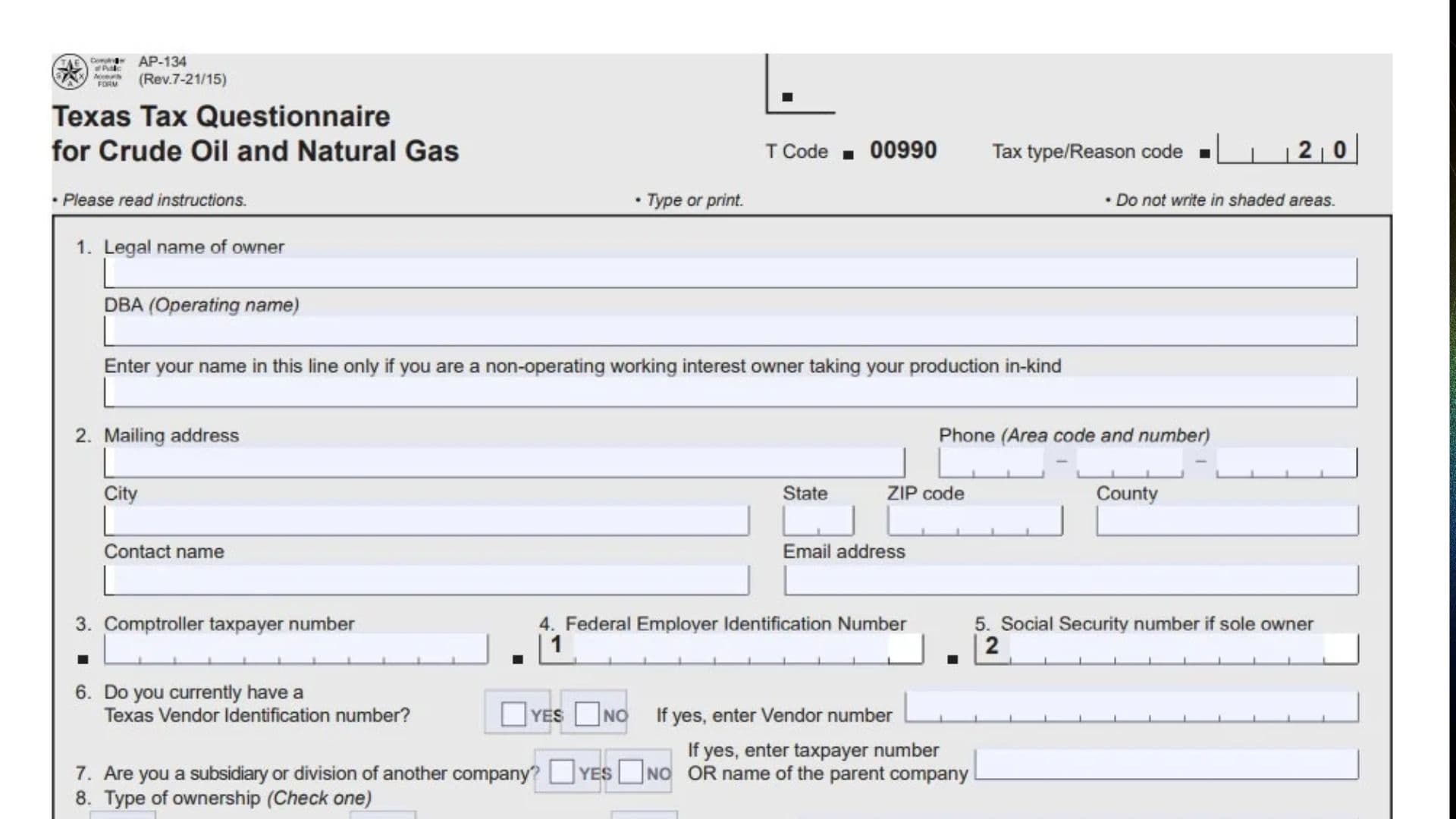
Texas Form AP-134, Tax Questionnaire for Crude Oil and Natural Gas, is a document issued by the Texas Comptroller of Public Accounts to collect business, ownership, and tax reporting information from individuals and organizations involved in producing or purchasing crude oil and natural gas in Texas. The form is required for businesses and individuals operating as sole owners, partnerships, corporations, other organizations, and non-operating working interest owners who receive their production in-kind. Its primary purpose is to identify the taxpayer, establish the legal ownership structure, determine the responsible individuals, and identify the appropriate tax reporting obligations. The questionnaire collects information such as the legal name of the owner, operating or trade name, mailing address, contact details, Texas taxpayer number, Federal Employer Identification Number (FEIN), Social Security number when applicable, and Vendor Identification Number (VIN). It also asks about subsidiary relationships, business classification, ownership percentages, and the identities of general partners or principal corporate officers. Applicants must indicate whether they will file crude oil or natural gas purchaser or producer reports and identify the beginning month and year of their sales or purchases. Businesses that have purchased an existing business or its assets must also provide information about the former owner and the assets acquired. Finally, the form requires applicable Texas Railroad Commission P-5 information and signatures from the responsible owners, partners, corporate officers, or authorized representatives. Providing complete and accurate information is important because the Comptroller uses these details to establish taxpayer records, identify the appropriate reporting requirements, and administer crude oil and natural gas tax obligations in Texas.
How To File Form AP-134
Form AP-134 must be completed and mailed to the Texas Comptroller of Public Accounts.
Mailing Address:
Comptroller of Public Accounts
111 E. 17th Street
Austin, TX 78774-0100
Before completing the questionnaire, prepare the following information:
- The legal name of the business or individual owner.
- The DBA or operating business name, if applicable.
- The mailing address and business contact information.
- The name and email address of the correspondence contact.
- The 11-digit Texas Comptroller taxpayer number, if assigned.
- The Federal Employer Identification Number (FEIN).
- The owner’s Social Security number, if operating as a sole owner.
- The Vendor Identification Number (VIN), if applicable.
- Parent company information, if the business is a subsidiary or division.
- Business ownership classification and registration details.
- Names, Social Security numbers, titles, and residential addresses of the required owners or officers.
- Information about crude oil and natural gas purchasing or production activities.
- Beginning month and year of the applicable sales or purchases.
- Former business owner information, if the business or its assets were purchased.
- Details of purchased assets, if applicable.
- Texas Railroad Commission P-5 number or application date, when required.
- Required signatures and certification information.
Applicants should type or print all information clearly and complete only the white areas of the form. Do not enter dashes when providing Social Security numbers, FEINs, Texas taxpayer numbers, or Vendor Identification Numbers.
Who Must Submit Form AP-134?
Every person or organization involved in producing or purchasing crude oil or natural gas in Texas must submit this questionnaire.
This includes:
- Sole proprietors.
- Partnerships.
- Corporations.
- Other business organizations.
- Non-operating working interest owners who take their production in-kind.
The requirement applies to businesses and individuals whose activities involve crude oil or natural gas production, purchasing, or applicable working interest ownership.
How To Complete Form AP-134

Form AP-134 contains 15 numbered items covering taxpayer identification, ownership structure, responsible individuals, tax reporting activities, successor liability, and signatures.
Taxpayer And Business Information
Item 1: Legal Name of Owner and DBA
Provide the legal name of the individual or business responsible for the crude oil or natural gas tax account.
The information required depends on the type of ownership:
- Sole Owner: Enter the individual’s first name, middle initial, and last name.
- Partnership: Provide the partnership’s complete legal name.
- Corporation: Enter the legal name exactly as registered with the Texas Secretary of State.
- Other Organization: Enter the organization’s official legal name or title.
- Non-Operating Working Interest Owner: Enter the legal name of the owner receiving production in-kind.
DBA (Operating Name)
Enter the business’s DBA, meaning the name under which it operates, if different from its legal name.
Use the operating name customers, vendors, or business partners recognize.
Name of Non-Operating Working Interest Owner Taking Production In-Kind
The form provides an additional name field specifically for a non-operating working interest owner receiving production in-kind.
Enter your name in this field only if you meet this condition. Other applicants should leave it blank.
Item 2: Mailing Address and Contact Information
Provide the mailing address where you want to receive correspondence from the Texas Comptroller of Public Accounts.
Complete the following fields:
Mailing Address
Enter the street number and name, building or unit information, and other necessary mailing details.
Phone (Area Code and Number)
Provide the business or taxpayer’s telephone number, including the area code.
City
Enter the city associated with the mailing address.
State
Provide the applicable state abbreviation.
ZIP Code
Enter the correct ZIP code for the mailing address.
County
Identify the county associated with the mailing address.
Contact Name
Enter the name of the individual responsible for receiving and responding to correspondence about the taxpayer account.
Email Address
Provide a valid email address for the designated correspondence contact.
If you want to receive Comptroller correspondence at a different address for other taxes, attach a separate letter identifying those additional mailing addresses.
Item 3: Comptroller Taxpayer Number
Enter the 11-digit Texas Comptroller taxpayer identification number assigned to the business or individual.
This number helps the Comptroller identify the taxpayer’s account and maintain the appropriate tax records.
Do not include hyphens or other punctuation when entering the number.
Item 4: Federal Employer Identification Number (FEIN)
Enter the Federal Employer Identification Number assigned to the business by the Internal Revenue Service.
The FEIN identifies the business for federal tax administration purposes.
Enter the number without dashes.
Item 5: Social Security Number for Sole Owner
Enter the Social Security number of the individual only if the business is operated as a sole proprietorship.
Partnerships, corporations, and other organizations should not enter an individual’s Social Security number in this field as though they were sole owners.
Enter the number without dashes.
The form explains that disclosure of a Social Security number is required and authorized under applicable federal and Texas laws for tax administration and individual identification.
Item 6: Texas Vendor Identification Number (VIN)
Indicate whether you currently have a Texas Vendor Identification Number.
Select the appropriate option:
- Yes: Check this box if you already have a Texas Vendor Identification Number.
- No: Check this box if you do not currently have one.
If you select Yes, enter the assigned Vendor Identification Number in the space provided.
The VIN referred to here is a Vendor Identification Number, not a vehicle identification number.
Item 7: Subsidiary or Division of Another Company
Indicate whether your business operates as a subsidiary or division of another company.
Select one of the following:
- Yes: Choose this option if your business is a subsidiary or division of another organization.
- No: Select this option if your business is not a subsidiary or division.
If you select Yes, provide either the parent company’s Texas taxpayer number or the legal name of the parent company in the designated field.
Make sure the parent company information is accurate so the Comptroller can identify the relationship between the organizations.
Ownership Classification
Item 8: Type of Ownership
Select the checkbox that correctly identifies the legal ownership structure of your business.
The form provides several classifications, each with specific registration information requirements.
Sole Owner
Select this option if the business is owned and operated by one individual.
The individual should use their personal legal name as required in Item 1.
Partnership
Choose this option if the business operates as a partnership.
Enter the partnership’s file number and effective Secretary of State (SOS) registration date in the corresponding fields, where applicable.
Other
Select this option if the business does not fit any of the listed ownership categories.
Describe the type of organization in the space provided.
Examples include:
- Social club.
- Independent School District.
- Family trust.
- Joint venture.
For a joint venture, identify the managing partner or the partner authorized to act as the venture’s representative. Also provide the names of two other principal partners.
Principal partners are those who have the largest entitlement to the venture’s profits under the joint venture agreement.
If available, attach a copy of the Joint Venture Agreement to the questionnaire.
Texas Corporation
Select this option if the business is incorporated in Texas.
Enter the file number assigned by the Texas Secretary of State and the applicable filing date.
Foreign Corporation (Non-Texas)
Choose this option if the corporation was formed outside Texas.
Provide:
- The state where the corporation was incorporated.
- Its corporate file number.
- The Texas Certificate of Authority number.
- The applicable date associated with the Texas authority.
Texas Limited Partnership
Select this option if the business is registered as a limited partnership in Texas.
Provide the applicable registration and identification information requested in the form.
Foreign Limited Partnership
Choose this option if the limited partnership is registered outside Texas.
Enter the state where the partnership is registered and its identification or file number, together with the applicable Texas Certificate of Authority details and date where required by the form.
Texas Limited Liability Company
Select this option if the business is a Texas-registered limited liability company (LLC).
Enter the file number assigned by the Texas Secretary of State and the filing date.
Foreign Limited Liability Company
Choose this option if the LLC was formed outside Texas.
Provide:
- The state where the company was formed.
- Its file number.
- The Texas Certificate of Authority number.
- The applicable date associated with the Texas authority.
Non-Operating Working Interest Owner
Select this option if you are a non-operating working interest owner receiving your share of production in-kind.
Enter your working interest percentage in the designated field.
This percentage represents your ownership interest in the production associated with the working interest arrangement.
Identification Of Owners And Responsible Individuals
Item 9: Identification of Owners
This section identifies the individuals responsible for owning or managing the business.
The information required depends on the business structure.
- Sole Owner: Provide the owner’s personal information.
- Partnership: List all general partners.
- Corporation: List the principal corporate officers.
- Other Organization: Provide information about the principal officers responsible for the organization.
The form provides space for three individuals. Attach additional sheets if more people must be reported.
Complete the following information for each person:
Name (First, Middle Initial, Last)
Enter the individual’s full name, including the first name, middle initial, and last name.
Social Security Number
Provide the individual’s Social Security number in the designated field.
Do not include dashes when entering the number.
If a partner is itself a corporation, enter that corporation’s FEIN instead of an individual’s Social Security number.
Title
Enter the person’s position or official title within the business.
For corporate or other organizations, the principal officers may include:
- President.
- Secretary.
- Vice-President.
Home Address (Street and Number)
Enter the individual’s complete residential street address.
City
Provide the city where the individual resides.
State
Enter the state abbreviation associated with the residential address.
ZIP Code
Provide the correct ZIP code for the individual’s home address.
Repeat these details for every required owner, general partner, or principal corporate officer.
If the available spaces are insufficient, attach additional sheets containing the same information.
Tax Reporting Requirements
Item 10: Type of Reports and Beginning Sales or Purchases
Select the types of tax reports your business expects to file.
For each applicable reporting category, enter the beginning year and month of your first sales or purchases using the YY/MM format.
The form provides five reporting options.
Crude Oil Purchaser (Monthly)
Select this option if your business purchases crude oil and is required to file monthly crude oil purchaser reports.
Enter the year and month when your first applicable crude oil purchases began.
Crude Oil Producer
Select this option if your business produces crude oil.
Enter the applicable beginning year and month.
The form’s instructions state that crude oil producers should contact the Comptroller if the purchaser does not pay the applicable taxes and the producer needs permission to file monthly reports.
Natural Gas Purchaser (Monthly)
Choose this option if your business purchases natural gas and must submit monthly purchaser reports.
Enter the year and month when the first applicable natural gas purchases began.
Natural Gas Producer (Annual)
Select this option if your business produces natural gas and qualifies for annual reporting.
The form identifies this reporting category for producers whose average monthly tax liability is under $200 or whose annual liability is under $2,400.
Enter the applicable beginning year and month.
Natural Gas Producer (Monthly)
Choose this option if your natural gas production results in an average monthly tax liability exceeding $200 or an annual liability exceeding $2,400.
Enter the beginning year and month for the applicable production and reporting activity.
Select the reporting categories that apply to your business. If you are uncertain about the appropriate crude oil reporting arrangement, contact the Comptroller before completing this section.
Successor Liability Information
This section applies only if you purchased an existing business or acquired business assets.
If you did not purchase an existing business or its assets, skip Items 11 through 14 and proceed directly to Item 15.
Item 11: Trade Name and Taxpayer Number
Enter the trade or operating name of the business you acquired.
In the taxpayer number field, provide the Texas taxpayer identification number associated with the acquired business, if available.
This information helps identify the previous business and its tax account.
Item 12: Legal Name and Contact Information of Former Owner
Provide the former owner’s identification and contact details.
Complete the following fields:
Legal Name of Former Owner (First, Middle Initial, Last)
Enter the former owner’s full legal name.
Phone (Area Code and Number)
Provide the former owner’s telephone number, including the area code.
Former Owner’s Texas Taxpayer Number (If Known)
Enter the former owner’s Texas Comptroller taxpayer number if you know it.
If the number is unavailable, do not guess. The field is specifically identified for information available to the applicant.
Item 13: Address of Former Owner
Enter the former owner’s complete address.
Include:
- Street number and name.
- City.
- State.
- ZIP code.
Provide the address associated with the former owner of the acquired business or assets.
Item 14: Assets Purchased
Check every category that represents assets acquired from the former business owner.
The available options are:
- Inventory: Select this option if you purchased the business’s inventory.
- Corporate Stock: Check this box if you acquired corporate stock.
- Equipment: Select this option if machinery, tools, or other business equipment were purchased.
- Real Estate: Choose this option if the transaction included real property.
- Other Assets: Select this option for additional purchased assets that do not fall into the listed categories.
You may select multiple boxes if the purchase included several types of assets.
If you did not purchase an existing business or business assets, leave Items 11 through 14 uncompleted and continue to Item 15.
Signatures And Certification
Item 15: Signatures
This section identifies the individuals who certify the information in the questionnaire.
The form requires signatures from the sole owner, all general partners, a corporate officer, or an authorized representative, as applicable to the business structure.
Complete the following fields:
Texas Railroad Commission P-5 Number
Enter the P-5 number issued by the Railroad Commission of Texas.
This number is assigned after the business files Form P-5, also known as the Organization Report.
The P-5 number is required for oil and gas producers or operators. The associated Form P-5 must be completed before the entity begins operations in Texas.
Non-operating working interest owners who receive their production in-kind are not required to provide a P-5 number on Form AP-134.
Date of Application for P-5 Number
If you have applied for a P-5 number but have not yet received it, enter the date of the P-5 application in the designated field.
Type or Print Name of Sole Owner, General Partner, Corporate Officer, or Authorized Representative
Enter the printed name of the individual responsible for signing the certification.
The form provides three separate name and signature spaces to accommodate the applicable responsible individuals.
Complete the appropriate spaces for the sole owner, general partners, corporate officer, or authorized representative.
Signature
Each required individual must sign in the corresponding signature area.
The signatures confirm the declaration that the information in the questionnaire is true and correct to the best of the signers’ knowledge and belief.
Attach additional signature sheets if necessary.
Comptroller Use Only
The bottom section contains administrative fields reserved for the Texas Comptroller of Public Accounts.
These include:
- Field Office: For the assigned Comptroller field office.
- E.O.: An internal administrative field.
- ACID: An internal identification field.
- Date: For the applicable administrative processing date.
Applicants should not complete these fields unless specifically instructed by the Comptroller.
Important General Instructions And Filing Requirements
Completing The Form Correctly
Follow these general instructions when preparing Form AP-134:
- Type or print all information clearly.
- Write only in the designated white areas.
- Do not enter information in shaded sections.
- Do not use dashes when entering SSNs, FEINs, Texas taxpayer numbers, or Vendor Identification Numbers.
- Attach additional sheets whenever the available spaces are insufficient.
- Make sure the legal business name and ownership details match the applicable business records.
Social Security Number Disclosure
The questionnaire explains that providing a Social Security number is required and authorized under applicable law for tax administration and the identification of individuals affected by relevant legal requirements.
The form identifies 42 U.S.C. Section 405(c)(2)(C)(i) and Texas Government Code Sections 403.011 and 403.078.
Information disclosed in response to a public information request is governed by the Texas Public Information Act, Chapter 552 of the Government Code, and applicable federal law.
Texas Railroad Commission P-5 Requirements
Oil and gas producers or operators must obtain a P-5 number from the Railroad Commission of Texas.
The P-5 number is issued after the required Organization Report, Form P-5, is filed.
The organization must complete Form P-5 before beginning operations in Texas.
However, non-operating working interest owners receiving production in-kind do not need to provide a P-5 number on Form AP-134.
Assistance And Contact Information
For questions about Form AP-134, crude oil and natural gas tax reporting, or other related tax matters, contact the Texas Comptroller of Public Accounts.
Telephone: 800-531-5441, Extension 3-4455
Email: congtax@cpa.texas.gov
Final Review Before Filing
Before submitting Form AP-134, review all sections to ensure that the information is complete and accurate.
Use the following checklist:
- Enter the correct legal name of the owner or business in Item 1.
- Provide the DBA or operating name, if applicable.
- Complete the additional name field if you are a non-operating working interest owner taking production in-kind.
- Enter the mailing address and telephone number in Item 2.
- Provide the city, state, ZIP code, and county.
- Enter the correspondence contact name and email address.
- Provide the 11-digit Comptroller taxpayer number in Item 3.
- Enter the FEIN in Item 4, if applicable.
- Enter the Social Security number in Item 5 only if you are a sole owner.
- Answer the Vendor Identification Number question in Item 6.
- Provide the VIN if applicable.
- Answer the subsidiary or division question in Item 7.
- Enter the parent company’s taxpayer number or legal name if applicable.
- Select the correct ownership classification in Item 8.
- Complete the applicable business registration and identification details.
- Enter the working interest percentage if applicable.
- Identify all required owners, general partners, or principal officers in Item 9.
- Provide their names, identification numbers, titles, and residential addresses.
- Attach additional ownership information if necessary.
- Select the appropriate crude oil and natural gas reporting categories in Item 10.
- Enter the beginning year and month of applicable sales or purchases.
- Complete Items 11 through 14 if you purchased an existing business or business assets.
- Identify the former owner and provide the applicable taxpayer information.
- Check all categories of purchased assets in Item 14.
- Enter the Texas Railroad Commission P-5 number in Item 15, if required.
- Provide the P-5 application date if applicable.
- Obtain all required signatures from the responsible individuals.
- Print the names of the individuals signing the questionnaire.
- Attach additional signature sheets if necessary.
- Leave the Comptroller’s administrative fields blank.
- Mail the completed application to the Comptroller of Public Accounts, 111 E. 17th Street, Austin, TX 78774-0100.
A properly completed Form AP-134 helps the Texas Comptroller establish accurate crude oil and natural gas taxpayer records and determine the appropriate reporting requirements. Before mailing the questionnaire, verify the ownership classification, taxpayer identification numbers, reporting selections, successor liability information, and required signatures to avoid incomplete submissions or processing delays.