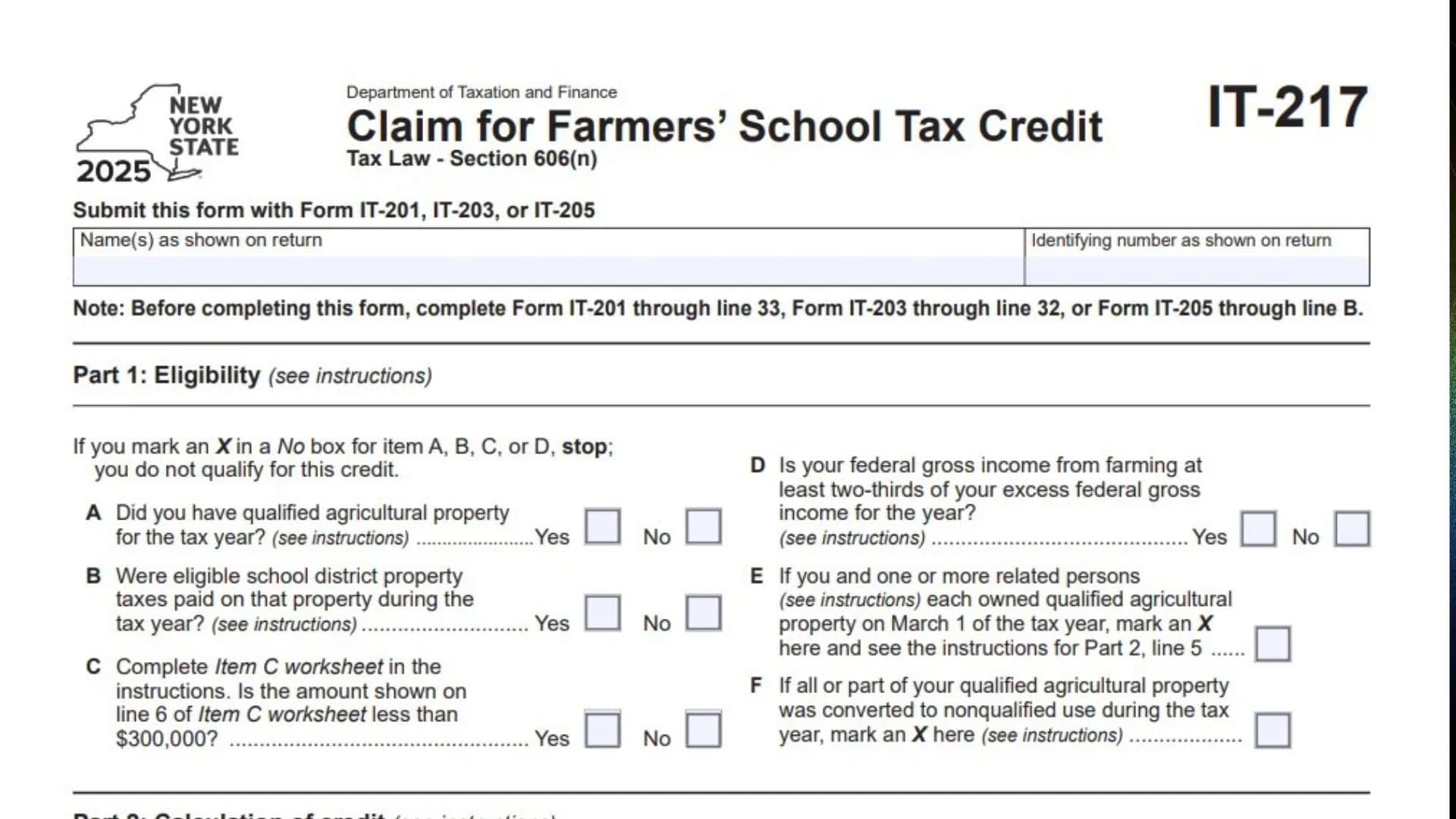
Form IT-217, Claim for Farmers’ School Tax Credit, is a New York State tax form used by eligible farmers, agricultural property owners, partners, S corporation shareholders, and beneficiaries of estates or trusts to claim a credit for qualifying school district property taxes. The credit is authorized under Section 606(n) of the New York Tax Law. The purpose of this form is to provide tax relief to individuals who own qualified agricultural property and have paid eligible school district property taxes on that property. It calculates the allowable credit using information about agricultural acreage, eligible property taxes, ownership interests, farming income, and the property’s use during the tax year.
Form IT-217 is not limited to individuals who directly own farmland. Partners in partnerships, shareholders of New York S corporations, and beneficiaries of estates or trusts may also qualify through their share of qualified agricultural property and eligible taxes. Fiduciaries have additional reporting responsibilities when agricultural property is held through an estate or trust.
The form also includes provisions for related persons who jointly own qualified agricultural property and for property that has been converted to nonqualified use. These situations may affect the credit calculation or require a credit recapture calculation.
Eligible taxpayers must satisfy specific agricultural property, school tax payment, income, and other requirements. Completing Form IT-217 correctly is important because errors in acreage, eligible taxes, ownership information, or income calculations can affect the credit amount or result in an incorrect claim.
How To File Form IT-217
Form IT-217 must be submitted with the applicable New York State income tax return. Depending on your filing situation, attach it to one of the following:
- Form IT-201, New York State Resident Income Tax Return.
- Form IT-203, Nonresident and Part-Year Resident Income Tax Return.
- Form IT-205, Fiduciary Income Tax Return.
Before completing Form IT-217, you must complete the applicable income tax return to the required point:
- Form IT-201 through line 33.
- Form IT-203 through line 32.
- Form IT-205 through line B.
The information from your completed income tax return is needed to determine eligibility and calculate the credit.
Information To Prepare Before Filing
Gather the following information before completing the form:
- Your name and identifying number as reported on the applicable tax return.
- Information about qualified agricultural property owned during the tax year.
- Total agricultural acreage and ownership information.
- Eligible school district property taxes paid during the tax year.
- Federal gross income from farming.
- Information required to complete the Item C worksheet.
- Details about related persons who owned qualified agricultural property.
- Partnership, S corporation, estate, and trust information, if applicable.
- Schedule K-1 or other relevant ownership and tax information.
- Details of agricultural property converted to nonqualified use.
- Information about previously claimed Farmers’ School Tax Credits, if recapture applies.
Review the applicable Form IT-217 instructions before completing the calculations, particularly the eligibility worksheet and the rules for determining qualified agricultural property and eligible school taxes.

How To Complete Form IT-217
The 2025 Form IT-217 contains six parts:
- Part 1: Eligibility.
- Part 2: Calculation of credit.
- Part 3: Partnership, S corporation, and estate or trust information.
- Part 4: Partner’s, shareholder’s, or beneficiary’s share of qualified agricultural property and eligible taxes.
- Part 5: Beneficiary’s and fiduciary’s share of agricultural property and eligible taxes.
- Part 6: Credit recapture on agricultural property converted to nonqualified use.
Complete the applicable parts based on your ownership and filing circumstances.
Taxpayer Identification Information
Name(s) as Shown on Return
Enter your name exactly as it appears on the Form IT-201, IT-203, or IT-205 with which you are filing Form IT-217.
Identifying Number as Shown on Return
Enter the identifying number associated with your income tax return. Make sure the number matches the information reported on the main return.
Part 1: Eligibility
Part 1 determines whether you meet the requirements for the Farmers’ School Tax Credit. Answer the questions in Items A through D by marking an X in the appropriate Yes or No box.
If you answer No to any of Items A, B, C, or D, you do not qualify for the credit and must stop completing the claim.
Item A: Qualified Agricultural Property
Indicate whether you had qualified agricultural property during the tax year.
Select Yes if you owned or otherwise had qualifying agricultural property under the applicable eligibility rules. Select No if you did not meet this requirement.
If you answer No, you are not eligible for the credit.
Item B: Eligible School District Property Taxes Paid
Indicate whether eligible school district property taxes were paid on the qualified agricultural property during the tax year.
Select Yes if the required eligible property taxes were paid. Otherwise, select No.
If you answer No, you do not qualify for the credit.
Item C: Agricultural Property Value Worksheet
Complete the Item C worksheet provided in the applicable instructions.
After completing the worksheet, review the amount calculated on line 6.
Determine whether the amount on line 6 is less than $300,000.
- Select Yes if the amount is below $300,000.
- Select No if the amount is $300,000 or more.
If you answer No, you are not eligible for the credit.
Item D: Federal Gross Income From Farming
Determine whether your federal gross income from farming represents at least two-thirds of your excess federal gross income for the year.
Use the applicable instructions to calculate and compare the amounts.
Select Yes if farming income meets or exceeds the required two-thirds threshold. Otherwise, select No.
If you answer No, you do not qualify for the credit.
Item E: Related Persons Owning Qualified Agricultural Property
If you and one or more related persons each owned qualified agricultural property on March 1 of the tax year, mark an X in this box.
This information is relevant when completing Part 2, line 5. Review the applicable instructions to determine how the base acreage amount should be calculated when related persons jointly meet the ownership conditions.
Item F: Conversion of Qualified Agricultural Property to Nonqualified Use
If all or part of your qualified agricultural property was converted to nonqualified use during the tax year, mark an X in this box.
This information is important because the conversion may require a credit recapture calculation in Part 6.
Review the applicable instructions to determine the reporting requirements for the converted property.
Part 2: Calculation of Credit
Part 2 calculates the Farmers’ School Tax Credit using qualified agricultural acreage, eligible school taxes, and applicable adjustment percentages.
The calculations differ depending on whether you are an individual property owner, a partner, an S corporation shareholder, a beneficiary, or a fiduciary.
Line 1: Total Qualified Agricultural Acres Owned by Individuals
If you are an individual taxpayer, enter the total number of acres of qualified agricultural property you owned during the tax year.
Use the applicable instructions to determine which acreage qualifies for this calculation.
Line 2: Qualified Agricultural Property Share From Partnerships, S Corporations, Estates, and Trusts
If you are a partner, S corporation shareholder, or beneficiary of an estate or trust, enter the amount from Part 4, line 7, Column A.
This represents your share of qualified agricultural property acreage received through these entities.
Line 3: Fiduciary’s Share of Qualified Agricultural Property
If you are filing as a fiduciary, enter the fiduciary’s share of qualified agricultural property from Part 5, Column C.
Use the total applicable acreage reported in that column.
Line 4: Total Qualified Agricultural Property Acres
Add the amounts reported on lines 1, 2, and 3.
Enter the combined acreage on line 4. This amount represents the total qualified agricultural property included in the credit calculation.
Line 5: Total Base Acreage Amount
Enter the total base acreage amount determined under the applicable instructions.
If you marked Item E in Part 1, review the special instructions for determining the base acreage amount when related persons own qualified agricultural property.
Line 6: Excess Agricultural Acreage
Subtract the amount on line 5 from the amount on line 4.
If the result is zero or negative, skip lines 7 and 8, enter 1.0000 (100%) on line 9, and continue with line 10.
If the result is positive, enter the difference on line 6 and continue to line 7.
Line 7: Calculate 50% of Excess Acreage
Multiply the amount on line 6 by 50% (0.5).
Enter the result on line 7.
Line 8: Adjusted Base Acreage
Add the amounts reported on lines 5 and 7.
Enter the combined amount on line 8.
This calculation combines the base acreage with half of the excess acreage.
Line 9: Agricultural Acreage Percentage
Divide the amount on line 8 by the amount on line 4.
Round the result to four decimal places and enter it on line 9.
If line 6 was zero or negative, enter 1.0000 (100%) as instructed.
Line 10: Eligible School Taxes Paid by Individuals
If you are an individual taxpayer, enter the eligible school district property taxes you paid during the tax year.
Use the applicable instructions to determine which property tax amounts qualify.
Line 11: Eligible Taxes From Partnerships, S Corporations, Estates, and Trusts
If you are a partner, S corporation shareholder, or beneficiary of an estate or trust, enter the amount from Part 4, line 7, Column B.
This represents your share of eligible school taxes from the applicable entities.
Line 12: Fiduciary’s Share of Eligible Taxes
If you are filing as a fiduciary, enter the fiduciary’s share of eligible school taxes from Part 5, Column D.
Use the amount reported in the applicable column.
Line 13: Total Eligible School Taxes
Add the amounts reported on lines 10, 11, and 12.
Enter the combined amount on line 13.
Line 14: Adjusted Eligible School Tax Amount
Multiply the amount on line 13 by the percentage reported on line 9.
Enter the result on line 14.
This calculation adjusts the eligible school taxes using the agricultural acreage percentage.
Line 15: Amount From Item C Worksheet
Enter the amount reported on line 6 of the Item C worksheet provided in the instructions.
If the amount on line 15 is $200,000 or less, skip lines 16, 17, and 18. Enter the amount from line 14 directly on line 19.
If the amount exceeds $200,000, continue with line 16.
Line 16: Excess Amount Over $200,000
Subtract $200,000 from the amount reported on line 15.
Enter the excess amount, subject to a maximum of $100,000.
The amount entered on this line cannot exceed $100,000.
Line 17: Calculate the Income-Based Percentage
Divide the amount on line 16 by $100,000.
Round the result to four decimal places. The percentage cannot exceed 1.0000 (100%).
Enter the calculated percentage on line 17.
Line 18: Adjusted Credit Reduction Amount
Multiply the amount on line 14 by the percentage reported on line 17.
Enter the result on line 18.
This amount is used to determine the final credit.
Line 19: Farmers’ School Tax Credit
Subtract the amount on line 18 from the amount on line 14.
Enter the difference on line 19.
This is the calculated Farmers’ School Tax Credit. If the amount on line 15 is $200,000 or less, enter the amount from line 14 directly on line 19 without completing lines 16 through 18.
Part 3: Partnership, S Corporation, and Estate or Trust Information
Complete Part 3 if you were a partner in a partnership, a shareholder of a New York S corporation, or a beneficiary of an estate or trust that owned qualified agricultural property.
Provide the requested information for each applicable entity.
Name of Entity
Enter the full legal name of the partnership, S corporation, estate, or trust that owned qualified agricultural property.
If you received qualifying agricultural property through multiple entities, provide the information for each one.
Type
Enter the appropriate entity classification:
- P – Partnership.
- S – S corporation.
- ET – Estate or trust.
Use the correct abbreviation for each entity.
Employer Identification Number
Enter the employer identification number (EIN) associated with the partnership, S corporation, estate, or trust.
Location of Property
Enter the location of the qualified agricultural property owned by the entity.
Provide sufficient location information to identify the relevant property.
The form provides space for two entity entries. If you have additional entities, follow the applicable instructions for reporting the additional information.
Part 4 calculates your share of qualified agricultural property acreage and eligible school taxes received through partnerships, S corporations, estates, and trusts.
The section contains two columns:
- Column A: Acres of qualified agricultural property.
- Column B: Eligible taxes.
Complete the applicable entries based on your relationship with the entity.
Partner Information
Line 1: Partner’s Share of Agricultural Property Acres
Enter your share of qualified agricultural property acreage received from the partnership.
Use the acreage information attributable to your partnership interest.
Line 2: Partner’s Share of Eligible Taxes
Enter your share of eligible school taxes from the partnership.
Report the applicable amount in Column B.
Line 3: S Corporation Shareholder’s Agricultural Property Acres
Enter your share of qualified agricultural property acreage received through the S corporation.
Use the acreage attributable to your ownership interest.
Line 4: S Corporation Shareholder’s Eligible Taxes
Enter your share of eligible school taxes from the S corporation.
Report the amount in Column B.
Beneficiary Information
Line 5: Beneficiary’s Share of Agricultural Property Acres
Enter your share of qualified agricultural property received from the estate or trust.
Use the applicable acreage information attributable to your beneficiary interest.
Line 6: Beneficiary’s Share of Eligible Taxes
Enter your share of eligible school taxes from the estate or trust.
Report the applicable amount in Column B.
Line 7: Total Qualified Agricultural Property and Eligible Taxes
Calculate the totals for both columns.
- Column A: Add the applicable acreage amounts from lines 1, 3, and 5.
- Column B: Add the applicable eligible tax amounts from lines 2, 4, and 6.
Enter the respective totals on line 7.
Important transfer instructions:
If you are a fiduciary, transfer the line 7 amount from Column A to Part 5, Column C, and the amount from Column B to Part 5, Column D.
For all other taxpayers, transfer the Column A amount from line 7 to Part 2, line 2, and the Column B amount to Part 2, line 11.
Part 5 is used to report the beneficiary’s and fiduciary’s share of qualified agricultural property and eligible school taxes.
This section contains five columns covering beneficiary identification, agricultural acreage, eligible taxes, and acreage converted to nonqualified use.
Column A: Beneficiary’s Name
Enter the full name of each beneficiary associated with the qualified agricultural property.
Provide a separate entry for each applicable beneficiary.
Column B: Identifying Number
Enter the identifying number associated with the beneficiary.
Make sure the information corresponds to the beneficiary named in Column A.
Column C: Acres of Qualified Agricultural Property
Enter the beneficiary’s share of qualified agricultural property acreage.
Use the applicable instructions to determine the acreage attributable to each beneficiary.
For the fiduciary’s entry, include the applicable acreage transferred from Part 4, line 7, Column A, as instructed.
Column D: Eligible Taxes
Enter the beneficiary’s share of eligible school district property taxes associated with the qualified agricultural property.
Use the applicable tax information to determine the amount.
For the fiduciary’s entry, include the applicable amount transferred from Part 4, line 7, Column B.
Column E: Acres of Qualified Agricultural Property Converted to Nonqualified Use
Enter the number of qualified agricultural acres converted to nonqualified use, where applicable.
Use the applicable instructions to determine the acreage that must be reported.
Totals Row
Calculate and report the applicable totals for the beneficiary entries in the designated columns.
The form provides separate spaces for beneficiary information and a fiduciary entry.
Fiduciary Row
Enter the fiduciary’s applicable share of qualified agricultural property and eligible taxes in the designated fields.
Use the applicable instructions when determining which amounts belong to the fiduciary rather than individual beneficiaries.
Part 6: Credit Recapture on Qualified Agricultural Property Converted to Nonqualified Use
Part 6 calculates the amount of Farmers’ School Tax Credit that may need to be recaptured when qualified agricultural property is converted to nonqualified use.
Complete this section when all or part of the qualified agricultural property was converted to nonqualified use during the tax year and the applicable recapture requirements are met.
The calculation uses five columns.
Column A: Total Acres Converted to Nonqualified Use
Enter the total acreage of qualified agricultural property that was converted to nonqualified use.
Use the applicable instructions to determine the acreage included in the recapture calculation.
Column B: Total Qualified Agricultural Acres Before Conversion
Enter the total acreage of qualified agricultural property owned before the conversion occurred.
This amount provides the total acreage used to calculate the proportion of property converted.
Column C: Percentage of Property Converted
Divide the amount in Column A by the amount in Column B.
Enter the resulting ratio or percentage in Column C.
This calculation determines the proportion of the original qualified agricultural property that was converted to nonqualified use.
Column D: Total Credit Claimed for the Previous Two Tax Years
Enter the total Farmers’ School Tax Credit claimed for the two previous tax years, as required by the applicable instructions.
Use the relevant prior-year tax records to determine the amount.
Column E: Total Credit Amount to Be Recaptured
Multiply the percentage in Column C by the amount in Column D.
Enter the result in Column E.
This amount represents the calculated credit recapture associated with the conversion of qualified agricultural property to nonqualified use.
Follow the applicable instructions for determining whether the recapture calculation is required and how the resulting amount must be reported.
Final Review Before Filing
Before submitting Form IT-217 with your New York State income tax return, review the following checklist to make sure all applicable information and calculations are complete.
- Your name matches the applicable Form IT-201, IT-203, or IT-205.
- Your identifying number is correct.
- You completed the main income tax return through the required line.
- You answered all eligibility questions in Part 1.
- You confirmed that you have qualified agricultural property.
- Eligible school district property taxes were paid during the tax year.
- You completed the Item C worksheet and checked the $300,000 eligibility limit.
- Your federal gross income from farming meets the two-thirds requirement.
- You marked Item E if related persons also owned qualified agricultural property on March 1.
- You marked Item F if qualified agricultural property was converted to nonqualified use.
- You entered the correct agricultural acreage on Part 2, line 1, if applicable.
- You transferred the correct acreage amounts from Part 4 or Part 5.
- Lines 4 through 9 are calculated correctly.
- Eligible school taxes are correctly reported on lines 10 through 12.
- Line 13 correctly totals eligible school taxes.
- Line 14 applies the correct agricultural acreage percentage.
- Lines 15 through 18 are completed when required.
- Line 19 contains the correct Farmers’ School Tax Credit amount.
- You completed Part 3 if you received qualifying property through a partnership, S corporation, estate, or trust.
- Part 4 correctly reports your share of agricultural acreage and eligible taxes.
- Part 5 contains the required beneficiary and fiduciary information, if applicable.
- Part 6 is completed when agricultural property was converted to nonqualified use and recapture applies.
- The credit recapture calculation uses the appropriate acreage and previous two years’ credit amounts.
- You attached Form IT-217 to the appropriate New York State income tax return.
Form IT-217 helps eligible agricultural property owners and other qualifying taxpayers calculate the New York Farmers’ School Tax Credit. Carefully reviewing the eligibility requirements, agricultural acreage, eligible school taxes, ownership information, and potential credit recapture will help ensure that the claim is completed accurately. Consult the applicable Form IT-217 instructions whenever additional eligibility or calculation details are required.