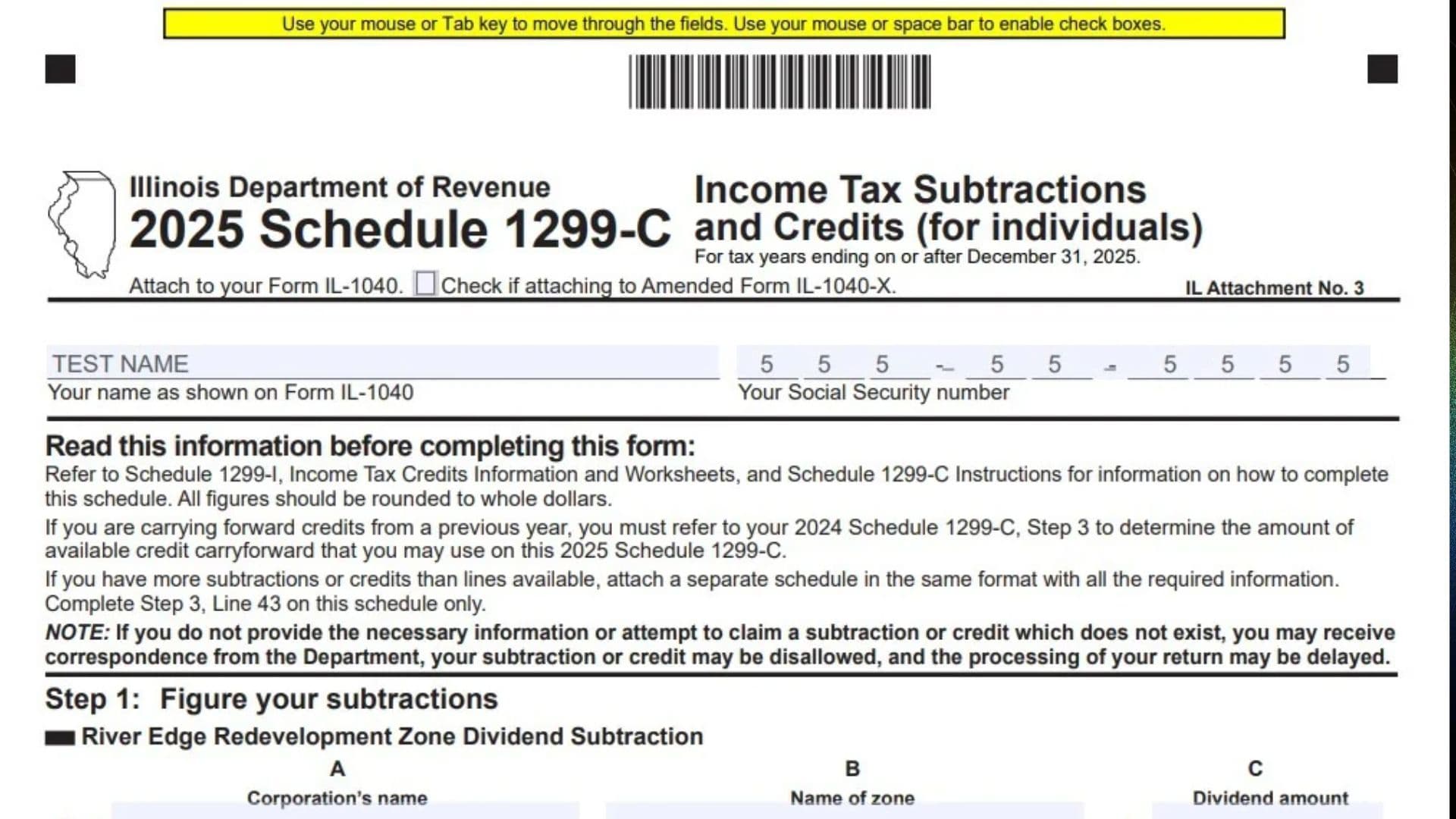
Illinois Schedule 1299-C, Income Tax Subtractions and Credits, is a tax schedule issued by the Illinois Department of Revenue for individual taxpayers. It is used to report specific income tax subtractions and calculate eligible Illinois income tax credits for tax years ending on or after December 31, 2025. The schedule is attached to Form IL-1040 and may also be used when filing an amended Form IL-1040-X.
The schedule allows qualifying taxpayers to report certain dividend subtractions associated with River Edge Redevelopment Zones and High Impact Businesses operating within Foreign Trade Zones or sub-zones. It also provides worksheets for calculating specific tax credits, including the Research and Development Credit, K-12 Instructional Materials and Supplies Credit, and Adoption Credit.
In addition, Schedule 1299-C contains a detailed credit calculation section where taxpayers report available credits, previous-year carryforwards, credits received through partnerships or other transfers, and the amounts applied against their Illinois income tax liability. It also tracks unused credits that may be carried forward to future tax years.
Taxpayers who received qualifying credits through partnerships, S corporations, trusts, or estates may need additional supporting schedules, such as Schedule K-1-P or Schedule K-1-T. Individuals carrying forward unused credits from a previous year must also review their 2024 Schedule 1299-C to determine the available amount.
Completing this schedule accurately is important because missing information, incorrect credit calculations, or claims for credits that do not exist may result in the Illinois Department of Revenue requesting additional information, disallowing a subtraction or credit, or delaying the processing of the tax return.
How To File Illinois Schedule 1299-C
Illinois Schedule 1299-C must be attached to your Form IL-1040 when claiming applicable income tax subtractions or credits.
If you are filing an amended individual income tax return, indicate that the schedule is being attached to Form IL-1040-X by checking the designated amended return box.
Information To Prepare Before Completing the Schedule
Gather the following information before starting:
- Your name as reported on Form IL-1040.
- Your Social Security number.
- Information about eligible River Edge Redevelopment Zone dividends.
- Information about eligible High Impact Business dividends within Foreign Trade Zones or sub-zones.
- Schedule K-1-P or K-1-T, if applicable.
- Your 2024 Schedule 1299-C if you have unused credits carried forward.
- Research and development expense information, if claiming that credit.
- Professional Educator License information, if applicable.
- Illinois school employment and qualified instructional material expenses, if claiming the K-12 credit.
- Adoption information and qualified adoption expenses, if claiming the Adoption Credit.
- Information about credits earned, transferred, or carried forward.
- Your Illinois income tax amount from Form IL-1040.
All amounts entered on the schedule must be rounded to whole dollars.
If you have more subtractions or credits than the available lines allow, attach an additional schedule using the same format and include all required information. Even in this situation, complete only Step 3, line 43, on the original Schedule 1299-C as instructed.

How To Complete Illinois Schedule 1299-C
The 2025 Schedule 1299-C contains three main steps:
- Step 1: Figure your subtractions.
- Step 2: Complete applicable credit worksheets.
- Step 3: Calculate your income tax credits.
Complete the sections that apply to your tax situation.
Taxpayer Identification Information
Before completing Step 1, enter the following information.
Your Name as Shown on Form IL-1040
Enter your full name exactly as it appears on your Illinois individual income tax return.
Your Social Security Number
Enter your Social Security number in the designated field. Make sure it matches the number reported on Form IL-1040.
Amended Return Checkbox
If you are attaching this schedule to an amended Form IL-1040-X, check the designated box. Otherwise, leave it unchecked.
Step 1: Figure Your Subtractions
Step 1 covers two types of dividend subtractions. These relate to qualifying corporations operating in designated economic development areas.
River Edge Redevelopment Zone Dividend Subtraction
This section is used to report eligible dividend amounts associated with corporations operating within River Edge Redevelopment Zones.
Line 1a: First Corporation’s Dividend Information
Enter the corporation’s name in Column A, the applicable River Edge Redevelopment Zone name in Column B, and the dividend amount in Column C.
Line 1b: Second Corporation’s Dividend Information
If you received eligible dividends from another corporation, enter its name, the applicable zone name, and the dividend amount in the corresponding columns.
Line 1c: Third Corporation’s Dividend Information
Enter the same information for a third qualifying corporation, if applicable.
If you have fewer than three qualifying corporations, use only the necessary rows.
Line 2: Distributive Share of River Edge Dividend Subtraction
Enter your share of the River Edge Redevelopment Zone dividend subtraction received through partnerships, S corporations, trusts, or estates.
Attach the applicable Schedule K-1-P or Schedule K-1-T to support the reported amount.
Line 3: Total River Edge Redevelopment Zone Dividend Subtraction
Add the dividend amounts reported in Column C on lines 1a, 1b, and 1c to the amount entered on line 2.
Enter the combined amount on line 3.
High Impact Business Within a Foreign Trade Zone or Sub-Zone Dividend Subtraction
This section reports eligible dividend subtractions associated with High Impact Businesses operating within a Foreign Trade Zone or sub-zone.
Line 4a: First Corporation’s Dividend Information
Enter the corporation’s name in Column A, the applicable Foreign Trade Zone or sub-zone name in Column B, and the dividend amount in Column C.
Line 4b: Second Corporation’s Dividend Information
If you received eligible dividends from another qualifying corporation, provide its name, zone information, and dividend amount.
Line 4c: Third Corporation’s Dividend Information
Enter the same information for a third qualifying corporation, if applicable.
Use only the rows necessary to report your eligible dividend income.
Line 5: Distributive Share of High Impact Business Dividend Subtraction
Enter your share of the qualifying High Impact Business dividend subtraction received from partnerships, S corporations, trusts, or estates.
Attach the applicable Schedule K-1-P or Schedule K-1-T.
Line 6: Total High Impact Business Dividend Subtraction
Add the dividend amounts reported in Column C on lines 4a, 4b, and 4c to the amount entered on line 5.
Enter the combined amount on line 6.
Line 7: Total Dividend Subtraction
Add the amounts reported on lines 3 and 6.
Enter the combined dividend subtraction on line 7.
This amount must also be reported on Schedule M, line 24.
Step 2: Worksheets
Complete Step 2 only if you earned one or more of the specific income tax credits covered by these worksheets during the current tax year.
This section contains three credit worksheets:
- Research and Development Credit.
- K-12 Instructional Materials and Supplies Credit.
- Adoption Credit.
Research and Development Credit Worksheet
Use this worksheet to calculate the Research and Development Credit amount that must be transferred to Step 3, Column E.
The worksheet compares average expenses during the base period with expenses incurred during the current tax year.
Line 8: Base Period Average Expenses and Current-Year Expenses
Enter the applicable amounts from line 6 of the Research and Development Worksheet in Schedule 1299-I.
- Column A: Enter the base period average expenses.
- Column B: Enter the expenses incurred during the current tax year.
Use the corresponding amounts from Schedule 1299-I.
Line 9: Excess of Current-Year Expenses Over Base Period Average
Subtract the amount in Column A of line 8 from the amount in Column B of line 8.
If the result is negative, enter zero instead.
Enter the calculated amount on line 9.
Line 10: Research and Development Credit Amount
Multiply the amount on line 9 by 6.5% (0.065).
Enter the result on line 10.
Transfer this amount to Step 3, Column E, on the credit entry row identified by the number 5 in Column A and credit code 5340 in Column B.
K-12 Instructional Materials and Supplies Credit Worksheet
This worksheet is for qualifying educators who worked at least 900 hours during 2025 in an Illinois K-12 school.
Eligible individuals include teachers, instructors, counselors, principals, and aides.
The worksheet provides separate columns for the primary taxpayer and spouse.
Line 11a: Professional Educator License Number
Enter your Professional Educator License number, if applicable.
- Column A: Enter the primary taxpayer’s license number.
- Column B: Enter the spouse’s license number, if applicable.
Line 11b: School Name
Enter the name of the Illinois school where the qualifying educator worked.
Provide the appropriate school name for the primary taxpayer and spouse in their respective columns.
Line 11c: Total Qualified Expenses Paid in 2025
Enter the total amount of qualifying instructional materials and supplies expenses paid during 2025.
Report the expenses separately for the primary taxpayer and spouse.
Line 11d: Allowable Expenses After the $500 Limit
For each individual, enter the smaller of the amount reported on line 11c or $500.
The amount entered cannot exceed $500 per person.
Line 12: Total K-12 Instructional Materials and Supplies Credit
Add the amounts reported on line 11d in Column A and Column B.
Enter the combined amount on line 12.
Transfer this amount to Step 3, Column E, on the credit entry row identified by the number 5 in Column A and credit code 5740 in Column B.
Adoption Credit Worksheet
Use this worksheet to calculate the Illinois Adoption Credit for qualifying adoptions.
The worksheet contains two parts: adopted child information and the credit calculation.
Part 1: Adopted Child Information
The form provides space to report information for up to three adopted children.
Line 13: First Adopted Child
Enter the first child’s full name, identifying number, birth date, Illinois residency status, and whether the adoption was finalized in 2025.
Line 14: Second Adopted Child
If applicable, enter the second adopted child’s full name, identifying number, birth date, Illinois residency status, and finalization status for 2025.
Line 15: Third Adopted Child
If applicable, enter the third adopted child’s full name, identifying number, birth date, Illinois residency status, and whether the adoption was finalized in 2025.
For each child, provide the following details:
- Child’s Name: Enter the child’s first and last name.
- Identifying Number: Enter the child’s applicable identifying number.
- Birth Date: Enter the child’s birth month and year.
- IL Resident: Indicate whether the child was an Illinois resident.
- Final in 2025: Indicate whether the adoption was finalized during 2025.
Part 2: Figure Your Credit
This section calculates the allowable adoption credit separately for each child listed on lines 13, 14, and 15.
The worksheet contains columns for Child 1, Child 2, and Child 3.
Line 16a: Maximum Credit Allowed Per Child
Enter the maximum adoption credit allowed for each child.
Use the applicable limit provided in the Schedule 1299-C instructions.
Line 16b: Previously Claimed Illinois Adoption Credit
Enter the amount of Illinois Adoption Credit previously claimed for each child.
This amount reduces the remaining credit available for the current calculation.
Line 16c: Remaining Credit Available
Subtract the amount on line 16b from the amount on line 16a.
Enter the remaining allowable credit for each child.
Line 16d: Qualified Adoption Expenses
Enter the qualified adoption expenses associated with each child.
Use the applicable instructions to determine which expenses qualify.
Line 16e: Allowable Adoption Expenses
Compare the amounts on lines 16c and 16d.
Enter whichever amount is smaller for each child.
This ensures that the calculated amount does not exceed either the remaining credit limit or the qualified adoption expenses.
Line 16f: Total Qualified Adoption Expenses
Add the amounts reported on line 16e for all applicable children.
Enter the combined total on line 16f.
Line 16g: Illinois Residency Adjustment
Enter the applicable residency factor:
- Illinois residents: Enter 1.0.
- Nonresidents and part-year residents: Enter the decimal amount from Schedule NR, line 48.
Use the factor that applies to your residency status.
Line 16h: Final Adoption Credit
Multiply the amount on line 16f by the factor entered on line 16g.
Enter the result on line 16h.
Transfer this amount to Step 3, Column E, on the credit entry row identified by the number 5 in Column A and credit code 5780 in Column B.
Step 3: Figure Your Income Tax Credit
Step 3 calculates the available Illinois income tax credit after considering your income tax liability, applicable credits, and credit carryforwards.
Complete Step 2 first if you are claiming any of the credits calculated in its worksheets.
This section contains lines 17 through 43 and a credit tracking table with Columns A through J.
Line 17: Illinois Income Tax
Enter the income tax amount reported on Form IL-1040, line 14.
Use the amount from your completed Illinois individual income tax return.
Line 18: Other Credit Amounts
Add the credit amounts reported on Form IL-1040, lines 15 and 16.
Enter the combined amount on line 18.
Line 19: Remaining Income Tax After Other Credits
Subtract line 18 from line 17.
If the result is zero or negative, enter zero.
This amount represents the remaining income tax used in the subsequent credit calculations.
Income Tax Credit Tracking Table: Lines 20 Through 41
The table provides 22 available credit entry rows, beginning with line 20 and continuing through line 41.
Each row records information about a particular credit, including its code, tax year, identifying information, original or carried credit amount, transfers, calculation, amount applied, and remaining carryforward.
Complete the applicable columns for each credit you are claiming or carrying forward.
Line 20: Amount Available for Credit Calculations
Transfer the amount from line 19 to line 20.
This amount establishes the income tax available for the credit calculation section.
Lines 21 Through 41: Individual Credit Entries
Use lines 21 through 41 to report additional eligible credits.
Complete the applicable columns for each credit entry using the following instructions.
Column A: Years Left to Carry
Enter the number of years remaining during which the credit may be carried forward.
Use the applicable carryforward period for the particular credit.
Column B: Credit Code
Enter the credit code associated with the income tax credit being reported.
Use the appropriate code from the Schedule 1299-C instructions.
Column C: Illinois Tax Year Credit Earned
Enter the Illinois tax year in which the credit was originally earned.
For a credit carried forward from an earlier year, report the year in which it was earned.
Column D: Identifying Number
Enter the identifying number associated with the credit, as required by the applicable credit instructions.
Column E: Credit Earned or Carried
Enter the amount of credit earned during the current tax year or the eligible credit amount being carried forward, as applicable.
For credits calculated in Step 2, transfer the appropriate amounts to the designated rows.
Column F: Distributive Share or Transfer
Enter any applicable credit amount received through a distributive share or transfer.
Use the relevant supporting information and applicable instructions to determine the amount.
Column G: Total Credit
Enter the total available credit amount for the applicable entry, using the amounts and calculation method required by the Schedule 1299-C instructions.
Column H: Calculation
Complete the credit calculation using the applicable instructions for the specific credit.
This column determines the amount available for application against the current year’s income tax liability.
Column I: Credit Applied
Enter the amount of the credit applied against the current year’s Illinois income tax liability.
The applicable amount is subject to the credit limitations and calculation rules for that credit.
Column J: Credit Carryforward
Enter the unused credit amount that remains available to carry forward to a future tax year, when permitted.
Follow the applicable carryforward rules and expiration periods.
Use additional rows as necessary to report all applicable credits. If the available rows are insufficient, attach a separate schedule in the same format with all required information.
Line 42: Total Credit Applied
Add all amounts reported in Column I for the applicable credit entries.
Enter the combined total on line 42.
Line 43: Final Income Tax Credit Claim
Follow the Schedule 1299-C Instructions to determine the amount of credit you are permitted to claim for the current tax year.
Enter the allowable amount on line 43.
Transfer this amount to Form IL-1040, line 17.
This is the final credit amount reported on your Illinois individual income tax return.
Credit Carryforward Information
Taxpayers claiming credits carried forward from a previous year must review their prior-year Schedule 1299-C before completing the current-year credit table.
For the 2025 tax year, use Step 3 of your 2024 Schedule 1299-C to determine the amount of available credit carryforward.
The amount carried forward must also comply with the applicable credit expiration period and other limitations.
When reporting carried-forward credits:
- Identify the original year in which the credit was earned.
- Enter the applicable credit code.
- Report the available credit amount.
- Include any applicable distributive share or transfer.
- Calculate the amount available for the current year.
- Report the credit applied and any remaining carryforward.
Do not assume that the entire unused amount from a previous year remains available. Follow the specific instructions for each credit.
Additional Schedule Requirements
If you have more subtractions or credits than the available lines allow, attach an additional schedule using the same format as Schedule 1299-C.
The additional schedule must contain all the required information for the relevant entries.
Even when an additional schedule is attached, complete only Step 3, line 43, on the original Schedule 1299-C as instructed.
Providing incomplete information or attempting to claim a subtraction or credit that does not exist may result in additional correspondence from the Illinois Department of Revenue, disallowance of the claim, or processing delays.
Final Review Before Filing
Before attaching Schedule 1299-C to Form IL-1040 or amended Form IL-1040-X, review the following checklist.
- Your name matches the information on Form IL-1040.
- Your Social Security number is correct.
- You checked the amended return box if attaching the schedule to Form IL-1040-X.
- All reported amounts are rounded to whole dollars.
- River Edge Redevelopment Zone dividend information is complete, if applicable.
- High Impact Business dividend information is complete, if applicable.
- Applicable Schedule K-1-P or K-1-T forms are attached.
- Line 3 correctly totals the River Edge dividend subtraction.
- Line 6 correctly totals the High Impact Business dividend subtraction.
- Line 7 correctly combines lines 3 and 6.
- The amount from line 7 is transferred to Schedule M, line 24.
- You completed the Research and Development worksheet if claiming that credit.
- The amounts on lines 8 through 10 are calculated correctly.
- You completed the K-12 Instructional Materials and Supplies worksheet if eligible.
- The 900-hour Illinois school employment requirement is satisfied.
- The expense limitation of $500 per qualifying individual is applied correctly.
- You completed the Adoption Credit worksheet if claiming that credit.
- Adopted child information is complete, where applicable.
- Previously claimed adoption credits are deducted correctly.
- Qualified adoption expenses are reported correctly.
- The appropriate Illinois residency factor is entered on line 16g.
- The final Adoption Credit is transferred to the correct Step 3 entry.
- Line 17 matches Form IL-1040, line 14.
- Line 18 correctly combines Form IL-1040, lines 15 and 16.
- Line 19 is calculated correctly.
- Line 20 contains the correct amount from line 19.
- All applicable credit entries on lines 21 through 41 are complete.
- Credit codes, original tax years, and identifying numbers are accurate.
- Previous-year credit carryforwards are verified using the 2024 Schedule 1299-C.
- Column I amounts are correctly totaled on line 42.
- Line 43 reflects the allowable credit under the applicable instructions.
- The amount from line 43 is transferred to Form IL-1040, line 17.
- Additional schedules are attached if the available credit or subtraction lines are insufficient.
- The completed Schedule 1299-C is attached to the appropriate Illinois income tax return.
Illinois Schedule 1299-C helps individual taxpayers report qualifying dividend subtractions and calculate available state income tax credits. Carefully completing all three steps, maintaining supporting records, and checking credit carryforward limitations can help prevent incorrect claims and unnecessary processing delays. For credit-specific eligibility requirements and calculations not fully explained on the schedule, consult the applicable Schedule 1299-I and Schedule 1299-C instructions before filing.