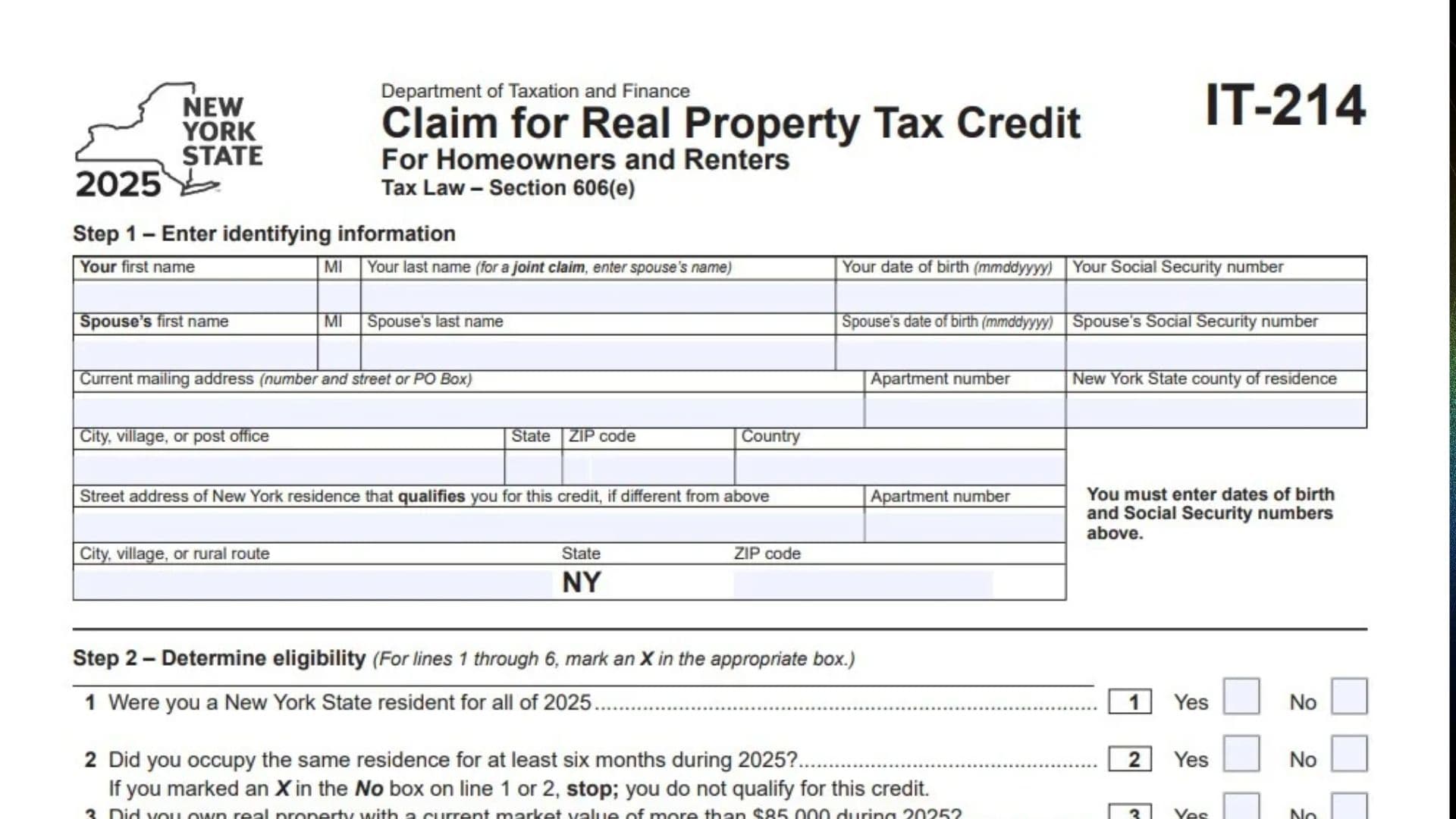
Form IT-214, Claim for Real Property Tax Credit, is a New York State tax form used by eligible homeowners and renters to claim a credit based on their housing costs and financial circumstances during the 2025 tax year. The form is administered by the New York State Department of Taxation and Finance under Section 606(e) of the New York Tax Law. The purpose of this form is to provide financial relief to qualifying New York residents who have paid property taxes directly as homeowners or indirectly through their rent as tenants. It collects personal identification details, residency information, household eligibility details, federal adjusted gross income (FAGI), rental payments or property tax expenses, and banking information when direct deposit is requested.
Both homeowners and renters can use this form, but certain sections apply exclusively to one group. Applicants must satisfy the residency, income, property ownership, and other eligibility requirements before calculating their credit. The form also considers whether the taxpayer, spouse, or a dependent is 65 or older when determining the applicable credit amount.
Completing Form IT-214 accurately is important because incorrect income figures, rental calculations, property tax amounts, or eligibility answers can affect the credit amount or result in an ineligible claim. Applicants should review every section carefully before submitting the form.
How To File Form IT-214
Form IT-214 can be submitted in two ways, depending on whether you are also filing a New York State income tax return.
If you are filing a New York State income tax return: Attach Form IT-214 to your New York State income tax return. If you use Form IT-201, enter the credit amount calculated on line 20 of IT-214 on line 67 of Form IT-201.
If you are not filing a New York State income tax return: Complete Form IT-214 separately and mail it to:
NYS TAX PROCESSING
PO BOX 15192
ALBANY NY 12212-5192
You must also select how you want to receive your refund. You can choose direct deposit by providing your bank account information or request a paper check mailed to your current mailing address.
Information To Prepare Before Filing
Before completing the form, gather the following information:
- Your name, date of birth, Social Security number, and current address.
- Your spouse’s information, if filing a joint claim.
- Your New York State county of residence.
- Federal adjusted gross income from your 2025 federal income tax return.
- Total rent paid during 2025, if you are a renter.
- Property taxes and special assessments paid during 2025, if you are a homeowner.
- The number of months you paid rent during 2025.
- Bank routing and account numbers if requesting direct deposit.
- Paid tax preparer information, if a preparer completed the form.
Keep relevant income, rental, and property tax records available when completing the calculations. For items specifically marked as requiring additional instructions, consult the applicable New York State IT-214 instructions.
How To Complete Form IT-214
The 2025 Form IT-214 contains six main steps. Each step collects information or calculates an amount used to determine your eligibility and potential credit.
Step 1: Enter Identifying Information
This section collects the personal details and residential address information needed to identify the applicant and establish the qualifying New York residence.
Your First Name, Middle Initial, and Last Name
Enter your legal first name, middle initial, and last name in the appropriate fields. For a joint claim, follow the form’s instruction regarding entering your spouse’s name in the last-name field.
Your Date of Birth
Enter your date of birth using the MMDDYYYY format. Make sure the information matches your official records.
Your Social Security Number
Enter your Social Security number accurately. This information is required to process your claim.
Spouse’s First Name, Middle Initial, and Last Name
If you are filing jointly, provide your spouse’s first name, middle initial, and last name in the designated fields.
Spouse’s Date of Birth and Social Security Number
Enter your spouse’s date of birth in MMDDYYYY format and provide their Social Security number.
Current Mailing Address
Enter your current mailing address, including the street number and street name or PO Box. Provide your apartment number if applicable.
New York State County of Residence
Enter the name of the New York State county where you currently reside.
City, Village, or Post Office
Provide the city, village, or post office associated with your mailing address.
State, ZIP Code, and Country
Enter your state, ZIP code, and country in the appropriate fields.
Street Address of Your Qualifying New York Residence
If the New York residence that qualifies you for the credit is different from your current mailing address, enter its complete street address.
Apartment Number, City, Village, or Rural Route
Provide the apartment number, if applicable, and the city, village, or rural route associated with the qualifying residence.
State and ZIP Code
Enter the state and ZIP code of the qualifying New York residence. The state field is designated for New York (NY).
If your qualifying residence and mailing address are the same, the separate residence address does not need to be different. Remember that the form requires the applicant’s and spouse’s dates of birth and Social Security numbers.
Step 2: Determine Eligibility
This section contains six eligibility questions and an additional information section for individuals aged 65 or older. Answer each question by marking an X in the appropriate Yes or No box.
Line 1: New York State Residency
Indicate whether you were a resident of New York State throughout the entire 2025 tax year.
Select Yes if you maintained New York State residency for all of 2025. Otherwise, select No. If you answer No, stop because you do not qualify for this credit.
Line 2: Occupancy of the Same Residence
Indicate whether you occupied the same residence for at least six months during 2025.
Select Yes if you lived in the same residence for six months or longer. Select No if you did not meet this requirement. If you answer No, you are not eligible to claim the credit.
Line 3: Ownership of High-Value Real Property
Indicate whether you owned real property with a current market value greater than $85,000 during 2025.
Select Yes if you owned property exceeding this value. Select No if you did not. A Yes answer makes you ineligible for the credit, and you must stop completing the claim.
Line 4: Dependency on Another Taxpayer
Indicate whether another taxpayer could claim you as a dependent on their 2025 federal income tax return.
Select Yes if someone else could claim you as a dependent. Otherwise, select No. If you answer Yes, you do not qualify for this credit.
Line 5: Public Housing or Tax-Exempt Residence
Indicate whether you lived in public housing or another residence that was completely exempt from real property taxes during 2025.
Select Yes if your residence falls into either category. Select No if it does not. A Yes answer makes you ineligible for the credit.
Line 6: Nursing Home Residency
Indicate whether you lived in a nursing home during 2025.
Select Yes or No as appropriate. If you select Yes, review the additional instructions applicable to nursing home residents before proceeding.
Line 7: Information About Individuals Aged 65 or Older
Complete this section if you, your spouse (if married), or a dependent was 65 years old or older.
The form provides space to enter the following information:
- A – First Name and Last Name: Enter the full name of the qualifying individual.
- B – Social Security Number: Enter that individual’s Social Security number.
- C – Date of Birth: Enter the individual’s date of birth using the MMDDYYYY format.
This information is important because it determines which credit calculation table applies when completing line 20.
Step 3: Determine Excess of Federal Adjusted Gross Income
This step calculates an amount based on your federal adjusted gross income and the applicable percentage rate.
Line 8: Federal Adjusted Gross Income (FAGI)
Enter your federal adjusted gross income for the 2025 tax year.
Use the FAGI amount from your federal income tax return. If the amount on this line exceeds $18,000, you do not qualify for the credit and must stop completing the form.
Line 9: Applicable FAGI Rate
Find the income range containing your line 8 amount in Table 1 on page 3. Enter the corresponding decimal rate on this line.
The applicable rates are:
| Federal Adjusted Gross Income | Rate |
|---|---|
| $0–$3,000 | 0.035 |
| $3,001–$5,000 | 0.040 |
| $5,001–$7,000 | 0.045 |
| $7,001–$9,000 | 0.050 |
| $9,001–$11,000 | 0.055 |
| $11,001–$14,000 | 0.060 |
| $14,001–$18,000 | 0.065 |
Choose the rate that matches your federal adjusted gross income.
Line 10: Calculated FAGI Amount
Multiply the amount on line 8 by the rate entered on line 9.
Enter the result on line 10. This calculated amount will be used later when determining your eligibility for the credit.
Step 4: Compute Real Property Tax
This step is divided into two sections. Renters complete lines 11–14, while homeowners complete lines 15–17. Complete only the section that applies to your housing situation.
Renters Only
Line 11: Total Rent Paid During 2025
Enter the total amount of rent you paid during the 2025 calendar year.
Do not include any portion of your rent that was subsidized. Only include the amount you actually paid.
Line 12: Adjusted Rent
Calculate your adjusted rent using the percentage that corresponds to the services or additional charges included in your rental payment.
Use the following calculation:
| Charges Included in Rent | Percentage to Apply |
|---|---|
| Heat, gas, electricity, furnishings, and board | 50% |
| Heat, gas, electricity, and furnishings | 75% |
| Heat, gas, and electricity | 80% |
| Heat or heat and gas | 85% |
| None of the above | 100% |
Multiply the amount on line 11 by the applicable percentage and enter the result on line 12.
For example, if your rent includes heat, gas, and electricity, multiply your total rent by 80%.
Line 13: Average Monthly Adjusted Rent
Divide the adjusted rent on line 12 by the number of months you paid rent during 2025.
Enter the calculated average monthly amount on line 13.
If the amount on line 13 exceeds $450, you do not qualify for the credit and must stop completing the form.
Line 14: Calculate 25% of Adjusted Rent
Multiply the amount on line 12 by 25% (0.25).
Enter the result on line 14. This amount must also be transferred to line 18 when calculating your credit.
Homeowners Only
Line 15: Real Property Taxes Paid During 2025
Enter the amount of real property taxes you paid during 2025.
Use the applicable instructions to determine which property tax payments qualify for this calculation.
Line 16: Special Assessments
Enter the amount of special assessments applicable to your property during 2025.
Use the relevant instructions when determining the amount to report.
Line 17: Total Real Property Taxes and Special Assessments
Add the amounts reported on line 15 and line 16.
Enter the combined amount on line 17. This total will be transferred to line 18 when calculating your credit.
Step 5: Calculate the Credit Amount
This step combines the information from the previous calculations to determine the amount of your real property tax credit.
Line 18: Eligible Rent or Property Tax Amount
Enter the appropriate amount based on whether you are a renter or homeowner.
- Renters: Transfer the amount from line 14.
- Homeowners: Transfer the amount from line 17.
If the amount on line 18 is zero or less, you cannot claim the credit and must stop completing the form.
Line 19: Calculated FAGI Amount
Transfer the amount from line 10 to line 19.
Compare this amount with the amount entered on line 18. If line 19 is equal to or greater than line 18, you do not qualify for the credit.
Line 20: Final Real Property Tax Credit
Use the appropriate table on page 3 to determine your credit amount. Your selection depends on whether an entry was made on line 7 and the amount reported on line 8.
Table A: Taxpayers Aged 65 or Older
Use Table A if you made an entry on line 7 indicating that you, your spouse, or a dependent was 65 or older.
| Federal Adjusted Gross Income | Credit Amount |
|---|---|
| $0–$3,000 | $375 |
| $3,001–$5,000 | $330 |
| $5,001–$7,000 | $300 |
| $7,001–$9,000 | $260 |
| $9,001–$11,000 | $230 |
| $11,001–$14,000 | $200 |
| $14,001–$18,000 | $150 |
Table B: Taxpayers Under Age 65
Use Table B if you did not make an entry on line 7.
| Federal Adjusted Gross Income | Credit Amount |
|---|---|
| $0–$5,000 | $75 |
| $5,001–$9,000 | $70 |
| $9,001–$14,000 | $60 |
| $14,001–$18,000 | $50 |
Find the income range containing your line 8 amount and enter the corresponding credit amount on line 20.
Receiving Your Credit
If you are filing Form IT-214 with your New York State income tax return, transfer the amount from line 20 to line 67 of Form IT-201.
If you are not filing a New York State income tax return, select one of the following refund methods:
Direct Deposit
Choose direct deposit if you want the Tax Department to transfer your refund directly into your bank account. You must complete the bank account information in Step 6.
Paper Check
Choose this option if you want your refund issued as a physical check and mailed to your current mailing address.
For joint claims, the check will include both spouses’ names, and both spouses must sign it. Paper checks can take several weeks to arrive.
Mark an X in the appropriate box to indicate your preferred refund method.
Step 6: Enter Account Information for Direct Deposit
Complete this section if you selected direct deposit as your refund method. The information provided allows the Tax Department to deposit your refund into the designated bank account.
Social Security Number
Enter your Social Security number in the identification field at the top of page 3.
Foreign Bank Account Declaration
If your refund will be deposited into a bank account located outside the United States, mark an X in the designated checkbox.
Line 21: Direct Deposit Information
Complete this section to provide the banking details required for electronic refund payments.
Line 21a: Account Type
Select the type of bank account that will receive your refund. Choose one of the following:
- Personal checking
- Personal savings
- Business checking
- Business savings
Select only the account type that matches your bank account.
Line 21b: Routing Number
Enter the routing number associated with your bank account. Check the number carefully to ensure the refund is sent to the correct financial institution.
Line 21c: Account Number
Enter your complete bank account number. Verify that it matches the account selected for direct deposit.
Third-Party Designee
Indicate whether you authorize a third party to discuss your tax claim with the Tax Department by selecting Yes or No.
If applicable, provide the following information:
- Designee’s Name: Enter the full name of the person you designate.
- Designee’s Phone Number: Provide the person’s contact telephone number.
- Personal Identification Number (PIN): Enter the required PIN in the designated field.
- Email: Provide the designee’s email address.
Paid Preparer Information
This section must be completed by the paid tax preparer when a professional prepares the claim.
- Preparer’s Signature: The paid preparer must sign the form.
- Preparer’s Printed Name: Enter the preparer’s full name.
- Firm’s Name: Provide the tax preparation firm’s name. If the preparer is self-employed, enter their own name as applicable.
- Address: Enter the preparer’s business or mailing address.
- Preparer’s NYTPRIN: Enter the New York Tax Preparer Identification Number.
- NYTPRIN Exclusion Code: Provide the applicable exclusion code, if required.
- Preparer’s PTIN or SSN: Enter the preparer’s Preparer Tax Identification Number or Social Security number, as applicable.
- Employer Identification Number: Enter the firm’s or preparer’s applicable Employer Identification Number.
- Date: Enter the date the preparer completed or signed the form.
- Email: Provide the preparer’s email address.
Taxpayer Signature and Contact Information
The taxpayer must complete the signature section to certify the claim.
- Your Signature: Sign the form to confirm the information provided.
- Your Occupation: Enter your current occupation.
- Spouse’s Signature and Occupation: For a joint claim, provide your spouse’s signature and occupation.
- Date: Enter the date you signed the form. The spouse must also provide the applicable signing date.
- Daytime Phone Number: Enter a telephone number where the Tax Department can reach you during the day.
- Email: Provide your email address for contact purposes.
Make sure all required signatures and contact details are completed before submitting the claim.
Final Review Before Filing
Before mailing Form IT-214 or attaching it to your New York State income tax return, review the following checklist to reduce the risk of errors or processing delays.
- Your name, date of birth, and Social Security number are correct.
- Your spouse’s information is complete, if filing jointly.
- Your current mailing address and New York qualifying residence information are accurate.
- Your New York State county of residence is correctly entered.
- You answered all eligibility questions on lines 1 through 6.
- You stopped completing the claim if your answers indicated that you were ineligible.
- You completed line 7 if you, your spouse, or a dependent was 65 or older.
- Your federal adjusted gross income on line 8 does not exceed $18,000.
- You selected the correct rate from Table 1 for line 9.
- Your calculation on line 10 is correct.
- If you are a renter, you excluded subsidized rent and applied the correct percentage on line 12.
- You calculated the average monthly adjusted rent correctly on line 13.
- If you are a homeowner, you entered the applicable property taxes and special assessments.
- You transferred the correct amount to line 18.
- You checked the eligibility comparison between lines 18 and 19.
- You selected the correct credit amount from Table A or Table B on line 20.
- You selected a refund method if filing the claim separately.
- Your banking information is accurate if requesting direct deposit.
- You completed the third-party designee section if applicable.
- The paid preparer completed their section, if applicable.
- You and your spouse signed the form when required.
- You included your daytime telephone number and email address.
- You are submitting the form with your New York State income tax return or mailing it to the correct processing address.
A carefully completed Form IT-214 helps ensure that your New York State real property tax credit claim contains the necessary eligibility information, calculations, and payment details. Review all entries before submission and consult the applicable tax instructions whenever the form requires additional clarification.