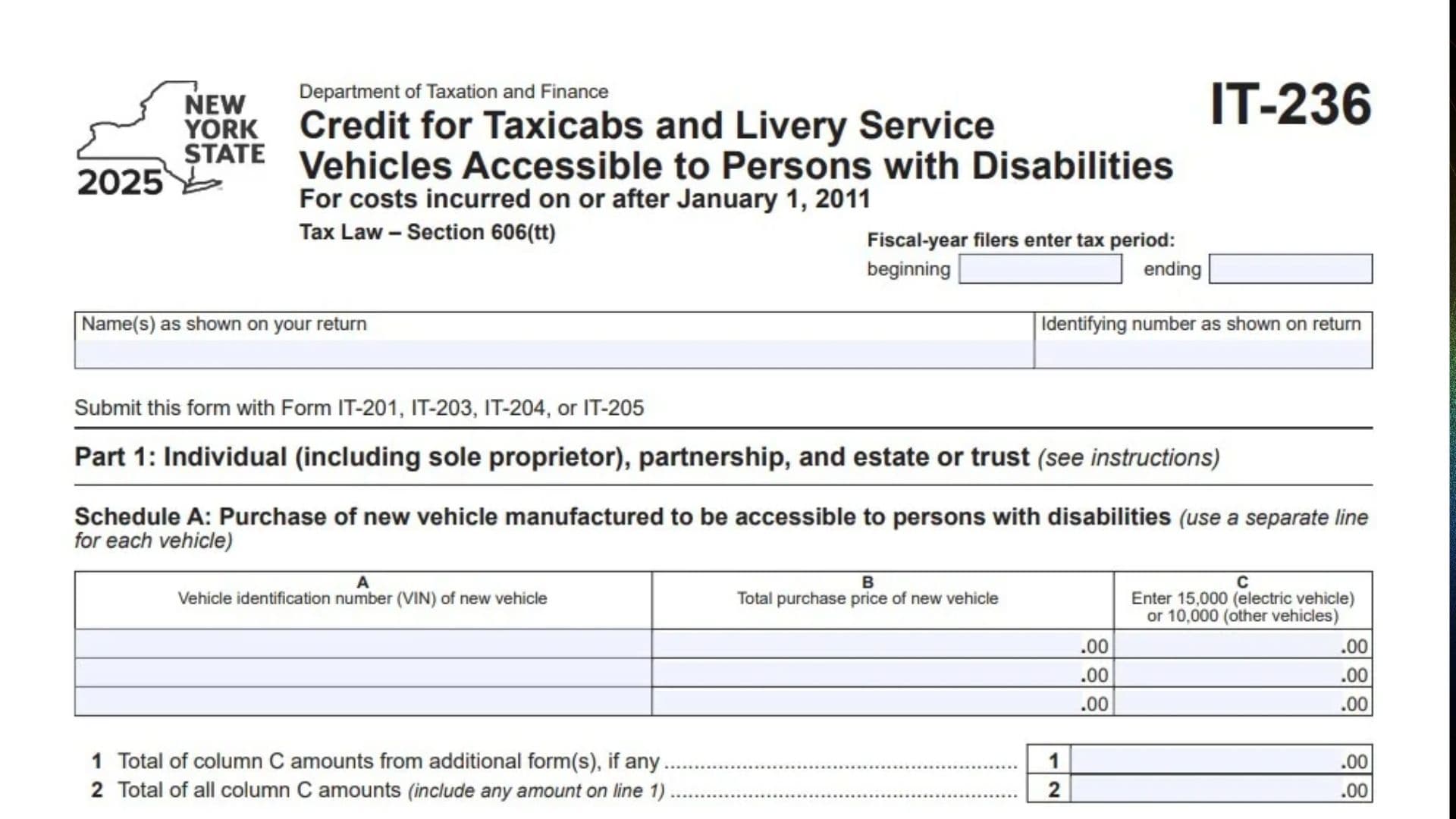
New York Form IT-236, Credit for Taxicabs and Livery Service Vehicles Accessible to Persons With Disabilities, is a tax form used by eligible taxpayers to claim a credit for qualifying costs associated with purchasing new vehicles manufactured to be accessible to persons with disabilities or upgrading existing motor vehicles to provide accessibility. The credit is authorized under Section 606(tt) of the New York Tax Law and applies to qualifying costs incurred on or after January 1, 2011. The form is designed to provide tax relief to individuals, sole proprietors, partnerships, estates, and trusts that incur eligible vehicle purchase or upgrade expenses. It also allows partners, shareholders of New York S corporations, and beneficiaries of estates or trusts to report their allocated shares of the credit. The form collects information about newly purchased vehicles, vehicle identification numbers (VINs), purchase prices, upgrade dates, incremental upgrade costs, and credit amounts. For new vehicles, the form distinguishes between electric vehicles and other vehicles, with specified amounts of $15,000 and $10,000, respectively. For upgraded vehicles, the allowable amount is limited to the lesser of the qualifying incremental cost or the applicable $15,000 or $10,000 limit. The form also includes sections for identifying partnerships, S corporations, estates, and trusts from which taxpayers received credit allocations. Fiduciaries must report credit amounts allocated to beneficiaries and the fiduciary’s own share. In addition, taxpayers can include eligible credit carried forward from the previous tax year and calculate the amount that can be applied against their current-year tax liability. Completing Form IT-236 accurately is important because the credit depends on the qualifying vehicle, purchase or upgrade costs, applicable limits, entity allocations, available carryover amounts, and current-year tax liability. The form is used for costs incurred on or after January 1, 2011, and must be attached to the appropriate New York State tax return. It does not function as a standalone tax return; instead, it supports the taxpayer’s claim for the credit under New York Tax Law Section 606(tt).
How To File Form IT-236
Form IT-236 must be submitted with the appropriate New York State income tax or fiduciary tax return. The form identifies four possible returns:
- Form IT-201 – Resident Income Tax Return.
- Form IT-203 – Nonresident and Part-Year Resident Income Tax Return.
- Form IT-204 – Partnership Return.
- Form IT-205 – Fiduciary Income Tax Return.
Select the appropriate return based on your taxpayer classification and filing situation.
Fiscal-year filers must enter the beginning and ending dates of their tax period in the spaces provided at the top of the form.
Before completing Form IT-236, prepare the following information:
- Your name as shown on the applicable New York State tax return.
- Your identifying number, such as a Social Security number or Employer Identification Number (EIN), as applicable.
- The beginning and ending dates of the tax period for fiscal-year filers.
- The Vehicle Identification Number (VIN) of each newly purchased qualifying vehicle.
- The total purchase price of each new vehicle.
- Information identifying whether each new vehicle is electric or another type of vehicle.
- The VIN of each upgraded motor vehicle.
- The dates when incremental upgrade costs were incurred.
- The qualifying incremental costs for each vehicle.
- Information about partnerships, New York S corporations, estates, or trusts from which you received a share of the credit.
- Beneficiary names and identifying numbers, if filing as a fiduciary.
- The amount of credit carried forward from the previous year’s Form IT-236.
- Current-year tax liability and other credit information needed to calculate the allowable credit.
Important: Use a separate entry line for each qualifying vehicle in Schedule A and Schedule B. If the available space is insufficient, use additional forms as permitted by the form instructions and include the applicable totals.

How To Complete Form IT-236
Form IT-236 contains six main parts. Part 1 includes Schedule A and Schedule B for calculating qualifying vehicle purchase and upgrade credits. Parts 2 through 4 cover credit received through other entities and fiduciary allocations. Part 5 calculates the total available credit, while Part 6 determines how much can be applied against current-year tax and how much can be carried forward.
Follow the instructions below in the same order as the form.
Taxpayer and Tax Period Information
The top section identifies the taxpayer and the New York State tax return associated with the credit claim.
Name(s) as Shown on Your Return
Enter your name exactly as it appears on the New York State tax return to which Form IT-236 will be attached.
For an individual, enter the taxpayer’s name. For a partnership, estate, or trust, use the entity name shown on its applicable return.
Identifying Number as Shown on Return
Enter the identifying number associated with the applicable tax return.
Use the appropriate taxpayer identification number, such as a Social Security number or Employer Identification Number (EIN).
Fiscal-Year Filers: Beginning
If you file using a fiscal year rather than a calendar year, enter the beginning date of your tax period.
Provide the applicable month, day, and year.
Fiscal-Year Filers: Ending
Enter the ending date of your fiscal tax period.
Make sure the beginning and ending dates correspond to the reporting period used on your New York State tax return.
Part 1: Individual, Sole Proprietor, Partnership, and Estate or Trust
Part 1 calculates the credit associated with purchasing new vehicles manufactured to be accessible to persons with disabilities and upgrading existing motor vehicles to provide accessibility.
It contains two schedules:
- Schedule A: Purchase of new accessible vehicles.
- Schedule B: Upgrade of motor vehicles.
Complete the schedules that apply to your qualifying vehicle expenses.
Schedule A: Purchase of New Vehicle Manufactured to Be Accessible to Persons With Disabilities
Schedule A is used to report newly purchased vehicles manufactured to be accessible to persons with disabilities.
Use a separate line for each qualifying vehicle. The schedule contains three columns for identifying the vehicle, reporting its purchase price, and entering the applicable amount.
Column A: Vehicle Identification Number (VIN) of New Vehicle
Enter the Vehicle Identification Number (VIN) of each newly purchased qualifying vehicle.
The VIN uniquely identifies the vehicle. Verify the number against the vehicle registration, purchase documentation, or manufacturer’s records.
Use a separate row for each vehicle.
Column B: Total Purchase Price of New Vehicle
Enter the total purchase price of each newly purchased vehicle.
Use the purchase amount supported by the applicable vehicle purchase documentation.
Make sure the amount corresponds to the vehicle identified in Column A.
Column C: Applicable Amount for Electric or Other Vehicles
Enter $15,000 for an electric vehicle or $10,000 for another qualifying vehicle, as indicated by the form.
Select the applicable amount based on the vehicle type.
Use a separate entry for each vehicle reported in Schedule A.
Line 1: Total of Column C Amounts From Additional Forms
If you used additional Forms IT-236 to report more qualifying vehicles, enter the combined Column C amounts from those additional forms.
If no additional forms were used, follow the applicable instructions for this line.
Line 2: Total of All Column C Amounts
Add all applicable amounts reported in Column C of Schedule A.
Include the amount entered on Line 1, if applicable.
The calculation is:
Schedule A Column C amounts + Line 1 = Line 2
Enter the combined total on Line 2.
This amount is used in the overall credit calculation in Schedule B and Part 5.
Schedule B: Upgrade of Motor Vehicle
Schedule B is used to report qualifying costs incurred to upgrade existing motor vehicles so they are accessible to persons with disabilities.
Use a separate line for each upgraded vehicle.
The schedule contains four columns for vehicle identification, the date costs were incurred, the incremental cost, and the allowable amount subject to the applicable limit.
Column A: VIN of Upgraded Vehicle
Enter the Vehicle Identification Number of each motor vehicle that was upgraded.
Verify the VIN against the vehicle’s registration or other vehicle identification records.
Use a separate row for each upgraded vehicle.
Column B: Date Incremental Costs Incurred
Enter the date the incremental upgrade costs were incurred.
Use the MMDDYYYY format.
For example, if the qualifying upgrade costs were incurred on March 15, 2025, enter 03152025.
Make sure the date corresponds to the actual qualifying expense.
Column C: Incremental Cost
Enter the qualifying incremental cost associated with upgrading the motor vehicle.
Use the amount determined under the applicable Form IT-236 instructions.
The incremental cost should relate to the qualifying accessibility upgrade rather than unrelated vehicle expenses.
Column D: Allowable Amount
Enter the lesser of the amount in Column C or the applicable vehicle limit.
The form provides two limits:
- $15,000 for an electric vehicle.
- $10,000 for another vehicle.
The calculation is:
Smaller of Column C or the applicable $15,000 or $10,000 limit = Column D
For example, if the qualifying incremental cost for an electric vehicle is $18,000, the allowable amount is $15,000.
If the qualifying incremental cost for another vehicle is $8,000, the allowable amount is $8,000.
Complete this calculation separately for each upgraded vehicle.
Line 3: Total of Schedule B, Column D Amounts From Additional Forms
If additional Forms IT-236 were used to report upgraded vehicles, enter the combined Column D amounts from those forms.
If no additional forms were used, follow the applicable instructions for this line.
Line 4: Total of All Schedule B, Column D Amounts
Add all allowable amounts reported in Column D of Schedule B.
Include the amount entered on Line 3, if applicable.
The calculation is:
Schedule B Column D amounts + Line 3 = Line 4
Enter the combined total on Line 4.
Line 5: Total Vehicle Purchase and Upgrade Amounts
Add the amount from Line 2 to the amount from Line 4.
The calculation is:
Line 2 + Line 4 = Line 5
Enter the result on Line 5.
The amount represents the combined total from the new vehicle purchase and motor vehicle upgrade schedules.
Transfer Instructions for Line 5
The next step depends on your taxpayer classification.
- Fiduciaries: Include the Line 5 amount on the Total line of Part 4, Column C.
- All others: Enter the Line 5 amount on Part 5, Line 10.
Make sure the amount is transferred to the correct section.
Part 2: Partnership, New York S Corporation, Estate, and Trust Information
Part 2 identifies the partnerships, New York S corporations, estates, and trusts from which you received a share of the Credit for Taxicabs and Livery Service Vehicles Accessible to Persons With Disabilities.
Complete this section if you were:
- A partner in a partnership and received a share of the credit.
- A shareholder of a New York S corporation and received a share of the credit.
- A beneficiary of an estate or trust and received a share of the credit.
Provide the requested information for each applicable entity.
Column A: Name
Enter the complete name of the partnership, New York S corporation, estate, or trust from which you received the credit.
Use the official entity name shown in its tax records.
Column B: Type
Enter the appropriate entity classification code.
Use the following codes:
- P – Partnership.
- S – New York S corporation.
- ET – Estate or trust.
Select the code that correctly identifies the entity distributing the credit.
Column C: Employer Identification Number
Enter the Employer Identification Number (EIN) of the partnership, S corporation, estate, or trust.
Verify the number against the entity’s tax records.
If you received credit from multiple entities, provide the information for each applicable entity in the available spaces.
Important: If you complete Part 2, you must also complete Parts 3 and 5 and, if applicable, Part 6.
Part 3 calculates the credit received through partnerships, New York S corporations, estates, and trusts.
Complete the lines that apply to your relationship with the entity distributing the credit.
Line 6: Partner’s Share of Credit
Enter your share of the Credit for Taxicabs and Livery Service Vehicles Accessible to Persons With Disabilities received from a partnership.
Use the credit amount allocated to you by the partnership.
Line 7: S Corporation Shareholder’s Share of Credit
Enter your share of the credit received from a New York S corporation.
Use the amount allocated to you as a shareholder.
Line 8: Beneficiary’s Share of Credit
Enter your share of the credit received from an estate or trust.
Use the amount allocated to you as a beneficiary.
Line 9: Total Share of Credit
Add the amounts reported on Lines 6, 7, and 8.
The calculation is:
Line 6 + Line 7 + Line 8 = Line 9
Enter the combined amount on Line 9.
Transfer Instructions for Line 9
The treatment of this amount depends on your taxpayer classification.
- Fiduciaries: Include the Line 9 amount on the Total line of Part 4, Column C.
- All others: Enter the Line 9 amount on Part 5, Line 11.
Use the correct transfer destination based on your filing situation.
Part 4 is used by fiduciaries to report how the vehicle accessibility credit is allocated between beneficiaries and the fiduciary.
The schedule contains three columns.
Column A: Beneficiary’s Name
Enter the name of each beneficiary receiving a share of the credit.
The beneficiary’s name must match the name reported on Form IT-205, Schedule C.
Make sure the spelling and identifying information are consistent with the fiduciary tax return.
Column B: Identifying Number
Enter the identifying number associated with each beneficiary.
Use the appropriate taxpayer identification number for the individual listed in Column A.
Column C: Share of Credit
Enter the amount of the vehicle accessibility credit allocated to each beneficiary.
Use the credit amount assigned to the beneficiary under the applicable allocation records.
Total: Beneficiaries’ Share of Credit
Enter the total amount of credit allocated to beneficiaries.
The form specifically instructs fiduciaries to include the amount from Part 1, Line 5, plus the amount from Part 3, Line 9.
The calculation is:
Line 5 + Line 9 = Total Beneficiary and Fiduciary Credit Amount
Enter the combined amount on the Total line in Column C.
Allocate the applicable credit amounts among the beneficiaries and fiduciary in the appropriate rows.
Fiduciary
Enter the fiduciary’s own share of the credit in the designated Fiduciary row under Column C.
Keep the fiduciary’s amount separate from the amounts allocated to individual beneficiaries.
The amount reported on the Fiduciary line is transferred to Part 5, Line 12.
Part 5: Calculation of Credit
Part 5 determines the total Credit for Taxicabs and Livery Service Vehicles Accessible to Persons With Disabilities available to the taxpayer.
The applicable line depends on whether the credit comes directly from qualifying vehicle expenses, through another entity, or through a fiduciary allocation.
Line 10: Credit for Individuals, Including Sole Proprietors, and Partnerships
Enter the amount from Part 1, Line 5.
This amount represents the combined qualifying vehicle purchase and upgrade amounts calculated in Part 1.
Transfer the amount without changing the calculation.
Line 11: Credit for Partners, S Corporation Shareholders, and Beneficiaries
Enter the amount from Part 3, Line 9.
Use the total credit received through the applicable partnership, New York S corporation, estate, or trust.
Line 12: Credit for Fiduciaries
Enter the amount from Part 4, Fiduciary line, Column C.
Use the fiduciary’s own share of the vehicle accessibility credit.
Do not enter the beneficiary allocations in this line.
Line 13: Carryover Credit From Last Year’s Form IT-236
Enter the unused credit carried forward from the previous year’s Form IT-236.
Use the carryover amount available for the current tax year.
Verify the amount against the previous year’s completed Form IT-236.
If no credit was carried forward, follow the applicable instructions for entering the amount.
Line 14: Total Credit
Add the amounts reported on Lines 10, 11, 12, and 13.
The calculation is:
Line 10 + Line 11 + Line 12 + Line 13 = Line 14
Enter the combined amount on Line 14.
This represents the total available credit before applying the current-year tax limitation.
Transfer Instructions for Line 14
The next step depends on your taxpayer classification.
- Partnerships: Enter the Line 14 amount and code 236 on Form IT-204, Line 147.
- All others: Complete Part 6 to determine the amount of credit that can be used and carried forward.
Part 6: Application of Credit and Calculation of Carryover
Part 6 determines how much of the available credit can be applied against the current year’s tax liability and how much remains available for the following tax year.
Complete this section if required based on your taxpayer classification.
Line 15: Total Credit
Enter the amount from Part 5, Line 14.
This represents the total vehicle accessibility credit available before applying the current-year tax limitation.
Line 16: Tax Due Before Credits
Enter the amount of tax due before applying tax credits.
Use the applicable tax calculation from your New York State tax return and follow the Form IT-236 instructions to determine the correct amount.
Line 17: Credits Applied Against the Tax Before This Credit
Enter the total amount of other tax credits already applied against the tax liability before using the vehicle accessibility credit.
Use the amount determined under the applicable instructions.
Do not include the credit reported on Form IT-236 itself.
Line 18: Net Tax
Subtract Line 17 from Line 16.
The calculation is:
Line 16 − Line 17 = Line 18
Enter the resulting amount on Line 18.
This represents the remaining tax liability available before applying the credit reported on Form IT-236.
Line 19: Amount Applied Against This Year’s Tax
Enter the amount of the vehicle accessibility credit applied against the current year’s tax liability.
Use the applicable instructions to determine the allowable amount.
The credit applied cannot exceed the available credit or the amount permitted under the applicable tax limitation.
Line 20: Amount of Credit Available for Carryover to Next Year
Subtract Line 19 from Line 15.
The calculation is:
Line 15 − Line 19 = Line 20
Enter the remaining amount on Line 20.
This represents the credit available to carry forward to the next tax year.
Verify that the amount agrees with the unused credit remaining after the current-year application.
Final Review Before Filing
Before submitting Form IT-236, review the following checklist to make sure all vehicle information, qualifying expenses, credit allocations, and carryover calculations are accurate.
Taxpayer and Tax Period Information
- Enter the taxpayer’s name as shown on the applicable New York State tax return.
- Verify the taxpayer identification number.
- Enter the beginning and ending dates if filing on a fiscal-year basis.
- Confirm that the form relates to qualifying costs incurred on or after January 1, 2011.
- Make sure the correct tax return is identified.
Part 1: Vehicle Purchase and Upgrade Information
- Complete Schedule A for each qualifying newly purchased accessible vehicle.
- Enter the correct VIN for each new vehicle.
- Report the total purchase price in Column B.
- Enter $15,000 for an electric vehicle or $10,000 for another vehicle in Column C.
- Complete Line 1 if additional forms were used.
- Calculate the total Schedule A amount on Line 2.
- Complete Schedule B for each qualifying upgraded vehicle.
- Enter the correct VIN for each upgraded vehicle.
- Enter the date incremental costs were incurred.
- Report the qualifying incremental cost in Column C.
- Apply the appropriate $15,000 or $10,000 limitation in Column D.
- Complete Line 3 if additional forms were used.
- Calculate the total Schedule B amount on Line 4.
- Add Lines 2 and 4 correctly on Line 5.
Part 2: Partnership, S Corporation, Estate, and Trust Information
- Complete Part 2 if you received credit through a partnership, New York S corporation, estate, or trust.
- Enter the correct legal name of each entity.
- Use the appropriate entity classification code.
- Verify each entity’s EIN.
- Make sure all applicable entities are listed.
Part 3: Credit Allocations Received
- Enter the partnership credit on Line 6, if applicable.
- Enter the S corporation credit on Line 7, if applicable.
- Enter the beneficiary credit on Line 8, if applicable.
- Add Lines 6, 7, and 8 correctly on Line 9.
- Transfer Line 9 to the correct destination based on your taxpayer classification.
Part 4: Beneficiary and Fiduciary Allocations
- Complete Part 4 if filing as a fiduciary.
- Verify beneficiary names against Form IT-205, Schedule C.
- Enter the correct beneficiary identifying numbers.
- Report each beneficiary’s share of credit in Column C.
- Include the amounts from Part 1, Line 5, and Part 3, Line 9, in the Total calculation as instructed.
- Report the fiduciary’s own share separately.
Part 5: Total Credit Calculation
- Enter the amount from Part 1, Line 5, on Line 10.
- Enter the amount from Part 3, Line 9, on Line 11.
- Enter the fiduciary’s share from Part 4, Column C, on Line 12.
- Verify the previous-year carryover credit on Line 13.
- Add Lines 10 through 13 correctly on Line 14.
- If filing as a partnership, transfer the amount with code 236 to Form IT-204, Line 147.
Part 6: Credit Application and Carryover
- Transfer the amount from Line 14 to Line 15.
- Enter tax due before credits on Line 16.
- Report previously applied credits on Line 17.
- Calculate net tax on Line 18.
- Determine the credit applied against the current year’s tax on Line 19.
- Calculate the available carryover on Line 20.
- Verify that the carryover amount is correctly recorded for the following tax year.
Final Filing Checks
- Review all VINs and vehicle purchase information.
- Verify the dates and incremental costs for vehicle upgrades.
- Check all applicable credit limits.
- Confirm that all entity and beneficiary allocations are accurate.
- Recheck all calculations and transferred amounts.
- Attach Form IT-236 to Form IT-201, IT-203, IT-204, or IT-205, as applicable.
- Retain copies of the completed form and supporting vehicle purchase and upgrade records.
Final Filing Reminder: New York Form IT-236 is used to claim the Credit for Taxicabs and Livery Service Vehicles Accessible to Persons With Disabilities under Tax Law Section 606(tt). The credit applies to qualifying costs incurred on or after January 1, 2011. Complete the applicable schedules for new vehicle purchases and accessibility upgrades, report any credit received through partnerships or other entities, and calculate the amount available for current-year use and future carryover. Make sure the completed form is attached to the appropriate New York State tax return.