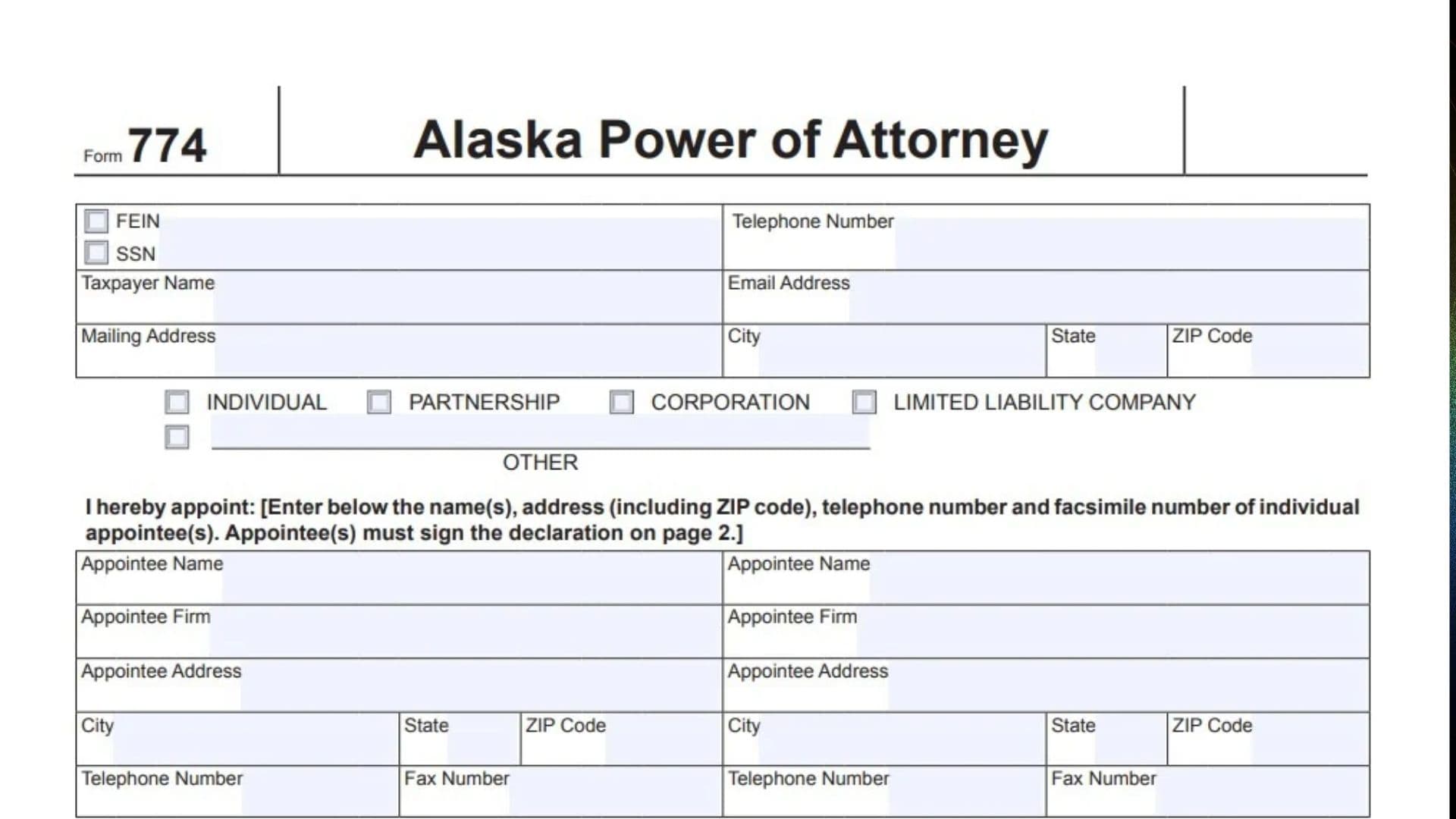
Alaska Form 774, Power of Attorney, is a legal authorization form used by taxpayers who want to appoint another individual to represent them before the Alaska Department of Revenue. It allows an authorized representative, known as an attorney-in-fact, to communicate with the department, receive confidential tax information, and perform specified actions on behalf of the taxpayer. The form can be used by individuals, partnerships, corporations, limited liability companies, and other eligible entities. It collects the taxpayer’s identification information, contact details, business structure, representative’s name and address, applicable tax types, and the tax years or periods covered by the authorization. It also allows taxpayers to determine which powers their representatives may exercise and which powers must remain restricted. The authorization generally covers matters involving the taxpayer’s rights, responsibilities, and liabilities under laws administered by the Alaska Department of Revenue. These matters may include preparing and filing documents, receiving confidential tax information, communicating with department personnel, and representing the taxpayer during audits, conferences, hearings, and other meetings. However, the individual appointed must qualify as a recognized representative under the department’s requirements. Eligible representatives generally include attorneys in good standing, licensed certified public accountants, individuals enrolled and actively authorized to practice before the IRS, certain officers or regular full-time employees, and immediate family members. The form also allows the taxpayer to limit the representative’s authority by checking specific restrictions. Completing Form 774 correctly is important because actions performed by the attorney-in-fact within the granted authority are binding on the taxpayer. The authorization also replaces previously filed powers of attorney covering the same tax matters and periods, except for any earlier authorizations specifically identified and preserved on the form.
How To File Alaska Form 774
Alaska Form 774 can be submitted electronically through Alaska Revenue Online or mailed to the Alaska Department of Revenue.
Electronic Filing
The department accepts Form 774 through Revenue Online:
Forms submitted through Revenue Online are treated as original documents and do not need to be mailed separately.
Mail Filing
If you do not submit the form through Revenue Online, the original signed document must be mailed to the Alaska Department of Revenue.
The form does not provide a specific mailing address. Check the department’s current contact information before sending the original document.
Before completing Form 774, prepare the following information:
- The taxpayer’s Federal Employer Identification Number (FEIN) or Social Security Number (SSN).
- The taxpayer’s full legal name.
- Telephone number and email address.
- Complete mailing address.
- Business structure, if applicable.
- Full name and contact information of each appointed representative.
- Representative’s company or firm name.
- Applicable Alaska tax types.
- Beginning and ending tax years or periods covered by the authorization.
- Any specific powers that should be excluded.
- Information about previously filed powers of attorney that should remain effective.
- The taxpayer’s authorized signature and printed name.
- The representative’s declaration and signatures.
If two individuals are being appointed, complete the information for both representatives and make sure each person completes the required declaration on page 2.
How To Complete Alaska Form 774
Taxpayer Identification Information
The first section identifies the taxpayer granting authority to another individual.
FEIN: Federal Employer Identification Number
Check the FEIN box if the taxpayer uses a Federal Employer Identification Number.
Enter the business’s complete FEIN in the designated field. Use the identification number associated with the taxpayer’s Alaska tax accounts.
SSN: Social Security Number
Check the SSN box if the taxpayer is an individual using a Social Security Number.
Enter the taxpayer’s SSN in the designated field.
Select the identification type that applies to the taxpayer.
Telephone Number
Enter the taxpayer’s contact telephone number.
Provide an active number where the Alaska Department of Revenue can reach the taxpayer if necessary.
Taxpayer Name
Enter the taxpayer’s full legal name.
For an individual, use the name associated with the tax account. For a business or organization, enter its registered legal name.
Email Address
Enter the taxpayer’s active email address.
Use an email address that can receive relevant tax communications.
Mailing Address
Enter the taxpayer’s complete mailing address.
Include the street address, building number, suite, or other applicable details.
City
Enter the city associated with the mailing address.
State
Enter the state associated with the mailing address.
ZIP Code
Enter the ZIP code associated with the mailing address.
Taxpayer Entity Type
Select the checkbox that identifies the legal structure of the taxpayer.
Individual
Check this option if the taxpayer is an individual rather than a business entity.
Partnership
Select this option if the taxpayer is a partnership.
Corporation
Check this option if the taxpayer is a corporation.
Limited Liability Company
Select this option if the taxpayer operates as a limited liability company (LLC).
Other
Check this option if the taxpayer’s legal structure does not match the listed categories.
Enter the applicable entity type in the space provided.
Appointed Representative Information
The next section identifies the individual or individuals authorized to represent the taxpayer before the Alaska Department of Revenue.
The form provides spaces for two representatives. Each appointed individual must complete the required declaration on page 2.
Appointee Name
Enter the full legal name of the first appointed representative.
If appointing a second representative, enter that person’s full name in the second Appointee Name field.
The individual must qualify as a recognized representative under the department’s requirements.
Appointee Firm
Enter the name of the company, accounting firm, law firm, or other organization associated with the representative.
If the representative does not work for a firm, provide the applicable information or leave the field blank if appropriate.
Appointee Address
Enter the representative’s complete mailing address.
Provide enough information to identify where official correspondence can be sent.
City
Enter the city associated with the representative’s address.
Complete this field separately for each appointed representative.
State
Enter the state associated with the representative’s mailing address.
ZIP Code
Enter the representative’s ZIP code.
Make sure the postal information is accurate for each individual.
Telephone Number
Enter the appointed representative’s contact telephone number.
Provide a working number where the department can reach the representative.
Fax Number
Enter the representative’s fax number.
Complete this field for each representative when applicable.
Tax Years and Periods Covered
This section establishes the period during which the representative is authorized to act on behalf of the taxpayer.
From Tax Year/Period
Enter the beginning tax year or period covered by the power of attorney.
Identify the first tax year or reporting period for which the representative can access information and provide assistance.
To Tax Year/Period
Enter the ending tax year or period covered by the authorization.
Make sure the beginning and ending periods clearly define the intended scope of representation.
Alaska Tax Types
The form allows taxpayers to grant authority for all Alaska tax types or select individual tax categories.
All Tax Types
Check this box if the representative should be authorized to handle all tax types administered by the Alaska Department of Revenue within the applicable tax periods.
If you select this option, you do not need to select individual tax categories.
Alaska Seafood Marketing
Check this box to authorize representation concerning Alaska seafood marketing tax matters.
Alcoholic Beverage
Select this option for matters involving alcoholic beverage taxes.
Charitable Gaming
Check this box for tax matters involving charitable gaming activities.
Commercial Passenger Vessel
Select this option for commercial passenger vessel tax matters.
Common Property Fishery
Check this box for tax matters involving common property fisheries.
Corporate Income
Select this option for Alaska corporate income tax matters.
Credit Application Submitted On
Check this box when the authorization relates to a credit application.
Enter the date the applicable credit application was submitted in the space provided.
Dive Fishery Management
Select this option for dive fishery management tax matters.
Electric Cooperative
Check this box for tax matters involving electric cooperatives.
Estate
Select this option for estate-related tax matters.
Film Production Tax Credits
Check this box for matters involving Alaska film production tax credits.
Fisheries Business
Select this option for fisheries business tax matters.
Fishery Resource Landing
Check this box for fishery resource landing tax matters.
Large Passenger Vessel
Select this option for large passenger vessel tax matters.
Marijuana
Check this box for Alaska marijuana tax matters.
Mining License
Select this option for mining license tax matters.
Motor Fuel
Check this box for motor fuel tax matters.
Oil and Gas Production
Select this option for oil and gas production tax matters.
Oil and Gas Property
Check this box for oil and gas property tax matters.
Regional Seafood Development
Select this option for regional seafood development tax matters.
Salmon Enhancement
Check this box for salmon enhancement tax matters.
Tire Fee
Select this option for matters involving tire fees.
Tobacco
Check this box for tobacco tax matters.
Telephone Cooperative
Select this option for telephone cooperative tax matters.
Vehicle Rental
Check this box for vehicle rental tax matters.
Select only the tax categories that apply to the intended authorization unless you have selected the all-tax-types option.
Copy of Assessments and Decisions
Send a Carbon Copy of Assessments and Decisions to Attorney-in-Fact
Check this box if you want the appointed representative to receive copies of assessments and decisions issued in proceedings involving the selected tax matters.
This allows the representative to receive copies of relevant department notices and decisions.
Leave the box unchecked if you do not want this additional notification arrangement.
Representative’s Authority and Restrictions
The power of attorney generally grants the appointed representative authority to receive confidential taxpayer information and perform actions on the taxpayer’s behalf concerning the selected tax matters.
The form provides several checkboxes that allow the taxpayer to exclude specific powers.
To Represent the Taxpayer in Administrative Proceedings
Check this box if the representative should not have authority to represent the taxpayer in administrative proceedings.
If the box is left unchecked, the representative may exercise this authority within the scope of the power of attorney.
To Receive, but Not to Endorse and Collect, Refund Checks
Check this box if the representative should not have authority to receive refund checks issued by the Alaska Department of Revenue.
This restriction concerns checks issued for tax refunds, penalties, or interest.
If the box is left unchecked, the representative may receive applicable refund checks but is not authorized by this provision to endorse or collect them.
To Execute Waivers of Restrictions on Assessment or Collection
Check this box if the representative should not have authority to execute waivers involving restrictions on the assessment or collection of tax deficiencies.
This restriction also covers waivers of notices relating to the disallowance of claims for tax credits or refunds.
To Execute Consents Extending the Statutory Period
Check this box if the representative should not have authority to sign agreements extending the statutory period for assessing or collecting taxes.
If the box is left unchecked, this authority remains available within the scope of the appointment.
To Execute Closing Agreements and Stipulations
Check this box if the representative should not have authority to execute closing agreements or stipulations on behalf of the taxpayer.
These agreements may affect how particular tax matters are resolved.
Other Powers Not Granted
Check this box if you want to exclude additional powers that are not specifically listed above.
Describe the powers that the representative must not exercise in the space provided.
Be specific so the department can understand the intended restrictions.
Important: The checkboxes in this section identify powers that are not granted. Checking a box removes the corresponding authority from the representative. Leaving a box unchecked means that the corresponding power remains available under the general authorization, subject to the selected tax matters and periods.
Page 2: Previous Power of Attorney Information
The second page contains information about previous authorizations and the taxpayer’s signature.
Previous Powers of Attorney
The form states that this power of attorney replaces all previously filed powers of attorney covering the same tax matters and years or periods.
If you want an earlier power of attorney to remain effective, identify it in the space provided.
Specify Previous Powers of Attorney to Remain Effective
Enter the details of any previously filed power of attorney that should not be revoked by the new authorization.
Identify the relevant document and the tax matters or periods it covers.
Attach Copies of Previous Powers of Attorney
Attach copies of the earlier powers of attorney that you have identified for preservation.
This allows the department to identify the existing authorizations that should remain effective.
If no previous power of attorney needs to remain effective, leave this section blank.
Taxpayer Signature and Certification
The taxpayer must sign the form to make the appointment effective.
Signature of Taxpayer
The taxpayer must sign in the designated space.
If the form is signed by a corporate officer, partner, or fiduciary on behalf of the taxpayer, the signer must certify that they have the authority to execute the power of attorney.
The signature confirms that the taxpayer is granting the authority described in the document.
Date
Enter the date the taxpayer or authorized representative signs the form.
Use the actual signing date.
Printed Name
Enter the full printed name of the individual who signed the form.
Make sure the name corresponds to the signature provided.
Printed Title
Enter the signer’s official position or title.
This field is particularly important when a corporate officer, partner, or fiduciary signs on behalf of the taxpayer.
Declaration of Representative
The appointed representative must complete the declaration on page 2.
The declaration confirms that the representative is an individual authorized to represent taxpayers before the Alaska Department of Revenue and is authorized to represent the specific taxpayer named in the form.
Representative Declaration
Each appointed representative must review the declaration and confirm that the statements are accurate.
The representative declares under the penalty of unsworn falsification that they are qualified to represent taxpayers before the department and have authority to represent the named taxpayer in the specified matters.
First Representative Signature
The first appointed representative must sign the first signature field under the Declaration of Representative section.
The signature confirms the individual’s acceptance of the appointment and the accuracy of the declaration.
First Representative Date
Enter the date the first representative signs the declaration.
Second Representative Signature
If a second representative has been appointed, that individual must sign the additional signature field.
The second representative must independently confirm the declaration.
Second Representative Date
Enter the date the second representative signs the declaration.
If only one representative is appointed, the additional representative signature field does not apply.
Power of Attorney Information and Representative Eligibility
The final section of Form 774 explains the purpose of the authorization and the qualifications required to represent a taxpayer before the Alaska Department of Revenue.
Who Can Serve as a Recognized Representative?
An individual who is not the taxpayer must qualify as a recognized representative before representing the taxpayer before the department.
The form identifies the following categories:
- Attorney: An attorney who is in good standing in any state.
- Certified Public Accountant: A CPA licensed in any state.
- IRS-Enrolled Practitioner: An individual enrolled to practice before the Internal Revenue Service and currently in active status.
- Officer or Regular Full-Time Employee: An officer or regular full-time employee of a corporation, organization, or employer associated with the taxpayer.
- Immediate Family Member: An individual who belongs to the taxpayer’s immediate family.
- Individual Authorized by the Department: Another individual may be permitted to represent a taxpayer in a particular matter upon written application and at the department’s discretion.
An individual who prepares or signs a tax return may also represent the taxpayer concerning that return.
What Authority Does a Power of Attorney Grant?
A power of attorney is a document signed by the taxpayer that authorizes another individual to act on the taxpayer’s behalf before the Alaska Department of Revenue.
The appointed individual is called the attorney-in-fact. Actions performed by the attorney-in-fact within the granted authority are binding on the taxpayer.
The authorization generally covers tax matters involving the taxpayer’s rights, privileges, and liabilities under laws and regulations administered by the department.
These responsibilities may include:
- Preparing and filing necessary tax documents.
- Receiving confidential tax information.
- Communicating with department employees.
- Responding to tax-related correspondence.
- Representing the taxpayer during audits.
- Attending conferences and hearings.
- Participating in other meetings involving the specified tax matters.
Form 774 provides a general power of attorney. Taxpayers who want to restrict the representative’s authority must identify the excluded powers in the restriction section.
Final Review Before Filing
Before submitting Alaska Form 774, review the following checklist to ensure the authorization is complete.
Taxpayer Information
- Select the correct identification type: FEIN or SSN.
- Enter the correct taxpayer identification number.
- Provide the taxpayer’s full legal name.
- Enter the telephone number.
- Provide the email address.
- Enter the complete mailing address.
- Verify the city, state, and ZIP code.
- Select the correct business or taxpayer structure.
Representative Information
- Enter the first representative’s full name.
- Provide the representative’s firm or company name.
- Enter the complete address.
- Verify the city, state, and ZIP code.
- Provide the telephone and fax numbers.
- Complete the same information for a second representative, if applicable.
- Confirm that each representative meets the recognition requirements.
Tax Matters and Authority
- Enter the beginning tax year or period.
- Enter the ending tax year or period.
- Select all tax types or the specific applicable tax categories.
- Enter the credit application submission date if that category applies.
- Decide whether the representative should receive copies of assessments and decisions.
- Review every restricted-power checkbox carefully.
- Specify any additional powers that should not be granted.
Previous Authorizations
- Review previously filed powers of attorney.
- Identify any earlier authorization that should remain effective.
- Attach copies of the relevant previous documents.
- Confirm that the new form covers the intended tax matters and periods.
Signatures and Declarations
- Obtain the taxpayer’s signature.
- Enter the taxpayer’s signing date.
- Print the signer’s full name.
- Enter the signer’s title.
- Make sure the person signing on behalf of an entity has the necessary authority.
- Obtain the first representative’s declaration and signature.
- Enter the first representative’s signing date.
- Obtain the second representative’s declaration and signature, if applicable.
- Enter the second representative’s signing date.
Submission: File the completed Form 774 through Alaska Revenue Online at https://online-tax.alaska.gov. Forms submitted electronically are considered original documents and do not require a separate mailed copy. If filing by mail, send the original signed form to the Alaska Department of Revenue using its current mailing address.
Retain a copy of the completed power of attorney and all attachments for your records.