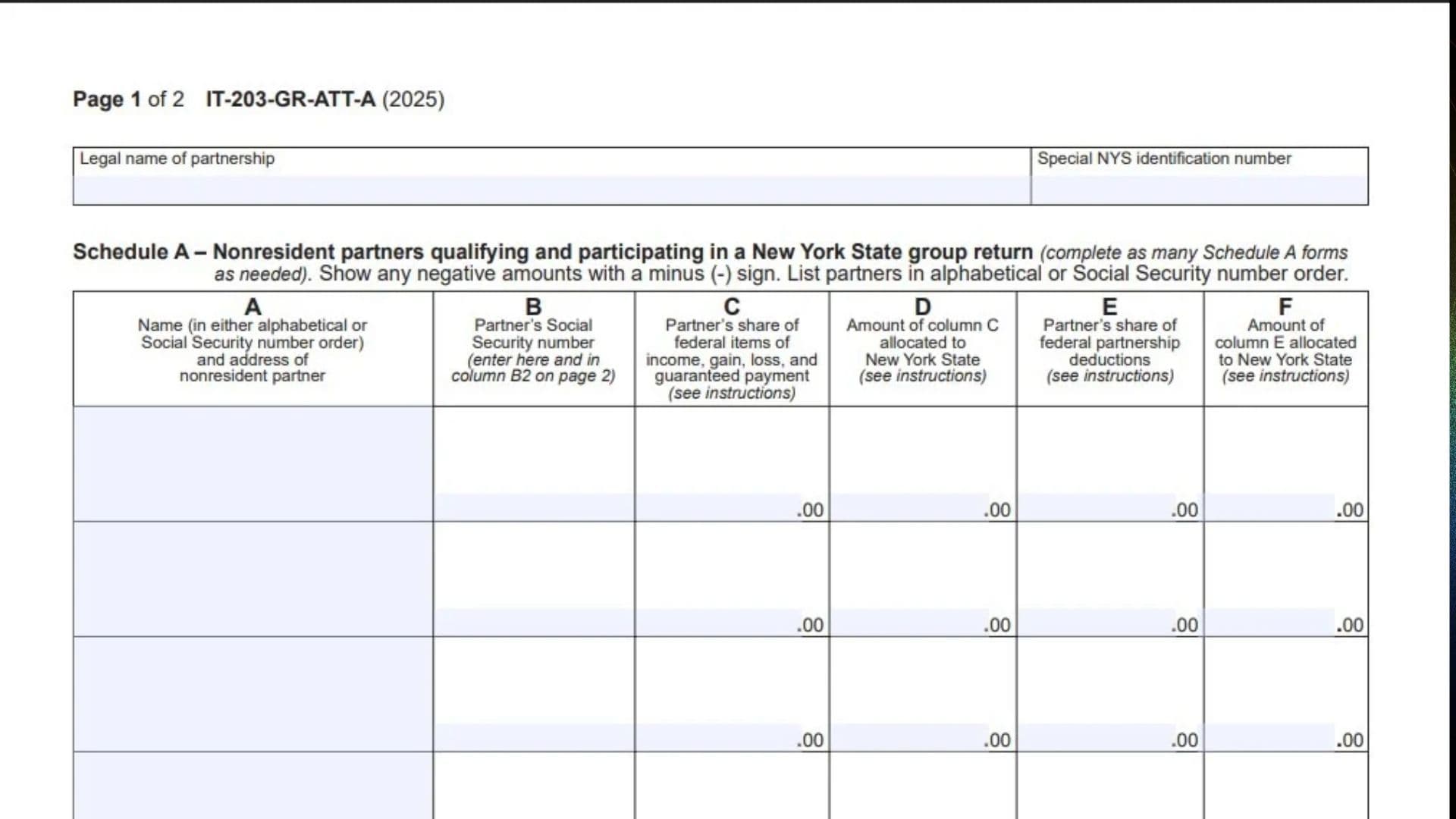
Form IT-203-GR-ATT-A (2025), New York State Group Return Attachment for Nonresident Partners, is a tax schedule used by partnerships participating in a New York State group return. It identifies eligible nonresident partners and reports each partner’s share of partnership income, gains, losses, guaranteed payments, deductions, and other amounts allocated to New York State. The form supports Form IT-203-GR by providing detailed information about individual nonresident partners included in the partnership’s group return. Instead of reporting all partners’ information as one combined amount, the attachment provides separate entries for each partner. This allows the partnership to calculate the New York State taxable income and tax associated with each participating nonresident partner.
The form contains two pages and one main schedule, Schedule A. The first page collects the partnership’s identification details and information about each partner’s federal income and deductions, together with the portions allocated to New York State. The second page continues the calculations by reporting New York State additions and subtractions, taxable income, tax, estimated payments, balances due, overpayments, and information about other group returns.
Partnerships use this attachment when reporting qualifying nonresident partners who participate in a New York State group return. The partnership must provide accurate information for every partner included in the group filing. If there are more partners than the available spaces, additional Schedule A forms must be completed. All partners must be listed in alphabetical order or Social Security number order.
Completing Form IT-203-GR-ATT-A correctly is important because the information determines each participating partner’s New York State taxable income and related tax liability. Incorrect income allocations, deductions, identification numbers, or payment amounts may affect the calculations reported on the main group return. The attachment must therefore be completed consistently with the partnership’s records and the applicable New York State tax reporting requirements.
How To File Form IT-203-GR-ATT-A
Form IT-203-GR-ATT-A is submitted with Form IT-203-GR, the New York State group return. It is an attachment rather than a separate standalone tax return.
The partnership must include all completed Schedule A attachments with the main group return. If multiple Schedule A forms are required, the partnership must provide all of them.
Before completing the attachment, prepare the following information:
- The partnership’s legal name.
- The partnership’s special New York State identification number.
- The name and address of each participating nonresident partner.
- Each partner’s Social Security number.
- Each partner’s share of federal partnership income, gains, losses, and guaranteed payments.
- Each partner’s share of federal partnership deductions.
- The amounts of partnership income and deductions allocated to New York State.
- Any applicable New York State additions and subtractions.
- Each partner’s estimated New York State income tax payments.
- Any amounts paid with Form IT-370.
- Information about other group returns, where applicable.
The partnership should also maintain supporting partnership records and allocation calculations to verify the amounts entered for each partner.
The form contains two pages. Complete the partnership identification section on both pages and enter the information for each partner in the corresponding columns.

How To Complete Form IT-203-GR-ATT-A
Partnership Identification Information
The partnership identification section appears at the top of both pages. Enter the same partnership details on each page.
Legal Name of Partnership
Enter the partnership’s complete legal name as used on its New York State tax filings. Make sure the name matches the partnership’s records and Form IT-203-GR.
Special NYS Identification Number
Enter the special New York State identification number assigned to the partnership for its group return filing. Use the same identification number on both pages of the attachment.
Schedule A: Nonresident Partners Qualifying and Participating in a New York State Group Return
Schedule A is the main section of Form IT-203-GR-ATT-A. It collects financial and identification information for each nonresident partner included in the group return.
Complete as many Schedule A forms as necessary to report all participating partners. List partners in alphabetical order or Social Security number order.
If an amount is negative, show it with a minus (-) sign. This is particularly important when reporting partnership losses, deductions, or allocation adjustments.
Page 1: Partner Information, Federal Income, and New York Allocations
Column A: Partner Name and Address
Enter the full name and mailing address of each nonresident partner participating in the group return.
List partners in either alphabetical order or Social Security number order. Maintain the same order throughout all Schedule A attachments so that the information can be matched correctly between the two pages.
Column B: Partner’s Social Security Number
Enter the Social Security number of the nonresident partner identified in column A.
The same Social Security number must also be entered in column B2 on page 2. Check each number carefully to avoid identification errors.
Column C: Partner’s Share of Federal Income, Gains, Losses, and Guaranteed Payments
Enter the partner’s share of the partnership’s federal income, gains, losses, and guaranteed payments.
Use the applicable federal partnership tax information to determine each partner’s share. Include the relevant amounts attributable to the individual partner.
If an amount represents a loss or another negative figure, enter it with a minus (-) sign.
Column D: Amount of Column C Allocated to New York State
Enter the portion of the amount reported in column C that is allocated to New York State.
Use the partnership’s applicable New York State allocation calculations to determine how much of the partner’s federal income, gains, losses, and guaranteed payments is attributable to New York State.
Do not automatically transfer the entire amount from column C unless the full amount is properly allocated to New York State.
Column E: Partner’s Share of Federal Partnership Deductions
Enter the individual partner’s share of federal partnership deductions.
Use the partnership’s federal tax information and applicable allocation records to determine the deductions attributable to each partner.
Include negative amounts with a minus (-) sign when applicable.
Column F: Amount of Column E Allocated to New York State
Enter the portion of the federal partnership deductions reported in column E that is allocated to New York State.
Use the applicable New York State allocation calculations to determine the amount attributable to New York State.
This amount is used in calculating New York State taxable income on page 2.
Schedule A Totals on Page 1
At the bottom of page 1, the form provides spaces for totals.
Totals: Partnership Income and Deduction Allocations
Calculate the applicable totals for the amounts reported in the corresponding columns of Schedule A.
If you are filing multiple Schedule A forms, calculate the grand totals from all completed attachments and enter them on the last Schedule A form only. Leave the other total boxes blank.
Submit every completed Schedule A attachment with Form IT-203-GR.
Transfer to Form IT-203-GR
The form directs the partnership to transfer the applicable totals to the corresponding lines of Form IT-203-GR.
Use the appropriate reporting lines on the main group return and make sure the totals agree with the amounts reported across all Schedule A attachments.
Page 2: New York State Adjustments, Taxable Income, and Tax Payments
Page 2 continues the information for each partner listed on page 1. The partner identification and financial entries must correspond to the same individual in both pages.
Column B2: Partner’s Social Security Number
Repeat the partner’s Social Security number from column B on page 1.
Enter the same number for each partner in the corresponding row. This connects the income and deduction information on page 1 with the New York State tax calculations on page 2.
Column G: Net Amount of New York Additions and Subtractions Allocated to New York State
Enter the net amount of New York State additions and subtractions allocated to the individual partner.
Calculate the applicable additions and subtractions using the partnership’s New York State tax information and allocation records.
Combine the applicable adjustments to determine the net amount. Enter negative amounts with a minus (-) sign when the result is negative.
Column H: New York Taxable Income
Calculate the partner’s New York State taxable income using the amounts reported in columns D, F, and G.
Follow this formula:
Column D − Column F + Column G = Column H.
Start with the New York State-allocated income from column D, subtract the allocated partnership deductions from column F, and then apply the net New York State additions and subtractions from column G.
Enter the resulting taxable income in column H.
Column I: New York State Tax
Calculate the New York State tax by multiplying the amount in column H by 10.90%.
Formula:
Column H × 0.1090 = Column I.
Enter the calculated tax amount for each partner. Use the taxable income reported in the corresponding row of column H.
Column J: New York State Estimated Income Tax Paid or Amount Paid With Form IT-370
Enter the New York State estimated income tax paid for the partner or the amount paid with Form IT-370, as applicable.
Use the partnership’s payment records to determine the correct amount attributable to each partner.
Make sure the amount is assigned to the correct individual and is consistent with the payments reported for the group return.
Column K: Balance Due
Calculate the remaining tax balance by subtracting column J from column I.
Formula:
Column I − Column J = Column K.
If the tax amount in column I is greater than the payment amount in column J, enter the difference as the balance due.
If the result is zero or negative, there is no positive balance due under this calculation.
Column L: Overpayment
Calculate the overpayment by subtracting column I from column J.
Formula:
Column J − Column I = Column L.
If the payment amount in column J is greater than the tax amount in column I, enter the difference as an overpayment.
If the result is zero or negative, there is no positive overpayment under this calculation.
Column M: Other Group Returns
Enter the applicable information about other group returns as directed by the form instructions.
Review the partnership’s group return filing information to determine whether this column applies to the partner.
The form refers taxpayers to its instructions for additional details about this entry. Do not assume that an amount belongs in this column without confirming the applicable reporting requirements.
Schedule A Totals on Page 2
At the bottom of page 2, the form provides additional spaces for the applicable totals.
Totals: New York State Adjustments and Taxable Income
Calculate the applicable totals for the amounts reported in the corresponding columns.
When filing multiple Schedule A attachments, include the combined amounts from all schedules on the last form only. Leave the other total boxes blank.
Make sure the totals are consistent with the individual partner amounts reported in columns G, H, and I.
Transfer to Form IT-203-GR
Enter the applicable totals on the corresponding lines of Form IT-203-GR.
Check that the amounts transferred to the main group return agree with the totals from all completed Schedule A attachments.
Additional Schedule A Forms
The form provides space for up to ten partners on each Schedule A attachment. If the partnership has more than ten participating nonresident partners, additional copies of Schedule A must be completed.
Follow these requirements when using additional forms:
- List all partners in alphabetical order or Social Security number order.
- Use the same partner order on both pages of each attachment.
- Enter the partnership’s legal name and special New York State identification number on every attachment.
- Complete all required partner information and financial columns.
- Show negative amounts with a minus (-) sign.
- Calculate the combined totals from all Schedule A attachments.
- Enter the grand totals on the last Schedule A form only.
- Leave the other total boxes blank.
- Submit every completed Schedule A attachment with Form IT-203-GR.
Final Review Before Filing
Before submitting Form IT-203-GR-ATT-A with the partnership’s New York State group return, review the following checklist:
- Confirm that the partnership’s legal name is correct.
- Verify the special New York State identification number on both pages.
- Include every qualifying and participating nonresident partner.
- Check that partners are listed in alphabetical or Social Security number order.
- Verify each partner’s name and address in column A.
- Confirm that every Social Security number in column B matches the correct partner.
- Check the federal income, gains, losses, and guaranteed payments reported in column C.
- Verify the New York State allocations entered in column D.
- Confirm each partner’s federal partnership deductions in column E.
- Check the New York State deduction allocations in column F.
- Verify the New York State additions and subtractions in column G.
- Recalculate New York State taxable income in column H.
- Confirm that column I uses the 10.90% tax calculation.
- Verify estimated tax payments and Form IT-370 payments in column J.
- Check the balance due calculation in column K.
- Verify the overpayment calculation in column L.
- Review column M for applicable information about other group returns.
- Confirm that the Social Security numbers in column B2 match column B on page 1.
- Check that all negative amounts include a minus (-) sign.
- If multiple Schedule A forms are used, verify that the grand totals appear only on the last form.
- Confirm that all applicable totals agree with Form IT-203-GR.
- Attach all completed Schedule A forms to Form IT-203-GR.
Submission: Submit all completed Forms IT-203-GR-ATT-A together with Form IT-203-GR as part of the New York State group return filing.
Review the applicable New York State group return instructions for additional eligibility rules, allocation requirements, and reporting details, particularly for columns D, F, G, and M.