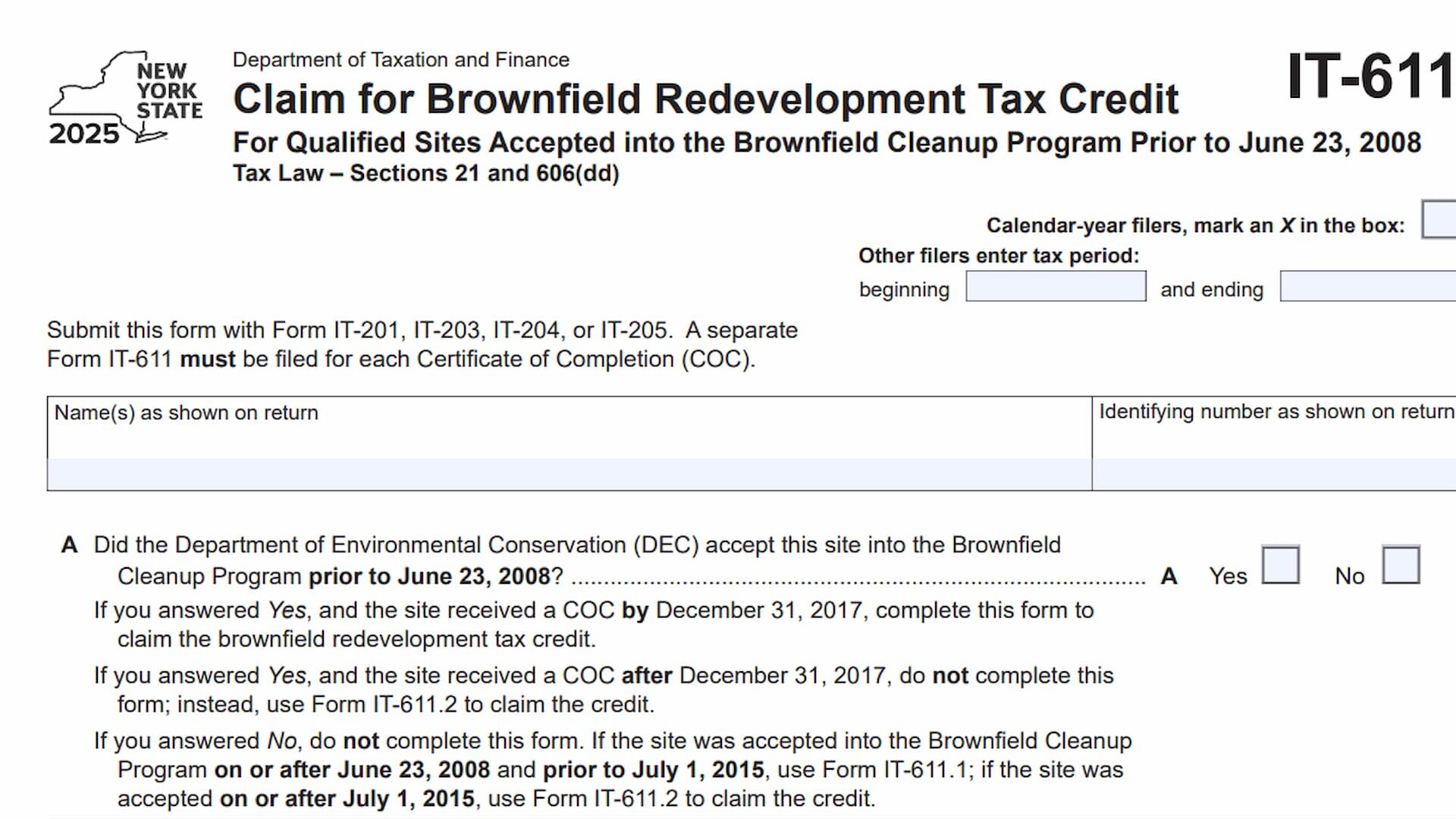
Form IT-611, Claim for Brownfield Redevelopment Tax Credit, is a New York State tax form used by eligible taxpayers to claim the Brownfield Redevelopment Tax Credit for qualified sites accepted into the Brownfield Cleanup Program before June 23, 2008. The credit is authorized under Sections 21 and 606(dd) of the New York State Tax Law. The form applies to qualified brownfield sites that were accepted into the New York State Department of Environmental Conservation (DEC) Brownfield Cleanup Program before June 23, 2008, and received a Certificate of Completion (COC) by December 31, 2017. The credit is designed to encourage the cleanup and redevelopment of contaminated properties. Eligible taxpayers may calculate credit amounts based on qualifying site preparation costs, tangible property investments, and on-site groundwater remediation expenses.
The 2025 Form IT-611 contains seven main schedules:
- Schedule A: Collects identifying information about the qualified brownfield site.
- Schedule B: Calculates the three credit components: site preparation, tangible property, and on-site groundwater remediation.
- Schedule C: Collects information about partnerships, S corporations, estates, and trusts from which the taxpayer received a credit allocation.
- Schedule D: Calculates the beneficiary’s and fiduciary’s shares of the credit components and recapture amounts.
- Schedule E: Calculates the total Brownfield Redevelopment Tax Credit.
- Schedule F: Calculates the recapture of previously claimed credits.
- Schedule G: Summarizes the total credit recapture amount to be reported on the applicable tax return.
Completing Form IT-611 correctly is important because eligibility depends on the site’s acceptance date, Certificate of Completion, qualified expenses, and applicable credit percentages. Taxpayers must also calculate any required credit recapture when qualified tangible property ceases to be used for a qualified purpose or when a Certificate of Completion is revoked.
A separate Form IT-611 must be filed for each Certificate of Completion.
How To File Form IT-611
Form IT-611 must be submitted with one of the following New York income or franchise tax returns:
- Form IT-201: New York State Resident Income Tax Return.
- Form IT-203: New York State Nonresident and Part-Year Resident Income Tax Return.
- Form IT-204: New York Partnership Return.
- Form IT-205: New York State Fiduciary Income Tax Return.
The form requires taxpayers to report the credit components attributable to the qualified brownfield site and any applicable recapture amounts.
Which Sites Qualify for Form IT-611?
Before completing the form, determine whether the brownfield site meets the applicable acceptance and Certificate of Completion requirements.
Sites Accepted Before June 23, 2008
If the DEC accepted the site into the Brownfield Cleanup Program before June 23, 2008, and the site received a Certificate of Completion by December 31, 2017, use Form IT-611 to claim the credit.
Sites Receiving a Certificate of Completion After December 31, 2017
If the site was accepted into the program before June 23, 2008, but received its Certificate of Completion after December 31, 2017, do not use Form IT-611.
Use Form IT-611.2 instead.
Sites Accepted on or After June 23, 2008, but Before July 1, 2015
Use Form IT-611.1 to claim the applicable Brownfield Redevelopment Tax Credit.
Sites Accepted on or After July 1, 2015
Use Form IT-611.2 instead.
If the site was not accepted before June 23, 2008, do not complete Form IT-611.
Information to Prepare Before Completing Form IT-611
Before filling out the form, gather the following information:
- Your applicable New York income or franchise tax return.
- Your name as shown on the return.
- Your taxpayer identification number.
- The tax period beginning and ending dates, if applicable.
- The Brownfield Cleanup Agreement (BCA) execution date.
- The Certificate of Completion issued by the DEC.
- The brownfield site’s name and location.
- The municipality and county where the site is located.
- The DEC region and Division of Environmental Remediation (DER) site number.
- The date the Certificate of Completion was issued.
- Any applicable sale or transfer documentation.
- Information about the site’s environmental zone (EN-Zone) status.
- Qualified site preparation costs.
- Qualified tangible property descriptions, costs, and dates placed in service.
- Qualified on-site groundwater remediation costs.
- Applicable credit percentages.
- Credit allocations received from partnerships, S corporations, estates, or trusts.
- Previous credit amounts and supporting records needed for any recapture calculation.
You should also consult Form IT-611-I, Instructions for Form IT-611, for additional guidance on qualifying expenses, applicable percentage rates, credit calculations, and recapture requirements.

How To Complete Form IT-611
The 2025 Form IT-611 is a four-page tax form divided into seven schedules.
Page 1 contains the taxpayer identification information, eligibility question A, and Schedule A.
Page 2 contains Schedule B, which calculates the site preparation and tangible property credit components.
Page 3 contains the groundwater remediation credit component and Schedules C and D.
Page 4 contains Schedule E, which calculates the total credit, Schedule F, which calculates credit recapture, and Schedule G, which summarizes the recapture amount.
Complete the taxpayer and site identification information first, then follow the applicable schedules in order.
Taxpayer Information
At the top of page 1, enter the identifying information associated with your New York income tax return.
Tax Period
Calendar-year filers should mark an X in the designated box.
If you are filing for a different tax period, enter the beginning and ending dates of the applicable reporting period.
Make sure the dates match the tax period covered by your return.
Name(s) as Shown on Return
Enter your name exactly as it appears on your applicable New York tax return.
If you are filing jointly, use the names shown on the return.
Partnerships and fiduciaries should use the applicable entity name.
Identifying Number as Shown on Return
Enter the taxpayer identification number associated with your return.
Individuals generally use their Social Security Number (SSN), while business entities and fiduciaries use the applicable Employer Identification Number (EIN).
Make sure the identifying number matches your associated tax return.
Question A: Brownfield Cleanup Program Acceptance
Question A determines whether the site meets the initial eligibility requirement for Form IT-611.
The question asks:
Did the Department of Environmental Conservation (DEC) accept this site into the Brownfield Cleanup Program prior to June 23, 2008?
Select Yes or No.
Yes
Select Yes if the DEC accepted the site into the Brownfield Cleanup Program before June 23, 2008.
The form then provides two additional conditions:
- If the site received a Certificate of Completion by December 31, 2017, complete Form IT-611 to claim the Brownfield Redevelopment Tax Credit.
- If the site received a Certificate of Completion after December 31, 2017, do not complete Form IT-611. Use Form IT-611.2 instead.
No
Select No if the site was not accepted into the program before June 23, 2008.
Do not complete Form IT-611.
The form directs taxpayers to use:
- Form IT-611.1 if the site was accepted on or after June 23, 2008, but before July 1, 2015.
- Form IT-611.2 if the site was accepted on or after July 1, 2015.
Make sure you select the correct form based on the site’s acceptance date.
Schedule A: Brownfield Site Identifying Information
Schedule A appears on page 1 and collects information about the qualified brownfield site.
The information must correspond to the Certificate of Completion issued by the DEC.
Question B: Brownfield Cleanup Agreement Execution Date
Enter the date the Brownfield Cleanup Agreement (BCA) was executed for the site for which you are claiming the credit.
Enter the date in MMDDYYYY format.
Use the official agreement date associated with the qualified brownfield site.
Question C: Information From the Certificate of Completion
Enter the information requested from the Certificate of Completion issued by the DEC.
The form requires the following details:
Site Name
Enter the official name of the qualified brownfield site as shown on the Certificate of Completion.
Site Location
Enter the site’s location.
The form provides separate fields for:
- Municipality.
- County.
Use the location information shown on the Certificate of Completion.
DEC Region
Enter the DEC region associated with the qualified site.
Division of Environmental Remediation (DER) Site Number
Enter the DER site identification number shown on the Certificate of Completion.
Date COC Was Issued
Enter the date the DEC issued the Certificate of Completion.
The form specifically requires taxpayers to submit a copy of the Certificate of Completion with Form IT-611.
Verify that all information matches the official document.
Question D: Certificate of Completion Transfer Date
If applicable, enter the date the Certificate of Completion was transferred following the sale or transfer of the qualified site.
Enter the date in MMDDYYYY format.
This field applies when the COC was transferred as part of a sale or other transfer of the property.
The form requires taxpayers to submit a copy of the sale or transfer documentation with the tax form.
If no transfer occurred, this field is not applicable.
Question E: Environmental Zone (EN-Zone) Status
Question E asks whether the qualified site covered by the Certificate of Completion is located within an environmental zone (EN-Zone).
Select Yes or No.
Use the site’s applicable environmental zone classification to determine the answer.
Question F: Percentage of Site Located Within an EN-Zone
Complete Question F only if you answered Yes to Question E.
Enter the percentage of the qualified site located within an environmental zone.
The form requires this percentage to be entered as a decimal rounded to four places.
For example, a percentage representing 50% would be entered as 0.5000.
Use the applicable site information to determine the percentage.
Schedule B: Credit Components
Schedule B appears on page 2 and calculates two of the three components of the Brownfield Redevelopment Tax Credit:
- Part 1: Site preparation credit component.
- Part 2: Tangible property credit component.
Both parts include expense reporting tables, applicable percentage rates, and calculations for credits received through partnerships, S corporations, estates, and trusts.
Part 1: Site Preparation Credit Component
Part 1 calculates the credit attributable to qualified site preparation costs.
The table contains three columns:
- Column A: Description of site preparation costs.
- Column B: Date costs were paid or incurred.
- Column C: Costs.
The form provides three initial rows for reporting individual expenses.
Column A: Description of Site Preparation Costs
Describe each site preparation expense included in the credit calculation.
List each qualifying cost separately.
Use the expense descriptions and eligibility requirements provided in Form IT-611-I.
Column B: Date Costs Paid or Incurred
Enter the date each site preparation cost was paid or incurred.
Use MMDDYYYY format.
Follow the applicable timing requirements in the separate instructions.
Column C: Costs
Enter the amount of each qualifying site preparation expense.
Use the actual amount paid or incurred for the applicable cost.
If additional space is needed, use additional forms as instructed.
Line 1: Total of Additional Site Preparation Costs
Enter the total of Column C amounts from any additional forms used to report site preparation costs.
If no additional forms are attached, enter zero.
Line 2: Total Site Preparation Costs
Add the amounts in Column C, including the amount reported on Line 1.
Enter the resulting total on Line 2.
The calculation is:
Total Column C amounts + Line 1 = Line 2
This represents the total site preparation costs used in the credit calculation.
Line 3: Applicable Percentage Rate
Enter the applicable percentage rate from the Applicable Percentage Table in Form IT-611-I.
The percentage depends on the applicable credit requirements and site classification.
Do not assume that the same percentage applies to every site.
Line 4: Site Preparation Credit Component
Multiply the amount on Line 2 by the percentage on Line 3.
Enter the resulting amount on Line 4.
The calculation is:
Line 2 × Line 3 = Line 4
This represents the site preparation credit component before accounting for allocations received through other entities.
Lines 5 Through 7: Credit Allocations From Other Entities
These lines apply when you receive a share of the site preparation credit component through a partnership, S corporation, estate, or trust.
Line 5: Partnership Share
Enter your share of the site preparation credit component received from your partnership or partnerships.
Use the applicable credit allocation information provided by the partnership.
Line 6: S Corporation Share
Enter your share of the site preparation credit component received from your S corporation or S corporations.
Use the credit allocation information provided by the S corporation.
Line 7: Beneficiary Share
Enter your share of the site preparation credit component received from an estate or trust.
Use the applicable beneficiary credit allocation information.
Line 8: Total Site Preparation Credit Component
Add the amounts reported on Lines 4 through 7.
Enter the resulting amount on Line 8.
The calculation is:
Line 4 + Line 5 + Line 6 + Line 7 = Line 8
This represents the total site preparation credit component available to the taxpayer.
Part 2: Tangible Property Credit Component
Part 2 calculates the credit attributable to qualified tangible property used at the brownfield site.
The reporting table contains five columns:
- Column A: Description of qualified tangible property.
- Column B: Principal use.
- Column C: Date placed in service.
- Column D: Life in years.
- Column E: Cost or other basis.
The form provides three initial rows for reporting individual property items.
Column A: Description of Qualified Tangible Property
List each item of qualified tangible property separately.
Provide a description that identifies the property included in the credit calculation.
Column B: Principal Use
Enter the principal use of the property.
Use the applicable property-use classification and requirements in Form IT-611-I.
Column C: Date Placed in Service
Enter the date the property was placed in service.
Use MMDDYYYY format.
Column D: Life in Years
Enter the applicable useful life of the property in years.
Use the instructions to determine the correct life for each property item.
Column E: Cost or Other Basis
Enter the cost or other basis of the qualified tangible property.
Use the amount determined under the applicable tax rules and instructions.
If additional space is needed, use additional forms.
Line 9: Total of Additional Tangible Property Costs
Enter the total of Column E amounts from additional forms used to report qualified tangible property.
If no additional forms are used, enter zero.
Line 10: Total Tangible Property Costs
Add the Column E amounts, including the amount reported on Line 9.
Enter the resulting amount on Line 10.
The calculation is:
Total Column E amounts + Line 9 = Line 10
Line 11: Applicable Percentage Rate
Enter the applicable percentage rate from the Applicable Percentage Table in Form IT-611-I.
Use the percentage applicable to the qualified tangible property credit component.
Line 12: Tangible Property Credit Component
Multiply the amount on Line 10 by the percentage on Line 11.
Enter the resulting amount on Line 12.
The calculation is:
Line 10 × Line 11 = Line 12
This represents the tangible property credit component before adding allocations from other entities.
Lines 13 Through 15: Tangible Property Credit Allocations
These lines report tangible property credit amounts received through other entities.
Line 13: Partnership Share
Enter your share of the tangible property credit component received from your partnership or partnerships.
Line 14: S Corporation Share
Enter your share of the tangible property credit component received from your S corporation or S corporations.
Line 15: Beneficiary Share
Enter your share of the tangible property credit component received from an estate or trust.
Use the applicable allocation information supplied by each entity.
Line 16: Total Tangible Property Credit Component
Add the amounts reported on Lines 12 through 15.
Enter the resulting amount on Line 16.
The calculation is:
Line 12 + Line 13 + Line 14 + Line 15 = Line 16
This represents the total tangible property credit component available to the taxpayer.
Schedule B: Part 3 – On-Site Groundwater Remediation Credit Component
Part 3 appears on page 3 and calculates the credit attributable to qualified on-site groundwater remediation costs.
The table contains three columns:
- Column A: Description of groundwater remediation costs.
- Column B: Date costs were paid or incurred.
- Column C: Costs.
The form provides three initial rows for reporting individual expenses.
Column A: Description of Groundwater Remediation Costs
Describe each qualifying groundwater remediation expense separately.
Use the applicable expense classifications and requirements in Form IT-611-I.
Column B: Date Costs Paid or Incurred
Enter the date each groundwater remediation cost was paid or incurred.
Use MMDDYYYY format.
Column C: Costs
Enter the amount of each qualifying groundwater remediation expense.
Use the actual cost paid or incurred, subject to the applicable requirements.
If additional space is required, use additional forms as instructed.
Line 17: Total of Additional Groundwater Remediation Costs
Enter the total of Column C amounts from any additional forms used to report groundwater remediation expenses.
If no additional forms are used, enter zero.
Line 18: Total Groundwater Remediation Costs
Add the amounts in Column C, including the amount reported on Line 17.
Enter the resulting total on Line 18.
The calculation is:
Total Column C amounts + Line 17 = Line 18
Line 19: Applicable Percentage Rate
Enter the applicable percentage rate from the Applicable Percentage Table in Form IT-611-I.
Use the percentage corresponding to the on-site groundwater remediation credit component.
Line 20: On-Site Groundwater Remediation Credit Component
Multiply the amount on Line 18 by the percentage on Line 19.
Enter the resulting amount on Line 20.
The calculation is:
Line 18 × Line 19 = Line 20
Lines 21 Through 23: Groundwater Remediation Credit Allocations
These lines report the on-site groundwater remediation credit received through other entities.
Line 21: Partnership Share
Enter your share of the on-site groundwater remediation credit component received from your partnership or partnerships.
Line 22: S Corporation Share
Enter your share of the on-site groundwater remediation credit component received from your S corporation or S corporations.
Line 23: Beneficiary Share
Enter your share of the on-site groundwater remediation credit component received from an estate or trust.
Use the corresponding credit allocation information provided by each entity.
Line 24: Total On-Site Groundwater Remediation Credit Component
Add the amounts reported on Lines 20 through 23.
Enter the resulting amount on Line 24.
The calculation is:
Line 20 + Line 21 + Line 22 + Line 23 = Line 24
This represents the total on-site groundwater remediation credit component.
Line 25: Brownfield Redevelopment Tax Credit
Add the three credit components calculated on Lines 8, 16, and 24.
Enter the resulting amount on Line 25.
The calculation is:
Line 8 + Line 16 + Line 24 = Line 25
This is the total Brownfield Redevelopment Tax Credit before completing Schedule E.
The form provides separate instructions for individuals and fiduciaries:
- Individuals: Enter the Line 25 amount on Line 26.
- Fiduciaries: Complete Schedule D.
Schedule C: Partnership, S Corporation, Estate, and Trust Information
Schedule C appears on page 3.
Complete this schedule if you were a partner in a partnership, a shareholder of a New York S corporation, or a beneficiary of an estate or trust and received a share of the Brownfield Redevelopment Tax Credit from that entity.
Provide the requested information for each applicable entity.
The schedule contains three columns:
Name
Enter the name of the partnership, New York S corporation, estate, or trust from which you received a share of the credit.
Type
Enter the applicable entity code:
- P: Partnership.
- S: S corporation.
- ET: Estate or trust.
Employer ID Number
Enter the entity’s Employer Identification Number (EIN).
Complete a separate row for each applicable entity.
Make sure the information corresponds to the credit allocation amounts reported in Schedule B.
Schedule D appears on page 3 and applies to fiduciaries and beneficiaries.
It calculates how the Brownfield Redevelopment Tax Credit components and any credit recapture amounts are allocated between beneficiaries and the fiduciary.
The schedule contains six columns.
Column A: Beneficiary’s Name
Enter the beneficiary’s name exactly as shown on Form IT-205, Schedule C.
Use the same identifying name reported on the fiduciary return.
Column B: Identifying Number
Enter the beneficiary’s applicable identifying number.
Column C: Share of Site Preparation Credit Component
Enter the beneficiary’s share of the site preparation credit component.
Use the applicable allocation information.
Column D: Share of Tangible Property Credit Component
Enter the beneficiary’s share of the tangible property credit component.
Column E: Share of On-Site Groundwater Remediation Credit Component
Enter the beneficiary’s share of the on-site groundwater remediation credit component.
Column F: Share of Recapture of Credit
Enter the beneficiary’s share of any applicable Brownfield Redevelopment Tax Credit recapture.
Total Row
The Total row summarizes the amounts allocated to beneficiaries.
Add the applicable beneficiary amounts in Columns C through F.
Use these totals when completing the fiduciary credit calculations in Schedule E and the recapture calculations in Schedule F and Schedule G, as applicable.
Beneficiary Rows
Use the available rows to report each beneficiary’s share of the credit components and recapture amounts.
Make sure each beneficiary’s allocation is properly identified.
Fiduciary Row
The Fiduciary row reports the portion of the credit components and recapture amounts retained by the fiduciary.
Enter the fiduciary’s applicable shares in Columns C through F.
The allocations should reconcile with the total credit components and recapture amounts reported for the entity.
Schedule E: Computation of Credit
Schedule E appears on page 4 and calculates the total Brownfield Redevelopment Tax Credit.
The schedule contains separate calculations for individuals and fiduciaries.
Line 26: Individual’s Credit Amount
Individuals should enter the amount from Line 25.
This is the total Brownfield Redevelopment Tax Credit calculated from the three credit components in Schedule B.
The amount on Line 26 is used in the final credit calculation on Line 28.
Lines 27a Through 27c: Fiduciary Credit Components
Fiduciaries should complete Lines 27a through 27c using the amounts from the Fiduciary row of Schedule D.
Line 27a: Site Preparation Credit Component
Enter the amount from Schedule D, Fiduciary row, Column C.
Line 27b: Tangible Property Credit Component
Enter the amount from Schedule D, Fiduciary row, Column D.
Line 27c: On-Site Groundwater Remediation Credit Component
Enter the amount from Schedule D, Fiduciary row, Column E.
These lines report the credit components allocated to the fiduciary.
Line 28: Total Brownfield Redevelopment Tax Credit
Add the amounts reported on Lines 26 through 27c.
Enter the resulting amount on Line 28.
The calculation is:
Line 26 + Line 27a + Line 27b + Line 27c = Line 28
This represents the total Brownfield Redevelopment Tax Credit calculated through Schedule E.
For individuals, the amount generally comes from Line 26.
For fiduciaries, the applicable credit components are reported on Lines 27a through 27c.
Schedule F: Recapture of Credit
Schedule F appears on page 4 and calculates the recapture of previously claimed Brownfield Redevelopment Tax Credits.
The schedule covers two situations:
- Tangible property that ceases to be in qualified use.
- Revocation of the Certificate of Completion.
Complete the applicable recapture section when one of these events occurs.
Tangible Property That Ceases to Be in Qualified Use
The first section of Schedule F calculates the recapture of tangible property credit when qualified property stops being used for a qualified purpose.
The table contains eight columns.
Column A: Description of Property
Enter a description of the tangible property that ceased to be in qualified use.
Identify each affected property item separately.
Column B: Date Property Was Placed in Service
Enter the date the property was originally placed in service.
Use the applicable date from the property records.
Column C: Date Property Ceased to Qualify
Enter the date the property ceased to qualify for the credit.
Use MMDDYYYY format.
Column D: Life (Months)
Enter the property’s applicable life in months.
Use the required useful life information for the property.
Column E: Unused Life (Months)
Enter the remaining unused life of the property in months.
Determine the unused period using the applicable dates and instructions.
Column F: Percentage
Divide the amount in Column E by the amount in Column D.
The calculation is:
Column E ÷ Column D = Column F
Enter the resulting percentage.
Column G: Tangible Property Credit Component Previously Allowed
Enter the amount of tangible property credit previously allowed for the property.
Use the applicable credit records.
Column H: Recaptured Tangible Property Credit Component
Multiply the amount in Column F by the amount in Column G.
The calculation is:
Column F × Column G = Column H
Enter the resulting recaptured credit amount.
Complete the calculation separately for each affected property item.
Line 29: Total of Additional Recapture Amounts
Enter the total of Column H amounts from any additional forms used to report tangible property recapture.
If no additional forms are used, enter zero.
Line 30: Total Recapture of Tangible Property Credit Component
Add the amounts in Column H, including the amount reported on Line 29.
Enter the resulting amount on Line 30.
The calculation is:
Total Column H amounts + Line 29 = Line 30
This represents the total recapture of the tangible property credit component.
Recapture if the Certificate of Completion Is Revoked
The second section of Schedule F calculates credit recapture when the Certificate of Completion is revoked.
It contains three separate lines for the credit components previously allowed.
Line 31: Net Tangible Property Credit Component Previously Allowed
Enter the net tangible property credit component previously allowed.
Use the applicable historical credit records and the instructions for Form IT-611-I.
Line 32: Site Preparation Credit Component Previously Allowed
Enter the site preparation credit component previously allowed.
Use the applicable credit amounts previously claimed for the qualified site.
Line 33: On-Site Groundwater Remediation Credit Component Previously Allowed
Enter the on-site groundwater remediation credit component previously allowed.
Use the applicable historical credit records.
Line 34: Total Recapture of Brownfield Redevelopment Tax Credit
Add the amounts reported on Lines 30 through 33.
Enter the resulting amount on Line 34.
The calculation is:
Line 30 + Line 31 + Line 32 + Line 33 = Line 34
This represents the total Brownfield Redevelopment Tax Credit recapture calculated on Schedule F.
The form provides different instructions depending on the taxpayer:
- Individuals and partnerships: Enter the Line 34 amount on Line 35.
- Fiduciaries: Include the Line 34 amount on the Total row of Schedule D, Column F.
Schedule G: Summary of Recapture of Credit
Schedule G appears on page 4 and summarizes the applicable recapture amounts for individuals, partnerships, beneficiaries, S corporation shareholders, and fiduciaries.
The schedule contains Lines 35 through 40.
Line 35: Individual’s and Partnership’s Recapture of Credit
Enter the recapture amount from Line 34.
This represents the recapture attributable to the individual or partnership.
Enter the beneficiary’s share of the recapture amount.
Use the applicable beneficiary allocation information.
Enter the partner’s share of the recapture amount.
Use the applicable partnership allocation information.
Enter the S corporation shareholder’s share of the recapture amount.
Use the applicable S corporation credit allocation information.
Fiduciaries should enter their share of the recapture amount from the Fiduciary row of Schedule D, Column F.
Use the amount allocated to the fiduciary.
Line 40: Total Recapture Amount
Add the amounts reported on Lines 35 through 39.
Enter the resulting amount on Line 40.
The calculation is:
Line 35 + Line 36 + Line 37 + Line 38 + Line 39 = Line 40
This represents the total recapture amount to be reported on the applicable New York tax return.
Where to Report the Line 40 Amount
The form provides separate reporting instructions for individuals, fiduciaries, and partnerships.
Individuals
Enter the Line 40 amount and credit code 171 on:
- Form IT-201-ATT, Line 20.
- Form IT-203-ATT, Line 19.
Fiduciaries
Include the Line 40 amount on Form IT-205, Line 12.
Partnerships
Enter the Line 40 amount and credit code 171 on Form IT-204, Line 148.
Make sure the amount is reported on the correct line based on the taxpayer or entity filing the return.
Additional Form Instructions and Important Requirements
The 2025 Form IT-611 includes several important filing, eligibility, allocation, and recapture requirements.
Separate Form for Each Certificate of Completion
A separate Form IT-611 must be filed for each Certificate of Completion.
If you are claiming credits for multiple qualified sites with separate COCs, complete a separate form for each applicable certificate.
Certificate of Completion Attachment
The form specifically requires taxpayers to submit a copy of the Certificate of Completion issued by the DEC.
If the COC was transferred following the sale or transfer of the qualified site, also submit a copy of the relevant sale or transfer documentation.
Environmental Zone Information
Question E determines whether the qualified site is located within an environmental zone.
If the answer is Yes, complete Question F and report the percentage of the site located within the EN-Zone as a decimal rounded to four places.
Additional Expense Forms
Schedules B provides limited space for reporting individual costs and property items.
If additional space is needed, use additional forms and transfer the applicable totals to Lines 1, 9, or 17, depending on the credit component.
Partnership and S Corporation Allocations
Taxpayers who receive a share of the Brownfield Redevelopment Tax Credit from a partnership or New York S corporation must report the applicable allocations in Schedule B.
Schedule C collects the identifying information for these entities.
Estate and Trust Allocations
Beneficiaries and fiduciaries must use Schedule D to report the allocated site preparation, tangible property, groundwater remediation, and recapture amounts.
Fiduciaries must also complete the applicable lines in Schedule E.
Credit Recapture
Schedule F addresses recapture when tangible property ceases to be in qualified use or when the Certificate of Completion is revoked.
Schedule G summarizes the applicable recapture amounts and identifies where they must be reported on the tax return.
Separate Instructions
The uploaded Form IT-611 refers taxpayers to Form IT-611-I for assistance with qualifying expenses, applicable percentage rates, and detailed recapture requirements.
The percentage table and full eligibility rules are not reproduced on the four-page IT-611 form itself.
Consult the separate instructions before finalizing the credit calculations.
Final Review Before Filing
Before submitting Form IT-611 with your New York tax return, review the following checklist to ensure that all required information and calculations are complete.
- Correct tax year: Confirm that you are using the 2025 Form IT-611.
- Tax period: Mark the calendar-year box or enter the beginning and ending dates for another tax period.
- Taxpayer information: Verify your name and identifying number.
- Question A: Confirm that the site was accepted into the Brownfield Cleanup Program before June 23, 2008.
- Certificate of Completion: Verify that the site received its COC by December 31, 2017.
- Correct form: Use IT-611.2 or IT-611.1 instead if the site falls under a different acceptance or completion date category.
- Schedule A, Line B: Enter the Brownfield Cleanup Agreement execution date.
- Schedule A, Line C: Complete the site name, municipality, county, DEC region, DER site number, and COC issue date.
- COC attachment: Attach a copy of the Certificate of Completion.
- Schedule A, Line D: Enter the transfer date and attach supporting documentation if applicable.
- Schedule A, Line E: Indicate whether the site is located within an environmental zone.
- Schedule A, Line F: If applicable, enter the EN-Zone percentage as a decimal rounded to four places.
- Schedule B, Part 1: List qualifying site preparation expenses, payment dates, and costs.
- Line 1: Include additional site preparation costs.
- Line 2: Calculate total site preparation costs.
- Line 3: Enter the applicable percentage rate.
- Line 4: Calculate the site preparation credit component.
- Lines 5–7: Report applicable partnership, S corporation, and beneficiary allocations.
- Line 8: Calculate the total site preparation credit component.
- Schedule B, Part 2: List each qualified tangible property item, principal use, date placed in service, useful life, and cost or other basis.
- Line 9: Include additional tangible property costs.
- Line 10: Calculate total tangible property costs.
- Line 11: Enter the applicable percentage rate.
- Line 12: Calculate the tangible property credit component.
- Lines 13–15: Report applicable partnership, S corporation, and beneficiary allocations.
- Line 16: Calculate the total tangible property credit component.
- Schedule B, Part 3: List qualifying groundwater remediation expenses, dates, and costs.
- Line 17: Include additional groundwater remediation costs.
- Line 18: Calculate total groundwater remediation costs.
- Line 19: Enter the applicable percentage rate.
- Line 20: Calculate the groundwater remediation credit component.
- Lines 21–23: Report applicable partnership, S corporation, and beneficiary allocations.
- Line 24: Calculate the total groundwater remediation credit component.
- Line 25: Add Lines 8, 16, and 24.
- Schedule C: Report the names, entity types, and EINs of applicable partnerships, S corporations, estates, and trusts.
- Schedule D: If applicable, report beneficiary and fiduciary shares of the credit components and recapture amounts.
- Schedule E, Line 26: Individuals should enter the amount from Line 25.
- Lines 27a–27c: Fiduciaries should enter their applicable credit components from Schedule D.
- Line 28: Calculate the total Brownfield Redevelopment Tax Credit.
- Schedule F: Review whether any tangible property ceased to be in qualified use or whether the COC was revoked.
- Columns A–H: Complete the tangible property recapture calculation when applicable.
- Line 29: Include additional tangible property recapture amounts.
- Line 30: Calculate total tangible property credit recapture.
- Lines 31–33: Enter the applicable previously allowed credit components if the COC was revoked.
- Line 34: Calculate total recapture of the Brownfield Redevelopment Tax Credit.
- Schedule G, Lines 35–39: Report the applicable individual, partnership, beneficiary, S corporation shareholder, and fiduciary recapture amounts.
- Line 40: Calculate total credit recapture.
- Return transfer: Report the Line 40 amount on the appropriate New York tax return using credit code 171 where required.
- Final review: Verify all expense amounts, property information, applicable percentages, allocations, supporting documents, and recapture calculations before filing.
Review all four pages of Form IT-611 carefully before submitting your return. Make sure the brownfield site’s acceptance date and Certificate of Completion meet the eligibility requirements, and verify that each credit component is supported by qualifying expenses and the applicable percentage rate. Attach the required Certificate of Completion and any applicable transfer documentation. If credit recapture applies, complete Schedules F and G and report the resulting amount on the correct New York tax return.