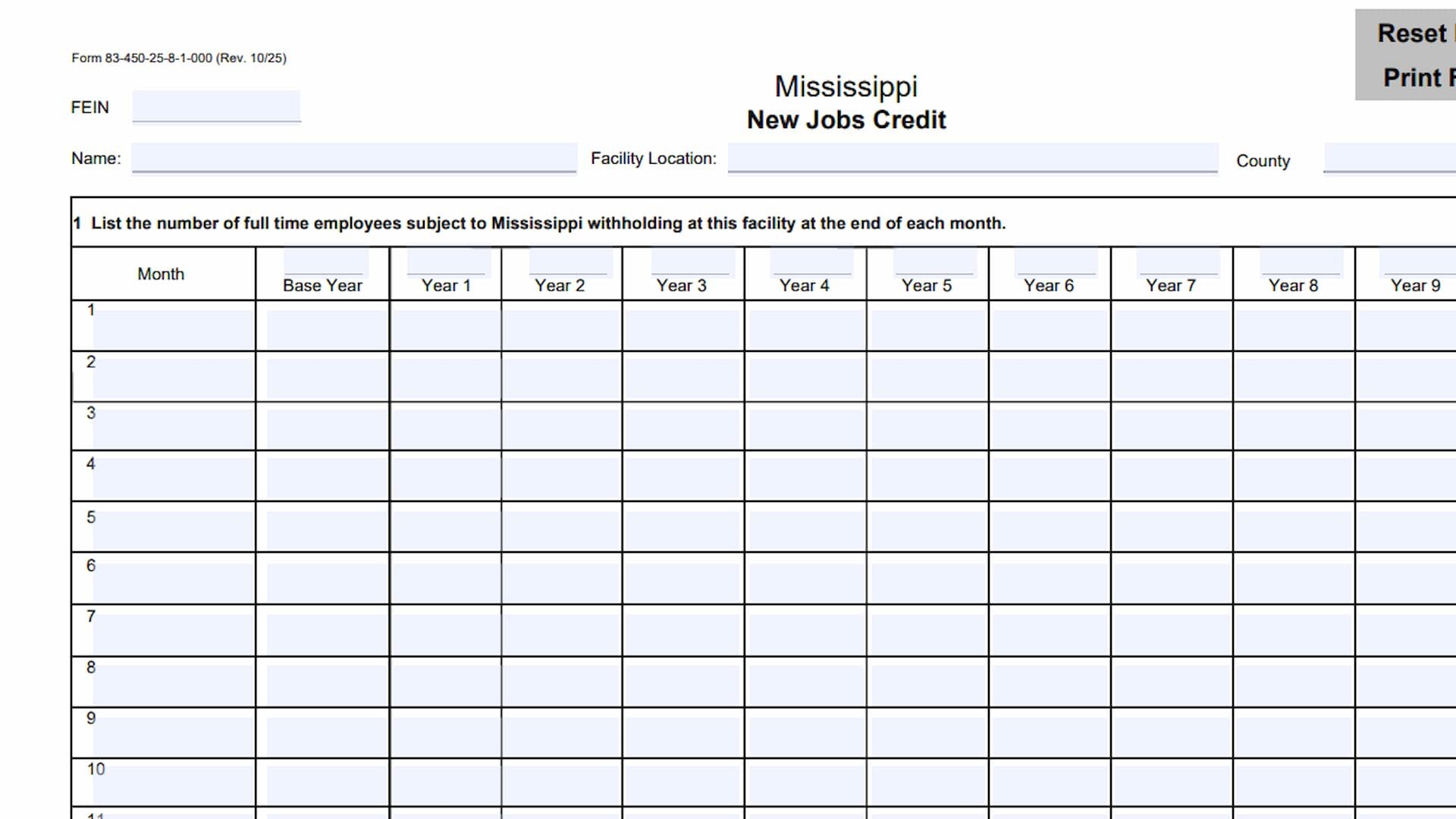
Form 83-450, New Jobs Credit, is a Mississippi tax form used by eligible employers to calculate the tax credit available for creating new full-time jobs in the state. The form is issued by the Mississippi Department of Revenue and tracks employment increases at a specific business facility over a period of up to 10 years. The New Jobs Credit calculation is based on the average increase in full-time employees subject to Mississippi withholding. Employers must report the number of qualifying employees at the end of each month, calculate the average employment increase, and determine the amount of payroll associated with eligible new jobs.
Form 83-450 collects information about the employer, including its Federal Employer Identification Number (FEIN), business name, facility location, and county. It also includes a 10-year employment reporting table and a separate credit calculation schedule.
The form contains two pages. Page 1 records monthly full-time employee counts for the base year and the following 10 years. It then calculates total employees, the number of months in operation, average full-time employees, and the average increase in employment.
Page 2 calculates the eligible credit. It considers employment increases from previous years, the number of new jobs eligible for the credit, payroll attributable to those jobs, and the percentage of payroll applicable to the facility’s county tier.
Completing Form 83-450 correctly is important because the credit calculation depends on employment changes during individual reporting periods. Employers cannot combine employment increases from multiple periods to qualify for a particular employment threshold.
How To File Form 83-450
Form 83-450 must be attached to the applicable Mississippi income tax return.
The form also requires employers to submit the Income Tax Credit Summary, Form 83-401, with their return.
In addition, employers must attach a supporting schedule listing the new full-time jobs created. This schedule must identify:
- The title of each new full-time job.
- The date each job was created.
- The payroll amount associated with each year.
Before completing Form 83-450, gather the following information:
- Your Federal Employer Identification Number (FEIN).
- Your business name.
- The facility’s location and county.
- Monthly full-time employee counts for the base year and applicable subsequent years.
- The number of months the facility was in operation during each reporting period.
- Average full-time employee figures for each year.
- Previous-year average employment figures.
- Information about qualifying increases in full-time employment.
- Payroll amounts associated with eligible new jobs.
- The applicable county tier percentage.
- Supporting employee and payroll records.
- Form 83-401, Income Tax Credit Summary.
Make sure the employee counts include only full-time employees subject to Mississippi withholding at the facility being reported.

How To Complete Form 83-450
The 2025 Form 83-450 is a two-page tax form divided into two main sections.
Page 1 contains the employer identification fields and the monthly employment reporting table. Page 2 contains the computation of the eligible credit, including the employment increase schedule and payroll calculations.
Complete the employer information first, then follow the employment reporting and credit calculations in order.
Employer Information
At the top of page 1, enter the identifying information associated with your business and the facility claiming the credit.
Federal Employer Identification Number (FEIN)
Enter your business’s nine-digit Federal Employer Identification Number.
Make sure the number matches your federal and Mississippi tax records.
Name
Enter the full legal name of the business claiming the New Jobs Credit.
Use the business name associated with your Mississippi tax return.
Facility Location
Enter the location of the facility where the new full-time jobs were created.
The employment information reported on the form must correspond to this facility.
County
Enter the Mississippi county in which the facility is located.
The county is important because the applicable percentage of payroll used in the credit calculation depends on the county tier.
Page 1: Monthly Employment Information
The first page contains the main employment reporting table.
It tracks the number of full-time employees subject to Mississippi withholding at the facility at the end of each month.
The table includes 11 reporting columns:
- Base Year.
- Year 1.
- Year 2.
- Year 3.
- Year 4.
- Year 5.
- Year 6.
- Year 7.
- Year 8.
- Year 9.
- Year 10.
The 12 numbered rows represent the months of the year.
Line 1: Number of Full-Time Employees
Enter the number of full-time employees subject to Mississippi withholding at the facility at the end of each month.
The form provides separate columns for the base year and each of the following 10 years.
For each reporting period, enter the applicable employee count in the corresponding monthly row.
For example:
- Row 1 represents the first month.
- Row 2 represents the second month.
- Row 3 represents the third month.
- Continue through Row 12, representing the final month.
Complete the applicable monthly employee counts for the base year and each subsequent year.
The form specifically requires the number of employees at the end of each month, rather than the total number of people hired during that month.
Use payroll and employment records to verify the figures.
Line 2: Total Employees
Calculate the total number of employees reported for each year.
Add the 12 monthly employee counts in each applicable column.
Enter the resulting total in Line 2.
Complete this calculation separately for the base year and each subsequent year.
The total represents the combined monthly employee counts used in the average employment calculation.
Line 3: Number of Months in Operation
Enter the number of months the facility was in operation during each reporting period.
Use the applicable number of operating months for the base year and each subsequent year.
This figure is used to calculate the average number of full-time employees.
If the facility operated throughout the entire year, report the applicable 12-month period.
For a facility that operated for fewer months, use the actual number of months in operation.
Line 4: Average of Full-Time Employees
Calculate the average number of full-time employees for each reporting period.
Divide the amount on Line 2 by the amount on Line 3.
The calculation is:
Line 2 ÷ Line 3 = Line 4
Enter the resulting average in the corresponding year column.
Repeat the calculation for the base year and each subsequent year.
This figure represents the average full-time employment level used to determine increases or decreases in employment.
Line 5: Less Prior Year Average
Enter the average full-time employee figure from the preceding reporting period.
Use the applicable previous-year average when completing each column.
For the first year, use the base-year average as the prior-year comparison.
For subsequent years, use the average from the immediately preceding year.
This figure provides the comparison needed to calculate the change in average full-time employment.
Line 6: Average Increase in Full-Time Employees
Calculate the average increase in full-time employees by comparing the current year’s average on Line 4 with the previous year’s average on Line 5.
Enter the resulting increase in the applicable year column.
If the current-year average is higher, the difference represents an increase in employment.
If the current-year average is lower, the difference represents a decrease in employment.
The form instructs employers to also enter the applicable Line 6 amount on page 2, Line 7.
Important: A current-year decrease in employment reduces the number of new jobs eligible for the credit in the current year. An increase in employment is treated differently, as the increase is delayed by one year in the credit calculation.
Page 2: Computation of Eligible Credit
Page 2 calculates the amount of New Jobs Credit available to the employer.
The schedule contains Lines 7 through 20 and provides separate columns for Years 1 through 10.
The calculation uses the average increase in full-time employees from page 1, determines the number of eligible new jobs, and applies the applicable county tier percentage to payroll.
Line 7: Average Increase in Full-Time Employees
Enter the average increase in full-time employees from page 1, Line 6.
Transfer the applicable employment increase or decrease into the corresponding year column.
Complete this line for each reporting year.
The amount reported here is used in the subsequent employment eligibility calculations.
Lines 8 Through 16: Employment Increases by Year
Lines 8 through 16 track employment increases from individual reporting years.
Each line represents an employment increase from a particular year, while the columns represent Years 1 through 10.
The schedule allows employers to track how employment increases from earlier reporting periods contribute to the number of jobs eligible for the credit in subsequent years.
Line 8: Year 1 Increase (Line 7)
Enter the applicable Year 1 employment increase from Line 7.
Use the corresponding Year 1 figure from the average employment increase calculation.
Line 9: Year 2 Increase (Line 7)
Enter the applicable Year 2 employment increase from Line 7.
Use the corresponding employment increase reported for Year 2.
Line 10: Year 3 Increase (Line 7)
Enter the applicable Year 3 employment increase from Line 7.
Line 11: Year 4 Increase (Line 7)
Enter the applicable Year 4 employment increase from Line 7.
Line 12: Year 5 Increase (Line 7)
Enter the applicable Year 5 employment increase from Line 7.
Line 13: Year 6 Increase (Line 7)
Enter the applicable Year 6 employment increase from Line 7.
Line 14: Year 7 Increase (Line 7)
Enter the applicable Year 7 employment increase from Line 7.
Line 15: Year 8 Increase (Line 7)
Enter the applicable Year 8 employment increase from Line 7.
Line 16: Year 9 Increase (Line 7)
Enter the applicable Year 9 employment increase from Line 7.
Complete the applicable cells in the corresponding year columns using the employment increase figures from Line 7.
The table contains shaded cells that distinguish certain year combinations. Follow the form’s layout when entering the applicable figures.
Line 17: Number of New Jobs Eligible for Credit
Add the amounts reported on Lines 8 through 16 for each applicable year column.
Enter the resulting total on Line 17.
The calculation is:
Lines 8 through 16 added together = Line 17
This figure represents the number of new jobs eligible for the credit in the applicable year.
A current-year decrease in employment reported on Line 7 reduces the number of new jobs eligible for the credit in that year.
The form also establishes an important restriction: an employer must achieve a qualifying employment increase within a single reporting period.
You cannot combine employment increases from two or more reporting periods to qualify for a particular employment level.
A reporting period is assumed to be a full fiscal or calendar year.
Line 18: Amount of Payroll for New Jobs
Enter the amount of payroll attributable to the new jobs eligible for the credit.
Use the payroll information associated with the new jobs identified in Line 17.
The form also requires a separate supporting schedule listing the new full-time jobs created, their job titles, creation dates, and payroll amounts for each year.
Use this supporting information to determine the payroll amount reported on Line 18.
Complete the applicable year columns.
Line 19: Percentage of Payroll for New Jobs in County Tier
Enter the applicable percentage of payroll for new jobs based on the county tier in which the facility is located.
The form uses the county tier percentage to determine the portion of eligible payroll that qualifies for the credit calculation.
Use the applicable county classification and percentage when completing this line.
The uploaded form does not provide a county-by-county percentage table. Consult the applicable Mississippi Department of Revenue guidance and Mississippi Administrative Code provisions to determine the correct percentage.
Line 20: Eligible Credit for Percentage of Payroll
Multiply the amount on Line 18 by the percentage on Line 19.
Enter the resulting amount on Line 20.
The calculation is:
Line 18 × Line 19 = Line 20
This represents the eligible credit calculated using the payroll amount for new jobs and the applicable county tier percentage.
Complete the calculation for each applicable year column.
Additional Form Instructions and Employment Requirements
The bottom of page 2 contains several important rules regarding employment increases, reporting periods, and supporting documentation.
Current-Year Employment Decreases
A current-year decrease in employment reported on Line 7 reduces the number of new jobs eligible for the credit on Line 17 for that year.
This is different from an employment increase, which is delayed by one year in the credit calculation.
Make sure employment decreases are reflected in the appropriate reporting year.
Employment Increases Must Occur Within a Single Reporting Period
An employer cannot combine employment increases from multiple reporting periods to qualify for a particular employment level.
A qualifying increase must occur within one reporting period.
The form assumes that a reporting period represents a full fiscal or calendar year.
For example, employment increases recorded in two separate reporting periods cannot simply be added together to meet a qualifying employment threshold.
New Full-Time Jobs Supporting Schedule
Employers must attach a separate schedule listing the new full-time jobs created.
The schedule must include:
- The title of each new full-time job.
- The date the job was created.
- The payroll amount for each year.
Make sure the supporting schedule corresponds to the employment and payroll figures reported on Form 83-450.
Mississippi Administrative Code
The form refers taxpayers to Title 35, Part X, Chapter 01 of the Mississippi Administrative Code for additional information about limitations.
Review the applicable provisions when determining whether the employment increases qualify for the credit.
Required Attachments
The form specifically instructs employers to attach the following documents to their tax return:
- Completed Form 83-450.
- Income Tax Credit Summary, Form 83-401.
- Supporting schedule listing new full-time jobs, job titles, creation dates, and annual payroll amounts.
Make sure all required attachments are included with the applicable return.
Final Review Before Filing
Before submitting Form 83-450 with your Mississippi tax return, review the following checklist to ensure that all required information and calculations are complete.
- Correct tax year: Confirm that you are using the 2025 Form 83-450.
- FEIN: Verify the business’s Federal Employer Identification Number.
- Business name: Make sure the legal name is correct.
- Facility location: Enter the location of the facility claiming the credit.
- County: Verify the county where the facility is located.
- Line 1: Report the number of full-time employees subject to Mississippi withholding at the end of each month.
- Base year: Complete the applicable monthly employee counts for the base year.
- Years 1–10: Complete the monthly employee counts for each applicable reporting year.
- Line 2: Add the 12 monthly employee counts for each reporting period.
- Line 3: Enter the number of months the facility was in operation.
- Line 4: Divide Line 2 by Line 3 to determine the average number of full-time employees.
- Line 5: Enter the previous year’s average employment figure.
- Line 6: Calculate the average increase or decrease in full-time employees.
- Page 2, Line 7: Transfer the applicable Line 6 amounts.
- Lines 8–16: Complete the employment increase schedule using the corresponding reporting years.
- Line 17: Add Lines 8 through 16 to determine the number of new jobs eligible for the credit.
- Line 18: Enter the payroll amount attributable to eligible new jobs.
- Line 19: Enter the applicable percentage of payroll for the facility’s county tier.
- Line 20: Multiply Line 18 by Line 19 to calculate the eligible credit.
- Employment decreases: Make sure any current-year decrease is reflected in the Line 17 calculation.
- Reporting periods: Confirm that qualifying employment increases occurred within individual reporting periods rather than being combined across multiple years.
- Supporting job schedule: Include each new job’s title, creation date, and payroll amount for each year.
- Form 83-401: Attach the completed Income Tax Credit Summary.
- Administrative Code: Review the applicable employment limitations under Title 35, Part X, Chapter 01 of the Mississippi Administrative Code.
- Final review: Verify all employee counts, averages, payroll figures, county tier percentages, and credit calculations before filing.
Review both pages of Form 83-450 carefully before submitting your return. Make sure the monthly employee counts are accurate, employment increases and decreases are reflected in the correct reporting periods, and the applicable county tier percentage is used. Attach Form 83-401 and the required new-jobs payroll schedule to complete your filing.