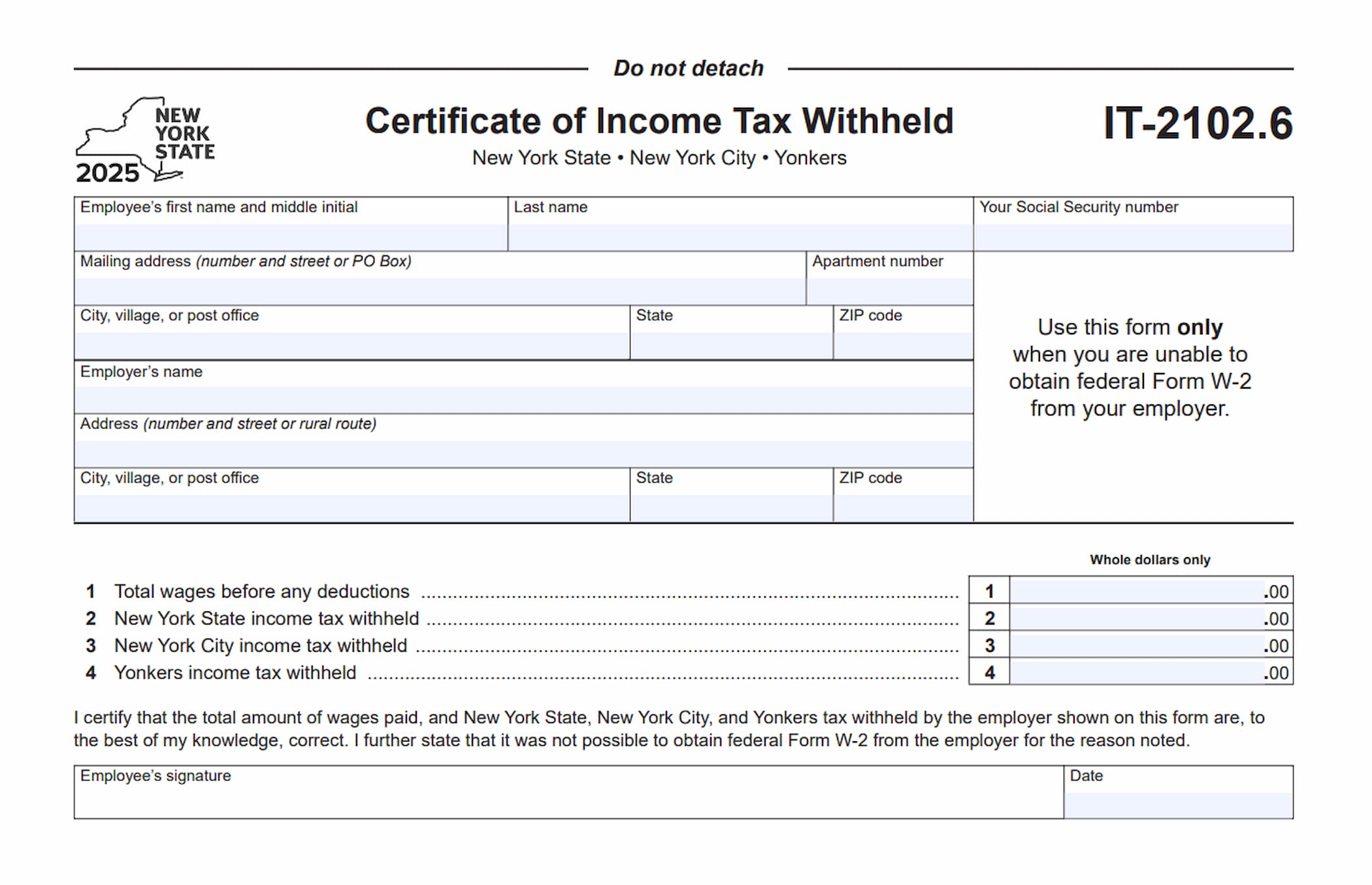
Form IT-2102.6, Certificate of Income Tax Withheld, is a New York State tax form used by employees who are unable to obtain a federal Form W-2, Wage and Tax Statement, from their employer. It allows taxpayers to report their wages and New York income taxes withheld when their employer has not provided the required federal wage statement. The form is issued by the New York State Department of Taxation and Finance and applies to New York State, New York City, and Yonkers income tax withholding.
Form IT-2102.6 is intended for employees who have contacted their employer about a missing W-2 but still have not received the document. It provides an alternative way to report the employee’s total wages and applicable state and local income tax withholding when filing the New York income tax return.
The certificate collects the employee’s name, Social Security number, mailing address, employer information, and the amounts of wages and income taxes withheld. It also requires the employee to explain why a federal Form W-2 could not be obtained and certify that the reported information is correct.
The form contains four financial reporting lines:
- Line 1 reports total wages before deductions.
- Line 2 reports New York State income tax withheld.
- Line 3 reports New York City income tax withheld.
- Line 4 reports Yonkers income tax withheld.
Completing Form IT-2102.6 correctly is important because the New York Department of Taxation and Finance uses the information to determine and administer the taxpayer’s income tax liability. Employees must provide accurate wage and withholding amounts, explain why the W-2 is unavailable, and sign the certificate before submitting it with their tax return.
How To File Form IT-2102.6
Form IT-2102.6 must be submitted with the applicable New York income tax return when an employer has not provided a federal Form W-2.
The form is intended for situations in which the employer has failed to provide the W-2 by January 31 and has not supplied it even after the employee contacted them.
Before filing the certificate, follow these steps:
- Contact your employer and request the missing federal Form W-2.
- If the employer still does not provide the document, complete Form IT-2102.6.
- Explain why you were unable to obtain the W-2.
- Provide your employer’s identifying information and any additional details that may help the department locate the employer.
- Report your wages and applicable New York income taxes withheld.
- Sign and date the certificate.
- Submit the completed form with your New York income tax return.
If you did not receive a W-2 from more than one employer, you must complete a separate Form IT-2102.6 for each employer.
The department also allows taxpayers to submit a copy of a payroll stub with the certificate when filing their return.
Which Information Should You Prepare?
Before completing Form IT-2102.6, gather the following information:
- Your first name and middle initial.
- Your last name.
- Your Social Security number.
- Your complete mailing address.
- Your employer’s name and address.
- Your total wages before deductions.
- Your New York State income tax withheld.
- Your New York City income tax withheld, if applicable.
- Your Yonkers income tax withheld, if applicable.
- Your employer’s Federal Employer Identification Number (EIN), if available.
- An explanation of why you could not obtain your federal Form W-2.
- A payroll stub or other supporting payroll information, if available.
If you have a previous federal Form W-2 from the same employer, you can use it to find the employer’s EIN.

How To Complete Form IT-2102.6
The 2025 Form IT-2102.6 is a one-page certificate with two main sections. The upper section contains instructions and spaces for explaining why the W-2 is unavailable and providing additional employer information. The lower section is the employee’s certificate, which contains identifying information, employer details, wage and withholding amounts, and the employee’s signature.
The form includes a detachable section marked “Do not detach.” Keep the certificate intact when completing and submitting it.
Upper Section: Explain Why You Could Not Obtain Form W-2
The upper portion of Form IT-2102.6 contains instructions and additional information fields. Complete these sections before filling out the employee certificate.
Explanation for Missing Federal Form W-2
Describe why you were unable to obtain a federal Form W-2 from your employer.
The form provides examples of acceptable explanations, including:
- The company was sold or closed.
- The employer refuses to provide the W-2.
- The employer does not respond to your request.
Provide a clear explanation of what happened and why you could not obtain the document.
Make sure the explanation accurately describes your circumstances.
Additional Employer Information
Enter any other information that may help the New York State Department of Taxation and Finance locate your employer.
The form specifically mentions the employer’s Federal Employer Identification Number (EIN) as an example.
If you have a previous federal Form W-2 from the same employer, you can find the EIN on that document.
Include any other relevant employer information that may help identify the business.
Employer’s Current Name and Address
If your employer’s current name or address is different from the information entered on the certificate, provide the updated details in this section.
Enter the employer’s current name and mailing address.
Complete this section when the employer has changed its business name, moved, or otherwise has different identifying information.
If the current information is the same as the employer information entered on the certificate, no additional details are necessary.
Employee Information
The lower portion of the certificate begins with the employee’s personal identifying information.
Complete these fields using the information associated with your New York income tax return.
Employee’s First Name and Middle Initial
Enter your first name and middle initial in the designated field.
Use the same identifying information associated with your tax records.
Last Name
Enter your complete last name.
Make sure the spelling matches the name used on your applicable New York income tax return.
Your Social Security Number
Enter your nine-digit Social Security number in the designated field.
Check the number carefully before submitting the certificate.
Employee Mailing Address
The next section collects your current mailing address.
Provide a complete address so the department can correctly identify the employee associated with the reported wages and withholding.
Mailing Address (Number and Street or PO Box)
Enter your complete mailing address.
Include your house or building number and street name, or provide your PO Box number.
Apartment Number
If applicable, enter your apartment or unit number.
Leave this field blank if you do not have an apartment number.
City, Village, or Post Office
Enter the city, village, or post office associated with your mailing address.
State
Enter the two-letter postal abbreviation for your state.
ZIP Code
Enter the ZIP code associated with your mailing address.
Verify that all address information is accurate and complete.
Employer Information
The certificate also requires identifying information about the employer responsible for paying your wages and withholding the applicable taxes.
Employer’s Name
Enter the full name of the employer who paid your wages.
Use the business name associated with your employment and payroll records.
Employer’s Address (Number and Street or Rural Route)
Enter the employer’s street address or rural route address.
Use the address associated with the employer’s payroll or business records.
City, Village, or Post Office
Enter the city, village, or post office where the employer is located.
State
Enter the two-letter postal abbreviation for the employer’s state.
ZIP Code
Enter the employer’s ZIP code.
Make sure the employer information corresponds to the business responsible for paying your wages during the tax year.
Important W-2 Requirement
The certificate contains a notice stating that Form IT-2102.6 should only be used when you are unable to obtain a federal Form W-2 from your employer.
It is not intended to replace a W-2 that you have already received.
Wage and Income Tax Withholding Information
The financial section of Form IT-2102.6 contains four numbered lines.
All amounts must be entered in whole dollars only. The form provides separate dollar fields for each amount.
Use your available payroll records, including pay stubs and other supporting documentation, to determine the correct figures.
Line 1: Total Wages Before Any Deductions
Enter the total wages paid by the employer before any deductions.
This amount represents your gross wages rather than the amount you received after taxes and other payroll deductions.
Use your payroll records to determine the total wages paid during the applicable tax year.
Line 2: New York State Income Tax Withheld
Enter the total amount of New York State income tax withheld from your wages by the employer.
Use your payroll records to determine the applicable withholding amount.
Report only the New York State income tax withheld in this field.
Line 3: New York City Income Tax Withheld
Enter the total amount of New York City income tax withheld from your wages, if applicable.
Use the amounts shown in your available payroll records.
If no New York City income tax was withheld, enter the applicable amount as zero.
Line 4: Yonkers Income Tax Withheld
Enter the total amount of Yonkers income tax withheld from your wages, if applicable.
Use your payroll records to determine the amount withheld.
If no Yonkers income tax was withheld, enter zero.
Important Financial Reporting Instructions
The form specifies that all financial amounts must be entered in whole dollars only.
When completing Lines 1 through 4:
- Use the total wages paid before deductions for Line 1.
- Report New York State income tax separately on Line 2.
- Report New York City income tax separately on Line 3.
- Report Yonkers income tax separately on Line 4.
- Use available payroll documentation to support the reported amounts.
Do not combine the different withholding categories into a single amount. Each tax type has its own designated line.
Employee Certification and Signature
The final section of Form IT-2102.6 contains a certification statement that must be reviewed and signed by the employee.
By signing the certificate, you confirm that the total wages paid and the New York State, New York City, and Yonkers taxes withheld by the employer shown on the form are correct to the best of your knowledge.
You also confirm that it was not possible to obtain a federal Form W-2 from the employer for the reason explained in the upper section.
Employee’s Signature
Sign the certificate in the designated field.
Your signature confirms that the information reported on Form IT-2102.6 is accurate to the best of your knowledge.
Date
Enter the date you signed the certificate.
Make sure the certificate is signed and dated before submitting it with your New York income tax return.
Additional Instructions and Privacy Notification
The upper section of Form IT-2102.6 includes additional filing guidance and a privacy notification from the New York State Department of Taxation and Finance.
Missing W-2 After January 31
If your employer has not provided a federal Form W-2 by January 31, the form directs you to visit the official New York State tax website at tax.ny.gov and search for “w-2.”
If you have already contacted your employer and still have not received the document, you may file Form IT-2102.6 with your current-year tax return.
Multiple Employers
If you did not receive a federal Form W-2 from more than one employer, you must file a separate certificate for each employer.
Complete each certificate with the corresponding employer’s information, wages, and withholding amounts.
Submit all completed Forms IT-2102.6 with your New York income tax return.
Payroll Stub Supporting Documentation
The department allows you to submit a copy of your payroll stub with Form IT-2102.6 when filing your return.
A payroll stub may help provide additional information about the employer and the wages and withholding amounts reported on the certificate.
The form specifically suggests this option as supporting documentation.
Privacy Notification
The form includes a privacy notification explaining how the New York State Department of Taxation and Finance collects and maintains personal information.
The department may collect information under the New York State Tax Law, including Social Security numbers, to determine and administer tax liabilities.
The information may also be used for legally authorized purposes, including tax offset programs and exchanges of tax information.
The notification further explains that quarterly wage information may be provided to certain state agencies for purposes such as:
- Fraud prevention.
- Support enforcement.
- Evaluating employment and training programs.
- Other purposes authorized by law.
The department warns that failure to provide required information may result in civil or criminal penalties, or both, under the Tax Law.
For additional details, taxpayers can consult the department’s website or Publication 54, Privacy Notification.
Final Review Before Filing
Before submitting Form IT-2102.6 with your New York income tax return, review the following checklist to ensure that all required information is complete and accurate.
- Correct tax year: Confirm that you are using the 2025 Form IT-2102.6.
- W-2 eligibility: Make sure you are unable to obtain a federal Form W-2 from your employer.
- Employer contact: Confirm that you contacted your employer and requested the missing W-2.
- Missing W-2 explanation: Explain why the employer did not provide the document.
- Additional employer information: Include the employer’s EIN or other information that may help the department locate the business.
- Employer address: Provide the employer’s current name and address if different from the information entered on the certificate.
- Employee name: Verify your first name, middle initial, and last name.
- Social Security number: Check that your nine-digit SSN is correct.
- Mailing address: Confirm your street address or PO Box and apartment number, if applicable.
- City, state, and ZIP: Verify that all mailing address details are complete.
- Employer name: Enter the correct employer name.
- Employer address: Verify the employer’s street address, city, state, and ZIP code.
- Line 1: Report total wages before any deductions.
- Line 2: Enter the total New York State income tax withheld.
- Line 3: Enter the total New York City income tax withheld, if applicable.
- Line 4: Enter the total Yonkers income tax withheld, if applicable.
- Whole-dollar amounts: Make sure all financial amounts are reported in whole dollars only.
- Payroll documentation: Consider attaching a copy of your payroll stub to support the reported information.
- Employee certification: Review the certification statement and verify that the reported wages and withholding amounts are correct.
- Signature: Sign the certificate.
- Date: Enter the date of your signature.
- Multiple employers: Complete a separate Form IT-2102.6 for each employer that did not provide a W-2.
- Final submission: Submit all completed certificates with your applicable New York income tax return.
Review the employee and employer information carefully before filing. Make sure the wage and withholding amounts are supported by your available payroll records and that the explanation for the missing W-2 is complete. Sign and date each certificate, and submit all applicable Forms IT-2102.6 with your New York income tax return.