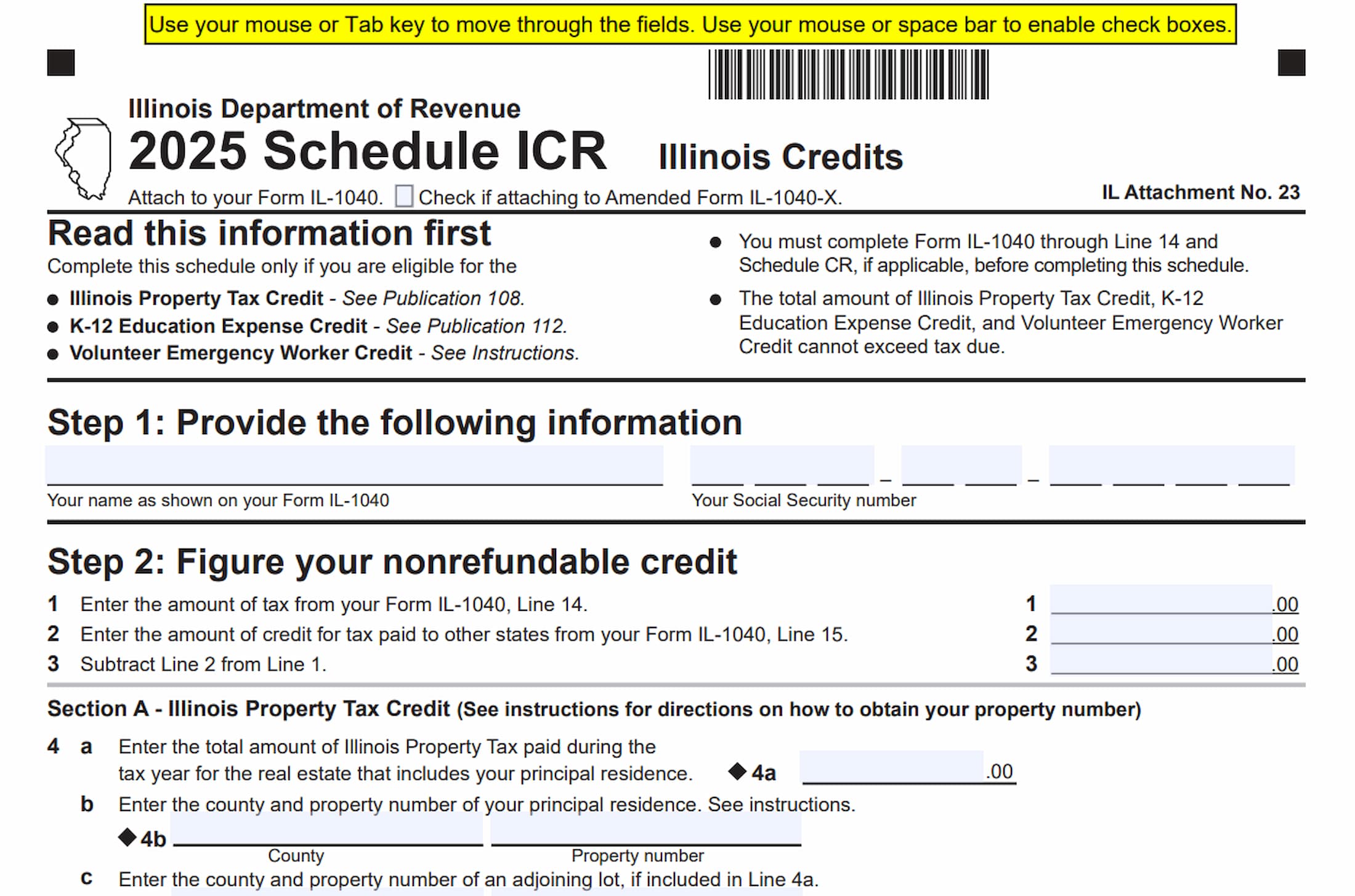
Illinois Schedule ICR, Illinois Credits, is a tax schedule used by eligible Illinois taxpayers to calculate and claim three nonrefundable state income tax credits: the Illinois Property Tax Credit, the K-12 Education Expense Credit, and the Volunteer Emergency Worker Credit. The schedule is attached to Form IL-1040 and helps determine the amount of these credits that can be applied against the taxpayer’s Illinois income tax liability.
The schedule is intended for individuals who qualify for one or more of these credits during the tax year. It collects information about the taxpayer, property taxes paid on a principal residence, qualifying education expenses for K-12 students, and volunteer emergency worker credit certificates issued by the Illinois Department of Revenue. Depending on the credits being claimed, taxpayers may need to provide property identification information, student details, school information, and supporting receipts.
Schedule ICR is divided into several sections. Step 1 collects the taxpayer’s identifying information. Step 2 calculates the available nonrefundable credits. Section A determines the Illinois Property Tax Credit, Section B calculates the K-12 Education Expense Credit, and Section C determines the Volunteer Emergency Worker Credit. Section D combines the allowable amounts to calculate the total nonrefundable credit.
The third page contains a K-12 Education Expense Credit Worksheet that taxpayers must complete when claiming the education credit. It collects information about each qualifying student, including their name, Social Security number, grade, school, school location, school type, and eligible tuition and related expenses.
Completing Schedule ICR accurately is important because the total amount of the Illinois Property Tax Credit, K-12 Education Expense Credit, and Volunteer Emergency Worker Credit cannot exceed the taxpayer’s tax due. Taxpayers must also complete the required portions of Form IL-1040 before preparing this schedule and provide the necessary supporting documentation. Incorrect calculations, missing student information, or incomplete supporting receipts may affect the credits claimed.
How To File Illinois Schedule ICR
Illinois Schedule ICR must be attached to Form IL-1040. Taxpayers filing an amended return using Form IL-1040-X should also indicate this by checking the designated box at the top of Schedule ICR.
Before completing the schedule, you must complete Form IL-1040 through Line 14. You must also complete Schedule CR, if applicable. These calculations provide the tax information needed to determine how much of the nonrefundable credits can be used.
Taxpayers claiming credits on Schedule ICR should prepare the following information:
- Your completed Form IL-1040 through Line 14.
- Your completed Schedule CR, if applicable.
- Your name as shown on Form IL-1040.
- Your Social Security number.
- Records of Illinois property taxes paid during the tax year for the real estate that includes your principal residence.
- The county and property identification numbers for your principal residence and any adjoining lots included in the property tax calculation.
- Information about the portion of property taxes deductible as a business expense on federal income tax forms or schedules.
- Records of qualifying K-12 education expenses for each eligible student.
- Receipts issued by each student’s school for education expenses.
- Volunteer Emergency Worker Credit Certificate numbers issued by the Illinois Department of Revenue, if applicable.
The K-12 Education Expense Credit Worksheet on page 3 must be completed when claiming the education credit. Attach any receipts received from the student’s school as required by the form.
The instructions also require taxpayers to submit complete and accurate information. Intentionally providing false information is a crime under Section 1301 of the Illinois Income Tax Act.

How To Complete Illinois Schedule ICR
The 2025 Schedule ICR contains three pages. The first page includes taxpayer information, the initial tax calculations, the Illinois Property Tax Credit, and the beginning of the K-12 Education Expense Credit calculation. The second page completes the remaining credit calculations. The third page contains the K-12 Education Expense Credit Worksheet.
Follow the steps and sections in order to determine the credits available for your tax return.
Amended Return and Electronic Form Instructions
Before completing the tax information, review the instructions and form controls at the top of the schedule.
Amended Form IL-1040-X Checkbox
Check this box if you are attaching Schedule ICR to an amended Form IL-1040-X.
Leave the box unchecked when filing the schedule with an original Form IL-1040.
Electronic Form Navigation
When using the fillable electronic version, you can use your mouse or the Tab key to move between fields.
Use your mouse or the space bar to select checkboxes.
Reset Button
The electronic form includes a Reset option that allows you to clear entered information and reset the fillable fields. Use it carefully because it may remove information you have already entered.
Print Button
Use the Print option to produce a copy of the completed schedule. Review all entries before printing to make sure the information is accurate and complete.
Step 1: Provide the Following Information
Step 1 identifies the taxpayer claiming the Illinois credits. Enter the information exactly as it appears on the corresponding Form IL-1040.
Your Name as Shown on Your Form IL-1040
Enter your name exactly as it appears on your Illinois individual income tax return.
If the return includes more than one taxpayer, use the applicable name information shown on the return.
Your Social Security Number
Enter your nine-digit Social Security number in the designated field.
Make sure the number matches the Social Security number reported on Form IL-1040.
Step 2: Figure Your Nonrefundable Credit
Step 2 calculates the amount of tax available for the nonrefundable credits claimed on Schedule ICR.
The initial calculation uses the tax amount from Form IL-1040 and subtracts the credit for taxes paid to other states. The resulting amount is then used throughout the following sections to determine how much of the available credits can be applied.
Line 1: Tax from Form IL-1040, Line 14
Enter the amount of tax reported on Form IL-1040, Line 14.
Use the figure shown on your completed Illinois income tax return.
Line 2: Credit for Tax Paid to Other States
Enter the amount of the credit for taxes paid to other states reported on Form IL-1040, Line 15.
Use the amount from your Illinois income tax return rather than calculating a separate figure on Schedule ICR.
Line 3: Tax After Credit for Taxes Paid to Other States
Subtract the amount on Line 2 from the amount on Line 1.
Enter the resulting amount on Line 3. This figure is used to determine the maximum amount available for the nonrefundable credits calculated in the following sections.
Section A: Illinois Property Tax Credit
Section A calculates the Illinois Property Tax Credit based on qualifying property taxes paid during the tax year for real estate that includes the taxpayer’s principal residence.
The calculation requires information about property taxes paid, property identification numbers, and any portion of the tax bill deductible as a business expense on federal income tax forms or schedules.
Line 4a: Total Illinois Property Tax Paid
Enter the total amount of Illinois property tax paid during the tax year for the real estate that includes your principal residence.
Use the actual property tax payments made during the applicable tax year. The amount must relate to the qualifying real estate associated with your principal residence.
Line 4b: County and Property Number of Your Principal Residence
Enter the county and property identification number associated with your principal residence.
Use the property number required by the Illinois instructions. The form directs taxpayers to consult the accompanying instructions for information about obtaining this number.
Both the county and property number must be provided in the designated fields.
Line 4c: County and Property Number of an Adjoining Lot
If an adjoining lot is included in the property tax amount reported on Line 4a, enter its county and property number here.
Complete this field only when an adjoining lot is included in the Line 4a calculation.
Line 4d: County and Property Number of Another Adjoining Lot
If a second adjoining lot is also included in the property tax amount reported on Line 4a, enter its county and property number here.
Provide the applicable county and property identification information for this additional property.
Line 4e: Property Taxes Deductible as a Business Expense
Enter the portion of your property tax bill that is deductible as a business expense on U.S. income tax forms or schedules.
This amount must be reported even if you did not actually claim the federal deduction. Use the portion of the property tax bill that qualifies as a business expense for this calculation.
Line 4f: Property Taxes After Business Expense Adjustment
Subtract the amount on Line 4e from the amount on Line 4a.
Enter the resulting amount on Line 4f. This represents the property taxes remaining after removing the portion attributable to deductible business expenses.
Line 4g: Illinois Property Tax Credit Base Amount
Multiply the amount on Line 4f by 5%, or 0.05.
Enter the result on Line 4g. This calculation determines the preliminary Illinois Property Tax Credit amount before applying the tax limitation on Line 3.
Line 5: Illinois Property Tax Credit Allowed
Compare the amounts on Lines 3 and 4g.
Enter whichever amount is smaller.
This represents the Illinois Property Tax Credit allowed after considering the available tax amount. The credit cannot exceed the amount remaining after the credit for taxes paid to other states.
Line 6: Tax Remaining After Illinois Property Tax Credit
Subtract the amount on Line 5 from the amount on Line 3.
Enter the difference on Line 6. This amount represents the remaining tax available for the K-12 Education Expense Credit and other nonrefundable credits calculated later in the schedule.
Section B: K-12 Education Expense Credit
Section B calculates the K-12 Education Expense Credit for qualifying education expenses.
Before completing this section, you must complete the K-12 Education Expense Credit Worksheet on page 3 of Schedule ICR. You must also attach any receipts received from your student’s school to claim the education credit.
The calculation excludes the first $250 of qualifying education expenses and applies a 25% credit rate, subject to a maximum credit amount of $750.
Line 7a: Total K-12 Education Expenses
Enter the total amount of qualifying K-12 education expenses reported on Line 15 of the worksheet on page 3.
Use the combined amount calculated from the qualifying students listed on the worksheet and any additional pages attached.
Line 7b: First $250 of Education Expenses
Enter $250.00.
The first $250 of qualifying K-12 education expenses cannot be used to calculate the education credit. This amount is subtracted from the total expenses reported on Line 7a.
Line 7c: Education Expenses Eligible for Credit Calculation
Subtract the amount on Line 7b from the amount on Line 7a.
If the result is negative, enter zero instead.
The amount on Line 7c represents the qualifying education expenses remaining after excluding the first $250.
Line 7d: Calculated K-12 Education Expense Credit
Multiply the amount on Line 7c by 25%, or 0.25.
Compare the result with $750 and enter whichever amount is smaller.
The credit calculation is limited to a maximum of $750, even when 25% of the eligible expenses exceeds that amount.
Line 8: K-12 Education Expense Credit Allowed
Compare the amounts on Lines 6 and 7d.
Enter whichever amount is smaller.
This limits the education credit to the amount remaining after the Illinois Property Tax Credit and ensures that the combined credits do not exceed the available tax.
Line 9: Tax Remaining After K-12 Education Expense Credit
Subtract the amount on Line 8 from the amount on Line 6.
Enter the resulting amount on Line 9. This is the remaining tax available for the Volunteer Emergency Worker Credit calculated in Section C.
Section C: Volunteer Emergency Worker Credit
Section C calculates the Volunteer Emergency Worker Credit for qualifying taxpayers.
This credit is available only if the taxpayer received a Volunteer Emergency Worker Credit Certificate from the Illinois Department of Revenue.
The section collects certificate numbers for the taxpayer and spouse, when applicable, and determines the credit amount based on whether one or both spouses received the award.
Line 10a: Your Volunteer Emergency Worker Credit Certificate Number
Enter your Volunteer Emergency Worker Credit Certificate Number issued by the Illinois Department of Revenue.
Use the certificate number associated with your individual credit award.
Line 10b: Spouse’s Volunteer Emergency Worker Credit Certificate Number
If you are married filing jointly and your spouse received the Volunteer Emergency Worker Credit, enter your spouse’s certificate number here.
Use the certificate number issued to your spouse by the Illinois Department of Revenue.
Line 10c: Volunteer Emergency Worker Credit Amount
Enter the applicable credit amount based on the number of qualifying awards received.
Use the following amounts:
- Enter $500 if you received the credit or, when filing jointly, if your spouse received the credit.
- Enter $1,000 if you are married filing jointly and both you and your spouse received the credit.
The amount reported must reflect the applicable certificate awards.
Line 11: Volunteer Emergency Worker Credit Allowed
Compare the amounts on Lines 9 and 10c.
Enter whichever amount is smaller.
This represents the Volunteer Emergency Worker Credit that can be used after accounting for the property tax and education credits.
Line 12: Tax Remaining After Volunteer Emergency Worker Credit
Subtract the amount on Line 11 from the amount on Line 9.
Enter the resulting difference on Line 12.
This represents the remaining tax after all three credit sections have been considered.
Section D: Total Nonrefundable Credit
Section D combines the allowable amounts calculated in the preceding sections to determine the total nonrefundable credit.
Line 13: Total Nonrefundable Credit
Add the amounts reported on Lines 5, 8, and 11.
Enter the combined total on Line 13.
This is the total Illinois nonrefundable credit amount calculated on Schedule ICR. Transfer this amount to Form IL-1040, Line 16.
Make sure the amount includes only the allowable credits calculated in the preceding sections.
K-12 Education Expense Credit Worksheet
The K-12 Education Expense Credit Worksheet appears on page 3 of Schedule ICR. Taxpayers claiming the education credit must complete this worksheet and attach any receipts received from their student’s school.
The worksheet collects information about each qualifying student and the education expenses associated with that student during the calendar year.
Line 14: Information for Each Qualifying Student
Complete the information requested for every qualifying student included in the education expense calculation.
If a student attended more than one qualifying school during the calendar year, list each school separately. If additional space is needed, attach a separate sheet of paper using the same format as the worksheet.
The worksheet provides ten student entries, labeled 14a through 14j, and seven information columns.
Column A: Student’s Name
Enter the full name of each qualifying student.
Provide a separate entry for every student included in the education expense calculation.
Column B: Social Security Number
Enter the student’s nine-digit Social Security number.
Make sure the number corresponds to the student identified in Column A.
Column C: Grade
Enter the student’s grade for the applicable school year.
This field applies to grades within the K-12 range.
Column D: School Name
Enter the name of the school attended by the student.
This field is for Illinois K-12 schools. If the student attended home school, enter “home school” as indicated by the worksheet.
Column E: School City
Enter the city in Illinois where the school is located.
The worksheet specifies that this field is intended for Illinois cities.
Column F: School Type
Select only one checkbox to identify the type of school attended.
Three options are available:
- P – Public: Select this option for a public school.
- N – Non-public: Select this option for a non-public school.
- H – Home school: Select this option when the student is homeschooled.
Choose only the school type that applies to the student’s educational arrangement.
Column G: Total Tuition, Book/Lab Fees
Enter the total tuition and qualifying book and laboratory fees associated with the student.
Use the applicable amounts supported by the school receipts and other relevant records.
The amount entered in this column is used to calculate the total qualifying education expenses on Line 15.
Lines 14a Through 14j: Student Entries
Use the available rows to enter information for each qualifying student.
The worksheet provides ten entries, from 14a through 14j. Complete the applicable columns for each student.
If a student attended more than one qualifying school during the calendar year, list the schools separately. If you need additional space beyond the ten available entries, attach another sheet following the same worksheet format.
Line 15: Total Qualified Education Expenses
Add the amounts reported in Column G for Lines 14a through 14j.
Include the amounts from Column G of any additional pages attached to the worksheet.
Enter the combined total on Line 15. This represents the total qualifying education expenses for the year.
Transfer this amount to Step 2, Line 7a of Schedule ICR.
School Receipts
Attach any receipts received from your student’s school to support the education expense credit claim.
The schedule specifically requires taxpayers to include these receipts when claiming the credit.
False Information Warning
The worksheet includes a warning that intentionally submitting false information is a crime under Section 1301 of the Illinois Income Tax Act.
Make sure all student details, school information, and reported expenses are accurate and supported by the available documentation.
Final Review Before Filing
Before attaching Schedule ICR to Form IL-1040, review the following checklist to ensure that all required information, calculations, and supporting documents are complete.
- Correct tax year: Confirm that you are completing the 2025 Illinois Schedule ICR.
- Amended return: Check the designated box if attaching the schedule to Form IL-1040-X.
- Form IL-1040: Complete Form IL-1040 through Line 14 before preparing Schedule ICR.
- Schedule CR: Complete Schedule CR if applicable.
- Taxpayer information: Verify that your name and Social Security number match Form IL-1040.
- Line 1: Confirm that the tax amount matches Form IL-1040, Line 14.
- Line 2: Verify that the credit for taxes paid to other states matches Form IL-1040, Line 15.
- Line 3: Check that Line 2 is subtracted correctly from Line 1.
- Property tax information: Confirm that Line 4a includes the applicable Illinois property taxes paid during the tax year for the real estate containing your principal residence.
- Property identification: Provide the correct county and property numbers for your principal residence and any adjoining lots included in Line 4a.
- Line 4e: Include the portion of property taxes deductible as a business expense on federal forms or schedules, even if you did not claim the federal deduction.
- Lines 4f and 4g: Verify the subtraction and 5% calculation.
- Lines 5 and 6: Confirm that the property tax credit does not exceed the available tax amount.
- K-12 worksheet: Complete the education expense worksheet on page 3 if claiming the education credit.
- Student information: Check each student’s name, Social Security number, grade, school name, and school city.
- School type: Select only one applicable school classification for each student: Public, Non-public, or Home school.
- Education expenses: Verify the tuition, book, and laboratory fee amounts entered in Column G.
- Additional worksheet pages: Attach additional pages if more space is needed or a student attended multiple qualifying schools.
- School receipts: Attach any receipts received from the student’s school.
- Line 15: Confirm that all Column G amounts are added correctly and transferred to Line 7a.
- Lines 7b through 7d: Verify the $250 exclusion, 25% calculation, and $750 maximum credit limitation.
- Lines 8 and 9: Confirm that the education credit is limited by the remaining tax amount.
- Volunteer Emergency Worker Credit: Verify that you received the required certificate from the Illinois Department of Revenue.
- Lines 10a and 10b: Enter the applicable certificate numbers for yourself and your spouse, if applicable.
- Line 10c: Confirm that the correct $500 or $1,000 credit amount is entered.
- Lines 11 and 12: Verify the Volunteer Emergency Worker Credit limitation and remaining tax calculation.
- Line 13: Add Lines 5, 8, and 11 to determine the total nonrefundable credit.
- Form IL-1040 transfer: Enter the amount from Schedule ICR, Line 13, on Form IL-1040, Line 16.
- Final review: Make sure all required fields, calculations, and supporting documents are complete and accurate.
Before submitting your return, review the combined credit amount to ensure it does not exceed the available tax due. Attach Schedule ICR and the required supporting receipts to your Form IL-1040. Accurate reporting of property taxes, education expenses, and volunteer emergency worker awards helps ensure that the appropriate Illinois nonrefundable credits are calculated and claimed.