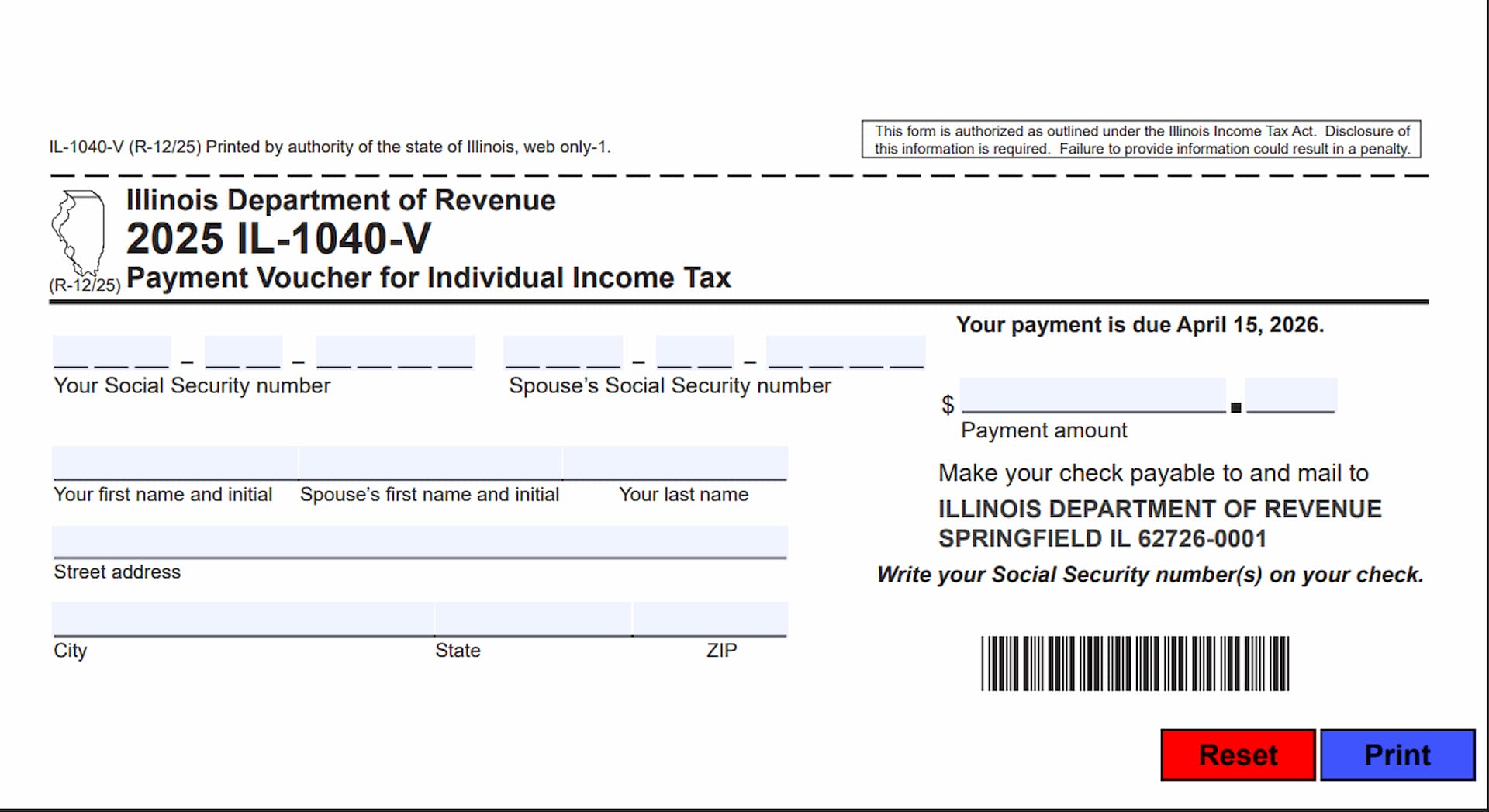
Form IL-1040-V, Payment Voucher for Individual Income Tax, is a payment form issued by the Illinois Department of Revenue for individuals who owe state income tax and prefer to pay their balance by mail. It accompanies a payment for an amount owed on Form IL-1040, Individual Income Tax Return. The voucher provides the Illinois Department of Revenue with the taxpayer’s identifying information, mailing address, and payment amount so that the submitted payment can be properly associated with the corresponding income tax account.
The form is intended for Illinois individual income taxpayers who have a balance due on their state income tax return and choose to submit their payment by mail rather than electronically. It collects the taxpayer’s Social Security number, spouse’s Social Security number when applicable, names, mailing address, and the amount being paid. The completed voucher must be sent together with the payment to the address provided on the form.
The Illinois Department of Revenue encourages taxpayers to make payments electronically whenever possible. Electronic payments can help avoid mailing delays, eliminate the need to purchase postage or visit a post office, and provide immediate payment confirmation. Taxpayers can make electronic payments through the official Illinois tax payment website at mytax.illinois.gov.
Completing Form IL-1040-V correctly is important because the information helps the department identify the taxpayer and process the payment. Incorrect identifying information, missing Social Security numbers, or an improperly submitted payment may delay processing. The form specifically warns taxpayers not to cover or remove their Social Security numbers because doing so can cause processing delays.
How To File Form IL-1040-V
Form IL-1040-V is submitted with a payment for an outstanding balance reported on Form IL-1040. It is not a replacement for the individual income tax return. Taxpayers who choose to pay by mail must complete the payment voucher located at the bottom of the form and send it together with their payment.
There are two payment methods described on the voucher:
Electronic Payment
The Illinois Department of Revenue encourages taxpayers to pay electronically whenever possible. Visit mytax.illinois.gov to make an electronic payment. This method helps avoid postal delays and provides immediate confirmation of payment.
Payment by Mail
Taxpayers who prefer to pay by mail should complete Form IL-1040-V and send it with their payment to the mailing address printed on the voucher.
For mailed payments, make the check payable to:
Illinois Department of Revenue
Mail the payment and completed voucher to:
Illinois Department of Revenue
Springfield, IL 62726-0001
Write your Social Security number or numbers on the check so the department can properly identify the payment.
For the 2025 tax year version of Form IL-1040-V, the printed payment due date is April 15, 2026.
Before completing the voucher, prepare the following information:
- Your completed Form IL-1040 and the amount you owe.
- Your Social Security number.
- Your spouse’s Social Security number, if applicable.
- Your first name and middle initial.
- Your spouse’s first name and middle initial, if applicable.
- Your last name.
- Your complete mailing address, including city, state, and ZIP code.
- The payment amount you intend to submit.
- A check payable to the Illinois Department of Revenue if paying by mail.
Make sure that all identifying information is accurate and that the payment amount corresponds to the balance you intend to pay.

How To Complete Form IL-1040-V
Form IL-1040-V is a one-page payment voucher with identifying information fields, a payment amount section, and instructions for submitting payment. The following explanations cover each field and the additional instructions printed on the form.
Payment Instructions and Electronic Filing Options
Before completing the voucher, review the payment guidance provided by the Illinois Department of Revenue.
Electronic Payment Option
Taxpayers are encouraged to use the Illinois Department of Revenue’s online payment service whenever possible. Visit mytax.illinois.gov to pay electronically. Electronic payments can reduce the risk of mailing delays, eliminate postage expenses, and provide immediate confirmation that the payment was received.
Mail-In Payment Instructions
If you choose to pay your Form IL-1040 balance by mail, complete the IL-1040-V voucher at the bottom of the page. Include the completed voucher with your payment and send both to the mailing address printed on the form.
Social Security Number Notice
Do not cover, remove, or otherwise redact your Social Security number or numbers when completing the payment voucher. The department warns that missing or obscured Social Security numbers may cause processing delays.
Taxpayer and Spouse Information
The first group of fields identifies the individual taxpayer and, when applicable, their spouse. Enter the requested information carefully so the payment can be associated with the correct income tax account.
Your Social Security Number
Enter the taxpayer’s nine-digit Social Security number in the designated field. Make sure the number is accurate and matches the information reported on your Form IL-1040.
Do not leave this field obscured or redact any of its digits. The Illinois Department of Revenue specifically warns that removing Social Security number information can delay payment processing.
Spouse’s Social Security Number
If you are filing jointly with your spouse, enter your spouse’s nine-digit Social Security number in the corresponding field.
Make sure the number matches the identifying information on your joint income tax return. Follow the applicable filing instructions if this field does not apply to your tax situation.
Your First Name and Initial
Enter the taxpayer’s first name and middle initial in the designated field. Use the same identifying information shown on your Form IL-1040.
Spouse’s First Name and Initial
For joint filers, enter the spouse’s first name and middle initial in the corresponding field. Keep the information consistent with the names reported on the income tax return.
Your Last Name
Enter the taxpayer’s last name as it appears on Form IL-1040. Check the spelling carefully to avoid discrepancies when the department processes the payment.
Mailing Address Information
The next group of fields collects the taxpayer’s mailing address. Provide a complete and accurate address so the Illinois Department of Revenue has the correct contact information associated with the payment voucher.
Street Address
Enter the taxpayer’s complete street address, including the house or building number and street name.
Use the mailing address associated with your income tax return.
City
Enter the name of the city associated with your mailing address.
State
Enter the two-letter postal abbreviation for the state in which your mailing address is located.
ZIP
Enter the ZIP code associated with your mailing address. Verify that the ZIP code is correct and corresponds to the city and state entered above.
Payment Information
The payment section is located on the right side of the voucher. It contains the payment amount field and the instructions for making and mailing a check.
Payment Amount
Enter the amount you are paying toward the balance owed on your Form IL-1040.
Use the amount you intend to submit with the voucher. Make sure the amount entered agrees with the payment you are enclosing.
Make Your Check Payable To
For payments submitted by check, make the check payable to the Illinois Department of Revenue.
Do not make the check payable to an individual or another organization. Use the department’s full name as printed on the voucher.
Mailing Address for Payment
Send your completed payment voucher and check to the following address:
Illinois Department of Revenue
Springfield, IL 62726-0001
Make sure the voucher accompanies the payment when mailing it to the department.
Social Security Number on Your Check
Write your Social Security number or numbers on the check. This information helps the Illinois Department of Revenue identify the taxpayer associated with the payment.
Do not omit this information when submitting a check.
Additional Form Instructions and Controls
The electronic version of Form IL-1040-V includes instructions for navigating and completing its fillable fields.
Moving Between Fields
Use your mouse or the Tab key to move from one fillable field to another. The Tab key allows you to navigate through the available fields without manually clicking each one.
Enabling Checkboxes
When a checkbox is available, use your mouse or the space bar to select it. The navigation instructions apply to interactive PDF fields.
Reset Button
The Reset button at the bottom of the electronic form allows users to clear entered information and reset the fillable fields. Use this option carefully because it may remove information you have already entered.
Print Button
Use the Print button to print the completed payment voucher. Review the entered information before printing to make sure all required fields are accurate and readable.
Authorization and Disclosure Notice
Form IL-1040-V includes an authorization and disclosure statement issued under the Illinois Income Tax Act.
The form is authorized under the Illinois Income Tax Act, and providing the requested information is required. Failure to provide the required information could result in a penalty.
Taxpayers should therefore provide complete and accurate identifying information when completing the voucher.
Final Review Before Filing
Before mailing Form IL-1040-V with your payment, review the following checklist to make sure the voucher is complete and ready to submit.
- Correct tax form: Confirm that you are using the 2025 Form IL-1040-V for your Illinois individual income tax payment.
- Taxpayer Social Security number: Verify that your nine-digit Social Security number is entered correctly and has not been redacted.
- Spouse’s Social Security number: If applicable, confirm that your spouse’s Social Security number is entered accurately.
- Taxpayer name: Check that your first name, middle initial, and last name match the information on your Form IL-1040.
- Spouse’s name: If applicable, verify that your spouse’s first name and middle initial are correct.
- Street address: Make sure your street address is complete and accurate.
- City, state, and ZIP code: Confirm that all mailing address fields contain the correct information.
- Payment amount: Verify that the amount entered on the voucher matches the payment you intend to submit.
- Check payable to: Make sure your check is payable to the Illinois Department of Revenue.
- Social Security number on check: Write your Social Security number or numbers on the check as instructed.
- Mailing address: Confirm that the completed voucher and payment are addressed to Illinois Department of Revenue, Springfield, IL 62726-0001.
- Payment due date: Review the applicable payment deadline. The 2025 voucher lists April 15, 2026.
- Electronic alternative: Consider using mytax.illinois.gov if you prefer to pay electronically.
- Completed voucher: Make sure the payment voucher is filled out and included with your check before mailing.
- Final review: Check all entered information for missing fields, incorrect numbers, and spelling errors.
Once you have verified the information, print the completed voucher and submit it with your check to the Illinois Department of Revenue if paying by mail. Keeping your payment information accurate and following the submission instructions can help prevent unnecessary processing delays.