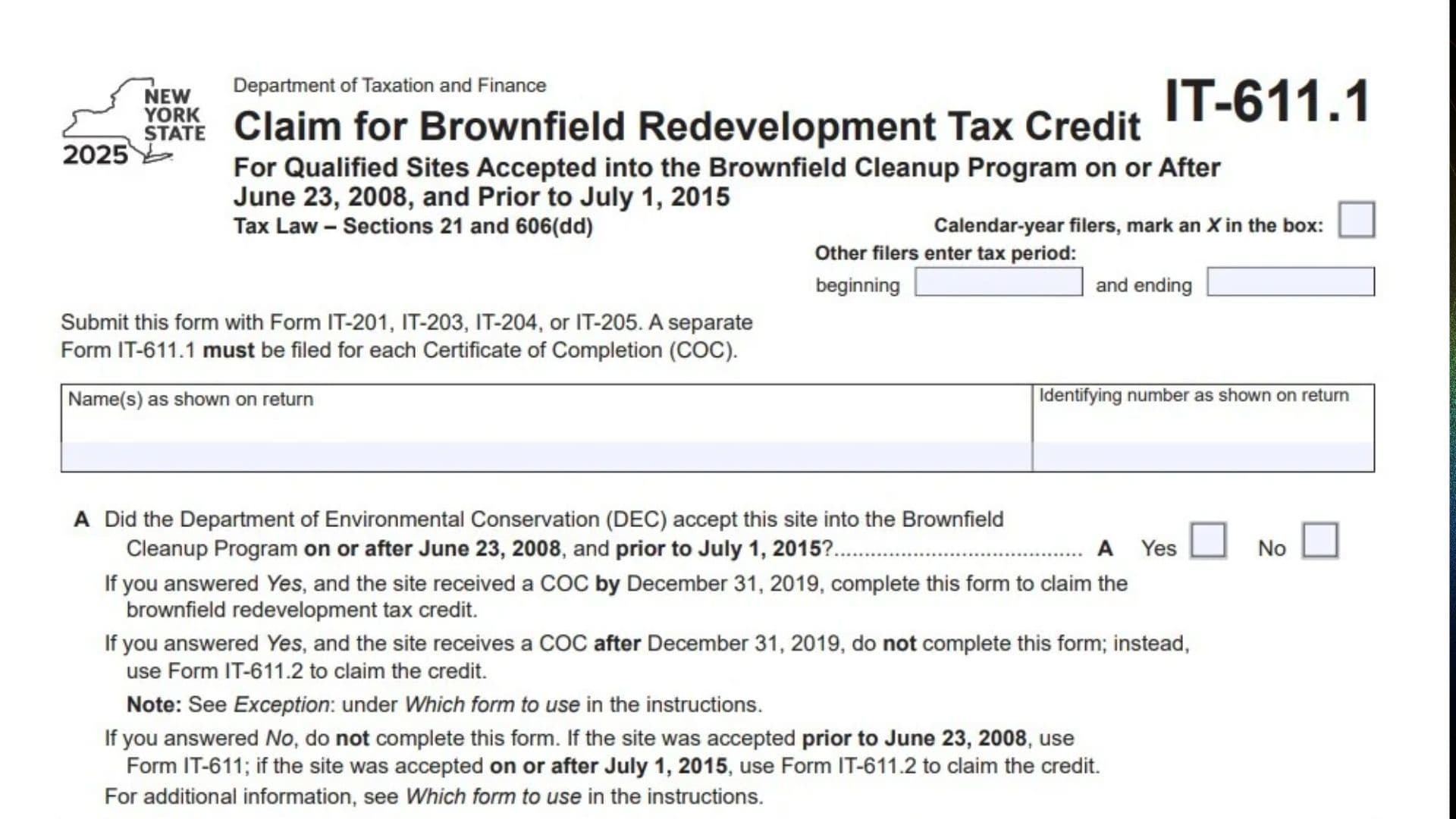
New York Form IT-611.1, Claim for Brownfield Redevelopment Tax Credit, is a tax form issued by the New York State Department of Taxation and Finance. It is used by eligible taxpayers to calculate and claim a Brownfield Redevelopment Tax Credit for qualified sites accepted into the Brownfield Cleanup Program between June 23, 2008, and before July 1, 2015.
The credit is intended for qualifying redevelopment activities involving contaminated or potentially contaminated properties that have been accepted into New York’s Brownfield Cleanup Program. Eligible taxpayers may claim credit components associated with site preparation costs, on-site groundwater remediation costs, and qualified tangible property used at the redevelopment site.
Form IT-611.1 collects information about the qualified brownfield site, the Brownfield Cleanup Agreement, the Certificate of Completion (COC), eligible project expenses, tangible property, and the taxpayer’s share of the available credit. It also provides sections for reporting credit amounts received through partnerships, S corporations, estates, and trusts.
The 2025 form contains seven main schedules. Schedule A identifies the qualified brownfield site and establishes whether the property meets the applicable program and certification requirements. Schedule B calculates the three credit components: site preparation, on-site groundwater remediation, and tangible property. Schedule C identifies partnerships, S corporations, estates, and trusts through which the taxpayer received a credit. Schedule D allocates credit components and recapture amounts among beneficiaries and fiduciaries. Schedule E calculates the total Brownfield Redevelopment Tax Credit. Schedule F calculates credit recapture when tangible property ceases to qualify or when a Certificate of Completion is revoked. Schedule G summarizes the total recapture amount for reporting on the appropriate New York tax return.
The form is specifically designed for qualified sites accepted into the Brownfield Cleanup Program on or after June 23, 2008, and before July 1, 2015. The date on which the Department of Environmental Conservation (DEC) issued the Certificate of Completion also matters. If the qualified site received its COC by December 31, 2019, Form IT-611.1 may be used to claim the credit. If the COC was issued after December 31, 2019, the taxpayer must generally use Form IT-611.2 instead.
Form IT-611.1 must be filed with the applicable New York income tax or fiduciary return. Depending on the taxpayer’s filing status, the form is submitted with Form IT-201, IT-203, IT-204, or IT-205. A separate Form IT-611.1 must be completed for each Certificate of Completion.
Completing the form correctly is important because the credit calculation depends on the qualified site’s eligibility, the dates and amounts of project expenses, the applicable credit percentages, and the taxpayer’s ownership or allocation share. Taxpayers must also provide supporting documentation, including a copy of the Certificate of Completion and applicable property transfer records. If a previously claimed credit becomes subject to recapture, the taxpayer must calculate and report the applicable recapture amount using Schedules F and G.
Who Must File New York Form IT-611.1?
You may need to complete Form IT-611.1 if you are an individual, partner, S corporation shareholder, beneficiary, fiduciary, or partnership claiming a qualifying Brownfield Redevelopment Tax Credit associated with an eligible New York brownfield site.
The qualified site must meet the applicable Brownfield Cleanup Program acceptance date requirements.
Qualified Brownfield Sites
The form applies to qualified sites accepted into the Brownfield Cleanup Program:
- On or after June 23, 2008.
- Before July 1, 2015.
The Department of Environmental Conservation must have accepted the site into the program within this period.
Certificate of Completion Requirements
The Certificate of Completion date determines which credit form should be used.
- If the site received its COC by December 31, 2019, use Form IT-611.1, provided the other eligibility requirements are met.
- If the site received its COC after December 31, 2019, generally use Form IT-611.2 instead.
- If the site was accepted into the program before June 23, 2008, use Form IT-611.
- If the site was accepted on or after July 1, 2015, use Form IT-611.2.
The form also refers taxpayers to the exception under the instructions’ “Which form to use” section.
Taxpayers Receiving Credit Through Other Entities
You may also need to complete this form if you receive a share of the brownfield redevelopment credit through:
- A partnership.
- A New York S corporation.
- An estate.
- A trust.
These taxpayers must report the applicable credit components and provide the required entity information.
Fiduciaries and Beneficiaries
Fiduciaries and beneficiaries may have additional reporting responsibilities.
Fiduciaries must complete Schedule D to allocate credit components and recapture amounts among beneficiaries and the fiduciary.
Beneficiaries receiving a credit through an estate or trust must report their applicable share using the appropriate sections of the form.
How To File New York Form IT-611.1
Form IT-611.1 must be submitted with the applicable New York tax return. It is not intended to be filed as a separate standalone tax return.
The form must accompany one of the following returns:
- Form IT-201.
- Form IT-203.
- Form IT-204.
- Form IT-205.
A separate Form IT-611.1 must be completed for each Certificate of Completion associated with a qualified site.
Where To Submit Form IT-611.1
Attach the completed Form IT-611.1 to the appropriate New York tax return.
Use the applicable return based on your filing status:
- Individuals generally attach the form to Form IT-201 or IT-203.
- Partnerships attach the form to Form IT-204.
- Fiduciaries attach the form to Form IT-205.
Follow the filing instructions for the applicable return when submitting the completed credit form.
Information To Prepare Before Completing Form IT-611.1
Gather the following information before starting:
- Taxpayer’s name as shown on the tax return.
- Social Security number or other identifying number.
- Tax year or tax period.
- Brownfield Cleanup Agreement execution date.
- Certificate of Completion.
- Qualified site’s name and location.
- Municipality and county.
- DEC region.
- Division of Environmental Remediation (DER) site number.
- Date the Certificate of Completion was issued.
- Site sale or transfer documentation, if applicable.
- Environmental zone information.
- Brownfield Opportunity Area notification, if applicable.
- Site preparation cost records.
- Groundwater remediation cost records.
- Qualified tangible property descriptions and cost records.
- Applicable credit percentages.
- Partnership, S corporation, estate, or trust allocation information.
- Previous credit amounts and recapture information, if applicable.
You should also prepare any additional schedules or supporting documents required by the applicable instructions.

How To Complete New York Form IT-611.1
Form IT-611.1 contains four pages and seven schedules. Complete the form in order, beginning with the taxpayer identification information and Schedule A.
The form is divided into the following sections:
- Schedule A: Brownfield site identifying information.
- Schedule B: Credit components.
- Schedule C: Partnership, S corporation, estate, and trust information.
- Schedule D: Beneficiary’s and fiduciary’s share of credit components and recapture of credit.
- Schedule E: Computation of credit.
- Schedule F: Recapture of credit.
- Schedule G: Summary of recapture of credit.
Taxpayer and Tax Period Information
The top section of page 1 identifies the taxpayer and the period covered by the return.
Calendar-Year Filers Checkbox
Check the box if you file your New York tax return on a calendar-year basis.
This identifies the tax period covered by the credit claim.
Other Filers: Beginning Tax Period
If you use a fiscal tax year or another tax period, enter the beginning date of the tax period.
Use the applicable starting date for your tax return.
Other Filers: Ending Tax Period
Enter the ending date of the tax period.
Make sure the beginning and ending dates agree with the tax period reported on your New York return.
Name(s) as Shown on Return
Enter the taxpayer’s name exactly as it appears on the applicable New York tax return.
If filing jointly, use the names shown on the joint return.
Identifying Number as Shown on Return
Enter the taxpayer identification number shown on the applicable tax return.
For individuals, this is generally the Social Security number. Use the appropriate identifying number for the entity or taxpayer filing the return.
Eligibility Question
Question A: Did the Department of Environmental Conservation Accept This Site Into the Brownfield Cleanup Program on or After June 23, 2008, and Prior to July 1, 2015?
Select Yes or No to indicate whether the qualified site was accepted into the Brownfield Cleanup Program within the specified period.
Choose Yes if the acceptance date falls on or after June 23, 2008, and before July 1, 2015.
If you answer Yes and the site received a Certificate of Completion by December 31, 2019, continue completing Form IT-611.1.
If the site received its Certificate of Completion after December 31, 2019, use Form IT-611.2 instead, subject to the applicable exception in the instructions.
If you answer No, do not complete this form.
Use Form IT-611 if the site was accepted before June 23, 2008. Use Form IT-611.2 if the site was accepted on or after July 1, 2015.
Schedule A: Brownfield Site Identifying Information
Schedule A collects information about the qualified brownfield site for which the taxpayer is claiming the credit.
The information should match the records issued by the New York State Department of Environmental Conservation.
Line B: Date of Execution of the Brownfield Cleanup Agreement
Enter the date the Brownfield Cleanup Agreement (BCA) was executed for the qualified brownfield site.
Use the month, day, and year format requested on the form (MMDDYYYY).
Make sure the date corresponds to the agreement associated with the specific site for which you are claiming the credit.
Line C: Qualified Site Information From the Certificate of Completion
Enter the site identification details exactly as they appear on the Certificate of Completion issued by the Department of Environmental Conservation.
The form provides separate fields for the following information.
Site Name
Enter the official name of the qualified brownfield site as shown on the Certificate of Completion.
Site Location: Municipality
Enter the municipality where the qualified site is located.
Use the location information provided on the Certificate of Completion.
Site Location: County
Enter the county in which the qualified brownfield site is situated.
DEC Region
Enter the Department of Environmental Conservation region associated with the qualified site.
Use the region identified in the site’s official documentation.
Division of Environmental Remediation (DER) Site Number
Enter the DER site identification number assigned to the qualified brownfield site.
Copy the number from the Certificate of Completion or applicable DEC records.
Date COC Was Issued
Enter the date the Department of Environmental Conservation issued the Certificate of Completion.
This date is important because it helps determine whether Form IT-611.1 or another brownfield credit form applies.
Attach a copy of the Certificate of Completion to the tax return.
Line D: Date the Certificate of Completion Was Transferred
If applicable, enter the date the Certificate of Completion was transferred because of a sale or transfer of the qualified site.
Use the requested MMDDYYYY format.
Attach a copy of the sale or transfer documentation supporting the transfer.
If no transfer occurred, leave this field blank.
Line E: Environmental Zone (EN-Zone) Status
Select Yes or No to indicate whether the qualified site covered by the Certificate of Completion is located within an environmental zone.
Use the applicable environmental zone information to determine the correct answer.
Line F: Percentage of the Qualified Site Located Within an EN-Zone
If you answered Yes on Line E, enter the percentage of the qualified site located within the environmental zone.
Enter the percentage as a decimal rounded to four places.
Use the applicable site information to calculate the portion located within the EN-Zone.
Line G: Brownfield Opportunity Area Notification
Check the box if you received notification from the New York State Department of State confirming that the qualified site is located in a Brownfield Opportunity Area.
Attach the supporting notification or documentation.
Leave the box unchecked if you did not receive the applicable notification.
Line H: Primary Manufacturing Use
Select Yes or No to indicate whether the qualified site will be used primarily for manufacturing activities.
Answer according to the intended primary use of the qualified site.
Line I: Multiple Taxpayers Listed on the Certificate of Completion
Select Yes or No to indicate whether multiple taxpayers are listed on the Certificate of Completion and are claiming a credit for the qualified site.
This information helps identify whether the credit is being claimed by more than one taxpayer.
Schedule B: Credit Components
Schedule B calculates the three components of the Brownfield Redevelopment Tax Credit.
These components are:
- Site preparation credit component.
- On-site groundwater remediation credit component.
- Tangible property credit component.
Each component has separate cost reporting and calculation requirements.
Part 1: Site Preparation Credit Component
Part 1 collects the qualifying site preparation costs associated with the brownfield redevelopment project.
The table contains three columns.
Column A: Description of Site Preparation Costs
Describe each qualifying site preparation expense.
List the individual costs separately and provide enough detail to identify the work performed.
Use the applicable Form IT-611.1-I instructions to determine which expenses qualify.
Column B: Date Costs Paid or Incurred
Enter the date each site preparation cost was paid or incurred.
Use the MMDDYYYY format.
Follow the applicable instructions when determining the correct date to report.
Column C: Costs
Enter the dollar amount of each qualifying site preparation expense.
Use the amount supported by the relevant invoices, receipts, and project records.
Report each cost on a separate row.
Line 1: Total of Column C Amounts From Additional Forms
If you used additional forms to report site preparation expenses, enter the combined Column C amounts from those forms.
If no additional forms were used, enter zero.
Line 2: Add Column C Amounts
Add all site preparation costs reported in Column C.
Include the amount from Line 1.
Use this calculation:
Total of Column C amounts + Line 1 = Line 2
Enter the combined amount on Line 2.
Line 3: Applicable Percentage
Enter the applicable percentage used to calculate the site preparation credit component.
Determine the percentage using the Form IT-611.1-I instructions and the qualified site’s applicable characteristics.
Do not substitute a percentage from another credit component.
Line 4: Site Preparation Credit Component
Multiply the amount on Line 2 by the applicable percentage entered on Line 3.
Use this calculation:
Line 2 × Line 3 = Line 4
Enter the resulting site preparation credit component.
Line 5: Partner’s Share of Site Preparation Credit Component
If you are claiming the credit as a partner, enter your share of the site preparation credit component received from your partnership or partnerships.
Use the applicable partnership credit allocation information.
Line 6: S Corporation Shareholder’s Site Preparation Credit Component
If you are a shareholder of an S corporation, enter your share of the site preparation credit component received from the S corporation or corporations.
Use the applicable shareholder allocation information.
Line 7: Beneficiary’s Share of Site Preparation Credit Component
If you are a beneficiary of an estate or trust, enter your share of the site preparation credit component received from the applicable estate or trust.
Use the allocation information provided by the fiduciary.
Line 8: Total Site Preparation Credit Component
Add the amounts reported on Lines 4 through 7.
Use this calculation:
Line 4 + Line 5 + Line 6 + Line 7 = Line 8
Enter the total site preparation credit component on Line 8.
Part 2: On-Site Groundwater Remediation Credit Component
Part 2 calculates the credit associated with qualifying groundwater remediation costs performed at the brownfield site.
The table uses three columns.
Column A: Description of Groundwater Remediation Costs
Describe each qualifying on-site groundwater remediation expense.
List individual expenses separately and provide sufficient information to identify the remediation work performed.
Use the applicable instructions to determine which expenses qualify.
Column B: Date Costs Paid or Incurred
Enter the date each groundwater remediation expense was paid or incurred.
Use the MMDDYYYY format.
Make sure the date agrees with the applicable payment or expense documentation.
Column C: Costs
Enter the dollar amount of each qualifying groundwater remediation expense.
Use the amount supported by the relevant invoices and project records.
Line 9: Total of Column C Amounts From Additional Forms
If additional forms were used to report groundwater remediation costs, enter the combined Column C amounts from those forms.
If no additional forms were used, enter zero.
Line 10: Add Column C Amounts
Add the groundwater remediation costs reported in Column C.
Include the amount from Line 9.
Use this calculation:
Total of Column C amounts + Line 9 = Line 10
Enter the combined groundwater remediation cost amount.
Line 11: Applicable Percentage
Enter the applicable percentage for the on-site groundwater remediation credit component.
Use the percentage determined under the Form IT-611.1-I instructions.
Line 12: On-Site Groundwater Remediation Credit Component
Multiply Line 10 by the applicable percentage entered on Line 11.
Use this calculation:
Line 10 × Line 11 = Line 12
Enter the resulting groundwater remediation credit component.
Line 13: Partner’s Share of On-Site Groundwater Remediation Credit Component
If you received a share of the groundwater remediation credit component through a partnership, enter your applicable share.
Use the partnership’s credit allocation information.
Line 14: S Corporation Shareholder’s Groundwater Remediation Credit Component
Enter your share of the on-site groundwater remediation credit component received through an S corporation.
Use the applicable shareholder allocation information.
Line 15: Beneficiary’s Share of Groundwater Remediation Credit Component
Enter your share of the on-site groundwater remediation credit component received from an estate or trust.
Use the fiduciary’s allocation information.
Line 16: Total On-Site Groundwater Remediation Credit Component
Add the amounts reported on Lines 12 through 15.
Use this calculation:
Line 12 + Line 13 + Line 14 + Line 15 = Line 16
Enter the combined amount on Line 16.
Part 3: Tangible Property Credit Component
Part 3 calculates the credit associated with qualified tangible property used at the brownfield redevelopment site.
The form provides five columns for reporting property information.
Column A: Description of Qualified Tangible Property
List each item of qualified tangible property separately.
Provide a description that identifies the property and allows it to be distinguished from other project assets.
Use the applicable instructions to determine whether the property qualifies.
Column B: Principal Use
Describe the principal use of the qualified tangible property.
Explain the main purpose for which the property is used at the qualified brownfield site.
Column C: Date Placed in Service
Enter the date the property was placed in service.
Use the MMDDYYYY format.
Report the actual date the property was placed in service rather than its purchase date, unless the applicable instructions provide otherwise.
Column D: Life (Years)
Enter the useful life of the tangible property in years.
Use the applicable property classification and instructions to determine the correct useful life.
Column E: Cost or Other Basis
Enter the qualifying cost or other basis of each item of tangible property.
Use the applicable tax basis and supporting purchase or project records.
List each property item separately.
Line 17: Total of Column E Amounts From Additional Forms
If additional forms were used to report qualified tangible property, enter the combined Column E amounts from those forms.
If no additional forms were used, enter zero.
Line 18: Add Column E Amounts
Add all qualifying tangible property costs reported in Column E.
Include the amount from Line 17.
Use this calculation:
Total of Column E amounts + Line 17 = Line 18
Enter the resulting amount.
Line 19: Applicable Percentage
Enter the applicable percentage used to calculate the tangible property credit component.
Determine the percentage using the Form IT-611.1-I instructions and the applicable site and property requirements.
Line 20a: Tentative Tangible Property Credit Component
Enter the tentative tangible property credit component calculated under the applicable instructions.
Use the qualified property information and applicable percentage to determine the amount.
Line 20b: Tangible Property Component Limitation for the Qualified Site
Enter the tangible property component limitation applicable to the qualified site.
Determine the limitation using the Form IT-611.1-I instructions.
Line 20c: Tangible Property Component for Use in the Current Tax Year for the Qualified Site
Enter the amount of the tangible property credit component available for use in the current tax year.
Use the applicable site limitation and credit calculation instructions.
Line 20d: Tangible Property Credit Component
Enter the final tangible property credit component after applying the applicable calculations and limitations on Lines 20a through 20c.
Use the Form IT-611.1-I instructions to determine the amount.
Line 21: Partner’s Share of Tangible Property Credit Component
If you received a tangible property credit component through a partnership, enter your share of that credit.
Use the applicable partnership allocation records.
Line 22: S Corporation Shareholder’s Tangible Property Credit Component
Enter your share of the tangible property credit component received through an S corporation.
Use the applicable shareholder allocation information.
Line 23: Beneficiary’s Share of Tangible Property Credit Component
Enter your share of the tangible property credit component received through an estate or trust.
Use the applicable fiduciary allocation information.
Line 24: Total Tangible Property Credit Component
Add the amounts reported on Lines 20d through 23.
Use this calculation:
Line 20d + Line 21 + Line 22 + Line 23 = Line 24
Enter the combined tangible property credit component.
Line 25: Brownfield Redevelopment Tax Credit
Add the three credit components reported on Lines 8, 16, and 24.
Use this calculation:
Line 8 + Line 16 + Line 24 = Line 25
Enter the total Brownfield Redevelopment Tax Credit on Line 25.
Fiduciaries must complete Schedule D.
Individuals must transfer the amount from Line 25 to Line 26 in Schedule E.
Schedule C: Partnership, S Corporation, Estate, and Trust Information
Schedule C collects information about the entities through which the taxpayer received a share of the Brownfield Redevelopment Tax Credit.
Complete this schedule if you were a partner in a partnership, a shareholder of a New York S corporation, or a beneficiary of an estate or trust and received a share of the credit from that entity.
Provide a separate entry for each applicable entity.
Name
Enter the full legal name of the partnership, S corporation, estate, or trust from which you received the credit.
Use the name shown on the applicable tax or allocation documents.
Type
Enter the letter code identifying the type of entity.
Use the following codes:
- P for partnership.
- S for S corporation.
- ET for estate or trust.
Enter only the applicable code for each entity.
Employer ID Number
Enter the federal employer identification number (EIN) assigned to the partnership, S corporation, estate, or trust.
Use the identification number provided by the entity.
If you received credit from multiple entities, list each entity separately.
Schedule D is used by fiduciaries to allocate the brownfield credit components and any credit recapture amounts between beneficiaries and the fiduciary.
The schedule includes six columns.
Column A: Beneficiary’s Name
Enter each beneficiary’s name exactly as shown on Form IT-205, Schedule C.
List each beneficiary separately.
Column B: Identifying Number
Enter the identifying number associated with each beneficiary.
Use the identification information reported on the applicable fiduciary tax records.
Column C: Share of Site Preparation Credit Component
Enter each beneficiary’s share of the site preparation credit component.
Use the applicable allocation information to determine each beneficiary’s amount.
Column D: Share of Tangible Property Credit Component
Enter each beneficiary’s share of the tangible property credit component.
Use the credit allocation information for the qualified site.
Column E: Share of On-Site Groundwater Remediation Credit Component
Enter each beneficiary’s share of the on-site groundwater remediation credit component.
Use the applicable fiduciary allocation records.
Column F: Share of Recapture of Credit
Enter each beneficiary’s share of any recaptured brownfield redevelopment tax credit.
Use the applicable recapture allocation information.
Total Row
Enter the combined amounts allocated to all beneficiaries in Columns C through F.
The total row summarizes the credit components and recapture amounts allocated through the fiduciary.
Beneficiary Rows
Enter the applicable credit component amounts and recapture amounts for each beneficiary.
Use separate rows for individual beneficiaries.
Fiduciary Row
Enter the fiduciary’s own share of the site preparation credit component, tangible property credit component, groundwater remediation credit component, and recapture amount.
These amounts are used in the fiduciary’s Schedule E and Schedule G calculations.
Schedule E: Computation of Credit
Schedule E calculates the total Brownfield Redevelopment Tax Credit available to the taxpayer.
The calculation differs depending on whether the taxpayer is an individual or a fiduciary.
Line 26: Individuals – Amount From Line 25
If you are an individual, enter the amount reported on Schedule B, Line 25.
Transfer the amount without recalculating it.
Line 27a: Fiduciaries – Amount From Schedule D, Fiduciary Line, Column C
If you are a fiduciary, enter the amount reported on the Fiduciary row of Schedule D, Column C.
This represents the fiduciary’s share of the site preparation credit component.
Line 27b: Fiduciaries – Amount From Schedule D, Fiduciary Line, Column D
Enter the amount reported on the Fiduciary row of Schedule D, Column D.
This represents the fiduciary’s share of the tangible property credit component.
Line 27c: Fiduciaries – Amount From Schedule D, Fiduciary Line, Column E
Enter the amount reported on the Fiduciary row of Schedule D, Column E.
This represents the fiduciary’s share of the on-site groundwater remediation credit component.
Line 28: Total Brownfield Redevelopment Tax Credit
Add the amounts reported on Lines 26 through 27c.
Use this calculation:
Line 26 + Line 27a + Line 27b + Line 27c = Line 28
Enter the resulting total on Line 28.
Use the applicable calculation based on whether you are filing as an individual or fiduciary.
Schedule F: Recapture of Credit
Schedule F calculates the amount of Brownfield Redevelopment Tax Credit that must be recaptured when qualifying tangible property stops being used for an eligible purpose or when the Certificate of Completion is revoked.
The schedule contains two main sections:
- Tangible property that ceases to be in qualified use.
- Recapture when the Certificate of Completion is revoked.
Tangible Property That Ceases to Be in Qualified Use
Complete the first section when qualified tangible property no longer meets the applicable qualified-use requirements.
The table contains eight columns.
Column A: Description of Property
Enter a description of the tangible property that ceased to qualify.
Identify each item separately.
Use the same property description or identification information used in the original credit calculation.
Column B: Date Property Was Placed in Service
Enter the date the tangible property was originally placed in service.
Use the MMDDYYYY format.
Refer to the original property records to verify the date.
Column C: Date Property Ceased to Qualify
Enter the date the property stopped meeting the qualified-use requirements.
Use the MMDDYYYY format.
This date is used to determine the remaining period of qualified use.
Column D: Life (Months)
Enter the useful life of the property in months.
Use the applicable useful life information associated with the original property credit calculation.
Column E: Unused Life (Months)
Enter the number of months of useful life remaining when the property ceased to qualify.
Determine the unused life using the applicable instructions.
Column F: Percentage (E ÷ D)
Divide the unused life reported in Column E by the total useful life reported in Column D.
Use this calculation:
Column E ÷ Column D = Column F
Enter the resulting percentage.
Column G: Tangible Property Credit Component Previously Allowed
Enter the amount of the tangible property credit component previously allowed for the applicable property.
Use the original credit records and prior tax returns to identify the amount.
Column H: Recaptured Tangible Property Credit Component
Multiply the percentage in Column F by the previously allowed tangible property credit component in Column G.
Use this calculation:
Column F × Column G = Column H
Enter the resulting recaptured credit amount.
Line 29: Total of Column H Amounts From Additional Forms
If additional forms were used to report tangible property recapture, enter the combined Column H amounts from those forms.
If no additional forms were used, enter zero.
Line 30: Total Recapture of Credit for Tangible Property Credit Component
Add the recaptured amounts reported in Column H.
Include the amount from Line 29.
Use this calculation:
Total Column H amounts + Line 29 = Line 30
Enter the total tangible property credit recapture.
Recapture if the Certificate of Completion Is Revoked
This section calculates additional credit recapture when the Certificate of Completion associated with the qualified site is revoked.
Line 31: Net Tangible Property Credit Component Previously Allowed
Enter the net tangible property credit component previously allowed for the qualified site.
Use the applicable prior credit records and follow the instructions for determining the net amount.
Line 32: Site Preparation Credit Component Previously Allowed
Enter the site preparation credit component previously allowed for the qualified site.
Use the applicable prior tax return and credit records.
Line 33: On-Site Groundwater Remediation Credit Component Previously Allowed
Enter the on-site groundwater remediation credit component previously allowed for the qualified site.
Use the applicable prior credit records.
Line 34: Total Recapture of Brownfield Redevelopment Tax Credit
Add the amounts reported on Lines 30 through 33.
Use this calculation:
Line 30 + Line 31 + Line 32 + Line 33 = Line 34
Enter the total recapture amount.
Individuals and partnerships must transfer the Line 34 amount to Line 35.
Fiduciaries must include the Line 34 amount on the Total line of Schedule D, Column F.
Schedule G: Summary of Recapture of Credit
Schedule G summarizes the total Brownfield Redevelopment Tax Credit recapture amount attributable to the individual, beneficiary, partner, S corporation shareholder, or fiduciary.
It combines the applicable recapture amounts into one total for reporting on the appropriate New York tax return.
Line 35: Individual’s and Partnership’s Recapture of Credit
Enter the recapture amount reported on Line 34.
This line applies to individuals and partnerships.
Line 36: Beneficiary’s Share of Recapture of Credit
Enter the beneficiary’s share of the recaptured credit.
Use the applicable allocation information from Schedule D.
Line 37: Partner’s Share of Recapture of Credit
Enter the partner’s share of the recaptured credit.
Use the applicable partnership allocation information.
Line 38: S Corporation Shareholder’s Share of Recapture of Credit
Enter the shareholder’s share of the recaptured credit received through an S corporation.
Use the applicable shareholder allocation records.
Line 39: Fiduciaries – Share From Schedule D, Fiduciary Line, Column F
Enter the amount reported on the Fiduciary row of Schedule D, Column F.
This represents the fiduciary’s share of the credit recapture.
Line 40: Total Recapture of Credit
Add the amounts reported on Lines 35 through 39.
Use this calculation:
Line 35 + Line 36 + Line 37 + Line 38 + Line 39 = Line 40
Enter the combined recapture amount on Line 40.
Where To Report Line 40
The form provides different reporting instructions depending on the taxpayer type.
- Individuals: Enter the Line 40 amount and code 170 on Form IT-201-ATT, Line 20, or Form IT-203-ATT, Line 19.
- Fiduciaries: Include the Line 40 amount on Form IT-205, Line 12.
- Partnerships: Enter the Line 40 amount and code 170 on Form IT-204, Line 148.
Make sure the recapture amount is transferred to the appropriate return or attachment.
Important Rules and Reporting Considerations for Form IT-611.1
Use the Correct Brownfield Credit Form
The site acceptance date and Certificate of Completion date determine which brownfield credit form generally applies.
Use Form IT-611.1 only for qualified sites accepted into the program within the applicable period and meeting the COC timing requirements.
File a Separate Form for Each Certificate of Completion
A separate Form IT-611.1 must be filed for each Certificate of Completion.
Do not combine multiple qualified sites with separate COCs on a single form.
Attach the Certificate of Completion
Schedule A requires a copy of the Certificate of Completion issued by the Department of Environmental Conservation.
Make sure the site name, location, DER number, and COC date agree with the supporting document.
Attach Sale or Transfer Documentation
If the Certificate of Completion was transferred because of a sale or transfer of the qualified site, report the applicable date on Line D.
Attach a copy of the sale or transfer documentation.
Support Brownfield Opportunity Area Claims
If you received notification from the Department of State that the qualified site is located in a Brownfield Opportunity Area, check the applicable box on Schedule A and attach supporting documentation.
Maintain Detailed Cost Records
The credit calculation depends on qualifying site preparation costs, groundwater remediation expenses, and tangible property costs.
Keep invoices, payment records, property descriptions, and other documentation needed to support the amounts reported.
Apply the Correct Credit Percentages and Limitations
Lines 3, 11, and 19 require applicable percentages.
The tangible property calculation also includes specific limitations and current-year amounts on Lines 20a through 20d.
Use the official Form IT-611.1-I instructions to determine these percentages, limitations, and calculations. Do not assume that the same percentage or limitation applies to every credit component.
Report Entity Allocations Correctly
Taxpayers receiving credit through partnerships, S corporations, estates, or trusts must report their applicable shares in the appropriate sections.
Complete Schedule C when the applicable entity information is required.
Fiduciaries must complete Schedule D to allocate credit components and recapture amounts.
Review Recapture Requirements
If tangible property ceases to qualify or the Certificate of Completion is revoked, review Schedule F.
Calculate the applicable recapture amount and report it through Schedule G.
Transfer the final amount to the correct tax return or attachment based on your filing status.
Final Review Before Filing
Before submitting Form IT-611.1 with your New York tax return, review the following checklist to ensure that all applicable information, calculations, schedules, and supporting documents are complete.
Taxpayer and Eligibility Information
- The correct tax year or tax period is entered.
- The taxpayer’s name matches the applicable New York return.
- The identifying number is correct.
- Question A is answered correctly.
- The qualified site was accepted into the Brownfield Cleanup Program during the required period.
- The Certificate of Completion date has been reviewed.
- Form IT-611.1 is the correct form for the qualified site.
Schedule A: Brownfield Site Information
- Line B includes the correct Brownfield Cleanup Agreement execution date.
- Line C includes the official site name.
- The municipality and county are entered correctly.
- The DEC region is identified.
- The DER site number is accurate.
- The Certificate of Completion issue date is entered.
- A copy of the Certificate of Completion is attached.
- Line D includes the applicable transfer date, if required.
- Sale or transfer documentation is attached when applicable.
- Line E correctly identifies the environmental zone status.
- Line F includes the applicable EN-Zone percentage when required.
- Line G is checked when Brownfield Opportunity Area notification was received.
- Supporting Brownfield Opportunity Area documentation is attached.
- Line H correctly identifies the site’s primary manufacturing use.
- Line I correctly identifies whether multiple taxpayers are claiming the credit.
Schedule B: Credit Components
Part 1: Site Preparation
- Column A describes the qualifying site preparation costs.
- Column B includes the applicable payment or incurred dates.
- Column C includes the correct costs.
- Line 1 includes additional form totals when applicable.
- Line 2 correctly totals the costs.
- Line 3 uses the correct applicable percentage.
- Line 4 calculates the site preparation credit component correctly.
- Line 5 includes the applicable partnership share.
- Line 6 includes the applicable S corporation shareholder share.
- Line 7 includes the applicable beneficiary share.
- Line 8 correctly totals Lines 4 through 7.
Part 2: On-Site Groundwater Remediation
- Column A describes qualifying groundwater remediation expenses.
- Column B includes the correct payment or incurred dates.
- Column C includes the qualifying costs.
- Line 9 includes additional form totals when applicable.
- Line 10 correctly totals the costs.
- Line 11 uses the applicable percentage.
- Line 12 calculates the groundwater remediation credit correctly.
- Line 13 includes the partnership share when applicable.
- Line 14 includes the S corporation shareholder share when applicable.
- Line 15 includes the beneficiary share when applicable.
- Line 16 correctly totals Lines 12 through 15.
Part 3: Tangible Property
- Column A identifies each qualified tangible property item separately.
- Column B describes the principal use.
- Column C includes the correct placed-in-service date.
- Column D includes the applicable useful life.
- Column E includes the correct cost or other basis.
- Line 17 includes additional form totals when applicable.
- Line 18 correctly totals the property costs.
- Line 19 uses the correct applicable percentage.
- Line 20a reports the tentative tangible property credit component.
- Line 20b reflects the applicable site limitation.
- Line 20c reports the amount available for the current tax year.
- Line 20d reflects the final tangible property credit component.
- Line 21 includes the partnership share when applicable.
- Line 22 includes the S corporation shareholder share when applicable.
- Line 23 includes the beneficiary share when applicable.
- Line 24 correctly totals the tangible property credit component.
- Line 25 correctly adds Lines 8, 16, and 24.
Schedule C: Entity Information
- Each applicable partnership, S corporation, estate, or trust is identified.
- The entity’s legal name is correct.
- The correct entity type code is entered.
- The entity’s EIN is accurate.
- All applicable entities are listed separately.
Schedule D: Beneficiary and Fiduciary Allocations
- Each beneficiary’s name matches Form IT-205, Schedule C.
- Each beneficiary’s identifying number is correct.
- Column C reports the site preparation credit share.
- Column D reports the tangible property credit share.
- Column E reports the groundwater remediation credit share.
- Column F reports the recapture share.
- The Total row includes the applicable beneficiary allocations.
- The Fiduciary row includes the fiduciary’s own share.
Schedule E: Credit Computation
- Line 26 includes the amount from Line 25 for individuals.
- Line 27a includes the fiduciary’s site preparation credit share.
- Line 27b includes the fiduciary’s tangible property credit share.
- Line 27c includes the fiduciary’s groundwater remediation credit share.
- Line 28 correctly totals Lines 26 through 27c.
Schedule F: Credit Recapture
- Column A describes the tangible property.
- Column B includes the original placed-in-service date.
- Column C includes the date the property ceased to qualify.
- Column D includes the property’s useful life in months.
- Column E includes the unused life in months.
- Column F correctly calculates the unused-life percentage.
- Column G reports the tangible property credit component previously allowed.
- Column H correctly calculates the recaptured credit.
- Line 29 includes additional form totals when applicable.
- Line 30 correctly totals the tangible property recapture.
- Line 31 reports the net tangible property credit previously allowed when applicable.
- Line 32 reports the site preparation credit previously allowed when applicable.
- Line 33 reports the groundwater remediation credit previously allowed when applicable.
- Line 34 correctly totals the recapture amount.
Schedule G: Recapture Summary
- Line 35 includes the individual or partnership recapture amount.
- Line 36 includes the beneficiary’s share when applicable.
- Line 37 includes the partner’s share when applicable.
- Line 38 includes the S corporation shareholder’s share when applicable.
- Line 39 includes the fiduciary’s share from Schedule D.
- Line 40 correctly totals Lines 35 through 39.
- The correct recapture amount is transferred to the applicable tax return or attachment.
- Code 170 is included where required.
Final Submission
- A separate Form IT-611.1 is completed for each Certificate of Completion.
- The applicable New York tax return is identified.
- All required supporting documentation is attached.
- The completed form is submitted with Form IT-201, IT-203, IT-204, or IT-205, as applicable.
- A complete copy of the form and supporting records is retained.
Completing New York Form IT-611.1 accurately helps ensure that the Brownfield Redevelopment Tax Credit and any applicable recapture amounts are properly calculated and reported. Verify the qualified site’s eligibility, review the supporting project expenses, confirm all credit allocations, and use the applicable official instructions for percentages and limitations before submitting the completed form with your New York tax return.