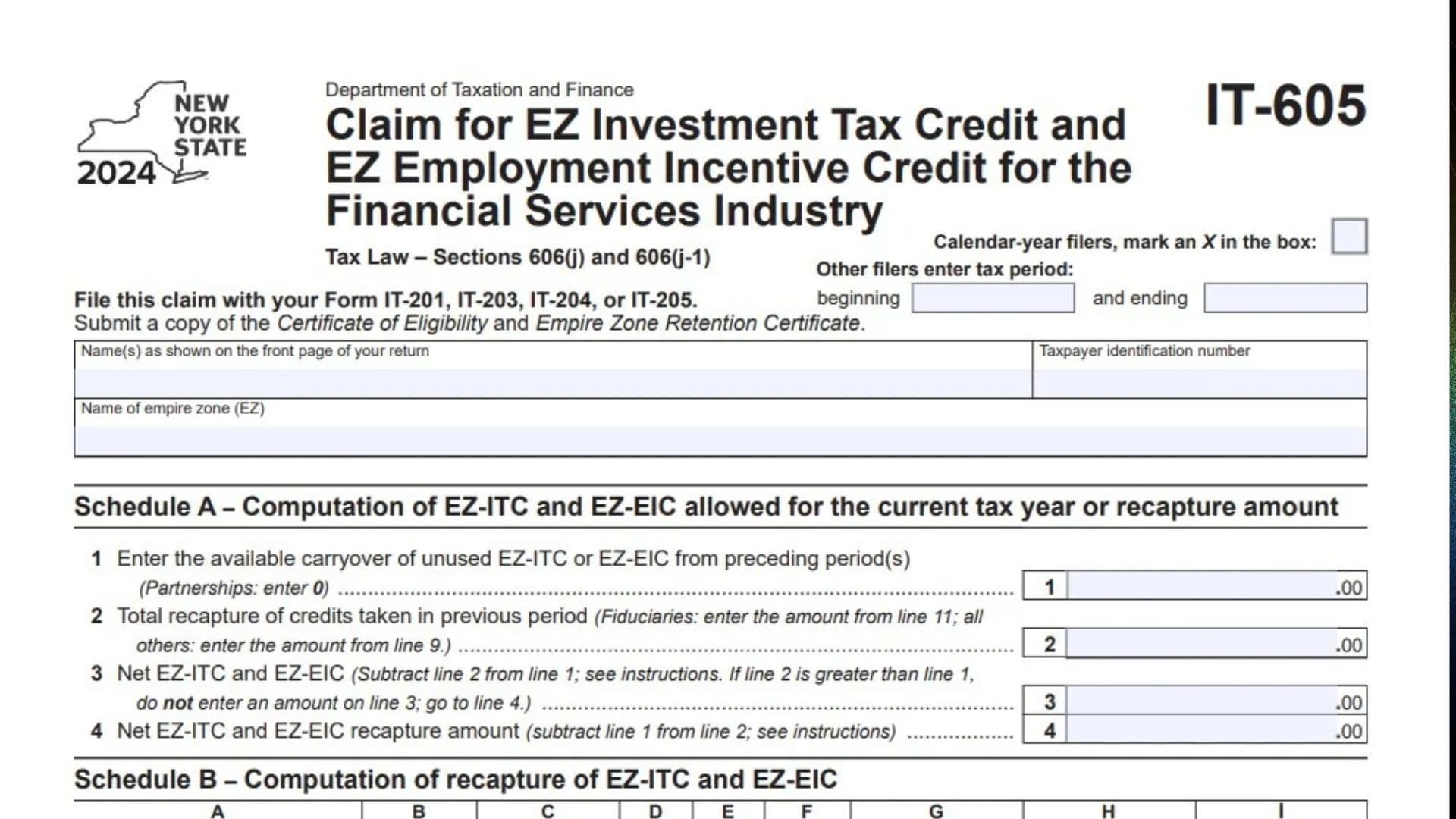
New York Form IT-605, titled Claim for EZ Investment Tax Credit and EZ Employment Incentive Credit for the Financial Services Industry, is used by eligible financial services businesses to calculate and claim Empire Zone (EZ) investment and employment incentive tax credits. The form is governed by New York Tax Law Sections 606(j) and 606(j-1). It allows qualifying taxpayers to report available unused credits from previous periods, calculate credit recapture, determine how much credit can be applied against current-year tax liability, and identify unused amounts that may be carried forward to future tax years. The form contains three schedules. Schedule A calculates the available credit and net recapture amount, Schedule B determines the recapture of previously claimed EZ investment and employment incentive credits, and Schedule C calculates the credits used during the current year and the remaining carryforward balance. The form also accommodates partnerships, S corporation shareholders, beneficiaries, and fiduciaries, with separate reporting requirements for credit allocations and recapture amounts. Taxpayers must provide their identifying information, the name of the Empire Zone where the business operates, and supporting certificates issued under the Empire Zones program. A copy of the Certificate of Eligibility and Empire Zone Retention Certificate must accompany the claim. Completing Form IT-605 correctly is important because the available credit, previous recapture amounts, current tax liability, and other credits applied must be considered before determining the amount that can be used. The 2024 version covered in this guide is a one-page form that must be filed with the applicable New York State income tax return.
Who Needs To File Form IT-605?
Form IT-605 is intended for eligible taxpayers in the financial services industry claiming the Empire Zone Investment Tax Credit (EZ-ITC), the Empire Zone Employment Incentive Credit (EZ-EIC), or reporting the recapture of previously claimed credits.
Depending on the business structure, the form may also involve:
- Individuals claiming eligible Empire Zone credits.
- Partnerships reporting applicable credit information.
- Partners receiving allocated credit amounts.
- S corporation shareholders receiving credit allocations.
- Beneficiaries receiving credits from an estate or trust.
- Fiduciaries calculating credit amounts and beneficiary allocations.
The taxpayer must meet the applicable Empire Zone program requirements and provide the required supporting certificates.
How To File Form IT-605
Form IT-605 must be submitted with the applicable New York State income tax return.
The form identifies four possible returns:
- Form IT-201, Resident Income Tax Return.
- Form IT-203, Nonresident and Part-Year Resident Income Tax Return.
- Form IT-204, Partnership Return.
- Form IT-205, Fiduciary Income Tax Return.
You must also submit copies of the following documents:
- Certificate of Eligibility.
- Empire Zone Retention Certificate.
Before completing the form, prepare the following information:
- Taxpayer’s name as shown on the main tax return.
- Taxpayer identification number.
- Name of the applicable Empire Zone.
- Tax period beginning and ending dates, if applicable.
- Available unused EZ-ITC and EZ-EIC carryforward amounts.
- Previous credit recapture information.
- Property acquisition and qualification dates.
- Applicable property life and unused life information.
- EZ investment tax credit amounts.
- EZ employment incentive credit amounts.
- Current-year tax liability before credits.
- Other credits applied before the EZ-ITC and EZ-EIC.
- Partnership, S corporation, estate, or trust allocation information, if applicable.

How To Complete Form IT-605
The form contains three schedules:
- Schedule A: Computation of EZ-ITC and EZ-EIC allowed for the current tax year or recapture amount.
- Schedule B: Computation of recapture of EZ-ITC and EZ-EIC.
- Schedule C: Computation of EZ-ITC and EZ-EIC used and carried over.
Complete each schedule using the applicable tax records and supporting documentation.
Taxpayer And Tax Period Information
Before completing Schedule A, enter the taxpayer’s identification information at the top of the form.
Calendar-Year Filers
If you file your New York tax return on a calendar-year basis, mark an X in the designated checkbox.
This identifies the tax period as the standard calendar year.
Other Filers: Beginning Date
If you use a fiscal or other reporting period, enter the beginning date of your tax period in the designated field.
Other Filers: Ending Date
Enter the ending date of the applicable tax period.
Make sure both dates match the reporting period used on your associated New York tax return.
Name(s) As Shown On The Front Page Of Your Return
Enter the taxpayer’s name exactly as it appears on the front page of the associated New York State income tax return.
If the return includes multiple taxpayers, enter their names as shown on that return.
Taxpayer Identification Number
Enter the taxpayer identification number associated with the return.
Use the same identification number reported on the main New York tax return.
Name Of Empire Zone (EZ)
Enter the name of the Empire Zone associated with the business claiming the credits.
Verify that the zone information matches the applicable Empire Zone certification documentation.
Schedule A: Computation Of EZ-ITC And EZ-EIC Allowed For The Current Tax Year Or Recapture Amount
Schedule A determines the amount of unused Empire Zone investment and employment incentive credits available from previous periods and compares those credits with amounts that must be recaptured.
It contains four lines.
Line 1: Available Carryover Of Unused EZ-ITC Or EZ-EIC
Enter the total amount of unused EZ-ITC or EZ-EIC carried forward from previous tax periods.
Use your previous tax returns and credit carryforward records to determine the available amount.
Partnerships must enter zero on this line, as specifically instructed by the form.
Line 2: Total Recapture Of Credits Taken In Previous Period
Enter the total amount of credits that must be recaptured from previous periods.
The amount depends on your filing status:
- Fiduciaries must enter the amount from line 11.
- All other taxpayers must enter the amount from line 9.
Use the applicable recapture calculation from Schedule B.
Line 3: Net EZ-ITC And EZ-EIC
Subtract the amount on line 2 from the amount on line 1.
The calculation is:
Line 3 = Line 1 – Line 2.
If line 2 is greater than line 1, do not enter an amount on line 3. Instead, proceed directly to line 4.
The resulting amount represents the net available credits after accounting for recapture.
Line 4: Net EZ-ITC And EZ-EIC Recapture Amount
Subtract line 1 from line 2.
The calculation is:
Line 4 = Line 2 – Line 1.
This line calculates the remaining recapture amount when the total recapture exceeds the available unused credits.
Follow the applicable instructions when reporting this amount.
Schedule B: Computation Of Recapture Of EZ-ITC And EZ-EIC
Schedule B calculates the amounts of previously claimed EZ investment and employment incentive credits that must be recaptured.
It contains a property information table with nine columns.
Complete a separate row for each applicable property.
Property Information Table
Column A: Description Of Property
Enter a description identifying the property associated with the previously claimed EZ investment tax credit.
Provide enough information to distinguish the property from other assets included in the calculation.
Column B: Date Acquired
Enter the date the property was acquired.
Use the acquisition date shown in your business asset and purchase records.
Column C: Date Property Ceased To Qualify
Enter the date the property stopped qualifying for the EZ investment tax credit.
Use the applicable date established by the property and program records.
Column D: Life (Months)
Enter the property’s applicable life in months.
Use the relevant property life information and the instructions for Form IT-605 to determine the correct period.
Column E: Unused Life (Months)
Enter the number of months of the property’s life that remained unused when the property ceased to qualify.
Use the applicable property records and recapture instructions.
Column F: Percentage (E ÷ D)
Divide the number of unused life months in column E by the total life in months in column D.
The calculation is:
Column F = Column E ÷ Column D.
This percentage is used to determine the portion of the previously allowed investment credit subject to recapture.
Column G: EZ-ITC Allowed
Enter the amount of EZ investment tax credit previously allowed for the property.
Determine the correct amount using the applicable credit records and Form IT-605 instructions.
Column H: Recaptured EZ-ITC (F × G)
Multiply the percentage in column F by the EZ-ITC allowed amount in column G.
The calculation is:
Column H = Column F × Column G.
Enter the resulting recaptured investment tax credit amount.
Column I: Recaptured EZ-EIC
Enter the applicable recaptured EZ Employment Incentive Credit amount for the property.
Use the separate recapture instructions to determine the correct amount.
Recapture Calculations
After completing the property information table, calculate the applicable totals using lines 5 through 11.
Line 5: Recaptured EZ-ITC
Add all amounts entered in column H.
Enter the combined recaptured EZ investment tax credit amount.
Line 6: Recaptured EZ-EIC
Add all amounts entered in column I.
Enter the total recaptured EZ Employment Incentive Credit.
Line 7: Additional Recapture
Enter any additional credit recapture amount required under the applicable Form IT-605 instructions.
Use the supporting instructions to determine whether additional recapture applies.
Line 8: Partners, Shareholders, Or Beneficiaries: Share Of Addback
Partners in a partnership, shareholders of an S corporation, and beneficiaries of an estate or trust must enter their respective shares of the EZ-ITC and EZ-EIC addback.
Use the applicable allocation information provided by the partnership, S corporation, estate, or trust.
Enter the amount attributable to your share of the credit addback.
Line 9: Total Recapture Amount
Add the amounts entered on lines 5, 6, 7, and 8.
The calculation is:
Line 9 = Line 5 + Line 6 + Line 7 + Line 8.
Enter the combined recapture amount.
For taxpayers other than fiduciaries, transfer this amount to Schedule A, line 2.
Additional Instructions For Fiduciaries
Fiduciaries must complete lines 10 and 11 to determine the portion of recapture allocated to beneficiaries and the amount retained by the estate or trust.
Line 10: Recapture Allocated To Beneficiaries
Enter the amount of credit recapture allocated to the beneficiaries of the estate or trust.
Use the applicable beneficiary allocation information to determine the total.
Line 11: Fiduciary Share Of Recapture
Subtract the amount on line 10 from the amount on line 9.
The calculation is:
Line 11 = Line 9 – Line 10.
Enter the remaining recapture amount attributable to the fiduciary.
Fiduciaries must also transfer this amount to Schedule A, line 2.
Schedule C: Computation Of EZ-ITC And EZ-EIC Used And Carried Over
Schedule C determines how much of the available EZ investment and employment incentive credits can be applied against the current year’s tax liability.
It also calculates the unused credit amount that can be carried forward to the next tax year.
Line 12: EZ-ITC And EZ-EIC Available For Use For The Current Tax Year
Enter the amount from Schedule A, line 3.
This represents the net available credits after accounting for applicable recapture amounts.
Line 13: Tax Due Before Credits
Enter your tax due before applying credits.
Use the applicable tax calculation instructions for your filing situation to determine the correct amount.
Line 14: All Credits Applied Against Your Tax Before The EZ-ITC And EZ-EIC
Enter the total amount of other credits applied against your tax before applying the EZ investment and employment incentive credits.
Do not include the EZ-ITC or EZ-EIC amounts being calculated on this form.
Follow the applicable Form IT-605 instructions when determining which credits must be included.
Line 15: Remaining Tax After Other Credits
Subtract the amount on line 14 from the amount on line 13.
The calculation is:
Line 15 = Line 13 – Line 14.
Enter the remaining tax amount available for the EZ-ITC and EZ-EIC.
Line 16: EZ-ITC And EZ-EIC Used This Year
Compare the available credits on line 12 with the remaining tax amount on line 15.
Enter whichever amount is smaller.
The calculation is:
Line 16 = Lesser of Line 12 or Line 15.
This amount represents the EZ investment and employment incentive credits used during the current tax year.
Line 17: Unused EZ-ITC And EZ-EIC Available For Carryforward For Next Year
Subtract the amount on line 16 from the amount on line 12.
The calculation is:
Line 17 = Line 12 – Line 16.
Enter the remaining unused credit amount.
This is the amount available for carryforward to the next tax year, subject to the applicable program rules and instructions.
Important Filing Instructions And Reminders
Before submitting Form IT-605, keep these requirements in mind.
Attach Required Certificates
A copy of the Certificate of Eligibility and Empire Zone Retention Certificate must accompany the claim.
Use The Correct Tax Return
Submit Form IT-605 with the applicable Form IT-201, IT-203, IT-204, or IT-205.
Follow The Partnership Reporting Rule
Partnerships must enter zero on Schedule A, line 1.
Use The Correct Recapture Line
Fiduciaries transfer line 11 to Schedule A, line 2. All other taxpayers transfer line 9.
Complete The Fiduciary Calculations When Applicable
Fiduciaries must complete both lines 10 and 11 to distinguish the beneficiary allocation from the amount retained by the estate or trust.
Check The Credit Carryforward
The amount on line 17 represents the unused EZ-ITC and EZ-EIC available for the next year.
Keep appropriate credit records to support the amount carried forward.
Final Review Before Filing
Before submitting Form IT-605, use the following checklist to verify that the claim is complete:
- Mark the calendar-year checkbox or enter the beginning and ending dates for another tax period.
- Enter the taxpayer’s name exactly as shown on the main return.
- Provide the correct taxpayer identification number.
- Enter the name of the applicable Empire Zone.
- Attach a copy of the Certificate of Eligibility.
- Attach a copy of the Empire Zone Retention Certificate.
- Enter the available unused credit carryforward on line 1.
- Enter zero on line 1 if filing as a partnership.
- Calculate the previous-period credit recapture on line 2.
- Verify the net available credit calculation on line 3.
- Calculate any additional net recapture amount on line 4.
- Complete all applicable property information in Schedule B.
- Verify the property acquisition and disqualification dates.
- Enter the correct property life and unused life in months.
- Calculate the percentage in column F.
- Verify the EZ-ITC allowed amount in column G.
- Calculate the recaptured EZ-ITC in column H.
- Enter the applicable recaptured EZ-EIC in column I.
- Calculate total recaptured EZ-ITC on line 5.
- Calculate total recaptured EZ-EIC on line 6.
- Enter additional recapture on line 7 when applicable.
- Enter the appropriate partner, shareholder, or beneficiary addback on line 8.
- Calculate total recapture on line 9.
- Complete lines 10 and 11 if filing as a fiduciary.
- Transfer the correct recapture amount to Schedule A, line 2.
- Enter the available current-year credits on line 12.
- Enter tax due before credits on line 13.
- Report other credits on line 14.
- Calculate the remaining tax on line 15.
- Enter the allowable credits used during the current year on line 16.
- Calculate the unused credit carryforward on line 17.
- Verify that all calculations are supported by the applicable tax and credit records.
- Submit Form IT-605 with the correct New York State tax return.
New York Form IT-605 helps eligible financial services businesses calculate their Empire Zone investment and employment incentive credits, report required recapture amounts, and determine the credits available for future tax years. Carefully review the supporting certificates, previous credit records, property information, and current tax calculations before filing to help ensure that the claimed amounts and carryforward balances are reported correctly.