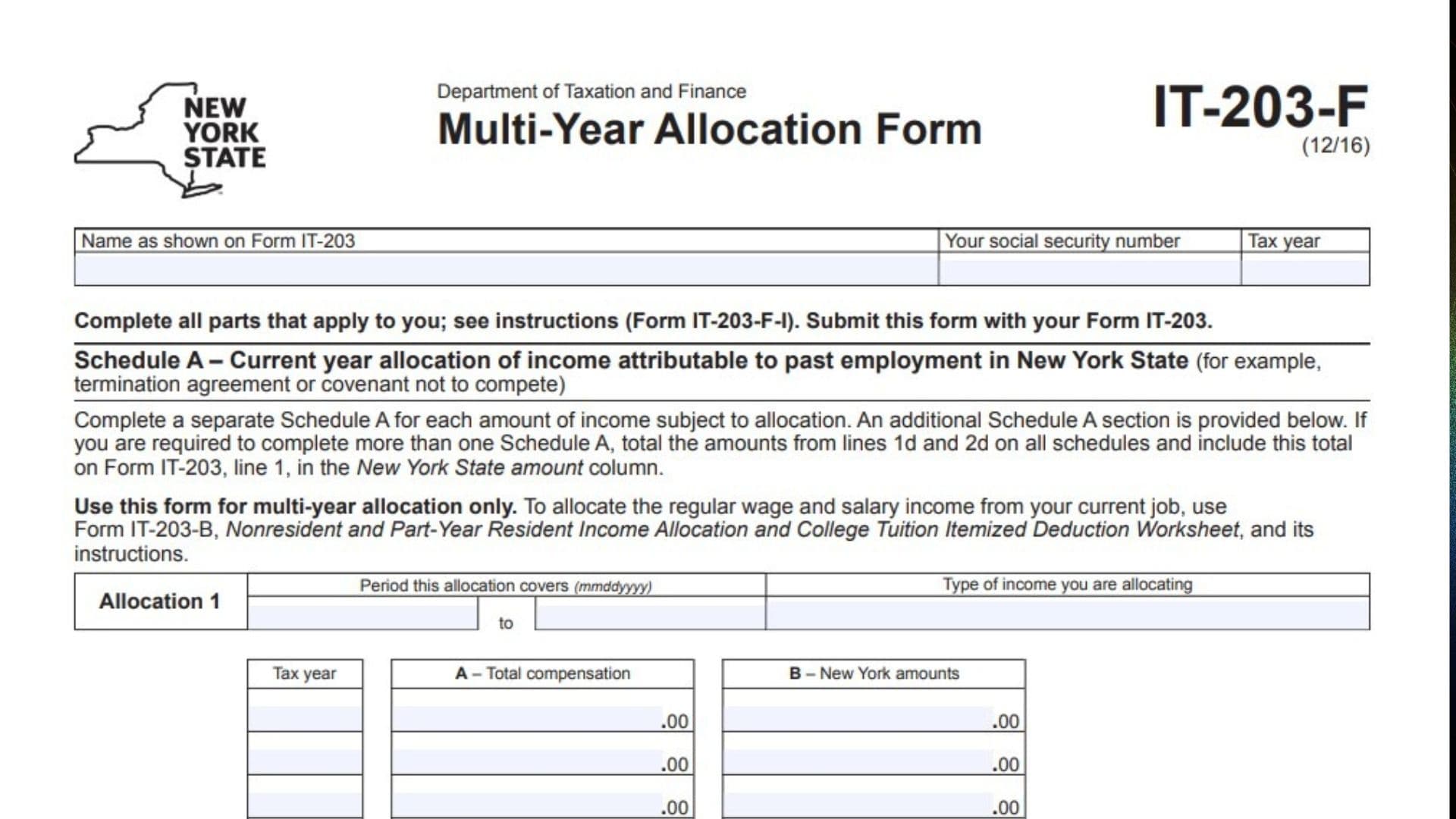
New York Form IT-203-F, titled Multi-Year Allocation Form, is a tax form used by nonresidents and part-year residents to calculate the portion of certain compensation that must be allocated to New York State. It is designed for situations where income received during the current tax year relates to employment or services performed over multiple years in New York. Common examples include payments received under employment termination agreements and noncompetition agreements. The form also addresses compensation from stock options, restricted stock, and stock appreciation rights when the allocation period differs from the period used on Form IT-203-B. It contains two schedules. Schedule A calculates the New York portion of income attributable to past employment in the state, while Schedule B determines the New York portion of compensation from stock-related awards. The calculations generally compare total compensation or applicable stock compensation with the amount attributable to New York, using the relevant employment or allocation period. Taxpayers must provide information about the income, applicable tax years, compensation amounts, allocation dates, and days worked inside and outside New York. The resulting New York allocation is transferred to the appropriate income line of Form IT-203. Completing Form IT-203-F correctly is important because it helps distinguish New York-source compensation from income attributable to services performed elsewhere. The form is a supporting document and must be submitted with the applicable New York Form IT-203.
Who Needs To File Form IT-203-F?
Form IT-203-F is intended primarily for nonresidents and part-year residents who received certain types of compensation connected to employment or services performed in New York State.
You may need this form if you received:
- Employment termination payments attributable to multiple years of New York employment.
- Compensation under a covenant not to compete.
- Stock option compensation.
- Restricted stock compensation.
- Stock appreciation rights compensation.
The form is particularly relevant when the income allocation period covers multiple years or differs from the allocation period used on Form IT-203-B.
Important: Form IT-203-F is specifically intended for multi-year allocation. If you are allocating regular wages and salary from your current employment, use Form IT-203-B, Nonresident and Part-Year Resident Income Allocation and College Tuition Itemized Deduction Worksheet, instead.
How To File Form IT-203-F
Form IT-203-F must be submitted with your New York State Form IT-203, Nonresident and Part-Year Resident Income Tax Return.
Complete all applicable sections based on the type of compensation you received. You do not necessarily need to complete both schedules.
Before preparing the form, gather the following information:
- Your full name as shown on Form IT-203.
- Your Social Security number.
- The applicable tax year.
- Employment and compensation records.
- Records of income received under termination agreements.
- Documentation relating to noncompetition agreements.
- The beginning and ending dates of each allocation period.
- Annual compensation information.
- New York-source compensation amounts.
- Stock option, restricted stock, or stock appreciation rights documentation.
- Grant, vesting, and exercise dates.
- Employment records showing days worked inside and outside New York.
- Records of weekends, holidays, sick leave, vacation, and other nonworking days.
Use the completed calculations to transfer the appropriate New York income amounts to Form IT-203.

How To Complete Form IT-203-F
The form contains two main schedules:
- Schedule A: Current year allocation of income attributable to past employment in New York State.
- Schedule B: Stock option, restricted stock, or stock appreciation rights allocation.
Complete the schedules that apply to your income.
Taxpayer Information
The top of page 1 contains the taxpayer identification fields.
Name As Shown On Form IT-203
Enter your full name exactly as it appears on your New York Form IT-203.
Make sure the spelling and name order match your income tax return.
Your Social Security Number
Enter your Social Security number in the designated field.
Use the same number reported on Form IT-203.
Tax Year
Enter the tax year covered by the return.
Make sure this matches the tax year of the Form IT-203 being filed.
Schedule A: Current Year Allocation Of Income Attributable To Past Employment In New York State
Schedule A is used to determine how much current-year income is attributable to employment previously performed in New York State.
Examples include payments received under termination agreements and covenants not to compete.
The form provides two allocation sections, Allocation 1 and Allocation 2. Complete a separate section for each amount of income requiring allocation.
If you have more than two separate income amounts to allocate, use additional Schedule A sections as necessary.
Period This Allocation Covers: Beginning Date
Enter the beginning date of the employment or allocation period associated with the income.
Use the MMDDYYYY format.
Period This Allocation Covers: Ending Date
Enter the ending date of the applicable allocation period.
Use the MMDDYYYY format.
Together, these dates identify the period over which the compensation was earned or to which it relates.
Type Of Income You Are Allocating
Describe the type of income being allocated.
For example, identify whether the payment relates to an employment termination agreement or a covenant not to compete.
Allocation 1: Compensation Information
This section contains a table for entering information covering up to four tax years.
Tax Year
Enter each tax year included in the allocation period.
Use a separate row for each applicable year.
Column A: Total Compensation
Enter the total compensation attributable to the applicable tax year.
Use the relevant employment and payment records to determine the amount.
This column represents the total compensation used in the allocation calculation.
Column B: New York Amounts
Enter the portion of the compensation attributable to services performed in New York State for the corresponding tax year.
Use employment records and other supporting documentation to determine the New York amount.
Line 1a: Totals
Add all amounts entered in Column A and enter the combined total in the Column A total field.
Separately add all amounts entered in Column B and enter the combined total in the Column B total field.
These totals are used to calculate the New York allocation percentage.
Line 1b: New York Allocation Percentage
Divide the total in Column B of line 1a by the total in Column A of line 1a.
Carry the result to four decimal places.
The calculation is:
New York Allocation Percentage = Line 1a, Column B ÷ Line 1a, Column A.
This percentage represents the portion of total compensation attributable to New York State.
Line 1c: Current Year Income To Be Allocated
Enter the amount of income received during the current tax year that must be allocated using this schedule.
Use the actual current-year income amount associated with the allocation period.
Line 1d: New York Income Allocation
Multiply the current-year income on line 1c by the decimal calculated on line 1b.
Enter the resulting New York-source income amount.
Transfer this amount to Form IT-203, line 1, in the New York State amount column.
Allocation 2: Compensation Information
Complete Allocation 2 if you received another separate amount of income that requires multi-year allocation.
Follow the same calculation process used for Allocation 1.
Period This Allocation Covers: Beginning Date
Enter the beginning date of the second allocation period using MMDDYYYY format.
Period This Allocation Covers: Ending Date
Enter the ending date of the second allocation period using MMDDYYYY format.
Type Of Income You Are Allocating
Describe the second type of income being allocated.
Tax Year
Enter each tax year included in the second allocation period.
Column A: Total Compensation
Enter the total compensation attributable to each applicable tax year.
Column B: New York Amounts
Enter the portion of the corresponding compensation attributable to New York State.
Line 2a: Totals
Add all Column A amounts and enter the total.
Separately add all Column B amounts and enter that total.
Line 2b: New York Allocation Percentage
Divide line 2a, Column B, by line 2a, Column A.
Carry the result to four decimal places.
Line 2c: Current Year Income To Be Allocated
Enter the current-year income amount associated with the second allocation.
Line 2d: New York Income Allocation
Multiply line 2c by the decimal calculated on line 2b.
Enter the resulting New York-source income amount.
Transfer this amount to Form IT-203, line 1, in the New York State amount column.
Combining Multiple Schedule A Calculations
If you complete more than one Schedule A section or use additional Schedule A forms, combine the results before transferring them to your tax return.
Add together all amounts from line 1d and line 2d on every completed Schedule A.
Enter the combined total on Form IT-203, line 1, in the New York State amount column.
Do not include the total compensation amounts again as separate New York income. Use the calculated New York allocation amounts.
Schedule B: Stock Option, Restricted Stock, Or Stock Appreciation Rights Allocation
Schedule B is used by New York State nonresidents and part-year residents who received compensation from stock options, restricted stock, or stock appreciation rights and performed services within New York State.
It calculates the portion of compensation attributable to New York when the allocation period differs from the period used on Form IT-203-B.
Complete a separate Schedule B for each option, stock award, or right granted to you.
Stock And Award Information
Your Social Security Number
Enter your Social Security number in the designated field on page 2.
It must match the number entered on page 1 and Form IT-203.
Description Of Stock
Provide a description identifying the stock, option, or other award being allocated.
Use enough detail to distinguish this award from other stock-related compensation.
Grant Date
Enter the date the stock option, restricted stock, or stock appreciation right was granted.
Use the MMDDYYYY format.
Vest Date
Enter the date the award vested.
Use the MMDDYYYY format.
Exercise Date
Enter the date the stock option or applicable right was exercised.
Use the MMDDYYYY format.
Allocation Period: Beginning Date
Enter the beginning date of the allocation period applicable to the award.
Refer to the applicable instructions to determine the correct period.
Allocation Period: Ending Date
Enter the ending date of the allocation period.
Use the MMDDYYYY format for both allocation dates.
Stock Type Selection
The form provides four checkboxes for identifying the type of stock or award.
Mark an X in the applicable box.
Statutory
Select this box if the award is classified as statutory stock under the applicable tax rules.
Non-Statutory
Select this box if the award is classified as non-statutory stock.
Restricted Stock
Select this box if the compensation relates to restricted stock.
Appreciation Right
Select this box if the compensation relates to stock appreciation rights.
Choose the classification that applies to the award being reported.
Stock Compensation Calculation
Line 3: Applicable Column A Amount From Schedule B Table
Enter the applicable Column A amount from the Schedule B Table in the accompanying instructions.
The amount must correspond to the stock or award being allocated.
The table itself is not reproduced on the attached form, so consult the applicable Schedule B instructions to identify the correct amount.
Line 4: Applicable Column B Amount From Schedule B Table
Enter the applicable Column B amount from the Schedule B Table.
Use the amount corresponding to the same stock award reported on line 3.
Line 5: Compensation To Be Allocated
Subtract line 4 from line 3.
The calculation is:
Line 5 = Line 3 – Line 4.
Enter the resulting compensation amount.
This is the amount that will be multiplied by the New York allocation percentage calculated later in the schedule.
Allocation Period: Workday Calculation
The next section calculates the number of working days within the allocation period and identifies how many were worked in New York.
Line 6: Total Days In Allocation Period
Enter the total number of calendar days included in the allocation period.
Count the days between the beginning and ending dates of the allocation period, following the applicable instructions.
Line 7: Saturdays And Sundays (Not Worked)
Enter the total number of Saturdays and Sundays during the allocation period that were not worked.
Count the applicable nonworking weekend days.
Line 8: Holidays (Not Worked)
Enter the number of holidays during the allocation period on which you did not work.
Include applicable holidays that were not worked.
Line 9: Sick Leave
Enter the number of days of sick leave included in the allocation period.
Use your employment and leave records to determine the number of applicable days.
Line 10: Vacation
Enter the number of vacation days included in the allocation period.
Count the applicable vacation days according to your employment records.
Line 11: Other Nonworking Days
Enter other nonworking days not already included on lines 7 through 10.
Do not count the same day more than once.
Line 12: Total Nonworking Days
Add lines 7, 8, 9, 10, and 11.
Enter the combined number of nonworking days.
Line 13: Total Days Worked In Allocation Period At This Job
Subtract line 12 from line 6.
The calculation is:
Line 13 = Line 6 – Line 12.
Enter the total number of days worked in the allocation period at the job associated with the award.
Line 14: Total Days Worked Outside New York State
Enter the number of days included in line 13 that were worked outside New York State.
Use employment records, work schedules, and travel records to determine the number of applicable days.
Line 15: Number Of Days Worked At Home Included In Line 14
Enter the number of days included in line 14 that were worked at home.
These days are identified separately for the allocation calculation.
Line 16: Days Worked Outside New York State Excluding Home Workdays
Subtract line 15 from line 14.
The calculation is:
Line 16 = Line 14 – Line 15.
Enter the resulting number of days.
Line 17: Days Worked In New York State
Subtract line 16 from line 13.
The calculation is:
Line 17 = Line 13 – Line 16.
Enter the resulting number of days worked in New York State.
Line 18: Total Days Worked In Allocation Period
Enter the number of days reported on line 13.
This repeats the total working days used as the denominator for the allocation percentage.
Line 19: New York Workday Allocation Percentage
Divide line 17 by line 18.
Round the result to four decimal places.
The calculation is:
New York Allocation Percentage = Line 17 ÷ Line 18.
This percentage represents the proportion of applicable working days allocated to New York State.
Line 20: New York Compensation Allocation
Multiply line 19 by line 5.
Enter the resulting New York-source compensation amount.
Transfer the amount from line 20 to the appropriate line of Form IT-203 in the New York State amount column.
Important Filing Instructions And Reminders
Before submitting Form IT-203-F, remember the following requirements:
Submit The Form With Form IT-203
Form IT-203-F is a supporting allocation form. Submit it with your New York Form IT-203.
Use Separate Schedule A Sections When Necessary
Complete a separate Schedule A for each separate income amount requiring multi-year allocation.
If more than two allocations are necessary, use additional Schedule A sections.
Do Not Use Schedule A For Regular Current Employment Wages
For regular wage and salary income from your current job, use Form IT-203-B rather than Form IT-203-F.
Complete A Separate Schedule B For Each Award
If you received multiple stock options, restricted stock awards, or stock appreciation rights, prepare a separate Schedule B for each grant.
Follow The Date Format
Use MMDDYYYY when entering dates in the allocation sections and stock award information.
Use Four Decimal Places
Carry the Schedule A allocation percentages on lines 1b and 2b to four decimal places. Round the Schedule B percentage on line 19 to four decimal places.
Consult The Separate Instructions
The applicable Schedule B Table and additional allocation guidance are provided in Form IT-203-F-I. The attached form does not reproduce the table needed to calculate lines 3 and 4.
Final Review Before Filing
Before submitting Form IT-203-F with your New York income tax return, review the following checklist:
- Enter your name exactly as shown on Form IT-203.
- Enter your correct Social Security number.
- Verify the tax year.
- Determine whether Schedule A, Schedule B, or both apply.
- Complete a separate Schedule A for each income amount requiring allocation.
- Enter the correct beginning and ending dates for each allocation period.
- Describe the income being allocated.
- Enter the applicable tax years.
- Verify all total compensation amounts in Column A.
- Verify all New York amounts in Column B.
- Calculate line 1a or line 2a correctly.
- Calculate the allocation percentages on lines 1b and 2b to four decimal places.
- Enter the correct current-year income on lines 1c and 2c.
- Calculate the New York income amounts on lines 1d and 2d.
- Combine all applicable Schedule A results before transferring them to Form IT-203.
- Complete a separate Schedule B for each stock award when required.
- Enter the description of the stock or award.
- Verify grant, vesting, and exercise dates.
- Enter the correct allocation period.
- Select the appropriate stock classification.
- Obtain the applicable Schedule B Table amounts for lines 3 and 4.
- Calculate the compensation amount on line 5.
- Verify the total days in the allocation period on line 6.
- Account for weekends, holidays, sick leave, vacation, and other nonworking days.
- Calculate total working days on line 13.
- Verify the days worked outside New York on lines 14 through 16.
- Calculate New York workdays on line 17.
- Verify the total workdays on line 18.
- Calculate the New York allocation percentage on line 19 to four decimal places.
- Calculate the New York compensation amount on line 20.
- Transfer the applicable amounts to the New York State amount column of Form IT-203.
- Submit Form IT-203-F with your completed Form IT-203.
Form IT-203-F helps nonresidents and part-year residents report the correct New York-source portion of compensation received through multi-year employment arrangements and stock-related awards. By carefully reviewing employment periods, compensation records, and workday calculations, you can determine the appropriate New York allocation and report it correctly on your state income tax return.