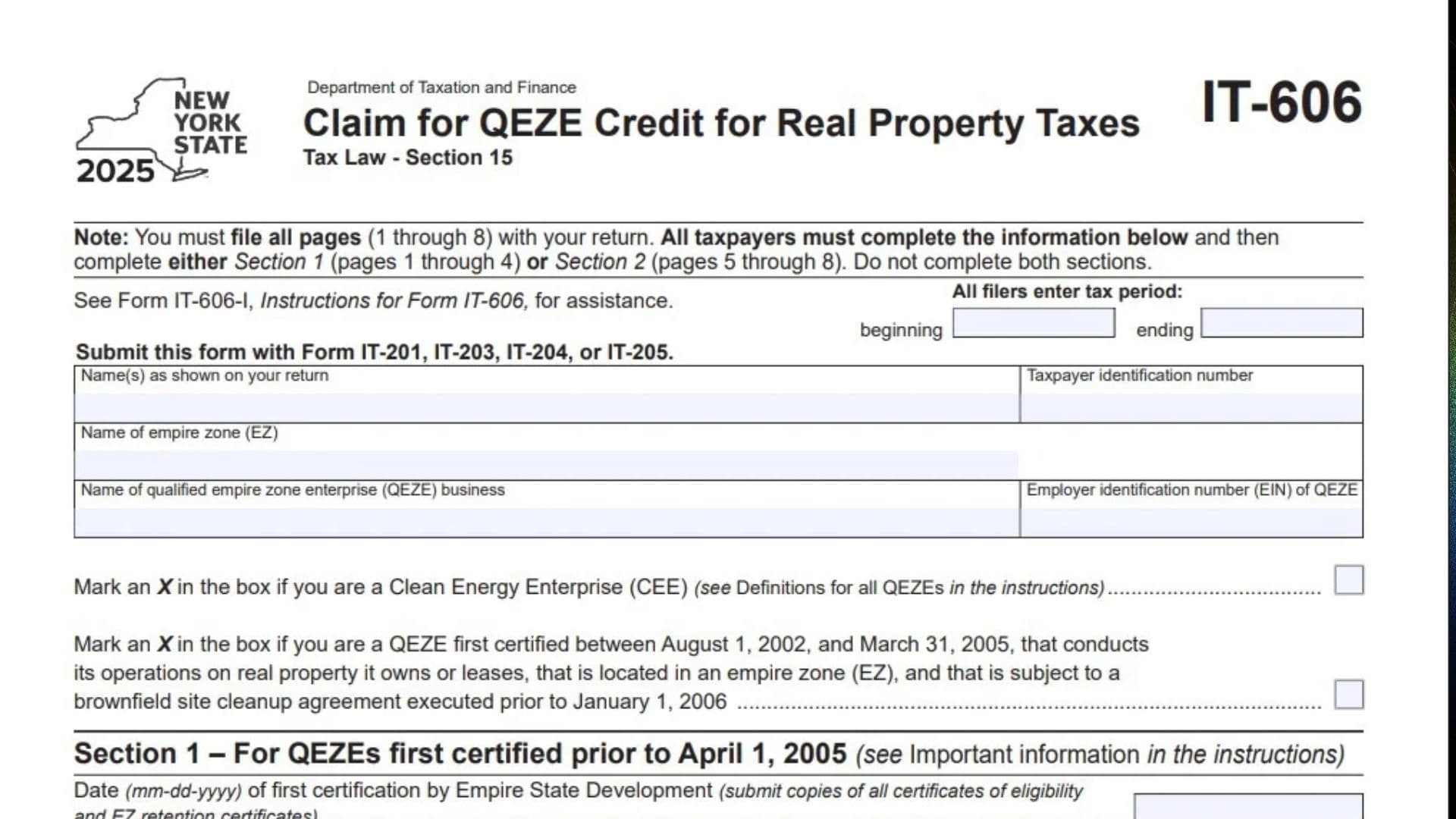
New York Form IT-606, titled Claim for QEZE Credit for Real Property Taxes, is used by qualified Empire Zone Enterprises (QEZEs) to calculate and claim a credit for eligible real property taxes under New York Tax Law Section 15. The credit is designed for qualifying businesses that operate within designated Empire Zones (EZs) and meet the applicable certification, employment, and other program requirements. The form collects information about the business, its Empire Zone location, certification date, employment levels, eligible property taxes, capital investments, and related business entities. It also includes calculations for employment increases, eligible employee wages and benefits, credit limitations, and recapture of previously claimed credits. The form has two separate filing sections based on when the business first received certification from Empire State Development (ESD). Section 1 applies to QEZEs first certified before April 1, 2005, while Section 2 applies to businesses first certified on or after that date. Each section contains different schedules and calculations, so taxpayers must select the correct one and must not complete both. The form also provides special reporting schedules for beneficiaries, fiduciaries, and related entities. Completing Form IT-606 accurately is important because the credit amount depends on the applicable employment tests, business certification details, property tax expenses, and other calculations. The completed form must include all eight pages and be submitted with the applicable New York State income tax return.
Who Needs To File Form IT-606?
Form IT-606 is intended for qualified Empire Zone Enterprises claiming the QEZE credit for real property taxes.
Depending on the business structure and tax filing arrangement, the form may also involve:
- Qualified businesses certified under the Empire Zones program.
- Businesses certified in development zones (DZs).
- Businesses certified in investment zones (IZs).
- Manufacturers meeting the applicable program requirements.
- Partnerships and their partners.
- S corporations and their shareholders.
- Estates and trusts.
- Beneficiaries receiving allocated credit amounts.
The applicable section depends on the business’s original ESD certification date.
- Section 1: For QEZEs first certified before April 1, 2005.
- Section 2: For QEZEs first certified on or after April 1, 2005.
You must complete only one section.
How To File Form IT-606
Form IT-606 must be submitted with the applicable New York State tax return:
- Form IT-201, Resident Income Tax Return.
- Form IT-203, Nonresident and Part-Year Resident Income Tax Return.
- Form IT-204, Partnership Return.
- Form IT-205, Fiduciary Income Tax Return.
All eight pages of Form IT-606 must be filed, even if certain schedules do not apply to your business.
Before completing the form, prepare the following information:
- Taxpayer name and identification number.
- Qualified Empire Zone Enterprise name and EIN.
- Empire Zone name or names.
- ESD certification date and certificates of eligibility.
- EZ retention certificates, when applicable.
- Quarterly employee information for the current tax year.
- Employment records for the applicable base period.
- Test-year employment information.
- Eligible real property tax records.
- Employee wage, health benefit, and retirement benefit information.
- Capital investment records.
- Related business entity names and EINs.
- Beneficiary and fiduciary allocation information, if applicable.
- Information needed to calculate credit recapture.
The form also refers taxpayers to Form IT-606-I, Instructions for Form IT-606. Consult those instructions for eligibility definitions and calculations that require additional details.

How To Complete Form IT-606
The form contains two main sections. Select the section that matches the business’s original certification date and complete the applicable schedules.
Section 1: QEZEs First Certified Before April 1, 2005
Complete Section 1 if the QEZE was first certified by Empire State Development before April 1, 2005.
Initial Business Information
Tax Period: Beginning And Ending
Enter the beginning and ending dates of the tax period covered by the return.
Name(s) As Shown On Your Return
Enter the taxpayer’s name exactly as it appears on the associated New York State tax return.
Taxpayer Identification Number
Enter the taxpayer identification number associated with the return.
Name Of Empire Zone (EZ)
Enter the name of the Empire Zone where the business operates.
Name Of Qualified Empire Zone Enterprise (QEZE) Business
Enter the legal name of the business claiming the credit.
Employer Identification Number (EIN) Of QEZE
Enter the business’s federal Employer Identification Number.
Clean Energy Enterprise (CEE)
Mark an X in the box if the business qualifies as a Clean Energy Enterprise under the definition provided in the Form IT-606 instructions.
Brownfield Site Cleanup Agreement
Mark an X if the business meets all the conditions described in this section:
- It was first certified between August 1, 2002, and March 31, 2005.
- It operates on real property it owns or leases.
- The property is located within an Empire Zone.
- The property is subject to a brownfield site cleanup agreement executed before January 1, 2006.
Date Of First Certification By Empire State Development
Enter the date the business first received ESD certification using the MM-DD-YYYY format.
Submit copies of all certificates of eligibility and EZ retention certificates with the return.
Schedule A: Employment Test For QEZEs First Certified Before April 1, 2005
Schedule A determines whether the business satisfies the required employment tests. It compares employee numbers for the current tax year with those from the applicable five-year base period.
Part 1: EZ Employment
This part calculates the number of full-time employees within all Empire Zones during the current tax year and the five-year base period.
Include employees working within all Empire Zones, even if the business is not certified in every zone.
Current Tax Year Employment Number
Enter the number of full-time employees within all Empire Zones for each reporting date:
- March 31.
- June 30.
- September 30.
- December 31.
Enter the corresponding total.
Base Period Employment Number: Base Years One Through Five
For each of the five base years, enter:
- The tax year ending, using MM-YYYY format.
- Full-time employees on March 31.
- Full-time employees on June 30.
- Full-time employees on September 30.
- Full-time employees on December 31.
- The total employment number for that base year.
Line 1: Current Tax Year Employment Number Within All EZs
Enter the total current-year employment number calculated from the quarterly employee information.
Do not round the amount.
Line 2: Base Period Employment Number Within All EZs
Calculate the total number of full-time employees within all EZs during the five-year base period.
Enter the resulting employment number without rounding.
Line 3: Current Employment Compared With Base Period Employment
Compare line 1 with line 2.
Select Yes if line 1 equals or exceeds line 2.
Select No if line 1 is lower than line 2.
If line 1 does not equal or exceed line 2, stop. The business does not qualify for the QEZE credit for real property taxes under this employment test.
Part 2: New York State Employment Outside All EZs
This part measures employment inside New York State but outside all Empire Zones. The calculation includes employees regardless of whether the business is certified in every Empire Zone.
Current Tax Year Employment Number
Enter the number of full-time employees located inside New York State and outside all EZs for:
- March 31.
- June 30.
- September 30.
- December 31.
Calculate the total.
Base Period Employment Number: Base Years One Through Five
For each of the five base years, enter the tax year ending and the full-time employee numbers for all four reporting dates.
Calculate the total employment number for each year and the overall five-year base period.
Line 4: Current Tax Year Employment Number Inside New York State And Outside All EZs
Enter the total number of full-time employees inside New York State but outside all EZs during the current tax year.
Do not round the amount.
Line 5: Base Period Employment Number Inside New York State And Outside All EZs
Enter the corresponding base period employment number calculated from the five-year employee records.
Do not round the amount.
Line 6: Current Employment Compared With Base Period Employment
Compare line 4 with line 5.
Select Yes if line 4 equals or exceeds line 5.
Select No if line 4 is lower than line 5.
If the current employment number does not equal or exceed the base period number, stop. The business is not eligible for the credit under this test.
Schedule B: Test Year Employment Number Within Certified EZs
Schedule B calculates the employment number during the designated test year within the Empire Zones where the business is certified.
Test Year: Beginning And Ending
Enter the applicable test-year period using MM-YYYY format.
Test Year Employment Number
Enter the number of full-time employees within the certified EZs for March 31, June 30, September 30, and December 31.
Calculate the total.
Line 7: Test Year Employment Number Within Certified EZs
Enter the total employment number from the test-year information.
This amount is used in Schedule C to calculate the employment increase factor.
Schedule C: Employment Increase Factor
Schedule C determines the employment increase factor by comparing current employment with test-year employment.
Line 8: Current Tax Year Employment Number Within Certified EZs
Enter the current tax year employment number within the Empire Zones where the business is certified.
Line 9: Test Year Employment Number Within Certified EZs
Enter the amount from line 7.
Line 10: Employment Increase
Subtract line 9 from line 8.
Enter the difference.
Line 11: Employment Increase Percentage
Divide line 10 by line 9.
Round the result to four decimal places.
If line 9 is zero and line 8 is greater than zero, enter 1 on this line.
Line 12: Alternative Employment Increase Calculation
Divide line 10 by 100.
Round the result to four decimal places.
Line 13: Employment Increase Factor
Enter the greater of line 11 or line 12.
The amount entered cannot exceed 1.0.
Also transfer this amount to line 15 in Schedule D.
Schedule D: Computation Of QEZE Credit For Real Property Taxes
Schedule D calculates the QEZE real property tax credit for businesses first certified before April 1, 2005.
Line 14: Tax Year Of The Business Tax Benefit Period And Benefit Period Factor
Enter the tax year of the business tax benefit period.
Use the benefit period factor table printed on page 3 to identify the applicable factor.
The table provides:
| Benefit Period Year | Factor |
|---|---|
| 1 through 10 | 1.0 |
| 11 | 0.8 |
| 12 | 0.6 |
| 13 | 0.4 |
| 14 | 0.2 |
| 15 | 0 |
Enter the appropriate factor on line 14.
Line 15: Employment Increase Factor
Enter the amount from line 13 of Schedule C.
Line 16: Eligible Real Property Taxes
Enter the eligible real property tax amount determined under the Form IT-606 instructions.
Line 17: Preliminary QEZE Credit Calculation
Multiply line 14 by line 15 and then multiply the result by line 16.
Enter the calculated amount.
Line 18: Recapture Of QEZE Credit For Real Property Taxes
Enter the applicable recapture amount calculated using Worksheet A in the Form IT-606 instructions.
Partners, shareholders, and beneficiaries should also review the applicable allocation instructions.
Line 19: Net Recapture Of QEZE Credit
Subtract line 17 from line 18.
If line 17 is greater than line 18, skip line 19 and continue to line 20.
Line 20: QEZE Credit For Real Property Taxes After Recapture
Subtract line 18 from line 17.
Enter the resulting amount.
Line 21: QEZE Credit For Real Property Taxes Limitation
Enter the applicable credit limitation determined under the instructions.
Do not enter zero.
Line 22: QEZE Credit For Real Property Taxes After Limitation
Enter the credit amount after applying the limitation described in the Form IT-606 instructions.
Line 23: Partners, Shareholders, And Beneficiaries
Complete this line if applicable to your filing situation.
Follow the instructions for reporting the appropriate credit amounts allocated to partners, shareholders, or beneficiaries.
Line 24: Total QEZE Credit For Real Property Taxes
Add lines 22 and 23.
Enter the resulting total credit amount.
Schedule E identifies the allocation of the QEZE credit and credit recapture between beneficiaries and the fiduciary.
This schedule is relevant when an estate or trust is involved.
The table contains four columns.
Column A: Beneficiary’s Name
Enter the beneficiary’s name exactly as shown on Form IT-205, Schedule C.
Column B: Identifying Number
Enter the beneficiary’s identifying number.
Column C: Share Of QEZE Credit For Real Property Taxes
Enter the amount of the credit allocated to each beneficiary.
Column D: Share Of Recapture Of QEZE Credit For Real Property Taxes
Enter each beneficiary’s allocated share of the credit recapture.
Total Row
Enter the combined beneficiary allocation amounts in columns C and D.
Fiduciary Row
Enter the portion of the credit and recapture retained by the fiduciary in the corresponding columns.
Schedule F: Related Entities
Schedule F identifies business entities related to the QEZE.
Name
Enter the legal name of each related business entity.
EIN
Enter the Employer Identification Number of each related entity.
Use the definition of related persons provided in the Form IT-606 instructions to determine which businesses must be included.
If there are more related entities than the available spaces, attach additional sheets containing the required information.
Schedule G: Valid Business Purpose For QEZEs First Certified Before August 1, 2002
Schedule G applies to businesses first certified before August 1, 2002, that are claiming the QEZE was formed for a valid business purpose.
Valid Business Purpose Election
Mark an X in the designated box if you are claiming that the QEZE was established for a valid business purpose.
You must also submit a notarized statement explaining in detail how the business meets the valid business purpose test.
The statement must accompany the completed tax return.
Section 2: QEZEs First Certified On Or After April 1, 2005
Complete Section 2 if the business was first certified by Empire State Development on or after April 1, 2005.
Do not complete Section 1 if you are completing this section.
Business Identification Information
Tax Period: Beginning And Ending
Enter the beginning and ending dates of the tax period.
Name(s) As Shown On Return
Enter the taxpayer’s name as reported on the associated New York State tax return.
Taxpayer Identification Number
Enter the taxpayer’s identification number.
Name Of Empire Zones (EZ)
List the names of the Empire Zones in which the business operates.
For each zone, identify whether it is classified as a development zone (DZ) or investment zone (IZ).
Attach additional sheets if more space is needed.
Name Of Qualified Empire Zone Enterprise (QEZE) Business
Enter the legal name of the qualified business claiming the credit.
Employer Identification Number (EIN) Of QEZE
Enter the business’s EIN.
Date Of First Certification By Empire State Development
Enter the original ESD certification date using MM-DD-YYYY format.
Submit copies of all certificates of eligibility and EZ retention certificates.
Tax Year Of The Business Tax Benefit Period
Enter the applicable tax year of the business tax benefit period.
Refer to the Form IT-606 instructions to determine the correct benefit period year.
Schedule H: Employment Test For QEZEs First Certified On Or After April 1, 2005
Schedule H evaluates employment levels within Empire Zones and throughout New York State.
Unlike Section 1, the base period in this section covers four years.
Part 1: EZ Employment
This part calculates the number of full-time employees within all Empire Zones for the current tax year and the four-year base period.
Include employees within all EZs, even if the business is not certified in every zone.
Current Tax Year Employment Number
Enter the number of full-time employees within all EZs for March 31, June 30, September 30, and December 31.
Calculate the total.
Base Period Employment Number: Base Years One Through Four
For each of the four base years, enter the tax year ending and the employee numbers for all four reporting dates.
Calculate the total employment number for each year and the overall base period.
Line 25: Current Tax Year Employment Number Within All EZs
Enter the total number of full-time employees within all Empire Zones for the current tax year.
Do not round the amount.
Line 26: Base Period Employment Number Within All EZs
Enter the total number of full-time employees within all EZs during the four-year base period.
Do not round the amount.
Line 27: Current Employment Compared With Base Period Employment
Compare line 25 with line 26.
Select Yes if line 25 exceeds line 26.
Select No if line 25 does not exceed line 26.
If line 25 does not exceed line 26, stop. The business is not eligible for the QEZE credit under this employment test.
Part 2: New York State Employment
This part compares current employment in New York State with the four-year base period.
Current Tax Year Employment Number
Enter the number of full-time employees in New York State for March 31, June 30, September 30, and December 31.
Calculate the total.
Base Period Employment Number: Base Years One Through Four
For each base year, enter the tax year ending and the full-time employee numbers for all four reporting dates.
Calculate the total for each year and the overall base period.
Line 28: Current Tax Year Employment Number In New York State
Enter the total number of full-time employees in New York State for the current tax year.
Do not round the amount.
Line 29: Base Period Employment Number In New York State
Enter the total number of full-time employees in New York State during the four-year base period.
Do not round the amount.
Line 30: Current Employment Compared With Base Period Employment
Compare line 28 with line 29.
Select Yes if line 28 exceeds line 29.
Select No if line 28 does not exceed line 29.
If the current-year employment number does not exceed the base period number, stop. The business is not eligible for the QEZE credit for real property taxes.
Schedule I: Computation Of Net New Employment
Schedule I calculates the increase in employment within the Empire Zones where the business is certified.
Line 31: Current Year Employment Number In Certified EZs
Enter the current-year employment number within the Empire Zones where the business is certified.
Line 32: Base Period Employment Number In Certified EZs
Enter the base period employment number within the certified Empire Zones.
Line 33: Net New Employment
Subtract line 32 from line 31.
Enter the difference.
This amount represents the net increase in employment and is used to determine the DZ employment increase factor in Schedule J.
Schedule J: DZ Employment Increase Factor
Schedule J determines the employment increase factor for businesses certified in development zones.
Use the net new employee amount from line 33 to identify the applicable factor.
The table provides the following factors:
| Net New Employees | DZ Employment Increase Factor |
|---|---|
| 1 to 10 | 0.25 |
| 11 to 49 | 0.50 |
| 50 to 75 | 0.75 |
| 76 and above | Net new employees divided by 100, maximum 1.0 |
Line 34: DZ Employment Increase Factor
Enter the applicable employment increase factor from the table.
For businesses with 76 or more net new employees, divide the number of new employees by 100.
The resulting factor cannot exceed 1.0.
Schedule K: Employee Information
Schedule K collects individual employee information for the new employees included in the net new employment calculation on line 33.
Complete a separate row for each applicable new employee.
Column A: Employee’s Name
Enter the full name of the employee.
Column B: Employee’s Social Security Number
Enter the employee’s Social Security number.
Column C: Employee’s Zone Location
Enter the employee’s applicable Empire Zone location.
Follow the Form IT-606 instructions to identify the correct zone information.
Column D: Total Wages, Health Benefits, And Retirement Benefits
Enter the employee’s total wages, health benefits, and retirement benefits.
Column E: Eligible Wages, Health Benefits, And Retirement Benefits
Enter the eligible portion of the employee’s wages and benefits included in column D.
The amount entered cannot exceed $40,000 per employee.
Additional Forms IT-606
If additional employee information forms are necessary, calculate the total of column E amounts from those additional forms and enter the amount in the designated space.
Line 35: Total Eligible Wages, Health Benefits, And Retirement Benefits
Add all applicable column E amounts.
Include amounts from additional Forms IT-606.
Enter the combined eligible wages and benefits amount on line 35.
Schedule L: Computation Of Credit For QEZEs Certified In DZs
Schedule L calculates the QEZE real property tax credit for businesses certified in development zones.
Line 36: Eligible Wages, Health Benefits, And Retirement Benefits
Enter the amount from line 35.
Line 37: 25% Factor
Enter 0.25, representing the 25% factor shown on the form.
Line 38: DZ Employment Increase Factor
Enter the employment increase factor from line 34.
Line 39: QEZE Credit For Real Property Taxes For QEZEs Certified In DZs
Multiply line 36 by line 37 and then by line 38.
Enter the resulting credit calculation.
Schedule M: Computation Of QEZE Credit For Manufacturers And QEZEs Certified Only In An IZ
Schedule M calculates the credit for manufacturers and QEZEs certified only in investment zones.
Line 40: Eligible Wages, Health Benefits, And Retirement Benefits
Enter the eligible amount from line 35.
Line 41: 25% Factor
Enter 0.25, representing the 25% factor shown on the form.
Line 42: QEZE Credit For Real Property Taxes
Multiply line 40 by line 41.
Enter the resulting amount.
Schedule N: QEZE Credit For Real Property Taxes
Schedule N calculates the final QEZE credit after considering the applicable credit amount, capital investment, eligible property taxes, limitations, and recapture.
Line 43: QEZE Credit
Enter the credit amount from either line 39 or line 42, depending on the applicable business category.
Line 44: Capital Investment Amount
Enter the capital investment amount from line 55 or line 58 of Schedule Q.
Use the applicable amount based on the business’s certification category.
Line 45: Greater Of Line 43 Or Line 44
Compare line 43 with line 44.
Enter the greater amount.
Line 46: Eligible Real Property Taxes
Enter the eligible real property tax amount.
Submit the required supporting documentation.
Line 47a: Lesser Of Line 45 Or Line 46
Compare line 45 with line 46.
Enter whichever amount is smaller.
Line 47b: Adjusted QEZE Credit Amount
The calculation depends on the business’s original certification date.
- If certified on or after April 1, 2009, multiply line 47a by 75%, or 0.75.
- If certified before April 1, 2009, enter the full amount from line 47a.
Line 48: Recapture Of QEZE Credit For Real Property Taxes
Enter the applicable credit recapture amount determined under the Form IT-606 instructions.
Line 49: Net Recapture Of QEZE Credit
Subtract line 47b from line 48.
If line 47b is greater than line 48, skip line 49 and continue to line 50.
Line 50: QEZE Credit For Real Property Taxes After Recapture
Subtract line 48 from line 47b.
Enter the resulting amount.
Line 51: Partners, Shareholders, And Beneficiaries
Complete this line when applicable.
Follow the instructions for reporting credit amounts allocated to partners, shareholders, and beneficiaries.
Line 52: Total QEZE Credit For Real Property Taxes
Add lines 50 and 51.
Enter the final total credit amount.
Schedule O reports the allocation of the QEZE credit and any recapture between beneficiaries and the fiduciary.
The table contains four columns.
Column A: Beneficiary’s Name
Enter the beneficiary’s name as shown on Form IT-205, Schedule C.
Column B: Identifying Number
Enter the beneficiary’s identifying number.
Column C: Share Of QEZE Credit For Real Property Taxes
Enter the portion of the QEZE credit allocated to each beneficiary.
Column D: Share Of Recapture Of QEZE Credit For Real Property Taxes
Enter the amount of credit recapture allocated to each beneficiary.
Total Row
Calculate and enter the total beneficiary allocations in columns C and D.
Fiduciary Row
Enter the portion of the credit and recapture retained by the fiduciary.
Schedule P: Related Entities
Schedule P identifies related business entities associated with the QEZE.
Name
Enter the name of each related business entity.
EIN
Enter the Employer Identification Number of each entity.
Use the related-person definition provided in the Form IT-606 instructions.
If additional space is needed, submit additional sheets with the required entity information.
Schedule Q: Capital Investment Amount
Schedule Q calculates the capital investment amount used in the QEZE credit calculation.
Complete only Part 1 or Part 2, depending on the applicable business category. Do not complete both parts.
Part 1: Capital Investment Amount For QEZEs Certified In DZs
Complete Part 1 for businesses certified in development zones.
The table contains six columns.
Column A: Address Of Property
Enter the address of the property associated with the capital investment.
Column B: Name Of Zone
Enter the name of the applicable Empire Zone, when required.
Column C: Cost Or Other Basis
Enter the property’s cost or other basis.
Use the applicable calculation rules provided in the Form IT-606 instructions.
Column D: Multiply Column C By 10%
Multiply the amount in column C by 10%, or 0.10.
Enter the result in column D.
Column E: Percentage Of Physical Occupancy And Use
Enter the applicable percentage of the property’s physical occupancy and use.
Follow the instructions for determining the correct percentage.
Column F: Multiply Column D By Column E
Multiply the amount in column D by the percentage entered in column E.
Enter the resulting amount in column F.
Line 53: Total Of Column F Amounts
Add all column F amounts from Part 1.
Enter the total on line 53.
Line 54: Total From Additional Forms IT-606
Enter the combined column F amounts reported on any additional Forms IT-606.
Line 55: Total Capital Investment Amount
Add lines 53 and 54.
Enter the result on line 55 and transfer the amount to line 44 in Schedule N.
Part 2: Capital Investment Amount For QEZEs Certified Only In IZs Or For Manufacturers
Complete Part 2 for businesses certified only in investment zones or for manufacturers.
The table contains seven columns.
Column A: Address Of Property
Enter the address of the property associated with the capital investment.
Column B: Name Of Zone
Enter the applicable Empire Zone name, when required.
Column C: Cost Or Other Basis
Enter the property’s cost or other basis using the calculation rules provided in the instructions.
Column D: Multiply Column C By 10%
Multiply the amount in column C by 10%, or 0.10.
Enter the result.
Column E: Percentage Of Physical Occupancy And Use
Enter the applicable percentage of physical occupancy and use.
Column F: Percent Of Column C
Enter the percentage of column C determined under the Form IT-606 instructions.
Column G: Multiply Column D By The Greater Of Column E Or F
Compare columns E and F.
Identify the greater percentage and multiply it by the amount in column D.
Enter the result in column G.
Line 56: Total Of Column G Amounts
Add all column G amounts from Part 2.
Enter the total on line 56.
Line 57: Total From Additional Forms IT-606
Enter the combined column G amounts from any additional Forms IT-606.
Line 58: Total Capital Investment Amount
Add lines 56 and 57.
Enter the result on line 58 and transfer the amount to line 44 in Schedule N.
Final Review Before Filing
Before submitting Form IT-606, review the completed schedules, supporting records, employment calculations, and credit amounts.
Use the following checklist:
- Enter the correct tax period.
- Verify the taxpayer’s name and identification number.
- Enter the correct Empire Zone name or names.
- Verify the QEZE business name and EIN.
- Complete the Clean Energy Enterprise checkbox when applicable.
- Complete the brownfield site cleanup agreement checkbox when applicable.
- Determine the correct original ESD certification date.
- Complete only Section 1 or Section 2.
- Attach the required ESD certificates and EZ retention certificates.
- Complete all applicable employment calculations.
- Verify the base period employment numbers.
- Check the employment eligibility questions.
- Calculate the employment increase factor where required.
- Verify eligible real property tax amounts.
- Review applicable recapture calculations.
- Complete beneficiary and fiduciary allocations when applicable.
- List related business entities in Schedule F or Schedule P, as applicable.
- Complete Schedule G when claiming a valid business purpose for a QEZE first certified before August 1, 2002.
- Complete employee information in Schedule K when applicable.
- Verify the eligible wages and benefits limitation of $40,000 per employee.
- Complete Schedule L or Schedule M as applicable.
- Complete Schedule Q Part 1 or Part 2, but not both.
- Transfer the correct capital investment amount to line 44.
- Verify the final credit calculation on line 24 or line 52, depending on the section.
- Include all eight pages of Form IT-606 with the tax return.
- Submit the form with the applicable Form IT-201, IT-203, IT-204, or IT-205.
Form IT-606 involves several employment tests, property tax calculations, and business certification requirements. Carefully verify the original ESD certification date before selecting a section, and make sure every applicable schedule is completed. Review the supporting instructions and documentation before filing to help ensure that the claimed QEZE credit is calculated and reported correctly.