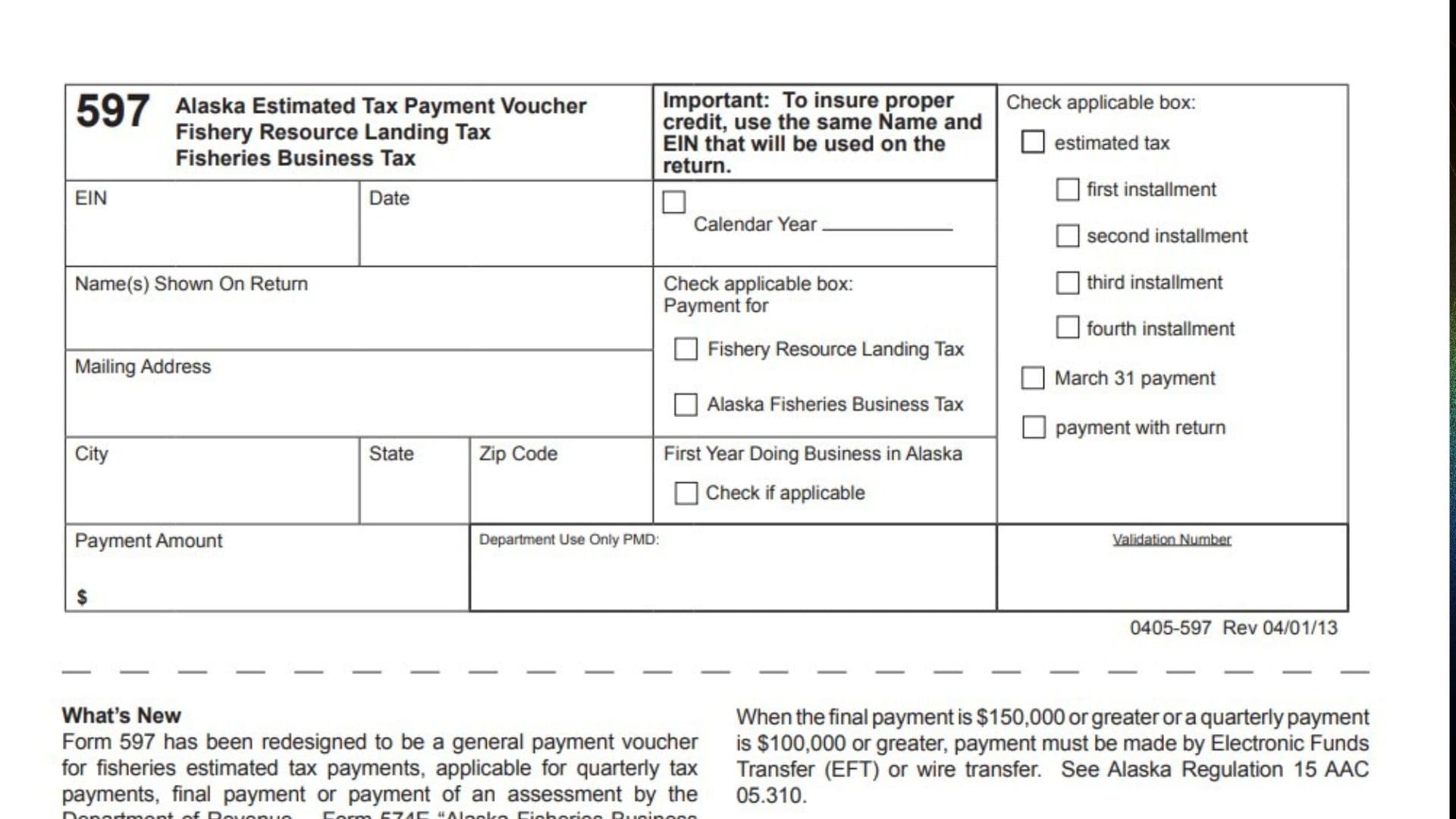
Alaska Form 597, titled Estimated Tax Payment Voucher, is a payment document used by taxpayers making certain payments related to Alaska fisheries taxes. It is designed to accompany payments for the Fishery Resource Landing Tax and the Alaska Fisheries Business Tax. The form can be used for quarterly estimated tax installments, final tax payments, and payments made toward assessments issued by the Alaska Department of Revenue. It helps the department identify the taxpayer, determine which tax account should receive the payment, and apply the money to the correct payment period. Form 597 collects essential information, including the taxpayer’s Employer Identification Number (EIN), name, mailing address, tax year, payment category, installment number, and payment amount. Taxpayers must also identify whether the payment relates to the Fishery Resource Landing Tax or the Alaska Fisheries Business Tax. Selecting the correct payment category and installment is important because an incorrectly identified payment could be credited to the wrong tax account or reporting period. The form can accompany a check or be used for certain wire transfer payments. Taxpayers are also encouraged to use the Alaska Department of Revenue’s Online Tax Information System (OTIS) Payment Center for electronic payments. The version covered in this guide displays revision date April 1, 2013.
Who Needs To Use Form 597?
Form 597 is intended for taxpayers making applicable Alaska fisheries tax payments.
You may need this voucher if you are:
- Making a first, second, third, or fourth quarterly estimated tax installment.
- Paying an amount due for the Fishery Resource Landing Tax.
- Paying an amount due for the Alaska Fisheries Business Tax.
- Making a final tax payment.
- Paying an assessment issued by the Alaska Department of Revenue.
- Making an eligible payment by check or wire transfer.
The form also includes a checkbox identifying taxpayers who are doing business in Alaska for the first time.
How To File Form 597
Form 597 is generally submitted with the applicable tax payment. It helps the Alaska Department of Revenue identify and correctly credit the payment.
Before completing the voucher, prepare the following information:
- Your Employer Identification Number (EIN).
- Your legal business or taxpayer name.
- Your mailing address.
- The applicable calendar year.
- The type of fisheries tax being paid.
- The applicable installment or payment category.
- Your payment amount.
- A check or payment arrangement, if applicable.
Electronic Payments
The Alaska Department of Revenue encourages taxpayers to make electronic payments through the Online Tax Information System (OTIS) Payment Center.
Visit the Alaska Department of Revenue website at www.tax.alaska.gov to access the payment system. Taxpayers can also print a payment voucher through OTIS.
Payments By Check
If you are paying by check, complete Form 597 and mail it with the payment to:
Tax Division
Alaska Department of Revenue
PO Box 110420
Juneau, AK 99811-0420
Wire Transfers
The form may also accompany certain wire transfer payments. Follow the applicable payment instructions provided by the Alaska Department of Revenue.
Important Electronic Payment Requirement
The form’s instructions state that electronic funds transfer (EFT) or wire transfer is mandatory when:
- The final payment is $150,000 or greater.
- A quarterly payment is $100,000 or greater.
These requirements are identified under Alaska Regulation 15 AAC 05.310.

How To Complete Form 597
Form 597 contains taxpayer identification fields, tax payment selections, and payment information. Complete each section carefully to help ensure that your payment is credited correctly.
Taxpayer Identification Information
EIN
Enter the Employer Identification Number associated with the business or taxpayer making the payment.
Use the same EIN that will appear on the corresponding Alaska fisheries tax return.
The form specifically emphasizes using consistent identification information to ensure proper payment crediting.
Date
Enter the date you are preparing or submitting the payment voucher.
Use the actual payment date associated with your check or payment transaction.
Name(s) Shown On Return
Enter the taxpayer’s legal name exactly as it appears on the applicable Alaska fisheries tax return.
If the return identifies multiple taxpayers, enter the names as shown on the return.
Using the same name on the voucher and tax return helps the department identify the correct taxpayer account.
Mailing Address
Enter the complete mailing address associated with the taxpayer.
Use the address where the Alaska Department of Revenue can send tax correspondence.
City
Enter the city associated with the mailing address.
State
Enter the state abbreviation for the mailing address.
ZIP Code
Enter the ZIP code associated with the mailing address.
Tax Period Information
Calendar Year
Enter the calendar year associated with the estimated tax payment.
Make sure the year corresponds to the tax period for which the payment is being made.
Payment Type Selection
Estimated Tax: First Installment
Check this box if the payment is for the first quarterly estimated tax installment.
Select this option when making the first estimated payment for the applicable tax year.
Estimated Tax: Second Installment
Check this box if the payment represents the second quarterly estimated tax installment.
Estimated Tax: Third Installment
Check this box if the payment represents the third quarterly estimated tax installment.
Estimated Tax: Fourth Installment
Check this box if the payment represents the fourth quarterly estimated tax installment.
Select only the installment that corresponds to the payment being submitted.
Tax Category Selection
Payment For: Fishery Resource Landing Tax
Check this box when the payment applies to the Fishery Resource Landing Tax.
Make sure the payment is associated with the correct tax liability.
Payment For: Alaska Fisheries Business Tax
Check this box when the payment applies to the Alaska Fisheries Business Tax.
Do not select this option for a payment intended for a different fisheries tax category.
Other Payment Selections
March 31 Payment
Check this box when the payment is specifically being made as a March 31 payment.
The form lists this as a separate payment selection from the quarterly estimated tax installment boxes.
Payment With Return
Check this box when submitting a payment together with the applicable tax return.
This option identifies a payment being made with the return rather than as a separately designated quarterly estimated installment.
First Year Doing Business In Alaska
Check this box if the business is operating in Alaska for the first time.
This information helps identify taxpayers who are beginning business operations in the state.
Payment Amount
Payment Amount
Enter the total amount being submitted with the voucher.
Use the actual amount of the check or payment associated with the selected tax category and payment period.
Make sure the amount is correct before submitting the voucher.
The form provides a dollar sign and designated space for entering the payment amount.
Department Use Only
PMD
Leave this field blank. It is reserved for processing by the Department of Revenue.
Validation Number
Do not enter information in this field. It is reserved for department processing and payment validation.
Important Payment Rules And Filing Reminders
Before submitting Form 597, keep these additional instructions in mind.
Use The Same Name And EIN
The name and EIN entered on Form 597 must match the information used on the corresponding tax return.
This is especially important for businesses that submit multiple fisheries tax payments during the year.
Electronic Payment Thresholds
EFT or wire transfer is required when the final payment reaches $150,000 or more, or a quarterly payment reaches $100,000 or more.
Use The Correct Payment Category
Identify whether the payment relates to the Fishery Resource Landing Tax or the Alaska Fisheries Business Tax.
Selecting the wrong category may cause payment processing problems.
Keep Payment Records
Retain copies of completed vouchers, checks, electronic payment confirmations, and relevant tax records.
These documents can help resolve payment crediting questions.
What If You Need Help With Form 597?
If you have questions about Form 597, need additional information, or require assistance with an Alaska fisheries tax payment, contact the Alaska Department of Revenue.
Telephone: 907-465-2320
The department’s Tax Division handles the fisheries tax payment process described in the form.
Final Review Before Filing
Before mailing Form 597 or completing your payment, review the following checklist:
- Enter the correct Employer Identification Number.
- Use the same taxpayer name shown on the corresponding tax return.
- Enter the correct date.
- Provide your complete mailing address.
- Enter the appropriate calendar year.
- Select the correct estimated tax installment, if applicable.
- Select Fishery Resource Landing Tax or Alaska Fisheries Business Tax.
- Check the March 31 payment option when applicable.
- Select Payment With Return when applicable.
- Check First Year Doing Business In Alaska if applicable.
- Enter the correct payment amount.
- Leave the PMD and Validation Number fields blank.
- Verify whether EFT or wire transfer is mandatory based on the payment amount.
- Include the voucher with your check when paying by mail.
- Use the correct Alaska Department of Revenue mailing address.
- Keep a copy of the voucher and payment confirmation for your records.
Alaska Form 597 is designed to make fisheries tax payments easier to identify and process. By entering the correct taxpayer information, selecting the appropriate payment category, and verifying the payment amount, you can help ensure that your payment is credited to the intended tax account.