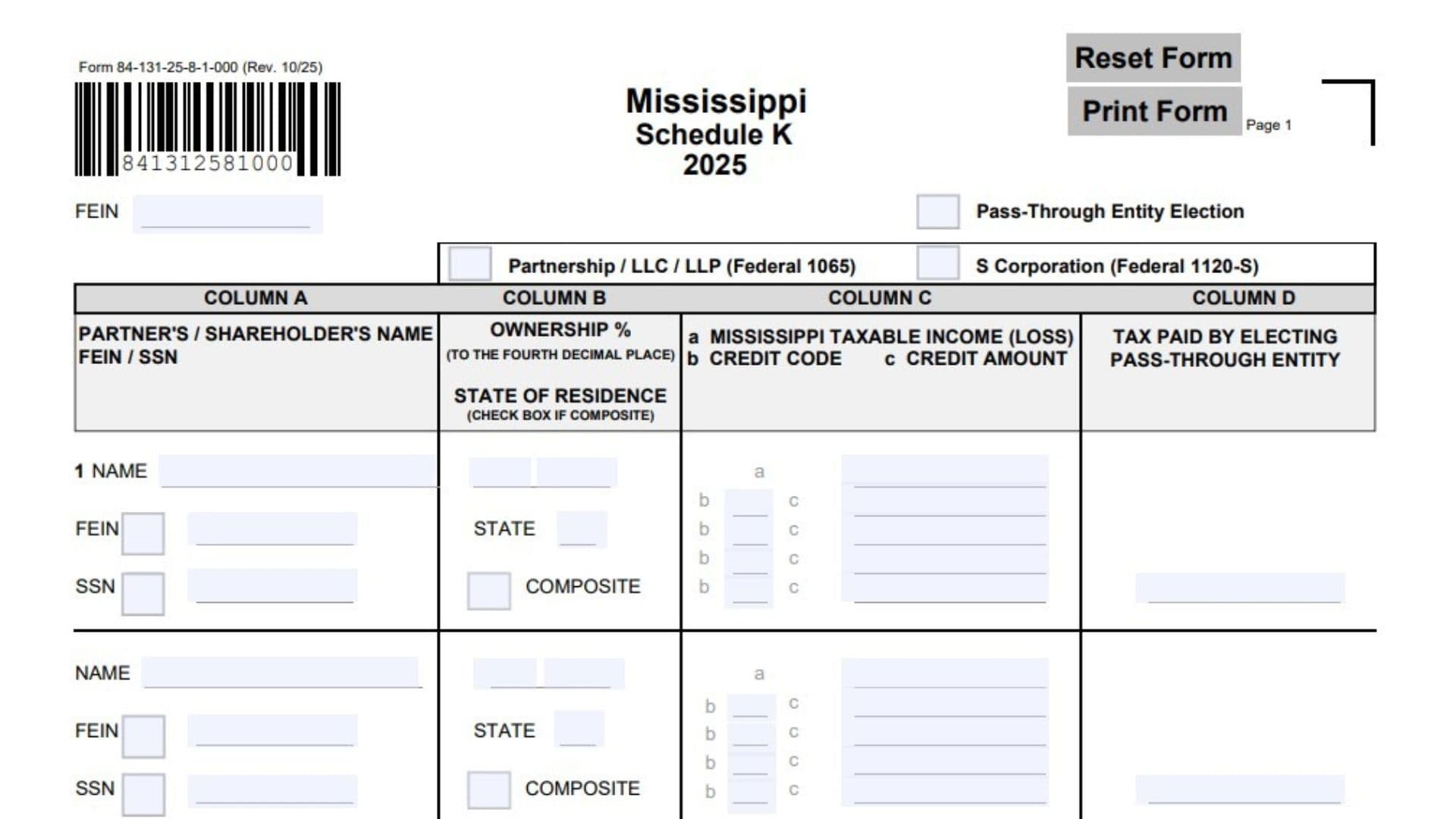
Mississippi Schedule K, Form 84-131, is a tax schedule issued by the Mississippi Department of Revenue for the 2025 tax year. It is titled Pass-Through Entity Election and is used to report information about the partners or shareholders of a pass-through business, including their ownership percentages, Mississippi taxable income or losses, allocated tax credits, and amounts of tax paid by the electing pass-through entity. The schedule accommodates partnerships, limited liability companies (LLCs), limited liability partnerships (LLPs) filing federal Form 1065, and S corporations filing federal Form 1120-S. It provides a structured way to identify each partner or shareholder, record their federal Employer Identification Number (FEIN) or Social Security number (SSN), identify their state of residence, and indicate whether they are included in a composite return. The schedule also contains separate columns for reporting Mississippi taxable income or losses, applicable credit codes, corresponding credit amounts, and taxes paid by the electing pass-through entity on behalf of its owners. Schedule K is divided into two pages. Page 1 provides space for five partners or shareholders and includes the main totals section. Page 2 provides additional space for five more partners or shareholders per supplemental page. The totals from the supplemental pages are transferred to page 1 so that the business can report the combined ownership percentages, Mississippi taxable income or losses, tax credits, and entity-paid taxes. Completing this schedule accurately is important because the reported information establishes how income, credits, and taxes are allocated among the business’s owners. It also helps ensure that the amounts reported in the entity’s Mississippi tax filing agree with the individual allocation records and supporting tax calculations. For composite filings, the schedule specifically directs taxpayers to transfer the total composite income or loss to Form 84-122, page 2, line 29.
Who Needs to Complete Mississippi Schedule K?
Schedule K is designed for qualifying Mississippi pass-through entities that need to report partner or shareholder information and applicable pass-through entity election details for the 2025 tax year.
The form identifies two main federal entity classifications:
- Partnership / LLC / LLP: Entities filing federal Form 1065.
- S Corporation: Entities filing federal Form 1120-S.
The schedule is used to report information for individual partners or shareholders, including their ownership percentages, Mississippi income or losses, allocated credits, and applicable taxes paid by the electing entity.
Pass-Through Entity Election
The form includes a checkbox labeled Pass-Through Entity Election.
Mark this checkbox when the entity is reporting under the applicable Mississippi pass-through entity election.
The schedule itself does not explain the eligibility conditions for making the election. Consult the applicable Mississippi pass-through entity instructions to determine whether the entity qualifies and must make the election.
How To File Mississippi Schedule K
Mississippi Schedule K is a supporting tax schedule for reporting pass-through entity ownership and allocation information. Complete it as part of the applicable 2025 Mississippi pass-through entity tax filing.
The form does not provide a separate mailing address, filing deadline, payment voucher, or independent submission procedure. Refer to the main Mississippi pass-through entity return instructions for the applicable filing method and submission requirements.
Information To Prepare Before Completing the Schedule
Gather the following information before starting:
- The entity’s federal Employer Identification Number (FEIN).
- The entity’s federal tax classification.
- The names of all partners or shareholders.
- Each partner’s or shareholder’s FEIN or SSN.
- Ownership percentages for each partner or shareholder.
- The state of residence of each partner or shareholder.
- Information about owners included in a composite return.
- Each owner’s allocated Mississippi taxable income or loss.
- Applicable Mississippi tax credit codes.
- The amount of each allocated tax credit.
- The amount of tax paid by the electing pass-through entity for each owner.
- Supporting ownership and tax allocation records.
- Additional partner or shareholder information if the available spaces are insufficient.
Make sure the amounts reported on Schedule K agree with the entity’s supporting tax calculations and ownership records.

How To Complete Mississippi Schedule K
The schedule contains four main columns, along with entity identification information and a totals section.
- Column A: Partner’s or shareholder’s name and FEIN/SSN.
- Column B: Ownership percentage and state of residence.
- Column C: Mississippi taxable income or loss and allocated tax credits.
- Column D: Tax paid by the electing pass-through entity.
Complete the entity information first, followed by the individual partner or shareholder entries. After entering all applicable information, calculate the totals and complete the supplemental schedule if necessary.
Entity Identification And Election Information
FEIN
Enter the federal Employer Identification Number assigned to the pass-through entity.
Use the entity’s official nine-digit FEIN and verify that it matches the number used on its federal and Mississippi tax records.
Pass-Through Entity Election Checkbox
Mark this checkbox when the entity is reporting its applicable Mississippi pass-through entity election.
Make sure the selection is consistent with the entity’s tax election and the applicable Mississippi filing instructions.
Partnership / LLC / LLP (Federal 1065)
Mark this checkbox if the business is classified as a partnership, LLC, or LLP filing federal Form 1065.
S Corporation (Federal 1120-S)
Mark this checkbox if the business is classified as an S corporation filing federal Form 1120-S.
Select the entity classification that matches the applicable federal tax return.
Column A identifies each individual or entity holding an ownership interest in the reporting pass-through business.
Page 1 provides five entry sections, while page 2 provides five additional entry sections.
Complete a separate entry for every partner or shareholder included in the schedule.
Name
Enter the complete name of the partner or shareholder.
Use the legal name associated with the owner’s tax identification records.
FEIN
Enter the partner’s or shareholder’s federal Employer Identification Number when the owner is identified using an FEIN.
Mark the small checkbox beside FEIN to identify the type of identification number being provided.
SSN
Enter the partner’s or shareholder’s Social Security number when the owner is identified using an SSN.
Mark the small checkbox beside SSN to identify the type of identification number being provided.
Make sure the identification number belongs to the corresponding owner and is entered correctly.
Column B: Ownership Percentage and State of Residence
Column B collects the ownership percentage and state of residence for each partner or shareholder.
Ownership Percentage
Enter the percentage of the pass-through entity owned by the corresponding partner or shareholder.
The form requires ownership percentages to be reported to the fourth decimal place.
For example, an ownership percentage of 25% should be entered as 25.0000%.
Use the entity’s ownership records to determine the correct percentage.
Enter the percentage separately for each partner or shareholder.
State of Residence
Enter the state in which the corresponding partner or shareholder resides.
Use the appropriate two-letter state abbreviation.
Make sure the state information belongs to the owner identified in Column A.
Composite Checkbox
Mark the COMPOSITE checkbox when the corresponding partner or shareholder is included in the composite return.
Do not mark this box simply because the owner is a nonresident. The selection should reflect the applicable composite filing treatment.
Column C: Mississippi Taxable Income (Loss) and Tax Credits
Column C contains three types of information:
- Mississippi taxable income or loss.
- Tax credit codes.
- Corresponding tax credit amounts.
Each partner or shareholder has a separate entry area for reporting these amounts.
Mississippi Taxable Income or Loss
Column C, Subsection A: Mississippi Taxable Income (Loss)
Enter the Mississippi taxable income or loss allocated to the corresponding partner or shareholder.
Report the amount associated with that owner’s share of Mississippi taxable income or loss for the tax year.
Use the entity’s supporting Mississippi income calculations and allocation records.
Enter the amount separately for each partner or shareholder.
Tax Credit Information
The form provides multiple spaces for reporting tax credit codes and their corresponding amounts.
Column C, Subsection B: Credit Code
Enter the applicable Mississippi tax credit code associated with the credit being allocated to the partner or shareholder.
Use the appropriate code from the applicable Mississippi tax credit instructions and supporting records.
If multiple credits apply to the same owner, enter each credit code on a separate line.
Column C, Subsection C: Credit Amount
Enter the dollar amount of the tax credit corresponding to the credit code entered in subsection B.
Make sure each amount matches the correct credit code.
If multiple credits apply, report each credit separately using the available entry lines.
The form provides multiple credit entry spaces for each partner or shareholder.
Important: Do not combine unrelated tax credits under one code. Each credit amount should correspond to its applicable credit code.
Column D: Tax Paid by Electing Pass-Through Entity
Column D: Tax Paid by Electing Pass-Through Entity
Enter the amount of tax paid by the electing pass-through entity attributable to the corresponding partner or shareholder.
Use the entity’s tax payment and owner allocation records to determine the appropriate amount.
Complete this field separately for each partner or shareholder.
Make sure the individual amounts agree with the entity’s supporting tax payment records.
Page 1: Total Calculations
After completing the partner or shareholder entries on page 1, calculate the totals for each applicable column.
The totals section contains lines 2 through 5.
Line 2: Total Column B, Column C, and Column D
Calculate the totals from the five partner or shareholder entries reported above.
The line includes the following amounts:
- Column B: Add the ownership percentages entered for all listed owners.
- Column C, Line 2a: Add the Mississippi taxable income or loss amounts reported in subsection A.
- Column C, Line 2c: Add all tax credit amounts reported in subsection C.
- Column D, Line 2: Add the tax paid by the electing pass-through entity for all listed owners.
Enter each total in its corresponding space.
The form does not require a separate total for the individual credit codes in subsection B.
Line 3: Totals From Additional Pages
Enter the totals from the additional partner or shareholder information reported on Form 84-131, page 2.
Transfer the applicable subtotals from the supplemental schedule:
- Column B: Enter the total ownership percentage from the additional pages.
- Column C, Line 3a: Enter the total Mississippi taxable income or loss from the additional pages.
- Column C, Line 3c: Enter the total tax credit amounts from the additional pages.
- Column D, Line 3: Enter the total tax paid by the electing pass-through entity from the additional pages.
If no supplemental page is used, complete this section according to the applicable filing instructions.
Line 4: Total Mississippi Taxable Income (Loss) and Total Tax Credits
Add the corresponding Column C amounts from lines 2 and 3.
Complete the following calculations:
- Line 4a: Add line 2a and line 3a to determine total Mississippi taxable income or loss.
- Line 4c: Add line 2c and line 3c to determine total tax credits.
The calculation is:
Line 2a + Line 3a = Line 4a
Line 2c + Line 3c = Line 4c
Enter each result in the appropriate space.
Special Instruction for Composite Filings
If the entity is filing a composite return, enter the total composite income or loss from line 4a on Form 84-122, page 2, line 29.
Make sure the amount transferred agrees with the total calculated on Schedule K.
Line 5: Total Tax Paid by Electing Pass-Through Entity
Add the amounts reported in Column D on lines 2 and 3.
The calculation is:
Line 2 + Line 3 = Line 5
Enter the combined amount.
This represents the total tax paid by the electing pass-through entity for the owners listed on the main schedule and supplemental pages.
Page 2 provides additional space for reporting partners or shareholders when the five available entry sections on page 1 are insufficient.
It uses the same four-column structure as page 1.
Each supplemental page provides five additional owner entry sections.
Complete the FEIN field at the top of page 2 using the same entity identification number reported on page 1.
Supplemental Column A: Owner Identification
Name
Enter the full name of each additional partner or shareholder.
FEIN
Enter the owner’s federal Employer Identification Number when applicable.
Mark the FEIN checkbox to identify the type of identification number entered.
SSN
Enter the owner’s Social Security number when applicable.
Mark the SSN checkbox to identify the type of identification number entered.
Supplemental Column B: Ownership Information
Ownership Percentage
Enter the additional partner’s or shareholder’s ownership percentage.
Report the percentage to four decimal places.
State of Residence
Enter the owner’s state of residence using the appropriate two-letter abbreviation.
Composite Checkbox
Mark this checkbox if the additional owner is included in the composite return.
Supplemental Column C: Mississippi Income and Credits
Subsection A: Mississippi Taxable Income (Loss)
Enter the Mississippi taxable income or loss allocated to the additional partner or shareholder.
Use the applicable supporting income calculations.
Subsection B: Credit Code
Enter the applicable tax credit code for each credit allocated to the additional owner.
Use a separate entry line for each applicable credit.
Subsection C: Credit Amount
Enter the corresponding dollar amount for each credit code.
Make sure the credit amount matches the code entered on the same line.
Supplemental Column D: Tax Paid by Electing Pass-Through Entity
Tax Paid by Electing Pass-Through Entity
Enter the amount of tax paid by the electing pass-through entity attributable to the additional partner or shareholder.
Use the entity’s supporting tax allocation and payment records.
Supplemental Page Subtotal
At the bottom of page 2, calculate the subtotal of the additional owner information.
The form instructs taxpayers to add Column B, Column C, and Column D and transfer the resulting amounts to page 1, line 3.
Column B: Ownership Percentage Subtotal
Add the ownership percentages reported for all partners or shareholders listed on the supplemental page.
Enter the total in the corresponding Column B subtotal field.
Column C, Subsection A: Mississippi Taxable Income (Loss) Subtotal
Add the Mississippi taxable income or loss amounts entered in subsection A for all additional owners.
Enter the total in the corresponding Column C, subsection A field.
Column C, Subsection C: Credit Amount Subtotal
Add all credit amounts reported in subsection C for the additional partners or shareholders.
Enter the combined amount in the corresponding Column C, subsection C field.
Column D: Tax Paid by Electing Pass-Through Entity Subtotal
Add the amounts of tax paid by the electing pass-through entity for all additional owners listed on the supplemental page.
Enter the total in Column D.
Supplemental Page Number
At the bottom of the page, complete the Supplemental Page ___ of ___ fields.
Enter the page’s sequence number and the total number of supplemental pages submitted.
For example, if three supplemental pages are included, number them 1 of 3, 2 of 3, and 3 of 3.
Transfer the applicable supplemental totals to page 1, line 3.
Important Calculation and Reporting Considerations
Ownership Percentages
Ownership percentages must be reported to four decimal places.
Use the entity’s official ownership records rather than estimating percentages.
Check the total against the entity’s ownership information to identify possible data-entry errors.
Mississippi Taxable Income and Loss
Report the Mississippi taxable income or loss allocated to each individual partner or shareholder.
Do not confuse this amount with the entity’s total income before allocation.
The amounts reported in Column C, subsection A, are combined on lines 2a, 3a, and 4a.
Tax Credit Codes and Amounts
Each allocated credit must have the correct credit code and corresponding dollar amount.
When multiple credits apply to one owner, use separate entry lines.
The form does not provide a list of credit codes, so use the applicable Mississippi tax credit instructions to identify the correct codes.
Composite Return Reporting
If an owner is included in a composite return, mark the corresponding COMPOSITE checkbox in Column B.
When filing on a composite basis, transfer the total composite income or loss from line 4a to Form 84-122, page 2, line 29.
Page 1 contains five owner entry sections.
Page 2 provides five additional sections per supplemental page.
When more space is needed, use additional supplemental pages and complete the page numbering fields.
Make sure all supplemental totals are transferred correctly to page 1, line 3.
Final Review Before Filing
Before submitting Mississippi Schedule K (Form 84-131), review the following checklist to ensure that all ownership, income, credit, and payment information is complete.
Entity Information
- Enter the correct entity FEIN.
- Mark the Pass-Through Entity Election checkbox when applicable.
- Select the correct federal entity classification.
- Confirm that the selected classification matches federal Form 1065 or Form 1120-S.
Partner and Shareholder Information
- List every applicable partner or shareholder.
- Enter each owner’s correct legal name.
- Enter the correct FEIN or SSN.
- Mark the appropriate identification number checkbox.
- Enter each ownership percentage to four decimal places.
- Enter the correct state of residence.
- Mark the COMPOSITE checkbox for owners included in the composite return.
Mississippi Income and Tax Credits
- Enter each owner’s Mississippi taxable income or loss in Column C, subsection A.
- Enter the correct credit codes in Column C, subsection B.
- Enter the corresponding credit amounts in Column C, subsection C.
- Use separate lines for multiple credits.
- Verify that all credit amounts match their corresponding credit codes.
- Enter the tax paid by the electing pass-through entity in Column D.
Page 1 Calculations
- Calculate the ownership percentage total on line 2.
- Calculate total Mississippi taxable income or loss on line 2a.
- Calculate total credit amounts on line 2c.
- Calculate total tax paid by the electing pass-through entity on line 2.
- Transfer supplemental totals to line 3 when applicable.
- Calculate total Mississippi taxable income or loss on line 4a.
- Calculate total tax credits on line 4c.
- For composite filings, transfer line 4a to Form 84-122, page 2, line 29.
- Calculate total tax paid by the electing pass-through entity on line 5.
Supplemental Pages
- Complete the entity FEIN field on each supplemental page.
- List all additional partners or shareholders.
- Complete all four columns for each applicable owner.
- Calculate the supplemental ownership percentage subtotal.
- Calculate the supplemental Mississippi taxable income or loss subtotal.
- Calculate the supplemental tax credit subtotal.
- Calculate the supplemental tax paid subtotal.
- Transfer all supplemental totals to page 1, line 3.
- Number supplemental pages in the correct sequence.
- Verify that no partner or shareholder has been accidentally omitted or counted twice.
Final Submission Checks
- Confirm that all amounts agree with the entity’s supporting tax records.
- Verify that ownership percentages are reported to the required precision.
- Check all FEINs and SSNs for accuracy.
- Confirm that composite return selections are correct.
- Review all credit codes and corresponding amounts.
- Verify the calculations on lines 2 through 5.
- Follow the filing and submission instructions for the applicable Mississippi pass-through entity return.
- Retain a copy of the completed schedule and supporting allocation records.
Correctly completing Mississippi Schedule K (Form 84-131) helps ensure that partner and shareholder ownership information, Mississippi taxable income or losses, tax credits, and electing pass-through entity tax payments are properly reported. Carefully review each owner’s information, verify the totals on both pages, and make sure all supplemental amounts are transferred correctly before submitting the 2025 Mississippi tax filing.