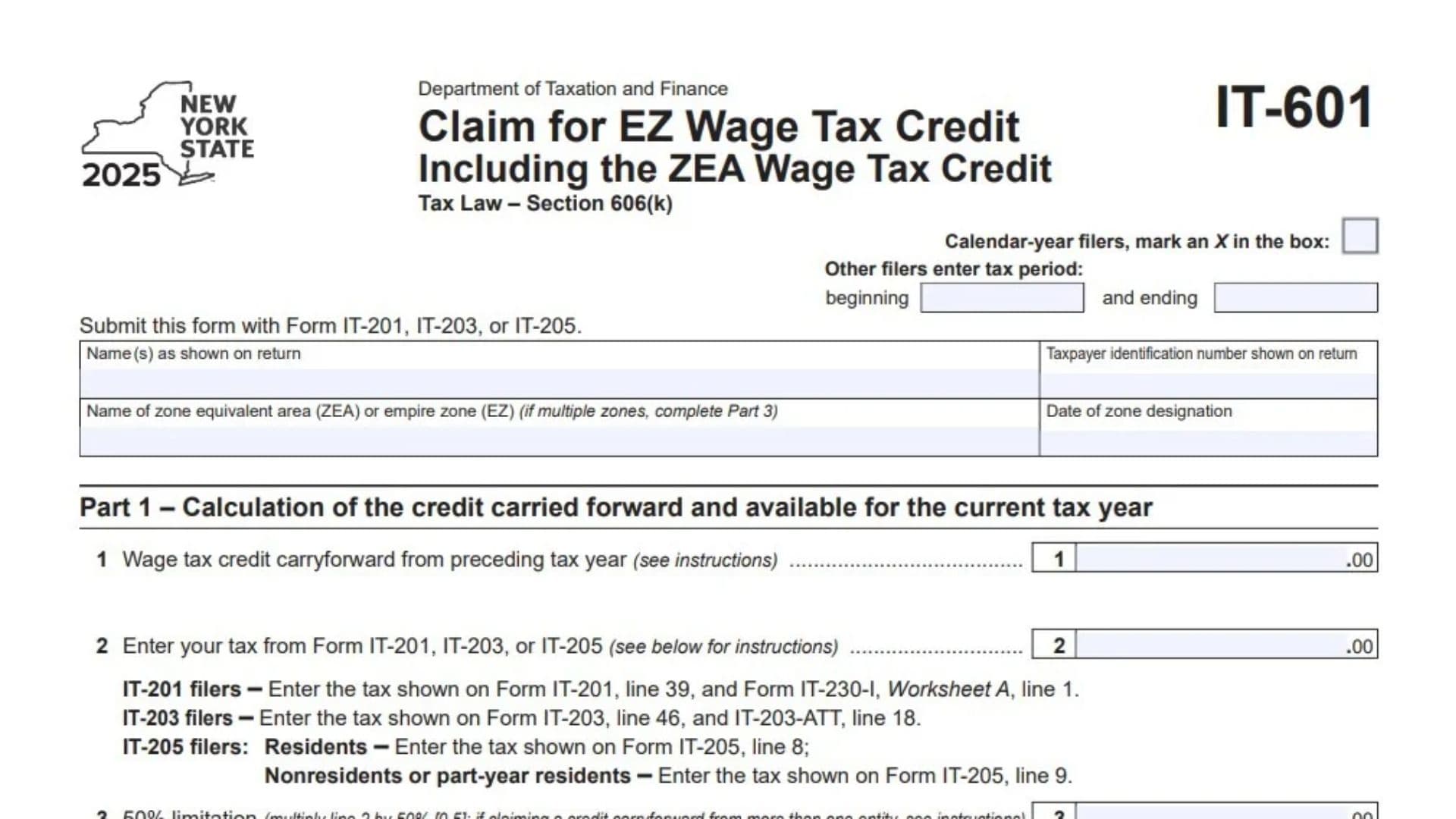
New York Form IT-601, officially titled Claim for EZ Wage Tax Credit Including the ZEA Wage Tax Credit, is a tax form issued by the New York State Department of Taxation and Finance. It is used to calculate and claim the Empire Zone (EZ) Wage Tax Credit and the Zone Equivalent Area (ZEA) Wage Tax Credit under New York Tax Law Section 606(k). These credits are associated with qualifying employment and business activities in designated Empire Zones or Zone Equivalent Areas. Form IT-601 helps eligible taxpayers determine how much wage tax credit is available for the current tax year, how much can be applied against their tax liability, and how much remains available to carry forward to a future tax year. The form collects taxpayer identification information, the name and designation date of the applicable zone, previous-year credit carryforwards, tax liability information, and details about multiple designated zones when applicable. Its calculations include a 50% limitation based on the taxpayer’s specified tax amount, the credit available for the current year, credits already applied against tax, and the remaining credit balance. Completing Form IT-601 accurately is important because it determines the amount of wage tax credit that can reduce the taxpayer’s New York State tax liability and the amount that remains available for future years. The form is generally relevant to taxpayers claiming an eligible EZ or ZEA wage tax credit and is submitted with Form IT-201, IT-203, or IT-205, depending on the type of New York State income tax return being filed.
Who Needs to File Form IT-601?
Form IT-601 is intended for taxpayers claiming the New York State Empire Zone Wage Tax Credit or Zone Equivalent Area Wage Tax Credit under Tax Law Section 606(k).
You may need this form if:
- You have an eligible EZ or ZEA wage tax credit to claim.
- You have an unused wage tax credit carried forward from a previous tax year.
- You need to calculate the amount of credit available for the current tax year.
- You need to determine how much of the available credit can be applied against your current tax liability.
- You have qualifying credit information associated with more than one Empire Zone or Zone Equivalent Area.
The form includes calculations for the credit available, the amount used during the current year, and the remaining amount available for carryforward.
How To File Form IT-601
Form IT-601 must be submitted with the applicable New York State income tax return. The form identifies three returns with which it may be filed:
- Form IT-201: New York State Resident Income Tax Return.
- Form IT-203: Nonresident and Part-Year Resident Income Tax Return.
- Form IT-205: Fiduciary Income Tax Return for Estates and Trusts.
Do not submit Form IT-601 as a substitute for your main income tax return.
Tax Year Information
At the top of Form IT-601, identify the applicable reporting period.
Calendar-Year Filers
If you file using the calendar year, mark an X in the designated checkbox. This identifies the reporting period as the calendar year.
Other Filers: Beginning and Ending Tax Period
If you use a fiscal year or another applicable tax period, enter the beginning and ending dates in the spaces provided.
Make sure the dates match the taxable year covered by your income tax return.
Information To Prepare Before Filing
Gather the following information before completing the form:
- Your name as shown on your New York State income tax return.
- Your taxpayer identification number.
- The name of the Empire Zone or Zone Equivalent Area.
- The date the applicable zone received its designation.
- Any wage tax credit carried forward from the previous tax year.
- The tax amounts required from Form IT-201, IT-203, or IT-205.
- Information about other credits already applied against your tax.
- Records of multiple designated zones, if applicable.
You should also have the applicable instructions for Form IT-601 available because certain calculations and carryforward situations require additional guidance.

How To Complete Form IT-601
Form IT-601 contains three main parts. Part 1 calculates the credit carried forward and available for the current tax year. Part 2 determines how much credit is used and how much remains available for future years. Part 3 provides additional information when the taxpayer has credit information involving multiple designated zones.
Complete the identification section first, then work through each calculation in order.
Taxpayer And Zone Identification Information
Name(s) as Shown on Return
Enter the taxpayer’s name exactly as it appears on the New York State income tax return filed with Form IT-601.
For a joint return, use the names shown on the corresponding income tax return.
Taxpayer Identification Number Shown on Return
Enter the taxpayer identification number associated with the income tax return.
Use the appropriate identifying number shown on Form IT-201, IT-203, or IT-205.
Name of Zone Equivalent Area (ZEA) or Empire Zone (EZ)
Enter the official name of the designated Zone Equivalent Area or Empire Zone associated with the wage tax credit being claimed.
If the credit involves more than one designated zone, complete Part 3 with the additional zone information.
Date of Zone Designation
Enter the date the applicable Empire Zone or Zone Equivalent Area received its official designation.
Use the designation date associated with the zone identified in the preceding field.
Part 1: Calculation of the Credit Carried Forward and Available for the Current Tax Year
Part 1 determines the amount of wage tax credit available for the current tax year. It considers the credit carried forward from the preceding year and applies the 50% limitation based on the specified tax amount.
Complete each line using the information from your previous tax year and the applicable New York State income tax return.
Line 1: Wage Tax Credit Carryforward From Preceding Tax Year
Enter the amount of unused wage tax credit carried forward from the previous tax year.
Use the carryforward amount established in your preceding year’s tax records and applicable credit calculations.
This amount represents the credit that remains available from an earlier year and may be considered for use during the current tax year.
If the carryforward involves more than one entity, review the applicable Form IT-601 instructions for the required treatment.
Line 2: Tax From Form IT-201, IT-203, or IT-205
Enter the applicable tax amount from the New York State income tax return being filed.
The required source depends on the type of return:
- IT-201 Filers: Use the tax shown on Form IT-201, line 39, and Form IT-230-I, Worksheet A, line 1.
- IT-203 Filers: Use the tax shown on Form IT-203, line 46, and Form IT-203-ATT, line 18.
- IT-205 Resident Filers: Enter the tax shown on Form IT-205, line 8.
- IT-205 Nonresident or Part-Year Resident Filers: Enter the tax shown on Form IT-205, line 9.
Use the applicable return and supporting worksheet or attachment to obtain the required figures. Follow the Form IT-601 instructions for determining the amount to enter when multiple source lines are identified.
Line 3: 50% Limitation
Multiply the amount entered on line 2 by 50%, or 0.5.
The calculation is:
Line 2 × 0.50 = Line 3
Enter the resulting amount on line 3.
This calculation establishes the 50% limitation used to determine how much credit is available for the current tax year.
If you are claiming a credit carryforward from more than one entity, consult the form instructions for the applicable calculation and treatment.
Line 4: Credit Available for Current Tax Year
Compare the amounts reported on line 1 and line 3.
Enter the smaller of these two amounts.
The calculation is:
- Compare line 1, the previous-year wage tax credit carryforward.
- Compare line 3, the amount calculated under the 50% limitation.
- Enter whichever amount is lower on line 4.
This represents the credit available for use during the current tax year before considering the other credits applied against your tax liability.
Part 2: Calculation of Credit Used and Carried Over
Part 2 determines how much of the available wage tax credit can actually be used during the current tax year and how much remains available for future years.
The calculation considers the tax due before credits and other credits already applied against that tax.
Line 5: Tax Due Before Credits
Enter the tax amount due before applying the credits considered in this section.
Use the applicable tax return and the Form IT-601 instructions to determine the correct amount.
This figure establishes the tax liability against which the available wage tax credit and other applicable credits are considered.
Line 6: Credits Applied Against the Tax Before This Credit
Enter the total amount of other credits already applied against the tax before applying the EZ or ZEA Wage Tax Credit.
Use the applicable tax return and supporting credit calculations to determine this amount.
Do not include the wage tax credit being calculated on Form IT-601 as part of this entry. The purpose of this line is to account for credits applied before the credit claimed through this form.
Line 7: Remaining Tax After Other Credits
Subtract the amount entered on line 6 from the amount entered on line 5.
The calculation is:
Line 5 − Line 6 = Line 7
Enter the resulting amount on line 7.
This figure represents the remaining tax after accounting for the credits applied before the EZ or ZEA Wage Tax Credit.
Line 8: Amount of Credit Used This Year
Compare the amounts on line 4 and line 7.
Enter the smaller amount.
The calculation requires you to consider:
- Line 4, the credit available for the current tax year.
- Line 7, the remaining tax after other credits.
The amount entered on line 8 cannot exceed the available credit or the remaining tax amount shown in these calculations.
This is the portion of the wage tax credit used to reduce the current year’s tax liability.
Line 9: Amount of Credit Available for Carryover
Subtract the amount on line 8 from the amount on line 1.
The calculation is:
Line 1 − Line 8 = Line 9
Enter the remaining amount on line 9.
This represents the portion of the previous-year wage tax credit carryforward that was not used during the current tax year and remains available for carryover.
Keep the calculated amount with your tax records because it may be relevant when completing Form IT-601 for a subsequent tax year.
Part 3: Multiple Zone Information
Part 3 is used when the taxpayer needs to report information about more than one designated Zone Equivalent Area or Empire Zone.
The form provides a table with two columns for identifying the applicable zones and their designation dates.
Complete this section when multiple zones are associated with the credit being claimed. If the available spaces are insufficient, attach additional sheets containing the same information.
Name of ZEA or EZ
Enter the official name of each additional Zone Equivalent Area or Empire Zone associated with the wage tax credit.
Provide a separate entry for each applicable zone.
Make sure the names are consistent with the designation information maintained in your tax and business records.
Date of Zone Designation
Enter the official designation date for each zone listed in the corresponding row.
Match each designation date with the correct zone name.
If more zones need to be reported than the available table allows, attach additional sheets showing the names and designation dates of the remaining zones.
Important Calculation Considerations
Understanding the 50% Limitation
Line 3 applies a 50% limitation to the tax amount reported on line 2.
This amount is compared with the previous-year credit carryforward on line 1. The smaller amount becomes the credit available for the current tax year on line 4.
Therefore, the total carryforward balance does not automatically determine how much credit can be used during the current year.
Understanding Credit Used and Carryforward
Part 2 separates the credit available from the amount that can actually be applied against the current tax liability.
Line 7 calculates the remaining tax after previously applied credits. Line 8 then limits the wage tax credit used to the smaller of the amount available and the remaining tax.
Finally, line 9 calculates the unused portion by subtracting the current-year credit used from the original carryforward amount on line 1.
Multiple Entities and Multiple Zones
The form identifies two situations that may require additional attention.
If a credit carryforward comes from more than one entity, review the applicable instructions for the 50% limitation calculation on line 3.
If the credit involves multiple designated zones, complete Part 3 and attach additional sheets when necessary.
Final Review Before Filing
Before submitting Form IT-601 with your New York State income tax return, review the following checklist:
- Confirm that you are using the correct Form IT-601 tax-year version.
- Mark the calendar-year checkbox or enter the applicable beginning and ending dates.
- Enter your name exactly as shown on the income tax return.
- Verify your taxpayer identification number.
- Enter the correct Empire Zone or Zone Equivalent Area name.
- Verify the applicable zone designation date.
- Enter the correct wage tax credit carryforward from the preceding tax year on line 1.
- Obtain the correct tax amounts from Form IT-201, IT-203, or IT-205 for line 2.
- Verify the 50% limitation calculation on line 3.
- Enter the smaller amount from line 1 or line 3 on line 4.
- Verify the tax due before credits on line 5.
- Include the applicable previously applied credits on line 6.
- Check the subtraction calculation on line 7.
- Enter the smaller of line 4 or line 7 on line 8.
- Calculate the remaining credit carryforward correctly on line 9.
- Complete Part 3 if multiple Empire Zones or Zone Equivalent Areas are involved.
- Match each additional zone name with its correct designation date.
- Attach additional sheets if the available Part 3 spaces are insufficient.
- Review the applicable Form IT-601 instructions for calculations involving multiple entities and other special situations.
- Confirm that Form IT-601 is submitted with Form IT-201, IT-203, or IT-205, as applicable.
Properly completing New York Form IT-601 helps ensure that the EZ or ZEA Wage Tax Credit is calculated accurately, applied against the appropriate tax liability, and carried forward correctly when an unused balance remains. Review each calculation and verify the supporting tax return information before submitting the form.