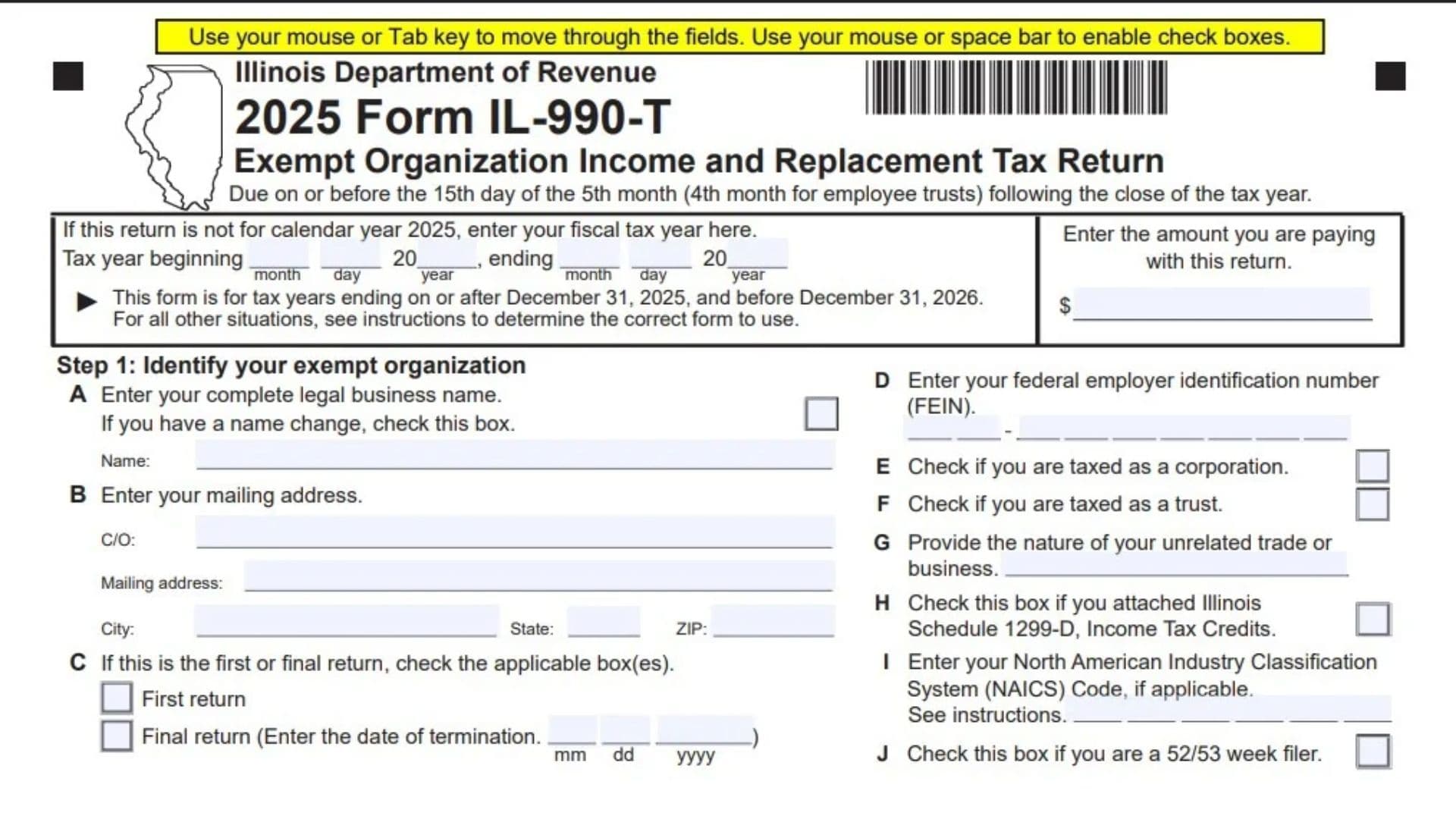
Form IL-990-T is the Illinois Exempt Organization Income and Replacement Tax Return. Exempt organizations use it to report unrelated business taxable income or loss and calculate the Illinois income tax, replacement tax, and applicable surcharges associated with that income. The return collects the organization’s identifying information, federal unrelated business taxable income, Illinois tax adjustments, income attributable to Illinois, credits, and payments. It also determines whether the organization owes additional tax, qualifies for a refund, or wants an overpayment applied forward. The form distinguishes between organizations taxed as corporations and those taxed as trusts, including different replacement tax rates. It also separates organizations whose relevant income comes entirely from Illinois from those with income derived partly outside the state. Completing these sections correctly matters because the classification, allocation, credit, and payment entries affect the final tax liability. The return requires disclosure under Illinois law, and missing information may result in a penalty.
The 2025 form applies to tax years ending on or after December 31, 2025, and before December 31, 2026. For a tax year outside that period, consult the applicable filing instructions to determine which version to use.
How To File Form IL-990-T
Filing Deadline
File the return by the 15th day of the fifth month after the tax year ends. Employee trusts must file by the 15th day of the fourth month after the tax year ends.
Where To Submit the Return
Submit Form IL-990-T to the Illinois Department of Revenue. The mailing address depends on whether a payment accompanies the return.
When no payment is enclosed, mail the return to:
Illinois Department of Revenue
P.O. Box 19009
Springfield, IL 62794-9009
When a payment is enclosed, mail the return to:
Illinois Department of Revenue
P.O. Box 19053
Springfield, IL 62794-9053
The form directs taxpayers who owe tax to make an electronic payment through Tax.Illinois.gov. If mailing a payment is necessary, complete Form IL-990-T-V and attach the voucher and payment to the front of the return.
Documents and Information To Prepare
Gather the following items, as applicable:
- The organization’s legal name, mailing address, and federal employer identification number.
- Tax-year beginning and ending dates.
- Federal Form 990-T, a copy of which must accompany the Illinois return.
- Records of Illinois income tax, replacement tax, and surcharges deducted when calculating federal unrelated business taxable income.
- Total sales everywhere and sales attributable to Illinois if completing the out-of-state income allocation section.
- Income information from partnerships, S corporations, trusts, and estates.
- Schedule UB information when relevant to the partnership income entries.
- Schedule 4255 for investment credit recapture.
- Form IL-477 for replacement tax investment credits.
- Schedule 1299-D for income tax credits.
- Schedules K-1-P or K-1-T supporting pass-through withholding or pass-through entity tax credits.
- Forms W-2G supporting Illinois income tax withholding.
- Records of previous overpayments and payments already made.
- Bank routing and account numbers if requesting direct deposit.
- Officer and paid preparer information needed to sign the return.
Attach the applicable supporting forms and schedules to Form IL-990-T rather than merely entering their totals.

How To Complete Form IL-990-T
Tax Year and Payment Information
Tax Year: Calendar-Year Return
The form is designated for calendar year 2025. If the organization uses a different tax period, complete the fiscal-year dates.
Tax Year: Beginning and Ending Dates
Enter the month, day, and year when the fiscal tax year began and ended. Confirm that the ending date falls within the period covered by this version of the form.
Payment Amount on Page 1
Enter the amount actually being paid with the return in the payment space at the top of page 1. Keep this separate from the total liability calculation: it identifies the payment accompanying the filing.
Payment and Voucher Attachment Area
If paying by mail, attach the payment and completed Form IL-990-T-V in the designated area on the front of the return.
Whole-Dollar Entries
Report monetary amounts in whole dollars. The tax calculation fields show fixed cents of “00.” Line 8 is different: its apportionment factor must be rounded to six decimal places.
Step 1: Identify Your Exempt Organization
Field A: Legal Business Name
Enter the organization’s complete legal business name.
Field A: Name Change Checkbox
Check the name-change box if the organization’s name has changed.
Field B: Care-of Name
Complete the “C/O” field when correspondence should be directed through a particular person or entity.
Field B: Mailing Address
Enter the mailing street address or other appropriate mailing delivery information.
Field B: City, State, and ZIP Code
Complete all three fields using the organization’s mailing location.
Field C: First Return Checkbox
Check this box if this is the organization’s first return.
Field C: Final Return Checkbox
Check this box if this is the organization’s final return. The form allows the applicable first-return and final-return boxes to be selected.
Field C: Termination Date
If filing a final return, enter the termination date in month, day, and four-digit year format.
Field D: Federal Employer Identification Number
Enter the organization’s federal employer identification number, commonly called its FEIN. Check the number carefully because it identifies the taxpayer associated with the return.
Field E: Taxed as a Corporation
Check this box if the organization is taxed as a corporation. This classification affects the replacement tax calculation on line 13.
Field F: Taxed as a Trust
Check this box if the organization is taxed as a trust. Use the classification that applies to the organization rather than selecting a category based only on its name.
Field G: Nature of Unrelated Trade or Business
Briefly describe the unrelated business activity associated with the reported income. Use a specific description of the activity rather than a general statement of the organization’s exempt purpose.
Field H: Schedule 1299-D Attachment Checkbox
Check this box if Illinois Schedule 1299-D, Income Tax Credits, is attached.
Field I: NAICS Code
Enter the applicable North American Industry Classification System code, if required for the organization. Consult the filing instructions if uncertain which code applies.
Field J: 52/53-Week Filer Checkbox
Check this box if the organization files on a 52/53-week tax-year basis.
Select the Applicable Income Source Option
Income Source Checkbox A: Illinois-Only Income or Illinois Resident Trust
Check box A if the amount on line 3 is derived entirely from Illinois or the organization is an Illinois resident trust.
Transfer line 3 directly to line 12. Do not complete Step 3; lines 4 through 11 must remain blank.
Income Source Checkbox B: Income Derived Partly Outside Illinois
Check box B if any portion of line 3 is derived outside Illinois and the organization must complete the allocation section.
Complete every line in Step 3. In particular, do not leave lines 6, 7, or 8 blank.
Step 2: Figure Your Base Income or Loss
Line 1: Federal Unrelated Business Taxable Income or Loss
Enter the unrelated business taxable income or loss from federal Form 990-T, applying the relevant filing instructions. Attach a copy of the federal return.
Line 2: Illinois Taxes and Surcharges Previously Deducted
Enter Illinois income tax, replacement tax, and surcharge amounts that were deducted in arriving at line 1. This entry adds those deductions back when calculating Illinois base income.
Line 3: Base Income or Loss
Add lines 1 and 2.
If income source box A applies, carry this amount to line 12 and leave Step 3 blank. If box B applies, continue through lines 4–11.
Step 3: Figure Your Income Allocable to Illinois
Complete this section only when income source box B is checked.
Line 4: Business Income or Loss From Specified Pass-Through Sources
Enter the business income or loss already included in line 3 that comes from non-unitary partnerships, partnerships included on Schedule UB, S corporations, trusts, or estates.
Use the filing instructions to identify the amounts belonging on this line. These items are removed before applying the organization’s sales-based apportionment factor.
Line 5: Business Income or Loss Subject to Apportionment
Subtract line 4 from line 3. The result is the amount used in the line 9 calculation.
Line 6: Total Sales Everywhere
Enter total sales from all locations. The amount cannot be negative, and this field must not be left blank when Step 3 applies.
Line 7: Total Sales Inside Illinois
Enter total sales attributable to Illinois. This amount also cannot be negative and must not be left blank.
Line 8: Apportionment Factor
Divide line 7 by line 6 and round the result to six decimal places.
Do not leave this line blank. If line 6 is zero, consult the filing instructions rather than attempting to divide by zero.
Line 9: Business Income or Loss Apportionable to Illinois
Multiply line 5 by the factor on line 8. Enter the resulting Illinois-apportioned business income or loss.
Line 10: Illinois-Apportionable Income or Loss From Specified Pass-Through Sources
Enter the business income or loss apportionable to Illinois from non-unitary partnerships, partnerships included on Schedule UB, S corporations, trusts, or estates.
This entry reports the Illinois-related amount for the categories addressed on line 4. Consult the filing instructions and supporting records to determine the correct figure rather than automatically copying line 4.
Line 11: Base Income or Loss Allocable to Illinois
Add lines 9 and 10. Carry the result to line 12.
Step 4: Figure Your Net Replacement Tax
Line 12: Net Income or Loss
Enter line 3 if income source box A applies. Enter line 11 if income source box B applies.
Line 13: Replacement Tax
Use the rate corresponding to the organization’s tax classification:
- Corporations: Multiply line 12 by 2.5%, or 0.025.
- Trusts: Multiply line 12 by 1.5%, or 0.015.
Make sure the rate matches the classification checked in Step 1.
Line 14: Investment Credit Recapture
Enter replacement-tax investment credit recapture from Schedule 4255. Attach the schedule if reporting recapture.
Line 15: Replacement Tax Before Investment Credits
Add lines 13 and 14.
Line 16: Investment Credits
Enter the replacement tax investment credits supported by Form IL-477. Attach the completed form.
Line 17: Net Replacement Tax
Subtract line 16 from line 15. If the result is negative, enter zero.
This amount carries to line 24.
Step 5: Figure Your Net Income Tax
Line 18: Net Income or Loss
Copy the amount from line 12. This is the starting amount for the income tax calculation.
Line 19: Income Tax
Calculate the income tax using the applicable Form IL-990-T filing instructions.
The return itself does not provide the rate or complete calculation method for this line. Do not substitute the replacement tax rates shown on line 13.
Line 20: Investment Credit Recapture
Enter the income-tax investment credit recapture supported by Schedule 4255. Attach the schedule.
Although lines 14 and 20 both concern recapture, they belong to different tax calculations. Use the appropriate amount for each.
Line 21: Income Tax Before Credits
Add lines 19 and 20.
Line 22: Income Tax Credits
Enter the income tax credits supported by Schedule 1299-D. Attach that schedule and check the attachment box in Step 1, field H.
Line 23: Net Income Tax
Subtract line 22 from line 21. If the result is negative, enter zero.
Carry this amount to line 25.
Step 6: Figure Your Refund or Balance Due
Total Taxes and Surcharges
Line 24: Net Replacement Tax
Copy the amount from line 17.
Line 25: Net Income Tax
Copy the amount from line 23.
Line 26: Medical Cannabis Program Surcharge
Enter any applicable surcharge associated with the Compassionate Use of Medical Cannabis Program Act.
The return directs filers to the instructions for this calculation. Determine whether the surcharge applies before entering an amount.
Line 27: Gaming Licensee Asset Sale Surcharge
Enter any applicable surcharge arising from the sale of assets by a gaming licensee. Use the filing instructions to determine applicability and the correct amount.
Line 28: Total Taxes and Surcharges
Add lines 24, 25, 26, and 27. This is the total against which payments and payment-related credits are compared.
Payments and Payment-Related Credits
Line 29a: Credits From Previous Overpayments
Enter credits from prior overpayments available for this return. Verify the amount against the organization’s tax records.
Line 29b: Payments Made Before Filing
Enter total payments made before the date the return is filed. Use payment records to confirm the amount and avoid counting the same payment more than once.
Line 29c: Pass-Through Withholding
Enter pass-through withholding reported to the organization on Schedules K-1-P or K-1-T. Attach the supporting schedules.
Line 29d: Pass-Through Entity Tax Credit
Enter the pass-through entity tax credit reported to the organization. Attach the relevant Schedules K-1-P or K-1-T.
Keep this amount separate from pass-through withholding on line 29c.
Line 29e: Illinois Income Tax Withholding
Enter Illinois income tax withholding supported by Forms W-2G. Attach those forms.
Line 30: Total Payments
Add lines 29a through 29e.
Overpayment, Credit Forward, and Refund
Line 31: Overpayment
If line 30 exceeds line 28, subtract line 28 from line 30. Enter the difference as the overpayment.
Line 32: Amount Credited Forward
Enter the portion of the overpayment to be credited forward, following the filing instructions. This amount reduces the refund calculated on line 33.
Line 32 Checkbox: Carryforward to a Different FEIN
Check the box if the carryforward is going to a different FEIN. Attach a detailed statement explaining the transfer.
Line 33: Refund
Subtract line 32 from line 31. The result is the amount requested as a refund.
Line 34: Direct Deposit Request
Complete the banking fields if requesting direct deposit of the refund.
Line 34: Routing Number
Enter the bank routing number for the receiving account. Verify it against the bank’s records.
Line 34: Checking or Savings Checkbox
Select the account type that matches the account receiving the refund.
Line 34: Account Number
Enter the receiving account number. Recheck every digit before submitting the return.
Tax Due and Payment
Line 35: Tax Due
If line 28 exceeds line 30, subtract line 30 from line 28. The difference is the tax owed.
Electronic Payment
The return directs filers with tax due to make an electronic payment through Tax.Illinois.gov.
Mailed Payment
If mailing payment is necessary, complete Form IL-990-T-V. Make the check or money order payable to “Illinois Department of Revenue.”
Write the following on the payment:
- The organization’s FEIN.
- The tax-year ending date.
- “IL-990-T-V.”
Attach the payment and voucher to the front of the return. Also enter the payment amount in the designated space at the top of page 1.
Step 7: Sign the Return
Authorized Officer Information
Declaration
By signing, the authorized officer affirms under penalties of perjury that the return has been examined and is accurate and complete to the best of the officer’s knowledge.
Authorized Officer Signature
Have the authorized officer sign the return.
Signature Date
Enter the signing date in month, day, and four-digit year format.
Title
Enter the signing officer’s title.
Phone
Enter the contact telephone number in the space provided.
Paid Preparer Discussion Checkbox
Check this box if the organization authorizes the Illinois Department of Revenue to discuss the return with the paid preparer identified in this section.
Paid Preparer Information
Paid Preparer Name
Print or type the paid preparer’s name.
Paid Preparer Signature
The paid preparer must sign in the designated space when completing this section.
Preparer Signature Date
Enter the preparer’s signing date in month, day, and four-digit year format.
Paid Preparer PTIN
Enter the preparer’s Preparer Tax Identification Number.
Self-Employed Checkbox
Check this box if the paid preparer is self-employed.
Firm Name
Enter the preparer firm’s name, when applicable.
Firm FEIN
Enter the firm’s federal employer identification number.
Firm Address
Enter the firm’s address.
Firm Phone
Enter the firm’s telephone number.
Final Review Before Filing
- Confirm that the form version covers the organization’s tax-year ending date.
- Verify any fiscal-year beginning and ending dates.
- Check the legal name, mailing address, and FEIN.
- Confirm the corporation or trust tax classification.
- Review all applicable name-change, first-return, final-return, Schedule 1299-D, and 52/53-week checkboxes.
- Enter the termination date if filing a final return.
- Attach a copy of federal Form 990-T.
- Confirm that the correct income source checkbox is selected.
- Leave lines 4–11 blank when income source box A applies.
- Complete every Step 3 line when box B applies, including lines 6–8.
- Verify that sales figures are not negative and that the apportionment factor has six decimal places.
- Check each calculation and every amount transferred from another line.
- Use the correct replacement tax rate and the applicable instructions for income tax and surcharges.
- Attach Schedule 4255, Form IL-477, and Schedule 1299-D when applicable.
- Attach supporting Schedules K-1-P, K-1-T, and Forms W-2G for the amounts claimed.
- Reconcile previous overpayments and payments already made.
- Verify the split between any credit forward and refund.
- Attach a detailed statement if a carryforward is going to a different FEIN.
- Double-check direct deposit routing, account number, and account type.
- Make sure the authorized officer has signed and dated the return.
- Complete the paid preparer section when applicable.
- If mailing payment, include Form IL-990-T-V, properly identify the payment, and enter the payment amount on page 1.
- Use the mailing address that corresponds to whether payment is enclosed.
- Keep a complete copy of the return, attachments, and payment confirmation.