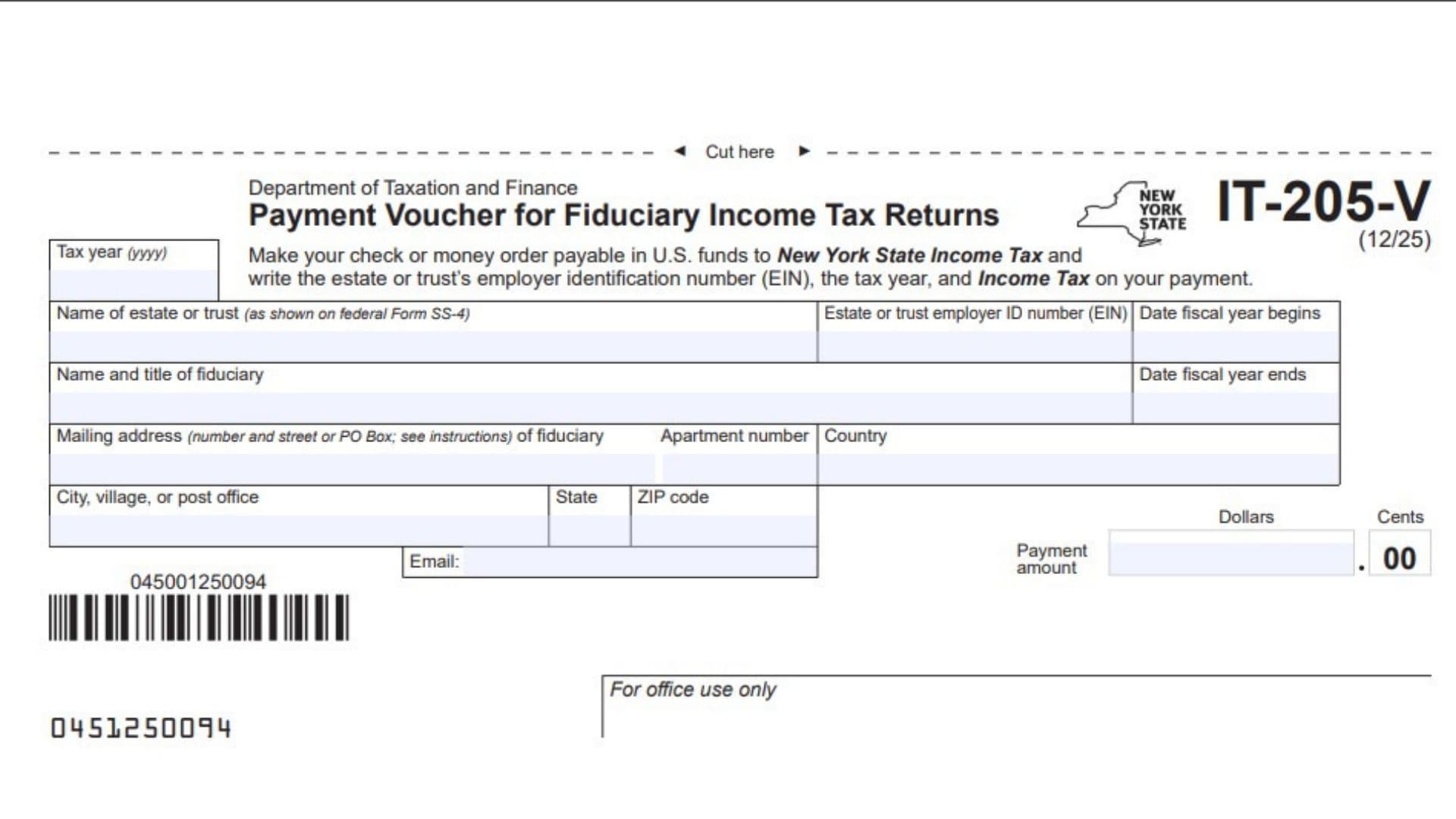
Form IT-205-V, Payment Voucher for Fiduciary Income Tax Returns, is a New York State tax payment voucher issued by the Department of Taxation and Finance. It is used by estates and trusts to submit income tax payments when paying their New York State fiduciary income tax through a check or money order. The voucher helps the tax department identify the estate or trust, match the payment to the correct tax year, and credit the money to the appropriate tax account. It collects important information, including the tax year, estate or trust name, employer identification number (EIN), fiscal year dates, fiduciary’s name and title, mailing address, email address, and payment amount. Form IT-205-V is generally used with Form IT-205, New York Fiduciary Income Tax Return. It is not a replacement for the actual fiduciary income tax return. Instead, it serves as an accompanying payment document that helps ensure the submitted payment is properly identified and processed. Estates and trusts making payments by check or money order must include this voucher with their payment. Completing it accurately is important because missing or incorrect information may prevent the New York State Department of Taxation and Finance from properly crediting the payment to the correct account.
How To File Form IT-205-V
Form IT-205-V must be submitted with a check or money order when paying New York State fiduciary income tax. The mailing address depends on whether you are filing a paper return, have already filed your return, or submitted it electronically.
Before completing the voucher, prepare the following information:
- The tax year covered by the fiduciary income tax return.
- The estate or trust’s legal name as shown on federal Form SS-4.
- The estate or trust’s complete Employer Identification Number (EIN).
- The beginning and ending dates of the fiscal year, if applicable.
- The fiduciary’s full name and title.
- The fiduciary’s complete mailing address.
- The payment amount in dollars and cents.
- A check or money order payable in U.S. funds to New York State Income Tax.
Where To Mail Form IT-205-V
The correct mailing address depends on your filing situation.
For electronically filed or previously filed returns
If you have already electronically filed Form IT-205 or are making a payment for a return submitted previously, mail Form IT-205-V along with your payment to:
NYS FIDUCIARY INCOME TAX
PROCESSING CENTER
PO BOX 4145
BINGHAMTON NY 13902-4145
For paper-filed returns
If you are submitting a paper Form IT-205, including an amended return, include Form IT-205-V and your payment with the tax return.
Mail all documents to:
STATE PROCESSING CENTER
PO BOX 15555
ALBANY NY 12212-5555
For private delivery services
If you are not sending your documents through the U.S. Postal Service, refer to New York State Publication 55, Designated Private Delivery Services, for the appropriate delivery instructions.
How To Prepare Your Check Or Money Order
Follow these instructions to make sure your payment can be processed correctly.
- Make the check or money order payable in U.S. funds to New York State Income Tax.
- Write the estate or trust’s complete Employer Identification Number (EIN) on the payment.
- Include the applicable tax year on the check or money order.
- Write Income Tax on the payment to identify the purpose of the payment.
Do not staple or attach the check or money order to Form IT-205-V. Place the payment loosely inside the mailing envelope with the completed voucher.

How To Complete Form IT-205-V
Form IT-205-V contains several identification, address, and payment fields. You must complete all applicable information so the New York State Department of Taxation and Finance can properly identify and credit your payment.
The following instructions explain each field in the order it appears on the voucher.
Taxpayer And Tax Year Information
Tax Year (yyyy)
Enter the four-digit tax year associated with the fiduciary income tax return for which you are making the payment. For example, if the payment relates to the 2025 tax return, enter 2025. Make sure the tax year matches the return being filed or the previously filed return for which you are making a payment.
Name of Estate or Trust (as shown on federal Form SS-4)
Enter the complete legal name of the estate or trust. The name must match the name shown on federal Form SS-4, which is used when identifying the entity for its Employer Identification Number. Do not use an abbreviated or informal name if it differs from the official name.
Estate or Trust Employer ID Number (EIN)
Enter the complete Employer Identification Number assigned to the estate or trust by the Internal Revenue Service (IRS). Check the number carefully to avoid payment processing problems. The EIN helps the New York State Department of Taxation and Finance identify the correct tax account.
Date Fiscal Year Begins
Enter the beginning date of the estate’s or trust’s fiscal year. This field applies when the entity uses a fiscal year rather than a standard calendar year. Provide the applicable starting date.
Date Fiscal Year Ends
Enter the ending date of the estate’s or trust’s fiscal year. Make sure this date corresponds to the fiscal year beginning date entered in the previous field. If the estate or trust does not use a fiscal year, follow the form instructions for the applicable tax year information.
Fiduciary Information
Name and Title of Fiduciary
Enter the full name and official title of the fiduciary responsible for the estate or trust. The fiduciary is the person authorized to manage the estate or trust and handle its tax-related responsibilities.
Include the person’s name and position, such as executor, administrator, trustee, or another applicable fiduciary title.
Mailing Address (Number and Street or PO Box) of Fiduciary
Enter the complete mailing address of the fiduciary. Include the street number and street name or the appropriate post office box number.
Use the address where tax-related correspondence can be delivered. Make sure the information is complete and accurate.
Apartment Number
If the fiduciary’s mailing address includes an apartment, suite, or unit number, enter it in this field. If the address does not have an apartment or unit number, leave this field blank.
Foreign Address Information
Country
If the fiduciary has a foreign mailing address, enter the full country name in this field. Do not use an abbreviated country name.
For example, write United Kingdom instead of UK.
City, Village, or Post Office
For a foreign address, enter the city, province, state, or post office box information in this field, as applicable.
The form specifically instructs taxpayers with foreign addresses to include the city, province, or state in this field.
State
Enter the appropriate state information when applicable. For a U.S. mailing address, provide the relevant state abbreviation.
For foreign addresses, follow the form’s instructions for entering the province or state information in the designated city field.
ZIP Code
Enter the ZIP code associated with the mailing address. If you are using a foreign address, enter the postal code, if one exists.
Make sure the postal code is accurate to help prevent delivery problems.
Contact Information
Enter the fiduciary’s email address in this field. Use an active email address that can be accessed if communication or follow-up is necessary.
Check the spelling and formatting before submitting the voucher.
Payment Information
Payment Amount – Dollars
Enter the dollar portion of the payment in the designated payment amount box. This should represent the whole-dollar portion of the total amount being paid toward the fiduciary income tax liability.
Make sure the amount matches the check or money order.
Payment Amount – Cents
Enter the cents portion of the payment in the separate cents box. The voucher provides a designated space for cents, with two decimal places.
For example, if the total payment is $1,250.75, enter 1,250 in the dollars field and 75 in the cents field.
Always verify that the combined amount matches the payment enclosed with the voucher.
For Office Use Only
For Office Use Only
This section is reserved for the New York State Department of Taxation and Finance. It is used for internal payment processing and administrative purposes.
Taxpayers should leave this area blank. Do not enter payment details or other personal information in this section.
Important Payment Rules For Form IT-205-V
In addition to completing the voucher correctly, taxpayers should understand the payment rules and other important information provided with the form.
Returned Payment Fee
New York State law allows the Department of Taxation and Finance to charge a $50 fee when a check, money order, or electronic payment is returned by a bank because the payment cannot be completed due to insufficient payment or nonpayment.
However, the department will not charge this fee if an electronic payment is returned because of an error made by the bank or the department.
If a payment is returned, the department will send a separate bill for $50 for each tax return or other tax document associated with the returned payment.
To avoid additional charges, make sure your payment is valid and that sufficient funds are available in the associated account.
Privacy Notification
New York State law requires government agencies that maintain personal information records to explain the legal authority for collecting that information, the primary reasons for collecting it, and where the information will be maintained.
The Department of Taxation and Finance provides this information through its privacy notification.
You can review the privacy notification on the New York State Department of Taxation and Finance website. If you do not have internet access, you can call the department and request Publication 54, Privacy Notification.
Need Help With Form IT-205-V?
If you need additional assistance completing Form IT-205-V, the New York State Department of Taxation and Finance provides online resources and telephone support.
Online Assistance
Visit the New York State Department of Taxation and Finance website:
www.tax.ny.gov
You can use the website to:
- Find information about New York State taxes.
- Manage your tax-related activities online.
- Check available online services and features.
- Access tax forms and publications.
Telephone Assistance
The department provides several telephone numbers for different types of tax assistance.
Automated Income Tax Refund Status:
518-457-5149
Personal Income Tax Information Center:
518-457-5181
To Order Tax Forms and Publications:
518-457-5431
Text Telephone (TTY) or TDD Users:
Dial 7-1-1 for the New York Relay Service.
Final Review Before Filing
Before mailing Form IT-205-V, review the completed voucher and payment to make sure all required information is accurate.
Use the following checklist to verify your submission:
- Entered the correct four-digit tax year.
- Provided the estate or trust’s full legal name as shown on federal Form SS-4.
- Entered the complete Employer Identification Number (EIN).
- Provided the fiscal year beginning and ending dates, if applicable.
- Entered the fiduciary’s full name and title.
- Provided the complete fiduciary mailing address.
- Included the apartment or unit number, if applicable.
- Entered the full country name for a foreign address without abbreviations.
- Provided the correct city, village, or post office information.
- Entered the appropriate state and ZIP or postal code.
- Provided an accurate email address.
- Entered the correct payment amount in dollars and cents.
- Made the check or money order payable to New York State Income Tax.
- Wrote the estate or trust’s EIN, tax year, and Income Tax on the payment.
- Selected the correct mailing address based on the filing situation.
- Included the voucher and payment with the paper return, if applicable.
- Placed the payment loosely in the envelope without stapling or clipping it to the voucher.
- Left the For Office Use Only section blank.
Completing these checks before submission can help prevent payment identification errors and unnecessary processing delays. Make sure Form IT-205-V and the accompanying payment are sent to the correct address for your filing situation.