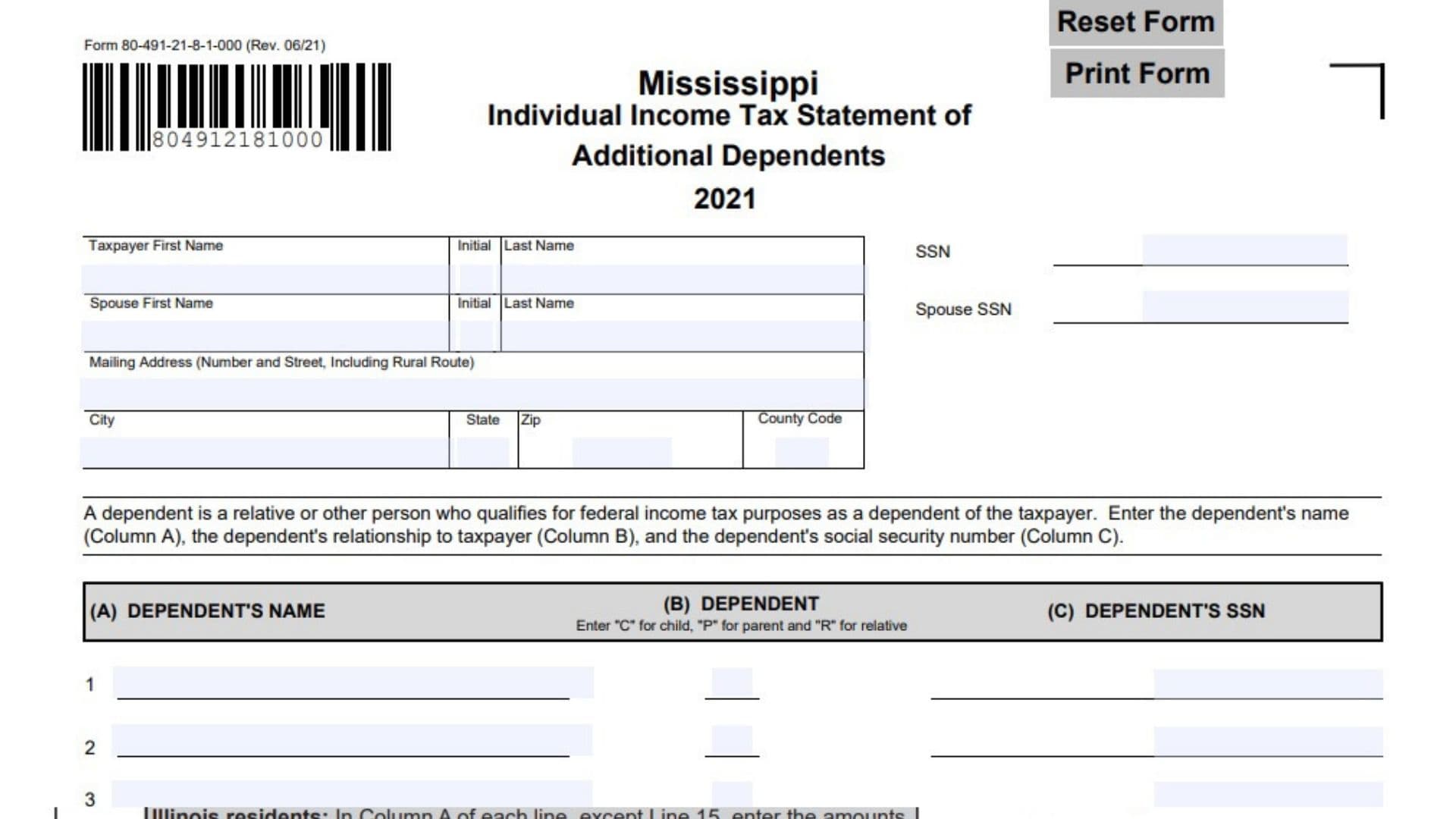
Mississippi Form 80-491-21-8-1-000, titled Individual Income Tax Statement of Additional Dependents, is a tax form used to provide information about additional dependents claimed by an individual taxpayer for the 2021 tax year. It allows taxpayers to identify dependents who qualify under federal income tax rules and provide the personal information needed to establish their relationship with the taxpayer. The form collects the taxpayer’s name, Social Security number, spouse’s information when applicable, mailing address, city, state, ZIP code, and county code. It also provides space to list up to 15 additional dependents, including each person’s full name, relationship to the taxpayer, and Social Security number. The relationship field uses specific identification codes: C for a child, P for a parent, and R for a relative. Completing this statement accurately is important because the information helps identify the additional individuals being reported as dependents for income tax purposes. Taxpayers should ensure that each listed person qualifies as a dependent under the applicable federal income tax requirements and that all identifying information is accurate. This is a 2021 tax-year form, so taxpayers should use the applicable instructions and filing requirements for that tax year rather than assuming that the same form or procedures apply to later tax years.
How To File Mississippi Statement of Additional Dependents
Mississippi Form 80-491-21-8-1-000 is designed to provide additional dependent information for an individual income tax filing. The form itself does not specify a separate mailing address or explicitly identify the main tax return to which it must be attached. Therefore, taxpayers should consult the applicable 2021 Mississippi individual income tax return instructions to confirm the submission requirements.
Information to Prepare Before Completing the Form
Gather the following information before filling out the statement:
- The taxpayer’s first name, middle initial, and last name.
- The taxpayer’s Social Security number.
- The spouse’s first name, middle initial, and last name, if applicable.
- The spouse’s Social Security number, if applicable.
- The taxpayer’s complete mailing address.
- City, state, and ZIP code.
- The applicable county code.
- The full names of all additional dependents being reported.
- The relationship of each dependent to the taxpayer.
- The Social Security number of each dependent.
Important Filing Instructions
- Enter taxpayer and spouse information accurately.
- Use the same identifying information associated with the applicable income tax return.
- List each additional dependent separately.
- Use the correct relationship code for every dependent.
- Provide the Social Security number for each person listed.
- Do not list individuals who do not qualify as dependents under the applicable federal income tax rules.
- Follow the applicable Mississippi filing instructions for submitting the completed statement.
Printing Requirement: The form specifically states that duplex printing and photocopies are not acceptable. Make sure you follow this requirement when preparing a printed copy.

How To Complete Mississippi Statement of Additional Dependents Form
The form contains taxpayer identification fields, spouse information, mailing address details, and a table with 15 spaces for reporting additional dependents.
Follow the instructions below to complete each section.
Form Identification
Form Number: 80-491-21-8-1-000
This is the identification number assigned to the Mississippi Individual Income Tax Statement of Additional Dependents. Make sure you are using the correct form for the 2021 tax year.
Revision Date: 06/21
The revision date identifies the version of the form. It indicates that the form was revised in June 2021.
Tax Year: 2021
This statement applies to the 2021 individual income tax year. Use the information relevant to that tax year when completing it.
Taxpayer Information
Taxpayer First Name
Enter the taxpayer’s legal first name in the designated field.
Make sure the name matches the information reported on the applicable income tax return.
Taxpayer Initial
Enter the taxpayer’s middle initial.
If the taxpayer does not have a middle name, follow the applicable form instructions rather than entering an assumed initial.
Taxpayer Last Name
Enter the taxpayer’s complete last name.
Use the same spelling shown on the taxpayer’s income tax return.
Taxpayer Social Security Number (SSN)
Enter the taxpayer’s Social Security number in the designated field.
Check the number carefully to ensure it matches the identifying information on the related tax return.
Spouse Information
Complete the spouse section when applicable.
Spouse First Name
Enter the spouse’s legal first name.
Use the name associated with the applicable tax return.
Spouse Initial
Enter the spouse’s middle initial.
Make sure the initial is accurate and consistent with the spouse’s identifying information.
Spouse Last Name
Enter the spouse’s complete last name.
Use the correct legal spelling as shown on the applicable income tax return.
Spouse Social Security Number (Spouse SSN)
Enter the spouse’s Social Security number in the designated field.
Verify the number before submitting the statement. If the spouse information does not apply, follow the applicable filing instructions.
Mailing Address Information
This section identifies the taxpayer’s mailing address.
Mailing Address (Number and Street, Including Rural Route)
Enter the taxpayer’s complete mailing address.
Include the house or building number and street name. If the taxpayer receives mail through a rural route, include the appropriate rural route information.
Make sure the address is complete enough for correspondence.
City
Enter the name of the city associated with the taxpayer’s mailing address.
State
Enter the two-letter state abbreviation for the mailing address.
For example, enter MS for Mississippi when the mailing address is in Mississippi.
ZIP Code
Enter the ZIP code associated with the mailing address.
Use the correct five-digit ZIP code and ensure it corresponds to the city and state entered above.
County Code
Enter the applicable county code associated with the taxpayer’s address.
Use the appropriate Mississippi county code rather than entering the county name in this field. Verify the correct code using the applicable Mississippi tax instructions.
Additional Dependent Information
This is the main section of the form. It provides space to report up to 15 additional dependents.
A dependent is a relative or another individual who qualifies as the taxpayer’s dependent under federal income tax rules.
For every person listed, provide three pieces of information:
- Column A: Dependent’s name.
- Column B: Relationship to the taxpayer.
- Column C: Dependent’s Social Security number.
The relationship field requires a specific letter code:
- C: Child.
- P: Parent.
- R: Relative.
Enter the correct code based on the dependent’s relationship to the taxpayer.
Column A: Dependent’s Name
Enter the full name of each additional dependent.
Use the dependent’s correct first and last name. Make sure the name is spelled accurately and corresponds to the person’s identifying information.
Column B: Dependent Relationship
Enter the appropriate relationship code for each dependent.
Use only the relationship codes provided on the form:
- Enter C if the dependent is the taxpayer’s child.
- Enter P if the dependent is the taxpayer’s parent.
- Enter R if the dependent is another relative.
Do not enter the full relationship description in this column. Use the required single-letter code.
Column C: Dependent’s Social Security Number
Enter the Social Security number of the dependent listed in Column A.
Each dependent must have the corresponding identifying number entered on the same row.
Double-check the number to avoid mixing the information of different dependents.
Individual Dependent Entries
The form provides 15 separate rows. Complete each row using the same three-column format.
Dependent 1
Enter the first additional dependent’s full name in Column A, the appropriate relationship code in Column B, and the dependent’s Social Security number in Column C.
Dependent 2
Enter the second additional dependent’s full name, relationship code, and Social Security number in the corresponding columns.
Dependent 3
Provide the third dependent’s full name, the applicable relationship code, and Social Security number.
Dependent 4
Enter the fourth dependent’s identifying information. Make sure the name, relationship code, and Social Security number belong to the same individual.
Dependent 5
Provide the fifth dependent’s full name, relationship code, and Social Security number.
Dependent 6
Enter the sixth dependent’s information in the appropriate columns.
Dependent 7
Enter the seventh dependent’s full name, relationship code, and Social Security number.
Dependent 8
Provide the eighth dependent’s identifying information, following the same three-column format.
Dependent 9
Enter the ninth dependent’s name, relationship code, and Social Security number.
Dependent 10
Provide the tenth dependent’s full name and the corresponding relationship code and Social Security number.
Dependent 11
Enter the eleventh dependent’s information in the designated row.
Dependent 12
Enter the twelfth dependent’s full name, relationship code, and Social Security number.
Dependent 13
Provide the thirteenth dependent’s identifying information in the corresponding columns.
Dependent 14
Enter the fourteenth dependent’s full name, relationship code, and Social Security number.
Dependent 15
Enter the fifteenth dependent’s full name, relationship code, and Social Security number.
If you have fewer than 15 additional dependents, leave the remaining unused rows blank. Do not repeat the same dependent to fill every available space.
Printing and Form Controls
Reset Form
The electronic version includes a Reset Form control. This option is used to clear entered information from the form. Be careful when using it because previously entered information may be lost.
Print Form
The Print Form control allows you to print the completed statement.
When preparing a printed copy, follow the form’s printing requirement.
Duplex and Photocopies NOT Acceptable
The form specifically prohibits duplex printing and photocopies. Prepare the form using an acceptable single-sided original printout. Do not submit a double-sided or photocopied version.
Understanding the Dependent Relationship Codes
The dependent relationship column uses three specific codes. Choosing the correct code is important because the form uses these entries to identify how each dependent is related to the taxpayer.
Code C: Child
Enter C when the dependent is the taxpayer’s child.
Code P: Parent
Enter P when the dependent is the taxpayer’s parent.
Code R: Relative
Enter R when the dependent is another relative of the taxpayer.
Use the relationship categories provided on the form. The person must also qualify as a dependent under the applicable federal income tax requirements.
Final Review Before Filing
Before submitting Mississippi Form 80-491-21-8-1-000, review every field to ensure the taxpayer, spouse, and dependent information is complete and accurate.
Use this checklist:
- Correct Form: Confirm that you are using the 2021 Mississippi Individual Income Tax Statement of Additional Dependents.
- Taxpayer First Name: Verify the taxpayer’s first name.
- Taxpayer Initial: Check the middle initial.
- Taxpayer Last Name: Confirm the correct last name.
- Taxpayer SSN: Verify the taxpayer’s Social Security number.
- Spouse Information: Check the spouse’s first name, initial, last name, and Social Security number when applicable.
- Mailing Address: Make sure the street address or rural route information is complete.
- City and State: Verify the city and state abbreviation.
- ZIP Code: Confirm the correct ZIP code.
- County Code: Enter the appropriate Mississippi county code.
- Dependent Eligibility: Make sure every listed individual qualifies as a dependent under applicable federal income tax rules.
- Dependent Names: Check the spelling of every dependent’s full name.
- Relationship Codes: Use C for child, P for parent, and R for relative.
- Dependent SSNs: Verify the Social Security number entered for every dependent.
- All 15 Rows: Make sure each completed row contains the correct information and unused rows remain blank.
- Duplicate Entries: Check that no dependent has been listed more than once.
- Printing Requirement: Make sure the form is not printed double-sided.
- Original Copy: Do not submit a photocopy of the form.
- Filing Requirements: Confirm the applicable submission instructions for the 2021 Mississippi individual income tax return.
Final Reminder: Mississippi Form 80-491-21-8-1-000 provides space to report up to 15 additional dependents. Each dependent must be identified by name, relationship code, and Social Security number. Carefully review all information before submission and follow the applicable 2021 Mississippi tax filing instructions.