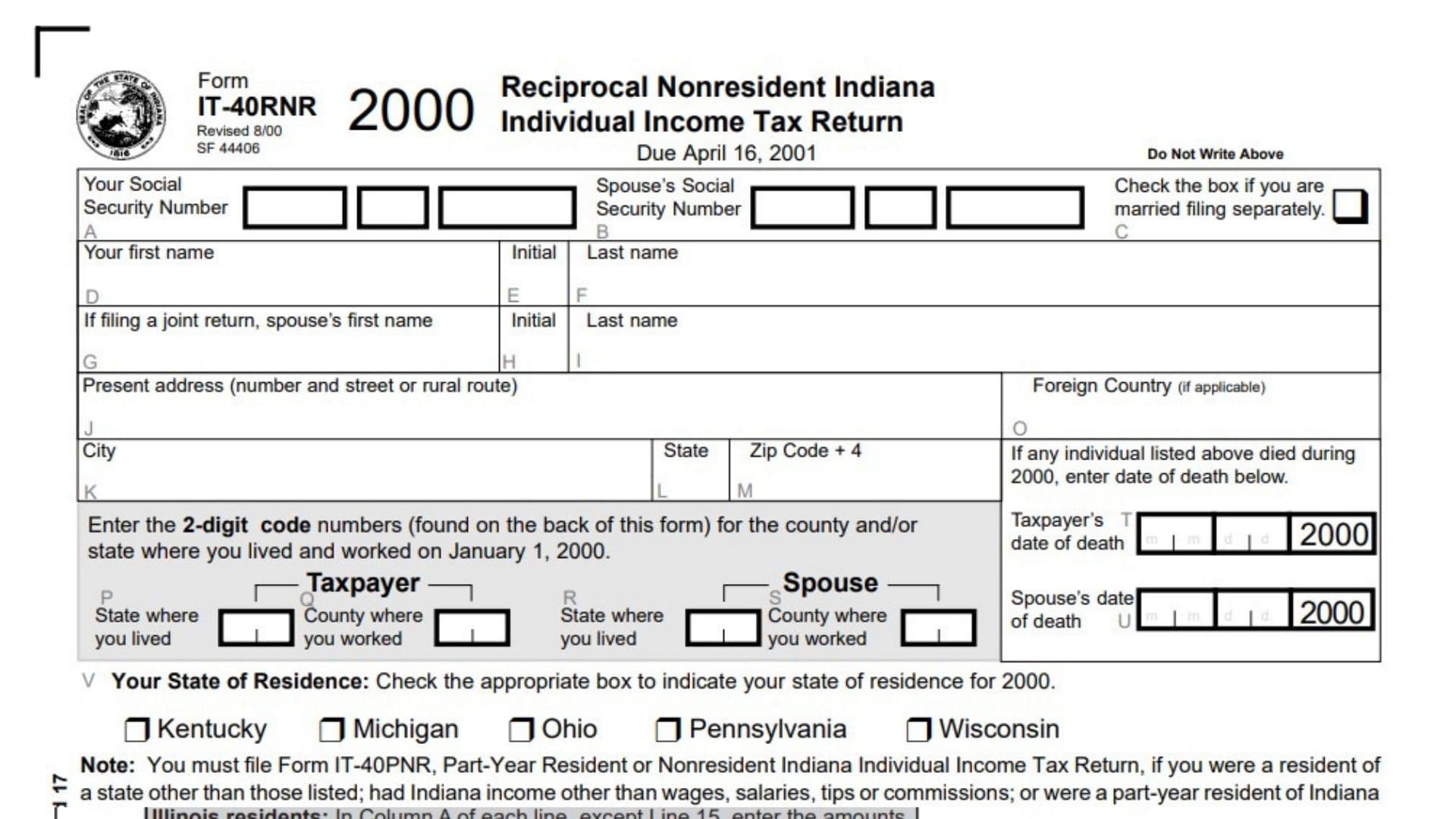
Indiana Form IT-40RNR, officially known as the Reciprocal Nonresident Indiana Individual Income Tax Return, is a state income tax form designed for full-year residents of certain states who earn employment income in Indiana. The form is issued by the Indiana Department of Revenue and allows eligible nonresident employees to calculate their Indiana county income tax liability, report state and county income taxes withheld from their wages, and claim a refund or pay any remaining amount due. It is specifically intended for residents of Kentucky, Michigan, Ohio, Pennsylvania, and Wisconsin who receive Indiana income exclusively from wages, salaries, tips, or commissions and whose Indiana tax credits consist only of Indiana state and county income taxes withheld. The form collects taxpayer and spouse identification details, residential information, state and county codes, Indiana employment income, allowable federal deductions, exemptions, county tax rates, withholding amounts, and payment or refund information. It also provides sections for direct deposit, taxpayer authorization, signatures, and paid preparer details. The main purpose of Form IT-40RNR is to help qualifying residents of reciprocal states report their Indiana employment income and determine whether they are entitled to a refund of Indiana state or excess county tax withheld or need to pay additional county tax. Completing the form correctly is important because county tax liability depends on the county where the employee principally worked on January 1 of the applicable year. The form also requires taxpayers to follow specific reciprocal-state eligibility rules and attach supporting wage and tax withholding documents. Taxpayers who do not meet the eligibility requirements must generally use the appropriate Indiana nonresident or part-year resident income tax return instead.
Important: This guide covers the 2000 tax-year version of Form IT-40RNR, which has an original filing due date of April 16, 2001. Its tax rates, deadlines, exemption amounts, and filing instructions are historical and should not be treated as current Indiana tax requirements.
How To File Indiana Form IT-40RNR
Form IT-40RNR is filed with the Indiana Department of Revenue. The completed return must be mailed to the department at the address printed on the form:
Indiana Department of Revenue
P.O. Box 40
Indianapolis, IN 46206-0040
The form is intended for qualifying full-year residents of Kentucky, Michigan, Ohio, Pennsylvania, and Wisconsin who earn only wages, salaries, tips, or commissions from Indiana sources and whose Indiana tax credits are limited to Indiana state and county taxes withheld.
Before completing the return, gather the following information:
- Your full legal name and Social Security number.
- Your spouse’s name and Social Security number, if filing jointly.
- Your residential mailing address.
- Your state and county of residence as of January 1, 2000.
- Your Indiana county of principal employment as of January 1, 2000.
- Your Indiana employment wages, salaries, tips, and commissions.
- Allowable federal deductions attributable to Indiana employment income.
- Federal income tax return information needed to calculate exemptions.
- Your Indiana state income tax withholding information.
- Your Indiana county income tax withholding information.
- Your W-2 forms and any applicable 1099 or WH-18 documents.
- Your bank routing number and account number if requesting direct deposit.
- Payment information if you have an amount due.
Federal Return Requirement
Complete your federal income tax return before preparing Form IT-40RNR.
If you file a joint federal income tax return, you must also file a joint Indiana return. If you file a separate federal return, you must file a separate Indiana return.
Required Supporting Documents
Attach the front page of your federal Form 1040 when claiming allowable deductions on Lines 2A and 2B.
Attach all applicable W-2 forms to support the Indiana state and county income taxes reported on Lines 9 and 10. The form also refers to 1099 and WH-18 documents in its supporting-document instructions.
Staple the W-2, 1099, or WH-18 documents to the designated area on the front page of the return, between Lines 1 and 17.
Do not staple a check or money order to the return. Doing so may delay processing.
Important Eligibility Restriction
You must file Form IT-40PNR instead of Form IT-40RNR if:
- You were a resident of a state other than Kentucky, Michigan, Ohio, Pennsylvania, or Wisconsin.
- You received Indiana income from sources other than wages, salaries, tips, or commissions.
- You were a part-year resident of Indiana.
- You are eligible to claim other credits, such as estimated tax payments or college credits.
Who Can File Indiana Form IT-40RNR?
Form IT-40RNR is available to individuals who were full-year residents of one of the five reciprocal states identified on the form.
The qualifying states are:
- Kentucky.
- Michigan.
- Ohio.
- Pennsylvania.
- Wisconsin.
To qualify, taxpayers must meet both of the following conditions:
Indiana Income Requirement
Your Indiana-source income must come exclusively from wages, salaries, tips, or commissions.
If you received other types of Indiana income, such as partnership income, farming income, or sole proprietorship income, you must generally file Form IT-40PNR instead.
Indiana Tax Credit Requirement
Your Indiana tax credits must consist only of Indiana state income tax and/or county income tax withheld from your wages.
If you qualify for other credits, such as estimated tax or college credits, Form IT-40PNR must be filed instead.
Understanding Indiana Reciprocal-State and County Tax Requirements
The form allows qualifying nonresidents to calculate Indiana county income tax based on their principal place of employment on January 1, 2000.
Even though the taxpayer lives in another state, Indiana county tax may apply if the county where the taxpayer worked had adopted a county income tax.
Use the county tax chart provided with the form to identify the applicable two-digit county code and nonresident tax rate.
If you did not work in an Indiana county on January 1, 2000, you are generally not subject to Indiana county tax under the instructions for this return.
If you began working in Indiana after January 1, 2000, the form instructs you to enter the appropriate state code in the county where you worked section.

How To Complete Indiana Form IT-40RNR
Form IT-40RNR contains taxpayer identification fields, county information, income calculations, tax withholding details, refund information, payment calculations, authorization fields, and paid preparer information.
The following instructions explain each section and numbered line.
Taxpayer Identification Information
Complete the identification section at the top of the first page.
Your Social Security Number (Field A)
Enter your Social Security number in the designated boxes.
This information identifies the primary taxpayer and must match the identifying information on the associated federal income tax return.
Spouse’s Social Security Number (Field B)
If you are filing a joint return, enter your spouse’s Social Security number.
Leave this field blank if you are filing separately and no spouse information is required.
Married Filing Separately Checkbox (Field C)
Check this box if you are filing as a married taxpayer using separate returns.
Do not select this option if you are filing jointly.
Your First Name (Field D)
Enter your first name.
Your Middle Initial (Field E)
Enter the initial of your middle name, if applicable.
Your Last Name (Field F)
Enter your last name as shown on your federal income tax return.
Spouse’s First Name (Field G)
If filing jointly, enter your spouse’s first name.
Spouse’s Middle Initial (Field H)
Enter your spouse’s middle initial, if applicable.
Spouse’s Last Name (Field I)
Enter your spouse’s last name.
Present Address (Field J)
Provide your current mailing address, including the house or building number and street name or rural route.
Foreign Country (Field O)
If your mailing address is located outside the United States, enter the applicable foreign country in this field.
City (Field K)
Enter the city or town associated with your mailing address.
State (Field L)
Enter the state abbreviation for your mailing address.
ZIP Code + 4 (Field M)
Enter your ZIP code and the additional four-digit ZIP code extension, if applicable.
County and State Information
This section identifies where you lived and worked on January 1, 2000. The information determines the appropriate state and county codes used for the reciprocal nonresident return.
Taxpayer’s State of Residence (Field P)
Enter the two-digit code for the state where you lived on January 1, 2000.
Use the state code chart printed on the back of the form.
The special state codes are:
- 94: Illinois.
- 95: Kentucky.
- 96: Michigan.
- 97: Ohio.
- 98: Pennsylvania.
- 99: Wisconsin.
If you lived in a state other than those specifically listed, use code 00, which represents all other states. However, residents of states outside the five qualifying reciprocal states generally do not meet the eligibility requirements for Form IT-40RNR.
Taxpayer’s County of Employment (Field Q)
Enter the two-digit code for the Indiana county where you principally worked on January 1, 2000.
Use the county code chart printed on the back of the form.
The county where you performed the principal amount of your work on January 1 determines the applicable county tax information.
Spouse’s State of Residence (Field R)
If filing jointly, enter the two-digit state code for your spouse’s state of residence on January 1, 2000.
Use the same state code chart provided with the form.
Spouse’s County of Employment (Field S)
Enter the two-digit Indiana county code for the county where your spouse principally worked on January 1, 2000.
Refer to the county chart to identify the correct code.
Taxpayer’s Date of Death (Field T)
If the taxpayer died during 2000, enter the date of death in the designated month, day, and year spaces.
The form provides space for a 2000 date.
Spouse’s Date of Death (Field U)
If the spouse listed on the return died during 2000, enter the spouse’s date of death.
Complete this field only when applicable.
State of Residence Selection
Your State of Residence (Field V)
Check the appropriate box to identify your state of residence for 2000.
The available choices are:
- Kentucky.
- Michigan.
- Ohio.
- Pennsylvania.
- Wisconsin.
Select the state in which you were a full-year resident during the tax year.
If you lived in a state other than those listed, the form instructions direct you to use Form IT-40PNR instead.
County Tax Rate Reference Chart
The back of the return includes a county tax chart containing three important details:
- Two-digit county identification code.
- County name.
- Applicable 2000 nonresident county tax rate.
Use this chart to identify the correct county code for Field Q or Field S and the corresponding tax rate for Lines 6A and 6B.
Some counties are marked NA, indicating that the chart does not provide an applicable nonresident county tax rate for that county.
The chart also identifies special state codes for Illinois, Kentucky, Michigan, Ohio, and Pennsylvania, with Wisconsin assigned code 99. Code 00 represents all other states.
The county chart contains the following entries:
| County Code | County | Nonresident Rate |
|---|---|---|
| 01 | Adams | 0.0035 |
| 02 | Allen | 0.0055 |
| 03 | Bartholomew | 0.0025 |
| 04 | Benton | 0.005 |
| 05 | Blackford | 0.005 |
| 06 | Boone | 0.0025 |
| 07 | Brown | 0.005 |
| 08 | Carroll | 0.0035 |
| 09 | Cass | 0.005 |
| 10 | Clark | NA |
| 11 | Clay | 0.0025 |
| 12 | Clinton | 0.005 |
| 13 | Crawford | 0.005 |
| 14 | Daviess | 0.0025 |
| 15 | Dearborn | 0.0015 |
| 16 | Decatur | 0.005 |
| 17 | DeKalb | 0.005 |
| 18 | Delaware | 0.0035 |
| 19 | Dubois | 0.0055 |
| 20 | Elkhart | 0.005 |
| 21 | Fayette | 0.0025 |
| 22 | Floyd | 0.003 |
| 23 | Fountain | 0.0025 |
| 24 | Franklin | 0.005 |
| 25 | Fulton | 0.00425 |
| 26 | Gibson | 0.005 |
| 27 | Grant | 0.0025 |
| 28 | Greene | 0.0025 |
| 29 | Hamilton | 0.0025 |
| 30 | Hancock | 0.004 |
| 31 | Harrison | 0.005 |
| 32 | Hendricks | 0.005 |
| 33 | Henry | 0.0025 |
| 34 | Howard | 0.00375 |
| 35 | Huntington | 0.00375 |
| 36 | Jackson | 0.005 |
| 37 | Jasper | 0.0025 |
| 38 | Jay | 0.005 |
| 39 | Jefferson | NA |
| 40 | Jennings | 0.005 |
| 41 | Johnson | 0.0025 |
| 42 | Knox | 0.0025 |
| 43 | Kosciusko | 0.003125 |
| 44 | LaGrange | 0.005 |
| 45 | Lake | NA |
| 46 | LaPorte | 0.007 |
| 47 | Lawrence | 0.0025 |
| 48 | Madison | 0.002375 |
| 49 | Marion | 0.00175 |
| 50 | Marshall | 0.0025 |
| 51 | Martin | 0.004 |
| 52 | Miami | 0.004 |
| 53 | Monroe | 0.0025 |
| 54 | Montgomery | 0.0025 |
| 55 | Morgan | 0.0025 |
| 56 | Newton | 0.0025 |
| 57 | Noble | 0.0025 |
| 58 | Ohio | 0.0025 |
| 59 | Orange | 0.005 |
| 60 | Owen | 0.005 |
| 61 | Parke | 0.005 |
| 62 | Perry | 0.00625 |
| 63 | Pike | 0.004 |
| 64 | Porter | NA |
| 65 | Posey | NA |
| 66 | Pulaski | 0.005 |
| 67 | Putnam | 0.005 |
| 68 | Randolph | 0.005 |
| 69 | Ripley | 0.005 |
| 70 | Rush | 0.005 |
| 71 | St. Joseph | 0.003125 |
| 72 | Scott | 0.0025 |
| 73 | Shelby | 0.005 |
| 74 | Spencer | 0.005 |
| 75 | Starke | 0.00425 |
| 76 | Steuben | 0.0025 |
| 77 | Sullivan | NA |
| 78 | Switzerland | 0.002375 |
| 79 | Tippecanoe | 0.0055 |
| 80 | Tipton | 0.005 |
| 81 | Union | 0.005 |
| 82 | Vanderburgh | 0.0025 |
| 83 | Vermillion | 0.001 |
| 84 | Vigo | NA |
| 85 | Wabash | 0.005 |
| 86 | Warren | 0.005 |
| 87 | Warrick | 0.00425 |
| 88 | Washington | 0.005 |
| 89 | Wayne | 0.005 |
| 90 | Wells | 0.005 |
| 91 | White | 0.005 |
| 92 | Whitley | 0.0045 |
An asterisk appears beside certain rates in the original chart to indicate rates that changed from the previous year’s chart.
Income and Tax Calculation Section
The main calculation section contains Lines 1 through 17. Taxpayers filing jointly must complete the separate taxpayer and spouse columns where applicable.
The form labels these columns as:
- Yours (A): Amounts attributable to the taxpayer.
- Spouse’s (B): Amounts attributable to the spouse.
Read the eligibility instructions before completing Lines 1 through 8.
Determining Whether County Tax Applies
The instructions ask taxpayers to consider two questions before calculating income and county tax.
Principal Place of Employment on January 1, 2000
Determine whether your principal place of employment was located in an Indiana county on January 1, 2000.
If yes, proceed with the applicable calculations.
If no, skip Lines 1 through 8 and enter any Indiana state and county withholding amounts on Lines 9 and 10.
Whether the Employment County Adopted a County Tax
If your principal place of employment was in an Indiana county, check the county chart to determine whether that county had adopted a county income tax.
If the county had an applicable tax rate, complete the relevant income and county tax calculations.
If you did not work in Indiana until after January 1, 2000, the instructions state that you are not subject to county tax for the applicable year.
Income Calculations
Line 1A: Taxpayer’s Gross Indiana Employment Income
Enter the total wages, salaries, tips, and commissions you earned from Indiana employment during 2000.
Include only qualifying employment income from Indiana sources.
If you received other Indiana income, such as partnership income, farming income, or sole proprietorship income, Form IT-40PNR must generally be filed instead.
Line 1B: Spouse’s Gross Indiana Employment Income
If filing jointly, enter your spouse’s total wages, salaries, tips, and commissions earned from Indiana employment.
Use the spouse’s applicable income records to determine the amount.
Do not include other types of Indiana income that would make the return ineligible.
Line 2A: Taxpayer’s Allowable Deductions
Enter the allowable federal deductions that apply to your Indiana employment income.
Examples include:
- Individual Retirement Account (IRA) adjustments.
- Simplified Employee Pension (SEP) adjustments.
- Keogh retirement plan adjustments.
Attach the front page of your federal Form 1040 to support the deductions claimed.
Line 2B: Spouse’s Allowable Deductions
Enter your spouse’s allowable federal deductions attributable to their Indiana employment income.
Apply the same deduction requirements used for Line 2A.
Attach the required federal return documentation supporting the deductions.
Line 3A: Taxpayer’s Indiana Adjusted Gross Income
Subtract Line 2A from Line 1A.
The calculation is:
Line 1A − Line 2A = Line 3A.
Enter the resulting amount in the taxpayer’s column.
This represents the taxpayer’s Indiana adjusted gross income used for the county tax calculation.
Line 3B: Spouse’s Indiana Adjusted Gross Income
Subtract Line 2B from Line 1B.
The calculation is:
Line 1B − Line 2B = Line 3B.
Enter the resulting amount in the spouse’s column.
Line 4A: Taxpayer’s Exemptions
Enter the total exemption amount available to the taxpayer under the instructions.
The form allows $1,000 for each exemption claimed on the taxpayer’s federal income tax return.
Additional exemption amounts may be available for:
- The taxpayer if age 65 or older.
- The taxpayer if legally blind.
- Certain qualifying dependent children.
The instructions also provide an additional $500 exemption for an individual age 65 or older if federal adjusted gross income is less than $40,000.
The federal adjusted gross income amount is taken from:
- Form 1040, Line 33.
- Form 1040A, Line 19.
- Form 1040EZ, Line 4.
Certain qualifying dependent children may receive an additional $1,500 exemption.
To qualify under the historical instructions, the dependent must be a son, stepson, daughter, stepdaughter, or qualifying foster child and must be under age 19 by December 31, 2000, or a student under age 24 by December 31, 2000.
In a joint return, the instructions recommend that the spouse with the higher county tax rate generally claim the dependents because that allocation may provide a greater county tax benefit.
However, one spouse cannot use the other spouse’s personal exemption.
Line 4B: Spouse’s Exemptions
Enter the total exemption amount applicable to your spouse.
Use the same exemption categories and eligibility requirements described for Line 4A.
The taxpayer and spouse must claim their own applicable exemptions separately.
The form’s instructions provide an example involving a married couple, Jim and Rita. They claim three federal exemptions, including themselves and their son, for a total of $3,000 in Indiana exemptions. They also qualify for an additional $1,500 exemption for their son, producing a combined exemption amount of $4,500.
Because Jim has the higher county tax rate, he claims $3,500 on Line 4A, while Rita claims her own $1,000 exemption on Line 4B.
Line 5A: Taxpayer’s Taxable Income
Subtract Line 4A from Line 3A.
The calculation is:
Line 3A − Line 4A = Line 5A.
Enter the resulting taxable income in the taxpayer’s column.
Line 5B: Spouse’s Taxable Income
Subtract Line 4B from Line 3B.
The calculation is:
Line 3B − Line 4B = Line 5B.
Enter the resulting taxable income in the spouse’s column.
County Tax Calculation
Line 6A: Taxpayer’s County Tax Rate
Enter the nonresident county tax rate applicable to the Indiana county where you principally worked on January 1, 2000.
Use the historical county rate chart printed with the form.
Enter the rate corresponding to the taxpayer’s county of employment.
Line 6B: Spouse’s County Tax Rate
Enter the applicable nonresident county tax rate for the Indiana county where your spouse principally worked on January 1, 2000.
Use the same county chart to identify the correct rate.
Line 7A: Taxpayer’s County Tax Due
Multiply the taxpayer’s taxable income on Line 5A by the county tax rate on Line 6A.
The calculation is:
Line 5A × Line 6A = Line 7A.
Enter the resulting county tax amount in the taxpayer’s column.
Line 7B: Spouse’s County Tax Due
Multiply the spouse’s taxable income on Line 5B by the county tax rate on Line 6B.
The calculation is:
Line 5B × Line 6B = Line 7B.
Enter the resulting county tax amount in the spouse’s column.
Line 8: Total County Tax Due
Add the amounts reported on Lines 7A and 7B.
The calculation is:
Line 7A + Line 7B = Line 8.
Enter the combined county income tax liability on Line 8.
This is the total county tax due for the taxpayer and spouse, if filing jointly.
Tax Withholding and Credits
Line 9: Indiana State Income Tax Withheld
Enter the total Indiana state income tax withheld from your wages during 2000.
The instructions indicate that Indiana state income tax withholding is generally shown in Box 18 of Form W-2.
Add the Indiana state income tax withheld from all applicable W-2 forms belonging to both the taxpayer and spouse, if filing jointly.
Enter the combined amount on Line 9.
Attach all W-2 forms to verify the withholding reported.
Line 10: Indiana County Income Tax Withheld
Enter the total Indiana county income tax withheld from your wages during 2000.
The instructions indicate that Indiana county income tax withholding is generally shown in Box 21 of Form W-2.
Add the applicable county tax withholding amounts from the taxpayer’s and spouse’s W-2 forms.
Enter the combined amount on Line 10.
Attach all W-2 forms supporting the reported county withholding.
Line 11: Total Credits
Add Line 9 and Line 10.
The calculation is:
Line 9 + Line 10 = Line 11.
Enter the combined amount of Indiana state and county income taxes withheld.
This total is compared with the county tax liability on Line 8 to determine whether you have an overpayment or an amount due.
Refund Calculation
Line 12: Overpayment or Refund Due
Compare the total credits on Line 11 with the total county tax due on Line 8.
If Line 11 is greater than Line 8, subtract Line 8 from Line 11.
The calculation is:
Line 11 − Line 8 = Line 12.
Enter the difference as the refund amount.
The form states that no refund will be issued for an amount less than $1.00.
If you are claiming a refund, you may provide your bank information in Line 13 to request direct deposit.
Direct Deposit Information
Line 13 contains three separate fields for taxpayers who want their refund deposited directly into a bank account.
Line 13A: Routing Number
Enter your bank’s nine-digit routing number.
The instructions state that the first two digits must fall within the following ranges:
- 01 through 12.
- 21 through 32.
Use the routing number associated with your bank account.
Do not rely on a deposit slip to verify the number because internal codes may appear as part of the printed information.
The instructions include a sample check illustrating where the routing number appears.
Line 13B: Account Number
Enter the bank account number where you want the refund deposited.
The account number may contain up to 17 digits.
Follow these requirements:
- Enter the account number from left to right.
- Do not include hyphens.
- Do not include accents or special symbols.
- Leave unused boxes blank.
The sample check provided with the instructions identifies the location of the account number.
Line 13C: Type of Account
Select the type of bank account where you want the refund deposited.
The available options are:
- Checking.
- Savings.
Check the appropriate box.
The form’s authorization statement also explains that requesting direct deposit allows the Indiana Department of Revenue to provide the financial institution with the routing number, account number, account type, and Social Security number needed to process the refund.
Amount Due and Additional Charges
Line 14: Amount Due
This line determines whether you owe additional Indiana county tax.
If Line 8 is greater than Line 11, subtract Line 11 from Line 8.
The calculation is:
Line 8 − Line 11 = Line 14.
Enter the difference on Line 14.
If Line 11 is greater than Line 8, you generally have an overpayment reported on Line 12 instead.
The form states that no payment is required if the amount owed is less than $1.00.
Line 15: Penalty
If you file after the April 16, 2001 due date and have an amount due, a penalty may apply.
The historical instructions state that the penalty is 10% of the amount referenced as the amount due on Line 13 or $5.00, whichever is greater.
The instructions provide an exception when all of the following conditions are met:
- You have a valid federal extension of time to file.
- You submit the return by the extended filing deadline.
- Your withholding payments cover at least 90% of the total county tax due reported on Line 8.
If these conditions are satisfied, the instructions state that no penalty is due.
Line 16: Interest
If the return is filed after April 16, 2001 and an amount remains due on Line 14, interest may apply.
Interest can be owed even if you received an extension of time to file.
The historical instructions direct taxpayers to contact the Indiana Department of Revenue for the applicable interest rate.
Line 17: Total Amount You Owe
Add the amounts reported on Lines 14, 15, and 16.
The calculation is:
Line 14 + Line 15 + Line 16 = Line 17.
Enter the combined amount on Line 17.
This represents the total payment due, including the additional amount due, any applicable penalty, and interest.
Payment Instructions
If you owe tax, make your check or money order payable to:
Indiana Department of Revenue.
The form instructs taxpayers to paperclip the payment to the designated area at the bottom of the front page.
Do not staple the payment to the return.
Do not send cash.
If the amount owed is less than $1.00, no payment is required.
Credit Card Payment Checkbox (Field W)
Check this box if you are paying the amount owed by credit card.
The historical instructions identify American Express, Discover, MasterCard, and Visa as accepted payment options.
The instructions provide a telephone payment number and an online payment option. These are historical payment details and should not be assumed to be active today.
Taxpayer Authorization and Signature Section
The second page contains the taxpayer declaration, authorization to discuss the return with a tax preparer, signature fields, and paid preparer information.
Taxpayer Declaration
The authorization statement confirms that the taxpayer has reviewed the return and all supporting documents and believes the information is true, complete, and correct under penalty of perjury.
For joint returns, the statement also explains that:
- Any refund will be payable jointly to both spouses.
- Both spouses are responsible for all taxes due under the return.
- A direct deposit request authorizes the department to share the necessary banking and identification information with the financial institution.
Field Z: Permission to Discuss the Return With a Tax Preparer
Select Yes or No to indicate whether you authorize the Indiana Department of Revenue to discuss the return with your tax preparer.
- Yes: Allows the department to discuss the return with the designated tax preparer.
- No: Does not provide this authorization.
Taxpayer and Spouse Signatures
Your Signature
Sign the return to certify that the information is accurate and complete.
Your Date
Enter the date you sign the return.
Your Daytime Telephone Number (Field X)
Provide a telephone number where the department can reach you during the day if additional information is needed.
Spouse’s Signature
If filing jointly, your spouse must also sign the return.
Spouse’s Date
Enter the date your spouse signs the return.
Spouse’s Daytime Telephone Number (Field Y)
Enter your spouse’s daytime telephone number.
Paid Preparer Information
If a paid tax preparer completes the return, the preparer information section must be completed.
Paid Preparer’s Name (Field MM)
Enter the full name of the person who prepared the return.
Paid Preparer’s Address (Field NN)
Provide the preparer’s business or mailing address.
Paid Preparer’s City (Field OO)
Enter the city where the preparer is located.
Paid Preparer’s State (Field PP)
Enter the preparer’s state abbreviation.
Paid Preparer’s ZIP Code + 4 (Field QQ)
Enter the preparer’s ZIP code and applicable four-digit extension.
Preparer’s Federal Identification Number or PTIN (Field KK)
Select the applicable identification type and provide the preparer’s information.
The available choices are:
- Federal Identification Number.
- Preparer Tax Identification Number (PTIN).
- Social Security Number.
Use the appropriate identification option.
Preparer’s Daytime Telephone Number (Field LL)
Enter the preparer’s daytime telephone number.
Preparer’s Signature (Field RR)
The paid preparer must sign the return in the designated space.
Preparer’s Date
Enter the date the preparer signed the return.
Mailing Address and Recordkeeping
After completing the return and attaching the required documents, mail it to:
Indiana Department of Revenue
P.O. Box 40
Indianapolis, IN 46206-0040
Keep a complete copy of the filed return and supporting documents for your records.
Important Indiana Form IT-40RNR Filing Rules
Before submitting the return, understand the additional requirements described in the general instructions.
Federal and Indiana Filing Status
Complete your federal income tax return before preparing Form IT-40RNR.
Your Indiana filing status must match your federal filing status:
- If you file a joint federal return, file a joint Indiana return.
- If you file a separate federal return, file a separate Indiana return.
County Employment Date Requirement
County tax liability is based on the Indiana county where you principally worked on January 1, 2000.
If your Indiana work location changed after January 1, 2000, the change does not affect your county tax liability until the following year.
If you did not work in an Indiana county until after January 1, 2000, the instructions state that you are not subject to county tax for that year.
Supporting Documents
Attach all required W-2 forms showing Indiana state and county income tax withholding.
Attach the front page of federal Form 1040 if you claim allowable deductions on Lines 2A and 2B.
The form also identifies 1099 and WH-18 documents as supporting records to be included where applicable.
Refund Eligibility
A refund may be available when the total Indiana state and county tax withholding reported on Line 11 exceeds the county tax due reported on Line 8.
However, the form states that refunds of less than $1.00 will not be issued.
Payment Options
Taxpayers who owe additional amounts may pay using a check, money order, cashier’s check, or the historical credit card payment methods described in the instructions.
Do not staple a payment to the return or send cash.
Final Review Before Filing
Before mailing Indiana Form IT-40RNR, review the following checklist to ensure that all applicable information and calculations are complete.
- Confirm that you were a full-year resident of Kentucky, Michigan, Ohio, Pennsylvania, or Wisconsin during 2000.
- Verify that your Indiana income consisted only of wages, salaries, tips, or commissions.
- Confirm that your Indiana tax credits were limited to state and county taxes withheld.
- Enter your correct Social Security number.
- Provide your spouse’s information if filing jointly.
- Complete your name and mailing address fields.
- Check the married filing separately box if applicable.
- Enter the correct state and county codes for the taxpayer and spouse.
- Verify your county of principal employment as of January 1, 2000.
- Select the appropriate state of residence.
- Report Indiana employment income on Lines 1A and 1B.
- Enter allowable federal deductions on Lines 2A and 2B.
- Attach the front page of federal Form 1040 when required.
- Calculate adjusted gross income on Lines 3A and 3B.
- Calculate the applicable exemptions on Lines 4A and 4B.
- Determine taxable income on Lines 5A and 5B.
- Enter the correct county tax rates on Lines 6A and 6B.
- Calculate county tax due on Lines 7A and 7B.
- Add the county tax amounts and complete Line 8.
- Report Indiana state tax withheld on Line 9.
- Report Indiana county tax withheld on Line 10.
- Attach all applicable W-2 forms.
- Calculate total credits on Line 11.
- Determine whether you have a refund on Line 12.
- Complete Lines 13A, 13B, and 13C if requesting direct deposit.
- Calculate any additional amount due on Line 14.
- Determine whether a penalty applies on Line 15.
- Calculate applicable interest on Line 16.
- Add Lines 14, 15, and 16 to determine the total amount owed on Line 17.
- Check the credit card payment box if using that payment method.
- Complete the taxpayer authorization section.
- Sign and date the return.
- Obtain your spouse’s signature if filing jointly.
- Complete the paid preparer section if a tax professional prepared the return.
- Attach all required supporting documents.
- Make any check or money order payable to the Indiana Department of Revenue.
- Mail the completed return to the designated department address.
- Keep a copy of the return and supporting documents for your records.
Indiana Form IT-40RNR provides qualifying nonresidents with a method for reporting Indiana employment income, calculating county tax liability, and determining whether state or county withholding resulted in an overpayment or additional tax due. Accurate income reporting, correct county tax rates, properly calculated exemptions, and complete withholding documentation are essential to preparing the return correctly.
Because this guide covers the 2000 tax-year version, taxpayers researching a current Indiana filing should use the applicable tax-year forms, rates, and instructions rather than relying on the historical amounts and deadlines described here.