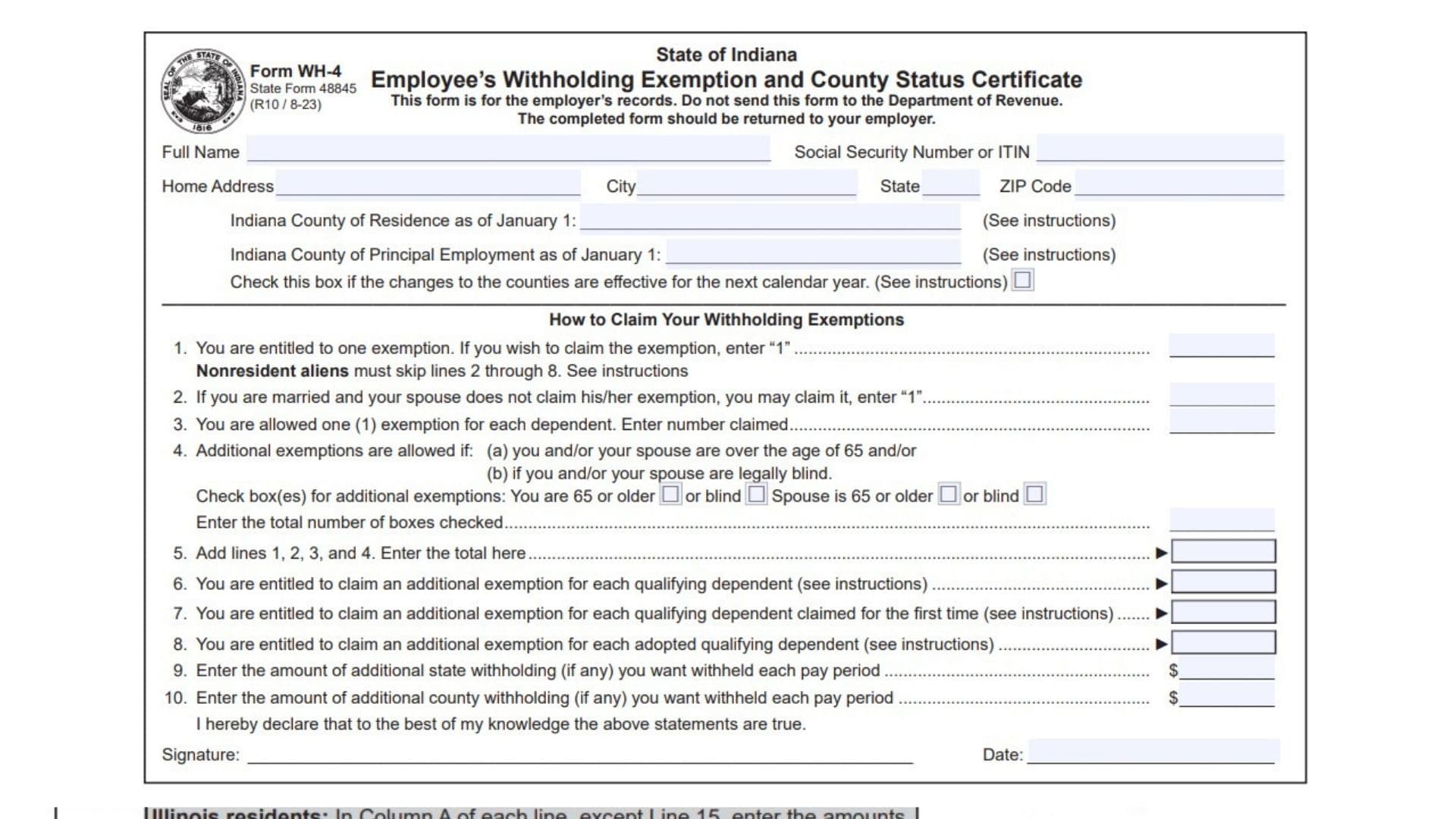
Indiana Form WH-4, officially called the Employee’s Withholding Exemption and County Status Certificate, is a state tax withholding form used by employees to report their personal withholding exemptions and county tax information to their employers. The form is issued by the Indiana Department of Revenue and helps employers determine the appropriate amount of Indiana state and county income tax to withhold from employee wages. It collects important information, including the employee’s full name, Social Security number or Individual Taxpayer Identification Number (ITIN), home address, Indiana county of residence, and county of principal employment as of January 1. It also allows employees to claim exemptions based on their personal circumstances, marital status, qualifying dependents, age, and blindness. Additional exemptions may be available for certain dependent children, children claimed for the first time, and qualifying adopted children. Employees can also request additional state or county income tax withholding from each paycheck. Both resident and nonresident employees who receive income subject to Indiana state or county income tax must complete this certificate. Nonresident aliens have special restrictions and may generally claim only one withholding exemption. Completing Form WH-4 accurately is important because the information directly affects how much tax an employer withholds from an employee’s wages. Incorrect exemption claims or outdated county information can result in improper withholding and possible tax obligations at the end of the year. The completed form is kept by the employer for recordkeeping purposes and must not be sent directly to the Indiana Department of Revenue.
How To File Indiana Form WH-4
Indiana Form WH-4 must be completed and returned directly to your employer. It is intended for employer records and should not be submitted to the Indiana Department of Revenue.
Both Indiana residents and nonresident employees who receive income subject to Indiana state or county income tax should complete the form.
Before filling out the certificate, prepare the following information:
- Your full legal name.
- Social Security number or Individual Taxpayer Identification Number (ITIN).
- Current home address.
- Indiana county of residence as of January 1.
- Indiana county where you principally work as of January 1.
- Marital status and spouse’s exemption information, if applicable.
- Number of qualifying dependents.
- Information about qualifying children, including their age and student status.
- Age and blindness information for you and your spouse, if applicable.
- Any additional state or county withholding amounts you want deducted from each paycheck.
After completing the applicable sections, review the information, sign the certificate, enter the date, and return it to your employer.
Important Filing Requirement
If you did not live or work in Indiana on January 1 of the current year, enter “Not Applicable” in the corresponding county field or fields.
If you move to another Indiana county or begin working in a different county after January 1, your county status generally remains unchanged for the current calendar year. You can check the designated box to request that the county change become effective for the next calendar year.
When to Submit an Updated Form
You may submit a new Form WH-4 at any time if the number of exemptions you are claiming increases.
However, you must submit an updated form within 10 days if your previously claimed exemptions decrease because of certain changes, including divorce, a change in dependent support, or a dependent no longer qualifying for an additional exemption.

How To Complete Indiana Form WH-4
Form WH-4 contains employee identification fields, county information, ten numbered lines, and an employee declaration. Each section provides information that employers use to calculate the appropriate state and county withholding amounts.
Employee Identification Information
Complete the personal information section at the top of the certificate before claiming any exemptions.
Full Name
Enter your complete legal name in the designated space. Use the name associated with your employment and tax records.
Social Security Number or ITIN
Enter your Social Security number (SSN) or Individual Taxpayer Identification Number (ITIN). Provide the correct identifying number to help your employer maintain accurate withholding records.
Home Address
Enter your complete residential address. Make sure the information reflects your current place of residence.
City
Enter the name of the city or town where you live.
State
Provide the state abbreviation associated with your residential address.
ZIP Code
Enter the ZIP code for your home address.
Indiana County Information
The certificate requires two separate county entries based on your circumstances as of January 1 of the current calendar year.
Indiana County of Residence as of January 1
Enter the Indiana county where you lived on January 1.
If you did not live in Indiana on that date, enter “Not Applicable.”
Indiana County of Principal Employment as of January 1
Enter the Indiana county where your principal place of employment was located on January 1.
If you did not work in Indiana on that date, enter “Not Applicable.”
County Change Effective for the Next Calendar Year
Check this box if you are requesting a change to your county of residence or principal employment for the next calendar year.
A move to another county or a change in your workplace after January 1 does not automatically change your county status for the current calendar year. The checkbox allows you to indicate that the county change should apply beginning with the next calendar year.
How To Claim Your Withholding Exemptions
This section contains Lines 1 through 8, which determine the number of personal and dependent exemptions you can claim for Indiana withholding purposes.
Most employees should complete all applicable lines. However, nonresident aliens must follow the special instructions and skip Lines 2 through 8.
Nonresident Alien Limitation
A nonresident alien is generally permitted to claim only one withholding exemption on this form.
If you are a nonresident alien:
- Enter 1 on Line 1.
- Skip Lines 2 through 8.
- Proceed directly to Line 9.
For this purpose, a nonresident alien is generally an individual who is not a United States citizen and does not meet either the green card test or the substantial presence test.
Additional information about these tests is available in IRS Publication 519.
Personal and Dependent Exemptions
Line 1: Personal Exemption for the Employee
Every eligible employee is entitled to claim one personal exemption.
If you want to claim this exemption, enter 1 on Line 1.
This exemption is available to the employee even if a parent or legal guardian claims the employee as a dependent on their federal income tax return.
If you choose not to claim the exemption, you may leave the line blank. Claiming fewer exemptions than you qualify for may result in additional withholding from your wages.
Line 2: Spouse’s Unclaimed Personal Exemption
This line allows a married employee to claim an additional exemption for their spouse, provided the spouse does not claim their own personal exemption.
If your spouse is not claiming the exemption on a separate Form WH-4, enter 1 on Line 2.
You cannot claim this exemption if your spouse is already claiming their own exemption.
The purpose of this line is to ensure that the same personal exemption is not claimed by both spouses.
Line 3: Dependent Exemptions
Use this line to report the number of qualifying dependents you are claiming for Indiana withholding purposes.
You are generally allowed one exemption for each qualifying dependent.
To qualify under the instructions, a dependent must receive more than half of their financial support from you during the tax year and have less than $4,400 in gross income during that year.
The gross income restriction does not apply in the same way to a qualifying child who meets either of these conditions:
- The child is under age 19.
- The child is under age 24 and attends a qualified educational institution as a full-time student for at least five months of the tax year.
Enter the total number of qualifying dependents on Line 3.
For example, if you have two dependents who meet the applicable requirements, enter 2.
Make sure that each person satisfies the Indiana dependent requirements before including them in your exemption count.
Line 4: Additional Exemptions for Age and Blindness
This line allows additional withholding exemptions when you or your spouse meet the age or blindness requirements.
The form provides separate checkboxes for the employee and spouse.
The available options are:
- Employee is 65 or older.
- Employee is legally blind.
- Spouse is 65 or older.
- Spouse is legally blind.
Check every box that applies to your circumstances.
You may claim one additional exemption for each applicable condition. For example, if you are 65 or older and your spouse is legally blind, you may check both corresponding boxes.
Calculating Line 4
Count the total number of boxes you checked and enter that number on Line 4.
For example:
- Employee is 65 or older: Enter 1.
- Employee is legally blind: Enter 1.
- Spouse is 65 or older: Enter 1.
- Spouse is legally blind: Enter 1.
If both you and your spouse qualify for both conditions, you may have four boxes checked, resulting in four additional exemptions.
Line 5: Total Personal and Dependent Exemptions
Line 5 calculates the combined number of exemptions claimed on Lines 1 through 4.
Add the following amounts:
- Line 1: Employee’s personal exemption.
- Line 2: Spouse’s unclaimed exemption.
- Line 3: Number of qualifying dependents.
- Line 4: Additional exemptions for age and blindness.
Enter the combined total on Line 5.
For example, assume you claim one personal exemption, one spouse exemption, two dependent exemptions, and one additional exemption for age.
Your calculation would be:
1 + 1 + 2 + 1 = 5 exemptions.
Enter 5 on Line 5.
Line 6: Additional Dependent Exemptions
This line allows an additional exemption for each qualifying dependent child already included on Line 3.
To qualify, the dependent child must be one of the following:
- Son.
- Stepson.
- Daughter.
- Stepdaughter.
- Foster child.
- Child for whom you are the legal guardian.
The child must also meet the applicable age and education requirements.
The child must be under age 19 or must be both under age 24 and a full-time student at a qualified educational institution for at least five months of the taxable year.
Enter the number of qualifying dependent children for whom you are claiming this additional exemption.
Only children who meet the requirements should be included. This exemption is additional to the regular dependent exemption already reported on Line 3.
Line 7: Additional Exemption for a Dependent Claimed for the First Time
This line is used when you are claiming the additional dependent exemption described on Line 6 for one or more qualifying children for the first time.
Enter the number of children for whom you are claiming this first-time exemption.
This additional exemption is available only for the calendar year in which the Form WH-4 claiming it is submitted.
If you want to claim this exemption in multiple tax years, you must submit a new Form WH-4 for each year.
There are important restrictions:
- Do not claim this exemption if the child was eligible for the additional dependent exemption in any previous year.
- This restriction applies even if you did not actually claim the exemption in the previous year.
- It also applies if the child was eligible before 2023.
- You cannot claim the exemption if another individual was previously eligible to claim the additional dependent exemption for that child.
For example, if a child qualified for the additional dependent exemption in an earlier year but the parent did not claim it, the child is still considered previously eligible. The first-time exemption cannot be claimed on that basis.
Line 8: Additional Exemption for Adopted Dependents
This line allows an additional exemption for certain qualifying dependent children who have been legally adopted by you or your spouse.
The child must already qualify for the dependent exemptions reported on Lines 3 and 6.
Eligible relationships include:
- Adopted son.
- Adopted stepson.
- Adopted daughter.
- Adopted stepdaughter.
The child must also satisfy the applicable age and education requirements.
The dependent must be under age 19 or must be both under age 24 and a full-time student at a qualified educational institution for at least five months of the taxable year.
Enter the number of qualifying adopted dependents for whom you are claiming this additional exemption.
Make sure the child meets the requirements for both dependent and additional dependent status before including them on this line.
Additional Withholding Amounts
Lines 9 and 10 allow employees to request additional state or county income tax withholding from each paycheck.
These amounts are separate from the exemptions claimed on Lines 1 through 8.
Line 9: Additional State Income Tax Withholding
Enter the additional amount of Indiana state income tax you want your employer to withhold from each pay period.
This amount is optional and can be used if you want additional state tax deducted from your wages beyond the regular withholding calculation.
For example, if you want an additional $30 withheld from every paycheck for Indiana state income tax, enter $30 on Line 9.
An entry on this line does not automatically require your employer to withhold the requested amount. The employer is not obligated to agree to the additional withholding arrangement.
You remain responsible for any additional income tax owed at the end of the tax year.
If your employer agrees to withhold the additional amount, it must be submitted along with the regular state income tax withholding.
Line 10: Additional County Income Tax Withholding
Use this line to request an additional amount of Indiana county income tax withholding from each pay period.
Enter the additional dollar amount you want deducted from your wages for county income tax purposes.
For example, if you want an additional $15 withheld from each paycheck for county income tax, enter $15 on Line 10.
This amount is optional and separate from the additional state withholding reported on Line 9.
Your employer is not required to agree to the requested additional withholding amount.
If the employer agrees to withhold the additional amount, it should be submitted along with the regular county income tax withholding.
Employee Declaration and Signature
After completing the applicable information and exemption calculations, review the declaration at the bottom of the certificate.
Employee Declaration
The declaration confirms that the information provided on Form WH-4 is true and accurate to the best of your knowledge.
By signing the certificate, you acknowledge your responsibility for providing correct exemption and county information.
Providing false information or intentionally submitting information that reduces the withholding exemption may result in penalties.
Employee’s Signature
Sign your name in the designated signature field to certify the information provided on the form.
Date
Enter the date you signed the certificate.
Make sure the form is signed and dated before returning it to your employer.
Indiana Form WH-4: Important Filing Rules and Employer Requirements
In addition to completing the individual lines, employees should understand several important requirements concerning exemption changes, employer responsibilities, and withholding adjustments.
Updating Your Withholding Exemptions
You may submit a new Form WH-4 at any time if the number of exemptions you are entitled to claim increases.
However, you must submit a new certificate within 10 days if the number of exemptions you previously claimed decreases because of certain changes.
These include:
- Divorce or Legal Separation: If you divorce or become legally separated from a spouse for whom you previously claimed an exemption, you must update your certificate.
- Spouse Claims Their Own Exemption: If your spouse begins claiming their personal exemption on a separate Form WH-4, you must remove the spouse exemption previously claimed.
- Change in Dependent Support: If another person takes over the support of a dependent you claim, or you no longer provide more than half of that person’s support during the tax year, your exemption information must be updated.
- Loss of Dependent Eligibility: If a dependent no longer qualifies for an additional dependent exemption or adopted dependent exemption, you must submit an updated certificate.
Keeping your withholding information current helps prevent incorrect exemption claims and potential tax underwithholding.
Employer Recordkeeping Requirements
The completed Form WH-4 is intended for the employer’s records.
Employees should return the certificate directly to their employer rather than mailing it to the Indiana Department of Revenue.
The employer uses the information to determine the appropriate state and county income tax withholding from employee wages.
Penalties for Providing False Information
Employees must provide accurate information when claiming withholding exemptions.
Penalties may apply to individuals who intentionally provide false information or information designed to improperly reduce their withholding exemptions.
Before signing, verify that all personal information, county details, dependent claims, and exemption calculations are correct.
Final Review Before Filing
Before returning Indiana Form WH-4 to your employer, review the following checklist to ensure that every applicable section has been completed correctly.
- Enter your full legal name.
- Provide your correct Social Security number or ITIN.
- Enter your complete home address.
- Identify your Indiana county of residence as of January 1.
- Identify your Indiana county of principal employment as of January 1.
- Enter “Not Applicable” for the relevant county information if you neither lived nor worked in Indiana on January 1.
- Check the county-change box if requesting a change for the next calendar year.
- Enter 1 on Line 1 if claiming your personal exemption.
- Enter 1 on Line 2 only if your spouse does not claim their own exemption.
- Enter the correct number of qualifying dependents on Line 3.
- Verify dependent support, gross income, age, and student eligibility requirements.
- Check the applicable age and blindness boxes on Line 4.
- Add Lines 1 through 4 and enter the total on Line 5.
- Enter the number of qualifying dependent children for the additional exemption on Line 6.
- Verify the first-time eligibility requirements before completing Line 7.
- Enter the number of qualifying adopted dependents on Line 8.
- Enter any requested additional state withholding on Line 9.
- Enter any requested additional county withholding on Line 10.
- Review the employee declaration.
- Sign and date the certificate.
- Return the completed form directly to your employer.
- Remember to submit an updated certificate within 10 days if your previously claimed exemptions decrease for a specified reason.
- Submit a new certificate whenever your exemption information increases or otherwise needs updating.
Indiana Form WH-4 plays an important role in determining the state and county income tax withheld from employee wages. By reporting accurate personal information, identifying the correct county status, and claiming only the exemptions for which you qualify, you can help your employer calculate appropriate withholding. Review the eligibility requirements carefully and update your certificate whenever your circumstances change to maintain accurate Indiana tax withholding.