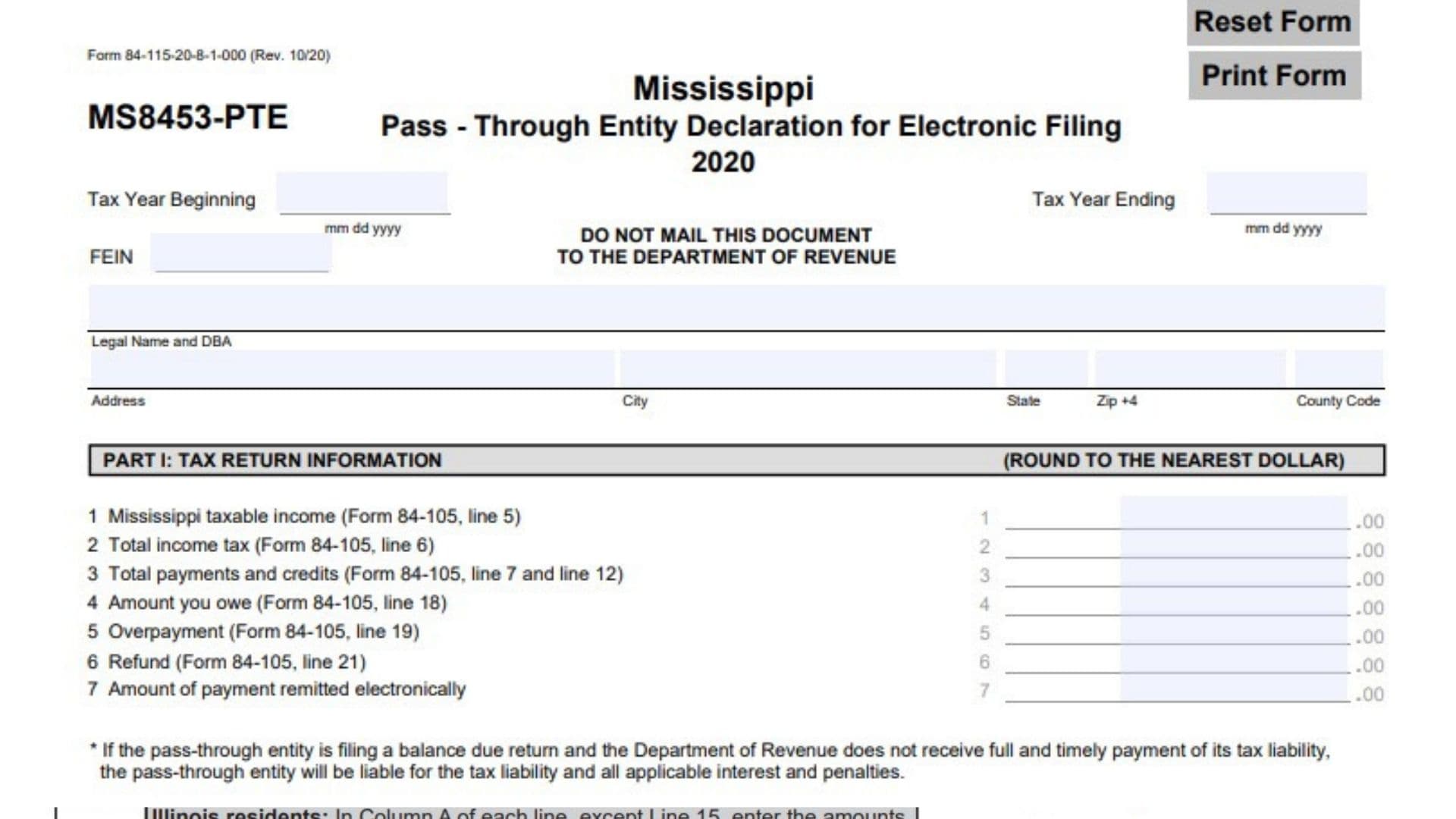
Mississippi Form MS8453-PTE, officially titled Pass-Through Entity Declaration for Electronic Filing, is a tax declaration form used by pass-through entities to authorize and document the electronic filing of their Mississippi pass-through entity tax returns. The 2020 version of the form is identified by Form Number 84-115-20-8-1-000 and is designed to collect taxpayer identification details, tax return information, an authorized officer’s declaration, and electronic return originator (ERO) and paid preparer information. It serves as a supporting declaration confirming that the amounts submitted electronically agree with the corresponding Mississippi Pass-Through Entity Tax Return. The form requires the entity’s federal employer identification number (FEIN), legal name, doing-business-as (DBA) name, address, tax year information, and applicable financial figures from Form 84-105. It also records Mississippi taxable income, total income tax, payments and credits, any remaining tax due, overpayment, refund, and the amount of payment remitted electronically. The form contains three main parts. Part I reports the tax return information, Part II contains the declaration and authorization of an entity officer, and Part III contains declarations and identifying information for the electronic return originator and paid preparer. By signing the declaration, the entity’s officer confirms under penalties of perjury that the information provided to the electronic filing provider agrees with the corresponding tax return and is true, correct, and complete to the best of their knowledge and belief. The officer also authorizes the electronic return originator, transmitter, or intermediate service provider to transmit the return and related documents to the Mississippi Department of Revenue and receive confirmation of acceptance or rejection. The completed declaration must be maintained by the electronic return originator and provided to the Department of Revenue upon request. Importantly, Form MS8453-PTE is not intended to be mailed to the Mississippi Department of Revenue. It serves as an electronic filing declaration and supporting record for the pass-through entity’s tax return.
How To File Form MS8453-PTE
Form MS8453-PTE is used in connection with the electronic filing of a Mississippi Pass-Through Entity Tax Return. The entity’s authorized officer, electronic return originator, and paid preparer must complete their respective sections when applicable.
The form must be completed using information from the corresponding pass-through entity tax return, Form 84-105. The financial amounts reported in Part I must agree with the applicable lines of that return.
Where to Submit Form MS8453-PTE
Form MS8453-PTE must not be mailed to the Mississippi Department of Revenue.
The form specifically instructs taxpayers not to mail the document to the Department of Revenue. Instead, the electronic return originator must maintain the completed declaration and provide it to the Department of Revenue upon request.
The entity’s tax return is transmitted electronically through the authorized electronic filing process.
What Information to Prepare Before Completing Form MS8453-PTE
Gather the following information before completing the declaration:
- Beginning and ending dates of the tax year.
- Federal Employer Identification Number (FEIN).
- Legal business name and DBA name, if applicable.
- Complete business mailing address.
- City, state, ZIP+4, and county code.
- Completed Mississippi Pass-Through Entity Tax Return, Form 84-105.
- Mississippi taxable income reported on Form 84-105, line 5.
- Total income tax reported on Form 84-105, line 6.
- Total payments and credits reported on Form 84-105, lines 7 and 12.
- Amount owed reported on Form 84-105, line 18.
- Overpayment reported on Form 84-105, line 19.
- Refund reported on Form 84-105, line 21.
- Amount of payment being remitted electronically.
- Authorized officer’s signature, date, and title.
- Electronic return originator’s signature and identifying information.
- Paid preparer’s signature and identifying information, if applicable.
Having these details available helps ensure that the declaration accurately reflects the tax return being electronically filed.

How To Complete Form MS8453-PTE
Form MS8453-PTE contains three main parts. Each part serves a different purpose in documenting the electronic filing of the pass-through entity’s Mississippi tax return.
Taxpayer Identification Information
The top portion of the form collects the business entity’s tax year and identifying information.
Tax Year Beginning
Enter the beginning date of the tax year covered by the pass-through entity’s Mississippi tax return.
Use the month, day, and year format indicated on the form.
For example, enter the applicable starting date of the entity’s reporting period.
Tax Year Ending
Enter the ending date of the tax year covered by the return.
Make sure the date corresponds to the reporting period used on Form 84-105.
FEIN
Enter the Federal Employer Identification Number assigned to the pass-through entity by the Internal Revenue Service.
Use the entity’s correct nine-digit federal identification number.
Legal Name and DBA
Enter the entity’s complete legal business name and its doing-business-as (DBA) name, if applicable.
The legal name should match the name used on the corresponding Mississippi tax return. If the entity operates under a separate trade name, include that DBA information in the designated space.
Address
Enter the entity’s complete mailing address.
Provide the street address or other appropriate mailing address associated with the business.
City
Enter the city where the entity’s mailing address is located.
State
Enter the state abbreviation associated with the business mailing address.
ZIP +4
Enter the ZIP code and additional four-digit ZIP code extension associated with the entity’s mailing address.
Use the correct postal information to help ensure accurate identification and correspondence.
County Code
Enter the appropriate county code associated with the entity’s address.
Use the applicable county code rather than entering the county name in place of the code.
Part I: Tax Return Information
Part I collects financial information directly from the entity’s Mississippi Pass-Through Entity Tax Return, Form 84-105.
All amounts entered in this section must be rounded to the nearest whole dollar.
The figures should agree with the corresponding lines of Form 84-105. Carefully compare the completed tax return with this declaration before entering the amounts.
Line 1: Mississippi Taxable Income
Enter the Mississippi taxable income reported on Form 84-105, line 5.
This amount represents the taxable income used in calculating the entity’s Mississippi income tax liability.
Transfer the amount directly from line 5 of Form 84-105.
Line 2: Total Income Tax
Enter the total income tax reported on Form 84-105, line 6.
This amount represents the entity’s total Mississippi income tax liability as calculated on the corresponding tax return.
Use the amount shown on line 6 of Form 84-105.
Line 3: Total Payments and Credits
Enter the combined amount of total payments and credits reported on Form 84-105, lines 7 and 12.
Add the amounts from those two lines and enter the resulting total.
Calculation:
Line 3 = Form 84-105, Line 7 + Form 84-105, Line 12.
Make sure the amount agrees with the corresponding payment and credit information on the tax return.
Line 4: Amount You Owe
Enter the amount owed reported on Form 84-105, line 18.
This represents the remaining tax liability shown on the entity’s return after accounting for applicable payments and credits.
Transfer the amount directly from line 18 of Form 84-105.
Line 5: Overpayment
Enter the overpayment amount reported on Form 84-105, line 19.
An overpayment represents the amount by which the entity’s payments and credits exceed its tax liability, as calculated on the corresponding return.
Use the amount shown on line 19 of Form 84-105.
Line 6: Refund
Enter the refund amount reported on Form 84-105, line 21.
This is the amount identified as refundable to the entity on its Mississippi Pass-Through Entity Tax Return.
Transfer the amount directly from line 21 of Form 84-105.
Line 7: Amount of Payment Remitted Electronically
Enter the amount of tax payment being remitted electronically with the entity’s return.
This field records the payment amount associated with the electronic filing.
If the entity owes tax, make sure the amount entered accurately reflects the payment being submitted electronically.
Important Payment Responsibility Notice
The form includes an important warning for pass-through entities filing a return with a balance due.
If the Mississippi Department of Revenue does not receive the full and timely payment of the entity’s tax liability, the pass-through entity remains responsible for the unpaid tax, together with all applicable interest and penalties.
Submitting the electronic return does not eliminate the entity’s responsibility to ensure that its tax liability is paid in full and on time.
Part II: Declaration of Officer
Part II must be completed by an authorized officer of the pass-through entity.
This section contains the officer’s formal declaration under penalties of perjury. By signing it, the officer confirms that the tax information provided to the electronic filing provider agrees with the corresponding Mississippi Pass-Through Entity Tax Return.
The declaration also authorizes the electronic filing provider to transmit the return and related documents to the Mississippi Department of Revenue.
Declaration Under Penalties of Perjury
The officer must review the declaration before signing.
The statement confirms that the signer is an officer of the pass-through entity identified on the form.
The officer declares that:
- The information provided to the electronic return originator, transmitter, or intermediate service provider is accurate.
- The amounts reported in Part I agree with the corresponding amounts on the entity’s Mississippi Pass-Through Entity Tax Return.
- The entity’s return is true, correct, and complete to the best of the officer’s knowledge and belief.
- The officer consents to the electronic filing provider transmitting the entity’s return, declaration, and accompanying schedules and statements to the Mississippi Department of Revenue.
- The officer authorizes the Department of Revenue to send the electronic filing provider an acknowledgment confirming receipt of the transmission.
- The officer also authorizes the Department of Revenue to communicate whether the return has been accepted or rejected and, if rejected, the reasons for the rejection.
The declaration further states that the electronic return originator must maintain the signed document and provide it to the Department of Revenue upon request.
Signature of Officer
The authorized officer must sign this field.
The signature confirms that the officer has reviewed the declaration and accepts responsibility for the statements made under penalties of perjury.
The officer should sign only after reviewing the tax return information and verifying that the figures in Part I agree with Form 84-105.
Date
Enter the date on which the officer signs the declaration.
Use the actual signing date rather than the date the tax return was prepared.
Title
Enter the official position or title of the officer signing the declaration.
For example, provide the officer’s actual business title, such as President, Treasurer, or another applicable position.
The title should accurately reflect the signer’s role within the pass-through entity.
Part III: Declaration of Electronic Return Originator (ERO) and Paid Preparer
Part III contains two separate declaration sections:
- Electronic Return Originator (ERO) Use Only.
- Paid Preparer Use Only.
These sections collect information and declarations from the professionals or service providers involved in preparing, reviewing, or transmitting the entity’s electronic tax return.
The ERO and paid preparer must complete their respective sections when applicable.
Electronic Return Originator (ERO) Use Only
The first portion of Part III is reserved for the electronic return originator.
The ERO declaration confirms that the return has been reviewed and that the information entered on Form MS8453-PTE is complete and correct to the best of the ERO’s knowledge.
The declaration also explains the ERO’s responsibilities concerning the officer’s signature, copies of filed documents, and electronic filing requirements.
ERO Declaration
The electronic return originator declares that the pass-through entity’s tax return has been reviewed and that the entries on Form MS8453-PTE are complete and correct to the best of the ERO’s knowledge.
If the individual is acting only as a collector, the declaration states that they are not responsible for reviewing the return. In that situation, the individual only declares that the information on Form MS8453-PTE accurately reflects the data on the return.
The declaration also confirms that:
- The corporate officer will have signed the form before the return is submitted.
- The ERO will provide the officer with copies of all forms and information being filed with the Department of Revenue.
- The ERO has followed the applicable requirements in IRS Publication 3112, IRS e-file Application and Participation, and Publication 4163, Modernized e-File (MeF) Information for Authorized IRS e-file Providers.
If the ERO is also acting as the paid preparer, the additional paid preparer declaration applies.
ERO Signature
The electronic return originator must sign this field to confirm the ERO declaration.
The signature should be provided by the individual responsible for the electronic return originator function.
Date
Enter the date the ERO signs the declaration.
Check if Also Paid Preparer
Mark this checkbox if the electronic return originator is also serving as the paid preparer of the entity’s tax return.
Selecting this option indicates that the individual is performing both roles.
Check if Self-Employed
Mark this checkbox if the electronic return originator is self-employed.
If the ERO works for a firm or organization and is not self-employed, do not select this option.
ERO SSN or PTIN
Enter the electronic return originator’s Social Security Number (SSN) or Preparer Tax Identification Number (PTIN), as applicable.
Use the identification number associated with the individual performing the ERO function.
Firm Name (or Yours if Self-Employed), Address and ZIP Code
Enter the name of the ERO’s firm or business.
If the ERO is self-employed, enter the individual’s business name or applicable identifying name.
Provide the complete mailing address and ZIP code.
EIN
Enter the Employer Identification Number of the ERO’s firm or business, where applicable.
Use the firm’s federal identification number in this field.
Phone No.
Enter the telephone number associated with the ERO or the firm.
Provide a working number that can be used for relevant electronic filing communications.
Paid Preparer Use Only
The second portion of Part III is reserved for the paid preparer.
This section contains a separate declaration confirming that the preparer has examined the pass-through entity’s tax return and accompanying schedules and statements.
It also collects the preparer’s signature, identification number, business information, and contact details.
Paid Preparer Declaration
The paid preparer declares under penalties of perjury that they have examined the entity’s tax return and accompanying schedules and statements.
The preparer confirms that, to the best of their knowledge and belief, the information is true, correct, and complete.
The declaration is based on all information available to the paid preparer.
This section establishes the preparer’s responsibility for the accuracy of the return information they have examined.
Preparer Signature
The paid preparer must sign this field to confirm the declaration.
The signature indicates that the preparer has examined the tax return and accepts the statements made in the declaration.
Date
Enter the date on which the paid preparer signs the declaration.
Check if Also Paid Preparer
Mark this checkbox if the individual completing the ERO section is also acting as the paid preparer.
This identifies an individual performing both electronic return origination and paid tax preparation responsibilities.
Check if Self-Employed
Mark this checkbox if the paid preparer is self-employed.
If the preparer works for a tax preparation firm or another organization and is not self-employed, leave the box unchecked.
Preparer SSN or PTIN
Enter the paid preparer’s Social Security Number (SSN) or Preparer Tax Identification Number (PTIN), as applicable.
The identification number should belong to the individual responsible for preparing the tax return.
Firm Name (or Yours if Self-Employed), Address and ZIP Code
Enter the name of the paid preparer’s firm or business.
If the preparer is self-employed, provide the applicable business or individual name.
Include the complete mailing address and ZIP code.
EIN
Enter the Employer Identification Number of the paid preparer’s firm or business, where applicable.
Use the correct federal identification number associated with the business.
Phone No.
Enter the paid preparer’s telephone number.
Provide an active contact number for communication regarding the tax return or preparation information.
Important Electronic Filing and Recordkeeping Requirements
Before completing the electronic filing process, the pass-through entity and its filing representatives should understand several important requirements stated on Form MS8453-PTE.
The Officer Must Sign Before Electronic Submission
The ERO declaration specifically confirms that the corporate officer will have signed Form MS8453-PTE before the electronic return is submitted.
The electronic return originator should ensure that the required officer declaration has been completed before transmitting the return.
The Tax Return and Declaration Must Agree
The amounts reported in Part I must match the corresponding lines of Form 84-105.
Any differences between the declaration and the actual tax return should be reviewed and corrected before electronic submission.
The ERO Must Maintain the Declaration
The signed declaration is not intended to be mailed to the Mississippi Department of Revenue.
Instead, the electronic return originator must maintain the declaration and provide it to the Department of Revenue upon request.
Payment Must Be Made in Full and on Time
A pass-through entity filing a balance-due return remains responsible for paying its tax liability in full and on time.
If the Department of Revenue does not receive the required payment by the applicable deadline, the entity may be responsible for the unpaid tax, interest, and penalties.
Electronic Filing Acknowledgment
By signing Part II, the entity’s officer authorizes the electronic filing provider to receive an acknowledgment from the Department of Revenue.
This acknowledgment indicates whether the transmitted return has been received and accepted or rejected.
If the return is rejected, the Department of Revenue may provide the reasons for the rejection through the authorized electronic filing provider.
Final Review Before Filing
Before electronically submitting the Mississippi Pass-Through Entity Tax Return, review Form MS8453-PTE carefully to ensure that all required information is accurate and complete.
Use the following checklist:
- Enter the correct tax year beginning date.
- Enter the correct tax year ending date.
- Verify the entity’s FEIN.
- Enter the legal business name and DBA, if applicable.
- Provide the complete business mailing address.
- Enter the correct city and state.
- Verify the ZIP+4 information.
- Enter the appropriate county code.
- Confirm that all financial amounts are rounded to the nearest dollar.
- Enter Mississippi taxable income from Form 84-105, line 5, on Line 1.
- Enter total income tax from Form 84-105, line 6, on Line 2.
- Enter total payments and credits from Form 84-105, lines 7 and 12, on Line 3.
- Enter the amount owed from Form 84-105, line 18, on Line 4.
- Enter the overpayment from Form 84-105, line 19, on Line 5.
- Enter the refund from Form 84-105, line 21, on Line 6.
- Enter the amount of payment remitted electronically on Line 7.
- Verify that the entity’s tax return agrees with all amounts reported in Part I.
- Have the authorized entity officer review the declaration in Part II.
- Obtain the officer’s signature.
- Enter the officer’s signing date.
- Enter the officer’s official title.
- Have the electronic return originator complete the ERO declaration.
- Obtain the ERO’s signature and date.
- Mark the appropriate ERO paid preparer checkbox, if applicable.
- Mark the self-employed checkbox when applicable.
- Enter the ERO’s SSN or PTIN.
- Provide the ERO’s firm name, address, and ZIP code.
- Enter the applicable firm EIN and telephone number.
- Complete the paid preparer declaration when applicable.
- Obtain the paid preparer’s signature and date.
- Enter the preparer’s SSN or PTIN.
- Provide the paid preparer’s firm name, address, and ZIP code.
- Enter the applicable preparer’s firm EIN and telephone number.
- Ensure that the required officer signature is obtained before electronic submission.
- Confirm that the ERO maintains the completed declaration for production upon request.
- Do not mail Form MS8453-PTE to the Mississippi Department of Revenue.
Completing Form MS8453-PTE accurately helps document the authorization and verification of a pass-through entity’s electronic Mississippi tax filing. The entity’s officer must confirm the accuracy of the return information, while the electronic return originator and paid preparer must complete their respective declarations when applicable. The completed form should be retained by the electronic return originator rather than mailed to the Mississippi Department of Revenue.