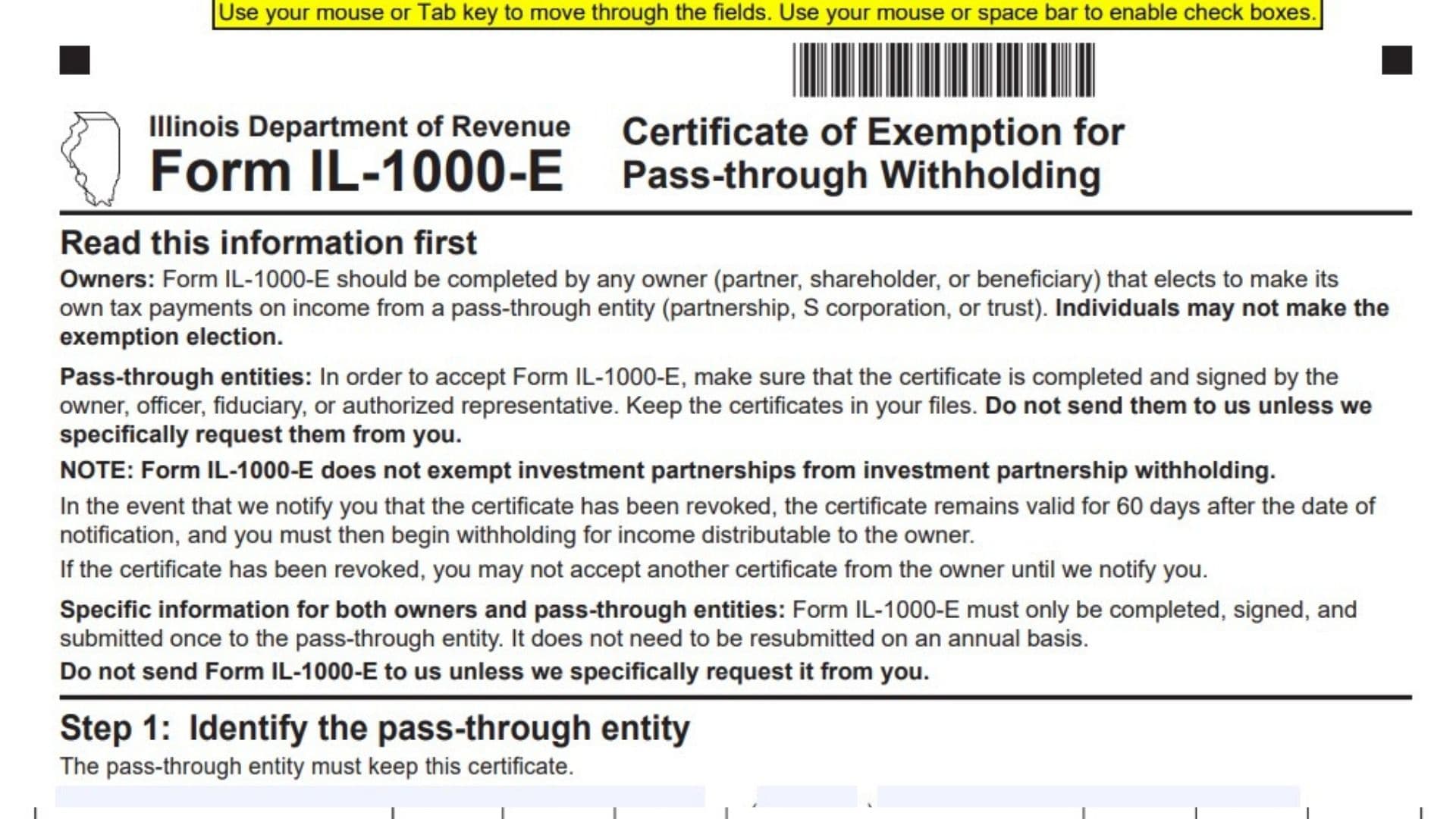
Illinois Form IL-1000-E, officially titled Certificate of Exemption for Pass-through Withholding, is a form issued by the Illinois Department of Revenue. It allows an eligible owner of a pass-through entity to elect to handle their own Illinois income tax payments instead of having the entity withhold Illinois income tax on their behalf. The form is intended for owners of partnerships, S corporations, and trusts, including partners, shareholders, and beneficiaries who make the required election.
Pass-through entities generally include businesses and organizations in which income is allocated or distributed to individual owners or beneficiaries. These entities may have Illinois withholding responsibilities for income distributable to certain owners. Form IL-1000-E provides a way for an eligible owner to certify that they will file all required Illinois income tax returns and make timely payments of all Illinois income taxes due on income received from the identified pass-through entity.
The certificate collects two sets of identification information. Step 1 identifies the pass-through entity responsible for maintaining the certificate, including its legal name, telephone number, mailing address, and Federal Employer Identification Number (FEIN). Step 2 identifies the owner making the exemption election, including their name, FEIN, mailing address, telephone number, and business or entity classification. The available classifications include corporation, Subchapter S corporation, partnership, trust, and estate.
Step 3 contains the certification and signature section. By signing the certificate, the appropriate owner, officer, fiduciary, or authorized representative confirms that the owner identified in Step 2 will file all required Illinois income tax returns and make timely payments of Illinois income taxes due. The certification also confirms that the owner is subject to the personal jurisdiction of Illinois for the collection of taxes relating to income from the pass-through entity identified in Step 1.
Form IL-1000-E is not required to be submitted annually. It must be completed, signed, and provided to the applicable pass-through entity only once. The entity must retain the completed certificate in its records and should not send it to the Illinois Department of Revenue unless specifically requested. The form does not exempt investment partnerships from investment partnership withholding.
Completing Form IL-1000-E correctly is important because it establishes the owner’s election and provides documentation that the owner accepts responsibility for filing Illinois income tax returns and paying the applicable taxes. If the Illinois Department of Revenue notifies the entity that the certificate has been revoked, the certificate remains valid for 60 days after the notification date. After that period, the entity must begin withholding on income distributable to the owner. The entity cannot accept another certificate from that owner until the department provides further notification.
How To File Illinois Form IL-1000-E
Form IL-1000-E must be completed and signed by the eligible owner, officer, fiduciary, or authorized representative and submitted to the applicable pass-through entity.
The pass-through entity is responsible for keeping the completed certificate in its records. The form is not routinely mailed to the Illinois Department of Revenue.
Who Should Complete Form IL-1000-E?
The form is intended for owners of pass-through entities who elect to make their own Illinois income tax payments on income received from those entities.
The eligible ownership categories identified by the form include:
- Partners of partnerships.
- Shareholders of S corporations.
- Beneficiaries of trusts.
The form also provides business classification options for identifying the owner or entity involved in the election.
The instructions specifically state that individuals may not make the exemption election. Therefore, taxpayers should follow the eligibility requirements applicable to the ownership and entity circumstances rather than assuming that every individual owner qualifies.
Responsibilities Of The Pass-Through Entity
A partnership, S corporation, or trust accepting Form IL-1000-E has several responsibilities.
- Ensure the certificate is properly completed.
- Confirm that it has been signed by the owner, officer, fiduciary, or authorized representative.
- Retain the completed certificate in the entity’s records.
- Do not submit the certificate to the Illinois Department of Revenue unless specifically requested.
- Monitor any notification from the department concerning revocation of the certificate.
- Begin withholding on income distributable to the owner after the applicable 60-day period following revocation notification.
How Often Must Form IL-1000-E Be Filed?
Form IL-1000-E must be completed, signed, and submitted to the pass-through entity only once.
It does not need to be resubmitted every year.
Both the owner and the pass-through entity should retain the relevant information and ensure that the certificate remains valid.
Important Restrictions And Exceptions
Investment Partnership Withholding
Form IL-1000-E does not exempt investment partnerships from investment partnership withholding.
An owner or entity should not treat this certificate as an exemption from that separate withholding requirement.
Revocation Of The Certificate
If the Illinois Department of Revenue notifies the pass-through entity that the certificate has been revoked, the existing certificate remains valid for 60 days after the notification date.
Once that 60-day period ends, the pass-through entity must begin withholding for income distributable to the owner.
Restriction On Submitting Another Certificate
After a certificate has been revoked, the pass-through entity cannot accept another certificate from the same owner until the Illinois Department of Revenue provides notification allowing it.

How To Complete Illinois Form IL1000-E
Form IL-1000-E contains three main steps:
- Step 1: Identify the pass-through entity.
- Step 2: Identify the owner.
- Step 3: Complete the certification and signature.
Each step collects specific information needed to identify the entity, establish the owner’s election, and document the certification.
Step 1: Identify The Pass-Through Entity
The first section identifies the partnership, S corporation, or trust that will maintain the exemption certificate.
The pass-through entity must keep the completed certificate in its records.
Name
Enter the complete legal name of the pass-through entity.
This should be the partnership, corporation, or trust associated with the income covered by the certificate.
Use the entity’s correct legal name so the Illinois Department of Revenue and the owner can identify the organization accurately.
Phone Number
Enter the telephone number associated with the pass-through entity.
Provide a valid number where the business or organization can be contacted if questions arise concerning the certificate.
Mailing Address
Enter the complete mailing address of the pass-through entity.
Include the street address or other applicable mailing information.
Use the address where the entity receives official correspondence.
Federal Employer Identification Number (FEIN)
Enter the Federal Employer Identification Number assigned to the pass-through entity by the Internal Revenue Service.
The FEIN identifies the partnership, corporation, or trust associated with the exemption certificate.
Check the number carefully before proceeding to Step 2.
City
Enter the city associated with the pass-through entity’s mailing address.
State
Enter the state abbreviation associated with the mailing address.
ZIP
Enter the ZIP code for the pass-through entity’s mailing address.
Make sure the city, state, and ZIP code correspond to the address entered above.
The second section identifies the owner who is making the election to handle their own Illinois income tax payments.
The information entered here must clearly identify the partner, shareholder, or beneficiary associated with the pass-through entity identified in Step 1.
Name
Enter the complete name of the owner making the exemption election.
The name should identify the individual or entity associated with the ownership interest in the partnership, S corporation, or trust.
Make sure the information is consistent with the applicable ownership and tax records.
Federal Employer Identification Number (FEIN)
Enter the Federal Employer Identification Number associated with the owner, when applicable.
Use the correct identification number for the owner being identified in this section.
Mailing Address
Enter the complete mailing address of the owner.
Include the street address and any additional mailing information necessary to identify the owner’s address.
Business Type: Corporation
Check this box if the applicable owner classification is Corporation.
Select this option when the owner is identified under the corporation classification provided on the form.
Business Type: Subchapter S Corporation
Check this box if the applicable classification is Subchapter S corporation.
This option identifies the S corporation classification shown in the owner information section.
Business Type: Partnership
Check this box if the applicable classification is Partnership.
Use this option when the owner is identified under the partnership classification.
Business Type: Trust
Check this box if the applicable classification is Trust.
This option identifies a trust associated with the ownership information being reported.
Business Type: Estate
Check this box if the applicable classification is Estate.
Use this option when the owner is identified under the estate classification.
Select the appropriate business type based on the applicable ownership information.
City
Enter the city associated with the owner’s mailing address.
State
Enter the state abbreviation for the owner’s mailing address.
ZIP
Enter the ZIP code associated with the owner’s mailing address.
Phone Number
Enter the owner’s telephone number.
Provide a valid contact number so the owner can be identified or contacted if clarification is required.
Step 3: Sign Below
The third section contains the owner’s certification and the required signature information.
This section is important because it formally documents the responsibility accepted by the owner through the exemption election.
Owner Certification
The certification confirms that the owner identified in Step 2 will:
- File all Illinois income tax returns required for the applicable income.
- Make timely payment of all Illinois income taxes due.
- Accept personal jurisdiction of the State of Illinois for the collection of income taxes due in connection with income from the partnership, corporation, or trust identified in Step 1.
Review the certification carefully before signing.
The signature confirms that the statements and responsibilities described in this section are accepted.
Signature Of Owner, Officer, Fiduciary, Or Authorized Representative
The form must be signed by the owner, officer, fiduciary, or authorized representative.
The person signing must have the appropriate authority to certify the information and make the declaration on behalf of the owner or entity, as applicable.
An unsigned certificate does not satisfy the form’s stated signature requirement.
Date
Enter the date on which the certificate is signed.
Use the actual signing date.
Printed Name
Enter the full printed name of the individual who signed the certificate.
The printed name should correspond to the signature provided above.
Title
Enter the official title or position of the person signing the certificate.
For example, this field may identify the signer as an owner, officer, fiduciary, or authorized representative, depending on their role.
Important Filing Rules For Form IL-1000-E
Before accepting or submitting Form IL-1000-E to the pass-through entity, review the following requirements.
The Certificate Must Be Signed
The certificate must be completed and signed by the appropriate owner, officer, fiduciary, or authorized representative.
The pass-through entity should ensure that the required information and signature are present before accepting the certificate.
The Certificate Must Be Retained By The Entity
The pass-through entity must keep the completed certificate in its records.
The form should not be routinely sent to the Illinois Department of Revenue.
Submit it to the department only when specifically requested.
Annual Resubmission Is Not Required
The certificate needs to be completed and submitted to the pass-through entity only once.
It does not need to be renewed or resubmitted annually under the instructions provided on the form.
The Certificate Does Not Apply To Investment Partnership Withholding
The exemption election does not exempt investment partnerships from investment partnership withholding.
This limitation should be considered before relying on the certificate for withholding purposes.
Follow The Revocation Requirements
If the Illinois Department of Revenue notifies the pass-through entity that the certificate has been revoked:
- The certificate remains valid for 60 days after the notification date.
- The entity must begin withholding on income distributable to the owner after the 60-day period.
- The entity cannot accept another certificate from the owner until the department provides notification.
Final Review Before Filing
Before submitting Illinois Form IL-1000-E to the pass-through entity, review every section to make sure the information is complete and accurate.
Use the following checklist:
- Confirm that Form IL-1000-E is appropriate for the applicable ownership and entity circumstances.
- Enter the complete legal name of the pass-through entity.
- Provide the entity’s telephone number.
- Enter the complete mailing address of the pass-through entity.
- Enter the correct entity FEIN.
- Verify the entity’s city, state, and ZIP code.
- Enter the complete name of the owner.
- Provide the owner’s FEIN, when applicable.
- Enter the owner’s complete mailing address.
- Select the appropriate business type.
- Check the correct classification: Corporation, Subchapter S corporation, Partnership, Trust, or Estate.
- Enter the owner’s city, state, and ZIP code.
- Provide the owner’s telephone number.
- Review the certification statement carefully.
- Confirm that the owner will file all required Illinois income tax returns.
- Confirm that the owner accepts responsibility for timely payment of applicable Illinois income taxes.
- Obtain the required signature from the owner, officer, fiduciary, or authorized representative.
- Enter the actual signing date.
- Provide the signer’s printed name.
- Enter the signer’s official title.
- Ensure the pass-through entity retains the completed certificate.
- Do not mail the certificate to the Illinois Department of Revenue unless specifically requested.
- Remember that annual resubmission is not required.
- Check whether any notification of revocation has been received.
- Follow the 60-day withholding rule if the certificate has been revoked.
- Do not treat the certificate as an exemption from investment partnership withholding.
Final Note: Illinois Form IL-1000-E is used to document an eligible owner’s election to make their own Illinois income tax payments on income from a pass-through entity. The form requires accurate identification of both the entity and the owner, the appropriate business classification, and a completed certification with an authorized signature. Once accepted, the pass-through entity must retain the certificate in its records. It does not need to be resubmitted annually, but the entity must follow the applicable withholding requirements if the Illinois Department of Revenue notifies it that the certificate has been revoked.