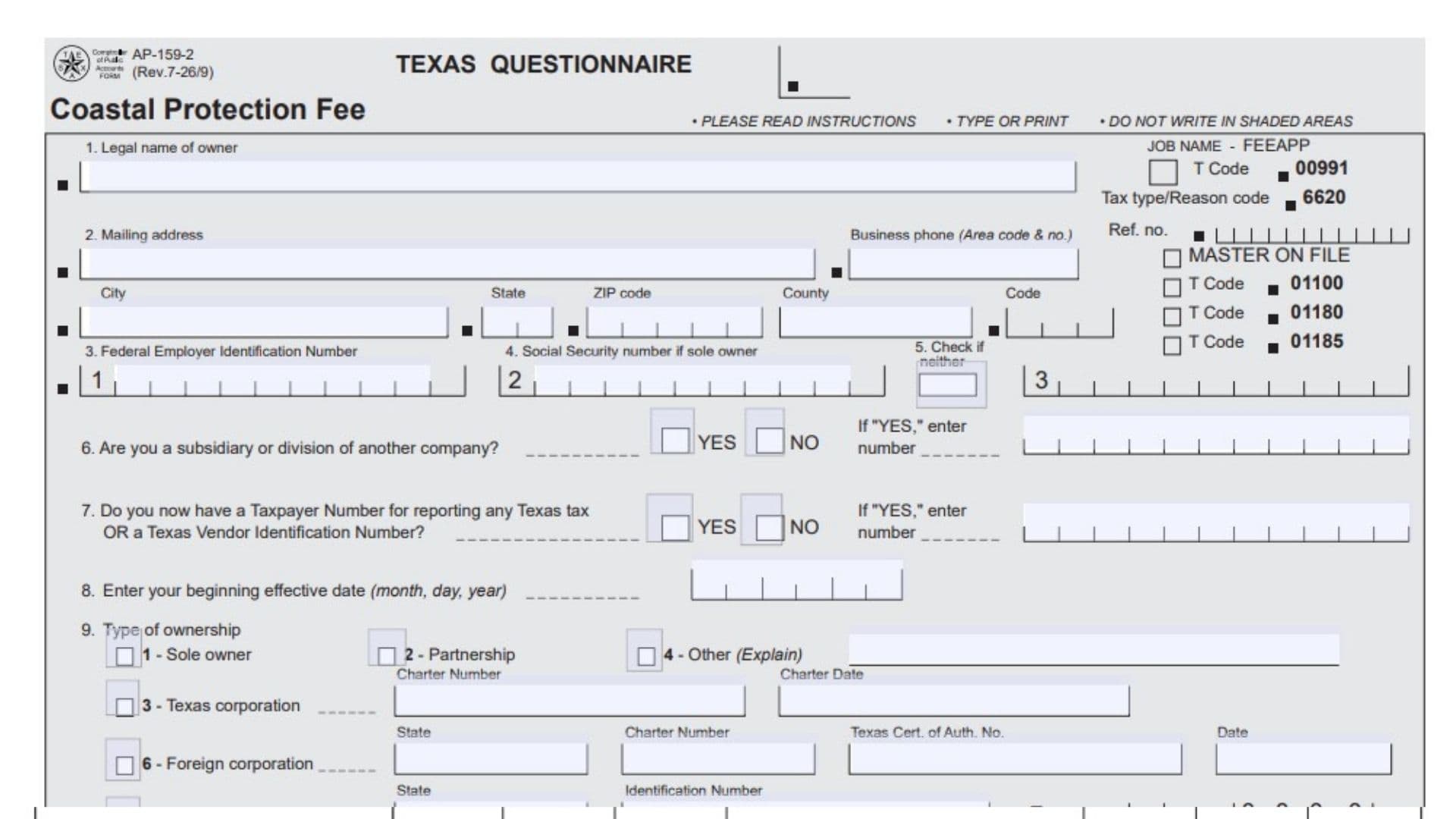
Texas Form AP-159, officially known as the Texas Questionnaire for Coastal Protection Fee, is a registration questionnaire used by the Texas Comptroller of Public Accounts to collect information from individuals and organizations involved in transferring crude oil and condensate between vessels and marine terminals located in Texas. The form helps the Comptroller identify businesses and individuals engaged in these activities and establish the necessary information for administering the Coastal Protection Fee. It applies to sole proprietors, partnerships, corporations, and other organizations that transfer crude oil and condensate from or to vessels at a marine terminal in Texas.
The questionnaire collects important business and ownership information, including the legal name of the owner, mailing address, business telephone number, Federal Employer Identification Number (FEIN), Social Security number, existing Texas Taxpayer Number, and Vendor Identification Number. It also requests information about the business’s ownership structure, corporate registration details, partners, principal officers, and managing personnel. Businesses that have purchased an existing business or its assets must provide additional information about the former owner and the acquired property. The questionnaire also requires businesses to identify each marine terminal facility they operate in Texas, including the facility’s trade name and physical location. This information allows the Comptroller to identify the responsible fee payer, maintain accurate business records, and administer the Coastal Protection Fee. Completing the form correctly is important because incomplete or inaccurate ownership, identification, or marine terminal information may affect the processing of the registration questionnaire and the establishment of the appropriate fee account.
How To File Form AP-159
Form AP-159 must be completed and mailed to the Texas Comptroller of Public Accounts at the following address:
Comptroller of Public Accounts
111 E. 17th Street
Austin, TX 78774-0100
Before completing the questionnaire, prepare the information needed to identify the business, its ownership structure, and its marine terminal operations.
Depending on the business structure and activities, gather the following information:
- The legal name of the business or individual owner.
- The complete business mailing address.
- The business telephone number.
- The Federal Employer Identification Number (FEIN), if assigned.
- The owner’s Social Security number, if applicable.
- Existing Texas Taxpayer Numbers and Vendor Identification Numbers.
- The business’s beginning effective date.
- Business ownership and registration information.
- Corporate charter numbers and registration dates, when applicable.
- Foreign corporation registration information.
- Limited partnership identification details.
- Information about all partners and principal corporate officers.
- Details of previously owned businesses or acquired business assets, if applicable.
- The trade names and physical locations of all marine terminal facilities operated in Texas.
- The names, titles, signatures, and signature dates of the authorized individuals.
General Instructions Before Completing The Form
Follow these instructions when preparing the questionnaire:
- Write only in the designated white areas.
- Do not enter information in shaded areas reserved for the Comptroller’s office.
- Do not use dashes when entering Social Security numbers, FEINs, Texas Taxpayer Numbers, or Vendor Identification Numbers.
- Provide the required Social Security number for tax administration purposes.
- Attach additional sheets where necessary and where permitted by the questionnaire.
- Complete the applicable sections according to the business’s actual legal structure.
The questionnaire also contains a federal privacy notice explaining that Social Security number disclosure is required and authorized by law for tax administration and identification purposes. Information released in response to public information requests is governed by applicable state and federal laws. The form also explains that individuals have certain rights to review, request, and correct information maintained about them.
For assistance with the questionnaire, tax returns, or other tax-related matters, contact the Texas Comptroller’s office at 1-800-252-1384.
Understanding Important Terms On Form AP-159
Before completing the questionnaire, it is helpful to understand two important terms used to determine who must submit the form.
Who Must Submit Form AP-159?
Every person or organization that transfers crude oil and condensate from or to vessels at a marine terminal located in Texas must submit this questionnaire.
This requirement applies to different types of business ownership, including:
- Sole proprietors.
- Partnerships.
- Corporations.
- Other organizations.
What Is A Marine Terminal?
A marine terminal is a terminal facility used for transferring crude oil to or from vessels.
The term covers facilities involved in the movement of crude oil between a terminal and a vessel.
What Is A Vessel?
A vessel includes any type of watercraft or other equipment capable of being used for transportation on water.
This includes both self-propelled and non-self-propelled watercraft, such as barges.

How To Complete Form AP-159
Form AP-159 contains 17 numbered items divided into taxpayer identification, ownership, proprietor information, successor liability, marine terminal information, and signatures.
The following instructions explain what information belongs in each item.
Taxpayer Identification
This section collects the legal and contact information of the individual or organization responsible for the business.
Item 1: Legal Name Of Owner
Enter the complete legal name of the person or organization responsible for the business.
The information depends on the ownership structure:
- Sole owner: Enter the individual’s first name, middle initial, and last name.
- Partnership: Enter the partnership’s complete legal name.
- Corporation: Enter the legal name exactly as registered with the Secretary of State.
- Other organization: Enter the official title or legal name of the organization.
Make sure the name matches the applicable legal or business registration records.
Item 2: Mailing Address And Business Telephone Number
Enter the complete mailing address where you want to receive correspondence from the Texas Comptroller of Public Accounts.
Provide the following address information:
- Street address, P.O. Box, or rural route and box number.
- City.
- State.
- ZIP code.
- County.
The form also requests the business telephone number, including the area code.
Use an address where the business can reliably receive official correspondence. If you want mail relating to other taxes sent to a different address, attach a separate letter listing those additional addresses.
Item 3: Federal Employer Identification Number (FEIN)
Enter the Federal Employer Identification Number assigned to your business by the Internal Revenue Service (IRS).
The FEIN is used to identify the business for federal tax administration purposes.
Enter the official number assigned to the business without dashes. If the business has not been assigned a FEIN, do not invent or substitute another identification number.
Item 4: Social Security Number
Enter the Social Security number of the individual owner if the business operates as a sole proprietorship.
This field applies specifically to sole owners. Use the owner’s actual Social Security number and enter it without dashes.
Item 5: Neither Social Security Number Nor FEIN
Check this box if the business or responsible individual has neither a Social Security number nor a Federal Employer Identification Number.
Only select this option when neither identification number is available.
Do not check this box if the business or owner already has an applicable identification number.
Ownership Information
This section identifies the business’s relationship with other companies, existing Texas tax registration information, beginning effective date, and legal ownership structure.
Item 6: Subsidiary Or Division Of Another Company
Indicate whether your business operates as a subsidiary or division of another company.
Select the appropriate option:
- Yes: If the business is a subsidiary or division of another company.
- No: If the business is not a subsidiary or division of another company.
If you select Yes, enter the identification number of the related or parent company in the space provided.
Item 7: Existing Texas Taxpayer Number Or Vendor Identification Number
Indicate whether the business currently has a Texas Taxpayer Number for reporting any Texas tax or a Texas Vendor Identification Number.
Select Yes or No.
If you select Yes, enter the applicable identification number in the designated field.
If the business has both a Texas Taxpayer Number and a Texas Vendor Identification Number, enter only the first 11 digits of the Vendor Identification Number.
Do not include dashes when entering the identification number.
Item 8: Beginning Effective Date
Enter the beginning effective date requested by the questionnaire.
Provide the month, day, and year in the designated date field.
Make sure the date is accurate and reflects the applicable beginning effective date for the business’s Coastal Protection Fee registration.
Item 9: Type Of Business Ownership
Select the option that accurately describes the legal ownership structure of the business.
The questionnaire provides the following options:
- 1 – Sole owner: Select this option if one individual owns the business.
- 2 – Partnership: Select this option if the business operates as a partnership.
- 3 – Texas corporation: Select this option if the corporation is organized in Texas.
- 4 – Other: Select this option if the organization has another legal structure not covered by the listed categories.
- 6 – Foreign corporation: Select this option if the corporation was organized outside Texas.
- 7 – Limited partnership: Select this option if the business operates as a limited partnership.
If you select Other, explain the type of organization in the space provided.
Examples include:
- Social club.
- Independent school district.
- Family trust.
- Joint venture.
For a joint venture, provide the name of the managing partner or the partner acting as the authorized agent, together with the names of two other principal partners. Principal partners are those with the largest claims to a share of the venture’s profits under the joint venture agreement.
If the joint venture agreement is available, attach a copy to the questionnaire.
Additional registration information is required for certain ownership types:
- Texas corporation: Enter the charter number assigned by the Secretary of State and the charter date.
- Foreign corporation: Enter the state where the corporation was organized, its charter number, its Texas Certificate of Authority number, and the date of that certificate.
- Limited partnership: Enter the state where the partnership is registered and its identification number.
Complete only the registration fields applicable to the selected ownership structure.
Proprietor And Principal Officer Information
Item 10: Identification Of Owners, Partners, And Principal Corporate Officers
Provide identifying and contact information for the individuals responsible for owning or managing the business.
The information required depends on the legal structure:
- Sole proprietorship: Enter the sole owner’s information.
- Partnership: Enter information for all partners.
- Corporation: Enter the information for the principal officers, including the president, secretary, and vice-president.
- Other organization: Enter the applicable principal officers or responsible individuals.
For each person, complete the following fields:
- Name: Enter the individual’s first name, middle initial, and last name.
- Social Security Number: Enter the individual’s Social Security number.
- Title: Identify the person’s position or official role in the business.
- Home street address: Enter the individual’s residential street address.
- City: Provide the city where the individual lives.
- State: Enter the applicable state.
- ZIP code: Provide the residential ZIP code.
If a partner is a corporation, enter that partner’s Federal Employer Identification Number (FEIN) instead of a Social Security number.
The questionnaire provides multiple spaces for reporting individuals. If additional space is needed, attach additional sheets containing the same information for every applicable partner or principal officer.
Successor Liability Information
This section applies only if the business purchased an existing business or acquired business assets.
If no existing business or business assets were purchased, skip Items 11 through 14 and proceed directly to Item 15.
Item 11: Former Owner’s Trade Name And Taxpayer Number
Enter identifying information about the previous owner of the business.
Complete the following fields:
- Trade name: Enter the trade name under which the former owner operated the business.
- Former owner’s Texas Taxpayer Number: If known, enter the previous owner’s Texas Taxpayer Number.
Use information available from the former owner or the relevant business acquisition records.
If the former owner’s taxpayer number is unknown, do not guess or create a number.
Item 12: Former Owner’s Legal Name, Address, And Telephone Number
Provide the previous owner’s legal and contact information.
Complete the following fields:
- Legal name of former owner: Enter the former owner’s complete legal name.
- Phone: If known, provide the former owner’s telephone number, including the area code.
- Address: If known, enter the complete address, including street number, city, state, and ZIP code.
Use accurate information from the former owner or available business records.
Item 13: Assets Purchased
Identify the categories of property or assets acquired when purchasing the existing business or its assets.
The questionnaire provides five checkboxes:
- Inventory: Check this option if inventory was included in the purchase.
- Corporate stock: Check this option if corporate stock was acquired.
- Equipment: Check this option if business equipment was purchased.
- Real estate: Check this option if real property was included in the transaction.
- Other assets: Check this option if other business assets were acquired.
Select every category that applies to the purchase.
Item 14: Purchase Price And Date Of Purchase
Enter the purchase price of the business or assets acquired and the date the transaction took place.
Complete both fields:
- Purchase price: Enter the total amount paid for the business or acquired assets.
- Date of purchase: Enter the month, day, and year of the transaction.
Use the actual purchase information from the acquisition agreement or transaction records.
If the business did not purchase an existing business or business assets, this item does not apply.
Additional Business Information
Item 15: Legal Name Of Owner And Fee Payer Number
Enter the legal name of the business owner or organization again.
The name must match the legal name entered in Item 1.
The form also provides a separate field for the fee payer number. Enter the applicable number if it has already been assigned or provided to the business. If you have not received a fee payer number, confirm how this field should be completed with the Comptroller’s office rather than entering an assumed number.
Item 16: Marine Terminal Facilities Operated In Texas
List each marine terminal facility your business operates in Texas.
This item is important because the questionnaire applies to businesses transferring crude oil and condensate from or to vessels at Texas marine terminals.
For each facility, provide the following information:
- Trade name: Enter the actual name under which the marine terminal facility operates.
- Location of terminal: Enter the physical location of the facility using its street address and number or clear directions to the location.
- City: Enter the city where the marine terminal is located.
- State: Provide the state.
- ZIP code: Enter the facility’s ZIP code.
- County: Identify the county where the terminal is located.
- County code: Enter the applicable county code.
The form specifically requires the physical location of the marine terminal. Do not use a P.O. Box or rural route as the terminal location.
The questionnaire provides multiple facility information sections so you can report several marine terminals operated by the same business.
Complete a separate set of fields for each facility.
If your business operates more marine terminal facilities than the available spaces allow, attach additional sheets listing the remaining facilities and providing the same information for each one.
Make sure every applicable Texas marine terminal operated by the business is included.
Signatures And Declaration
Item 17: Declaration And Authorized Signatures
This item confirms that the information provided in the questionnaire is true and correct to the best of the signer’s knowledge and belief.
The questionnaire identifies the following individuals as authorized signers:
- The sole owner.
- All general partners.
- The corporation’s president.
- The corporation’s vice-president.
- The corporation’s secretary.
- The corporation’s treasurer.
- An authorized representative.
The required signatures depend on the business’s legal structure.
Complete the signature section as follows:
- Date of signatures: Enter the date when the application is signed.
- Printed name: Enter the full name of the sole owner, partner, or corporate officer.
- Signature: The applicable individual must sign in the designated signature area.
- Additional partner or officer information: Complete the additional signature spaces for the other applicable partners or officers.
If an authorized representative signs the questionnaire instead of the appropriate owner, partner, or corporate officer, a written power of attorney must be submitted with the questionnaire.
Make sure the required individuals sign the application before mailing it.
Understanding The Comptroller’s Office-Only Section
Form AP-159 contains certain fields reserved for the Texas Comptroller’s office. These areas are used for internal registration and administrative processing.
The office-only information includes:
- Job name and tax type or reason code.
- Reference number.
- Master account information.
- Internal tax processing codes.
- County code processing information.
- Field office information.
- Employee or E.O. information.
- Processing date.
Applicants should not complete fields specifically reserved for the Comptroller’s office.
Final Review Before Filing
Before mailing Form AP-159, review the entire questionnaire to make sure all applicable information is accurate and complete.
Use the following checklist:
- Item 1 contains the correct legal name of the owner or organization.
- Item 2 contains the complete mailing address and business telephone number.
- Item 3 contains the correct FEIN, if assigned.
- Item 4 contains the sole owner’s Social Security number, when applicable.
- Item 5 is checked only if neither a Social Security number nor FEIN is available.
- Item 6 correctly identifies whether the business is a subsidiary or division of another company.
- Item 7 accurately identifies any existing Texas Taxpayer Number or Vendor Identification Number.
- Item 8 contains the correct beginning effective date.
- Item 9 identifies the correct business ownership structure.
- Applicable corporate charter or foreign corporation registration information is provided.
- Joint venture information and the agreement are included where applicable and available.
- Limited partnership information is completed where applicable.
- Item 10 contains the required information for all applicable owners, partners, and principal officers.
- Items 11 through 14 are completed if an existing business or business assets were purchased.
- All applicable purchased asset categories are selected.
- The purchase price and date are entered when required.
- Item 15 repeats the correct legal name of the owner.
- The fee payer number is handled appropriately.
- Item 16 lists every applicable Texas marine terminal facility operated by the business.
- Each marine terminal includes its trade name, physical location, city, state, ZIP code, county, and county code.
- Additional sheets are attached if there is insufficient space.
- Item 17 contains the required printed names, signatures, and signature date.
- A written power of attorney is attached if an authorized representative signs the questionnaire.
- No information has been entered in shaded areas reserved for the Comptroller’s office.
- All identification numbers are entered without dashes.
After completing the review, mail the questionnaire to:
Comptroller of Public Accounts
111 E. 17th Street
Austin, TX 78774-0100
If you need assistance completing the questionnaire, filing tax returns, or addressing other tax-related matters, contact the Texas Comptroller’s office at 1-800-252-1384.
Providing complete and accurate information helps the Comptroller identify the responsible business, record its marine terminal operations, and process its Coastal Protection Fee registration.