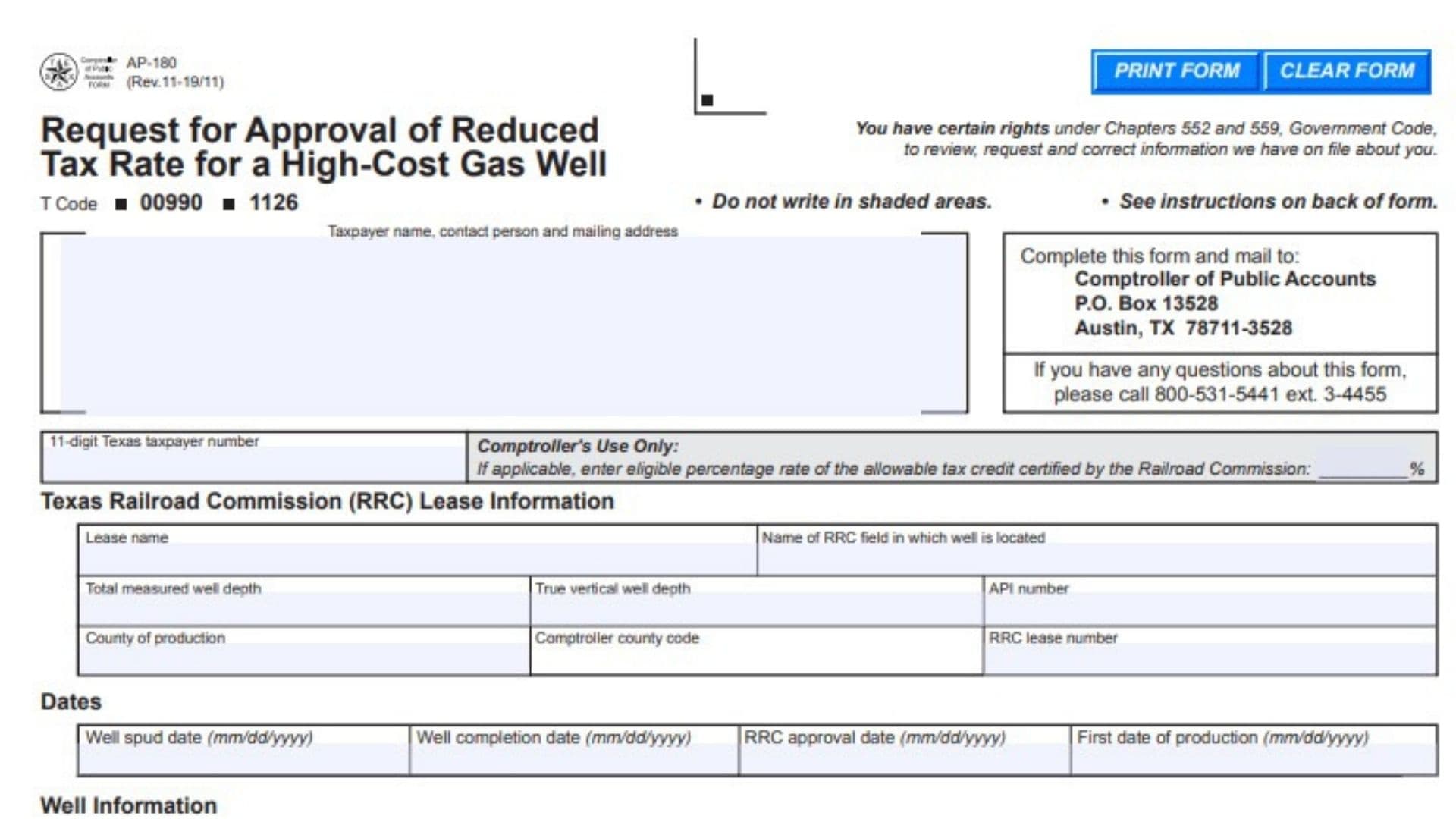
Form AP-180, officially titled Request for Approval of Reduced Tax Rate for a High-Cost Gas Well, is a Texas tax application used by taxpayers seeking a reduced natural gas production tax rate for wells certified as high-cost gas wells by the Texas Railroad Commission (RRC). The Texas Comptroller of Public Accounts uses this application to review the well’s identification details, production dates, certification status, drilling expenses, and completion costs. The information helps determine the reduced tax rate available for an eligible well and the period during which the tax benefit may apply. Applicants must identify the well, provide the relevant RRC certification documents, report qualifying drilling and completion expenses, and certify that the information submitted is accurate. Different documentation requirements apply to regular wells, stacked lateral wells, recompleted wells, multiple completion wells, and commingled wells. Completing Form AP-180 correctly matters because the reported costs affect the calculation of the reduced tax rate, while filing deadlines can affect the amount of tax savings or credits a taxpayer may claim.
Who Must File Form AP-180?
Form AP-180 is intended for taxpayers seeking a reduced Texas natural gas production tax rate for wells that have received high-cost gas well certification from the Texas Railroad Commission.
The applicant must have a qualifying well and the supporting RRC certification documentation.
The form may be completed by the taxpayer or submitted through a consultant or authorized third party.
If a consultant or another authorized representative files the application on behalf of the taxpayer, a Limited Power of Attorney must accompany the completed application.
A taxpayer should not assume that a well qualifies for the reduced rate simply because its drilling costs are high. The application requires certification by the Texas Railroad Commission.
How To File Form AP-180
Form AP-180 is submitted to the Texas Comptroller of Public Accounts.
The application contains fields for taxpayer identification, RRC lease information, important well dates, well classification, drilling and completion costs, and an authorized declaration.
Step 1: Obtain the Railroad Commission Certification
Before submitting Form AP-180, obtain the certification letter issued by the Texas Railroad Commission for the qualifying high-cost gas well.
A copy of the certification letter must accompany the application.
You will also need the applicable RRC Form G-1 and any additional documents required for your well classification.
Step 2: Gather the Required Well Information
Prepare the well’s lease name, RRC field name, measured depth, true vertical depth, API number, production county, county code, and RRC lease number.
You should also have the well spud date, completion date, RRC approval date, and first production date.
These details help identify the specific well and establish the relevant filing and tax benefit periods.
Step 3: Prepare Drilling and Completion Cost Records
Gather records showing the qualifying expenses associated with drilling and completing the well.
Separate the expenses into the categories requested by the application.
Drilling expenses include pre-drilling costs, drilling operations, casing and cementing, and drilling support.
Completion expenses include services, stimulation, production equipment, and completion support.
Do not combine all project expenses into one amount. The application requires separate totals for drilling and completion.
Step 4: Complete the Application
Type or print the requested information clearly.
Select the correct well classification and provide any additional lease numbers or information required for that well type.
Complete the drilling and completion cost sections using the applicable cost categories.
Do not enter information in shaded areas reserved for the Comptroller.
If completing an electronic version, the form provides Print Form and Clear Form controls. Print or preserve your completed information before using the clear function.
Step 5: Sign and Submit the Application
An authorized individual must sign the declaration.
If a consultant or authorized third party is submitting the application, include a Limited Power of Attorney.
Mail the completed application and supporting documents to:
Comptroller of Public Accounts
P.O. Box 13528
Austin, TX 78711-3528
For questions about the application, the instructions provide the following telephone number:
800-531-5441, extension 3-4455
Confirm the current mailing address and filing requirements before submission.

How To Complete Form AP-180
Form AP-180 does not use numbered lines for its main application fields. Instead, it organizes the required information into sections covering the taxpayer, RRC lease, well dates, well classification, drilling and completion expenses, and declaration.
Complete each field using the records associated with the specific well.
Taxpayer Identification and Contact Information
This section identifies the taxpayer requesting the reduced tax rate.
Taxpayer Name
Enter the legal name of the taxpayer seeking the reduced tax rate.
Use the name associated with the taxpayer’s Texas tax account.
Contact Person
Provide the name of the person responsible for answering questions about the application.
This may be an employee, company representative, or other appropriate contact.
Mailing Address
Enter the mailing address where correspondence concerning the application should be sent.
Provide the complete address, including the relevant street or mailing box information, city, state, and ZIP code.
11-Digit Texas Taxpayer Number
Enter the taxpayer’s 11-digit Texas taxpayer identification number.
Use the number assigned to the taxpayer for reporting applicable Texas taxes.
Check that all digits are correct.
Tax Code and Administrative Codes
The application displays tax code 00990 and an additional administrative code, 1126.
These are preprinted identifiers. Do not replace them with your own taxpayer information.
Comptroller’s Use Only: Eligible Percentage Rate
This field is reserved for the Comptroller.
When applicable, it records the eligible percentage rate of the allowable tax credit certified by the Railroad Commission.
Do not enter a percentage in this field.
Texas Railroad Commission Lease Information
This section collects the identification details used to connect the application with the well’s Railroad Commission records.
Lease Name
Enter the name of the lease associated with the well.
Use the lease name recorded with the Texas Railroad Commission.
Name of RRC Field in Which the Well Is Located
Enter the official RRC field name associated with the well.
Use the field designation shown in the well’s regulatory records.
Total Measured Well Depth
Enter the well’s total measured depth.
Measured depth represents the length along the wellbore from its reference point to the measured endpoint.
Use the depth reported in the applicable well records.
True Vertical Well Depth
Enter the well’s true vertical depth.
True vertical depth represents the vertical distance from the reference point to the relevant depth in the well.
This measurement may differ from total measured depth, particularly for directional or horizontal wells.
API Number
Enter the American Petroleum Institute (API) well identification number.
Use the number assigned to the specific well.
County of Production
Enter the Texas county where the well produces natural gas.
Make sure the county matches the well’s regulatory and production records.
Comptroller County Code
Enter the county code used by the Texas Comptroller for the production county.
Use the appropriate code associated with the well’s location.
RRC Lease Number
Enter the lease number assigned by the Texas Railroad Commission.
Certain well classifications require additional or different lease numbers in the well information section.
Important Well Dates
The application requires four dates associated with the well’s development, certification, and production.
Each date must be entered in month/day/year format.
Well Spud Date
Enter the date when drilling operations began for the well.
Use the official spud date recorded for the well.
Well Completion Date
Enter the date the well was completed.
Use the completion date shown in the relevant well records.
RRC Approval Date
Enter the date the Texas Railroad Commission approved the well’s high-cost gas certification.
This date is important when determining the applicable Form AP-180 filing deadline.
First Date of Production
Enter the date when the well first began producing natural gas.
This date is used in determining certain filing deadlines and the duration of the reduced tax rate benefit.
Check that the dates are consistent with the RRC certification and production records.
Well Information and Classification
This section identifies the type of well covered by the application.
Select the applicable well classification and include the supporting documentation required for that category.
Regular Well
Regular Well Checkbox
Select this checkbox when the application concerns a regular well rather than one of the special classifications listed below.
Required Supporting Documents
Attach copies of the Railroad Commission’s certification letter and Form G-1.
RRC Lease Number
Use the relevant RRC lease number already identified in the lease information section.
The regular well row does not require an additional special lease number.
Stacked Lateral Well
Stacked Lateral Well Checkbox
Select this checkbox when the application concerns a stacked lateral well.
Required Supporting Documents
Attach copies of the following:
- RRC certification letter
- RRC Form G-1
- Supplementary Attachment to Form PR
Parent Lease Number
Enter the parent lease number previously reported to the Railroad Commission.
Use the designated space in the stacked lateral well row.
Allocated Production Reporting
When preparing tax reports, report the allocated production corresponding to the specific well identified in the application.
Make sure the production information is associated with the correct well.
Recompleted Well
Recompleted Well Checkbox
Select this checkbox if the application concerns a recompleted well.
Required Supporting Documents
Attach the RRC certification letter and Form G-1.
Originally Completed Well Lease Number
Enter the lease number of the originally completed well that was reported to the Railroad Commission.
Current Drilling and Completion Costs
For a recompleted well, report only the current and contemporaneous drilling and completion costs associated with the recompletion.
Do not include unrelated historical expenses from the original well completion.
Multiple Completion Well
Multiple Completion Well Checkbox
Select this checkbox when the application concerns a multiple completion well.
Required Supporting Documents
Attach copies of the RRC certification letter and Form G-1.
Additional RRC Lease Number
The multiple completion well row does not request an additional lease number.
Statewide Rule Exception (SWR-10)
The application asks whether the well is designated by the Railroad Commission as a Statewide Rule Exception under SWR-10.
Select Yes if the well has this designation.
Select No if it does not.
Check the well’s RRC records before answering.
Commingled Well
Commingled Well Checkbox
Select this checkbox if the application concerns a commingled well.
Required Supporting Documents
Attach copies of the following:
- RRC certification letter
- RRC Form G-1
- A spreadsheet showing the allocated percentages for the wells
Corresponding Commingled Well Lease Number
Enter the lease number of the corresponding commingled well reported to the Railroad Commission.
Allocated Production Reporting
When preparing tax reports, report the allocated production that corresponds to the specific well identified in the application.
Use the appropriate allocation information to distinguish the production attributable to that well.
Drilling and Completion Costs for a High-Cost Gas Well
This section requires the taxpayer to report the expenses associated with drilling and completing the qualifying well.
The application divides the expenses into two groups:
- Drilling costs
- Completion costs
Enter the applicable amounts in dollars and cents. The amount fields are formatted with two decimal places.
Use supporting accounting records and cost documentation to determine the correct amounts.
Drilling Costs
Pre-Drilling Costs
Enter the qualifying expenses incurred while preparing the well site before drilling.
The instructions identify several types of costs that may be included.
These include surveying, permitting, road construction, fences and gates, well pad preparation, cellars, concrete pads, rat holes, mouse holes, conductor holes and pipes, drilling pits, liners, and water wells.
Environmental surveys and related work may also qualify. This includes monitoring wells, environmental impact studies, and necessary remediation.
Do not include damage payments made to surface owners.
Also exclude petroleum engineering or geoscience expenses associated with the well location, as specifically directed by the instructions.
Drilling Costs
Enter the qualifying expenses directly associated with drilling the well.
These may include rig day rates, footage-based drilling charges, and ordinary rig operating expenses.
Include applicable rig mobilization, positioning, and demobilization costs.
Other eligible drilling expenses identified in the instructions include:
- Fuel and power used during drilling
- Drilling mud and chemicals
- Materials used to maintain or restore circulation
- Weighting and lost-circulation materials
- Crude oil, diesel oil, or mineral oil used in the circulating system
- Air or gas compression used for drilling
- Drill bits, including diamond drilling bits
- Directional drilling labor, tools, equipment, and services
- Mud logging and drill stem testing
- Applicable test analysis expenses
- Open-hole logging and wireline formation testing
- Inclination and directional surveys
- Core recovery and core analysis
- Rental tools and drilling equipment
Directional drilling expenses may include whipstocks, casing window milling, cement plugs, special bottomhole assemblies, measurement-while-drilling equipment, reamers, and other tools used to control the wellbore’s direction.
Rental equipment may include blowout preventers, drill pipe, drill collars, bottomhole assemblies, mud motors, shale shakers, degassers, desanders, desilters, and centrifuges.
Include only expenses associated with the applicable drilling operations.
Casing and Cementing
Enter the costs associated with installing casing and performing cementing operations.
Qualifying expenses include casing, float shoes, float collars, centralizers, liners, and liner hangers.
Also include cement, cement additives, pumping charges, and the costs of plugs used in the casing and cementing process.
Drilling Support Costs
Enter the qualifying support expenses associated with drilling operations.
These include transporting water, casing, and rental equipment to the well site.
The instructions also include special equipment testing, roustabout crews, and direct supervision of drilling operations.
Do not duplicate expenses already entered in another drilling cost category.
Total Drilling Costs
Add the four drilling cost categories:
\[ \begin{aligned} \text{Total Drilling Costs}={}&\text{Pre-Drilling Costs}\\ &+\text{Drilling Costs}\\ &+\text{Casing and Cementing}\\ &+\text{Drilling Support Costs} \end{aligned} \]
Enter the total in the designated field.
For example, if the amounts are $100,000, $600,000, $200,000, and $50,000, the total drilling costs would be $950,000.
Check the calculation against the underlying cost records.
Completion Costs
Completion Services
Enter the qualifying costs of services performed during well completion.
These may include the rig used for completion operations.
If the drilling rig is also used for completion work, separate the completion expenses from the drilling expenses.
Include applicable cased-hole wireline operations, such as logging, perforating, and setting tools.
The instructions also include qualifying wellbore fluids used after production casing is cemented and before the well begins sales, excluding fluids used for stimulation.
Other eligible services include testing pay intervals when the expenses do not belong in another category, site restoration, and remediation associated with completion operations.
Well Stimulation
Enter the costs directly associated with stimulating the producing interval.
Qualifying expenses include acidizing and hydraulic fracturing operations.
The instructions also include equipment specifically used for stimulation, such as fracturing tanks.
Coiled tubing equipment and related operations may also be included when used for stimulation.
Do not include stimulation fluids in the completion services category when they belong in this category.
Production Equipment
Enter the qualifying costs of equipment required to prepare the well for production.
The instructions identify several types of production equipment, including:
- Production tubing
- Packers
- Bridge plugs
- Tubing anchors
- Gravel packing
- Wellhead equipment
- Gas lift equipment
- Rod pumping equipment
- Plunger lift equipment
- Cavity displacement pumps
- Production and storage equipment
- Separation equipment
- Meters and flowlines
- Chemical pumps
Both downhole and surface equipment may qualify when associated with the listed production systems.
The category also includes equipment from the wing valve to the sales meter that is necessary to produce the well.
Applicable location expenses, such as gates, roads, and fences associated with lease equipment, may be included.
Do not include costs incurred beyond the outlet of a lease separator.
Expenses considered marketing costs for severance tax purposes are also excluded.
Completion Support Costs
Enter the qualifying support expenses associated with completing the well.
These include transporting materials and equipment to the well site when the costs are not more appropriately assigned to another category.
Examples include hauling casing or tubing to the location, rental equipment used during completion, roustabout crews working during or after the end of drilling operations, and direct supervision of completion activities.
The instructions specifically distinguish these expenses from costs such as transporting water for fracture stimulation, which should not be included in general completion support costs.
Total Completion Costs
Add the four completion cost categories:
\[ \begin{aligned} \text{Total Completion Costs}={}&\text{Completion Services}\\ &+\text{Well Stimulation}\\ &+\text{Production Equipment}\\ &+\text{Completion Support Costs} \end{aligned} \]
Enter the result in the total completion costs field.
For example, if completion services total $150,000, stimulation costs are $400,000, production equipment costs are $250,000, and completion support costs are $50,000, total completion costs would be $850,000.
Combined Drilling and Completion Costs
Although the application provides separate drilling and completion totals, their combined amount is important for determining the limit on the tax benefit.
Calculate the combined amount as follows:
\[ \text{Combined Costs}=\text{Total Drilling Costs}+\text{Total Completion Costs} \]
Using the examples above:
$950,000 + $850,000 = $1,800,000.
This combined amount is relevant because the tax benefit may end when cumulative tax savings reach 50% of the total drilling and completion costs.
The actual reduced tax rate is determined through the applicable approval process rather than by entering a self-calculated rate on the application.
Declaration and Authorized Signature
The final section requires an authorized individual to confirm that the application information is accurate.
Declaration of Accuracy
The signer confirms that the information provided is true and correct to the best of their knowledge and belief.
Review the taxpayer details, well identification, dates, cost amounts, and supporting documents before signing.
Name and Title of Authorized Individual
Type or print the full name and official title of the person authorized to sign.
Use the person’s actual business role.
Daytime Telephone Number
Enter the authorized individual’s daytime telephone number, including area code.
Email Address
Provide the email address associated with the authorized individual or the application contact.
Limited Power of Attorney
If a consultant or authorized third party is submitting the application on behalf of the taxpayer, attach a Limited Power of Attorney.
This document establishes the representative’s authority to act for the taxpayer.
Signature
The authorized individual must sign the application in the designated space.
Date
Enter the date of signing in month/day/year format.
Make sure the declaration is complete before mailing the application.
Form AP-180 Filing Deadlines and Tax Credit Requirements
The application instructions identify several timing rules that affect amended reports, tax credits, and the reduced tax rate.
These rules are especially important when a taxpayer seeks to recover taxes previously paid.
Four-Year Limitation Period
Amended reports must be filed within four years of the due date for the relevant production period.
This limitation affects the taxpayer’s ability to recover credits through amended reporting.
Review the due date of each production period before preparing an amended report.
Filing Deadline and 10% Reduction
The application identifies a filing deadline based on two dates:
- The 180th day after the well’s first production date
- The 45th day after the Railroad Commission’s approval date
Form AP-180 must be filed by whichever of these dates occurs later.
If the application is filed after the applicable deadline, the instructions state that the tax deduction is reduced by 10% for the period beginning on the 180th day after first production and ending when Form AP-180 is filed with the Comptroller.
Example of the Deadline Calculation
Suppose a well begins production on January 1 and receives RRC approval on June 1 of the same year.
Determine the 180th day after January 1 and the 45th day after June 1.
Compare the two dates.
The later date becomes the applicable filing deadline under this rule.
Use actual calendar dates when determining your deadline.
One-Year Window for Amended Reports
The application includes a separate requirement for amended reports involving approved high-cost gas wells.
When an amended report covers a production period before the Comptroller’s signature date, it must be filed by the first anniversary of that signature date.
This requirement applies to the relevant previously reported production periods.
Two-Year Tax Credit Window
The instructions allow taxpayers to claim tax credits for up to 24 consecutive calendar months immediately preceding the month in which the certification application was filed with the Texas Railroad Commission.
The relevant certification application is Form ST-1, Application for Texas Severance Tax Incentive Certification.
Review the ST-1 filing month when determining which earlier production periods may qualify.
The 24-month rule does not eliminate the other filing deadlines described in the instructions.
When Does the High-Cost Gas Well Tax Benefit End?
The application establishes two conditions that determine when the reduced tax rate benefit ends.
The benefit ends at the earlier of:
- 120 months after the well’s first production date.
- The point when cumulative tax savings equal 50% of the well’s total drilling and completion costs.
The first condition establishes a maximum period of 120 months, equivalent to 10 years.
The second condition limits the total tax savings based on qualifying drilling and completion expenses.
For example, if approved drilling and completion costs total $2,000,000, then 50% of those costs equals $1,000,000.
If cumulative tax savings reach $1,000,000 before the 120-month period ends, the tax benefit ends under the cost-based limit.
If the savings threshold is not reached, the 120-month limit still applies.
How Drilling and Completion Costs Affect the Reduced Tax Rate
The Texas Comptroller uses reported drilling and completion costs as part of the process for determining reduced tax rates for high-cost gas wells.
The application instructions explain that after March 1 each year, the Comptroller determines the median drilling and completion costs for high-cost wells using applications submitted during the preceding state fiscal year.
The median is then used in calculating the reduced tax rate for individual qualifying wells.
This makes accurate cost reporting important.
Amendments to Drilling and Completion Costs
The instructions restrict when previously approved drilling and completion costs may be amended.
An amendment is not permitted if submitted after March 1 of the subsequent fiscal year.
Taxpayers should therefore review their cost records carefully before submitting the original application.
If an adjustment is necessary, check the applicable amendment deadline before filing.
How To Check High-Cost Gas Well Information
The Texas Comptroller provides an online inquiry system for information about approved high-cost gas wells.
The application instructions identify two types of access.
Public Information
The public information section does not require a login.
It allows users to review detailed information about a high-cost gas well.
To locate a well, select the search option based on the lease number and enter the requested information.
Secure Information
The secure information section requires authorized access.
It is intended for individuals responsible for reporting taxes.
Consultants and authorized third parties may access a taxpayer’s account when they have an approved Limited Power of Attorney.
The instructions identify a Type 05 Savings inquiry for reviewing the current accumulated tax savings associated with a high-cost gas well.
To use that inquiry, enter the relevant lease number and county.
Confidentiality of Drilling and Completion Cost Information
The application explains that drilling and completion costs reported for high-cost gas wells are confidential under Texas Tax Code Section 201.057(h).
These costs generally cannot be publicly disclosed as individual taxpayer information.
The instructions allow disclosure when the information is combined with similar data to produce industry averages.
This confidentiality provision applies specifically to the drilling and completion cost information described in the application.
The form also identifies taxpayer rights under Chapters 552 and 559 of the Texas Government Code concerning access to and correction of information maintained by the state.
Common Mistakes To Avoid When Completing Form AP-180
Submitting Without RRC Certification
The application requires a certification letter from the Texas Railroad Commission.
Do not submit the request without the required certification documentation.
Using an Incorrect RRC Lease Number
Verify the lease number and any additional parent, original, or commingled lease number required for the selected well type.
Selecting the Wrong Well Classification
Different well types have different supporting documentation and reporting requirements.
Review the classification before completing the well information table.
Omitting Allocated Production Information
Stacked lateral and commingled wells have specific allocated production reporting requirements.
Make sure the production reported corresponds to the well identified in the application.
Including Historical Costs for a Recompleted Well
The application restricts recompleted well costs to current and contemporaneous drilling and completion expenses associated with the recompletion.
Do not include unrelated costs from earlier operations.
Combining Drilling and Completion Expenses
Report drilling and completion costs in their separate categories.
Do not place all expenses in one total.
Including Excluded Expenses
Do not include costs that the instructions specifically exclude, such as surface-owner damage payments, certain location-related engineering expenses, or marketing costs beyond the lease separator.
Missing Filing Deadlines
The application includes several timing requirements.
Check the 180-day and 45-day filing rules, the amended report windows, and the applicable limitation periods.
Missing Representative Authorization
If a consultant or authorized third party files the application, include the required Limited Power of Attorney.
Final Review Before Filing
Before submitting Form AP-180, review the following checklist to confirm that the application is complete and accurate.
- Taxpayer Name: Verify the legal name of the taxpayer requesting the reduced tax rate.
- Contact Information: Confirm the contact person’s name and complete mailing address.
- Texas Taxpayer Number: Check that the correct 11-digit taxpayer number is entered.
- Administrative Fields: Leave shaded areas and fields reserved for the Comptroller blank.
- Lease Name: Confirm the lease name matches the Railroad Commission’s records.
- RRC Field Name: Verify the field designation.
- Total Measured Depth: Check the well’s reported measured depth.
- True Vertical Depth: Confirm the correct vertical depth.
- API Number: Verify the well identification number.
- County of Production: Check the production county.
- Comptroller County Code: Enter the correct county code.
- RRC Lease Number: Verify the lease number associated with the well.
- Well Spud Date: Confirm the date drilling began.
- Well Completion Date: Verify the completion date.
- RRC Approval Date: Confirm the certification approval date.
- First Production Date: Check the date production began.
- Well Classification: Select the correct regular, stacked lateral, recompleted, multiple completion, or commingled well checkbox.
- RRC Certification Letter: Attach the required certification letter.
- Form G-1: Include the required RRC Form G-1.
- Stacked Lateral Wells: Include the Supplementary Attachment to Form PR, parent lease number, and applicable allocated production information.
- Recompleted Wells: Provide the original lease number and report only the applicable current and contemporaneous costs.
- Multiple Completion Wells: Answer the SWR-10 Yes or No question.
- Commingled Wells: Include the corresponding lease number, allocation spreadsheet, and applicable allocated production information.
- Pre-Drilling Costs: Include only qualifying site preparation expenses.
- Drilling Costs: Verify all qualifying drilling expenses.
- Casing and Cementing: Confirm the applicable casing and cementing amounts.
- Drilling Support: Review transportation, equipment testing, labor, and supervision expenses.
- Total Drilling Costs: Recalculate the total of all four drilling categories.
- Completion Services: Verify the qualifying completion service expenses.
- Well Stimulation: Check stimulation-related costs.
- Production Equipment: Include only eligible equipment expenses.
- Completion Support: Confirm qualifying support costs.
- Total Completion Costs: Recalculate the total of all four completion categories.
- Combined Costs: Check the combined drilling and completion amount used in evaluating the tax savings limit.
- Filing Deadline: Compare the 180-day and 45-day deadlines and determine the later date.
- Amended Reports: Review the four-year limitation, one-year filing window, and 24-month credit period where applicable.
- Cost Amendment Deadline: Check whether any proposed amendment is permitted under the March 1 restriction.
- Declaration: Review the accuracy statement.
- Authorized Individual: Enter the signer’s name, title, daytime telephone number, and email address.
- Signature and Date: Confirm that the authorized individual has signed and dated the application.
- Limited Power of Attorney: Attach the required authorization if a consultant or third party is filing.
- Submission Address: Verify the current Comptroller mailing address.
- Recordkeeping: Keep a copy of the completed application, certification documents, cost records, and supporting materials.
Completing Form AP-180 accurately helps the Texas Comptroller review a qualifying high-cost gas well and determine the applicable reduced natural gas tax rate. Before filing, verify the Railroad Commission certification, confirm all well identification and production details, report drilling and completion costs in the correct categories, and check every applicable deadline. A complete application with the required supporting documents and authorized signature helps support the review of the requested tax benefit.