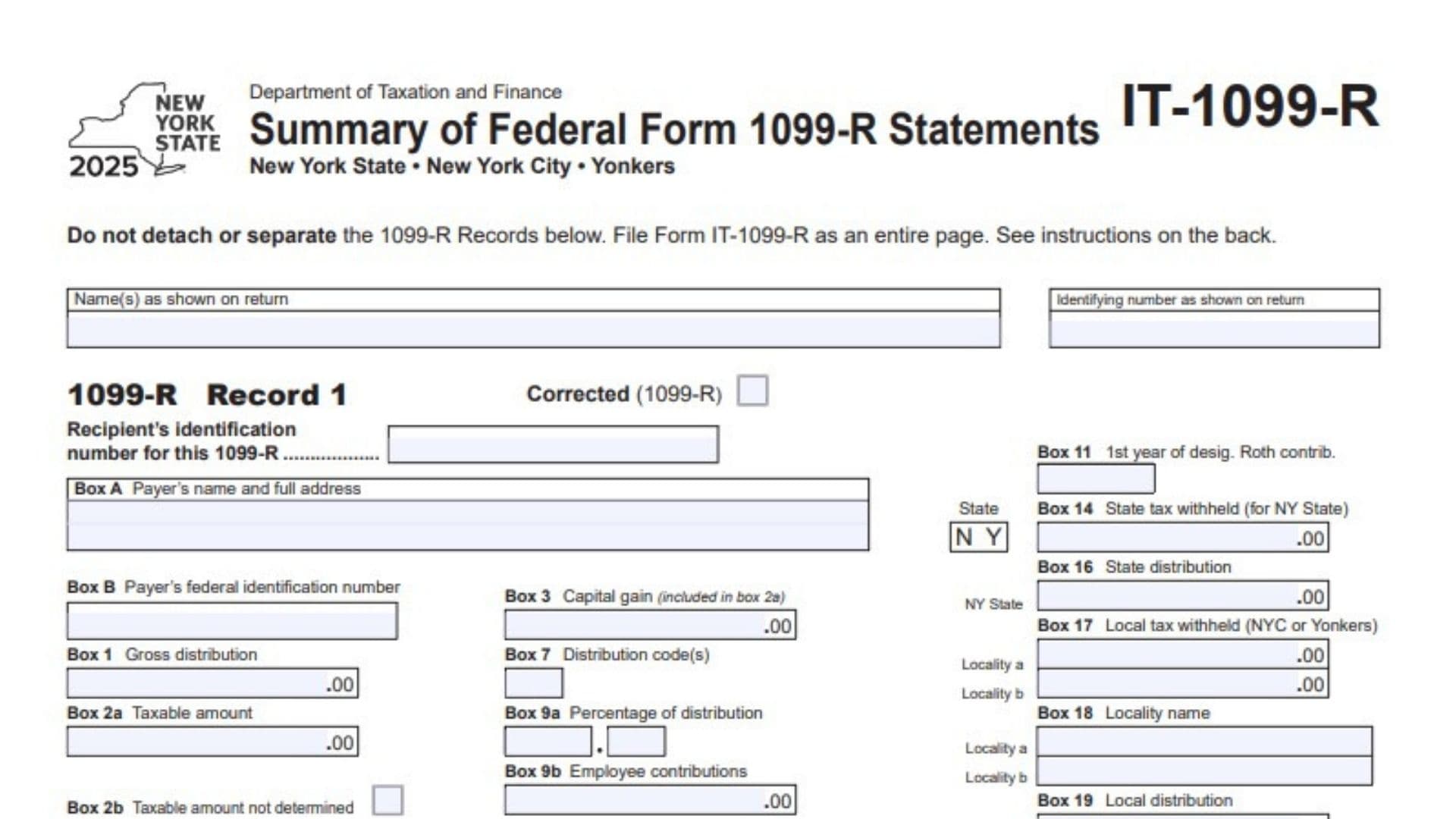
Form IT-1099-R, officially titled Summary of Federal Form 1099-R Statements, is a New York State tax form used to report information from federal Form 1099-R statements that show New York State, New York City, or Yonkers income tax withholding. Federal Form 1099-R generally reports distributions from pensions, annuities, retirement plans, individual retirement arrangements, and other applicable retirement-related arrangements. New York requires certain taxpayers to transfer relevant information from these federal statements onto Form IT-1099-R when filing a state income tax return. The form collects details about the recipient, payer, gross distribution, taxable amount, distribution codes, capital gains, employee contributions, state tax withheld, local tax withheld, and state or local distribution amounts. It also provides space to report information from multiple federal Form 1099-R statements. Each federal statement must be entered separately so that the withholding amounts can be accurately identified and transferred to the appropriate New York State income tax return. Individuals, married couples filing jointly, and estates or trusts may need to complete this form depending on their filing circumstances and the number of applicable federal 1099-R statements received. Completing Form IT-1099-R correctly is important because the reported New York State, New York City, and Yonkers tax withholding amounts must agree with the corresponding federal statements. These amounts are transferred to specific lines of Form IT-201, Form IT-203, or Form IT-205. The form also requires taxpayers to follow whole-dollar rounding rules and submit the complete page without detaching individual 1099-R records.
How To File Form IT-1099-R
Form IT-1099-R must be submitted with the applicable New York State income tax return. It is a supporting form used to report federal retirement and distribution statements showing New York State or local tax withholding.
Attach the completed form to one of the following:
- Form IT-201: New York State Resident Income Tax Return.
- Form IT-203: New York State Nonresident and Part-Year Resident Income Tax Return.
- Form IT-205: New York State Fiduciary Income Tax Return.
Who Must File Form IT-1099-R?
You must complete Form IT-1099-R if both of the following conditions apply:
- You are required to file a New York State income tax return.
- You received one or more federal Form 1099-R statements showing New York State, New York City, or Yonkers tax withholding.
If you received multiple qualifying federal 1099-R statements, you must report each statement separately.
Information To Prepare Before Completing The Form
Gather the following information before starting:
- Your name as shown on your New York State income tax return.
- Your complete nine-digit Social Security number (SSN) or employer identification number (EIN), as applicable.
- Your spouse’s name and Social Security number, if filing jointly.
- Each federal Form 1099-R received during the tax year.
- The recipient’s identification number shown on each federal statement.
- The payer’s name, address, and federal identification number.
- Gross distribution and taxable distribution amounts.
- Capital gain information, if applicable.
- Distribution codes and other applicable retirement distribution details.
- Employee contribution information, if reported.
- New York State income tax withheld.
- New York City or Yonkers local tax withheld.
- New York State distribution amounts.
- Local distribution amounts and locality names.
- Corrected federal Form 1099-R statements, if applicable.
Important Filing Rules
One Record for Each Federal Form 1099-R
Complete a separate 1099-R Record section for every federal Form 1099-R that reports New York State, New York City, or Yonkers withholding.
The form provides three record sections. If you have more than three qualifying statements, complete additional Form IT-1099-R pages.
Married Couples Filing Jointly
If you are married and filing a joint return, complete one separate 1099-R Record for every federal Form 1099-R received by you and another separate record for every applicable statement received by your spouse.
Estates and Trusts
Estates and trusts must complete one 1099-R Record for each federal Form 1099-R received.
Corrected Federal Statements
If you receive a corrected federal Form 1099-R, complete a separate record for that corrected statement and mark the Corrected (1099-R) checkbox.
Whole-Dollar Reporting
Enter whole-dollar amounts only. Do not include cents.
Follow these rounding rules:
- Drop amounts below 50 cents.
- Round amounts from 50 cents through 99 cents up to the next whole dollar.
Examples:
- $1.39 becomes $1.
- $2.50 becomes $3.
Do Not Detach Individual Records
Submit Form IT-1099-R as a complete page. Do not detach or separate the individual 1099-R records.
Paper filers should not submit copies of their federal Form 1099-R statements with the New York return. Keep those documents with your personal tax records.

How To Complete Form IT-1099-R
Form IT-1099-R contains an identification section and three separate 1099-R Record sections. Each record follows the same structure and corresponds to one federal Form 1099-R statement.
Complete the general identification section first, then enter the information from each applicable federal statement into its own record.
Taxpayer Identification Information
The top section identifies the taxpayer or entity submitting the form.
Name(s) as Shown on Return
Enter your name exactly as it appears on your New York State income tax return.
If you are married and filing jointly, enter both spouses’ names as shown on the return.
Identifying Number as Shown on Return
Enter the complete nine-digit Social Security number or employer identification number reported on your New York State income tax return.
If filing jointly, enter the Social Security number of the spouse listed first on the income tax return.
For an estate or trust, enter the applicable employer identification number.
1099-R Record 1: First Federal Distribution Statement
Record 1 is used to report information from your first qualifying federal Form 1099-R statement.
Transfer the information directly from the corresponding federal statement into the matching fields.
Corrected (1099-R) Checkbox
Mark an X in this box if the federal Form 1099-R you received is identified as a corrected statement.
Leave the box unmarked if the statement is not corrected.
Recipient’s Identification Number for This 1099-R
Enter the identification number associated with the recipient on the federal Form 1099-R.
Depending on the recipient, this may be:
- Your Social Security number.
- Your spouse’s Social Security number.
- The estate’s or trust’s employer identification number.
Use the identification number shown on the corresponding federal statement.
Box A: Payer’s Name and Full Address
Enter the name and complete mailing address of the organization or individual that issued the federal Form 1099-R.
Copy the payer’s information as it appears on the federal statement.
Box B: Payer’s Federal Identification Number
Enter the payer’s federal identification number exactly as shown on the corresponding federal Form 1099-R.
Do not enter your own Social Security number in this field.
Box 1: Gross Distribution
Enter the gross distribution amount reported in Box 1 of federal Form 1099-R.
This represents the total distribution amount reported by the payer before distinguishing the taxable and nontaxable portions.
Round the amount to the nearest whole dollar using the required rounding rules.
Box 2a: Taxable Amount
Enter the taxable amount reported in Box 2a of federal Form 1099-R.
This is the portion of the distribution identified as taxable on the federal statement.
If the taxable amount differs from the gross distribution, report the two amounts in their respective fields.
Box 2b: Taxable Amount Not Determined
Mark an X in this checkbox if the corresponding Box 2b on federal Form 1099-R indicates that the taxable amount was not determined.
This checkbox communicates the status of the taxable distribution information.
Do not enter a dollar amount in this field.
Total Distribution Checkbox
Mark an X in the Total Distribution checkbox if the corresponding total distribution box is marked on federal Form 1099-R.
Transfer the checkbox information accurately rather than estimating whether the payment represents a complete distribution.
Box C: Account Number
Enter the account number shown in the account number field of federal Form 1099-R.
This helps identify the specific account associated with the reported distribution.
If no account number is provided, follow the applicable form instructions rather than inventing one.
Box 3: Capital Gain Included in Box 2a
Enter the capital gain amount reported in Box 3 of federal Form 1099-R.
This amount is included in the taxable amount reported in Box 2a.
Use the amount shown on the federal statement and apply the whole-dollar rounding rules.
Box 7: Distribution Code(s)
Enter the distribution code or codes reported in Box 7 of federal Form 1099-R.
These codes identify the type or circumstances of the distribution.
Copy the codes exactly as printed, including multiple codes when the federal statement contains more than one.
Box 9a: Percentage of Distribution
Enter the percentage reported in Box 9a of federal Form 1099-R.
This field is used to report the applicable percentage of the distribution as shown on the federal statement.
Box 9b: Employee Contributions
Enter the employee contributions amount reported in Box 9b of federal Form 1099-R.
Transfer the amount exactly as shown, applying the required whole-dollar rounding rules.
Box 10: Amount Allocable to IRR Within 5 Years
Enter the amount reported in Box 10 of federal Form 1099-R.
The field identifies the amount allocable to IRR within five years. Use the corresponding federal statement and do not substitute an amount from another box.
Box 11: First Year of Designated Roth Contribution
Enter the first year of designated Roth contributions reported in Box 11 of federal Form 1099-R.
Copy the applicable year from the original statement.
Box 14: State Tax Withheld for New York State
Enter the New York State income tax withheld amount reported in Box 14 of federal Form 1099-R.
This amount is used when determining the total New York State withholding to transfer to your main income tax return.
Box 16: State Distribution
Enter the state distribution amount reported in Box 16 of federal Form 1099-R for New York State.
Use the amount shown on the corresponding federal statement.
Box 17: Local Tax Withheld for New York City or Yonkers
Enter the local income tax withheld amounts reported in Box 17 of federal Form 1099-R.
The form provides two separate entries:
- Locality A: Enter the applicable local tax withheld amount for the first locality.
- Locality B: Enter the applicable local tax withheld amount for the second locality, if reported.
These amounts are used to identify local tax withholding for New York City or Yonkers.
Keep the amounts associated with their correct localities.
Box 18: Locality Name
Enter the locality names associated with the local tax withholding reported in Box 17.
The form provides two separate spaces:
- Locality A: Enter the first applicable locality name.
- Locality B: Enter the second applicable locality name, if applicable.
Use the locality names shown on the corresponding federal Form 1099-R.
Box 19: Local Distribution
Enter the local distribution amounts reported in Box 19 of federal Form 1099-R.
The form provides two separate entries:
- Locality A: Enter the distribution amount associated with the first locality.
- Locality B: Enter the distribution amount associated with the second locality, if applicable.
Ensure that the amounts correspond to the locality names entered in Box 18.
1099-R Record 2: Second Federal Distribution Statement
Record 2 is used when you have a second qualifying federal Form 1099-R statement.
Complete this record independently using the information from the second federal statement.
Corrected (1099-R) Checkbox
Mark an X if the second federal Form 1099-R is identified as corrected.
Recipient’s Identification Number for This 1099-R
Enter the recipient’s Social Security number or the applicable employer identification number shown on the second federal statement.
Box A: Payer’s Name and Full Address
Enter the second payer’s complete name and address.
Box B: Payer’s Federal Identification Number
Enter the federal identification number of the second payer.
Box 1: Gross Distribution
Enter the total gross distribution amount from Box 1 of the second federal statement.
Box 2a: Taxable Amount
Enter the taxable distribution amount reported in Box 2a.
Box 2b: Taxable Amount Not Determined
Mark the checkbox if the second federal statement indicates that the taxable amount was not determined.
Total Distribution Checkbox
Mark this checkbox if the Total Distribution box is marked on the second federal statement.
Box C: Account Number
Enter the account number associated with the second federal distribution.
Box 3: Capital Gain Included in Box 2a
Enter the capital gain amount reported in Box 3.
Box 7: Distribution Code(s)
Copy the distribution code or codes shown in Box 7.
Box 9a: Percentage of Distribution
Enter the percentage reported in Box 9a.
Box 9b: Employee Contributions
Enter the employee contribution amount shown in Box 9b.
Box 10: Amount Allocable to IRR Within 5 Years
Enter the amount reported in Box 10.
Box 11: First Year of Designated Roth Contribution
Enter the applicable year shown in Box 11.
Box 14: State Tax Withheld for New York State
Enter the New York State income tax withheld amount from the second federal statement.
Box 16: State Distribution
Enter the New York State distribution amount reported in Box 16.
Box 17: Local Tax Withheld for New York City or Yonkers
Enter the applicable local withholding amounts for Locality A and Locality B, where reported.
Box 18: Locality Name
Enter the locality names corresponding to the local withholding amounts in Box 17.
Box 19: Local Distribution
Enter the local distribution amounts associated with Locality A and Locality B.
1099-R Record 3: Third Federal Distribution Statement
Record 3 is used for a third qualifying federal Form 1099-R statement.
The same reporting rules apply as for Records 1 and 2. Use the third federal statement as the source for every applicable entry.
Corrected (1099-R) Checkbox
Mark an X if the third federal Form 1099-R is a corrected statement.
Recipient’s Identification Number for This 1099-R
Enter the recipient’s identification number shown on the third federal statement.
Box A: Payer’s Name and Full Address
Enter the payer’s name and complete address.
Box B: Payer’s Federal Identification Number
Enter the payer’s federal identification number.
Box 1: Gross Distribution
Enter the gross distribution amount from the third federal statement.
Box 2a: Taxable Amount
Enter the taxable amount reported in Box 2a.
Box 2b: Taxable Amount Not Determined
Mark the checkbox if the corresponding federal statement indicates that the taxable amount was not determined.
Total Distribution Checkbox
Mark this box if the Total Distribution box is marked on the third federal Form 1099-R.
Box C: Account Number
Enter the account number associated with the third distribution.
Box 3: Capital Gain Included in Box 2a
Enter the capital gain amount shown in Box 3.
Box 7: Distribution Code(s)
Enter the distribution code or codes reported on the third federal statement.
Box 9a: Percentage of Distribution
Enter the percentage shown in Box 9a.
Box 9b: Employee Contributions
Enter the employee contribution amount reported in Box 9b.
Box 10: Amount Allocable to IRR Within 5 Years
Enter the applicable amount reported in Box 10.
Box 11: First Year of Designated Roth Contribution
Enter the year reported in Box 11.
Box 14: State Tax Withheld for New York State
Enter the New York State income tax withheld amount.
Box 16: State Distribution
Enter the New York State distribution amount.
Box 17: Local Tax Withheld for New York City or Yonkers
Enter the local tax withholding amounts for Locality A and Locality B, where applicable.
Box 18: Locality Name
Enter the corresponding locality names for the amounts reported in Box 17.
Box 19: Local Distribution
Enter the local distribution amounts for each applicable locality.
Transferring Tax Withholding to Your New York State Income Tax Return
After completing all applicable 1099-R records, total the relevant withholding amounts from every record.
The form requires New York State, New York City, and Yonkers withholding to be transferred separately to the appropriate lines of your main income tax return.
New York State Tax Withheld
Add the amounts entered in Box 14 across all completed 1099-R records.
Transfer the total to the appropriate line:
- Form IT-201: Line 72.
- Form IT-203: Line 62.
- Form IT-205: Line 34.
New York City Tax Withheld
Add the New York City tax withholding amounts reported in Box 17 across all applicable 1099-R records.
Transfer the total to:
- Form IT-201: Line 73.
- Form IT-203: Line 63.
- Form IT-205: Line 35.
Make sure you include only the New York City withholding amounts in this calculation.
Yonkers Tax Withheld
Add the Yonkers tax withholding amounts reported in Box 17 across all applicable 1099-R records.
Transfer the total to:
- Form IT-201: Line 74.
- Form IT-203: Line 64.
- Form IT-205: Line 36.
Keep the Yonkers withholding separate from New York State and New York City withholding.
Additional Form IT-1099-R Pages
The standard Form IT-1099-R provides three separate 1099-R Record sections.
If you received more than three qualifying federal Form 1099-R statements, additional pages must be completed.
Additional 1099-R Records
Use another Form IT-1099-R for each additional federal Form 1099-R that shows New York State, New York City, or Yonkers withholding.
Complete a separate record for each federal statement rather than combining multiple statements into one record.
Paper Filing Requirements
When filing a paper return:
- Do not submit the original federal Form 1099-R statements.
- Keep your federal statements for your personal records.
- Do not detach or separate the individual records on Form IT-1099-R.
- Submit additional Form IT-1099-R pages when necessary.
- File each completed IT-1099-R page as part of your New York State income tax return.
Final Review Before Filing
Before submitting Form IT-1099-R with your New York State income tax return, review the following checklist to make sure all records and withholding amounts are complete.
Taxpayer Identification
- Your name matches your New York State income tax return.
- Your complete nine-digit SSN or EIN is entered correctly.
- Both spouses’ names are included if filing jointly.
- The correct first-listed spouse’s SSN is entered for a joint return.
Federal 1099-R Statements
- Every qualifying federal Form 1099-R has its own separate record.
- The recipient’s identification number is correct for each statement.
- Payer names and addresses match the federal statements.
- Payer federal identification numbers are entered correctly.
- Corrected federal statements are identified using the appropriate checkbox.
- Gross distributions are reported correctly in Box 1.
- Taxable amounts are reported correctly in Box 2a.
- Box 2b is marked when the federal statement indicates that the taxable amount was not determined.
- The Total Distribution checkbox is marked when applicable.
- Account numbers are entered in Box C where provided.
- Capital gains are reported in Box 3.
- Distribution codes are copied correctly into Box 7.
- Box 9a percentages and Box 9b employee contributions are entered correctly.
- Box 10 amounts are reported correctly.
- Box 11 contains the applicable designated Roth contribution year.
State and Local Tax Information
- New York State withholding amounts are reported in Box 14.
- New York State distribution amounts are entered in Box 16.
- New York City or Yonkers withholding amounts are reported in Box 17.
- Locality names are entered in Box 18.
- Local distribution amounts are entered in Box 19.
- Locality A and Locality B amounts are associated with the correct locality names.
Withholding Transfers
- Total New York State withholding is transferred to the correct line of Form IT-201, IT-203, or IT-205.
- Total New York City withholding is transferred to the correct line.
- Total Yonkers withholding is transferred to the correct line.
- The withholding totals agree with the amounts reported across all completed 1099-R records.
Final Submission
- All amounts are rounded to whole dollars.
- The correct rounding rules have been applied.
- Additional IT-1099-R pages are included if more than three qualifying statements were received.
- Individual records have not been detached or separated.
- Federal Form 1099-R statements are retained for your records rather than submitted with a paper return.
- The complete Form IT-1099-R is attached to Form IT-201, IT-203, or IT-205, as applicable.
Final Reminder: Form IT-1099-R is used to report information from federal Form 1099-R statements that show New York State, New York City, or Yonkers tax withholding. The most important steps are to complete a separate record for each qualifying federal statement, accurately transfer the state and local withholding amounts, apply the correct whole-dollar rounding rules, and submit the entire form with your New York State income tax return.