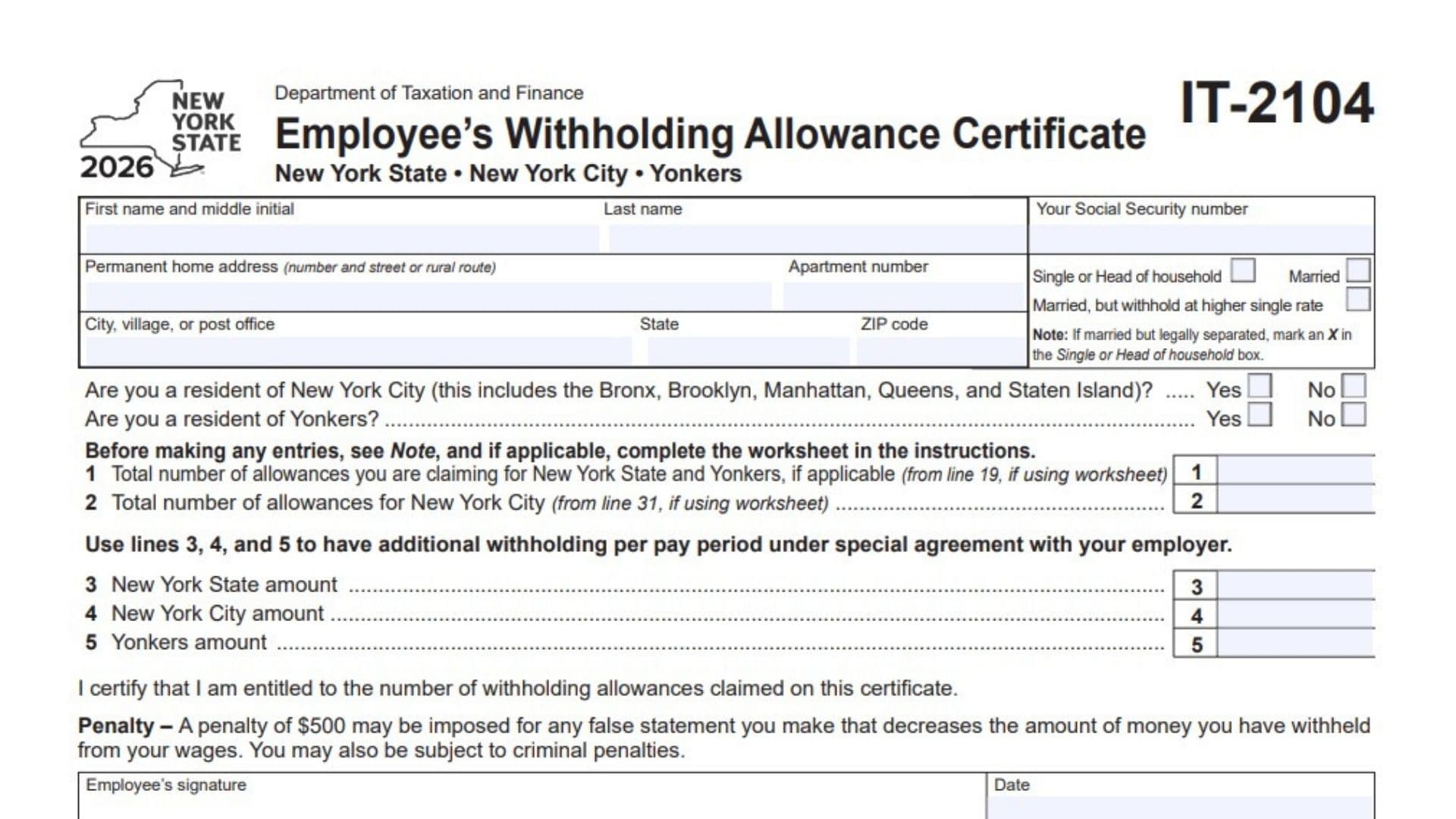
New York Form IT-2104, officially called the Employee’s Withholding Allowance Certificate, is a tax form issued by the New York State Department of Taxation and Finance. Employees use this form to tell their employers how much New York State, New York City, and Yonkers income tax should be withheld from their wages. It collects personal identification details, residential information, marital status, and the number of withholding allowances an employee is claiming. It also allows employees to request additional tax withholding from each paycheck when they have made an agreement with their employer. The information provided helps employers calculate the appropriate state and local income tax withholding throughout the year. The form is relevant to employees whose wages are subject to New York State income tax withholding, including applicable New York City and Yonkers taxes. Employees must provide accurate information because claiming an incorrect number of allowances can result in insufficient tax withholding. The certificate also contains a section for employers to report certain new-hire information and identify circumstances that require an additional copy to be sent to the New York State Department of Taxation and Finance. Completing the form correctly helps ensure that payroll withholding reflects the employee’s circumstances and applicable withholding preferences.
Who Needs To Complete Form IT-2104?
Form IT-2104 is intended for employees who need to provide or update their New York State income tax withholding information with their employer.
You may need to complete this form if:
- You are starting a new job in New York.
- You are returning to employment with an employer.
- You want to update your withholding allowances.
- Your marital status has changed.
- Your New York City or Yonkers residency status has changed.
- You want additional New York income tax withheld from each paycheck.
- Your existing withholding information needs to be reviewed or corrected.
Employees who are single, have one job, and have zero dependents may generally enter zero on Lines 1 and 2, as applicable.
Married taxpayers, heads of household, employees with dependents, and individuals expecting to itemize deductions or claim tax credits should complete the applicable worksheet in the separate instructions.
How To File Form IT-2104
Form IT-2104 is generally given directly to your employer rather than submitted independently as an annual income tax return.
Where To Submit Form IT-2104
Employees should:
- Complete the employee section of Form IT-2104.
- Review all personal information and withholding selections.
- Sign and date the certificate.
- Give the completed form to their employer.
- Keep a copy for their personal records.
The employer uses the information to determine the appropriate payroll withholding.
Employers must retain the completed certificate with their records. If certain conditions apply, the employer must complete the relevant employer information, mark the appropriate boxes, and send an additional copy to the New York State Department of Taxation and Finance.
Information To Prepare Before Completing The Form
Gather the following information before starting:
- Your legal first and last name.
- Your Social Security number.
- Your permanent home address.
- Your apartment number, if applicable.
- Your city, state, and ZIP code.
- Your marital or filing status.
- Your New York City residency status.
- Your Yonkers residency status.
- Information needed to calculate your withholding allowances.
- Any additional withholding amount agreed upon with your employer.
If you need to complete the withholding worksheet, also prepare the relevant information about your dependents, expected deductions, and tax credits.
Important Note About The Withholding Worksheet
The form directs certain taxpayers to complete a separate worksheet before entering their withholding allowances.
The worksheet provides the calculations used for:
- Line 1: New York State and Yonkers withholding allowances.
- Line 2: New York City withholding allowances.
The applicable worksheet is included in the separate IT-2104 instructions. The form identifies Line 19 of the worksheet as the source for Line 1 and Line 31 as the source for Line 2.

How To Complete Form IT-2104
The 2026 Form IT-2104 contains an employee information section, withholding allowance entries, additional withholding fields, a certification section, and an employer information section.
Complete the employee portion first. The employer should handle the employer-specific portion.
Employee Personal Information
First Name And Middle Initial
Enter your legal first name and middle initial in the designated fields.
Use the same name information associated with your employment and tax records.
Last Name
Enter your complete legal last name.
Make sure it is spelled correctly and matches your official identification and payroll records.
Your Social Security Number
Enter your Social Security number in the space provided.
Check every digit carefully because the number is used to identify your tax and payroll records.
Permanent Home Address
Enter your permanent residential address, including the house or building number and street name.
If you live on a rural route, enter the applicable rural route address.
Do not enter your employer’s business address in this field.
Apartment Number
If your residence is an apartment or other unit within a building, enter the apartment number here.
If you do not have an apartment number, leave this field blank.
City, Village, Or Post Office
Enter the name of the city, village, or post office associated with your permanent home address.
State
Enter the two-letter postal abbreviation for the state where you permanently reside.
ZIP Code
Enter the ZIP code associated with your permanent home address.
Verify that the ZIP code matches your residential mailing address.
Marital And Filing Status
Select the checkbox that best describes your marital or filing status.
The form provides three options.
Single Or Head Of Household
Check this box if you are single or qualify to use head-of-household status.
The form also instructs employees who are married but legally separated to select this option.
Married
Check this box if you are married and want withholding calculated using the married selection.
Married, But Withhold At Higher Single Rate
Select this option if you are married but want your employer to calculate withholding using the higher single withholding rate.
This selection changes the withholding calculation used for your paycheck.
Important: Select only the status that accurately reflects your circumstances and withholding preference.
New York City And Yonkers Residency Questions
These questions determine whether New York City or Yonkers local income tax withholding applies to your wages.
Are You A Resident Of New York City?
Indicate whether you are a resident of New York City.
The form specifically includes all five boroughs:
- The Bronx.
- Brooklyn.
- Manhattan.
- Queens.
- Staten Island.
Select:
- Yes: If you are a New York City resident.
- No: If you are not a New York City resident.
Your answer helps determine whether New York City income tax withholding applies.
Are You A Resident Of Yonkers?
Indicate whether you are a resident of Yonkers.
Select:
- Yes: If you are a Yonkers resident.
- No: If you are not a Yonkers resident.
This information helps determine whether Yonkers income tax withholding applies.
Withholding Allowances And Additional Withholding
Before entering Lines 1 through 5, review the note printed on the form.
If you are a single taxpayer with one job and zero dependents, the form instructs you to enter zero on Lines 1 and 2, when applicable.
Married taxpayers, including those with or without dependents, heads of household, and taxpayers expecting to itemize deductions or claim tax credits should complete the separate worksheet in the IT-2104 instructions.
Line 1: Total New York State And Yonkers Withholding Allowances
Enter the total number of withholding allowances you are claiming for New York State and Yonkers, if applicable.
If you complete the withholding worksheet, transfer the result from Line 19 of that worksheet.
If you are a single taxpayer with one job and zero dependents, enter zero as directed by the form.
Use the result of the applicable worksheet rather than estimating the number of allowances.
Line 2: Total New York City Withholding Allowances
Enter the total number of withholding allowances you are claiming for New York City.
If you complete the withholding worksheet, transfer the amount from Line 31 of that worksheet.
If you are a single taxpayer with one job and zero dependents, enter zero when applicable.
This line is used to determine the New York City portion of your paycheck withholding.
Line 3: Additional New York State Withholding
Enter the additional amount of New York State income tax you want your employer to withhold from each pay period.
This line is intended for employees who have made a special agreement with their employer for additional withholding.
For example, if you and your employer agree that an additional amount should be withheld from every paycheck, enter that amount here.
Do not enter your annual tax liability. The amount should represent the additional withholding for each pay period.
Line 4: Additional New York City Withholding
Enter the additional amount of New York City income tax you want withheld from each pay period.
Use this field if you have made an agreement with your employer to withhold an additional amount for New York City income tax.
This is separate from the additional New York State withholding entered on Line 3.
Line 5: Additional Yonkers Withholding
Enter the additional amount of Yonkers income tax you want your employer to withhold from each pay period.
Use this field when you have agreed with your employer to increase the withholding for Yonkers income tax.
Keep the three additional withholding amounts separate:
- Line 3 is for New York State.
- Line 4 is for New York City.
- Line 5 is for Yonkers.
These entries allow employees to request additional withholding beyond the amounts calculated using their withholding allowances.
Employee Certification And Signature
After completing the personal information and withholding sections, review the certification statement and sign the form.
Employee Certification
By signing the certificate, you confirm that you are entitled to claim the number of withholding allowances entered on the form.
Before signing, verify that the allowances reported on Lines 1 and 2 are supported by your circumstances and any required worksheet calculations.
Employee’s Signature
Sign your name in the designated signature field.
Your signature confirms that the information provided on the certificate is accurate to the best of your knowledge.
Date
Enter the date you signed the form.
Use the date of actual completion and signing.
Penalty For False Statements
The form warns that a $500 penalty may be imposed for making a false statement that reduces the amount of income tax withheld from your wages.
You may also be subject to criminal penalties.
Therefore, review the withholding allowances and other information carefully before signing.
Employee Filing Instructions
After signing the form, give it to your employer.
Keep a copy for your own records.
The form also recommends reviewing your withholding information once each year and updating it whenever necessary.
This is important if your marital status, residency, income circumstances, or withholding preferences change.
Employer Instructions For Form IT-2104
The lower portion of Form IT-2104 is reserved for employer use.
Employers must retain the completed certificate with their records.
If either of the specified conditions applies, the employer must mark the corresponding checkbox, complete the requested additional information, and send an additional copy of the form to the New York State Department of Taxation and Finance.
Employer Reporting Requirements
Box A: Employee Claimed More Than 14 New York State Exemption Allowances
Check Box A if the employee claims more than 14 withholding allowances for New York State.
This checkbox identifies an employee whose claimed New York State allowances exceed the threshold specified on the form.
When this condition applies:
- Mark Box A.
- Complete the applicable employer information.
- Send an additional copy of Form IT-2104 to the New York State Department of Taxation and Finance.
Box B: Employee Is A New Hire Or Rehire
Check Box B if the employee is newly hired or has been rehired.
This section helps identify employees who must be reported under New York’s new-hire reporting requirements.
When Box B applies, the employer must also complete the additional date field.
First Date Employee Performed Services For Pay
Enter the first date on which the employee performed services for pay.
Use the month-day-year format specified on the form:
MMDDYYYY
For example, if the employee first performed paid services on March 15, 2026, enter:
03152026
Use the actual first date of paid services rather than an estimated future date.
New-Hire Reporting Through The Online System
The form allows employers to report new-hire information online instead of mailing the form to New York State.
The designated reporting website is:
www.nynewhire.com/#/login
Employers can use this online reporting option for applicable new-hire information.
Important Independent Contractor Reporting Note
The form includes a separate instruction for independent contractor arrangements.
Employers must report individuals working under an independent contractor arrangement when the contract exceeds $2,500.
This reporting must be completed through the designated online new-hire reporting website rather than through Form IT-2104.
Do not use the employee withholding certificate as a substitute for the required independent contractor reporting.
Dependent Health Insurance Information
Are Dependent Health Insurance Benefits Available For This Employee?
The employer must indicate whether dependent health insurance benefits are available to the employee.
Select the appropriate checkbox:
- Yes: If dependent health insurance benefits are available.
- No: If dependent health insurance benefits are not available.
This question concerns the availability of dependent health insurance benefits, not whether the employee has already enrolled dependents in coverage.
Date The Employee Qualifies
If the answer to the dependent health insurance question is Yes, enter the date the employee qualifies for those benefits.
Use the required month-day-year format:
MMDDYYYY
Enter the applicable eligibility date rather than the date the form is completed.
Employer Identification Information
Employer’s Name And Address
Enter the employer’s legal name and business address in the designated field.
The form specifically states that the employer should complete this section only when sending a copy of Form IT-2104 to the New York State Tax Department.
If no additional copy is being submitted to the department, this section does not need to be completed for that purpose.
Employer Identification Number
Enter the employer’s federal Employer Identification Number (EIN).
Use the EIN associated with the employer’s business or organization.
As with the employer name and address, this field is intended for situations in which the employer is sending a copy of the certificate to the New York State Tax Department.
Employer Recordkeeping Responsibilities
Employers must retain the completed withholding allowance certificate with their payroll records.
When an employee claims more than 14 New York State withholding allowances or is a new hire or rehire, the employer must follow the additional reporting instructions on the form.
Employers should also ensure that applicable dependent health insurance information and new-hire dates are completed accurately.
Important Notes About Form IT-2104
Review Your Withholding Information Annually
The form specifically recommends reviewing your withholding certificate once each year.
Employees should also consider submitting an updated certificate when relevant personal or financial circumstances change.
Understand The Difference Between Withholding Allowances And Additional Withholding
Lines 1 and 2 report the number of withholding allowances used to calculate applicable tax withholding.
Lines 3, 4, and 5 allow employees to request additional withholding amounts per pay period through a special agreement with their employer.
These are separate parts of the certificate and should not be confused.
Complete The Worksheet When Required
Not every employee should enter withholding allowances without completing the worksheet.
The form directs married taxpayers, heads of household, employees with dependents, and taxpayers expecting to itemize deductions or claim tax credits to complete the applicable worksheet in the separate instructions.
The worksheet results are transferred to Lines 1 and 2.
Keep A Copy Of The Completed Certificate
Employees should retain a copy of the signed certificate after giving it to their employer.
Employers should also keep the completed certificate in their records.
This helps both parties verify the withholding information if questions arise later.
Final Review Before Filing
Before giving Form IT-2104 to your employer, review the following checklist to make sure every applicable field has been completed correctly.
Employee Information Checklist
- First name and middle initial are entered correctly.
- Last name matches your official records.
- Social Security number is accurate.
- Permanent home address is complete.
- Apartment number is entered, if applicable.
- City, village, or post office is correct.
- State abbreviation is correct.
- ZIP code is accurate.
Marital Status And Residency Checklist
- The correct marital or filing status box is selected.
- Married but legally separated taxpayers have selected Single or Head of household, as instructed.
- New York City residency status is answered correctly.
- Yonkers residency status is answered correctly.
- The correct borough or residential circumstances have been considered when determining New York City residency.
Withholding Allowance Checklist
- Line 1 contains the correct New York State and Yonkers withholding allowances.
- Line 2 contains the correct New York City withholding allowances.
- The worksheet has been completed if required.
- Line 1 matches Line 19 of the worksheet, if applicable.
- Line 2 matches Line 31 of the worksheet, if applicable.
- Single taxpayers with one job and zero dependents have followed the instruction to enter zero where applicable.
- Line 3 contains the agreed additional New York State withholding amount, if applicable.
- Line 4 contains the agreed additional New York City withholding amount, if applicable.
- Line 5 contains the agreed additional Yonkers withholding amount, if applicable.
Signature Checklist
- The certification statement has been reviewed.
- The employee’s signature is provided.
- The correct signing date is entered.
- All information is accurate before submission.
Employer Checklist
- The employer retains a copy of the completed certificate.
- Box A is marked if the employee claims more than 14 New York State withholding allowances.
- Box B is marked if the employee is a new hire or rehire.
- The first date the employee performed services for pay is entered when applicable.
- Applicable new-hire information is reported through the designated reporting method.
- Independent contractor arrangements exceeding $2,500 are reported through the online reporting system rather than Form IT-2104.
- Dependent health insurance availability is indicated.
- The employee’s eligibility date is entered when applicable.
- Employer name, address, and EIN are completed when sending a copy to the New York State Tax Department.
- An additional copy is sent to the department when required.
Final Reminder: Form IT-2104 is an employee withholding certificate, not an annual New York income tax return. Employees should submit the completed and signed form to their employer and retain a copy. Employers should use the information to administer payroll withholding, maintain the required records, and complete additional state reporting when applicable.