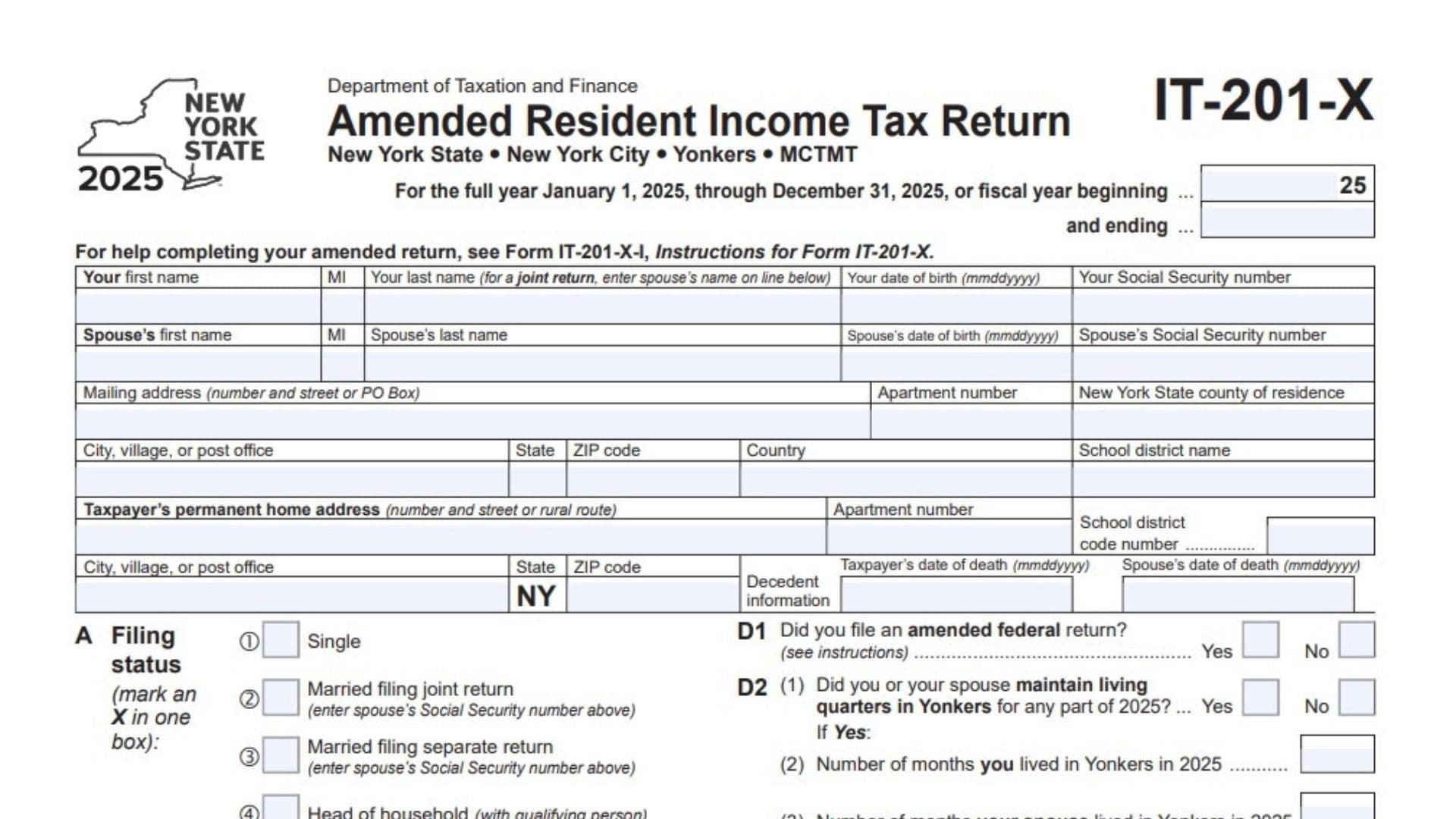
New York Form IT-201-X, officially titled Amended Resident Income Tax Return, is a tax document issued by the New York State Department of Taxation and Finance for individuals who need to correct or update a previously filed New York State resident income tax return. The 2025 version covers New York State income tax, New York City income tax, Yonkers taxes and surcharges, and the Metropolitan Commuter Transportation Mobility Tax (MCTMT). It is designed for taxpayers who need to report changes to previously submitted income, federal adjustments, New York additions and subtractions, deductions, exemptions, tax calculations, credits, withholding, estimated payments, or other information affecting their original state income tax return. The form covers the full tax year from January 1, 2025, through December 31, 2025, and also provides spaces for taxpayers filing on a fiscal-year basis to enter their applicable beginning and ending dates. Form IT-201-X collects personal and spouse information, filing status, residential addresses, county and school district details, dependent information, federal income, New York-specific income adjustments, taxable income, state and local taxes, refundable credits, payment history, refund calculations, and outstanding tax liabilities. It also includes a dedicated section explaining why the original return is being amended, with categories covering federal audit changes, worthless securities, wages, military matters, court rulings, workers’ compensation, credit claims, protective claims, net operating losses, and other adjustments. Taxpayers who are correcting information resulting from a federal audit must provide additional information about the federal determination, the changes made, corrected federal taxable income, disallowed credits, and assessed penalties. The amended return also includes sections for third-party authorization, paid preparer information, taxpayer signatures, and electronic refund or payment account details. Completing Form IT-201-X accurately is important because changes to federal income, New York additions, deductions, credits, withholding, or previous payments can affect the final state tax liability, refund amount, or balance due. The form must be completed using the corrected information applicable to the tax year being amended, with supporting schedules and documents provided wherever required by the associated instructions.
Who Needs To File Form IT-201-X?
Form IT-201-X is intended for individuals who need to amend a previously filed New York State resident income tax return.
The form covers several categories of taxpayers and tax-related circumstances.
New York State Residents
Individuals who filed a New York resident income tax return and subsequently need to correct information may use Form IT-201-X.
Corrections can involve income, deductions, exemptions, tax calculations, credits, withholding, payments, or other information affecting the original return.
Married Taxpayers
Married taxpayers filing jointly or separately can use the applicable filing status section to identify their amended return.
For joint returns, the form provides separate identifying information and signature fields for both spouses.
New York City Residents
The form includes specific sections for New York City income tax, household credits, resident tax calculations, school tax credits, and other applicable NYC tax adjustments.
Yonkers Residents And Nonresidents
Taxpayers with applicable Yonkers residency or employment circumstances can use the Yonkers sections to report resident income tax surcharges, nonresident earnings taxes, and part-year resident surcharges.
Taxpayers With MCTMT Obligations
The return includes separate calculations for MCTMT net earnings bases and tax amounts for Zone 1 and Zone 2.
Taxpayers Correcting Federal Or Other Tax Information
Form IT-201-X also provides specific amendment categories for taxpayers correcting information related to federal audits, income adjustments, tax credits, net operating losses, and other circumstances.
How To File Form IT-201-X
Form IT-201-X is the amended resident income tax return itself. It must be completed using the corrected information for the applicable tax year.
The form refers taxpayers to Form IT-201-X-I, Instructions for Form IT-201-X, for detailed filing guidance.
Where To Submit Form IT-201-X
The form instructs taxpayers to consult the accompanying Form IT-201-X-I instructions for the correct mailing address.
It does not print a mailing address directly on the six-page return.
Use the mailing instructions applicable to your filing circumstances rather than assuming that an address used for an original return is also appropriate for an amended return.
Documents And Information To Prepare
Before completing the amended return, gather the following information, where applicable:
- A copy of the original New York resident income tax return.
- Corrected federal income information.
- Federal amended return information, if applicable.
- W-2 and other income statements.
- Interest and dividend statements.
- Business income and expense records.
- Federal Schedule C.
- Federal Schedule D.
- Federal Form 4797.
- Federal Schedule E.
- Federal Schedule F.
- Information about federal adjustments to income.
- New York additions and subtractions.
- Form IT-225 information.
- Form IT-196, if using itemized deductions.
- Form IT-201-ATT, if claiming applicable additional credits or taxes.
- Form IT-360.1, if reporting applicable part-year NYC or Yonkers residency calculations.
- Form Y-203, if reporting Yonkers nonresident earnings tax.
- Original estimated tax payment records.
- Records of amounts paid with the original return.
- Previous New York State adjustments or overpayment information.
- Federal audit determination information, if applicable.
- Banking details for direct deposit or electronic funds withdrawal.
- Paid preparer identification information, if applicable.
Not every document is required for every amended return. Prepare the schedules that relate to the corrections being reported.

How To Complete Form IT-201-X
The 2025 Form IT-201-X contains six pages divided into personal information, federal income, New York income adjustments, deductions, tax calculations, payments, refunds, amendment reasons, and signature sections.
Follow the sections in order and use the applicable corrected amounts throughout the return.
Tax Year And Personal Identification Information
The first page establishes the tax period and identifies the taxpayer and spouse.
Tax Year: Full-Year Or Fiscal-Year Filing
The form is designed for the full year January 1, 2025, through December 31, 2025.
If you are filing for a fiscal year, enter the beginning and ending dates in the spaces provided.
The form includes the tax-year designation 2025.
Your First Name
Enter your first legal name.
MI
Enter your middle initial.
Your Last Name
Enter your complete last name.
For a joint return, the form provides a separate line below for the spouse’s name.
Your Date Of Birth
Enter your date of birth using the MMDDYYYY format.
For example, enter the month, day, and four-digit year in the designated order.
Your Social Security Number
Enter your Social Security number in the space provided.
Use the same identifying information associated with your New York income tax return.
Spouse Information
Complete this section when filing jointly or when the spouse information is applicable.
Spouse’s First Name
Enter your spouse’s first name.
Spouse’s MI
Enter your spouse’s middle initial.
Spouse’s Last Name
Enter your spouse’s last name.
Spouse’s Date Of Birth
Enter your spouse’s date of birth using MMDDYYYY format.
Spouse’s Social Security Number
Enter your spouse’s Social Security number.
Mailing Address
Mailing Address: Number And Street Or PO Box
Enter the mailing address where you receive tax correspondence.
You can provide a street address or a post office box.
Apartment Number
Enter your apartment or unit number, if applicable.
New York State County Of Residence
Enter the New York State county in which you reside.
City, Village, Or Post Office
Enter the name of your city, village, or post office location.
State
Enter the applicable state abbreviation.
ZIP Code
Enter your mailing ZIP code.
Country
Enter your country if your mailing address is outside the United States.
School District Name
Enter the name of your school district as requested on the form.
Taxpayer’s Permanent Home Address
This section collects the taxpayer’s permanent residential address.
Taxpayer’s Permanent Home Address: Number And Street Or Rural Route
Enter the street address or rural route associated with your permanent home.
Apartment Number
Enter the apartment or unit number, if applicable.
School District Code Number
Enter the school district code associated with your permanent home address.
City, Village, Or Post Office
Enter the city, village, or post office associated with the permanent home address.
State
Enter the state abbreviation.
ZIP Code
Provide the ZIP code for the permanent home address.
Decedent Information
The form includes two fields for death-related information.
Taxpayer’s Date Of Death
Enter the taxpayer’s date of death in MMDDYYYY format, if applicable.
Spouse’s Date Of Death
Enter the spouse’s date of death in MMDDYYYY format, if applicable.
These fields identify the applicable death information associated with the return.
Filing Status And Preliminary Questions
Page 1 contains filing status selections and questions about federal deductions, dependency, Yonkers residency, New York City residency, and special conditions.
Item A: Filing Status
Mark an X in one box to identify your filing status for the tax year.
Box 1: Single
Select this option if your filing status is single.
The form uses this status when calculating the applicable standard deduction.
Box 2: Married Filing Joint Return
Select this option if you are filing jointly with your spouse.
Enter your spouse’s Social Security number in the spouse information section.
Box 3: Married Filing Separate Return
Select this option if you are filing separately from your spouse.
Enter your spouse’s Social Security number in the designated field.
Box 4: Head Of Household With Qualifying Person
Select this option if you are filing as head of household with a qualifying person.
Box 5: Qualifying Surviving Spouse
Select this option if your filing status is qualifying surviving spouse.
Choose only the filing status applicable to the amended return.
Item B: Federal Itemized Deductions
Did You Itemize Your Deductions On Your 2025 Federal Income Tax Return?
Select Yes or No.
This question identifies whether you claimed itemized deductions on your federal income tax return for 2025.
Your selection is relevant when determining the appropriate New York deduction.
Item C: Dependency Status
Can You Be Claimed As A Dependent On Another Taxpayer’s Federal Return?
Select Yes or No.
This question establishes whether another taxpayer can claim you as a dependent on their federal income tax return.
The answer also affects the standard deduction shown in the table on page 3 for single taxpayers.
Item D1: Amended Federal Return
Did You File An Amended Federal Return?
Select Yes or No.
Mark Yes if you filed an amended federal income tax return.
Mark No if you did not file one.
The form directs taxpayers to consult the instructions for this question.
Item D2: Yonkers Living Quarters And Employment
This section asks about you and your spouse’s connection to Yonkers during 2025.
D2(1): Did You Or Your Spouse Maintain Living Quarters In Yonkers For Any Part Of 2025?
Select Yes or No.
This question establishes whether you or your spouse maintained living quarters in Yonkers during any portion of the tax year.
D2(2): Number Of Months You Lived In Yonkers In 2025
If you answered Yes to the preceding question, enter the number of months you lived in Yonkers during 2025.
D2(3): Number Of Months Your Spouse Lived In Yonkers In 2025
Enter the number of months your spouse lived in Yonkers during 2025, if applicable.
D2(4): Did You Or Your Spouse Work In Yonkers While Not Living In Yonkers For Any Part Of 2025?
This question applies when the answer to D2(1) is No.
Select Yes or No to indicate whether you or your spouse worked in Yonkers during a period when neither of you maintained living quarters there.
Item E: New York City Residency
This section determines whether you or your spouse maintained living quarters in New York City and records the number of days spent there.
New York City includes:
- The Bronx.
- Brooklyn.
- Manhattan.
- Queens.
- Staten Island.
E(1): Did You Or Your Spouse Maintain Living Quarters In NYC During 2025?
Select Yes or No.
This identifies whether you or your spouse maintained living quarters in New York City during the tax year.
E(2): Number Of Days Spent In NYC During 2025
Enter the total number of days spent in New York City.
The form specifically states that any part of a day spent in NYC counts as one day.
Item F: NYC Resident And Part-Year Resident Information
Complete this section if you or your spouse qualifies as a New York City resident or part-year resident.
F(1): Number Of Months You Lived In NYC In 2025
Enter the number of months you lived in New York City during 2025.
F(2): Number Of Months Your Spouse Lived In NYC In 2025
Enter the number of months your spouse lived in New York City during 2025, if applicable.
Item G: Special Condition Codes
Enter Your Two-Character Special Condition Codes, If Applicable
Enter the applicable two-character special condition code if your circumstances require one.
The form directs taxpayers to the instructions for the available codes.
Do not invent a code or enter an unrelated description in this field.
Item H: Dependent Information
Item H contains a table for reporting dependent information.
Complete a separate row for each dependent.
First Name
Enter the dependent’s first name.
MI
Enter the dependent’s middle initial.
Last Name
Enter the dependent’s last name.
Relationship
Identify the dependent’s relationship to the taxpayer.
Social Security Number
Enter the dependent’s Social Security number.
Date Of Birth
Enter the dependent’s date of birth using MMDDYYYY format.
More Than Seven Dependents
If you have more than seven dependents, mark an X in the additional box provided below the table.
The form provides seven rows for dependent information.
For Office Use Only
Leave the designated office-use section for the New York State Department of Taxation and Finance.
Federal Income And Adjustments
Page 2 contains the federal income section.
The form specifies that amounts in this section must be entered in whole dollars only.
Enter the corrected federal income information applicable to the amended return.
Your Social Security Number
Repeat your Social Security number in the identification field at the top of page 2.
Federal Income
Line 1: Wages, Salaries, Tips, Etc.
Enter your total wages, salaries, tips, and other compensation included in this category.
Use the corrected income information from your federal tax records and applicable wage statements.
Line 2: Taxable Interest Income
Enter the total taxable interest income received during the tax year.
Use the corrected interest information from your applicable tax statements.
Line 3: Ordinary Dividends
Enter the total ordinary dividends included in your federal income.
Use the corrected dividend information applicable to the tax year.
Line 4: Taxable Refunds, Credits, Or Offsets Of State And Local Income Taxes
Enter the taxable refunds, credits, or offsets of state and local income taxes included in your federal income.
The same amount must also be entered on Line 25 of the New York subtractions section.
Line 5: Alimony Received
Enter the amount of alimony received that is included in the applicable federal income calculation.
Line 6: Business Income Or Loss
Enter your business income or loss.
The form requests a copy of federal Schedule C, Form 1040, to support this entry.
Line 7: Capital Gain Or Loss
Enter the amount of capital gain or loss reported for the tax year.
If required, submit a copy of federal Schedule D, Form 1040.
Line 8: Other Gains Or Losses
Enter other gains or losses included in your federal income.
The form identifies federal Form 4797 as the supporting document for this entry.
Submit a copy when applicable.
Line 9: Taxable Amount Of IRA Distributions
Enter the taxable portion of your IRA distributions.
If the distributions were received as a beneficiary, mark an X in the designated box.
Line 10: Taxable Amount Of Pensions And Annuities
Enter the taxable amount of pension and annuity income.
If you received the payments as a beneficiary, mark an X in the box provided.
Line 11: Rental Real Estate, Royalties, Partnerships, S Corporations, Trusts, Etc.
Enter the income or loss from rental real estate, royalties, partnerships, S corporations, trusts, and other categories included in this line.
The form requests a copy of federal Schedule E, Form 1040.
Line 12: Rental Real Estate Included In Line 11
Enter the portion of the amount reported on Line 11 that relates to rental real estate.
This line separately identifies rental real estate income included in the broader Line 11 category.
Do not add Line 12 again when calculating Line 17.
Line 13: Farm Income Or Loss
Enter your farm income or loss.
The form requests a copy of federal Schedule F, Form 1040.
Line 14: Unemployment Compensation
Enter the amount of unemployment compensation included in your federal income.
Line 15: Taxable Amount Of Social Security Benefits
Enter the taxable portion of your Social Security benefits.
The same amount must also be entered on Line 27 of the New York subtractions section.
Line 16: Other Income
Enter any other income that belongs in this category.
Use the space marked Identify to describe the type of income being reported.
Line 17: Total Federal Income
Add the amounts entered on Lines 1 through 11 and Lines 13 through 16.
Use this calculation:
Line 1 + Line 2 + Line 3 + Line 4 + Line 5 + Line 6 + Line 7 + Line 8 + Line 9 + Line 10 + Line 11 + Line 13 + Line 14 + Line 15 + Line 16 = Line 17.
Line 12 is not included separately because it is already included in Line 11.
Enter the resulting total.
Line 18: Total Federal Adjustments To Income
Enter the total federal adjustments to income.
Use the space marked Identify to describe the adjustments included in this amount.
Line 19: Federal Adjusted Gross Income
Subtract Line 18 from Line 17.
Use the following calculation:
Line 17 – Line 18 = Line 19.
Enter the resulting federal adjusted gross income.
New York Additions
The New York additions section identifies amounts that must be added to federal adjusted gross income when calculating New York adjusted gross income.
Line 20: Interest Income On State And Local Bonds And Obligations
Enter interest income from state and local bonds and obligations, excluding obligations issued by New York State and its local governments.
Include the applicable interest amount under the form’s instructions.
Line 21: Public Employee 414(h) Retirement Contributions
Enter the applicable public employee 414(h) retirement contributions reported on your wage and tax statements.
Use the information from the relevant employment and retirement documents.
Line 22: New York’s 529 College Savings Program Distributions
Enter the applicable distributions from New York’s 529 college savings program.
Use the amount that must be included as a New York addition.
Line 23: Other New York Additions
Enter other applicable New York additions.
The form directs taxpayers to use Form IT-225, Line 9.
Line 24: Total New York Additions And Federal Adjusted Gross Income
Add Lines 19 through 23.
Use the following calculation:
Line 19 + Line 20 + Line 21 + Line 22 + Line 23 = Line 24.
Enter the resulting amount.
New York Subtractions
This section identifies amounts that can be subtracted when calculating New York adjusted gross income.
Line 25: Taxable Refunds, Credits, Or Offsets Of State And Local Income Taxes
Enter the amount from Line 4.
This line transfers the applicable taxable state and local income tax refunds, credits, or offsets into the New York subtraction calculation.
Line 26: Pensions Of New York State And Local Governments And The Federal Government
Enter the applicable pension income received from New York State and local governments or the federal government.
Use the amount that qualifies under the applicable New York tax instructions.
Line 27: Taxable Amount Of Social Security Benefits
Enter the amount from Line 15.
This line transfers the taxable Social Security benefits reported in the federal income section.
Line 28: Interest Income On U.S. Government Bonds
Enter applicable interest income from U.S. government bonds.
Line 29: Pension And Annuity Income Exclusion
Enter the applicable pension and annuity income exclusion.
Use the amount permitted under the relevant New York tax instructions.
Line 30: New York’s 529 College Savings Program Deduction/Earnings
Enter the applicable New York 529 college savings program deduction or earnings amount.
Use the amount that qualifies for the New York subtraction.
Line 31: Other New York Subtractions
Enter other applicable New York subtractions.
The form directs taxpayers to Form IT-225, Line 18.
Line 32: Total New York Subtractions
Add Lines 25 through 31.
Use the following calculation:
Line 25 + Line 26 + Line 27 + Line 28 + Line 29 + Line 30 + Line 31 = Line 32.
Enter the total.
Line 33: New York Adjusted Gross Income
Subtract Line 32 from Line 24.
Use the following calculation:
Line 24 – Line 32 = Line 33.
The resulting amount is your New York adjusted gross income.
Standard Deduction Or Itemized Deduction
Page 3 determines the deduction used to calculate New York taxable income.
The form allows taxpayers to choose the applicable standard deduction or itemized deduction.
Line 34: Standard Deduction Or Itemized Deduction
Enter either your applicable New York standard deduction or your itemized deduction from Form IT-196.
Mark an X in one of the two boxes:
- Standard: Select this option if using the standard deduction.
- Itemized: Select this option if using itemized deductions from Form IT-196.
The form provides the following standard deduction table.
New York State Standard Deduction Table
Use the filing status reported on page 1 and the applicable dependency answer from Item C.
| Filing Status | Standard Deduction |
|---|---|
| Single, Item C marked Yes | $3,100 |
| Single, Item C marked No | $8,000 |
| Married Filing Joint Return | $16,050 |
| Married Filing Separate Return | $8,000 |
| Head Of Household With Qualifying Person | $11,200 |
| Qualifying Surviving Spouse | $16,050 |
Enter the applicable amount on Line 34 if using the standard deduction.
If using itemized deductions, enter the amount from Form IT-196 instead.
Line 35: Income After Deduction
Subtract Line 34 from Line 33.
Use the following calculation:
Line 33 – Line 34 = Line 35.
If Line 34 is greater than Line 33, enter zero.
Line 36: Dependent Exemption Amount
Multiply the number of dependents listed in Item H by $1,000.
Use the following calculation:
Number Of Dependents × $1,000 = Line 36.
Enter the resulting dependent exemption amount.
Line 37: Taxable Income
Subtract Line 36 from Line 35.
Use the following calculation:
Line 35 – Line 36 = Line 37.
Enter the resulting New York taxable income.
Tax Calculation, Credits, And Other Taxes
Page 4 contains the New York State tax calculation.
This section determines the state tax after applicable credits and includes other New York State tax amounts.
Line 38: Taxable Income
Enter the amount from Line 37 on page 3.
Line 39: New York State Tax On Line 38 Amount
Enter the New York State tax calculated on the taxable income reported on Line 38.
Use the applicable New York State tax calculation instructions.
Line 40: New York State Household Credit
Enter the applicable New York State household credit.
Use the amount determined under the relevant tax instructions.
Line 41: Resident Credit
Enter the applicable New York State resident credit.
Line 42: Other New York State Nonrefundable Credits
Enter the amount of other applicable New York State nonrefundable credits.
The form directs taxpayers to Form IT-201-ATT, Line 7.
Line 43: Total New York State Credits
Add Lines 40, 41, and 42.
Use the following calculation:
Line 40 + Line 41 + Line 42 = Line 43.
Line 44: New York State Tax After Credits
Subtract Line 43 from Line 39.
Use the following calculation:
Line 39 – Line 43 = Line 44.
If Line 43 is greater than Line 39, enter zero.
Line 45: Net Other New York State Taxes
Enter the net other New York State taxes calculated on Form IT-201-ATT, Line 30.
Line 46: Total New York State Taxes
Add Lines 44 and 45.
Use the following calculation:
Line 44 + Line 45 = Line 46.
Enter the total New York State tax amount.
New York City And Yonkers Taxes, Credits, Surcharges, And MCTMT
This section calculates applicable New York City and Yonkers taxes, credits, surcharges, and Metropolitan Commuter Transportation Mobility Tax amounts.
Line 47: New York City Taxable Income
Enter the applicable New York City taxable income.
Line 47a: New York City Resident Tax
Enter the New York City resident tax calculated on the amount reported on Line 47.
Line 48: New York City Household Credit
Enter the applicable New York City household credit.
Line 49: New York City Tax After Household Credit
Subtract Line 48 from Line 47a.
Use the following calculation:
Line 47a – Line 48 = Line 49.
If Line 48 is greater than Line 47a, enter zero.
Line 50: Part-Year New York City Resident Tax
Enter the applicable part-year NYC resident tax calculated using Form IT-360.1.
Line 51: Other New York City Taxes
Enter other applicable New York City taxes from Form IT-201-ATT, Line 34.
Line 52: Total New York City Taxes Before Nonrefundable Credits
Add Lines 49, 50, and 51.
Use the following calculation:
Line 49 + Line 50 + Line 51 = Line 52.
Line 53: New York City Nonrefundable Credits
Enter the applicable NYC nonrefundable credits from Form IT-201-ATT, Line 10.
Line 54: New York City Taxes After Nonrefundable Credits
Subtract Line 53 from Line 52.
Use the following calculation:
Line 52 – Line 53 = Line 54.
If Line 53 is greater than Line 52, enter zero.
Metropolitan Commuter Transportation Mobility Tax
The following lines calculate the applicable MCTMT amounts for Zone 1 and Zone 2.
Line 54a: MCTMT Net Earnings Base For Zone 1
Enter the net earnings base applicable to MCTMT Zone 1.
Line 54b: MCTMT Net Earnings Base For Zone 2
Enter the net earnings base applicable to MCTMT Zone 2.
Line 54c: MCTMT For Zone 1
Enter the calculated MCTMT amount for Zone 1.
Line 54d: MCTMT For Zone 2
Enter the calculated MCTMT amount for Zone 2.
Line 54e: Total MCTMT
Add Lines 54c and 54d.
Use the following calculation:
Line 54c + Line 54d = Line 54e.
Enter the combined MCTMT amount.
Yonkers Taxes And Surcharges
Line 55: Yonkers Resident Income Tax Surcharge
Enter the applicable Yonkers resident income tax surcharge.
Line 56: Yonkers Nonresident Earnings Tax
Enter the applicable Yonkers nonresident earnings tax.
The form directs taxpayers to Form Y-203.
Line 57: Part-Year Yonkers Resident Income Tax Surcharge
Enter the applicable part-year Yonkers resident income tax surcharge calculated using Form IT-360.1.
Line 58: Total New York City And Yonkers Taxes, Surcharges, And MCTMT
Add Line 54, Line 54e, and Lines 55 through 57.
Use the following calculation:
Line 54 + Line 54e + Line 55 + Line 56 + Line 57 = Line 58.
Enter the resulting total.
Sales Tax, Voluntary Contributions, And Total Taxes
The next section includes sales or use tax and voluntary contributions reported on the original return.
Line 59: Sales Or Use Tax Reported On The Original Return
Enter the sales or use tax amount reported on your original return.
The form specifically states that Line 59 must not be left blank.
Enter the applicable amount even if no change is being made to this item.
Line 60: Voluntary Contributions
Enter the voluntary contributions reported on your original return or as adjusted by the New York State Department of Taxation and Finance.
Follow the instructions associated with this line when determining the correct amount.
Line 61: Total New York State, New York City, Yonkers, Sales Or Use Taxes, MCTMT, And Voluntary Contributions
Add Lines 46, 58, 59, and 60.
Use the following calculation:
Line 46 + Line 58 + Line 59 + Line 60 = Line 61.
Enter the resulting total.
Payments And Refundable Credits
Page 5 contains the refundable credits, tax withholding, estimated payments, and amounts previously paid.
These entries are used to determine the total payments available against the corrected tax liability.
Line 62: Amount From Line 61
Enter the amount from Line 61.
This transfers the total tax and contribution amount to the payments calculation section.
Refundable Credits
Line 63: Empire State Child Credit
Enter the applicable Empire State child credit.
Line 64: New York State/New York City Child And Dependent Care Credit
Enter the applicable NYS/NYC child and dependent care credit.
Line 65: New York State Earned Income Credit
Enter the applicable New York State earned income credit (EIC).
Line 66: New York State Noncustodial Parent Earned Income Credit
Enter the applicable NYS noncustodial parent earned income credit.
Line 67: Real Property Tax Credit
Enter the applicable New York real property tax credit.
Line 68: College Tuition Credit
Enter the applicable college tuition credit.
Line 69: New York City School Tax Credit, Fixed Amount
Enter the applicable fixed-amount NYC school tax credit.
The form also directs taxpayers to complete Item F on page 1.
Line 69a: New York City School Tax Credit, Rate Reduction Amount
Enter the applicable NYC school tax credit rate reduction amount.
Line 70: New York City Earned Income Credit
Enter the applicable New York City earned income credit.
Line 70a: New York City Income Tax Elimination Credit
Enter the applicable NYC income tax elimination credit.
Line 71: Other Refundable Credits
Enter other applicable refundable credits.
The form directs taxpayers to Form IT-201-ATT, Line 18.
Important Supporting Documentation Notice
The form warns that all required supporting forms must be submitted.
Failure to provide the required forms may result in an adjustment to the amended return.
Tax Withholding And Payments
Line 72: Total New York State Tax Withheld
Enter the total New York State income tax withheld during the tax year.
Use the applicable wage and tax statements.
Line 73: Total New York City Tax Withheld
Enter the total New York City income tax withheld.
Line 74: Total Yonkers Tax Withheld
Enter the total Yonkers tax withheld.
Line 75: Total Estimated Tax Payments / Amount Paid With Form IT-370
Enter the total applicable estimated tax payments and the amount paid with Form IT-370.
Use the relevant payment records.
Line 76: Amount Paid With Original Return, Plus Additional Tax Paid After Original Return Was Filed
Enter the amount paid with the original return, together with any additional tax paid after the original return was filed.
Use the payment history and follow the applicable instructions for determining the amount.
Line 77: Total Payments
Add Lines 63 through 76.
Use the following calculation:
Line 63 + Line 64 + Line 65 + Line 66 + Line 67 + Line 68 + Line 69 + Line 69a + Line 70 + Line 70a + Line 71 + Line 72 + Line 73 + Line 74 + Line 75 + Line 76 = Line 77.
Enter the total.
Line 78: Overpayment Shown On Original Return Or Previously Adjusted By New York State
Enter the overpayment, if any, shown on the original return or previously adjusted by New York State.
Use the relevant original return and adjustment records.
Line 78a: Amount From Original Form IT-201, Line 79
Enter the amount reported on Line 79 of your original Form IT-201.
This line specifically refers to the original return rather than the amended return currently being prepared.
Line 79: Payments After Accounting For Previous Overpayment
Subtract Line 78 from Line 77.
Use the following calculation:
Line 77 – Line 78 = Line 79.
Enter the resulting amount.
This amount is used to determine whether the amended return produces a refund or an additional amount owed.
Your Refund
Line 80: Refund Amount
Complete this line if Line 79 is greater than Line 62.
Subtract Line 62 from Line 79.
Use the following calculation:
Line 79 – Line 62 = Line 80.
Enter the resulting refund amount.
The form requires you to select one of two refund methods.
Direct Deposit
Select this option if you want the refund deposited directly into the bank account identified in the account information section.
Complete the applicable banking fields through Line 82c.
Paper Check
Select this option if you want the refund issued by paper check.
Mark the appropriate box to identify your refund preference.
Amount You Owe
Line 81: Additional Amount Due
Complete this line if Line 79 is less than Line 62.
Subtract Line 79 from Line 62.
Use the following calculation:
Line 62 – Line 79 = Line 81.
Enter the resulting amount owed.
Electronic Funds Withdrawal
The form provides an option to pay the balance due through electronic funds withdrawal.
If you select this payment method, mark an X in the designated box and complete Lines 82 through 82d.
Payment By Check Or Money Order
If you pay by check or money order, the form instructs you to complete Form IT-201-V and mail it with your amended return.
Account Information
Line 82 collects banking information for direct deposit or electronic funds withdrawal.
Complete the fields carefully to ensure the funds are sent to or withdrawn from the correct account.
Line 82: Account Information For Direct Deposit Or Electronic Funds Withdrawal
This section is used when you select direct deposit for a refund or electronic funds withdrawal for a payment.
The form also asks whether the bank account is located outside the United States.
Foreign Bank Account Indicator
If the funds for your payment or refund would come from or go to an account outside the United States, mark an X in the designated box.
Follow the instructions associated with this selection.
Line 82a: Account Type
Select one of the available account types:
- Personal Checking.
- Personal Savings.
- Business Checking.
- Business Savings.
Mark the box corresponding to the account being used.
Line 82b: Routing Number
Enter the bank routing number.
Check the number against your banking information before submitting the return.
Line 82c: Account Number
Enter the complete bank account number.
Verify the account number carefully to avoid an unsuccessful deposit or withdrawal.
Line 82d: Electronic Funds Withdrawal Date And Amount
Complete this section when arranging an electronic funds withdrawal.
Enter:
- Date: The date the electronic payment should be withdrawn, following the applicable instructions.
- Amount: The amount authorized for electronic withdrawal.
The amount should correspond to the payment being arranged.
Reasons For Amending Your Return
Page 6 contains Line 83, which identifies the reasons for submitting the amended return.
The form instructs taxpayers to mark an X in all applicable boxes.
More than one reason may be selected when the amended return involves multiple types of corrections.
Line 83: Reasons For Amending Your Return
Review each category and select every reason that applies to your amendment.
Box 83a: Federal Audit Change
Select this box if the amended return is being filed because of changes resulting from a federal audit.
If you select this option, you must complete Lines 84 through 91.
Box 83b: Worthless Stock/Securities
Select this box if the amendment involves worthless stock or securities.
Box 83c: Claim Of Right
Select this box if the amended return relates to a claim of right.
Box 83d: Wages
Select this box if the amendment involves changes to wage information.
Box 83e: Military
Select this box if the amendment relates to military matters.
Box 83f: Court Ruling
Select this box if the amendment results from a court ruling.
Box 83g: Workers’ Compensation
Select this box if the amendment involves workers’ compensation.
Box 83h: Treaties/Visa
Select this box if the amendment relates to applicable treaty or visa matters.
Box 83i: Tax Shelter Transaction
Select this box if the amendment concerns a tax shelter transaction.
Box 83j: Credit Claim
Select this box if the amendment involves a tax credit claim.
Box 83k: Protective Claim
Select this box if you are filing a protective claim.
The form directs taxpayers to the instructions for additional information about this category.
Box 83l: Net Operating Loss
Select this box if the amendment involves a net operating loss.
Mark an X in the box and enter the year of the loss in the designated field.
Box 83m: Report Social Security Number
This section collects information relating to a reported Social Security number.
Complete the following fields:
- Prior Identification Number: Enter the previous identification number.
- Date SSN Was Issued: Enter the date the Social Security number was issued.
Box 83n: Other
Select this box if the reason for amending the return does not fit the other listed categories.
Mark an X and explain the reason in the space provided.
Provide a clear explanation of the correction being reported.
Line 83o: Partnership Or S Corporation Adjustments
This section applies when the amendment involves adjustments to partnership or S corporation income, gain, loss, or deduction.
Select the applicable entity type.
Partnership
Mark this box if the adjustment relates to a partnership.
S Corporation
Mark this box if the adjustment relates to an S corporation.
Complete the following identifying fields.
Name Of Partnership Or S Corporation
Enter the complete name of the partnership or S corporation involved in the adjustment.
Identifying Number
Enter the applicable identification number of the entity.
Principal Business Activity
Describe the principal business activity of the partnership or S corporation.
Address Of Partnership Or S Corporation
Enter the complete address of the entity.
Provide the information requested so that the business associated with the adjustment can be identified.
Federal Audit Change Information
Lines 84 through 91 must be completed if you marked Box 83a for a federal audit change.
The form states that taxpayers who did not select Box 83a may skip these lines and proceed directly to the third-party designee section.
Line 84: Date Of Final Federal Determination
Enter the date of the final federal determination using MMDDYYYY format.
The form also provides an explanation area.
Use this space to provide the explanation requested in connection with the federal determination.
Line 85: Concession Of Federal Audit Changes
Do You Concede The Federal Audit Changes?
Select Yes or No.
If you select No, explain your position in the space provided below the question.
This identifies whether you accept the federal audit changes being reported.
Line 86: List Federal Changes
Use this section to identify the changes resulting from the federal audit.
The form provides five separate entries.
Line 86a: First Federal Change
Describe the first federal adjustment and enter its corresponding amount.
Line 86b: Second Federal Change
Describe the second federal adjustment and enter its corresponding amount.
Line 86c: Third Federal Change
Describe the third federal adjustment and enter its corresponding amount.
Line 86d: Fourth Federal Change
Describe the fourth federal adjustment and enter its corresponding amount.
Line 86e: Fifth Federal Change
Describe the fifth federal adjustment and enter its corresponding amount.
Use the description spaces to identify the adjustments and the amount fields to report their corresponding values.
Line 87: Net Federal Changes
Enter the net amount of the federal changes.
The form describes this amount as an increase or decrease.
Consider all applicable federal adjustments listed on Line 86 when determining the net change.
Enter the resulting amount.
Line 88: Federal Taxable Income
Select one of the two options to identify the basis of the federal taxable income being reported.
Per Return
Select this box if the amount represents federal taxable income as reported on the federal return.
Previously Adjusted
Select this box if the amount reflects federal taxable income that was previously adjusted.
Enter the applicable amount in the space provided.
Line 89: Corrected Federal Taxable Income
Enter the corrected federal taxable income after accounting for the applicable federal changes.
Use the corrected amount associated with the amended federal tax information.
Line 90: Federal Credits Disallowed
This section identifies certain federal tax credits that were disallowed.
The form provides two categories.
Earned Income Credit
Mark the box if the federal earned income credit was disallowed.
Enter the amount of the earned income credit disallowed in the corresponding amount field.
Child Care Credit
Mark the box if the federal child care credit was disallowed.
Enter the amount of the child care credit disallowed.
Line 91: Federal Penalties Assessed
This section identifies penalties assessed in connection with the federal audit.
The form provides three categories.
Line 91a: Fraud
Mark this box if a fraud penalty was assessed.
Line 91b: Negligence
Mark this box if a negligence penalty was assessed.
Line 91c: Other
Mark this box if another type of federal penalty was assessed.
Use the explanation area below to describe the other penalty.
Third-Party Designee
The third-party designee section allows you to identify another person who may be authorized to discuss the amended return with the tax department, subject to the applicable authorization rules.
Third-Party Designee: Yes Or No
Select Yes if you want to designate a third party.
Select No if you do not want to designate another person.
If you select Yes, complete the following fields.
Print Designee’s Name
Enter the full name of the person you are authorizing.
Designee’s Phone Number
Enter the telephone number of the designated person.
Personal Identification Number (PIN)
Enter the applicable PIN in the space provided.
Enter the designee’s email address.
Review the information before submitting the return.
Paid Preparer Information
The paid preparer section must be completed by the tax professional who prepared the amended return for compensation.
If you prepared the return yourself without a paid preparer, the paid preparer section is not applicable.
Preparer’s NYTPRIN
Enter the preparer’s New York Tax Preparer Registration Identification Number.
NYTPRIN Exclusion Code
Enter the applicable exclusion code, if required.
Preparer’s Signature
The paid preparer must sign the designated field.
Preparer’s Printed Name
Enter the preparer’s full printed name.
Firm’s Name Or Yours, If Self-Employed
Enter the name of the tax preparation firm.
If the preparer is self-employed, enter the applicable business or preparer’s name.
Preparer’s PTIN Or SSN
Enter the preparer’s Preparer Tax Identification Number or Social Security number, as applicable.
Address
Enter the preparer’s business or mailing address.
Employer Identification Number
Enter the firm’s or preparer’s applicable employer identification number.
Date
Enter the date the preparer completed or signed the return.
Enter the preparer’s email address.
Taxpayer Signature And Declaration
The taxpayer signature section is located at the bottom of page 6.
The form specifically states that the taxpayer must sign the amended return.
Your Signature
Sign your name in the designated taxpayer signature field.
Your signature confirms that you are submitting the amended return.
Your Occupation
Enter your current occupation.
Spouse’s Signature And Occupation
For a joint return, your spouse must sign in the designated field and provide their occupation.
Date
Enter the date you signed the amended return.
For a joint return, follow the applicable signature instructions.
Daytime Phone Number
Enter a telephone number where you can be contacted during the day.
Include the appropriate area code.
Enter your email address in the designated field.
For joint returns, provide the applicable spouse information as requested.
Mailing Instructions
The bottom of page 6 directs taxpayers to consult the instructions for the correct mailing address.
Use the mailing address specified in Form IT-201-X-I for the applicable filing circumstances.
Understanding The Main Calculations On Form IT-201-X
The amended return uses a series of calculations to determine corrected income, taxable income, taxes, payments, and the final refund or balance due.
The main calculation sequence is outlined below.
Federal Adjusted Gross Income
Line 17 combines the applicable federal income amounts.
Line 19 subtracts federal adjustments from total federal income.
New York Adjusted Gross Income
Line 24 adds New York additions to federal adjusted gross income.
Line 32 totals New York subtractions.
Line 33 subtracts New York subtractions from the amount on Line 24.
New York Taxable Income
Line 35 subtracts the applicable standard or itemized deduction.
Line 36 calculates the dependent exemption amount.
Line 37 determines taxable income.
New York State Taxes
Lines 38 through 46 calculate New York State tax after applicable credits and other state taxes.
New York City, Yonkers, And MCTMT
Lines 47 through 58 calculate the applicable local taxes, credits, surcharges, and MCTMT.
Total Tax And Contributions
Line 61 combines New York State taxes, local taxes, sales or use taxes, MCTMT, and voluntary contributions.
Payments And Refunds
Lines 63 through 77 calculate payments and refundable credits.
Line 79 adjusts the payment total for the overpayment reported on Line 78.
Line 80 calculates a refund when the adjusted payment amount exceeds the amount on Line 62.
Line 81 calculates an additional amount due when the adjusted payment amount is less than the amount on Line 62.
Common Mistakes To Avoid When Completing Form IT-201-X
Amended income tax returns require careful attention because a correction in one section can affect several other calculations.
Avoid the following mistakes:
- Using Original Instead Of Corrected Information: Enter the corrected amounts applicable to the amended tax return.
- Incorrect Filing Status: Select the correct filing status and provide the required spouse information.
- Incomplete Residency Information: Review the Yonkers and NYC residency questions carefully.
- Missing Dependent Details: Complete all applicable dependent information and mark the additional box when reporting more than seven dependents.
- Incorrect Federal Income Calculations: Ensure that income and adjustments are reported on the correct lines.
- Double Counting Rental Income: Line 12 is included in Line 11 and must not be added separately to Line 17.
- Missing New York Additions: Review the applicable state-specific additions before calculating Line 24.
- Incorrect New York Subtractions: Verify that amounts transferred from Lines 4 and 15 are correctly reported on Lines 25 and 27.
- Wrong Standard Deduction: Use the standard deduction table that matches the filing status and dependency answer.
- Incorrect Dependent Exemption: Calculate Line 36 using the number of dependents reported in Item H.
- Missing Supporting Schedules: Include required schedules such as IT-225, IT-196, and IT-201-ATT when applicable.
- Incorrect NYC Or Yonkers Tax Calculations: Review the applicable residency and employment information.
- Leaving Line 59 Blank: The form specifically requires an entry for sales or use tax reported on the original return.
- Incorrect Payment History: Review estimated payments, withholding, original payments, and previous state adjustments.
- Incorrect Refund Calculation: Check the relationship between Lines 62, 77, 78, and 79.
- Missing Amendment Reason: Select all applicable reasons on Line 83.
- Incomplete Federal Audit Information: If Box 83a is selected, complete Lines 84 through 91.
- Missing Bank Details: Verify the routing and account numbers when requesting direct deposit or electronic withdrawal.
- Missing Taxpayer Signature: Sign and date the amended return.
- Missing Spouse Signature: Complete the spouse signature section for a joint return.
Final Review Before Filing
Before submitting Form IT-201-X, review the following checklist to ensure that all applicable sections have been completed.
Page 1: Personal And Filing Information
- Correct tax year or fiscal-year dates are entered.
- Taxpayer’s first name, middle initial, and last name are correct.
- Date of birth is entered.
- Social Security number is correct.
- Spouse information is completed, if applicable.
- Mailing address is complete.
- New York State county of residence is provided.
- Permanent home address is entered.
- School district name and code are provided.
- Applicable taxpayer and spouse death dates are entered.
- Correct filing status is selected.
- Federal itemized deduction question is answered.
- Dependency question is answered.
- Federal amended return question is answered.
- Yonkers residency and employment questions are completed.
- NYC residency questions are completed.
- Applicable NYC residency months are entered.
- Special condition codes are entered, if applicable.
- Dependent information is complete.
- Additional dependent box is marked if there are more than seven dependents.
Page 2: Federal Income And New York Adjustments
- Social Security number is repeated correctly.
- Federal income lines 1 through 16 are reviewed.
- Beneficiary boxes on Lines 9 and 10 are marked when applicable.
- Supporting federal schedules are included when required.
- Line 17 correctly totals federal income.
- Line 18 includes applicable federal adjustments.
- Line 19 correctly calculates federal adjusted gross income.
- New York additions on Lines 20 through 23 are reviewed.
- Line 24 is calculated correctly.
- New York subtractions on Lines 25 through 31 are reviewed.
- Line 32 correctly totals New York subtractions.
- Line 33 correctly calculates New York adjusted gross income.
Page 3: Deductions And Taxable Income
- Standard or itemized deduction is selected.
- Line 34 contains the correct deduction.
- Applicable standard deduction table amount is used.
- Line 35 is calculated correctly.
- Dependent exemption amount on Line 36 is correct.
- Line 37 correctly calculates taxable income.
Page 4: Taxes And Credits
- Line 38 reflects taxable income from Line 37.
- New York State tax on Line 39 is correct.
- Household, resident, and other credits are entered.
- Line 43 correctly totals the credits.
- Line 44 correctly calculates tax after credits.
- Other New York State taxes are entered on Line 45.
- Line 46 correctly calculates total New York State taxes.
- NYC taxable income and resident tax are entered.
- NYC household credit is included.
- Lines 49 through 54 are calculated correctly.
- MCTMT Zone 1 and Zone 2 information is completed, if applicable.
- Yonkers taxes and surcharges are reported, if applicable.
- Line 58 correctly calculates total local taxes and MCTMT.
- Line 59 is completed and not left blank.
- Voluntary contributions are entered on Line 60.
- Line 61 correctly calculates the total.
Page 5: Payments, Refunds, And Account Information
- Line 62 reflects Line 61.
- Applicable refundable credits are reported on Lines 63 through 71.
- Required supporting credit forms are included.
- New York State tax withholding is reported.
- NYC tax withholding is reported.
- Yonkers tax withholding is reported.
- Estimated payments and IT-370 payments are included.
- Original and additional payments are reported.
- Line 77 correctly calculates total payments.
- Line 78 reflects the applicable previous overpayment.
- Line 78a reflects the amount from the original Form IT-201, Line 79.
- Line 79 is calculated correctly.
- Refund amount on Line 80 is calculated when applicable.
- Paper check or direct deposit preference is selected.
- Amount owed on Line 81 is calculated when applicable.
- Account type is selected, if applicable.
- Foreign account indicator is marked when applicable.
- Routing number and account number are correct.
- Electronic withdrawal date and amount are entered when applicable.
Page 6: Amendment Reasons And Federal Audit Information
- All applicable amendment reasons on Line 83 are selected.
- Federal audit information is completed if Box 83a is selected.
- Worthless stock or securities reason is marked when applicable.
- Claim of right reason is marked when applicable.
- Wage adjustment reason is marked when applicable.
- Military reason is marked when applicable.
- Court ruling reason is marked when applicable.
- Workers’ compensation reason is marked when applicable.
- Treaty or visa reason is marked when applicable.
- Tax shelter transaction reason is marked when applicable.
- Credit claim or protective claim is identified when applicable.
- Net operating loss box and loss year are entered when applicable.
- Prior identification number and SSN issue date are entered when applicable.
- Other amendment reason is explained when applicable.
- Partnership or S corporation information is completed when applicable.
- Lines 84 through 91 are completed when required.
- Federal audit changes and corrected taxable income are reported.
- Disallowed federal credits are identified when applicable.
- Federal penalties are identified when applicable.
Third-Party, Preparer, And Signature Information
- Third-party designee selection is completed.
- Designee’s name, phone number, PIN, and email are entered when applicable.
- Paid preparer information is complete, if applicable.
- Preparer’s NYTPRIN and exclusion code are provided when required.
- Preparer’s signature and printed name are provided.
- Firm information and preparer identification numbers are complete.
- Taxpayer’s signature is provided.
- Taxpayer’s occupation is entered.
- Spouse’s signature and occupation are provided for a joint return.
- Signature dates are entered.
- Daytime telephone number is provided.
- Email addresses are entered as applicable.
- Correct mailing instructions have been reviewed.
Final Reminder: New York Form IT-201-X is used to correct a previously filed resident income tax return. Carefully review the original return, identify every item that needs correction, and ensure that the amended amounts are reflected consistently throughout the six pages. Pay particular attention to federal adjusted gross income, New York additions and subtractions, taxable income, state and local taxes, payment history, and the final refund or balance due calculation. Complete the applicable amendment reason and signature sections, include all required supporting schedules, and follow the mailing instructions provided for Form IT-201-X-I.