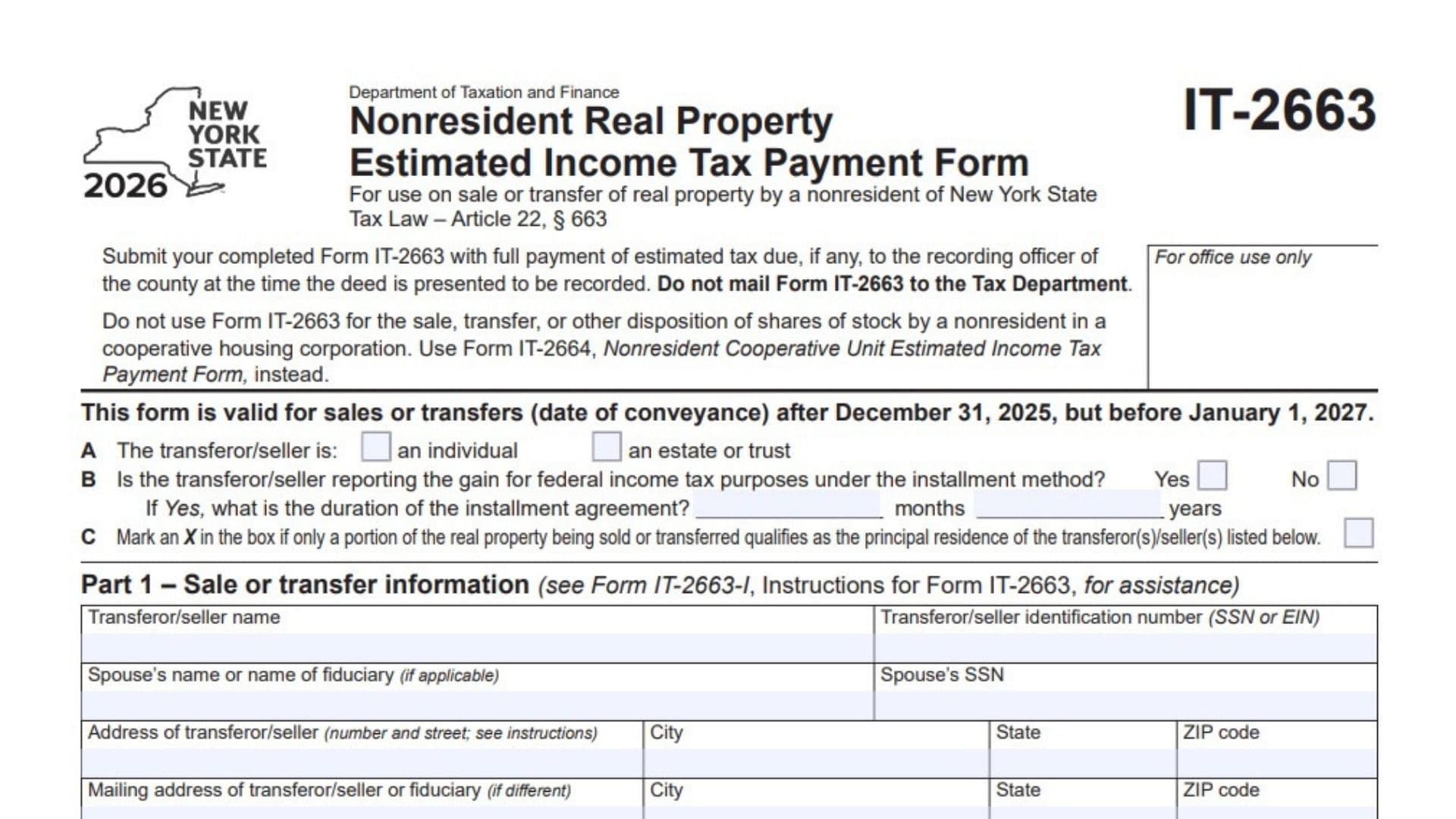
New York Form IT-2663, Nonresident Real Property Estimated Income Tax Payment Form, is a tax document used by individuals, estates, and trusts that are not residents of New York State when they sell or transfer real property located in New York. The form is required under Article 22, Section 663 of the New York Tax Law and is designed to collect estimated income tax on taxable gains resulting from qualifying property transactions. It applies to sales or transfers with a conveyance date after December 31, 2025, but before January 1, 2027. The form collects information about the seller or transferor, taxpayer identification numbers, property location, purchase price, selling expenses, adjusted basis, depreciation, and the date of conveyance. It also determines the portion of the gain that must be reported for New York tax purposes and calculates the estimated tax payment using the 2026 New York State tax rate of 10.90%. Sellers who qualify for certain exceptions, such as a transaction resulting in a loss or a transfer for which gain or loss does not have to be recognized under applicable Internal Revenue Code provisions, may complete Part 3 to certify that estimated tax payment is not required. The form also addresses installment sales, multiple property owners, and transactions involving property that is only partially located in New York or partially qualifies as the seller’s principal residence. A separate payment voucher, Form IT-2663-V, is included on the third page and must be completed even when no estimated personal income tax payment is due. When payment is required, the seller must submit the completed form and the full estimated tax payment to the recording officer of the county when the deed is presented for recording. Form IT-2663 must not be mailed to the New York State Department of Taxation and Finance. Completing the form accurately is important because the information establishes the property’s adjusted basis, determines the taxable gain, and calculates the estimated income tax that must be paid in connection with the transfer.
Who Needs to File Form IT-2663?
Form IT-2663 is intended for nonresidents of New York State who sell or transfer real property located in New York during the applicable tax year.
The form identifies two types of transferors:
- Individuals: Nonresident individuals selling or transferring qualifying real property.
- Estates or Trusts: Nonresident estates or trusts involved in the sale or transfer of New York real property.
The form applies to qualifying transactions with a conveyance date between January 1, 2026, and December 31, 2026.
The seller must calculate the estimated tax based on the applicable gain from the transaction and report the required amount on Form IT-2663.
Do not use Form IT-2663 when a nonresident sells, transfers, or otherwise disposes of shares of stock in a cooperative housing corporation.
Instead, use Form IT-2664, Nonresident Cooperative Unit Estimated Income Tax Payment Form.
Form IT-2663 is intended for real property transactions and should not be substituted for the cooperative housing form.
How To File Form IT-2663
Form IT-2663 must be submitted to the recording officer of the county where the property is located when the deed is presented for recording.
You must submit the completed form together with the full estimated tax payment, if any, required by Part 2, Line 3.
The form is not mailed to the New York State Department of Taxation and Finance.
Where to Submit Form IT-2663
Submit the completed Form IT-2663 and Form IT-2663-V to the appropriate county recording officer when presenting the deed for recording.
The form is part of the property transfer and recording process.
Do not send the completed form directly to the New York State Department of Taxation and Finance.
Payment Requirements
If estimated income tax is due, attach a separate check or money order for the full amount shown on Part 2, Line 3.
The payment must:
- Be made in U.S. funds.
- Be payable to NYS Income Tax.
- Match the estimated tax amount reported on Form IT-2663 and Form IT-2663-V.
Write the following information on your payment:
- Your name.
- The last four digits of your Social Security number or Employer Identification Number.
- 2026 IT-2663-V.
Attach the payment to the designated area on Page 3.
Information to Prepare Before Completing Form IT-2663
Gather the following information before starting:
- Transferor’s or seller’s full legal name.
- Social Security number (SSN) or Employer Identification Number (EIN).
- Spouse’s name and SSN, if applicable.
- Name and title of the fiduciary, if applicable.
- Seller’s residential or business address.
- Mailing address, if different.
- Property location and description.
- County where the property is located.
- Property tax map number.
- Date of conveyance.
- Original property purchase price.
- Costs of improvements.
- Eligible closing costs added to the property’s basis.
- Other basis adjustments.
- Depreciation deductions, if applicable.
- Other decreases to basis.
- Selling price.
- Selling expenses.
- Information about any installment agreement.
- Details about the portion of the property located in New York, if applicable.
- Information about the portion qualifying as a principal residence, if applicable.
- Information about other property owners or transferors, if applicable.
- Payment information, if estimated tax is due.
You should also have the relevant purchase, improvement, depreciation, closing, and sale records available to calculate the property’s gain or loss accurately.

How To Complete Form IT-2663
The 2026 Form IT-2663 contains four main parts, a worksheet for calculating the property’s gain or loss, and a separate estimated income tax payment voucher.
Complete the preliminary questions first, then Part 1, the Part 2 worksheet, the estimated tax calculation, and the applicable certification and signature sections.
Preliminary Questions and Elections
The top of Page 1 contains three preliminary items labeled A, B, and C.
These questions identify the type of seller, whether the transaction involves installment reporting, and whether only part of the property qualifies as the seller’s principal residence.
Item A: Type of Transferor or Seller
Identify whether the person or entity transferring the property is an individual or an estate or trust.
Select one of the following options:
- An Individual: Select this option when the transferor or seller is an individual taxpayer.
- An Estate or Trust: Select this option when the property is being transferred by an estate or trust.
Choose the classification that correctly describes the seller.
Item B: Installment Method for Reporting the Gain
This question asks whether the transferor or seller will report the gain from the property transaction for federal income tax purposes using the installment method.
Select Yes if the seller is reporting the gain under the federal installment method.
Select No if the transaction is not being reported using the installment method.
If you select Yes, provide the duration of the installment agreement in the spaces provided.
Installment Agreement Duration in Months
Enter the total duration of the installment agreement in months when the agreement is expressed in months.
Installment Agreement Duration in Years
Enter the total duration of the installment agreement in years when the agreement is expressed in years.
Use the applicable duration of the installment arrangement. The form provides separate spaces for months and years.
Item C: Partial Principal Residence Qualification
Check this box if only a portion of the real property being sold or transferred qualifies as the principal residence of the transferor or sellers identified on the form.
If the entire property does not qualify as the seller’s principal residence, select this option when the partial qualification applies.
This information is important when determining the taxable portion of the gain on Worksheet for Part 2, Line 18.
Part 1: Sale or Transfer Information
Part 1 identifies the seller, any applicable spouse or fiduciary, the property’s location, and the date of the transfer.
Enter the information carefully because it connects the estimated tax calculation to the specific property transaction.
Transferor/Seller Name
Enter the full legal name of the individual, estate, or trust transferring the property.
Use the name associated with the taxpayer identification number reported on the form.
Transferor/Seller Identification Number (SSN or EIN)
Enter the seller’s appropriate taxpayer identification number.
Use:
- Social Security number (SSN) for an individual.
- Employer Identification Number (EIN) for an estate or trust.
Verify the identification number before submitting the form.
Spouse’s Name or Name of Fiduciary
Enter the spouse’s name when the transferor is an individual and spouse information applies.
If the transferor is an estate or trust, enter the name of the fiduciary responsible for the estate or trust.
A fiduciary is the person legally responsible for managing or representing the estate or trust.
Spouse’s SSN
Enter the spouse’s Social Security number when applicable.
This field applies when spouse information is required for the transaction.
If the transferor is an estate or trust, follow the applicable instructions for the fiduciary and identification information.
Address of Transferor/Seller
Enter the complete street address of the individual or entity transferring the property.
Provide the house or building number and street name.
This field identifies the transferor’s address rather than the location of the property being sold.
City
Enter the city where the transferor or seller resides or receives mail.
State
Enter the two-letter postal abbreviation for the seller’s state.
ZIP Code
Enter the ZIP code associated with the transferor’s address.
Mailing Address of Transferor/Seller or Fiduciary
Complete this field if the mailing address is different from the address entered above.
For example, an estate or trust may receive official correspondence at the fiduciary’s mailing address rather than at the property’s address.
Enter the complete mailing address when applicable.
Mailing City
Enter the city associated with the separate mailing address.
Mailing State
Enter the two-letter postal abbreviation for the mailing address.
Mailing ZIP Code
Enter the ZIP code associated with the mailing address.
If the mailing address is the same as the transferor’s primary address, a separate mailing address is not necessary.
Location and Description of Property Transferred
Enter the complete location and a description of the real property being sold or transferred.
Include the county where the property is located and the applicable tax map number.
Provide enough information to identify the specific property involved in the transaction.
Tax Map Designation: Section, Block, and Lot
The form includes spaces for the property’s tax map designation:
- Section.
- Block.
- Lot.
These fields are marked for office use only. Leave them blank for the appropriate recording or processing office.
Date of Conveyance
Enter the date the property is legally conveyed or transferred.
The date of conveyance is important because it determines the applicable tax year and whether the transaction falls within the period covered by the 2026 form.
The 2026 form applies to conveyances after December 31, 2025, but before January 1, 2027.
Part 2: Estimated Tax Information
Part 2 summarizes the property’s sale price, total gain, and estimated tax due.
Before completing this section, you must first complete the Worksheet for Part 2 on Page 2.
The amounts reported on Part 2, Lines 1 through 3, are transferred from the corresponding worksheet calculations.
Line 1: Sale Price
Enter the sale price calculated on Worksheet for Part 2, Line 15.
This amount represents the property’s selling price after subtracting the applicable selling expenses.
Do not enter the original purchase price here.
Use the final amount calculated on Worksheet Line 15.
Line 2: Total Gain
Enter the total gain calculated on Worksheet for Part 2, Line 17.
If the transaction results in a gain, transfer the positive amount from Line 17.
If the transaction results in a loss or zero gain, enter zero instead.
This line represents the total gain before applying the special allocation rules used to determine the amount subject to New York estimated tax.
Line 3: Estimated Tax Due
Enter the estimated tax calculated on Worksheet for Part 2, Line 20.
This is the amount of estimated New York State income tax due on the taxable portion of the property’s gain.
If the transaction results in a loss or no taxable gain, the estimated tax amount may be zero.
Enter the amount in dollars and cents as required by the form.
Part 3: Nonpayment of Estimated Tax by a Nonresident Upon Sale of Real Property
Part 3 allows an eligible nonresident seller to certify that estimated tax payment is not required because the transaction qualifies under one of the reasons listed on the form.
Line 4 contains two possible exceptions.
Complete this section only when the seller qualifies for one of the listed reasons.
Line 4: Certification of Nonpayment of Estimated Tax
This section establishes that the transferor or seller is a nonresident of New York State and is not required to make the estimated tax payment under Tax Law Section 663 because one of the specified conditions applies.
Select the applicable option.
Line 4A: Sale or Transfer Results in a Loss
Select this option if the sale or transfer of the property results in a loss or a zero amount for federal income tax purposes.
A loss or zero result means the selling price, after applicable selling expenses, does not exceed the property’s adjusted basis.
You must complete the Worksheet for Part 2 on Page 2 to establish the property’s gain or loss.
Use the worksheet calculations to support this certification.
Line 4B: Gain or Loss Is Not Required to Be Recognized Under the Internal Revenue Code
Select this option if the seller is not required to recognize gain or loss from the transfer under the provisions of the Internal Revenue Code, excluding Section 121.
This option applies when the transaction qualifies for nonrecognition treatment under another applicable IRC provision.
If you select this option, you must complete the brief summary section immediately below it.
Brief Summary of the Transfer
Provide a written explanation of the property transfer and why the gain or loss does not have to be recognized for federal income tax purposes.
Your explanation must include:
- The applicable Internal Revenue Code section or sections.
- The relevant facts surrounding the transfer.
- An explanation supporting the claim that recognition of the gain or loss is not required.
Make the explanation specific to the transaction.
The purpose of this statement is to provide the information supporting your nonrecognition claim.
Part 4: Signature
Part 4 contains the seller’s certification that the form and all accompanying documents are accurate and complete.
The transferor or seller must sign and date the form.
Signature of Transferor/Seller
The individual transferring the property must sign the form.
For an estate or trust, the appropriate authorized fiduciary should sign on behalf of the entity.
The signature confirms that the information provided is true, correct, and complete to the best of the signer’s knowledge and belief.
Date
Enter the date the transferor or seller signs the form.
Use the appropriate date format.
Signature of Spouse (If Applicable)
If a spouse’s signature is applicable to the transaction, the spouse must sign in the designated space.
Spouse’s Date
Enter the date the spouse signs the form.
Make sure both signatures and dates are provided when applicable.
Worksheet for Part 2: Calculate the Gain or Loss on the Property
The Worksheet for Part 2 appears on Page 2 of Form IT-2663.
It is used to calculate the property’s adjusted basis, determine the total gain or loss from the transaction, and calculate the estimated tax payment.
The worksheet follows the general federal income tax method for calculating gain or loss on the sale or transfer of real property.
The worksheet contains three main calculation sections:
- Computation of cost or other basis.
- Gain or loss.
- Estimated tax due.
Complete every applicable line in the correct order.
Computation of Cost or Other Basis
This section determines the property’s adjusted basis before calculating the gain or loss.
Line 5: Purchase Price of Property
Enter the original purchase price of the real property.
Use the amount paid to acquire the property, based on the applicable purchase records.
For multiple transferors or sellers, enter the total purchase price of the property rather than only one person’s share.
Line 6: Improvements
Enter the qualifying costs of improvements made to the property.
These amounts increase the property’s basis when they qualify under the applicable federal tax rules.
Use your property improvement records to determine the appropriate amount.
Line 7: Closing Costs
Enter the applicable closing costs that increase the property’s basis.
Use the qualifying costs associated with acquiring the property.
Only include closing costs that are properly treated as basis adjustments.
Line 8: Other Basis Increases
Enter any other qualifying amounts that increase the property’s basis and are not already included on Lines 6 or 7.
Explain the nature of the additional adjustment in the space provided.
Make sure the amount is supported by the property’s relevant records.
Line 9: Total Basis Increases
Add the amounts reported on Lines 6, 7, and 8.
Calculation:
Line 6 + Line 7 + Line 8 = Line 9.
Enter the combined amount on Line 9.
This represents the total adjustments that increase the property’s original purchase basis.
Line 10: Total Cost or Other Basis Before Decreases
Add Line 5 and Line 9.
Calculation:
Line 5 + Line 9 = Line 10.
Enter the result on Line 10.
This amount represents the property’s original purchase price plus the qualifying basis increases.
Decreases to Basis
This section identifies amounts that reduce the property’s adjusted basis.
Line 11: Depreciation
Enter the applicable depreciation claimed or allowable for the property.
Complete this line if depreciation applies to the property.
Use the relevant depreciation records and federal tax information to determine the amount.
Line 12: Other Basis Decreases
Enter other adjustments that reduce the property’s basis and are not already included on Line 11.
Explain the nature of the adjustment in the space provided.
Use the applicable property and tax records to support the amount.
Line 13: Total Basis Decreases
Add Lines 11 and 12.
Calculation:
Line 11 + Line 12 = Line 13.
Enter the combined amount on Line 13.
Line 14: Adjusted Basis of Property
Subtract Line 13 from Line 10.
Calculation:
Line 10 − Line 13 = Line 14.
Enter the result on Line 14.
This amount represents the property’s adjusted basis after accounting for qualifying increases and decreases.
The adjusted basis is used in the next section to determine whether the sale produced a gain or loss.
Gain or Loss Calculation
After calculating the adjusted basis, determine the amount realized from the property sale and compare it with the adjusted basis.
Line 15: Sale Price Less Selling Expenses
Enter the property’s selling price after subtracting the applicable selling expenses.
Calculation:
Selling price − Selling expenses = Line 15.
Use the actual transaction information to determine the amount.
Transfer the amount from Line 15 to Part 2, Line 1, on the front page.
Line 16: Cost or Adjusted Basis
Transfer the adjusted basis calculated on Line 14 to Line 16.
Do not recalculate the basis. Use the amount already determined on the previous line.
This amount represents the property’s adjusted cost basis for the gain or loss calculation.
Line 17: Total Gain or Loss
Subtract Line 16 from Line 15.
Calculation:
Line 15 − Line 16 = Line 17.
The result determines whether the property transaction produced a gain or loss.
Follow the appropriate instructions:
- If the result is greater than zero: Enter the gain on Line 17, transfer it to Part 2, Line 2, and continue to Line 18.
- If the result is zero or less: Enter zero on Line 17, Line 20, and Part 2, Line 2.
If the transaction produces a loss or zero gain, complete Part 2, Part 3, and Form IT-2663-V on Page 3 as instructed.
Estimated Tax Due
This section determines how much New York State estimated income tax must be paid on the taxable gain from the property transfer.
Line 18: Gain Subject to New York Tax
Enter the gain from Line 17 that will be reported on your 2026 federal income tax return.
If only part of the total gain is subject to New York tax or will be reported on your federal return, enter the applicable allocated amount instead of the entire gain.
The following special rules apply.
Property Located Partly Inside New York State
If only part of the property is located within New York State, enter the gain allocated to the portion located in New York.
Attach a separate statement to Form IT-2663 explaining how you calculated the allocation.
Property Partly Qualifies as a Principal Residence
If only a portion of the property qualifies as the seller’s principal residence, enter the gain allocated to the portion that does not qualify as the principal residence and that will be reported on the 2026 federal income tax return.
Attach a statement explaining how the gain was allocated between the qualifying and nonqualifying portions.
Property Has Multiple Transferors or Sellers
If two or more individuals are transferring or selling the property, allocate the total gain among the transferors using the same method applied for federal income tax purposes.
Attach a statement identifying each transferor or seller.
The statement must include:
- Each transferor’s or seller’s name.
- SSN or EIN.
- Address.
- Individual share of the gain.
Installment Sale
If the gain is being reported using the installment method, enter the amount of gain that you and your spouse, if applicable, will report on your 2026 federal income tax return.
Do not automatically enter the entire gain if only a portion will be recognized during the applicable tax year.
Nonresident Estate or Trust
A nonresident estate or trust must enter the total gain from Line 17 without considering distributions made by the estate or trust.
Use the full amount calculated on Line 17 for this purpose.
Line 19: New York State Tax Rate
The tax rate for 2026 is 10.90%, represented by 0.1090.
This rate is based on the highest New York State income tax rate applicable for the tax year under Tax Law Section 601.
The rate is preprinted on the worksheet.
Use 0.1090 when calculating the estimated tax on Line 20.
Line 20: Estimated Tax Due
Multiply the amount on Line 18 by the tax rate on Line 19.
Calculation:
Line 18 × 0.1090 = Line 20.
Round the result to the nearest whole dollar.
Enter the calculated amount on Line 20.
Then transfer the same amount to Part 2, Line 3, on the front page.
You must also enter this amount as the estimated tax payment on Form IT-2663-V on Page 3.
An important requirement is that Form IT-2663-V must be completed even when no estimated personal income tax payment is due.
Form IT-2663-V: Nonresident Real Property Estimated Income Tax Payment Voucher
Form IT-2663-V appears at the bottom of Page 3.
It is the payment voucher associated with Form IT-2663 and identifies the seller, property transfer date, taxpayer classification, and payment amount.
You must complete this voucher even if Part 2, Line 3, shows zero tax due.
Do not detach the voucher from the main form.
Voucher Identification Information
Individual Taxpayer’s Full Name or Name of Estate or Trust
Enter the full legal name of the individual taxpayer, estate, or trust responsible for the property transfer.
For an individual, use the taxpayer’s full name.
For an estate or trust, enter the legal name of the entity.
Spouse’s Name or Name and Title of Fiduciary
Enter the spouse’s name when applicable.
For an estate or trust, enter the name and official title of the fiduciary responsible for the entity.
Make sure this information agrees with the corresponding details on the main Form IT-2663.
Spouse’s SSN
Enter the spouse’s Social Security number when applicable.
Verify that the number belongs to the spouse identified in the previous field.
Identification Number (SSN or EIN of the Estate or Trust)
Enter the appropriate taxpayer identification number.
Use the individual’s SSN or the estate’s or trust’s EIN, as applicable.
Check the number carefully because it helps identify the payment.
Type of Taxpayer: Individual or Estate/Trust
Select one of the two classifications:
- Individual: Select this option if the taxpayer is an individual.
- Estate/Trust: Select this option if the transferor is an estate or trust.
Choose the classification that agrees with Item A on the main form.
Individual Taxpayer’s Street Address or Address of Fiduciary or Representative
Enter the complete mailing address of the individual taxpayer.
For an estate or trust, enter the address of the fiduciary or authorized representative, as applicable.
Use the appropriate address associated with the taxpayer or entity.
City, Village, or Post Office
Enter the city, village, or post office associated with the mailing address.
State
Enter the two-letter postal abbreviation for the state.
ZIP Code
Enter the ZIP code associated with the address.
Voucher Date Information
Date Fiscal Year Ends
Enter the fiscal year-end date when applicable to the estate or trust.
Use the appropriate date information for the taxpayer’s fiscal reporting year.
Date of Conveyance
Enter the date the property is transferred.
This date should agree with the date reported in Part 1 of Form IT-2663.
Voucher Payment Information
Total Payment: Dollars
Enter the dollar portion of the estimated tax payment.
Use the amount calculated on Part 2, Line 3, of Form IT-2663.
Total Payment: Cents
Enter the cents portion of the payment amount.
The voucher includes a separate cents field, which is preprinted with 00.
Make sure the total payment agrees with the amount calculated on the main form.
Check or Money Order Attachment
If estimated tax is due, attach a separate check or money order in U.S. funds.
The payment must be made payable to NYS Income Tax.
The payment must cover the full estimated personal income tax amount reported on Part 2, Line 3, and Form IT-2663-V.
Write the taxpayer’s name, the last four digits of the SSN or EIN, and 2026 IT-2663-V on the payment.
Do Not Detach the Voucher
Keep Form IT-2663-V attached to the main Form IT-2663.
The voucher and the payment should be submitted together as part of the property recording process.
Important Filing Rules for Form IT-2663
Before submitting Form IT-2663, understand the following important requirements.
The Form Applies Only to the Specified 2026 Conveyance Period
The 2026 form is valid for property sales or transfers occurring after December 31, 2025, but before January 1, 2027.
Use the appropriate form for transactions outside this period.
Submit the Form to the County Recording Officer
The completed form must accompany the deed when it is presented for recording.
Submit it to the recording officer of the county where the property is located.
Do Not Mail Form IT-2663 to the Tax Department
The form is submitted as part of the county property recording process, not mailed directly to the New York State Department of Taxation and Finance.
The Estimated Tax Rate Is 10.90%
For tax year 2026, use the highest New York State income tax rate of 10.90% when calculating estimated tax on the taxable gain.
Complete the Worksheet Before Part 2
You must complete the Worksheet for Part 2 on Page 2 before entering the amounts on the front page.
The worksheet establishes the adjusted basis, gain or loss, and estimated tax amount.
Complete Form IT-2663-V Even If No Tax Is Due
The payment voucher must be completed even when the estimated tax due is zero.
Use Form IT-2664 for Cooperative Housing Shares
Do not use Form IT-2663 for a nonresident’s sale or transfer of shares in a cooperative housing corporation.
Use Form IT-2664 instead.
Final Review Before Filing
Before presenting Form IT-2663 for recording, review all sections, calculations, supporting statements, and payment information.
Use the following checklist to make sure the form is complete.
Preliminary Information
- The correct 2026 Form IT-2663 is being used.
- The date of conveyance falls within the applicable 2026 filing period.
- Item A correctly identifies the transferor as an individual or estate/trust.
- Item B correctly identifies whether the gain is reported using the installment method.
- The installment agreement duration is entered when applicable.
- Item C is checked if only part of the property qualifies as the principal residence.
Part 1: Sale or Transfer Information
- The transferor’s or seller’s full legal name is provided.
- The correct SSN or EIN is entered.
- The spouse’s name or fiduciary’s name is provided when applicable.
- The spouse’s SSN is entered when applicable.
- The transferor’s complete street address is provided.
- The city, state, and ZIP code are correct.
- A separate mailing address is entered when necessary.
- The property location and description are complete.
- The county and property tax map information are available.
- The date of conveyance is accurate.
- The office-use-only fields are left for the appropriate officials.
Part 2: Estimated Tax Information
- The Worksheet for Part 2 has been completed before entering the front-page amounts.
- Line 1 agrees with Worksheet Line 15.
- Line 2 agrees with Worksheet Line 17, with zero entered if there is a loss.
- Line 3 agrees with Worksheet Line 20.
- All amounts are transferred correctly.
Part 3: Nonpayment Certification
- Line 4 is completed when the seller qualifies for an applicable nonpayment reason.
- Option A is selected when the transaction results in a loss or zero gain.
- Option B is selected when the transfer qualifies for nonrecognition under an applicable IRC provision other than Section 121.
- The required brief summary is completed when Option B is selected.
- The applicable IRC section and supporting facts are included in the summary.
Worksheet for Part 2
- Line 5 includes the correct purchase price.
- Line 6 includes applicable improvements.
- Line 7 includes qualifying closing costs.
- Line 8 identifies other qualifying basis increases.
- Line 9 correctly adds Lines 6, 7, and 8.
- Line 10 correctly adds Lines 5 and 9.
- Line 11 includes applicable depreciation.
- Line 12 identifies other basis decreases.
- Line 13 correctly adds Lines 11 and 12.
- Line 14 correctly subtracts Line 13 from Line 10.
- Line 15 reflects the sale price less selling expenses.
- Line 16 agrees with Line 14.
- Line 17 correctly calculates the total gain or loss.
- Line 18 includes the gain subject to New York tax.
- Required allocation statements are attached when applicable.
- Line 19 uses the 10.90% tax rate.
- Line 20 correctly calculates the estimated tax and rounds to the nearest whole dollar.
Form IT-2663-V Payment Voucher
- The taxpayer’s full legal name is entered.
- The spouse’s name or fiduciary’s name and title are provided when applicable.
- The spouse’s SSN is entered when applicable.
- The correct SSN or EIN is provided.
- The Individual or Estate/Trust box is selected.
- The taxpayer’s or fiduciary’s mailing address is complete.
- The city, state, and ZIP code are correct.
- The fiscal year-end date is entered when applicable.
- The date of conveyance agrees with the main form.
- The total payment agrees with Part 2, Line 3.
- A separate check or money order is attached if payment is due.
- The payment is made payable to NYS Income Tax.
- The payment is in U.S. funds.
- The taxpayer’s name and last four digits of the SSN or EIN are written on the payment.
- 2026 IT-2663-V is written on the payment.
- The voucher remains attached to the main form.
Final Submission
- Part 4 is signed by the transferor or seller.
- The signature date is entered.
- The spouse’s signature and date are provided when applicable.
- All required supporting statements are attached.
- The estimated tax payment is included when required.
- The completed Form IT-2663 and Form IT-2663-V are submitted to the correct county recording officer when the deed is presented.
- The form is not mailed to the New York State Department of Taxation and Finance.
- Form IT-2664 is used instead if the transaction involves cooperative housing corporation shares.
Completing Form IT-2663 accurately helps nonresident individuals, estates, and trusts calculate and report estimated New York State income tax on real property transactions. Review the property’s adjusted basis, selling expenses, gain allocation, and applicable estimated tax rate before submitting the form. Make sure the required payment voucher and any supporting statements accompany the completed form when the deed is presented for recording.