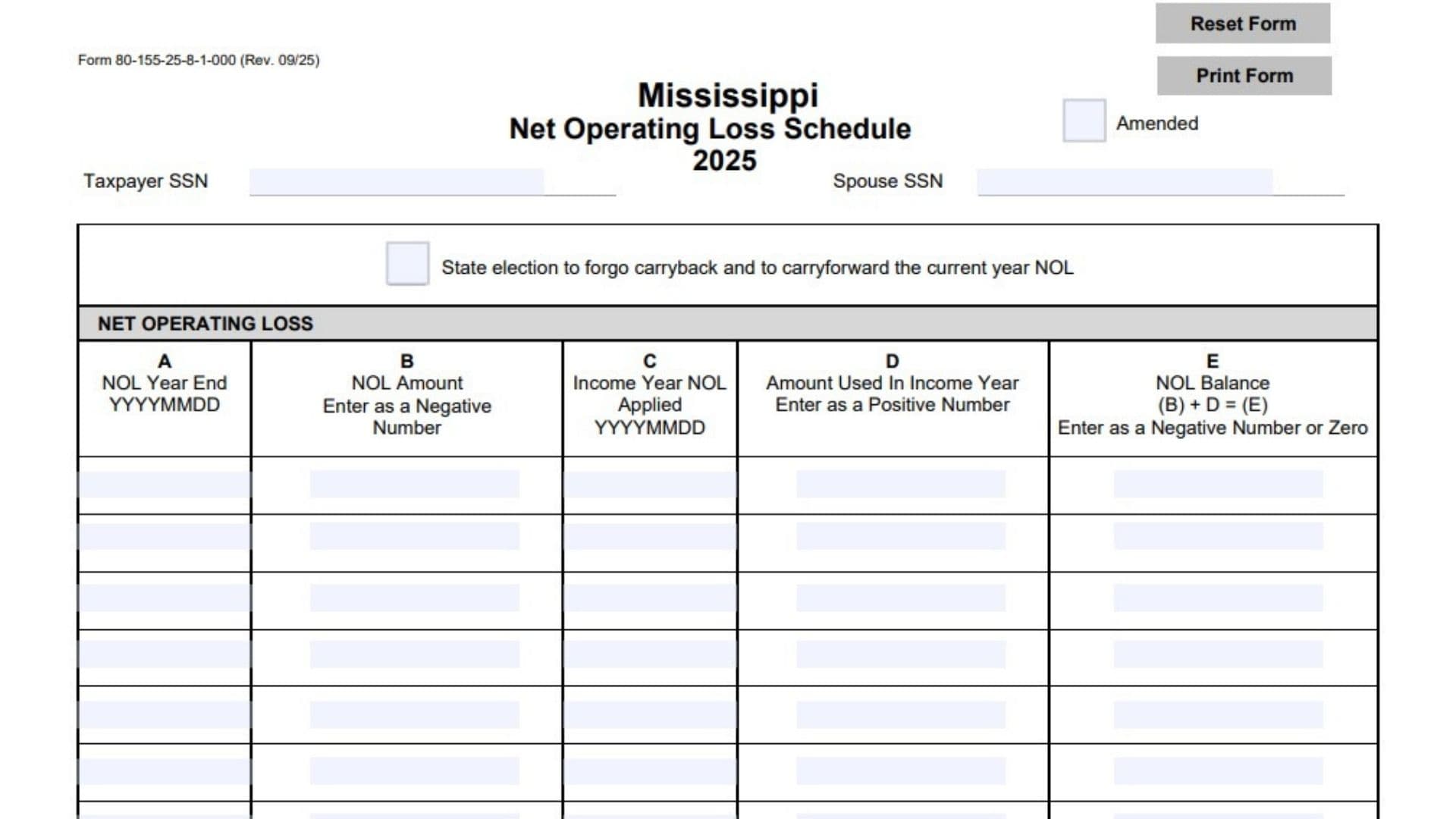
The Mississippi Net Operating Loss Schedule, Form 80-155, is a tax schedule used to track net operating losses (NOLs) and determine how much of those losses remains available for future use. A net operating loss generally occurs when allowable business deductions exceed the applicable business income for a tax year. This schedule helps taxpayers maintain a record of losses from different years, identify the income years in which those losses are applied, calculate the amount used, and determine the remaining balance available for carryforward. The 2025 schedule collects the taxpayer’s and spouse’s Social Security numbers, information about each NOL year, the original loss amounts, the income years in which the losses are applied, and the amounts used against income. It also provides an election allowing taxpayers to forgo carrying back the current year’s NOL and instead carry it forward, subject to applicable Mississippi tax rules. The final section contains three calculations that summarize the total NOL available, the amount used during the current year, and the remaining amount available for carryforward. Keeping these amounts accurate is important because previously generated losses and their remaining balances affect how much NOL can be applied in a subsequent tax year. The form also includes an amended checkbox for taxpayers submitting an amended schedule. Completing the schedule correctly helps maintain an accurate record of NOL activity and ensures that the amount transferred to Form 80-108, Schedule N, is consistent with the NOL used during the current tax year.
How To File The Mississippi Net Operating Loss Schedule
Form 80-155 is a Mississippi tax schedule for reporting and tracking net operating losses for the 2025 tax year. It contains a reference to Form 80-108, Schedule N, which is used to report the current-year NOL amount applied.
The schedule itself does not provide a mailing address or complete submission instructions. Therefore, taxpayers should consult the applicable Mississippi income tax return instructions to confirm where to submit the schedule and whether it must be attached to the main return.
Information To Prepare Before Completing The Schedule
Gather the following information before filling out the form:
- Your Social Security number.
- Your spouse’s Social Security number, if applicable.
- The ending date of each tax year in which an NOL occurred.
- The original NOL amount for each applicable year.
- The income year in which each NOL is applied.
- The amount of NOL used in each income year.
- The remaining NOL balance for each loss year.
- The total NOL available before the current-year application.
- The amount of NOL used during the current tax year.
- Records of previously reported NOL amounts and carryforward balances.
- Information needed to determine whether you are making the election to forgo the carryback of the current-year NOL.
Keep your previous tax returns and NOL calculation records available so that the amounts entered on this schedule can be verified.

How To Complete Form 80-155
The 2025 Mississippi Net Operating Loss Schedule contains taxpayer identification fields, an amended return checkbox, a state NOL election checkbox, a five-column NOL tracking table, and three final calculation lines.
Follow the instructions below to complete each section.
Taxpayer Identification Information
Taxpayer SSN
Enter the taxpayer’s nine-digit Social Security number.
Make sure the number matches the taxpayer identification information used on the associated Mississippi income tax return.
Spouse SSN
If filing jointly or providing applicable spouse information, enter your spouse’s nine-digit Social Security number.
If you are filing without a spouse, follow the applicable return instructions for this field.
Amended Return Checkbox
Amended
The form includes a checkbox labeled Amended near the top.
Mark this box if you are submitting an amended version of the schedule.
If you are filing the original schedule rather than an amended one, leave this box unchecked.
State Election To Forgo Carryback And Carry Forward The Current Year NOL
State Election To Forgo Carryback And To Carryforward The Current Year NOL
This checkbox identifies an election to forgo carrying the current-year net operating loss back and instead carry the loss forward.
Mark this box if you are making this election under the applicable Mississippi tax rules.
This election affects how the current-year NOL is treated. Review the applicable Mississippi instructions to determine whether you qualify and understand the requirements before selecting this option.
Net Operating Loss Tracking Table
The main section of Form 80-155 contains five columns labeled A through E.
Use this table to track each NOL, identify the income year in which it is applied, record the amount used, and calculate the remaining balance.
Each row should contain the information for the applicable NOL year and its use in an income year. Use additional rows when necessary to report multiple NOL records or applications.
Column A: NOL Year End
Enter the ending date of the tax year in which the net operating loss occurred.
Use the YYYYMMDD format.
For example, if the NOL year ended on December 31, 2024, enter 20241231.
Use the correct year-end date associated with the original loss.
Column B: NOL Amount
Enter the original net operating loss amount for the applicable NOL year.
The form specifically requires this amount to be entered as a negative number.
For example, if the NOL amount is $25,000, enter -25,000.
Do not enter the loss as a positive amount in this column.
Column C: Income Year NOL Applied
Enter the ending date of the income year in which the NOL is applied.
Use the YYYYMMDD format.
This column identifies the income year associated with the NOL application.
Make sure the date corresponds to the income year in which the loss is being used.
Column D: Amount Used In Income Year
Enter the amount of the NOL applied against income in the specified income year.
The form requires this amount to be entered as a positive number.
For example, if $5,000 of a previously reported NOL is used, enter 5,000.
Use the actual amount applied for the applicable income year.
Column E: NOL Balance
Calculate the remaining NOL balance by adding the amount in column B to the amount in column D.
The form provides the following calculation:
NOL Balance = Column B + Column D
Enter the result as a negative number or zero.
For example:
- Column B: -25,000
- Column D: 5,000
- Column E: -20,000
The remaining NOL balance is -20,000.
This amount represents the loss remaining after accounting for the amount used in the applicable income year.
Repeat the process for each applicable NOL record.
Final NOL Calculations
After completing the NOL tracking table, use the three lines at the bottom of the schedule to summarize the total available loss, the amount used during the current year, and the remaining carryforward amount.
Line 1: Total NOL Available
Enter the total NOL available from the tracking schedule above.
The amount must be entered as a negative number.
Use the remaining NOL balances recorded in column E to determine the total available amount.
For example, if the remaining NOL balances total $40,000, enter -40,000.
Line 2: NOL Used In Current Year
Enter the amount of NOL used during the current tax year.
This amount must be entered as a positive number.
You must also enter this same amount on Form 80-108, Schedule N, line 1.
Check that the amount reported here agrees with the NOL actually applied during the current year.
Line 3: Remaining NOL Available For Carryforward
Calculate the remaining NOL available for future years by adding line 1 and line 2.
Use the following calculation:
Remaining NOL Available = Line 1 + Line 2
For example:
- Line 1: -40,000
- Line 2: 10,000
- Line 3: -30,000
Enter -30,000 as the remaining NOL available for carryforward.
This amount represents the remaining loss after subtracting the current-year NOL usage through the positive addition shown on the form.
Understanding The NOL Carryforward Election
The schedule provides an option for taxpayers to elect to forgo carrying back the current-year NOL and instead carry it forward.
This election is important because it identifies how the taxpayer wants the current-year loss to be treated for Mississippi tax purposes.
Election To Forgo Carryback
Selecting this option indicates that the taxpayer is choosing not to carry the current-year NOL back under the election identified on the form.
Election To Carry Forward The Current-Year NOL
The election also indicates that the current-year NOL will be carried forward instead.
Before making this election, review the applicable Mississippi tax instructions to understand the eligibility requirements, applicable deadlines, and consequences.
The schedule itself does not provide the detailed rules governing the election.
Understanding The Difference Between NOL Amount, NOL Used, And NOL Balance
It is important to understand the difference between the three main amounts recorded in the NOL tracking table.
NOL Amount
This is the original loss amount associated with the applicable NOL year. It must be entered as a negative number in column B.
NOL Used
This is the amount of the loss applied against income in an applicable income year. It must be entered as a positive number in column D.
NOL Balance
This is the remaining loss after accounting for the amount used. It is calculated by adding the negative NOL amount to the positive amount used.
Understanding these three amounts helps prevent errors when calculating the total available NOL and the remaining carryforward balance.
Final Review Before Filing
Before submitting Form 80-155, review the following checklist to make sure all information and calculations are complete.
Taxpayer Information
- Enter the correct taxpayer Social Security number.
- Enter the spouse’s Social Security number, if applicable.
- Verify that the identification information matches the associated tax return.
- Mark the Amended checkbox if submitting an amended schedule.
NOL Election
- Review the state election to forgo carryback and carry forward the current-year NOL.
- Mark the election checkbox only if you are making the election under the applicable Mississippi rules.
- Verify that you understand the applicable election requirements before selecting the option.
NOL Tracking Table
- Enter the correct NOL year-end date in column A.
- Use the YYYYMMDD date format.
- Enter each original NOL amount as a negative number in column B.
- Enter the correct income year in column C.
- Use the YYYYMMDD date format for the income year.
- Enter each amount used as a positive number in column D.
- Calculate each remaining NOL balance using column B plus column D.
- Enter each balance as a negative number or zero in column E.
- Verify that all applicable NOL records are included.
Final Calculations
- Enter the total available NOL on line 1 as a negative number.
- Enter the current-year NOL used on line 2 as a positive number.
- Transfer the same line 2 amount to Form 80-108, Schedule N, line 1.
- Add lines 1 and 2 to calculate line 3.
- Verify that line 3 correctly represents the remaining NOL available for carryforward.
Final Submission
- Review all entries for accuracy.
- Check that the NOL amounts agree with your supporting tax records.
- Confirm that the applicable Mississippi filing instructions have been followed.
- Check whether the schedule must accompany your Mississippi income tax return.
- Keep a copy of the completed schedule and supporting NOL records for your files.
Completing the Mississippi Net Operating Loss Schedule accurately helps maintain a clear record of available losses, amounts used, and remaining carryforward balances. Review each NOL year carefully, enter losses and applications using the required positive and negative number formats, and verify that the final amount agrees with Form 80-108, Schedule N, line 1.