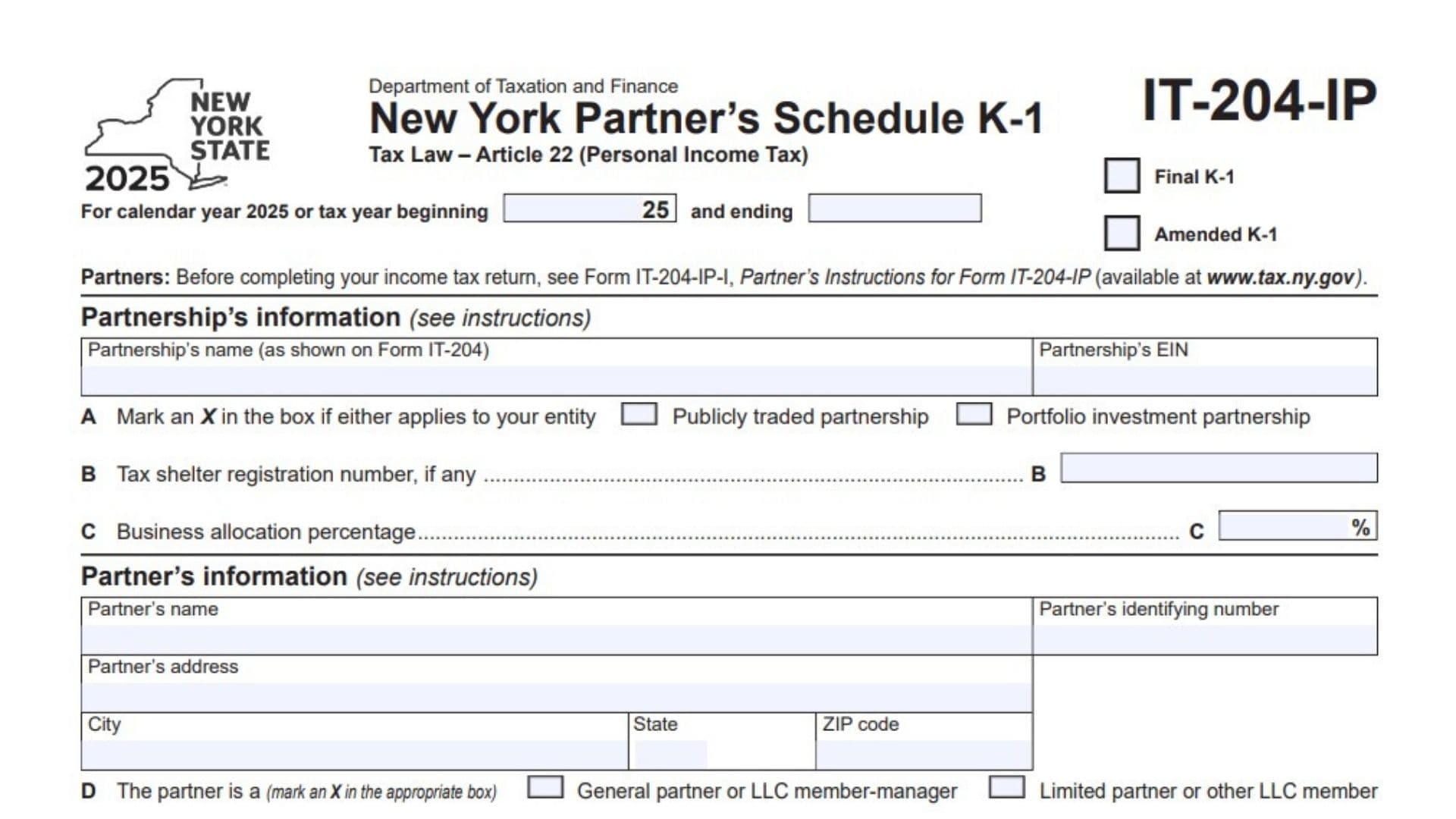
New York Form IT-204-IP, titled New York Partner’s Schedule K-1, reports a partner’s share of income, deductions, modifications, liabilities, distributions, and tax credit information from a partnership for New York State personal income tax purposes. Partnerships use this schedule to provide partners with information they may need when preparing their New York income tax returns. The form includes information about the partnership and the individual partner, the partner’s share of profits and losses, capital account activity, residency status, estimated tax payments made on the partner’s behalf, and whether the partnership elected to pay pass-through entity tax (PTET). It also separates federal Schedule K-1 amounts from New York State amounts and identifies New York additions, subtractions, itemized deduction adjustments, income allocation details, and tax credit information. The schedule is particularly important when the partner’s New York tax treatment differs from the federal treatment of partnership income or deductions. It may also provide information needed to calculate or claim eligible tax credits, including brownfield redevelopment, Qualified Empire Zone Enterprise (QEZE), Excelsior Jobs Program, farmers’ school tax, investment, and START-UP NY credits. The partnership completes the schedule and provides it to the partner, who uses the information when preparing the applicable tax return. Accurate reporting helps ensure that the partner accounts for the correct income, adjustments, payments, and credits under New York tax rules. Not every field applies to every partner, so the entries should reflect the partnership’s records, the partner’s circumstances, and the instructions for the applicable tax year.
How To Use Form IT-204-IP
Form IT-204-IP is a partner information schedule rather than a standalone individual income tax return. The partnership generally prepares the schedule and provides it to each partner. The partner then uses the reported information to prepare the appropriate New York income tax return.
Before using the form, gather the following information:
- Partnership information: The partnership’s legal name, employer identification number (EIN), business allocation percentage, and applicable registration details.
- Partner information: The partner’s name, identifying number, mailing address, entity classification, and residency status.
- Federal Schedule K-1: The federal amounts used to report the partner’s share of income, deductions, distributions, and other partnership items.
- Capital account records: Beginning and ending capital balances, contributions, withdrawals, distributions, and changes during the tax year.
- Liability information: The partner’s share of nonrecourse liabilities, qualified nonrecourse financing, and recourse liabilities.
- Estimated tax payment records: New York State estimated tax payments and Metropolitan Commuter Transportation Mobility Tax (MCTMT) payments made on behalf of the partner.
- New York modifications: Information about state additions, subtractions, and itemized deduction adjustments.
- Tax credit information: Supporting schedules and records for applicable partnership tax credits, credit bases, addbacks, and recaptures.
- Residency details: Information needed to identify the partner’s New York State, New York City, and Yonkers residency status.
The form specifically directs partners to consult the instructions for Form IT-204-IP, identified as Form IT-204-IP-I, before completing their income tax returns.
Use the completed schedule to enter the applicable amounts on your New York income tax return and any required supporting forms. Follow the applicable filing instructions to determine whether the schedule must be attached to the return or retained with your tax records.

How To Complete Form IT-204-IP
The 2025 form contains five pages. Page 1 identifies the partnership and partner and reports ownership, capital, liability, and residency details. Page 2 covers estimated tax payments, PTET information, and the partner’s share of federal and New York income items. Page 3 reports New York modifications and itemized deduction adjustments. Page 4 provides additional New York income allocation information and several tax credit components. Page 5 continues the tax credit reporting and includes START-UP NY information.
Complete the form using the information supplied by the partnership and the applicable supporting tax records. The partnership should provide the amounts and information needed for the partner’s reporting obligations.
Page 1: Partnership and Partner Information
Tax Year and K-1 Status
Tax Year
The form covers calendar year 2025 or a fiscal tax year beginning during 2025. If the partnership uses a fiscal year, enter the beginning and ending dates in the designated spaces. Use the tax period shown on the partnership’s records.
Final K-1
Mark an X in the Final K-1 box if the schedule is the final Schedule K-1 issued for the partner under the applicable circumstances. Confirm the status with the partnership.
Amended K-1
Mark an X in the Amended K-1 box if the schedule corrects or replaces a previously issued Schedule K-1. Use the amended information when preparing or correcting the applicable tax return.
Partnership’s Information
Partnership’s Name
Enter the partnership’s name exactly as shown on Form IT-204. The name should match the partnership’s official tax filing information.
Partnership’s EIN
Enter the partnership’s employer identification number. Check the number against the partnership’s tax records.
Field A: Publicly Traded Partnership or Portfolio Investment Partnership
Mark an X in the applicable box if the partnership qualifies as a publicly traded partnership or a portfolio investment partnership. Select the appropriate classification based on the partnership’s status.
Field B: Tax Shelter Registration Number
Enter the tax shelter registration number, if applicable. Leave the field blank if no registration number applies, following the partnership’s instructions.
Field C: Business Allocation Percentage
Enter the business allocation percentage reported for the partnership. This percentage represents the allocation information used for New York tax purposes. Use the amount provided by the partnership and follow the applicable instructions.
Partner’s Information
Partner’s Name
Enter the name of the partner receiving the schedule. The name should match the partner’s tax identification and filing records.
Partner’s Identifying Number
Enter the partner’s applicable identifying number. Use the correct number for the partner’s tax classification and follow the instructions for the required identification.
Partner’s Address
Enter the partner’s mailing address.
City
Enter the city associated with the partner’s address.
State
Enter the state associated with the partner’s address.
ZIP Code
Enter the ZIP code for the partner’s mailing address.
Field D: Partner Classification
Mark an X in the appropriate box to identify the partner’s role in the partnership.
- General partner or LLC member-manager: Select this option if the partner is a general partner or a limited liability company member-manager.
- Limited partner or other LLC member: Select this option if the partner is a limited partner or another type of LLC member.
Use the partnership’s records to determine the correct classification.
Field E: Partner’s Tax Filing Status
Mark the applicable box if the partner’s tax filing status is known.
- Individual
- Estate or trust
- Partnership
Select the classification that corresponds to the partner receiving the schedule.
Field F: Tax ID for a Disregarded Entity or Grantor Trust
If the partner is a disregarded entity or grantor trust, enter the tax identification number of the entity or individual reporting the income, if known. Use the identifying number applicable to the person or entity responsible for reporting the income.
Field G: Sale of Entire Partnership Interest
Answer Yes or No to indicate whether the partner sold the entire partnership interest during the tax year.
Select Yes if the entire interest was sold during the year. Select No if the partner did not sell the entire interest. Follow the applicable instructions when reporting the tax consequences of a sale.
This section reports the partner’s percentage interests at the beginning and end of the tax year. Enter the percentages supplied by the partnership.
Field H1: Profit
Enter the partner’s share of partnership profits at the beginning and at the end of the tax year. Use the corresponding beginning and ending percentage columns.
Field H2: Loss
Enter the partner’s share of partnership losses at the beginning and at the end of the tax year.
Field H3: Capital
Enter the partner’s share of partnership capital at the beginning and at the end of the tax year.
The percentages may differ among profit, loss, and capital interests. Use the partnership’s records rather than assuming that all three percentages are identical.
Report the partner’s share of partnership liabilities at the end of the year, using the amounts provided by the partnership.
Field I1: Nonrecourse Liabilities
Enter the partner’s share of nonrecourse liabilities. These are liabilities reported by the partnership under the applicable nonrecourse classification.
Field I2: Qualified Nonrecourse Financing
Enter the partner’s share of qualified nonrecourse financing, if applicable.
Field I3: Recourse Liabilities
Enter the partner’s share of recourse liabilities.
Keep the three categories separate. Use the partnership’s liability records and applicable tax classifications.
Field J: Partner’s Capital Account Analysis
This section summarizes the partner’s capital account activity during the tax year.
Field J1: Beginning Capital Account
Enter the partner’s capital account balance at the beginning of the year.
Field J2: Capital Contributed During the Year — Cash
Enter the cash contributions made by the partner during the tax year.
Field J3: Capital Contributed During the Year — Property
Enter the value of property contributed by the partner during the year, using the amount reported by the partnership.
Field J4: Current-Year Increase or Decrease
Enter the current-year increase or decrease in the partner’s capital account. Use the partnership’s capital account calculation.
Field J5: Withdrawals and Distributions — Cash
Enter the amount of cash withdrawn or distributed to the partner during the year.
Field J6: Withdrawals and Distributions — Property
Enter the amount attributed to property withdrawals or distributions during the year.
Field J7: Ending Capital Account
Enter the partner’s capital account balance at the end of the tax year. Check that the ending balance agrees with the partnership’s capital account records.
Field J8: Method of Accounting
Mark an X in the applicable box to identify the accounting method used for the capital account analysis.
- Tax basis
- Generally accepted accounting principles (GAAP)
- Book
- Other
If you select Other, submit the explanation required by the form.
Field K: Partner’s Residency Status
Mark an X in all boxes that apply to the partner’s residency status. The form provides the following choices:
New York State Full-Year Resident
Select this box if the partner was a full-year New York State resident.
New York State Part-Year Resident
Select this box if the partner was a part-year New York State resident.
New York State Nonresident
Select this box if the partner was a New York State nonresident.
Yonkers Full-Year Resident
Select this box if the partner was a full-year Yonkers resident.
Yonkers Part-Year Resident
Select this box if the partner was a part-year Yonkers resident.
Yonkers Nonresident
Select this box if the partner was a Yonkers nonresident.
New York City Full-Year Resident
Select this box if the partner was a full-year New York City resident.
New York City Part-Year Resident
Select this box if the partner was a part-year New York City resident.
Select all classifications that apply, based on the partner’s actual residency circumstances and the instructions.
Field L: Special New York State Identification Number for a Group Return
If the partner was included in a group return, enter the special New York State identification number, if known. Use the number supplied by the partnership.
Page 2: Estimated Tax Payments and Income Information
Field M: Form IT-2658-E Filed With the Partnership
Answer Yes or No to indicate whether Form IT-2658-E was filed with the partnership. Use the partnership’s records to confirm the answer.
Field N: New York State Estimated Tax Paid on Behalf of the Partner
This section reports New York State estimated tax payments made on behalf of the partner. The information comes from Form IT-2658-NYS.
For each installment, enter the applicable payment date and amount.
Field N1: First Installment
Enter the date and amount of the first New York State estimated tax installment paid on the partner’s behalf.
Field N2: Second Installment
Enter the date and amount of the second installment.
Field N3: Third Installment
Enter the date and amount of the third installment.
Field N4: Fourth Installment
Enter the date and amount of the fourth installment.
Field N: Total New York State Estimated Tax Paid
Add the amounts reported for installments N1 through N4.
Calculation:
Total New York State estimated tax paid = N1 + N2 + N3 + N4
Enter the total in the designated field.
Field O: Estimated MCTMT Paid on Behalf of the Partner
This section reports estimated Metropolitan Commuter Transportation Mobility Tax payments made on behalf of the partner. The form identifies Form IT-2658-MTA as the source.
For each installment, enter the applicable payment date and amount.
Field O1: First Installment
Enter the date and amount of the first estimated MCTMT installment.
Field O2: Second Installment
Enter the date and amount of the second installment.
Field O3: Third Installment
Enter the date and amount of the third installment.
Field O4: Fourth Installment
Enter the date and amount of the fourth installment.
Field O: Total Estimated MCTMT Paid
Add the amounts reported for installments O1 through O4.
Calculation:
Total estimated MCTMT paid = O1 + O2 + O3 + O4
Enter the total in the designated field.
Field P: Pass-Through Entity Tax Election
Field P: Did the Partnership Elect to Pay PTET for the Current Tax Year?
Answer Yes or No to indicate whether the partnership elected to pay pass-through entity tax for the current tax year.
PTET Residency Classification
If the answer is Yes, mark the applicable box to identify the residency status assigned to the partner for calculating pass-through entity taxable income.
- Resident
- Nonresident
Use the classification assigned by the partnership for this purpose rather than selecting a status based solely on an unrelated tax calculation.
The table on page 2 has three columns:
- Column A: Partner’s Distributive Share Items — Identifies the type of income, deduction, distribution, or other item.
- Column B: Federal K-1 Amount — Reports the federal amount associated with the partner’s share.
- Column C: New York State Amount — Reports the amount applicable to New York State tax purposes.
The federal and New York State amounts may differ. Use the figures provided by the partnership and do not automatically copy the federal amount into the New York State column.
Line 1: Ordinary Business Income or Loss
Enter the partner’s share of ordinary business income or loss in the federal and New York State columns, as applicable.
Line 2: Net Rental Real Estate Income or Loss
Enter the partner’s share of net rental real estate income or loss.
Line 3: Other Net Rental Income or Loss
Enter the partner’s share of other net rental income or loss that is not included on line 2.
Line 4: Guaranteed Payments
Enter the partner’s share of guaranteed payments reported by the partnership.
Line 5: Interest Income
Enter the partner’s share of interest income.
Line 6: Ordinary Dividends
Enter the partner’s share of ordinary dividends.
Line 7: Royalties
Enter the partner’s share of royalty income.
Line 8: Net Short-Term Capital Gain or Loss
Enter the partner’s share of net short-term capital gain or loss.
Line 9: Net Long-Term Capital Gain or Loss
Enter the partner’s share of net long-term capital gain or loss.
Line 10: Net Section 1231 Gain or Loss
Enter the partner’s share of net gain or loss under Section 1231, using the amounts provided by the partnership.
Line 11: Other Income or Loss
Enter other income or loss that belongs in this category. Identify the nature of the item in the space provided.
Line 12: Section 179 Deduction
Enter the partner’s share of the Section 179 deduction reported by the partnership.
Line 13: Other Deductions
Enter other deductions not included in the preceding categories. Identify the type of deduction in the space provided.
Line 14: Intentionally Left Blank
Do not enter an amount on line 14. The form reserves this line without an assigned reporting item.
Line 15: Net Earnings or Loss From Self-Employment
Enter the partner’s share of net earnings or loss from self-employment, using the applicable partnership information.
Line 16: Tax-Exempt Income and Nondeductible Expenses
Enter the partner’s share of tax-exempt income and nondeductible expenses reported by the partnership.
Line 17: Distributions — Cash and Marketable Securities
Enter the partner’s share of distributions made in cash and marketable securities.
Line 18: Distributions — Other Property
Enter the partner’s share of distributions made in property other than cash and marketable securities.
Line 19: Other Items Required to Be Reported Separately
Enter other partnership items that must be separately reported to partners but are not included on lines 1 through 18. Identify each item in the space provided.
Use the partnership’s supporting information to determine the correct amounts and categories. Transfer the applicable figures to your tax return or supporting forms as directed by the instructions.
This page reports New York State additions, subtractions, and itemized deduction adjustments allocated to the partner. These entries may differ from the amounts shown on the federal Schedule K-1.
New York State Additions
Line 20a: First New York State Addition Modification
Enter the applicable addition modification code or number and the corresponding amounts. Column A reports the total amount, while column B reports the New York State allocated amount.
Line 20b: Second New York State Addition Modification
Enter the next applicable addition modification and its total and New York State allocated amounts.
Line 20c: Third New York State Addition Modification
Enter the third applicable addition modification and the corresponding amounts.
Line 20d: Fourth New York State Addition Modification
Enter the fourth applicable addition modification and the corresponding amounts.
Line 20e: Fifth New York State Addition Modification
Enter the fifth applicable addition modification and the corresponding amounts.
Line 20f: Sixth New York State Addition Modification
Enter the sixth applicable addition modification and the corresponding amounts.
The form identifies these rows with the prefix EA. Use the applicable modification code or number and the instructions to determine which additions must be reported.
Line 21: Total Addition Modifications
Add the amounts in column A for lines 20a through 20f.
Calculation:
Line 21 = Column A, line 20a + Column A, line 20b + Column A, line 20c + Column A, line 20d + Column A, line 20e + Column A, line 20f
Enter the total in the designated field. Keep the New York State allocated amounts in column B separate, as required by the form.
New York State Subtractions
Line 22a: First New York State Subtraction Modification
Enter the applicable subtraction modification code or number and the corresponding total and New York State allocated amounts.
Line 22b: Second New York State Subtraction Modification
Enter the next applicable subtraction modification and its corresponding amounts.
Line 22c: Third New York State Subtraction Modification
Enter the third applicable subtraction modification and its corresponding amounts.
Line 22d: Fourth New York State Subtraction Modification
Enter the fourth applicable subtraction modification and its corresponding amounts.
Line 22e: Fifth New York State Subtraction Modification
Enter the fifth applicable subtraction modification and its corresponding amounts.
Line 22f: Sixth New York State Subtraction Modification
Enter the sixth applicable subtraction modification and its corresponding amounts.
The form identifies these rows with the prefix ES. Use the applicable modification code or number and follow the instructions for determining which subtractions belong in this section.
Line 23: Total Subtraction Modifications
Add the amounts in column A for lines 22a through 22f.
Calculation:
Line 23 = Column A, line 22a + Column A, line 22b + Column A, line 22c + Column A, line 22d + Column A, line 22e + Column A, line 22f
Enter the total in the designated field. Keep column B’s New York State allocated amounts separate.
Additions to Itemized Deductions
Line 24a: First Addition to Itemized Deductions
Enter the applicable modification letter and amount for the first addition to itemized deductions.
Line 24b: Second Addition to Itemized Deductions
Enter the applicable modification letter and amount for the second addition.
Line 24c: Third Addition to Itemized Deductions
Enter the applicable modification letter and amount for the third addition.
Line 24d: Fourth Addition to Itemized Deductions
Enter the applicable modification letter and amount for the fourth addition.
Line 24e: Fifth Addition to Itemized Deductions
Enter the applicable modification letter and amount for the fifth addition.
Line 24f: Sixth Addition to Itemized Deductions
Enter the applicable modification letter and amount for the sixth addition.
Use the applicable instructions to determine the correct modification letters and amounts. Complete only the rows that apply.
Line 25: Total Additions to Itemized Deductions
Add the amounts reported on lines 24a through 24f.
Calculation:
Line 25 = Line 24a + Line 24b + Line 24c + Line 24d + Line 24e + Line 24f
Enter the total in the designated field.
Subtractions From Itemized Deductions
Line 26a: First Subtraction From Itemized Deductions
Enter the applicable modification letter and amount for the first subtraction.
Line 26b: Second Subtraction From Itemized Deductions
Enter the applicable modification letter and amount for the second subtraction.
Line 26c: Third Subtraction From Itemized Deductions
Enter the applicable modification letter and amount for the third subtraction.
Line 26d: Fourth Subtraction From Itemized Deductions
Enter the applicable modification letter and amount for the fourth subtraction.
Line 26e: Fifth Subtraction From Itemized Deductions
Enter the applicable modification letter and amount for the fifth subtraction.
Line 26f: Sixth Subtraction From Itemized Deductions
Enter the applicable modification letter and amount for the sixth subtraction.
Use the applicable instructions to identify the proper modification letters and amounts.
Line 27: Total Subtractions From Itemized Deductions
Add the amounts reported on lines 26a through 26f.
Calculation:
Line 27 = Line 26a + Line 26b + Line 26c + Line 26d + Line 26e + Line 26f
Enter the total in the designated field.
Line 28: Intentionally Left Blank
Do not enter an amount on line 28. The form reserves this line without an assigned reporting item.
Page 4: Partner’s Other Information
This section provides additional information that may be needed to calculate New York taxes, allocations, or eligibility for certain tax credits.
Line 29a: Partner’s Share of New York Source Gross Income
Enter the partner’s share of gross income sourced to New York. Use the amount provided by the partnership and follow the applicable allocation instructions.
Line 29b: MCTD Zone 1 Allocation Percentage
Enter the partner’s applicable allocation percentage for Metropolitan Commuter Transportation District Zone 1. Use the percentage supplied by the partnership and the relevant instructions.
Line 29c: MCTD Zone 2 Allocation Percentage
Enter the partner’s applicable allocation percentage for Metropolitan Commuter Transportation District Zone 2.
Line 29d: Partner’s Share of Receipts From the Sale of Goods by Manufacturing
Enter the partner’s share of receipts from the sale of goods by manufacturing, as reported by the partnership.
Line 29e: Partner’s Share of New York Adjusted Basis of Qualified Manufacturing Property
Enter the partner’s share of the New York adjusted basis of qualified manufacturing property. Use the amount supplied by the partnership and follow the applicable instructions.
Partner’s Credit Information: Part 1 — Flow-Through Credit Bases and Information
Part 1 reports information related to certain tax credits generated by the partnership. These amounts or factors may be needed when the partner calculates a credit on the applicable New York tax form.
Brownfield Redevelopment Tax Credit
This section relates to the brownfield redevelopment tax credit forms identified on the schedule: Form IT-611, Form IT-611.1, and Form IT-611.2. The table provides separate columns for each form.
Line 30: Site Preparation Credit Component
Enter the applicable site preparation credit component in the column corresponding to the relevant credit form.
Line 31: Tangible Property Credit Component
Enter the applicable tangible property credit component in the appropriate form column.
Line 32: On-Site Groundwater Remediation Credit Component
Enter the applicable on-site groundwater remediation credit component in the appropriate form column.
Use the partnership’s credit information to complete these lines. Do not assume that every credit component applies to every partner.
Line 33: Intentionally Left Blank
Do not enter an amount on line 33.
Line 34: Intentionally Left Blank
Do not enter an amount on line 34.
Line 35: Intentionally Left Blank
Do not enter an amount on line 35.
QEZE Tax Reduction Credit
This section relates to the Qualified Empire Zone Enterprise tax reduction credit and identifies Form IT-604.
Line 36: QEZE Employment Increase Factor
Enter the applicable employment increase factor reported for the QEZE tax reduction credit.
Line 37: QEZE Zone Allocation Factor
Enter the applicable zone allocation factor.
Line 38: QEZE Benefit Period Factor
Enter the applicable benefit period factor.
Use the information supplied by the partnership and the relevant credit instructions to determine the correct factors.
Excelsior Jobs Program Tax Credit
This section relates to the Excelsior Jobs Program tax credit and identifies Form IT-607.
Line 39: Excelsior Jobs Tax Credit Component
Enter the applicable Excelsior jobs tax credit component.
Line 40: Excelsior Investment Tax Credit Component
Enter the applicable Excelsior investment tax credit component.
Line 41: Excelsior Research and Development Tax Credit Component
Enter the applicable Excelsior research and development tax credit component.
Line 42: Excelsior Real Property Tax Credit Component
Enter the applicable Excelsior real property tax credit component.
Line 42a: Excelsior Child Care Services Tax Credit Component
Enter the applicable Excelsior child care services tax credit component.
Use the corresponding partnership credit information to complete these lines. Follow the applicable instructions when calculating or claiming a credit on the partner’s tax return.
Farmers’ School Tax Credit
This section relates to the farmers’ school tax credit and identifies Form IT-217.
Line 43: Acres of Qualified Agricultural Property
Enter the number of acres of qualified agricultural property reported for the credit.
Line 44: Acres of Qualified Conservation Property
Enter the number of acres of qualified conservation property, as applicable.
Line 45: Eligible School District Property Taxes Paid
Enter the amount of eligible school district property taxes paid, using the partnership’s credit information.
Line 46: Acres of Qualified Agricultural Property Converted to Nonqualified Use
Enter the number of acres of qualified agricultural property converted to nonqualified use, when applicable.
Use the applicable credit instructions to determine the correct amounts and whether the information affects the partner’s credit calculation.
Other Flow-Through Credit Bases
Lines 47a through 47f provide space for additional credit bases identified by code and amount.
Line 47a: First Other Credit Base
Enter the applicable credit code and corresponding amount.
Line 47b: Second Other Credit Base
Enter the applicable credit code and amount.
Line 47c: Third Other Credit Base
Enter the applicable credit code and amount.
Line 47d: Fourth Other Credit Base
Enter the applicable credit code and amount.
Line 47e: Fifth Other Credit Base
Enter the applicable credit code and amount.
Line 47f: Sixth Other Credit Base
Enter the applicable credit code and amount.
Use the code and amount supplied by the partnership for each applicable credit base.
Other Flow-Through Credit Information
Lines 47g through 47l provide space for additional credit information identified by code and description or other information.
Line 47g: First Other Credit Information Item
Enter the applicable code and corresponding information.
Line 47h: Second Other Credit Information Item
Enter the applicable code and corresponding information.
Line 47i: Third Other Credit Information Item
Enter the applicable code and corresponding information.
Line 47j: Fourth Other Credit Information Item
Enter the applicable code and corresponding information.
Line 47k: Fifth Other Credit Information Item
Enter the applicable code and corresponding information.
Line 47l: Sixth Other Credit Information Item
Enter the applicable code and corresponding information.
Complete these fields using the information provided by the partnership. Follow the applicable instructions for interpreting each code.
Page 5: Partner’s Credit Information Continued
Page 5 contains additional flow-through credits, credit addbacks and recaptures, and START-UP NY tax elimination credit information.
Part 2: Flow-Through Credits, Addbacks, and Recaptures
Line 48: Long-Term Care Insurance Credit
Enter the applicable long-term care insurance credit information identified by Form IT-249. Use the amount provided by the partnership and follow the instructions for claiming the credit.
Line 49: Investment Credit
Enter the applicable investment credit information identified by Form IT-212. This category includes the employment incentive credit and historic barn rehabilitation credit, as indicated by the form.
Line 50: Research and Development Investment Credit
Enter the applicable research and development investment credit information from Form IT-212.
Line 50a: Investment Credit Using Eligible Farmer’s Rate
Enter the applicable investment credit information calculated using the eligible farmer’s rate, when applicable. The form identifies Form IT-212 for this credit.
Other Flow-Through Credits
Line 51 provides space for additional flow-through credits. Each entry requires a code and amount.
Line 51a: First Other Flow-Through Credit
Enter the applicable credit code and amount.
Line 51b: Second Other Flow-Through Credit
Enter the applicable credit code and amount.
Line 51c: Third Other Flow-Through Credit
Enter the applicable credit code and amount.
Line 51d: Fourth Other Flow-Through Credit
Enter the applicable credit code and amount.
Line 51e: Fifth Other Flow-Through Credit
Enter the applicable credit code and amount.
Line 51f: Sixth Other Flow-Through Credit
Enter the applicable credit code and amount.
Line 51g: Seventh Other Flow-Through Credit
Enter the applicable credit code and amount.
Line 51h: Eighth Other Flow-Through Credit
Enter the applicable credit code and amount.
Use the credit codes and amounts supplied by the partnership. Complete only the entries that apply.
Addbacks of Credits and Recaptures
Line 52 provides space for credit addbacks and recaptures that must be reported under the applicable New York tax rules. Each entry requires a code and amount.
Line 52a: First Credit Addback or Recapture
Enter the applicable code and amount.
Line 52b: Second Credit Addback or Recapture
Enter the applicable code and amount.
Line 52c: Third Credit Addback or Recapture
Enter the applicable code and amount.
Line 52d: Fourth Credit Addback or Recapture
Enter the applicable code and amount.
Line 52e: Fifth Credit Addback or Recapture
Enter the applicable code and amount.
Line 52f: Sixth Credit Addback or Recapture
Enter the applicable code and amount.
Use the partnership’s information to determine which credit addbacks or recaptures must be reported. Do not enter a credit amount in this section simply because it appears elsewhere on the schedule; use the applicable code and reporting instructions.
Part 3: START-UP NY Tax Elimination Credit Information
This section relates to the START-UP NY tax elimination credit and identifies Form IT-638.
Line 53: START-UP NY Business Certificate Number
Enter the START-UP NY business certificate number associated with Form DTF-74, as provided by the partnership.
Line 54: Year of START-UP NY Business Tax Benefit Period
Enter the year of the START-UP NY business tax benefit period applicable to the partnership and partner.
Line 55: START-UP NY Area Allocation Factor
Enter the applicable START-UP NY area allocation factor supplied by the partnership. Use the relevant instructions to determine how this factor is used when calculating the credit.
Common Mistakes to Avoid When Using Form IT-204-IP
A few checks can help prevent errors when transferring the partnership information to a New York income tax return.
- Using the wrong tax year: Confirm that the schedule covers the correct calendar or fiscal tax year.
- Ignoring the Final K-1 or Amended K-1 designation: Check whether the schedule is final or amended before using the amounts.
- Confusing federal and New York amounts: Review columns B and C separately. New York State amounts may differ from federal amounts.
- Entering incorrect partner ownership percentages: Use the partnership’s beginning and ending percentages for profit, loss, and capital.
- Mixing liability categories: Keep nonrecourse liabilities, qualified nonrecourse financing, and recourse liabilities separate.
- Reporting capital account activity incorrectly: Check cash contributions, property contributions, withdrawals, distributions, and the ending capital account against the partnership’s records.
- Overlooking estimated tax payments: Review the New York State and MCTMT payment information and confirm that the installment totals are correct.
- Selecting the wrong residency status: Check the partner’s New York State, New York City, and Yonkers classifications separately.
- Misreporting New York modifications: Use the applicable modification codes and report the total and New York State allocated amounts in the correct columns.
- Leaving out credit information: Review the credit sections and enter the information supplied by the partnership for each applicable credit.
- Claiming a credit without checking its requirements: The presence of a credit amount or factor on the schedule does not by itself establish that every credit requirement has been met.
- Transferring amounts without reviewing supporting forms: Follow the applicable instructions to determine how each amount, factor, or code affects the partner’s New York tax return.
Final Review Before Filing
Before using Form IT-204-IP to complete your New York income tax return, review the schedule carefully.
- The correct 2025 calendar or fiscal tax year is shown.
- The Final K-1 and Amended K-1 boxes are marked correctly, if applicable.
- The partnership’s name and EIN are correct.
- The partnership classification, tax shelter registration number, and business allocation percentage have been reviewed.
- The partner’s name, identifying number, and address are accurate.
- The partner’s classification and tax filing status have been identified correctly.
- The sale-of-entire-interest question has been answered.
- The beginning and ending profit, loss, and capital percentages are correct.
- The liability amounts are reported in the correct categories.
- The capital account analysis agrees with the partnership’s records.
- The accounting method is identified correctly.
- The partner’s New York State, New York City, and Yonkers residency classifications have been reviewed.
- The group return identification number has been entered when applicable.
- Form IT-2658-E filing information has been confirmed.
- New York State estimated tax payments and MCTMT payments have been entered with the correct dates and amounts.
- The total estimated payments in fields N and O have been calculated correctly.
- The PTET election and assigned residency classification have been reported correctly.
- The federal and New York State amounts on lines 1 through 19 have been checked separately.
- The New York addition and subtraction modification codes and amounts are correct.
- Lines 21 and 23 reflect the applicable totals from column A.
- Lines 25 and 27 include the correct itemized deduction adjustments.
- The additional New York income allocation information on lines 29a through 29e is complete when applicable.
- The applicable brownfield, QEZE, Excelsior, farmers’ school tax, and other credit information has been reviewed.
- Other flow-through credit bases and information have been entered using the appropriate codes.
- Credit addbacks and recaptures have been reported when applicable.
- The START-UP NY information is complete when applicable.
- All applicable supporting forms and instructions have been reviewed before transferring amounts to the tax return.
Form IT-204-IP provides the partnership information needed to determine how partnership income, deductions, modifications, payments, and credits may affect a partner’s New York income tax return. Reviewing each section and using the applicable instructions can help ensure that the information is transferred accurately and that the partner’s tax return reflects the correct amounts.