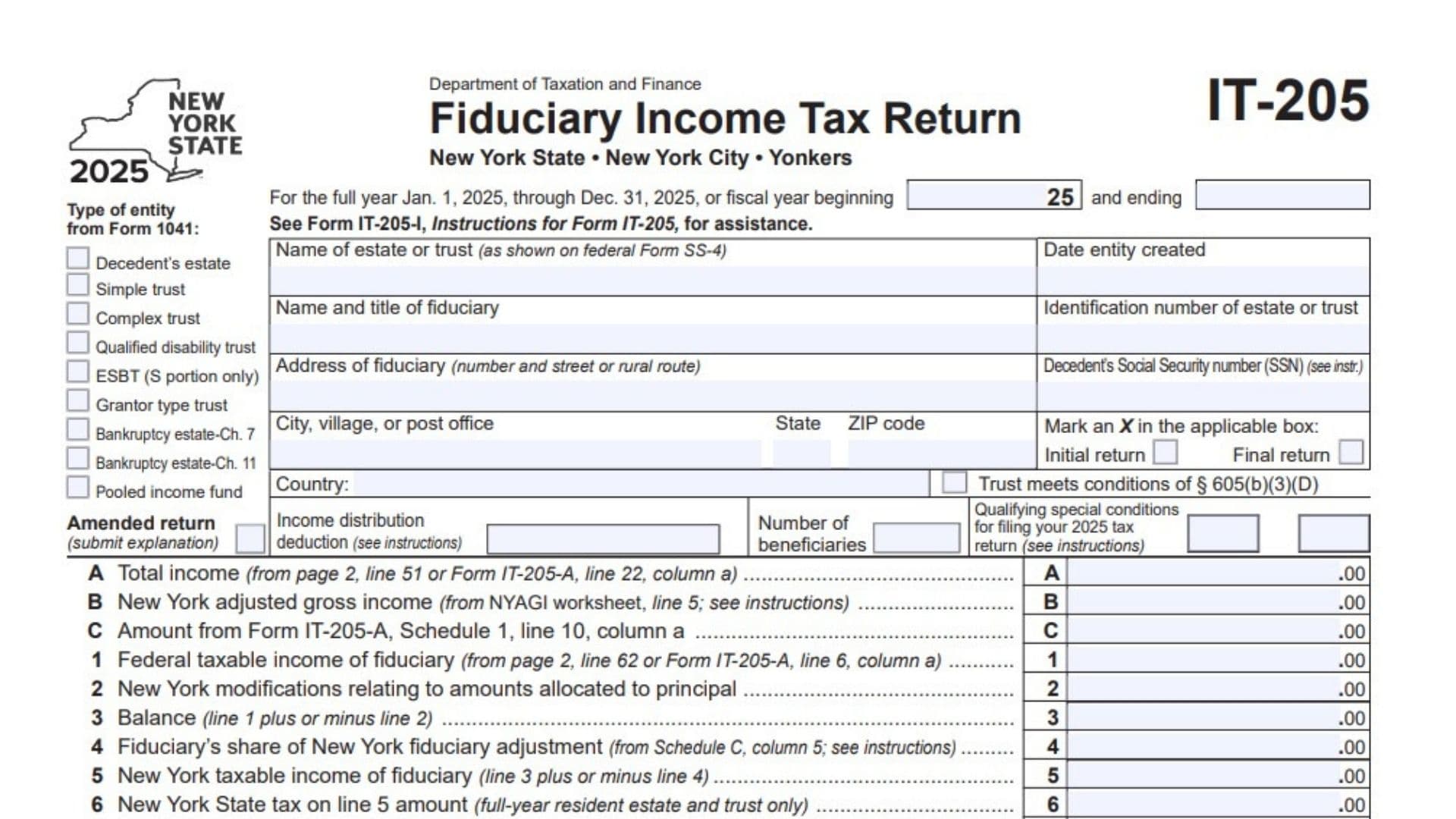
New York Form IT-205, titled Fiduciary Income Tax Return, is used to report income, deductions, tax adjustments, tax liabilities, payments, and other required information for estates and trusts subject to New York State fiduciary income tax filing requirements. The return covers New York State, New York City, and Yonkers tax obligations, where applicable. A fiduciary is the person or entity responsible for administering an estate or trust and handling its tax reporting, such as an executor, trustee, or other authorized representative. Form IT-205 collects identifying information about the estate or trust, the fiduciary, beneficiaries, income sources, deductions, distributions, New York adjustments, and tax payments. It also includes schedules for calculating federal taxable income, determining New York fiduciary adjustments, allocating those adjustments among beneficiaries, and reporting additional estate or trust information. Depending on the entity’s circumstances, the return may require information from federal Form 1041, beneficiary Schedule K-1 forms, and other supporting tax schedules. The completed return determines the applicable New York State, New York City, Yonkers, and sales or use tax amounts, as well as whether the estate or trust has an overpayment, a refund, or an outstanding balance. Completing the form accurately matters because incorrect income figures, deductions, adjustments, beneficiary allocations, or payment amounts can affect the tax liability reported on the return. Not every line applies to every estate or trust. The fiduciary should complete the sections relevant to the entity’s tax situation and use the instructions for the applicable tax year when a calculation or eligibility question requires additional clarification.
How To File Form IT-205
Form IT-205 is filed as the fiduciary income tax return for the applicable estate or trust. Complete the return using the 2025 tax-year information or the fiscal-year dates entered in the tax-period section.
The form directs taxpayers to consult the instructions for Form IT-205, identified as Form IT-205-I, for assistance with completing and filing the return. It also directs filers to those instructions to determine where to mail the completed return.
Before completing the form, gather the following information and records:
- Estate or trust identification: The entity’s legal name, creation date, identification number, address, and applicable entity classification.
- Fiduciary information: The fiduciary’s name, title, address, contact details, and any other identification information requested.
- Federal tax records: Federal Form 1041 and the schedules needed to calculate income, deductions, distributions, and taxable income.
- Beneficiary records: Beneficiary names, addresses, identification numbers, distributable income amounts, and relevant Schedule K-1 information.
- Income records: Statements showing interest, dividends, business income, capital gains or losses, rental income, farm income, and other taxable income.
- Deduction records: Documentation supporting interest, taxes, fiduciary fees, charitable deductions, professional fees, other deductions, estate tax deductions, and applicable business income deductions.
- New York adjustment information: Details needed to report additions and subtractions on Schedule B and to allocate adjustments among beneficiaries on Schedule C.
- Tax payment records: Estimated payments, amounts allocated to beneficiaries, tax withheld, refundable credits, and any payments made with an original return or after it was filed.
- Bank account details: Routing and account numbers if requesting direct deposit or arranging an electronic funds withdrawal.
- Preparer and signature information: Details required for the fiduciary or authorized officer and, where applicable, the paid tax preparer.
Complete all applicable fields and schedules. Include the supporting documents specified by the form’s instructions. For example, the return identifies particular federal schedules that must accompany certain income or deduction entries.
If the return is amended, follow the applicable instructions and provide the required explanation. If the return shows an amount due, follow the payment instructions. The form specifically directs taxpayers paying by check or money order to complete Form IT-205-V and mail it with the return.
Do not assume that every estate or trust uses the same mailing address or payment method. Consult the instructions for Form IT-205 for the filing procedure applicable to the entity.

How To Complete Form IT-205
Form IT-205 contains four pages. Page 1 includes entity identification, filing information, and the main tax calculation. Page 2 contains payment and refund calculations and Schedule A. Page 3 contains Schedule B, Schedule C, and additional estate or trust questions. Page 4 contains banking information, electronic payment details, third-party authorization, preparer information, and the signature section.
Complete the return in an organized manner. Many lines refer to amounts calculated elsewhere on the form or on another schedule, so prepare the supporting calculations before transferring the figures to the main tax calculation.
Entity Information and Filing Status
Tax Year and Entity Classification
Tax Year
The form covers the calendar year from January 1, 2025, through December 31, 2025, or an applicable fiscal year. For a fiscal-year return, enter the beginning and ending dates in the designated spaces. Use the period that applies to the estate or trust.
Type of Entity From Federal Form 1041
Select the applicable entity classification from the options provided. The form lists the following types:
- Decedent’s estate
- Simple trust
- Complex trust
- Qualified disability trust
- Electing Small Business Trust (ESBT), S portion only
- Grantor type trust
- Bankruptcy estate under Chapter 7
- Bankruptcy estate under Chapter 11
- Pooled income fund
Choose the classification that applies to the entity’s federal Form 1041. Consult the Form IT-205 instructions if the correct classification is uncertain.
Name of Estate or Trust
Enter the name of the estate or trust as shown on federal Form SS-4. Make sure the name matches the entity’s identifying records.
Date Entity Created
Enter the date the estate or trust was created in the space provided.
Name and Title of Fiduciary
Enter the name of the person responsible for administering the estate or trust and that person’s title. Use the title that reflects the person’s role, such as executor or trustee, when applicable.
Identification Number of Estate or Trust
Enter the identification number assigned to the estate or trust. Check the number against the entity’s tax records before filing.
Address of Fiduciary
Enter the fiduciary’s street address or rural route address. Use the address requested for the fiduciary rather than automatically substituting the estate’s or trust’s address.
Decedent’s Social Security Number
If the return concerns a decedent’s estate, enter the decedent’s Social Security number in the designated field. Follow the instructions if this information is not applicable or requires special treatment.
City, Village, or Post Office
Enter the city, village, or post office associated with the fiduciary’s address.
State and ZIP Code
Enter the state and ZIP code associated with that address.
Country
If applicable, enter the country associated with the address in the designated field.
Filing Checkboxes and Additional Information
Initial Return
Mark an X in the initial-return box if the return is the entity’s initial return for the applicable filing circumstances. Follow the Form IT-205 instructions to confirm whether the return qualifies as an initial return.
Final Return
Mark an X in the final-return box if the return is the estate’s or trust’s final return, as applicable. Review the instructions before selecting this status.
Trust Meets Conditions of Section 605(b)(3)(D)
Mark the designated box if the trust meets the conditions specified by the cited provision. Do not select this option merely because the entity is a trust; determine eligibility using the applicable instructions.
Qualifying Special Conditions for Filing the 2025 Tax Return
Complete the designated field or fields if the estate or trust qualifies for a special filing condition identified in the instructions. Use the instructions to determine the appropriate entry rather than guessing.
Amended Return
Identify the return as amended when correcting a previously filed return, as applicable. The form instructs the filer to submit an explanation with an amended return. Follow the instructions for reporting previously filed amounts and additional payments.
Income Distribution Deduction
Enter the applicable income distribution deduction amount in the designated field. Use the relevant tax calculation and supporting schedules to determine the amount. The deduction is also reported in the appropriate section of the return.
Number of Beneficiaries
Enter the number of beneficiaries associated with the estate or trust as required by the form. Use the entity’s records and the applicable instructions to determine the correct number.
Page 1: Main Tax Calculation
The following entries summarize income and tax amounts calculated from supporting schedules and other forms. Complete each line using the specified source and the instructions for the applicable tax situation.
Line A: Total Income
Enter the total income from page 2, line 51, or from Form IT-205-A, line 22, column a, as applicable. Use the amount from the correct source for the entity’s circumstances.
Line B: New York Adjusted Gross Income
Enter the New York adjusted gross income amount from line 5 of the New York adjusted gross income worksheet identified in the form’s instructions.
Line C: Amount From Form IT-205-A, Schedule 1
Enter the amount from line 10, column a, of Schedule 1 of Form IT-205-A. Complete this entry when applicable to the return.
Line 1: Federal Taxable Income of Fiduciary
Enter the federal taxable income calculated on page 2, line 62, or the amount from Form IT-205-A, line 6, column a, as applicable. Use the source that corresponds to the entity’s filing circumstances.
Line 2: New York Modifications Relating to Amounts Allocated to Principal
Enter the applicable New York modifications relating to amounts allocated to principal. Determine the amount from the relevant records and instructions. Apply the required addition or subtraction when calculating line 3.
Line 3: Balance
Adjust line 1 by the amount on line 2.
Calculation:
Line 3 = Line 1 plus or minus Line 2
If the modification increases the taxable amount, add it. If it reduces the amount, subtract it, as directed by the applicable instructions.
Line 4: Fiduciary’s Share of New York Fiduciary Adjustment
Enter the fiduciary’s share of the New York fiduciary adjustment from Schedule C, column 5. Use the allocation calculated on Schedule C and follow the instructions for determining whether the amount increases or decreases the taxable income.
Line 5: New York Taxable Income of Fiduciary
Adjust line 3 by the amount on line 4.
Calculation:
Line 5 = Line 3 plus or minus Line 4
Use the applicable instructions to determine whether the adjustment is added or subtracted.
Line 6: New York State Tax on Line 5 Amount
Enter the New York State tax calculated on the amount from line 5 when the return is for a full-year resident estate or trust. The form identifies this line as applying only to full-year resident estates and trusts.
Line 7: New York State Amount From Form IT-230
Enter the amount from Form IT-230, Part 2, line 2, when applicable to a resident estate or trust. Follow the instructions for determining whether this entry is required.
Line 8: Combined New York State Tax Amount
Add lines 6 and 7.
Calculation:
Line 8 = Line 6 + Line 7
Line 9: Allocated New York State Tax
Enter the allocated New York State tax from Form IT-205-A, Schedule 1, line 13, when applicable.
If Form IT-230, Part 2, has been completed, mark the checkbox provided on this line. Follow the instructions to determine the correct tax calculation route.
Line 10: Nonrefundable State Credits
Enter the applicable nonrefundable New York State credits. The form directs the filer to submit the required credit schedule. Use the supporting schedule to determine the amount.
Line 11: New York State Tax After Nonrefundable Credits
Subtract line 10 from line 8 or line 9, depending on the applicable calculation.
Calculation:
Line 11 = Applicable amount from line 8 or line 9 − Line 10
Use the correct starting amount for the entity’s circumstances and follow the instructions if the calculation requires special treatment.
Line 12: State Separate Tax on Lump-Sum Distributions and Other Addbacks
Enter the applicable New York State separate tax relating to lump-sum distributions and other addbacks. Determine the amount using the relevant tax calculations and instructions.
Line 13: Intentionally Left Blank
Do not enter an amount on line 13. The form reserves this line without a tax calculation.
Line 14: Total New York State Tax
Add lines 11 and 12.
Calculation:
Line 14 = Line 11 + Line 12
This amount represents the total New York State tax calculated on the return.
Line 15a: New York City Resident Tax
Enter the applicable New York City resident tax calculated on the line 5 amount. Use this line when the resident tax calculation applies.
Line 15b: New York City Part-Year Resident Tax
Enter the applicable New York City part-year resident tax. Use this line instead of line 15a when the part-year resident calculation applies.
Line 16: New York City Amount From Form IT-230
Enter the amount from Form IT-230, Part 2, line 2, when applicable to the New York City tax calculation.
Line 17: New York City Tax Before Accumulation Distribution Credit
Add line 15a or line 15b, as applicable, to line 16.
Calculation:
Line 17 = Applicable amount from line 15a or line 15b + Line 16
Line 18: New York City Accumulation Distribution Credit
Enter the applicable New York City accumulation distribution credit. Use the relevant calculation and instructions to determine whether the credit applies.
Line 19: New York City Tax After Accumulation Distribution Credit
Subtract line 18 from line 17.
Calculation:
Line 19 = Line 17 − Line 18
If the result is less than zero, leave line 19 blank, as directed by the form.
Line 20: New York City Separate Tax on Lump-Sum Distributions
Enter the applicable New York City separate tax on lump-sum distributions. Calculate this amount using the relevant instructions.
Line 21: New York City Tax Before Other Credits
Add lines 19 and 20.
Calculation:
Line 21 = Line 19 + Line 20
Line 22: Other New York City Credits
Enter the applicable other New York City credits. Consult the instructions to determine which credits qualify and how to calculate them.
Line 23: New York City Tax After Other Credits
Subtract line 22 from line 21.
Calculation:
Line 23 = Line 21 − Line 22
If the result is less than zero, leave line 23 blank.
Line 24: Intentionally Left Blank
Do not enter an amount on line 24. The form does not assign a calculation to this line.
Line 25: Yonkers Resident Income Tax Surcharge
Enter the Yonkers resident income tax surcharge from line e of the Yonkers worksheet, when applicable. Follow the instructions for calculating the surcharge.
Line 26: Yonkers Part-Year Resident Income Tax Surcharge
Enter the applicable surcharge from Form IT-205-A-I, Worksheet C, line 14. Use this line when the part-year resident calculation applies.
Line 27: Yonkers Nonresident Fiduciary Earnings Tax
Enter the amount from Form Y-206, line 10, when the Yonkers nonresident fiduciary earnings tax applies.
Line 28: Sales or Use Tax
Enter the applicable sales or use tax amount. Follow the instructions to determine whether an amount is required and how it should be calculated.
Line 29: Total New York State, New York City, Yonkers, and Sales or Use Taxes
Add line 14 and lines 23 through 28.
Calculation:
Line 29 = Line 14 + Line 23 + Line 25 + Line 26 + Line 27 + Line 28
Line 24 is intentionally blank and does not contribute an amount to this calculation.
Enter the resulting total. This figure is used in the payment and refund calculations on page 2.
Page 2: Payments, Refunds, and Amounts Owed
Page 2 continues the main tax calculation by comparing payments and credits with the tax and penalty amounts due. Complete the payment lines using the estate’s or trust’s payment records.
Line 30: Estimated Tax Paid
Enter the estimated tax payments made for the applicable tax year. The form includes payments made with Form IT-370-PF in this amount.
Line 31: Estimated Tax Payments Allocated to Beneficiaries
Enter the estimated tax payments allocated to beneficiaries from Form IT-205-T.
Line 32: Estimated Tax Payments Remaining After Beneficiary Allocations
Subtract line 31 from line 30.
Calculation:
Line 32 = Line 30 − Line 31
This amount represents the estimated tax payments remaining after the payments allocated to beneficiaries have been deducted.
Line 32a: Amount Paid With Original Return and Additional Tax Paid Later
Enter the amount paid with the original return plus any additional tax paid after the original return was filed, as applicable. The form directs filers to consult the instructions for this line, particularly when filing an amended return.
Line 33: Refundable Credits
Enter the applicable refundable credits and identify the credits in the space provided. Use the relevant supporting records and instructions to determine which credits can be claimed.
Line 34: New York State Tax Withheld
Enter the New York State income tax withheld for the estate or trust, as supported by the relevant tax records.
Line 35: New York City Tax Withheld
Enter the applicable New York City tax withheld.
Line 36: Yonkers Tax Withheld
Enter the applicable Yonkers tax withheld.
Line 37: Total Payments
Add lines 32 through 36.
Calculation:
Line 37 = Line 32 + Line 33 + Line 34 + Line 35 + Line 36
If the return is amended, follow the special instructions for calculating this line.
Line 38: Amount Overpaid
If line 37 is greater than the total of lines 29 and 42, subtract the total of lines 29 and 42 from line 37.
Calculation:
Line 38 = Line 37 − (Line 29 + Line 42)
Use this calculation when the payments exceed the amounts specified by the form. Follow the applicable instructions if the return is amended.
Line 39: Amount to Be Refunded
Enter the portion of the overpayment on line 38 that you want refunded.
Mark one of the available boxes to indicate whether you want the refund issued by direct deposit or paper check. If you select direct deposit, complete line 71 with the required account information.
Do not enter more than the amount available for a refund on line 38.
Line 40: Amount Applied to 2026 Estimated Tax
Enter the portion of the overpayment on line 38 that you want applied to the estate’s or trust’s 2026 estimated tax.
This is the amount directed toward future estimated tax rather than refunded to the entity. Ensure that the amount is consistent with the overpayment available.
Line 41: Amount You Owe
If line 37 is less than the total of lines 29, 42, and 42a, subtract line 37 from that total.
Calculation:
Line 41 = (Line 29 + Line 42 + Line 42a) − Line 37
Enter the result when the calculation shows an amount due.
If you want to pay by electronic funds withdrawal, mark the designated checkbox and complete lines 71 and 72. If you pay by check or money order, the form instructs you to complete Form IT-205-V and mail it with the return.
Line 42: Estimated Tax Penalty
Enter the applicable estimated tax penalty. Use the relevant instructions to determine whether a penalty applies and how to calculate it.
Line 42a: Other Penalties and Interest
Enter any other applicable penalties and interest. Determine the amount using the applicable instructions and supporting records.
Schedule A: Details of Federal Taxable Income of a Fiduciary of a Resident Estate or Trust
Schedule A on page 2 provides the detailed income and deduction calculations used to determine federal taxable income of a fiduciary of a resident estate or trust. The form directs filers to submit a copy of federal Schedule K-1, Form 1041, for each beneficiary, as applicable.
The schedule contains income lines 43 through 51 and deduction lines 52 through 61. Line 62 calculates the federal taxable income of the fiduciary.
Income
Line 43: Interest Income
Enter the interest income applicable to the fiduciary’s income calculation. Use the relevant income records and federal tax information.
Line 44: Dividends
Enter dividend income from the applicable records.
Line 45: Business Income or Loss
Enter business income or loss as determined from the applicable federal tax records. The form identifies federal Schedule C, Form 1040, as a supporting document to submit when required.
Line 46: Capital Gain or Loss
Enter the applicable capital gain or loss. The form identifies federal Schedule D, Form 1041, as the supporting schedule to submit when required.
Line 47: Rents, Royalties, Partnerships, Other Estates and Trusts
Enter the applicable income or loss from rents, royalties, partnerships, and other estates or trusts. The form identifies federal Schedule E, Form 1040, as a supporting document when required.
Line 48: Farm Income or Loss
Enter the applicable farm income or loss. The form identifies federal Schedule F, Form 1040, as a supporting document when required.
Line 49: Ordinary Gain or Loss
Enter the applicable ordinary gain or loss. The form identifies federal Form 4797 as the supporting document when required.
Line 50: Other Income
Enter other applicable income not reported on the preceding income lines. State the nature of the income as requested so the amount can be identified.
Line 51: Total Income
Add lines 43 through 50.
Calculation:
Line 51 = Line 43 + Line 44 + Line 45 + Line 46 + Line 47 + Line 48 + Line 49 + Line 50
Enter the total on line 51 and transfer it to line A on page 1.
Deductions
Line 52: Interest
Enter the applicable interest deduction supported by the relevant tax records.
Line 53: Taxes
Enter the applicable tax deduction. Use the instructions to determine the amount that qualifies for this line.
Line 54: Fiduciary Fees
Enter the applicable fiduciary fees associated with administering the estate or trust.
Line 55: Charitable Deduction
Enter the applicable charitable deduction supported by the relevant records and tax calculation.
Line 56: Attorney, Accountant, and Return Preparer Fees
Enter the applicable fees for attorneys, accountants, and tax return preparers.
Line 57: Other Deductions
Enter other applicable deductions not included on lines 52 through 56 or the following specified deduction lines. The form directs filers to itemize these deductions on an additional sheet.
Line 58: Income Distribution Deduction
Enter the applicable income distribution deduction. The form directs filers to submit a copy of federal Schedule K-1, Form 1041, for each beneficiary, as applicable.
Line 59: Estate Tax Deduction
Enter the applicable estate tax deduction. The form directs filers to submit the supporting computation.
Line 59a: Qualified Business Income Deduction
Enter the applicable qualified business income deduction. The form identifies federal Form 8995 or Form 8995-A as a supporting document to submit when required.
Line 60: Exemption (Federal)
Enter the applicable federal exemption amount used in calculating the fiduciary’s taxable income.
Line 61: Total Deductions
Add lines 52 through 60, including line 59a.
Calculation:
Line 61 = Line 52 + Line 53 + Line 54 + Line 55 + Line 56 + Line 57 + Line 58 + Line 59 + Line 59a + Line 60
Enter the total deductions on line 61.
Line 62: Federal Taxable Income of Fiduciary
Subtract line 61 from line 51.
Calculation:
Line 62 = Line 51 − Line 61
Enter the resulting federal taxable income of the fiduciary on line 62 and transfer the amount to line 1 on page 1 when this is the applicable source for that line.
Schedule B: New York Fiduciary Adjustment
Schedule B on page 3 calculates the New York fiduciary adjustment for a resident or nonresident estate or trust, or a part-year resident trust. It separates specified additions from specified subtractions.
Complete the lines using the applicable tax records and supporting forms. Not every line will necessarily contain an amount.
Additions
Line 63: Interest Income on State and Local Bonds Other Than New York
Enter interest income from state and local bonds issued outside New York that was not included in federal income. The form requests the gross amount.
Line 64: Income Taxes or General Sales Tax Deducted on the Federal Fiduciary Return
Enter the applicable income taxes or general sales tax deducted on the federal fiduciary return. Follow the instructions to determine which amount applies.
Line 65: Other Additions
Enter other applicable additions from Form IT-225, line 9. Use the instructions to determine the appropriate amount.
Line 66: Total Additions
Add lines 63, 64, and 65.
Calculation:
Line 66 = Line 63 + Line 64 + Line 65
Enter the total additions on line 66.
Subtractions
Line 67: Interest Income on U.S. Obligations Included in Federal Income
Enter interest income from U.S. obligations that was included in federal income, as applicable.
Line 68: Other Subtractions
Enter other applicable subtractions from Form IT-225, line 18. Follow the instructions to determine the amount to report.
Line 69: Total Subtractions
Add lines 67 and 68.
Calculation:
Line 69 = Line 67 + Line 68
Enter the total subtractions on line 69.
Line 70: New York Fiduciary Adjustment
Subtract line 69 from line 66.
Calculation:
Line 70 = Line 66 − Line 69
Enter the resulting New York fiduciary adjustment. The form directs filers to enter this amount on the total line in Schedule C, column 5, when applicable.
Schedule C on page 3 allocates the New York fiduciary adjustment among the beneficiaries and the fiduciary, as applicable. It provides space for three beneficiaries and includes additional rows for amounts reported on additional sheets.
The form directs the filer to provide each beneficiary’s name and address. If a beneficiary is a nonresident of New York State or Yonkers, mark an X in the appropriate box. Complete columns 2 through 5 for each beneficiary on the corresponding line.
Beneficiary Information
Column 1: Name
Enter each beneficiary’s name on the corresponding row. Use separate rows for different beneficiaries.
Column 1b: Number and Street
Enter the beneficiary’s street address.
City
Enter the city associated with the beneficiary’s address.
State
Enter the state associated with the beneficiary’s address.
ZIP Code
Enter the beneficiary’s ZIP code.
NYS Nonresident Checkbox
Mark an X in the New York State nonresident box when the beneficiary is a nonresident of New York State, as applicable.
Yonkers Nonresident Checkbox
Mark an X in the Yonkers nonresident box when the beneficiary is a nonresident of Yonkers, as applicable.
Review both residency questions and select the appropriate boxes based on the beneficiary’s circumstances.
Allocation Columns
Column 2: Identifying Number of Beneficiary
Enter the identifying number requested for each beneficiary. Check the number against the beneficiary’s tax records.
Column 3: Amount of Federal Distributable Net Income
Enter each beneficiary’s share of federal distributable net income. Use the relevant federal tax records and the instructions to determine the correct amount.
Column 4: Percent
Enter the percentage associated with each beneficiary’s share of federal distributable net income. Calculate the percentages using the applicable allocation figures and follow the instructions for the required calculation.
The total percentage shown on the final totals line must equal 100%.
Column 5: Shares of New York Fiduciary Adjustment
Enter the portion of the New York fiduciary adjustment allocated to each beneficiary or retained by the fiduciary, as applicable. Use the required allocation method and supporting records.
The total in column 5 must agree with the amount reported on Schedule B, line 70.
Additional Schedule C Rows
Totals From Additional Sheets
If more than three beneficiaries must be reported, use additional sheets as necessary. Enter the combined amounts from those sheets on the designated totals-from-additional-sheets row.
Include the applicable federal distributable net income amounts and New York fiduciary adjustment shares.
Fiduciary
Enter the applicable amount of federal distributable net income and New York fiduciary adjustment attributable to the fiduciary, using the allocation method required by the instructions.
Totals
Combine the beneficiary amounts, additional-sheet totals, and fiduciary amounts as required.
The total federal distributable net income amount should reconcile with the relevant allocation records, and the percentage total must equal 100%. Most importantly, the total in column 5 must equal the amount on Schedule B, line 70.
Check the calculations carefully before transferring the fiduciary’s share of the adjustment to line 4 on page 1.
Additional Estate or Trust Information
Page 3 contains additional questions about the estate or trust, its residency, its grantor, and certain legal or financial characteristics. Complete each applicable field and answer the required Yes or No questions accurately.
Field A: Grantor Name and Address for an Inter Vivos Trust
If the entity is an inter vivos trust, enter the grantor’s name and address. An inter vivos trust is established during the grantor’s lifetime. Follow the instructions if the classification or required information is uncertain.
Field B: Date of Change of Residence for a Revocable Trust
If the trust is revocable and its state or city residence changed during the year, enter the date of the change. Use the applicable instructions to determine which change of residence must be reported.
Field C: Resident Status
Mark an X in all boxes that apply to the estate or trust. The form lists the following classifications:
- Box 1: New York State full-year resident estate or trust.
- Box 2: New York State part-year resident trust.
- Box 3: New York State full-year nonresident estate or trust.
- Box 4: New York City full-year resident estate or trust.
- Box 5: New York City part-year resident trust.
- Box 6: Yonkers full-year resident estate or trust.
- Box 7: Yonkers part-year resident trust.
- Box 8: Yonkers full-year nonresident estate or trust.
Select the classifications that accurately describe the entity’s residency for the tax year. Use the instructions to determine the appropriate combination of boxes.
Field D: Last Known Address of Decedent
If the return is for an estate, enter the decedent’s last known address.
Field E: State of Residency for a Nonresident Estate
If the estate is a nonresident estate, enter the state of residency requested by the form.
Field F: List of Executors or Trustees
Submit a list of executors or trustees, including their addresses and identification numbers. The form specifies that the identification number should be a Social Security number (SSN) or employer identification number (EIN), as applicable.
Field G: Grantor Trust Identification Number
If the entity is a grantor trust, enter the SSN or EIN of the individual reporting the income or loss. Follow the instructions to determine the appropriate identification number.
Field H: Convictions Involving Specified Government-Related Offenses
Answer Yes or No to indicate whether the estate or trust, or an entity of which the estate or trust is an owner, has been convicted of the offenses described in the question. These include specified bribery, corruption, and government-defrauding offenses identified by New York law.
Read the question carefully and answer based on the relevant legal facts. Consult the instructions or a qualified tax professional if the answer is uncertain.
Field I: Grantor’s Reversionary Interest
Answer Yes or No to indicate whether the grantor has a reversionary interest in any portion of the trust’s principal assets or trust income. Use the applicable trust documents and instructions to determine the correct response.
Field J: Power to Remove and Replace an Independent Trustee
Answer Yes or No to indicate whether the grantor has the power to remove an independent trustee and appoint another person, including the grantor, as the replacement trustee.
Field K: Borrowing From Trust Assets or Income
Answer Yes or No to indicate whether the grantor has borrowed directly or indirectly from the trust’s principal assets or income. Review the relevant financial and trust records before answering.
Field L: Power to Deal With or Dispose of Trust Assets or Income
Answer Yes or No to indicate whether the grantor or a non-adverse party has the power to purchase, exchange, otherwise deal with, or dispose of the trust’s principal assets or income.
Use the applicable trust documents and instructions to determine the correct answer.
Page 4: Banking Information and Electronic Payments
Page 4 contains the information needed for direct deposit, electronic funds withdrawal, and payment processing. Complete the fields relevant to the payment or refund method selected.
Line 71: Account Information for Direct Deposit or Electronic Funds Withdrawal
Provide the bank account information needed for direct deposit of a refund or electronic withdrawal of a payment, as applicable.
If the payment would come from an account outside the United States or the refund would be deposited into an account outside the United States, mark an X in the designated checkbox. Follow the instructions for accounts outside the country.
Line 71a: Account Type
Select the appropriate bank account type:
- Personal checking
- Personal savings
- Business checking
- Business savings
Choose the account type that matches the account used for the transaction.
Line 71b: Routing Number
Enter the bank routing number for the selected account. Verify the number against the bank’s records before submitting the return.
Line 71c: Account Number
Enter the account number for the selected bank account. Check each digit carefully to avoid payment or refund processing problems.
Line 72: Electronic Funds Withdrawal
Complete this line when arranging an electronic funds withdrawal, as applicable. Enter the requested withdrawal date and payment amount.
Follow the instructions to confirm the permitted date and payment arrangements. Make sure the amount agrees with the intended payment and the relevant tax calculation.
Third-Party Designee
The form allows the fiduciary to identify a third party who may be authorized to discuss the return with the tax department under the applicable authorization rules.
Third-Party Designee: Yes or No
Select Yes if you want to authorize a third party as provided by the form’s instructions. Select No if you do not want to make that designation.
Designee’s Name
If you select Yes, enter the authorized person’s name.
Designee’s Phone Number
Enter the designee’s telephone number, including the applicable area code.
Designee’s Personal Identification Number
Enter the personal identification number (PIN) requested for the designee, following the instructions.
Designee’s Email
Enter the designee’s email address, when applicable.
Make sure the information is accurate and that the intended designee is the person identified on the form.
Paid Preparer Information
The paid preparer section must be completed by the tax preparer when applicable. If the return is prepared by a paid professional, the preparer should complete the required fields in accordance with the instructions.
Preparer’s NYTPRIN
Enter the preparer’s New York Tax Preparer Identification Number (NYTPRIN), as applicable.
NYTPRIN Exclusion Code
Enter the appropriate exclusion code when applicable under the preparer identification requirements. Follow the instructions to determine whether a code is required.
Preparer’s Signature
The paid preparer must sign the return in the designated space when required.
Preparer’s Printed Name
Enter the preparer’s printed name.
Firm’s Name
Enter the name of the tax preparation firm. If the preparer is self-employed, enter the preparer’s name as appropriate.
Preparer’s PTIN or SSN
Enter the preparer’s applicable Preparer Tax Identification Number (PTIN) or Social Security number, as required.
Preparer’s Address
Enter the preparer’s business address or applicable address requested by the form.
Employer Identification Number
Enter the preparer’s firm’s employer identification number, when applicable.
Preparer’s Date
Enter the date the preparer completed or signed the return, as required.
Preparer’s Email
Enter the preparer’s email address.
Review the preparer information for completeness and accuracy before the return is submitted.
Sign and Complete the Return
The fiduciary or an authorized officer representing the fiduciary must complete the signature section.
Signature of Fiduciary or Officer Representing Fiduciary
The fiduciary or authorized officer should sign the return in the designated space. Make sure the person signing has the appropriate authority to represent the estate or trust.
Printed Name of Person Who Signed Above
Enter the printed name of the person who signed the return.
Date
Enter the date the fiduciary or authorized officer signs the return.
Daytime Phone Number
Enter a telephone number where the person responsible for the return can be reached during the day.
Enter the email address requested in the signature section.
Before submitting the return, make sure the required signature and contact fields have been completed and that the return includes all applicable schedules and supporting information.
Final Review Before Filing
Review the completed Form IT-205 carefully before submitting it. Use the checklist below to identify missing fields, calculation errors, and inconsistencies between the main return and its supporting schedules.
- The correct tax year or fiscal-year period has been entered.
- The estate or trust classification matches the applicable federal records.
- The estate or trust name, creation date, identification number, and address are correct.
- The fiduciary’s name, title, address, and contact details are complete.
- The decedent’s Social Security number has been entered when applicable.
- The initial-return, final-return, amended-return, and other applicable filing fields have been reviewed.
- The income distribution deduction and number of beneficiaries have been entered when required.
- Lines A, B, and C contain the correct amounts from their specified sources.
- Lines 1 through 5 reconcile with the applicable federal taxable income and New York adjustment calculations.
- The New York State tax and credit calculations on lines 6 through 14 are complete when applicable.
- The New York City tax and credit calculations on lines 15a through 23 are correct when applicable.
- The Yonkers taxes and sales or use tax have been included when required.
- Line 29 reflects the applicable total taxes and sales or use tax.
- Estimated tax payments, beneficiary payment allocations, refundable credits, and tax withholding have been entered correctly.
- Lines 37 through 42a have been checked for accurate payment, refund, amount-due, penalty, and interest calculations.
- Schedule A includes all applicable income and deduction amounts.
- Line 51 reflects total income from lines 43 through 50.
- Line 61 reflects total deductions from lines 52 through 60, including line 59a.
- Line 62 correctly reflects line 51 minus line 61.
- Schedule B includes all applicable additions and subtractions.
- Line 70 reflects the difference between total additions and total subtractions.
- Schedule C includes the required beneficiary names, addresses, identifying numbers, and allocation amounts.
- The Schedule C percentage total equals 100%.
- The total in Schedule C, column 5, agrees with Schedule B, line 70.
- Additional estate or trust information fields and Yes or No questions have been answered where applicable.
- Banking information is accurate if direct deposit or electronic funds withdrawal is requested.
- The third-party designee section has been completed consistently with the authorization decision.
- The paid preparer information has been completed when applicable.
- The fiduciary or authorized officer has signed and dated the return.
- All supporting schedules and documents required by the instructions have been included.
- Any amended return includes the required explanation.
- The correct filing and payment procedures have been followed.
A final review helps ensure that the estate or trust’s income, deductions, New York adjustments, beneficiary allocations, payments, and tax liability are reported consistently. When a line depends on a separate worksheet, federal schedule, or special residency rule, use the instructions for Form IT-205 to confirm the correct treatment before filing.