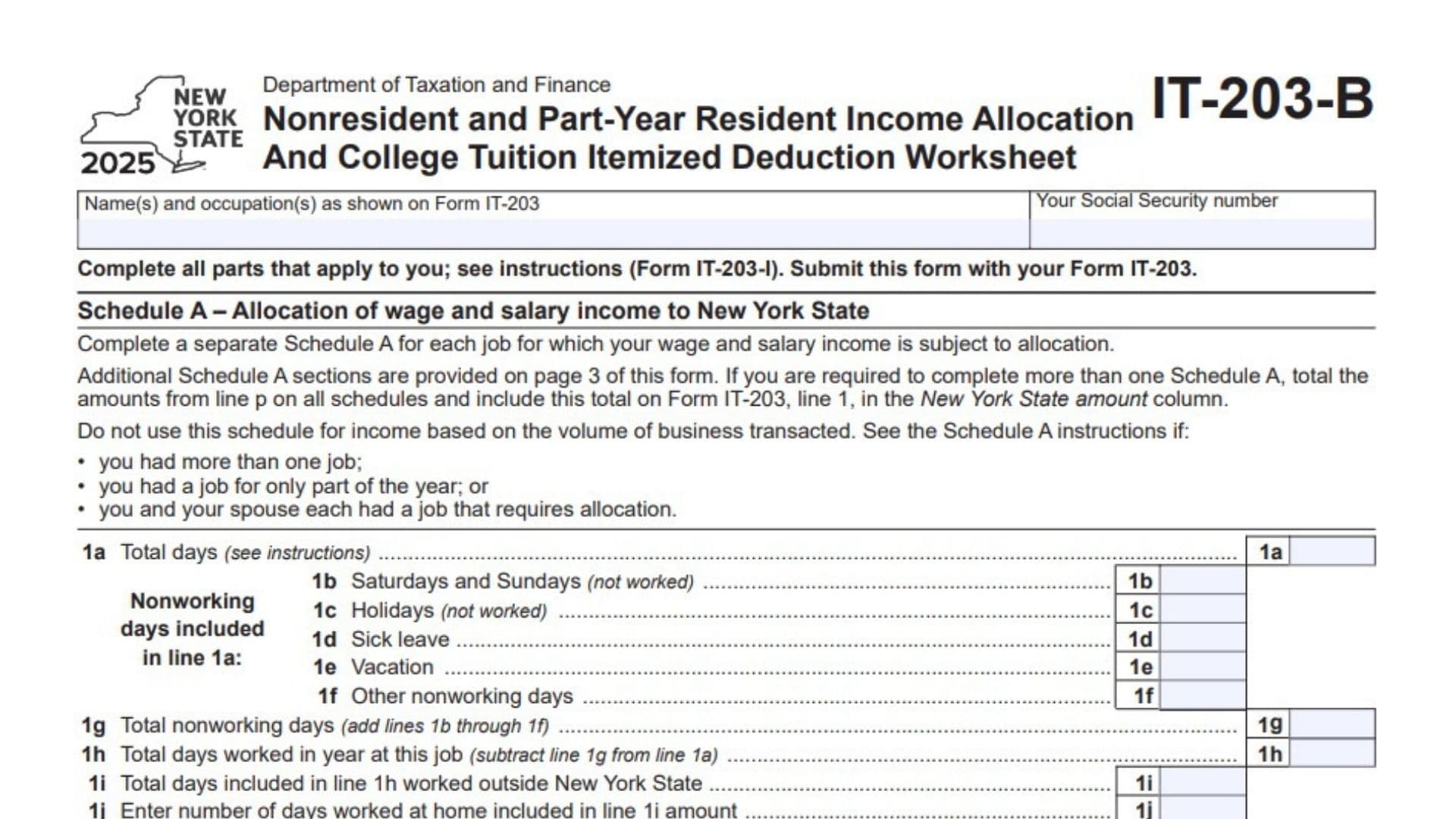
New York Form IT-203-B, titled Nonresident and Part-Year Resident Income Allocation and College Tuition Itemized Deduction Worksheet, is a tax form used with Form IT-203 to help taxpayers report certain income allocation details and calculate a potential college tuition itemized deduction. It contains three main sections: Schedule A, which calculates the portion of wage and salary income allocated to New York State; Schedule B, which records information about living quarters maintained in New York State and the number of days spent in the state; and Schedule C, which helps determine the amount of qualified college tuition expenses that may be included in an itemized deduction. The form is relevant to nonresidents and part-year residents whose tax situations require one or more of these schedules. It collects information such as employment days, nonworking days, work locations, wages, New York addresses, days spent in New York, student identification details, college information, and qualified tuition expenses. Completing the form accurately helps ensure that income is allocated correctly, applicable living-quarter information is reported, and the college tuition deduction is calculated using the amounts and limits shown on the worksheet. Not every taxpayer needs to complete every schedule. You should complete only the sections that apply to your circumstances and follow the instructions for the applicable tax year.
How To File Form IT-203-B
Form IT-203-B is submitted with New York Form IT-203, the nonresident and part-year resident income tax return. It is not intended to replace the main tax return. Schedule A provides wage allocation amounts that must be transferred to Form IT-203, while Schedule C calculates a college tuition itemized deduction amount that is also entered on Form IT-196, New York Resident, Nonresident, and Part-Year Resident Itemized Deductions.
Before completing the form, gather the information needed for each applicable schedule. Preparing these details in advance can help reduce calculation errors and missing information.
- Your tax return information: Have your Form IT-203 available so you can enter your name, occupation, and Social Security number consistently.
- Employment and wage records: Gather wage statements, payroll records, employment dates, and information about the days you worked in New York State, outside New York State, and at home.
- Workday records: Prepare a calendar or other reliable record of working days, weekends not worked, holidays not worked, sick leave, vacation, and other nonworking days.
- Living-quarter information: Collect the street addresses, cities or villages, ZIP codes, and relevant maintenance information for living quarters you or your spouse maintained in New York State.
- Travel information: Determine the number of days you spent in New York State during the tax year, remembering that even part of a day counts as a day under the form’s instructions.
- Student and college information: If completing Schedule C, gather each eligible student’s name, Social Security number, date of birth, college or university name, employer identification number (EIN), and qualified tuition expense information.
- Tuition payment records: Keep the records needed to determine the qualified tuition expenses paid for each eligible student.
Complete the schedules that apply to your circumstances. If you have more jobs than the available Schedule A sections can accommodate, use additional schedules as needed. If Schedule B or Schedule C requires more space than the form provides, attach additional sheets containing the necessary information.
When filing, include Form IT-203-B with Form IT-203 using the applicable filing method. Follow the filing instructions for the relevant tax year to determine how supporting schedules or additional sheets should be included.

How To Complete Form IT-203-B
The form has three pages. Page 1 contains the taxpayer identification fields, the first Schedule A, and Schedule B. Page 2 contains Schedule C. Page 3 provides two additional Schedule A sections for allocating wage and salary income from other jobs.
Complete the form using the information applicable to the 2025 tax year. The detailed instructions for Form IT-203, commonly identified as Form IT-203-I, should be used when you need clarification about how to count days, determine which expenses qualify, or handle a special situation.
Taxpayer Identification Information
Name(s) and occupation(s)
Enter the name or names and occupation or occupations exactly as they appear on Form IT-203. Consistent information helps associate this worksheet with the correct tax return.
Your Social Security number
Enter the taxpayer’s Social Security number in the identification field on page 1. Enter the same number in the designated field at the top of pages 2 and 3, as applicable. Check the number carefully before filing.
Complete all applicable parts
Review the schedules and complete those that apply to your circumstances. You do not need to fill in every schedule simply because it appears on the form.
Schedule A: Allocation of Wage and Salary Income to New York State
Schedule A calculates the amount of wages, salaries, tips, and other covered employment income allocated to New York State. The calculation uses the relationship between the days worked in New York and the total days worked during the applicable period.
Complete a separate Schedule A for each job for which wage and salary income must be allocated. The first schedule appears on page 1, while page 3 provides two additional schedules. Do not use this schedule for income based on the volume of business transacted.
The form specifically directs taxpayers to consult the Schedule A instructions if they had more than one job, worked at a job for only part of the year, or both spouses had jobs requiring allocation.
First Schedule A: Job 1 (Page 1)
Line 1a: Total Days
Enter the total number of days used for the employment allocation calculation. Use the applicable Schedule A instructions to determine the correct period and which days should be counted, especially if you started or left the job during the year.
Line 1b: Saturdays and Sundays (Not Worked)
Enter the number of Saturdays and Sundays that you did not work and that are included in the total reported on line 1a. Do not include days that fall outside the period counted on line 1a.
Line 1c: Holidays (Not Worked)
Enter the number of holidays on which you did not work, provided those days are included in the total on line 1a.
Line 1d: Sick Leave
Enter the number of sick-leave days included in line 1a. Count the days according to the applicable Schedule A instructions.
Line 1e: Vacation
Enter the number of vacation days included in line 1a.
Line 1f: Other Nonworking Days
Enter the number of other nonworking days included in line 1a that have not already been reported in the preceding categories. Follow the instructions for determining which days qualify.
Line 1g: Total Nonworking Days
Add the amounts reported on lines 1b, 1c, 1d, 1e, and 1f.
Calculation:
Line 1g = Line 1b + Line 1c + Line 1d + Line 1e + Line 1f
This total represents the nonworking days deducted from the total days on line 1a.
Line 1h: Total Days Worked in Year at This Job
Subtract line 1g from line 1a.
Calculation:
Line 1h = Line 1a − Line 1g
Enter the resulting number of days worked at this job for the allocation calculation.
Line 1i: Total Days Worked Outside New York State
Enter the number of days included in line 1h that you worked outside New York State. Use the Schedule A instructions to determine how work locations and applicable days should be treated.
Line 1j: Days Worked at Home
Enter the number of days worked at home that are already included in the amount on line 1i. Do not enter home-work days that are not included in line 1i.
Line 1k: Adjusted Days Worked Outside New York State
Subtract line 1j from line 1i.
Calculation:
Line 1k = Line 1i − Line 1j
This calculation removes the home-work days reported on line 1j from the outside-New-York workday total. Apply the detailed instructions when determining which home-work days belong in these amounts.
Line 1l: Days Worked in New York State
Subtract line 1k from line 1h.
Calculation:
Line 1l = Line 1h − Line 1k
Enter the resulting number of days treated as worked in New York State for this allocation calculation.
Line 1m: Total Days Used for the Allocation Ratio
Enter the number of days reported on line 1h. This repeats the total working-day amount used as the denominator for the allocation ratio.
Line 1n: New York State Workday Allocation Ratio
Divide line 1l by line 1m. Round the result to four decimal places.
Calculation:
Line 1n = Line 1l ÷ Line 1m
This ratio represents the proportion of the applicable working days allocated to New York State. Check your calculations and follow the form instructions if your circumstances require special treatment.
Line 1o: Wages, Salaries, Tips, and Other Covered Amounts to Be Allocated
Enter the amount of wages, salaries, tips, and other covered employment income that must be allocated using this schedule. Use your employment and wage records to determine the correct amount.
Line 1p: New York State Allocated Wage and Salary Income
Multiply the allocation ratio on line 1n by the income amount on line 1o.
Calculation:
Line 1p = Line 1n × Line 1o
Enter the resulting New York State allocated wage and salary income. Transfer the amount from line 1p to line 1 of Form IT-203 in the New York State amount column.
Second Schedule A: Job 2 (Page 3)
Use this additional schedule when a second job requires wage and salary income allocation to New York State. Complete each line using the records for that job rather than automatically copying the figures from the first schedule.
Line 2a: Total Days
Enter the total days used for the second job’s allocation calculation, following the Schedule A instructions.
Line 2b: Saturdays and Sundays (Not Worked)
Enter the Saturdays and Sundays not worked that are included in line 2a.
Line 2c: Holidays (Not Worked)
Enter the holidays not worked that are included in line 2a.
Line 2d: Sick Leave
Enter the sick-leave days included in line 2a.
Line 2e: Vacation
Enter the vacation days included in line 2a.
Line 2f: Other Nonworking Days
Enter other nonworking days included in line 2a that are not covered by lines 2b through 2e.
Line 2g: Total Nonworking Days
Add lines 2b through 2f.
Calculation:
Line 2g = Line 2b + Line 2c + Line 2d + Line 2e + Line 2f
Line 2h: Total Days Worked at This Job
Subtract line 2g from line 2a.
Calculation:
Line 2h = Line 2a − Line 2g
Line 2i: Total Days Worked Outside New York State
Enter the days included in line 2h that you worked outside New York State.
Line 2j: Days Worked at Home
Enter the number of days worked at home that are included in line 2i.
Line 2k: Adjusted Days Worked Outside New York State
Subtract line 2j from line 2i.
Calculation:
Line 2k = Line 2i − Line 2j
Line 2l: Days Worked in New York State
Subtract line 2k from line 2h.
Calculation:
Line 2l = Line 2h − Line 2k
Line 2m: Total Days Used for the Allocation Ratio
Enter the number of days reported on line 2h.
Line 2n: New York State Workday Allocation Ratio
Divide line 2l by line 2m and round the result to four decimal places.
Calculation:
Line 2n = Line 2l ÷ Line 2m
Line 2o: Wages, Salaries, Tips, and Other Covered Amounts to Be Allocated
Enter the wage and salary income amount that must be allocated for the second job.
Line 2p: New York State Allocated Wage and Salary Income
Multiply line 2n by line 2o.
Calculation:
Line 2p = Line 2n × Line 2o
Transfer the amount from line 2p to line 1 of Form IT-203 in the New York State amount column.
Third Schedule A: Job 3 (Page 3)
Use the third Schedule A when another job also requires allocation of wage and salary income to New York State. Base the entries on that job’s employment period, workdays, and income records.
Line 3a: Total Days
Enter the total days used for the third job’s allocation calculation, following the applicable Schedule A instructions.
Line 3b: Saturdays and Sundays (Not Worked)
Enter the Saturdays and Sundays not worked that are included in line 3a.
Line 3c: Holidays (Not Worked)
Enter the holidays not worked that are included in line 3a.
Line 3d: Sick Leave
Enter the sick-leave days included in line 3a.
Line 3e: Vacation
Enter the vacation days included in line 3a.
Line 3f: Other Nonworking Days
Enter other nonworking days included in line 3a that are not already reported in the preceding nonworking-day categories.
Line 3g: Total Nonworking Days
Add lines 3b through 3f.
Calculation:
Line 3g = Line 3b + Line 3c + Line 3d + Line 3e + Line 3f
Line 3h: Total Days Worked at This Job
Subtract line 3g from line 3a.
Calculation:
Line 3h = Line 3a − Line 3g
Line 3i: Total Days Worked Outside New York State
Enter the days included in line 3h that you worked outside New York State.
Line 3j: Days Worked at Home
Enter the number of days worked at home that are included in line 3i.
Line 3k: Adjusted Days Worked Outside New York State
Subtract line 3j from line 3i.
Calculation:
Line 3k = Line 3i − Line 3j
Line 3l: Days Worked in New York State
Subtract line 3k from line 3h.
Calculation:
Line 3l = Line 3h − Line 3k
Line 3m: Total Days Used for the Allocation Ratio
Enter the number of days reported on line 3h.
Line 3n: New York State Workday Allocation Ratio
Divide line 3l by line 3m. Round the result to four decimal places.
Calculation:
Line 3n = Line 3l ÷ Line 3m
Line 3o: Wages, Salaries, Tips, and Other Covered Amounts to Be Allocated
Enter the wage and salary income amount that must be allocated for the third job.
Line 3p: New York State Allocated Wage and Salary Income
Multiply line 3n by line 3o.
Calculation:
Line 3p = Line 3n × Line 3o
Transfer the amount from line 3p to line 1 of Form IT-203 in the New York State amount column.
Important: Combining Multiple Schedule A Amounts
If you complete more than one Schedule A, add the amounts reported on the final allocation lines of all completed schedules: line 1p, line 2p, line 3p, and the corresponding final lines on any additional schedules. Include the combined amount on Form IT-203, line 1, in the New York State amount column.
Do not add the wage amounts from line 1o, 2o, or 3o to calculate this total. Those lines contain the income being allocated, while the final lines contain the calculated New York State amounts.
Schedule B: Living Quarters Maintained in New York State
Schedule B collects information about living quarters maintained in New York State by you or your spouse. It also asks how many days you spent in New York State during the tax year. Complete the schedule according to your circumstances and the applicable Form IT-203 instructions.
Living Quarters Maintained for the Entire Tax Year
Mark an X in the designated checkbox if New York State living quarters were maintained for you or by you for the entire tax year. Read the statement carefully before selecting the box.
Addresses of Living Quarters Maintained During Any Part of the Year
If you or your spouse maintained living quarters in New York State during any part of the year, enter the applicable address information in the table. The form provides space for multiple addresses.
Column A: Street Address
Enter the street address of each applicable set of living quarters maintained in New York State.
Column B: City, Village, or Post Office
Enter the city, village, or post office associated with the street address in column A.
Column C: State
The form displays NY in the state column. Check the address entries to make sure the information identifies the correct New York location.
Column D: ZIP Code
Enter the ZIP code associated with the address.
Column E: Living Quarters Still Maintained
Mark an X in the checkbox in column E if the living quarters are still maintained for you or by you. Review the wording carefully because this question concerns whether the living quarters continue to be maintained, not simply whether you lived there at some point during the year.
Additional Address Sheets
If you or your spouse maintained more New York State living quarters than the table can accommodate, attach additional sheets containing the required address information. Make sure the additional information clearly corresponds to Schedule B.
Days Spent in New York State During the Tax Year
Enter the total number of days you spent in New York State during the tax year.
The form specifically states that any part of a day spent in New York State is considered a day spent in New York State. Therefore, do not automatically exclude a day merely because you were in the state for only part of it.
Use your travel calendar and other records to calculate the number accurately. Follow the applicable Form IT-203 instructions if you need help determining how a particular day should be treated.
Schedule C: College Tuition Itemized Deduction Worksheet
Schedule C helps calculate the college tuition itemized deduction amount that may be included on Form IT-196. It begins with an eligibility question and then collects information about eligible students and their qualified college tuition expenses.
The form provides space for three eligible students. If you need to report additional students, use additional sheets as instructed.
Eligibility Question
Question 1: Are You Claimed as a Dependent on Another Taxpayer’s New York State Tax Return?
Answer Yes or No to indicate whether another taxpayer claims you as a dependent on their New York State tax return for the tax year.
- If Yes: Stop completing Schedule C. The form states that you do not qualify for the college tuition itemized deduction.
- If No: Continue to the student information sections. Complete fields A through I for each eligible student for whom you paid qualified college tuition expenses.
Do not continue with the student entries if the answer to question 1 is Yes.
Eligible Student 1
Field A: Student’s Name
Enter the student’s first name, middle initial (MI), last name, and suffix, if applicable. Use the appropriate space for each part of the student’s name.
Field B: Student’s Social Security Number
Enter the eligible student’s Social Security number. Check the number against the student’s records before completing the form.
Field C: Student’s Date of Birth
Enter the student’s date of birth using the month-day-year format shown on the form: MMDDYYYY.
Field D: Is the Student Claimed as a Dependent on Your New York State Return?
Select Yes or No to indicate whether the student is claimed as a dependent on your New York State tax return. Follow the Schedule C instructions if you need help determining the appropriate answer.
Field E: College or University Employer Identification Number
Enter the employer identification number (EIN) of the college or university associated with the student’s tuition expenses. Use the institution’s correct identifying number.
Field F: Name of College or University
Enter the name of the college or university. Check that the institution’s name corresponds to the EIN entered in field E.
Field G: Were the Expenses for Undergraduate Tuition?
Select Yes or No to indicate whether the expenses were for undergraduate tuition. Consult the Schedule C instructions when determining how the question applies to the student’s educational expenses.
Field H: Amount of Qualified College Tuition Expenses
Enter the amount of qualified college tuition expenses for the eligible student. Use the applicable instructions and your records to determine which expenses qualify and the amount to report.
Field I: Lesser of Field H or $10,000
Enter the smaller of the amount on field H or $10,000.
For example, if the qualified tuition expenses entered in field H are $6,500, enter $6,500 in field I. If field H contains $12,000, enter $10,000 in field I.
This field applies the worksheet’s $10,000 limit to the amount entered for the student.
Eligible Student 2
Complete the second student section if you paid qualified college tuition expenses for another eligible student. Enter each student’s information separately.
Field A: Student’s Name
Enter the second student’s first name, middle initial, last name, and suffix, if applicable.
Field B: Student’s Social Security Number
Enter the second student’s Social Security number.
Field C: Student’s Date of Birth
Enter the second student’s date of birth in MMDDYYYY format.
Field D: Student’s Dependent Status on Your New York State Return
Select Yes or No to indicate whether the second student is claimed as a dependent on your New York State tax return.
Field E: College or University Employer Identification Number
Enter the EIN of the college or university associated with the second student’s tuition expenses.
Field F: Name of College or University
Enter the college or university’s name.
Field G: Undergraduate Tuition
Select Yes or No to indicate whether the expenses were for undergraduate tuition.
Field H: Qualified College Tuition Expenses
Enter the amount of qualified college tuition expenses for the second student, based on the applicable instructions and supporting records.
Field I: Lesser of Field H or $10,000
Enter the smaller of field H or $10,000. Apply the same calculation used for the first student.
Eligible Student 3
Use the third student section if you paid qualified college tuition expenses for a third eligible student. Complete each field separately.
Field A: Student’s Name
Enter the third student’s first name, middle initial, last name, and suffix, if applicable.
Field B: Student’s Social Security Number
Enter the third student’s Social Security number.
Field C: Student’s Date of Birth
Enter the third student’s date of birth in MMDDYYYY format.
Field D: Student’s Dependent Status on Your New York State Return
Select Yes or No to indicate whether the third student is claimed as a dependent on your New York State tax return.
Field E: College or University Employer Identification Number
Enter the EIN of the college or university associated with the third student’s tuition expenses.
Field F: Name of College or University
Enter the institution’s name.
Field G: Undergraduate Tuition
Select Yes or No to indicate whether the expenses were for undergraduate tuition.
Field H: Qualified College Tuition Expenses
Enter the amount of qualified college tuition expenses for the third student, using the applicable instructions to determine the amount that qualifies.
Field I: Lesser of Field H or $10,000
Enter the smaller of field H or $10,000. Do not enter more than $10,000 in this field under the calculation specified on the worksheet.
Additional Eligible Students
The form provides three student sections. If you paid qualified college tuition expenses for more eligible students, use additional sheets as necessary.
For each additional student, provide the same information requested in fields A through I. Calculate the amount for field I using the same lesser-of calculation and include the additional field I amounts when completing line 2.
Make sure the additional sheets identify the information clearly so that the amounts can be included in the total deduction calculation.
College Tuition Deduction Calculation
Line 2: College Tuition Itemized Deduction
Add the amounts reported in field I for all eligible students. Include the amounts from any additional sheets.
Calculation:
Line 2 = Total of all eligible students’ field I amounts
Enter the resulting total on line 2 of Schedule C.
The form also instructs you to enter this amount on Form IT-196, New York Resident, Nonresident, and Part-Year Resident Itemized Deductions. Make sure the amount transferred to Form IT-196 agrees with the total on line 2.
Common Mistakes to Avoid When Completing Form IT-203-B
A few simple checks can help you avoid errors when completing this worksheet.
- Using the wrong tax year: Make sure you are completing the version of the form that applies to your tax return.
- Skipping an applicable schedule: Review your employment, living-quarter, and tuition circumstances before deciding which sections to complete.
- Combining multiple jobs incorrectly: Complete a separate Schedule A for each job that requires allocation and add the calculated New York State amounts from the final lines.
- Counting nonworking days incorrectly: Include only the applicable nonworking days counted in the corresponding total-days line.
- Entering the wrong workday ratio: Check the subtraction, division, and four-decimal rounding required for each Schedule A.
- Reporting the wrong income amount: Use the amount that must be allocated for the relevant job rather than the final allocated amount.
- Missing home-workday information: Complete the home-workday line when applicable and follow the instructions for calculating the adjusted outside-New-York workday amount.
- Leaving out New York addresses: Report the required living-quarter details when you or your spouse maintained living quarters in the state during any part of the year.
- Miscounting days in New York: Remember that a part of a day spent in New York State counts as a day under the form’s stated rule.
- Completing Schedule C after answering Yes to question 1: The form directs you to stop if another taxpayer claims you as a dependent on their New York State return.
- Exceeding the student-level tuition limit: For each student, enter the lesser of qualified tuition expenses or $10,000 in field I.
- Forgetting additional student amounts: Include eligible students reported on additional sheets when totaling line 2.
- Transferring amounts to the wrong return lines: Check that Schedule A amounts go to Form IT-203, line 1, in the New York State amount column, and the Schedule C total goes to Form IT-196.
Final Review Before Filing
Before submitting Form IT-203-B with Form IT-203, review the completed worksheet using this checklist.
- The name or names and occupation or occupations match Form IT-203.
- The Social Security number is correct wherever it is requested.
- Every applicable schedule has been completed.
- A separate Schedule A has been completed for each job requiring wage and salary allocation.
- The total days and nonworking-day amounts on each Schedule A are accurate.
- The working-day calculations and New York State allocation ratio are correct.
- Each Schedule A final allocation amount has been calculated correctly.
- The final amounts from all completed Schedule A sections have been combined and transferred to Form IT-203, line 1, in the New York State amount column.
- Schedule B includes the required New York State living-quarter addresses, if applicable.
- The Schedule B checkbox for living quarters maintained for the entire tax year has been answered accurately.
- The column E checkboxes have been marked correctly for applicable addresses.
- The number of days spent in New York State has been calculated with the form’s part-day rule in mind.
- Schedule C question 1 has been answered before entering student information.
- Each eligible student’s name, Social Security number, date of birth, dependent status, college EIN, and college name have been checked.
- The undergraduate tuition question has been answered for each eligible student.
- The qualified tuition expense amount and the lesser-of calculation have been completed for each student.
- Additional schedules or student information sheets have been included where needed.
- The Schedule C line 2 total includes all eligible students and has been transferred to Form IT-196.
- The amounts transferred to the main tax return agree with the completed worksheet.
- Form IT-203-B is included with Form IT-203 and the filing instructions for the applicable tax year have been followed.
Carefully reviewing each applicable section before filing can help you report the correct wage allocation, provide complete New York State living-quarter information, and calculate the college tuition itemized deduction using the worksheet’s stated rules.