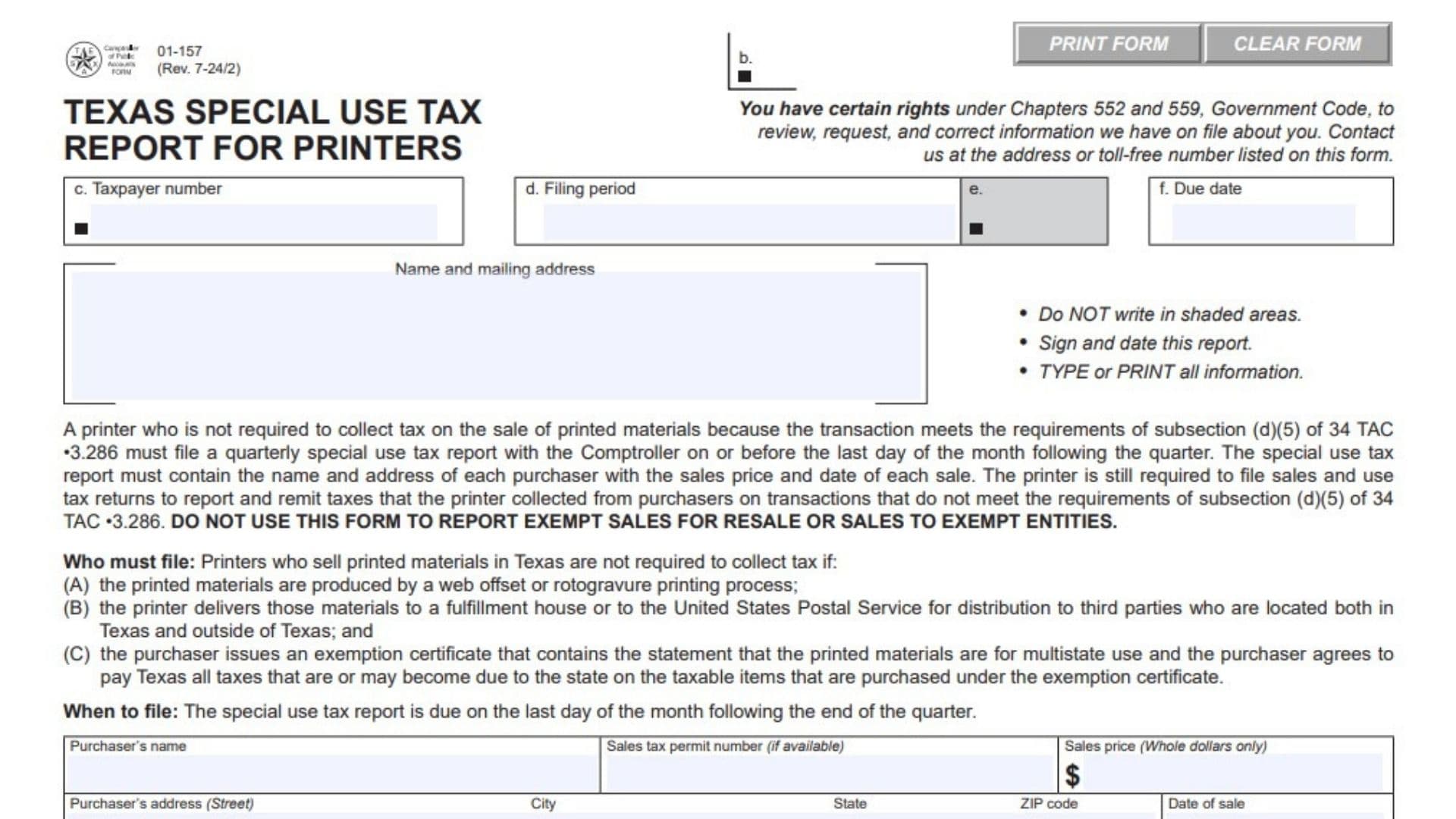
Texas Special Use Tax Report for Printers Form 01-157 is a quarterly report used by certain printers that sell printed materials in Texas without collecting tax because the transactions meet the specific requirements for the special multistate-use treatment described on the form. The report allows the Texas Comptroller of Public Accounts to receive information about qualifying sales, including the name and address of each purchaser, the purchaser’s sales tax permit number when available, the sales price, and the date of each sale. The form applies to printers whose printed materials are produced using a web offset or rotogravure printing process, delivered to a fulfillment house or the United States Postal Service for distribution to third parties located both inside and outside Texas, and purchased under an exemption certificate containing the required multistate-use statement and agreement to pay Texas any tax that becomes due. The printer must file the special use tax report quarterly even though tax was not collected on these qualifying transactions. This report is separate from the printer’s ordinary sales and use tax reporting obligations. Sales that do not qualify for the special treatment and on which the printer collected tax must instead be reported through the applicable sales and use tax return. The form specifically must not be used to report exempt sales for resale or sales to exempt entities. Completing the report accurately is important because the Comptroller uses the purchaser and transaction information reported on the form to identify the sales covered by this special use tax arrangement.
How To File Form 01-157
Form 01-157 is filed quarterly by a printer that qualifies for the special use tax reporting requirements.
The report is due on or before the last day of the month following the end of the quarter.
The completed report should be mailed to:
Comptroller of Public Accounts
Audit – Technical Support
PO Box 13528
Austin, TX 78711-3528
Before completing the report, gather the following information for each qualifying sale:
- Purchaser’s legal or business name.
- Purchaser’s sales tax permit number, if available.
- Purchaser’s street address.
- Purchaser’s city.
- Purchaser’s state.
- Purchaser’s ZIP code.
- Date of sale.
- Sales price in whole dollars.
You should also have the printer’s taxpayer number, filing period, due date, taxpayer name and mailing address, and the information needed to identify the applicable reporting quarter.
Who Must File Form 01-157?
A printer must file this special use tax report when the printer sells printed materials in Texas and is not required to collect tax because the transaction satisfies all of the conditions specified for the special treatment.
Printing Process Requirement
The printed materials must be produced using either a web offset or rotogravure printing process.
If the printing process does not meet this requirement, the transaction does not qualify for the special reporting treatment described on this form.
Distribution Requirement
The printer must deliver the printed materials to either a fulfillment house or the United States Postal Service.
The materials must then be distributed to third parties located both inside Texas and outside Texas.
Purchaser Exemption Certificate Requirement
The purchaser must provide an exemption certificate containing the required statement that the printed materials are intended for multistate use.
The purchaser must also agree to pay Texas any taxes that are or may become due on the taxable items purchased under the exemption certificate.
All of these conditions must be satisfied for the transaction to fall under the special reporting requirements.

How To Complete Form 01-157
Return Identification Information
The upper portion of Form 01-157 contains the printer’s account and filing information. Review the preprinted information carefully before completing the transaction section.
Item b: Processing Information
This is a shaded processing area associated with the Comptroller’s processing of the return. Do not enter information in the shaded area.
Item c: Taxpayer Number
Enter or verify the taxpayer number assigned to the printer’s Texas tax account.
Make sure the taxpayer number corresponds to the printer filing the special use tax report.
Item d: Filing Period
Enter or verify the reporting period covered by the return.
The filing period should correspond to the quarter for which the printer is reporting qualifying special-use-tax sales.
Item e: Processing Field
This is a designated shaded area used for processing purposes. Do not write in the shaded area.
Item f: Due Date
Enter or verify the due date shown for the reporting period.
The special use tax report is due on the last day of the month following the end of the quarter.
Taxpayer Name And Mailing Address
Name And Mailing Address
Enter or verify the printer’s name and complete mailing address.
Use the taxpayer information associated with the Texas tax account. The information should be clear and complete so that the Comptroller can properly identify the taxpayer and communicate regarding the report.
Purchaser And Transaction Information
The main body of Form 01-157 contains seven purchaser information sections. Each section records one purchaser and the corresponding qualifying sale.
If the printer has more qualifying sales than the form provides space for, additional information should be supplied in a manner that allows each purchaser and sale to be clearly identified.
Purchaser Information Section 1
Purchaser’s Name — Section 1
Enter the name of the purchaser involved in the qualifying sale.
Use the purchaser’s name clearly enough to identify the customer associated with the transaction.
Sales Tax Permit Number — Section 1
Enter the purchaser’s Texas sales tax permit number if one is available.
The field is specifically identified as optional when the permit number is available rather than mandatory for every purchaser.
Sales Price — Section 1
Enter the sales price of the qualifying transaction.
The form requires the sales price to be reported in whole dollars only.
Do not enter cents.
Purchaser’s Address — Street — Section 1
Enter the purchaser’s street address.
City — Section 1
Enter the city where the purchaser’s address is located.
State — Section 1
Enter the state associated with the purchaser’s address.
ZIP Code — Section 1
Enter the purchaser’s ZIP code.
Date Of Sale — Section 1
Enter the date on which the sale occurred.
Purchaser Information Section 2
Purchaser’s Name — Section 2
Enter the name of the second purchaser whose qualifying sale is being reported.
Sales Tax Permit Number — Section 2
Enter the purchaser’s sales tax permit number if available.
Sales Price — Section 2
Enter the sales price for the transaction in whole dollars only.
Purchaser’s Address — Street — Section 2
Enter the purchaser’s street address.
City — Section 2
Enter the purchaser’s city.
State — Section 2
Enter the purchaser’s state.
ZIP Code — Section 2
Enter the purchaser’s ZIP code.
Date Of Sale — Section 2
Enter the date the second reported sale took place.
Purchaser Information Section 3
Purchaser’s Name — Section 3
Enter the name of the third purchaser associated with a qualifying sale.
Sales Tax Permit Number — Section 3
Enter the purchaser’s sales tax permit number if it is available.
Sales Price — Section 3
Enter the transaction’s sales price using whole dollars only.
Purchaser’s Address — Street — Section 3
Enter the purchaser’s street address.
City — Section 3
Enter the purchaser’s city.
State — Section 3
Enter the purchaser’s state.
ZIP Code — Section 3
Enter the purchaser’s ZIP code.
Date Of Sale — Section 3
Enter the date on which the sale occurred.
Purchaser Information Section 4
Purchaser’s Name — Section 4
Enter the name of the fourth purchaser being reported.
Sales Tax Permit Number — Section 4
Enter the purchaser’s sales tax permit number if available.
Sales Price — Section 4
Enter the sales price in whole dollars only.
Purchaser’s Address — Street — Section 4
Enter the purchaser’s street address.
City — Section 4
Enter the purchaser’s city.
State — Section 4
Enter the purchaser’s state.
ZIP Code — Section 4
Enter the purchaser’s ZIP code.
Date Of Sale — Section 4
Enter the date of the fourth reported sale.
Purchaser Information Section 5
Purchaser’s Name — Section 5
Enter the name of the fifth purchaser associated with a qualifying transaction.
Sales Tax Permit Number — Section 5
Enter the purchaser’s sales tax permit number if available.
Sales Price — Section 5
Enter the sales price for the sale in whole dollars only.
Purchaser’s Address — Street — Section 5
Enter the purchaser’s street address.
City — Section 5
Enter the purchaser’s city.
State — Section 5
Enter the purchaser’s state.
ZIP Code — Section 5
Enter the purchaser’s ZIP code.
Date Of Sale — Section 5
Enter the date of the sale.
Purchaser Information Section 6
Purchaser’s Name — Section 6
Enter the name of the sixth purchaser whose qualifying sale is being reported.
Sales Tax Permit Number — Section 6
Enter the purchaser’s sales tax permit number if available.
Sales Price — Section 6
Enter the sales price in whole dollars only.
Purchaser’s Address — Street — Section 6
Enter the purchaser’s street address.
City — Section 6
Enter the purchaser’s city.
State — Section 6
Enter the purchaser’s state.
ZIP Code — Section 6
Enter the purchaser’s ZIP code.
Date Of Sale — Section 6
Enter the date the sale was made.
Purchaser Information Section 7
Purchaser’s Name — Section 7
Enter the name of the seventh purchaser associated with a qualifying sale.
Sales Tax Permit Number — Section 7
Enter the purchaser’s sales tax permit number if available.
Sales Price — Section 7
Enter the sales price in whole dollars only.
Purchaser’s Address — Street — Section 7
Enter the purchaser’s street address.
City — Section 7
Enter the purchaser’s city.
State — Section 7
Enter the purchaser’s state.
ZIP Code — Section 7
Enter the purchaser’s ZIP code.
Date Of Sale — Section 7
Enter the date of the seventh reported sale.
Important Rules For Reporting Sales
Report Qualifying Multistate Sales
Only transactions that meet the special requirements described on the form should be reported using Form 01-157.
The transaction must involve qualifying printed materials, the required printing process, the required delivery and distribution arrangement, and the purchaser’s appropriate exemption certificate.
Do Not Use Form 01-157 For Exempt Resale Sales
Do not use this report to report sales that are exempt because they are sales for resale.
Those transactions are outside the purpose of this special use tax report.
Do Not Use Form 01-157 For Sales To Exempt Entities
Do not use this form to report sales made to entities that are exempt from tax.
The form is specifically intended for the special printer transactions described in its filing requirements.
Sales On Which Tax Was Collected
A printer may still have ordinary sales and use tax reporting responsibilities.
If a transaction does not meet the special requirements and the printer collected tax from the purchaser, that transaction should be reported through the printer’s applicable sales and use tax return rather than being reported as a special-use-tax transaction on Form 01-157.
When To File Form 01-157
Form 01-157 is a quarterly report.
Quarterly Filing Deadline
The report must be filed by the last day of the month following the end of the quarter.
The applicable reporting period and due date should be reviewed before submitting the report.
Signature And Certification
The bottom portion of the form contains the taxpayer certification and signature area.
Taxpayer’s Name
Enter the taxpayer’s name in the designated area at the bottom of the report.
This should correspond to the printer identified in the taxpayer information section.
Declaration
The taxpayer or authorized agent certifies that the information reported on the form and any attachments is true and correct to the best of their knowledge.
Review the entire report before signing because the signature confirms the accuracy of the information submitted.
Taxpayer Or Duly Authorized Agent
The taxpayer or a duly authorized representative must sign the report.
The person signing should have authority to act for the taxpayer.
Date
Enter the date the report is signed.
Daytime Phone
Provide a daytime telephone number, including the area code, where the taxpayer or authorized agent can be reached.
Mailing Information
Mailing Address
The completed report should be mailed to:
Comptroller of Public Accounts
Audit – Technical Support
PO Box 13528
Austin, TX 78711-3528
Make sure the report is properly completed and signed before mailing it.
Questions And Assistance
If you have questions about Form 01-157, the form provides two telephone options for assistance.
You may contact the Texas State Comptroller’s field office in your area or call the toll-free nationwide number:
800-531-5441, extension 3-3900
The form also provides the Austin number:
512-463-3900
Form Completion Requirements
The form provides several basic instructions that should be followed when preparing the return.
Do Not Write In Shaded Areas
Leave all shaded areas blank. These areas are reserved for processing.
Sign And Date The Report
The completed report must be signed and dated by the taxpayer or duly authorized agent.
Type Or Print All Information
All information entered on the form should be typed or clearly printed so it can be read and processed correctly.
Final Review Before Filing
Before mailing Form 01-157, verify that:
- The report is for the correct quarterly filing period.
- The taxpayer number is correct.
- The taxpayer’s name and mailing address are correct.
- The filing period is correct.
- The due date has been reviewed.
- No information has been written in shaded areas.
- Every reported transaction qualifies for the special printer reporting treatment.
- The printed materials were produced using a qualifying web offset or rotogravure printing process.
- The required delivery arrangement involved a fulfillment house or the United States Postal Service.
- The printed materials are being distributed to third parties located both inside and outside Texas.
- The purchaser provided the required exemption certificate for multistate use.
- The purchaser agreed to pay any Texas tax that becomes due on the taxable items covered by the exemption certificate.
- Each purchaser’s name is entered correctly.
- Each purchaser’s sales tax permit number is included when available.
- Each sales price is reported in whole dollars only.
- Each purchaser’s street address is complete.
- Each purchaser’s city is correct.
- Each purchaser’s state is correct.
- Each purchaser’s ZIP code is correct.
- The date of each sale is entered.
- Exempt sales for resale have not been reported on this form.
- Sales to exempt entities have not been reported on this form.
- Transactions on which the printer collected tax are being handled through the appropriate sales and use tax return instead.
- The taxpayer’s name is entered in the certification section.
- The taxpayer or duly authorized agent has signed the report.
- The signature date is provided.
- A daytime telephone number with the area code is included.
- The report is being mailed to the correct Comptroller address.
- The report is filed by the last day of the month following the end of the applicable quarter.