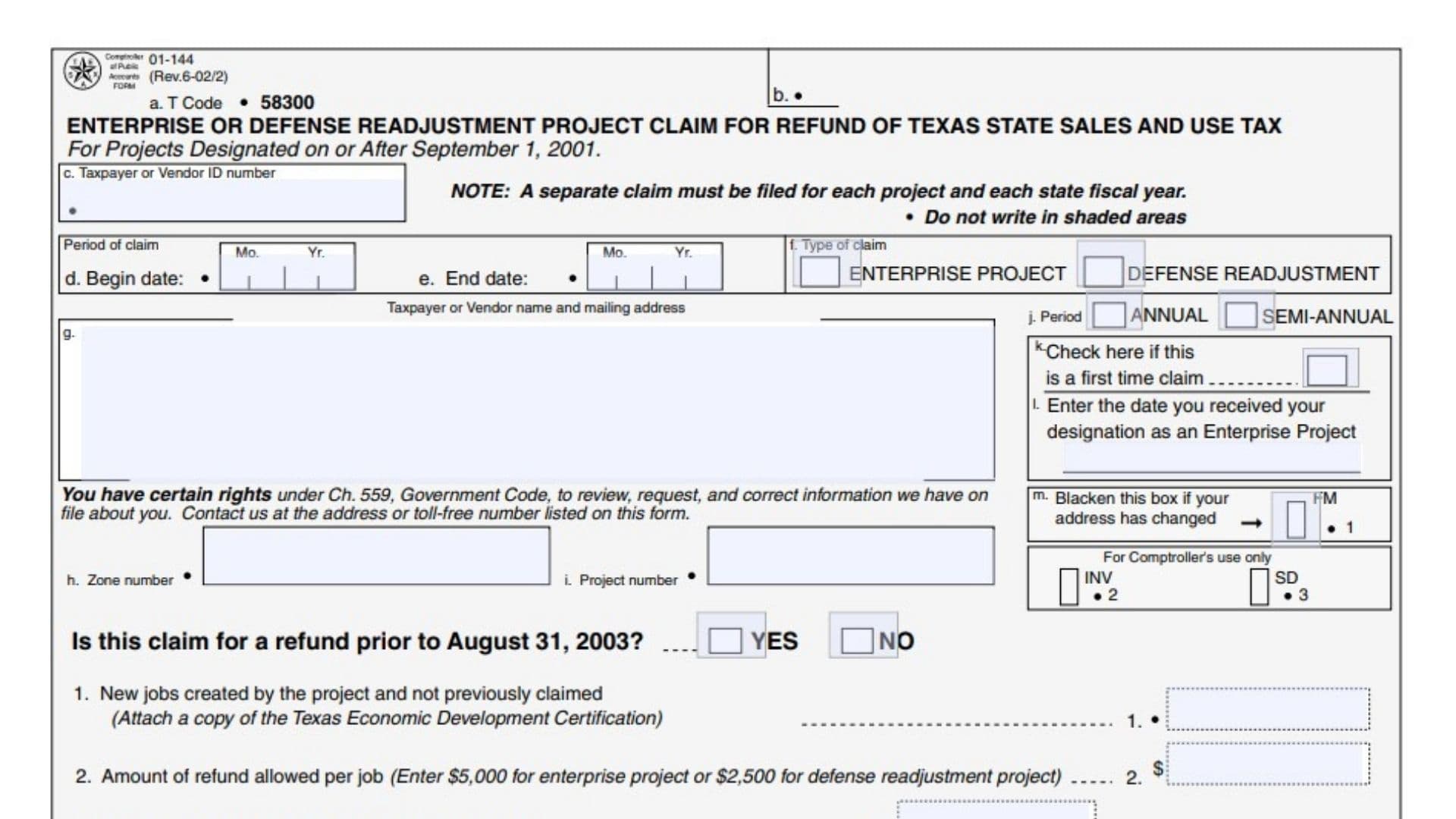
Texas Form 01-144, Enterprise or Defense Readjustment Project Claim for Refund of Texas State Sales and Use Tax, allows qualifying designated projects to request a refund of eligible Texas state sales and use tax. The June 2002 revision addresses projects designated on or after September 1, 2001, and calculates the available refund using certified new jobs, unused job credits, eligible taxes paid, previous claims, and an annual limit. It collects the project’s identifying information, designation details, claim period, supporting tax amounts, and the claimant’s certification. Completing the calculations correctly matters because the allowable refund cannot exceed either the applicable job-based credit or the remaining annual limit, and unused tax claims and unused job credits must be tracked separately. This guide explains the June 2002 revision; its historical amounts, eligibility provisions, contact details, and submission procedures should not be assumed to govern a later claim without confirmation.
How To File Form 01-144
Where To Submit the Claim
The mailing address printed on this revision is:
Comptroller of Public Accounts
111 E. 17th Street
Austin, Texas 78774-0100
Submit a separate claim for each project and each Texas state fiscal year. The state fiscal year begins September 1 and ends August 31.
The instructions allow annual or semiannual claims. A semiannual filer must account for refunds already claimed within the same fiscal year when calculating the remaining annual limit.
This form is a refund claim, not an attachment to an ordinary sales tax return. The supporting invoice or contract schedule accompanies the claim when required.
Documents To Prepare
Before completing the claim, gather:
- Your Federal Employer Identification Number or, for an individual filer, Social Security number.
- The taxpayer or vendor’s name and mailing address.
- The zone number and project number.
- Project designation records and designation date.
- The Texas Economic Development certification supporting newly created jobs.
- The previous claim, if carrying forward unused job credit or an unrefunded tax claim.
- Records of refunds previously claimed during the same fiscal year.
- Form 01-125 or an acceptable equivalent containing the required invoice and contract information.
- Supporting invoices and copies of referenced contracts.
- Records establishing the eligible Texas state tax actually paid.
Assistance With Filing
This revision lists 1-800-531-5441, extension 3-4545, or 512-463-4545 for assistance.
For callers using a Telecommunications Device for the Deaf, it lists 1-800-248-4099 or 512-463-4621. Those numbers are identified specifically for TDD use.
Because these are historical contact details, confirm their availability before relying on them for a current submission.

How To Complete Form 01-144
Do not write in shaded areas or in spaces reserved for the Comptroller.
The form uses lettered identification fields and numbered calculations. Items 3a and 3b feed into Item 3, while Items 4a and 4b feed into Item 4. Keep those supporting entries separate from their resulting totals.
Taxpayer and Claim Identification
Item a: T Code
The form displays transaction code 58300. This identifies the claim type for processing; it is not a tax rate or refund amount. Preserve the preprinted entry.
Item b: Administrative area
No claimant instruction is provided for this labeled area. Leave administrative and shaded spaces untouched.
Item c: Taxpayer or Vendor ID Number
Enter your Federal Employer Identification Number. If filing as an individual, use your Social Security number as directed by the instructions.
Item d: Beginning Date of Claim Period
Enter the month and year when the claim period begins. Ensure the period belongs to the fiscal year covered by this separate claim.
Item e: Ending Date of Claim Period
Enter the month and year when the claim period ends. Check that the beginning and ending dates agree with the annual or semiannual period selected.
Item f: Enterprise Project Checkbox
Select this option if claiming as an enterprise project. This classification determines the per-job amount used in Item 2.
Item f: Defense Readjustment Checkbox
Select this option if claiming as a defense readjustment project. Use the corresponding per-job amount in Item 2.
Item g: Taxpayer or Vendor Name and Mailing Address
Enter the claimant’s name and complete mailing address. Review any preprinted details and provide corrections where necessary.
Item h: Zone Number
Enter the zone number associated with the designated project. Use the project’s designation records rather than a taxpayer identification number.
Item i: Project Number
Enter the number assigned to the specific project covered by this claim. Separate projects require separate claims.
Refund Before August 31, 2003: Yes Checkbox
Select “Yes” if the claim concerns a refund before August 31, 2003, as asked on this historical revision.
Refund Before August 31, 2003: No Checkbox
Select “No” if that description does not apply. This question is separate from the project’s designation-date field.
Item j: Semiannual Period Checkbox
Select this option if filing a semiannual claim. If another claim was filed for the same fiscal year, include the previously claimed amount in Item 4b.
Item j: Annual Period Checkbox
Select this option if filing for the annual period. The relevant year is the Texas state fiscal year, not automatically the calendar year.
Item k: Project Designation Date
Enter the date the project received its designation. The instructions specifically require this information for a first-time claim.
The instructions allow claims to include eligible taxes paid as early as 90 days before designation and through the end of the designation period.
Item l: First-Time Claim Checkbox
Select this box if the project has never previously filed a refund claim for tax paid.
Item m: Address Changed Checkbox
Fill in this box if the mailing address has changed, and provide the corrected address in the name and address area.
New Jobs and Available Job Credit
Certified Jobs and Per-Job Amount
Item 1: New Jobs Created and Not Previously Claimed
Enter the number of newly created project jobs supported by the Texas Economic Development certification. Do not include jobs already used in an earlier claim.
Attach a copy of the certification supporting the job count.
Item 2: Refund Amount Allowed Per Job
For this revision, enter:
- $5,000 for an enterprise project.
- $2,500 for a defense readjustment project.
Choose the amount matching the project type selected in Item f. These figures are historical provisions of this revision, not a confirmation of current program limits.
Job Credit Calculation
Item 3a: New Job Credit Available
Multiply the certified new jobs in Item 1 by the per-job amount in Item 2.
\text{Item 3a}=\text{Item 1}\times\text{Item 2}This entry represents credit generated by the newly claimed jobs.
Item 3b: Unused Job Credit From Prior Periods
Enter the unused job credit from Item 11 of the previous claim.
This is remaining job-based credit, not the separate carryover of eligible tax entered in Item 7.
Item 3: Total Job Credit Available
Add the new job credit in Item 3a to the unused prior-period credit in Item 3b.
\text{Item 3}=\text{Item 3a}+\text{Item 3b}Use this total when determining the maximum refund in Item 5.
Annual Limit and Maximum Allowable Refund
Item 4a: Annual Maximum
The form provides an annual maximum of $250,000 for this revision. Use that amount as the starting annual limit.
Item 4b: Refunds Previously Claimed During the Fiscal Year
For semiannual claims, enter refunds already claimed for the same project during the same state fiscal year.
This reduces the remaining annual allowance so that separate filings do not each receive a fresh $250,000 limit.
Item 4: Maximum Available on This Claim
Subtract Item 4b from Item 4a.
\text{Item 4}=\text{Item 4a}-\text{Item 4b}The result is the remaining annual capacity available for this claim.
Item 5: Maximum Refund Allowed
Compare Item 3 with Item 4 and enter the smaller amount.
\text{Item 5}=\min(\text{Item 3},\text{Item 4})This ensures the claim does not exceed either available job credit or the remaining annual limit.
Eligible Texas State Tax and Supporting Documentation
Completing Item 6
Item 6: Texas State Sales or Use Tax Paid
Enter the eligible Texas state sales or use tax paid on invoices or contracts included in the supporting schedule.
Include only actual tax payments that have not already been refunded or exempted under another Texas sales tax provision. Do not enter purchase prices or total invoice amounts in place of tax.
Only the Texas state portion belongs in this claim.
Purchases Identified in the Instructions
Machinery and equipment
Include eligible Texas state tax paid on machinery or equipment used in the project.
Building materials
Include eligible tax paid on materials used to construct, renovate, or rehabilitate the project.
Construction and remodeling labor
Include eligible tax paid on labor for construction, rehabilitation, or remodeling of a project structure.
Electricity and natural gas
Include eligible tax on electricity and natural gas purchased and consumed in the project’s ordinary business operations.
Tangible personal property
Include eligible tax paid on tangible personal property purchased and consumed in the enterprise project’s ordinary business operations.
Taxable services
Include eligible Texas state tax paid on taxable services covered by the claim.
These categories do not remove the need to verify that each purchase qualifies for the project and claim period.
Amounts To Exclude
Local sales and use taxes
Do not include local taxes in Item 6. Questions about a possible local refund should be directed to the applicable local taxing authority or the economic development agency identified in the instructions.
Taxes paid to another state
Exclude tax paid to another state.
If an invoice includes both Texas tax and another state’s tax, include only the eligible Texas state portion.
Previously refunded or exempted amounts
Do not claim tax that has already been refunded or treated as exempt under another Texas sales tax provision.
Form 01-125 and Invoice Requirements
Required supporting schedule
Attach Form 01-125, Enterprise or Defense Readjustment Project—Invoices or Contracts, unless the entire claim consists of a carryover from Item 10 of a previous claim.
The schedule should identify the invoices or contracts supporting the taxes claimed.
Spreadsheet alternative
The historical instructions permit a spreadsheet reproducing the supplement’s required format and information, submitted by email or on diskette. Confirm the currently accepted format and delivery method before using this older procedure.
Invoice evidence
Supporting invoices should establish that the goods were shipped to the project, received by the project, and paid for by the project.
Referenced contracts
Include a copy of any contract referenced in the supporting information so it can be reviewed.
Refund Carryovers and Current Refund Calculation
Item 7: Carryover Claim From Prior Periods
Enter the unrefunded tax claim carried forward from Item 10 of the previous claim.
This amount represents eligible tax not previously refunded because of the applicable claim ceiling. It is separate from unused job credit.
Item 8: Total Refund Claim for This Period
Add Item 6 and Item 7.
\text{Item 8}=\text{Item 6}+\text{Item 7}The total combines newly claimed eligible tax with the tax claim carried forward.
Item 9: Refund Allowed for This Period
Compare Item 5 with Item 8 and enter the smaller amount.
\text{Item 9}=\min(\text{Item 5},\text{Item 8})This is the calculated refund allowed under the form’s limits.
Item 10: Refund Claim Carried Forward
If Item 8 exceeds Item 5, subtract Item 5 from Item 8.
\text{Item 10}=\text{Item 8}-\text{Item 5}If Item 8 does not exceed Item 5, no excess refund claim remains under this calculation.
The instructions describe the excess as carried into the next fiscal year. Use the amount in Item 7 of the later claim as applicable.
Item 11: Unused Job Credit Carried Forward
Subtract the allowed refund in Item 9 from the available job credit in Item 3.
\text{Item 11}=\text{Item 3}-\text{Item 9}Carry this amount to Item 3b of the next claim. The instructions allow unused job credit to support a later claim even if no additional jobs are created.
Understanding the Two Carryovers
The form tracks two different balances:
- Item 10 records eligible tax awaiting refund.
- Item 11 records unused job-based credit.
Keep these carryovers separate. Having eligible tax does not eliminate the need for available credit and annual capacity, and having credit does not establish that eligible tax was paid.
Signature, Certification, and Administrative Fields
Accuracy Declaration
Review the claim and its attachments before signing. The declaration confirms that the information is accurate to the signer’s knowledge and belief.
Claimant or Authorized Agent Signature
The claimant or a properly authorized agent must sign in the designated space.
Daytime Phone
Enter a daytime telephone number, including the area code, for questions about the claim.
Date
Enter the date the claim is signed.
Item n: PM Date
The form does not provide claimant instructions for this administrative field. Leave it for processing rather than entering a guessed date.
Comptroller-Only Fields
Leave the areas marked for the Comptroller, including the FM, INV, and SD processing spaces and associated numbered boxes, blank.
Taxpayer Information Rights
The notice explains that Texas Government Code Chapter 559 provides rights to review, request, and correct information maintained about you. Contact the Comptroller using the listed address or telephone number for those requests.
Final Review Before Filing
- Confirm that the form revision and program provisions apply to the project and claim period.
- Prepare a separate claim for each project and state fiscal year.
- Check the taxpayer or vendor identification number, name, and address.
- Enter the correct zone number and project number.
- Select the appropriate project type and annual or semiannual filing option.
- Complete the historical refund-date question.
- Provide the designation date and first-time claim selection when applicable.
- Attach the certification supporting newly claimed jobs.
- Verify that Item 1 excludes jobs previously claimed.
- Use the appropriate per-job amount for the project type and applicable rules.
- Transfer unused job credit from the previous Item 11 to Item 3b.
- Reduce annual capacity by refunds already claimed in the same fiscal year.
- Include only eligible Texas state sales or use tax in Item 6.
- Exclude local taxes, other-state taxes, and amounts already refunded or exempted.
- Attach Form 01-125 or an accepted equivalent unless the claim consists entirely of a prior carryover.
- Check that invoices establish shipment to, receipt by, and payment by the project.
- Include copies of referenced contracts.
- Transfer the previous Item 10 carryover to Item 7.
- Recheck every addition, subtraction, and smaller-of comparison.
- Keep the Item 10 tax carryover separate from the Item 11 job-credit carryover.
- Sign and date the claim and include a daytime telephone number.
- Leave shaded and Comptroller-only areas untouched.
- Confirm the accepted submission procedure before sending a claim using this historical revision.
- Retain the completed claim, supporting records, and carryover calculations.