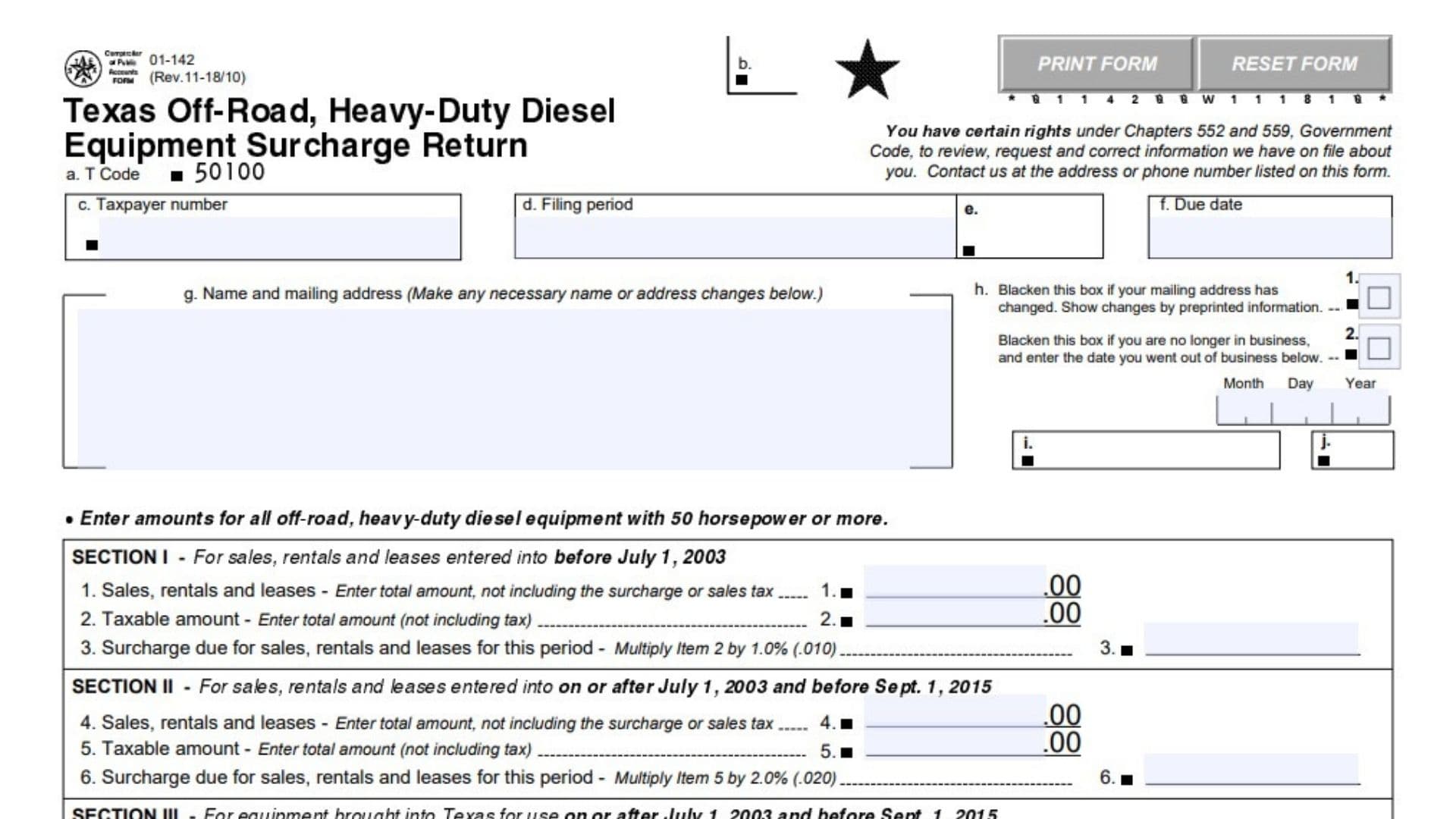
Texas Form 01-142, the Texas Off-Road, Heavy-Duty Diesel Equipment Surcharge Return, reports the surcharge associated with qualifying off-road diesel equipment rated at 50 horsepower or more. The surcharge applies separately from regular sales or use tax. The return collects taxpayer identification information, the reporting period, sales and taxable amounts, equipment-use amounts, and the resulting surcharge liability. Its five sections distinguish transactions and equipment use according to the applicable dates and rates. The final portion accounts for a timely filing discount, previously applied payments, penalties, interest, and the total payment. Correctly classifying transactions matters because the November 2018 revision contains different rates for different periods. This guide explains that revision and its accompanying instructions; it does not establish that every provision remains applicable to a later reporting period.
Who Must File Form 01-142?
The filing instructions require sellers, lessors, and rental providers of qualifying off-road, heavy-duty diesel equipment rated at 50 horsepower or more to collect the surcharge in addition to regular sales or use tax. The return also contains separate sections for equipment brought into Texas for use. Complete the sections that correspond to the activity and dates being reported. If you believe you do not qualify to file this return, contact the Comptroller rather than changing the form to report a different tax.
How To File Form 01-142
Filing Deadline
File or obtain a postmark by the 20th day of the month following the end of the reporting period.
If that date falls on a Saturday, Sunday, or legal holiday, the deadline moves to the next business day.
Use the reporting period and due date associated with your account. Do not assume that every taxpayer files monthly.
Where To Submit the Return
Mail the completed return and applicable payment to:
Comptroller of Public Accounts
P.O. Box 149361
Austin, TX 78714-9361
Make the payment for the amount calculated in Item 20 payable to STATE COMPTROLLER.
Electronic reporting and payment options are also available through the Comptroller’s online filing and payment service. Keep the return available when accessing that service.
The instructions do not identify a separate tax return to which Form 01-142 must be attached.
Records To Prepare
Before completing the return, gather:
- Your taxpayer number and account information.
- The applicable filing period and deadline.
- Records identifying qualifying equipment and its horsepower rating.
- Sales, rental, and lease totals.
- Taxable transaction amounts.
- Contract dates needed to select the appropriate section.
- Amounts subject to the use surcharge and the relevant Texas-use dates.
- Details of prior payments or overpayments applied to this specific period.
- Information needed to calculate penalties and interest, if applicable.
For questions, contact a local Comptroller field office or call 1-800-252-5555.

How to Complete Texas Form 01-142
General Instructions for Completing the Return
Complete the return using the rates assigned to the applicable sections, not one rate for every transaction.
Do not write in shaded areas.
Enter “0” where the amount is zero. Show negative amounts in angle brackets, such as <1,250.00>.
Where an entry area is preprinted with .00, complete the whole-dollar portion of that field rather than treating the printed cents as an additional entry.
If preprinted information is incorrect, contact the Comptroller. Use the form’s designated name and address correction area for those changes.
How To Complete the Identification Fields and Checkboxes
Taxpayer and Reporting Information
Item a: T Code
This administrative field identifies the return’s transaction code. The form displays 50100 in this area. Leave the preprinted code unchanged for an original return. For an amended return, follow the separate instruction to strike through Item a.
Item c: Taxpayer number
Enter your taxpayer number if it is not already printed.
If you are a sole owner and do not know that number, the instructions direct you to enter your Social Security number. For another type of organization, enter its federal Employer Identification Number when completing this field under the form’s alternative-identification instructions.
Item d: Filing period
If the period is not preprinted, identify whether the return covers a month, quarter, or year and provide the period’s ending date.
For example, a quarterly entry should identify the quarter ending date, rather than only the month in which you submit the return.
Item f: Due date
Review the deadline printed for the reporting period. Apply the next-business-day rule when the ordinary deadline falls on a weekend or legal holiday.
If the preprinted due date appears incorrect, contact the Comptroller.
Item g: Name and mailing address
Check the taxpayer’s name and mailing address. Enter necessary corrections in the designated area beneath the preprinted information.
Mailing address changed checkbox
Fill in this box if your mailing address has changed. Supply the corrected address beside or beneath the existing information as directed.
No longer in business checkbox
Fill in this box if the business has ceased operating.
Date business ended
When selecting the business-closure box, enter the month, day, and year you went out of business.
Other preprinted administrative markings
The return contains additional processing labels, codes, and shaded areas without taxpayer-entry instructions. Do not create entries for these markings or write in restricted areas.
Taxpayer Name and Repeated Account Information
Taxpayer name
Enter or verify the taxpayer name in the name field provided near the declaration and payment portion. Use a name consistent with the account identified on the return.
Repeated T Code
Preserve the transaction code in the repeated identification area. Do not substitute a surcharge percentage or payment amount.
Repeated taxpayer number
Make sure any taxpayer number appearing in the repeated account-identification area agrees with the main taxpayer-number field.
Repeated period
Make sure the reporting period in the repeated identification area matches the period covered by the return.
Section I: Sales, Rentals, and Leases Entered Into Before July 1, 2003
Use this section for qualifying sales, rentals, and leases entered into before July 1, 2003.
Item 1: Total sales, rentals, and leases
Enter the total transaction amount for this category. Exclude both the surcharge and sales tax.
Item 2: Taxable amount
Enter the portion subject to the surcharge. Do not include tax in this amount.
Item 3: Surcharge due at 1%
Multiply Item 2 by 0.010.
\text{Item 3}=\text{Item 2}\times0.010Carry this surcharge amount into the combined calculation in Item 14.
Section II: Sales, Rentals, and Leases Entered Into July 1, 2003, Through August 31, 2015
Use this section for qualifying agreements entered into on or after July 1, 2003, but before September 1, 2015.
Item 4: Total sales, rentals, and leases
Enter the total amount for transactions in this date category, excluding the surcharge and sales tax.
Item 5: Taxable amount
Enter the amount subject to the surcharge. Exclude tax.
Item 6: Surcharge due at 2%
Multiply Item 5 by 0.020.
\text{Item 6}=\text{Item 5}\times0.020Include the result in Item 14.
Section III: Equipment Brought Into Texas for Use July 1, 2003, Through August 31, 2015
Use this section for qualifying equipment brought into Texas for use on or after July 1, 2003, but before September 1, 2015.
Item 7: Amount subject to use surcharge
Enter the amount subject to the equipment-use surcharge for this date category. This field requests the taxable amount, not the surcharge itself.
Item 8: Use surcharge due at 2%
Multiply Item 7 by 0.020.
\text{Item 8}=\text{Item 7}\times0.020Include the resulting surcharge in Item 14.
Section IV: Sales, Rentals, and Leases Entered Into on or After September 1, 2015
Use this section for qualifying sales, rentals, and leases entered into on or after September 1, 2015.
Item 9: Total sales, rentals, and leases
Enter the total transaction amount in this category without including the surcharge or sales tax.
Item 10: Taxable amount
Enter the amount subject to the surcharge, excluding tax.
Item 11: Surcharge due at 1.5%
Multiply Item 10 by 0.015.
\text{Item 11}=\text{Item 10}\times0.015Include the result in Item 14.
Section V: Equipment Brought Into Texas for Use on or After September 1, 2015
Use this section for qualifying equipment brought into Texas for use on or after September 1, 2015.
Item 12: Amount subject to use surcharge
Enter the amount subject to the use surcharge for this category. Do not enter the calculated surcharge here.
Item 13: Use surcharge due at 1.5%
Multiply Item 12 by 0.015.
\text{Item 13}=\text{Item 12}\times0.015Include the result in Item 14.
Total Surcharge, Discount, and Prior Payments
Item 14: Amount due before adjustments
Add the surcharge amounts from Items 3, 6, 8, 11, and 13.
\text{Item 14}
=
\text{Item 3}+\text{Item 6}+\text{Item 8}+\text{Item 11}+\text{Item 13}
Do not add the underlying sales or equipment-use amounts to this total.
Item 15: Timely discount
If you both file the return and pay the surcharge by the deadline, multiply Item 14 by 0.005. This is a discount equal to 0.5% of the calculated surcharge, not 0.5% of sales.
\text{Item 15}=\text{Item 14}\times0.005Do not claim the discount if you fail to meet either the filing or payment condition.
Item 16: Prior payments
Review the preprinted amount representing a prior payment or overpayment you requested be applied to this particular reporting period.
The amount reflects the credit available as of the return’s preparation date. Do not assume that an unrelated credit or a payment applied to another period belongs here. Contact the Comptroller if the preprinted amount appears incorrect.
Item 17: Net surcharge due
Subtract Items 15 and 16 from Item 14.
\text{Item 17}
=
\text{Item 14}-\text{Item 15}-\text{Item 16}
This result is the starting amount for the penalty and interest calculations.
Penalty, Interest, and Total Payment
Item 18: Penalty due
A penalty applies if the return is filed late or the surcharge is paid late.
- For a delay of 1–30 days, calculate 5% of Item 17.
- For a delay exceeding 30 days, calculate 10% of Item 17.
- The stated minimum penalty is $1.
The form also warns that an additional $50 late-filing penalty is assessed each time a return is filed after its deadline.
The Item 18 calculation specifically describes the percentage-based penalty. The instructions do not expressly explain how the separately assessed $50 charge should be entered in that field. Confirm its treatment with the Comptroller if you are preparing a late return.
Item 19: Interest due
If any surcharge remains unpaid 61 days after the due date, calculate interest on the amount in Item 17 using the applicable published rate.
The form does not supply a fixed interest rate or a complete interest worksheet. Obtain the appropriate rate from the Comptroller or call 1-877-447-2834. Do not assume the surcharge percentage is also the interest rate.
Item 20: Total amount due and payable
Add Items 17, 18, and 19.
\text{Item 20}
=
\text{Item 17}+\text{Item 18}+\text{Item 19}
Use this result as the payment amount, subject to resolving any separately assessed late-filing charge with the Comptroller.
Declaration, Signature, and Payment Instructions
Accuracy declaration
Review the return and any attachments before signing. The declaration confirms that the information is accurate and complete to the signer’s knowledge and belief.
Taxpayer or duly authorized agent
The taxpayer or an appropriately authorized representative must sign the return.
Daytime phone
Provide a telephone number where the signer or responsible contact can be reached during the day.
Date
Enter the date the return is signed.
Payment recipient
Make the amount payable to STATE COMPTROLLER.
Mailing destination
Send the paper filing to the Comptroller of Public Accounts at P.O. Box 149361, Austin, TX 78714-9361.
How To File an Amended Form 01-142
Use an amended return to correct a previously submitted filing.
Using a Blank Return
Obtain a blank form through the Comptroller or a local field office. Prepare the corrected return, identify it as an amendment, and sign and date it.
Using a Copy of the Original Return
Amended-return label
Write “AMENDED RETURN” across the top of the copied return.
Item a correction
Strike through Item a, the original transaction-code field.
Changed figures
Draw a line through each amount that needs correction and enter the replacement figure. Recalculate any totals affected by those changes.
Signature and date
Sign and date the amendment before submitting it.
Additional Notices and Form Controls
Information Review and Correction Rights
Taxpayer information rights
Texas Government Code Chapters 552 and 559 provide rights to request, review, and correct information maintained about you. Contact the Comptroller using the address or telephone number provided on the return to exercise those rights.
Statutory Background
Section I background
This section covers the earlier category of sales, rentals, and leases entered into before July 1, 2003.
Sections II and III background
The instructions attribute the July 1, 2003, through August 31, 2015, categories to legislative changes made by the 78th Legislature.
Sections IV and V background
The instructions attribute the September 1, 2015, changes to House Bill 7 of the 84th Legislature. These notes explain the form’s date categories; they do not create additional fields to complete.
Print and Reset Controls
Print Form
Use this control to produce a paper copy. Printing alone does not file the return or transmit payment.
Reset Form
Use this control only when you intend to clear entered information. Save or print a completed copy before resetting the form if you need to retain your work.
Final Review Before Filing
- Confirm that Form 01-142 is appropriate for the activity and reporting period.
- Verify the taxpayer number, legal name, and mailing address.
- Complete the address-change or business-closure checkbox when applicable.
- Enter the closure date if the business has stopped operating.
- Check the filing period and due date.
- Include only qualifying off-road, heavy-duty diesel equipment rated at 50 horsepower or more.
- Assign transactions and equipment-use amounts to the correct date-based sections.
- Exclude sales tax and the surcharge from sales, rental, and lease totals where instructed.
- Verify the 1%, 2%, or 1.5% calculation for each applicable section.
- Add only Items 3, 6, 8, 11, and 13 when calculating Item 14.
- Claim the timely discount only if both filing and payment meet the deadline.
- Confirm that Item 16 applies to this reporting period.
- Recalculate the net surcharge, penalty, interest, and total payment.
- Resolve the additional $50 late-filing assessment if the return is late.
- Enter zero amounts and negative amounts in the required format.
- Leave shaded and administrative areas untouched.
- Sign and date the return and provide a daytime telephone number.
- For an amendment, label it clearly, strike through Item a, and correct the affected figures.
- Make the payment payable to STATE COMPTROLLER.
- Submit through the appropriate filing channel and retain a copy for your records.