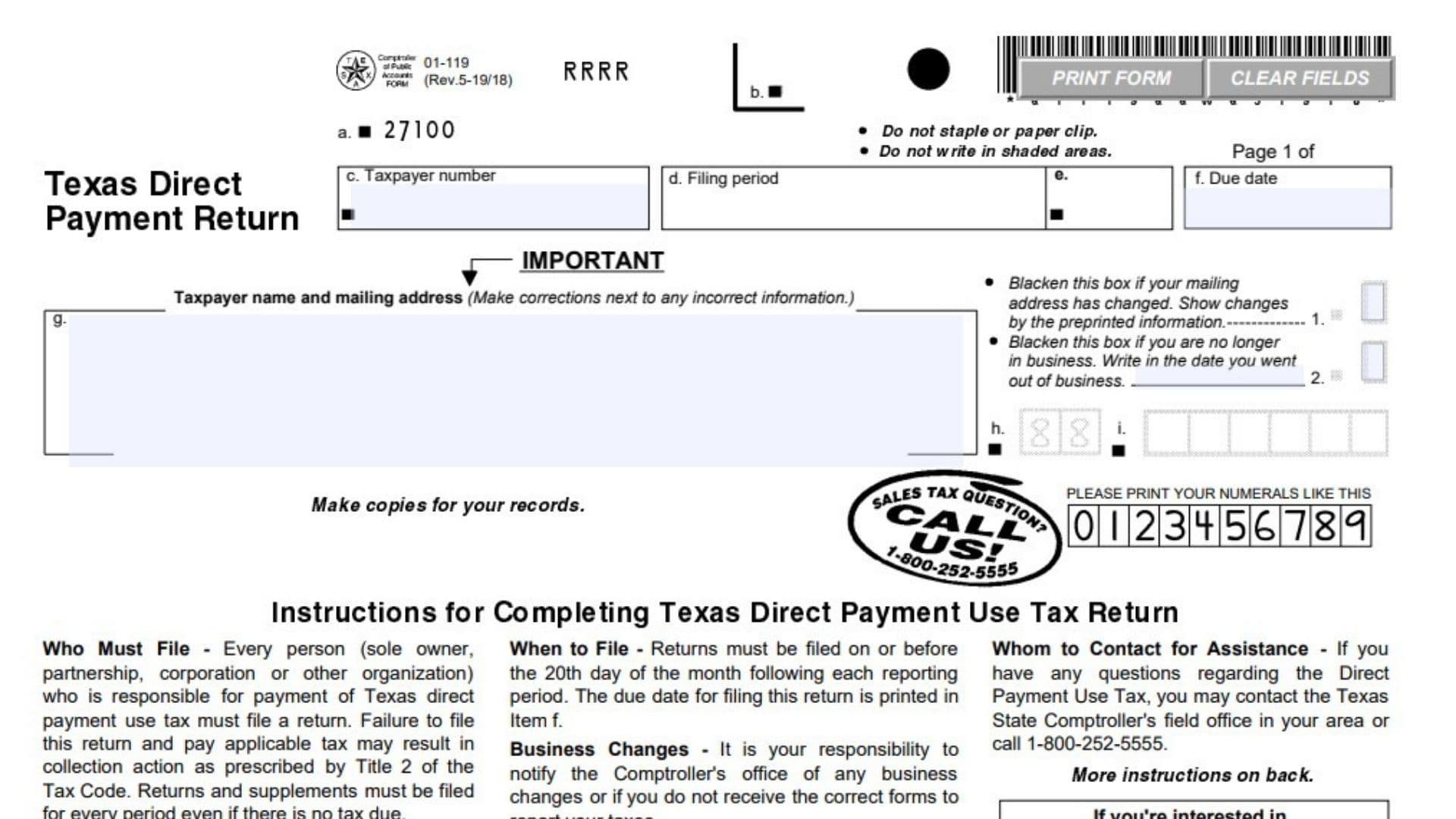
Texas Direct Payment Use Tax Return Form 01-119 is used by taxpayers who are responsible for reporting and paying Texas direct payment use tax. The form is intended for individuals and organizations such as sole owners, partnerships, corporations, and other organizations that hold a Texas Direct Payment Permit issued by the Comptroller’s office. The return reports taxable purchases on which the applicable tax was not paid to the supplier and calculates the state and local tax amounts due. The form also provides space for prior payments, any applicable penalty and interest, and the total amount that must be paid for the reporting period. Taxpayers must file the return for every reporting period, even when there are no purchases to report or no tax is due. Accurate completion is important because failing to file the return or pay the applicable tax can result in collection action and late-filing penalties. The form also asks whether the taxpayer is claiming a credit for sales or use tax paid in error on purchases; when the answer is yes, Form 01-149 must be completed and submitted with the return.
A key requirement appears prominently on the first page: a taxpayer cannot file this return unless the taxpayer holds a Texas Direct Payment Permit issued by the Comptroller’s office.
How To File Form 01-119
Form 01-119 is filed for each reporting period. The instructions state that the return must be filed on or before the 20th day of the month following the reporting period. The specific due date is printed in Item f of the return.
The completed return and payment are mailed to:
COMPTROLLER OF PUBLIC ACCOUNTS
P.O. Box 149354
Austin, TX 78714-9354
Payment should be made as instructed on the return, with the check payable to the STATE COMPTROLLER.
Before completing the return, have the information needed to determine your taxable purchases and the corresponding state and local tax amounts. You should also review the preprinted taxpayer information and make sure the reporting period and due date are correct. If the preprinted information is incorrect, or if you no longer qualify to file the return, the instructions direct you to contact the Comptroller’s office.
If you have no purchases to report for the period, you must still file the return.
The form also provides information about electronic tax filing. Taxpayers interested in electronic filing are directed to contact the Comptroller’s office by telephone or email.

How To Complete Form 01-119
The first page contains the taxpayer identification and reporting information, followed by the tax calculation and payment section. The back of the form provides general and specific instructions, including rules for prior payments, late filing, penalty, and interest.
Return Identification And Taxpayer Information
Item a: Form Code
The form identifies the return with the preprinted code 27100. This is part of the return identification information and should be retained as shown on the form.
Item b: Return Identifier
The return contains a preprinted identifier in this area. Do not alter shaded or restricted areas of the form.
Item c: Taxpayer Number
Enter or verify the taxpayer number associated with the direct payment tax account. If the number or other preprinted taxpayer information is incorrect, contact the Comptroller’s office rather than attempting to change information that is designated for processing.
Item d: Filing Period
Verify the reporting period for which the return is being filed. The return must correspond to the correct reporting period.
Item e: Preprinted Return Information
Review the preprinted information shown in this area of the return. If information supplied by the Comptroller’s office is incorrect, contact the Comptroller’s office for assistance.
Item f: Due Date
Verify the due date printed on the return. Returns are due on or before the 20th day of the month following the reporting period.
Item g: Taxpayer Name And Mailing Address
Review the taxpayer’s name and mailing address printed on the return. The form instructs taxpayers to make corrections next to incorrect information.
If the mailing address has changed, blacken the designated box and provide the updated information as instructed by the form.
Item 1: Mailing Address Change Box
Blacken this box if the taxpayer’s mailing address has changed. The updated information should be supplied according to the instructions associated with the preprinted information.
Item 2: No Longer In Business Box
Blacken this box if the business is no longer operating. The form also instructs the taxpayer to write the date the business went out of business.
Item h: Preprinted Taxpayer Information
Review the information displayed in this area. As with the other preprinted taxpayer information, contact the Comptroller’s office if the information is incorrect.
Item i: Preprinted Identification Information
Review the information shown in this area of the return and use the information as provided for the filing. The form also provides an example showing how numerals should be written in the return’s boxes.
Credit For Tax Paid In Error
Item j: Credit For Taxes Paid In Error
Indicate whether you are taking a credit to reduce the taxes due on this return because sales or use tax was paid in error on your own purchases.
Blacken YES if you are claiming this type of credit. If you select yes, complete Form 01-149, Texas Direct Pay Tax Return—Credits Schedule, and submit it with the return.
The instructions explain that this situation includes sales or use tax paid in error to a vendor or tax accrued in error on an earlier direct payment tax return when the purchases were exempt from sales or use tax.
Blacken NO if you are not claiming such a credit.
Taxable Purchases And Tax Calculation
Item 1: Amount Subject To State Tax
Enter the amount of taxable purchases on which tax was not paid to the supplier. The form specifically requires whole dollars only for this amount.
This figure is the starting point for calculating the state tax due.
Item 2: Total Tax Due
This section calculates the total state and local tax due. It is divided into a state tax column and a local tax column.
Item 2a: State Tax
Calculate the state tax by multiplying the amount entered in Item 1 by 0.062500.
The resulting amount represents the state tax component and is entered in the state-tax column.
Item 2b: Local Tax
Enter the total amount from Item 7b on all list supplements. This represents the local tax amount associated with the taxable purchases reported through the applicable supplements.
Item 2: Total Tax Due
The state amount from Item 2a and the local amount from Item 2b make up the total tax due for the reporting period. Enter the applicable amounts in their respective columns.
Prior Payments And Net Tax
Item 3: Prior Payments
Enter the amount of any prior payment designated for the specific reporting period.
The form explains that if you requested that a prior payment and/or overpayment be applied to this particular period, the amount is preprinted in Item 3 as of the date the return was printed.
This amount is subtracted from the tax due.
Item 4: Net Tax Due
Calculate the net tax due by subtracting Item 3 from Item 2.
In other words:
Item 4 = Item 2 − Item 3
Enter the resulting state and local amounts in the appropriate columns.
Penalty And Interest
Item 5: Penalty And Interest
Enter any penalty and interest that applies because the return or payment is late.
The form provides different calculations based on how late the return is:
- 1–30 days late: Calculate a penalty equal to 5% of Item 4.
- 31–60 days late: Calculate a penalty equal to 10% of Item 4.
- More than 60 days late: Calculate a 10% penalty on Item 4 and add the applicable interest.
The interest rate is based on the rate specified by the Comptroller’s office.
The form also states that the minimum late-filing penalty is $2.00, consisting of $1.00 for state tax and $1.00 for local tax.
An additional $50 late-filing penalty is assessed each time a return is filed after its due date.
If the return is timely filed and no penalty or interest applies, use the return instructions to determine the appropriate entry.
Total Amount Due
Item 6: Total State And Local Amount Due
Add the net tax due in Item 4 and the applicable penalty and interest in Item 5.
In general:
Item 6 = Item 4 + Item 5
The resulting amounts are separated into state and local totals.
Item 6a: Total State Amount Due
Enter the total amount due for state tax after accounting for the net state tax and any applicable state penalty and interest.
Item 6b: Total Local Amount Due
Enter the total amount due for local tax after accounting for the net local tax and any applicable local penalty and interest.
The state and local amounts together represent the total amount that must be paid for the reporting period.
Payment Information
Item 7: Total Amount Paid
Enter the total payment being submitted with the return.
This amount should equal the combined state and local amounts shown in Items 6a and 6b.
The form instructs taxpayers to make the check payable to the STATE COMPTROLLER.
T Code
The return includes a preprinted T Code as part of its payment and processing identification information. Use the information supplied on the return.
Taxpayer Number
Verify the taxpayer number shown in the payment section against the taxpayer information at the top of the return.
Period
Verify that the reporting period associated with the payment is correct.
Taxpayer Name
Enter or verify the taxpayer name associated with the return and payment.
Declaration And Signature
Taxpayer Or Duly Authorized Agent
The taxpayer or an authorized agent must sign the return to certify the information being submitted.
Date
Enter the date the return is signed.
Daytime Phone
Provide a daytime telephone number, including the area code, where the taxpayer or authorized representative can be contacted.
Declaration
By signing the return, the taxpayer or authorized agent declares that the information on the return and any attachments is true and correct to the best of their knowledge.
General Instructions For Form 01-119
Use Of Shaded Areas
Do not write in shaded areas of the return. These areas are reserved for processing or other purposes.
Negative Amounts
If an amount entered on the return is negative, the instructions require the amount to be shown in brackets using the specified format.
For example, a negative amount would appear in a format similar to:
<xx,xxx.xx>
Entering Numbers
When typing the return, numbers may be entered consecutively as demonstrated by the numerical example printed on the form.
Filing When There Are No Purchases
A return must still be filed even if there were no purchases to report for the reporting period.
Incorrect Preprinted Information
If any preprinted information is incorrect, contact the Comptroller’s office. The same applies if you do not qualify to file the return.
Business Changes
Taxpayers are responsible for notifying the Comptroller’s office about business changes or when the correct forms are not received for reporting taxes.
Electronic Tax Filing
The first page provides contact information for taxpayers interested in electronic tax filing. The form directs taxpayers to contact the Comptroller’s office for information about electronic filing.
The form provides a telephone contact for electronic tax filing inquiries and an email address for this purpose.
Assistance With Direct Payment Use Tax
Taxpayers with questions about Direct Payment Use Tax can contact the Texas Comptroller’s field office in their area or use the taxpayer assistance telephone number provided on the return.
The form also notes that additional instructions are provided on the back of the return.
Final Review Before Filing
Before submitting Form 01-119, review the entire return carefully and make sure:
- You hold a valid Texas Direct Payment Permit.
- The taxpayer name and taxpayer number are correct.
- The filing period is correct.
- The printed due date has been reviewed.
- Any mailing address change has been properly indicated.
- The business-closed box has been marked if the business is no longer operating, with the date of closure provided.
- Item j correctly indicates whether you are claiming a credit for taxes paid in error.
- Form 01-149 has been completed and submitted if YES was selected for Item j.
- Item 1 contains the taxable purchase amount subject to state tax.
- Item 1 contains whole dollars only, as required.
- Item 2a has been calculated by multiplying Item 1 by 0.062500.
- Item 2b includes the applicable total from Item 7b on the list supplements.
- Item 3 properly reflects any prior payment designated for the reporting period.
- Item 4 correctly subtracts Item 3 from Item 2.
- Any applicable penalty and interest has been calculated and entered in Item 5.
- The applicable late-filing rules have been considered if the return is filed after its due date.
- Item 6a contains the total state amount due.
- Item 6b contains the total local amount due.
- Item 7 equals the combined amounts shown in Items 6a and 6b.
- The payment is made payable to the STATE COMPTROLLER.
- The taxpayer or duly authorized agent has signed the return.
- The date and daytime telephone number have been provided.
- No information has been written in shaded areas.
- Any required attachments or supplements are included with the return.
- A copy of the completed return has been retained for your records.
Form 01-119 should be filed for every reporting period, even when there are no purchases or no tax due. Careful review of the taxpayer information, taxable purchase amount, state and local tax calculations, prior payments, penalties, interest, and payment amount can help prevent avoidable filing problems. 01-119